The Cost of Slow Follow‑Up: Why Speed to Lead Matters on LinkedIn

Suppose your average deal is $5,000 and you get 100 inbound leads a month. At a 3% conversion rate with fast follow-up, that’s $15,000 in revenue. Let response time slip and conversion drops to 1% — now you’re looking at $5,000. That’s $10,000 gone every month, not from a weak product or poor targeting, but from being too slow to respond.
Scale that to a team closing $20,000 deals and the same drop costs $40,000 a month. The leads and the budget were there, but the timing wasn’t.
Research from InsideSales revealed that when you respond to a lead within the first five minutes, you’re eight times more likely to convert them compared to them waiting for 24 hours.
The proof? Alex Hormozi, Founder at Acquisition.com, shares a story about a restoration company owner who converts 55% of his leads by doing one thing: responding the moment interest shows up. Not five hours later. The moment it happens.
In essence, Speed to lead — the time between a prospect showing interest and your first response — is one of the highest-leverage variables in outbound sales. On LinkedIn, where intent signals are everywhere and mostly ignored, that gap is where the pipeline gets lost.
This article covers why slow follow-up happens, what it can cost, and how to improve it with tools like Expandi.
What speed to lead means for lead response time and conversion rate
Speed to lead, also known as lead response time, is the time it takes to respond to a prospect the moment they show interest in your business through LinkedIn messages, filling a contact form on your website, or requesting a demo.
Responding quickly to a lead after they show interest in your products or services increases the likelihood of converting them. On the other hand, a slow response time shifts the prospect’s attention elsewhere, reducing conversion rates.
According to a study, prospects who received a call within one minute of their initial inquiry were 391% more likely to convert than those called anytime after that. In other words, the faster a prospect receives responses from a business, the more likely they will stay interested.
The one-deal example understates the real damage. Think about what it means to consistently lose the same type of lead — high-intent, inbound, actively evaluating solutions — to whoever responds first.
If your average competitor is responding in under an hour and your team is averaging six, you’re not just losing individual deals. You’re systematically ceding your highest-converting lead segment to faster competitors. Every week. Those are the leads most likely to close, at the highest deal values, with the shortest sales cycles, and they’re going to whoever picks up first, not whoever has the better product.
Over a quarter, that’s not one missed deal. It’s a structural disadvantage that compounds in your competitors’ favor.
Here’s what makes slow follow-up particularly damaging at scale: it doesn’t show up as a clear failure. Leads don’t disappear from your CRM. They just sit there, uncontacted or under-contacted, making your pipeline look healthier than it is.
A sales leader looking at 50 open opportunities might feel confident about the month ahead. But if 20 of those leads came in more than 72 hours ago with no meaningful follow-up, those aren’t real opportunities anymore. The forecast looks fine, but the revenue doesn’t materialize.
This is the compounding cost of slow follow-up. It doesn’t announce itself, just slowly erodes your close rate, month after month, while the pipeline report tells you everything is on track.
In the next section, you’ll further learn why most sales teams struggle with slow response times and how it affects conversion.
Why most sales teams struggle with slow response times and how that hurts conversion rates
Many sales teams struggle to respond to a lead fast, and the cost of that delay is deep. The chances of qualifying a lead drop by 80% if it takes longer than five minutes to respond. Before fixing the problem, sales professionals need to identify its cause. Here are some reasons response time falls short.
1. High lead volume
A large influx of leads can overwhelm sales teams. Without a clear scoring model and a scalable process, many opportunities pile up and clog the pipeline, preventing sales teams from effectively prioritizing high-intent leads.
2. Manual data entry
Research revealed that salespeople spend only 28% of their week actually selling. The rest of their time (72%) is spent on other tasks such as manual data entry and deal management. When sales teams spend too much time entering data, they have less time to engage leads, leading to increased delays and errors.
3. Misalignment in sales and marketing teams
Not all leads are treated equally. This applies to sales and marketing teams, who have different views of what a lead means. While marketing teams track MQLs based on traffic, form fills, or downloads, the sales team can track theirs based on quality, considering factors such as buying intent and budget.
As a result, when a lead comes in, and the marketing team defines it as “hot,” it may not align with the sales team’s criteria, leading to delayed responses, selective outreach, or no outreach at all to the leads.
4. Chasing leads that have already gone cold
When a rep finally gets to a lead that came in 48 hours ago, they spend time researching, personalising, and crafting a message for a prospect who has already moved on. The lead is cold, the effort is wasted, and the rep has less time for the leads that are still warm.
This is a hidden time tax in slow follow-up that rarely shows up in pipeline reports, but can cause you to lose over 50 hours of selling time per month to outreach that was never going to convert.
How high‑performing teams improve speed to lead automatically using Expandi
The fastest-responding sales teams don’t monitor LinkedIn manually and decide when to act, but instead, they build a signal-based system that does it for them.
When someone likes your post, visits your profile, or engages with your content, that’s a buying signal, and the window to act on it is short.
Ilija Cosic, GTM engineer at Expandi, analyzed 10,000+ campaigns over six years and found that teams responding to intent signals within 2 hours consistently hit reply rates of 20%+:
“Our fastest-growing customers respond to intent signals within 2 hours. Not 2 days. Not ‘when they have time to personalize.’ By the time you’ve researched someone’s LinkedIn, watched their webinar, and crafted the perfect opener, your competitor has already booked the call. Speed is personalization.”
The four costs we talked about above — lost revenue, wasted rep time, ghost pipeline, and ceded leads — all have the same root cause: outreach that waits for a human decision before it moves. Expandi removes that dependency.
When a lead engages with your content or visits your profile, Expandi’s Signals feature detects it and routes them into a sequence automatically with no rep intervention required. That directly addresses the revenue gap: your fastest follow-ups now happen without anyone having to decide to act.
For rep time, the system eliminates cold-lead chasing entirely. Leads only enter sequences when they’ve shown a signal, so every message your team sends goes to someone who was active recently, not someone who enquired three days ago and moved on.
For pipeline decay, the always-on nature of signal-based outreach means leads don’t sit idle in your CRM. The moment someone signals interest, the sequence starts. Your pipeline reflects real activity, not hope.
And for competitive positioning: if your sequence fires within 24 hours of a signal and your competitor is still doing it manually, you’re consistently first.
How to set up signal-based lead response in Expandi
In this section, you’ll learn exactly how to use Expandi to supercharge your LinkedIn outreach ROI based on a signal-based approach.
From the dashboard, click “Signals,” which automatically adds people to a sequence based on specific triggers.
For example, if someone visits your profile, lands on your company page, or engages with selected LinkedIn posts, the system automatically adds them to a sequence every 24 hours.
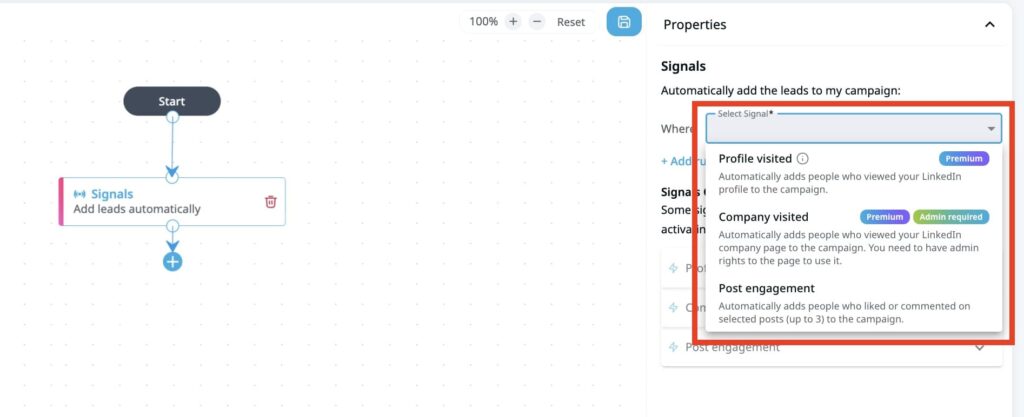
Note that as the LinkedIn marketing tool routes leads based on their actions to your sequence, you won’t be able to add leads via a CSV file, Search, or API.
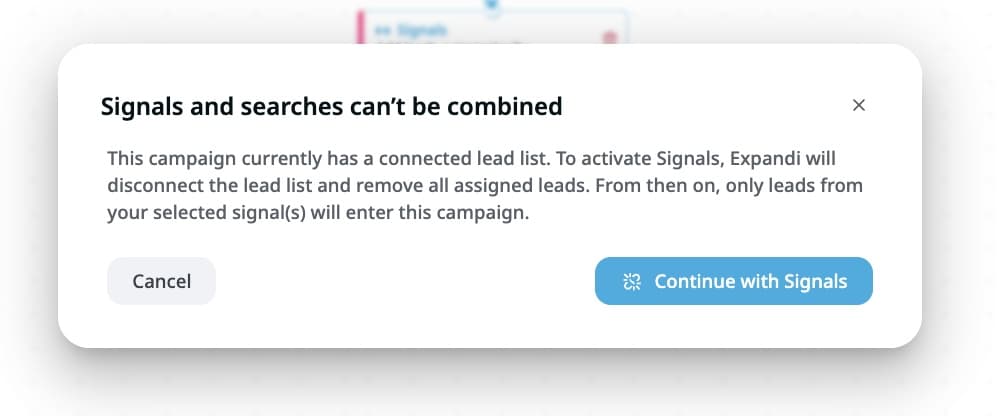
If you have added leads via any of these methods and attempt to combine the Signal feature, you will receive a warning message saying “Signals and searches can’t be combined.” In short, the Signals only import new leads when a specific trigger occurs.
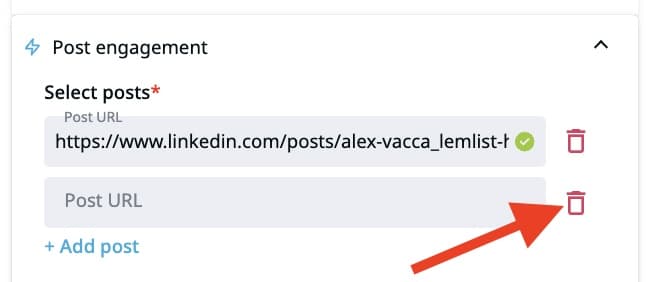
Suppose you want to respond to people who engaged with your LinkedIn post, click Signals >> Post engagement. Next, add the URLs of the LinkedIn posts. Note that once the steps are saved and the campaign is activated, you won’t be able to modify, remove, or add new ones. So, make sure the links are correct.
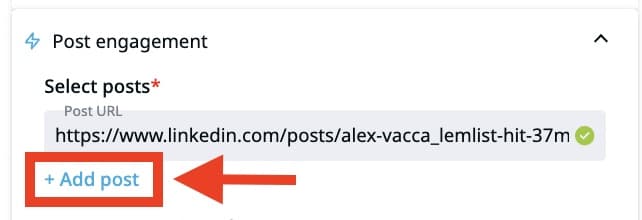
To remove the URL of any post, click the trash can next to the link.
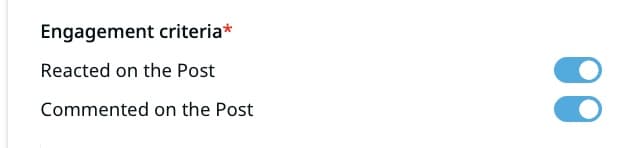
Next, select the engagement criteria. You can choose to extract leads who reacted or commented on your post. Toggle the button next to it to choose who you want to respond to in real-time.
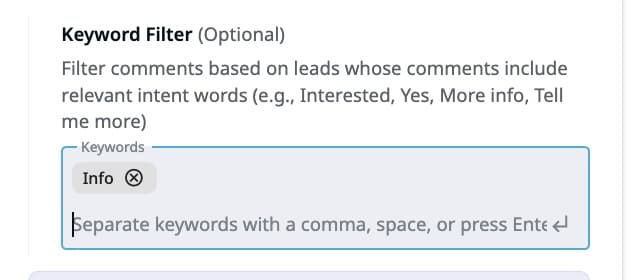
Then, you may add keywords. Expandi lets you import leads based on specific keywords in their comments. This step is completely optional.
At the end, you will create something that looks like the image below. You’d have built a campaign that alerts you in real time when a lead performs specific actions.
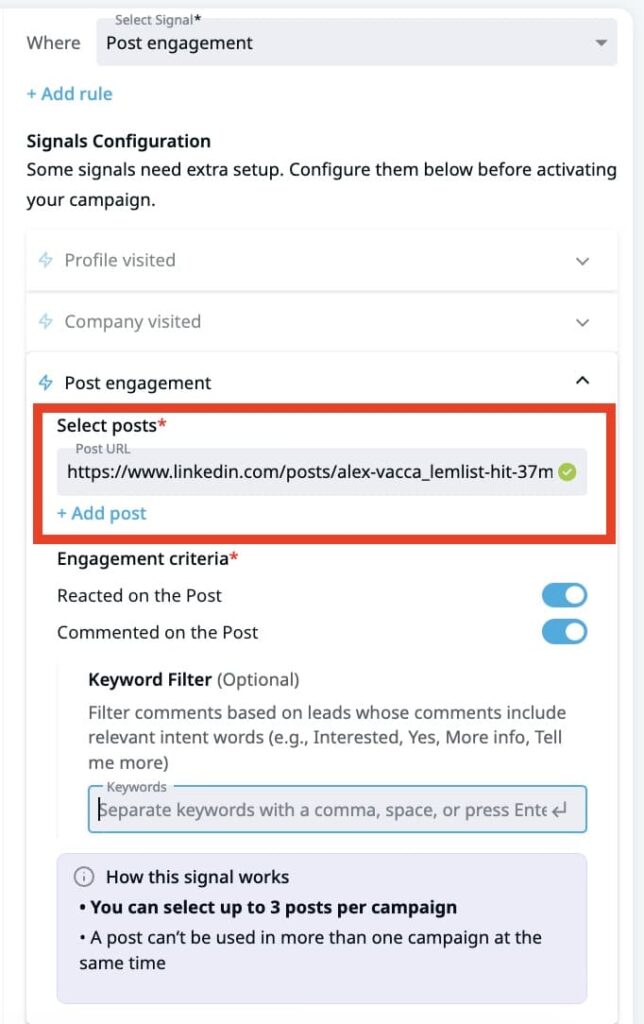
Once you activate the campaign, Expandi will route leads who engage with your posts to an automated sequence that engages them for further outreach. This will improve your lead response time and turn your LinkedIn presence into a lead engine.
Use Expandi for a faster response time on LinkedIn
Every LinkedIn engagement signal you’re not acting on is a warm lead going cold. Start your free 14-day Expandi trial and set up your first signal-triggered sequence today — no credit card required.
FAQ about speed to lead
The ideal lead response time for the LinkedIn sales team is under five minutes. Responding within this timeframe increases your likelihood of converting a lead compared to waiting 30 minutes or longer.
Use a simple formula to calculate your speed-to-lead. First, identify the average time between every lead’s conversion and the first contact from your company. Then, add up all the numbers and divide by the number of leads.
The most effective approach is signal-based automation: instead of manually monitoring who engages with your content or visits your profile, you set up a system that detects those actions and triggers outreach automatically.
For example, Expandi’s Signals feature does this by pulling in leads who engage with specific posts or visit your profile, then routing them into a pre-built sequence within 24 hours. You define the trigger and the follow-up steps once and the tool handles timing and execution.

You’ve made it all the way down here, take the final step