Thinking of Deleting LinkedIn? Here’s How to Use It for Lead Gen Before You Go

If you’ve gotten as far as searching how to close your LinkedIn account, you have a reason for it.
The feed feels like a performance, the inbox is mostly cold pitches, and the news that LinkedIn was using your data to train AI by default in 2024 was the last push.
Plenty of people are quietly clicking through Settings, Account preferences, Close account, and walking away from deleting their LinkedIn account.
You have three options when it comes to deleting your account:
- Delete the account permanently
- Hibernate it instead
- Strip the platform down to a passive lead engine that runs on automation while you stop scrolling
We watched the deletion conversation flood our customer base after LinkedIn’s automatic opt-in for AI training landed in 2024, and again when the policy expanded to the EU and UK in late 2025. The ones who stayed on the platform redesigned how they used the account, with fewer hours, more automation, and profile views still flowing through.
Here’s what we’ll cover:
- The three real options for your LinkedIn account: deleting, hibernating, or using it less.
- Step-by-step deletion and hibernation on desktop and mobile in 2026.
- Five things to handle before you close your LinkedIn account.
- The real reasons people are deleting in 2026, and which ones hold up.
- How to turn LinkedIn into a lead engine that runs without your attention.
Key Takeaways
- Deleting is permanent after a 14-day grace period. During those 14 days you can sign back in and reverse it; after that the profile, connections, messages, recommendations, endorsements, and followers are gone for good.
- Hibernating is the safer choice if you want a break. Your profile goes invisible, you stop showing in search, notifications stop, and the account restores the moment you log back in.
- The AI training opt-out is a 30-second setting fix, not a reason to delete. Settings & Privacy → Data Privacy → Data for Generative AI Improvement → off.
- If you barely use LinkedIn but it still sends warm inbound, the third option is to run a Smart Sequence on a country-based IP through Expandi and let signal-based triggers handle outreach while you do other things.
Thinking of Deleting LinkedIn? Here’s How to Use It for Lead Gen Before You Go

Three options for your LinkedIn account: deleting, hibernating, or using less
Closing your LinkedIn account branches into three different outcomes, and lumping them together is how people end up regretting it.
- Permanent deletion
Permanent deletion is irreversible after a specific number of days. It erases the profile, connections, messages, recommendations, endorsements, and followers.
LinkedIn keeps a 14-day grace period where signing back in restores the account. After that, you can’t recover the data anymore.Search engines like Google may still show a cached version of the profile for weeks after deletion because of how external indexers work, and LinkedIn cannot remove that for you.
- Hibernation
Hibernation (LinkedIn’s word for deactivation) hides the profile from search and from anyone clicking your old URL.
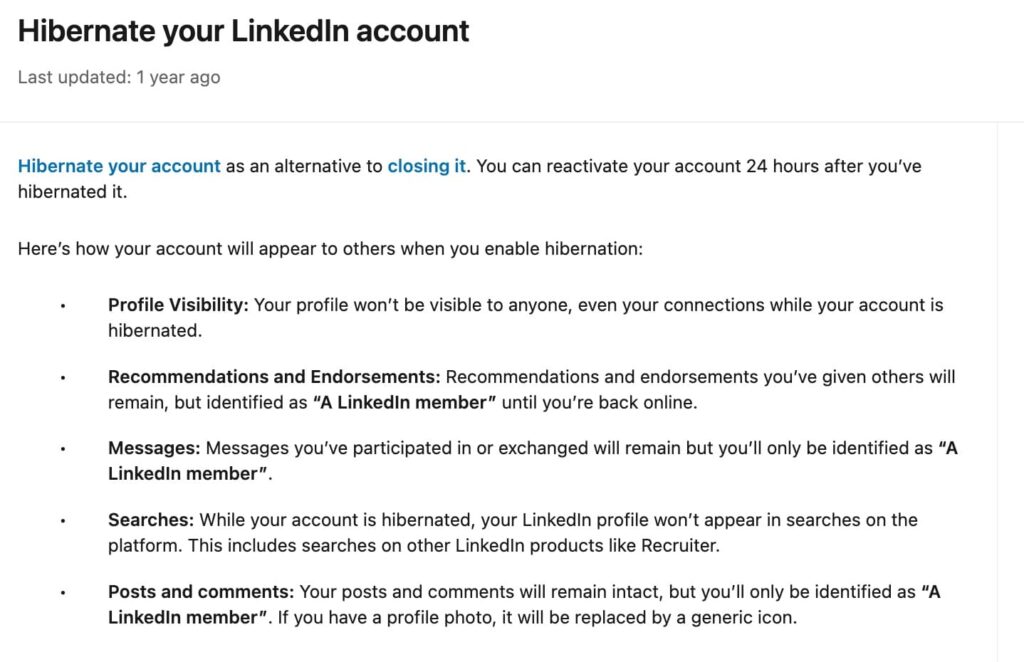
The profile, connections, and conversation history sit in storage, untouched, until you sign back in. Reactivation is available 24 hours after hibernating and is automatic. Log in and the profile reappears as if nothing happened.
Use hibernation when you want a pause without losing the network.
- Using LinkedIn less
The third option is structural. People associate LinkedIn with the daily scroll, the inbox triage, and the time spent posting to chase a half-active feed.
Stripping those out is a configuration job:
- Turn off notifications.
- Mute the feed.
- Archive old messages.
- Set up Smart Sequences that handle outreach on autopilot.
- Check the inbox once a week.
The account stays useful for inbound, for the lead engine, and for the occasional warm intro. The platform stops being a daily commitment. We get into the setup in the lead engine section below.
How to delete or hibernate your LinkedIn account in 2026
Closing the account takes five clicks on desktop and four on mobile. Hibernating it is the same path, one menu item over. Both flows live behind your profile menu, require your password, and write to the same account state across every signed-in device.
The setting has not moved in 2026:
Account preferences → Account management → Close account (or Hibernate account).
Delete your LinkedIn account on desktop (5 steps)
To delete your LinkedIn account on desktop:
- Click the Me icon in the top-right corner of your LinkedIn homepage.
- Select Settings & Privacy from the dropdown.
- Click Account preferences on the left rail.
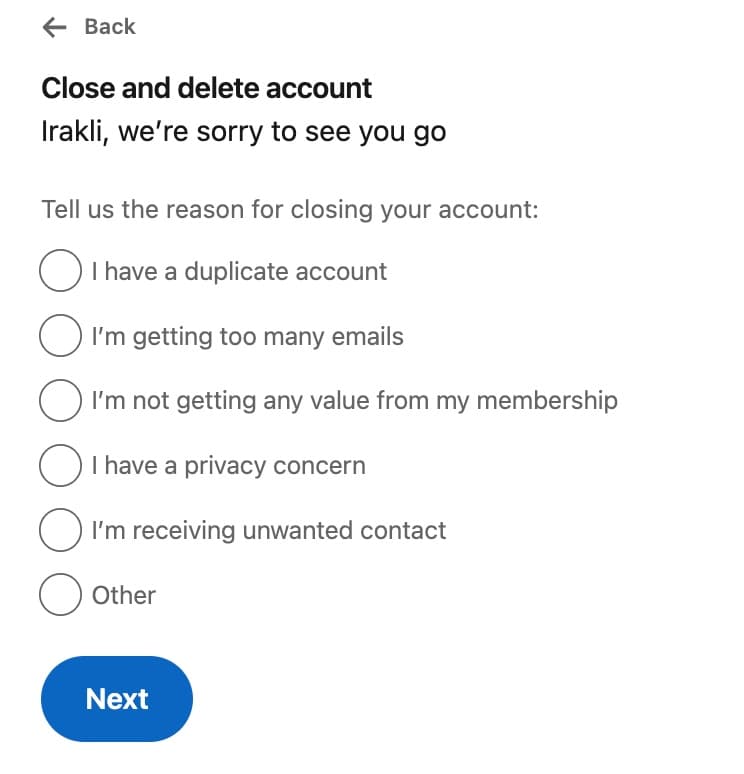
- Scroll down to Account management, then click close and delete account.
- Indicate your reason, click Continue, enter your password, and confirm.
Delete your LinkedIn account on mobile (4 steps)
To delete your LinkedIn account on mobile:
- Open the LinkedIn app and tap your profile photo in the top-left.
- Tap Settings.
- Tap Account preferences, scroll to Account management, and tap Close account.
- Choose a reason, enter your password, and confirm. The grace period starts immediately.
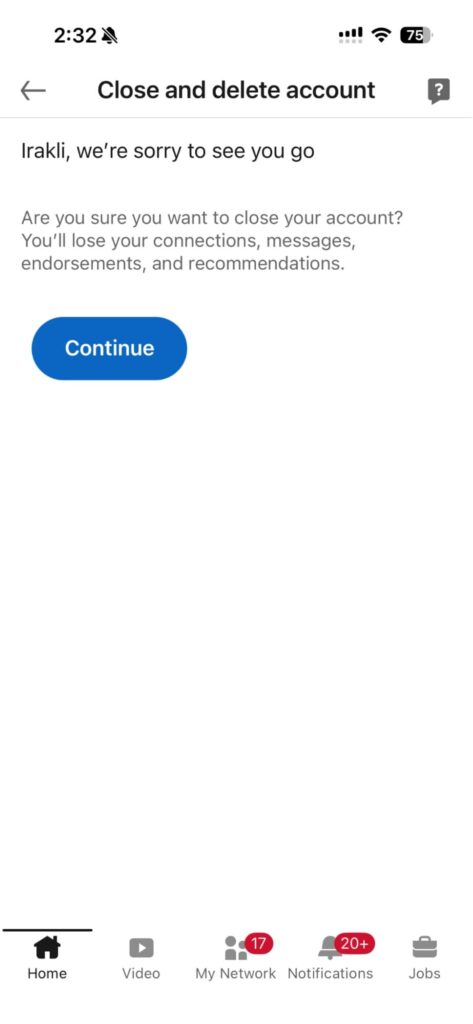
The mobile and desktop flows write to the same account state, so triggering deletion from one device closes the profile on every other signed-in device within minutes.
Hibernate (deactivate) your LinkedIn account instead
If you want a break rather than a permanent exit, hibernation lives one item above Close account in the same menu. The profile goes invisible, search results stop including you, and notifications pause until you log back in.
To hibernate your LinkedIn account:
- Open Settings & Privacy → Account preferences → Account management.
- Click Hibernate account.
- Choose a reason, enter your password, and confirm.
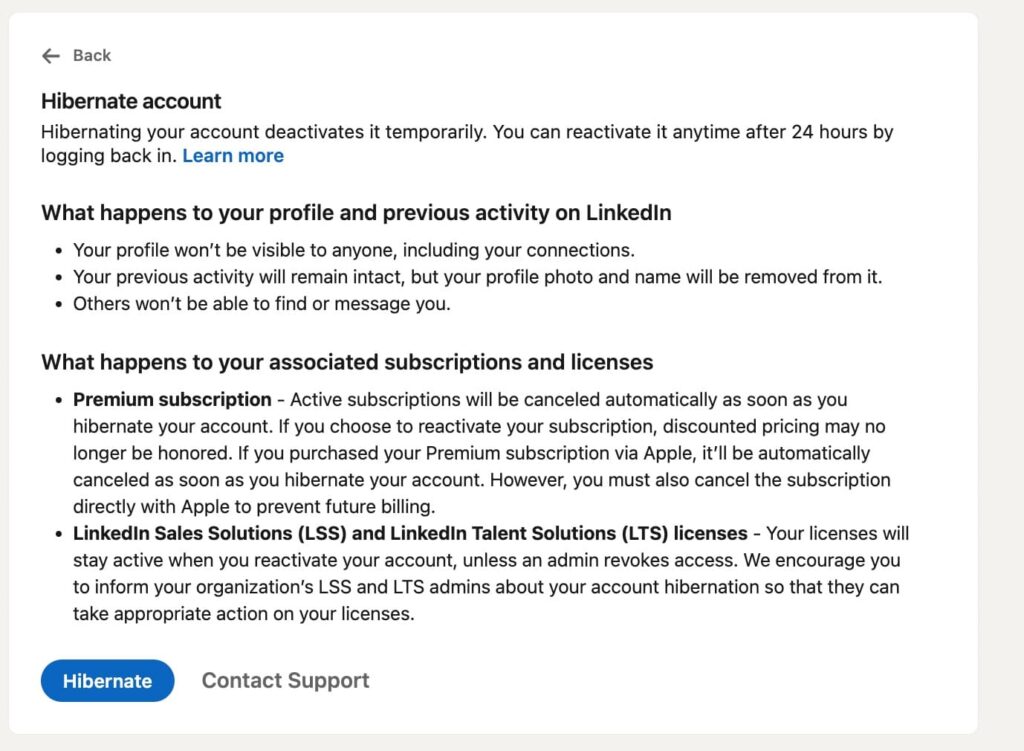
After 24 hours, log in with your usual credentials and the profile restores instantly — connections, messages, posts, and recommendations all come back.
Anything you wrote during your active time stays attached to your profile but shows as “A LinkedIn member” while the account is asleep.
How long LinkedIn account deletion takes and what comes off Google
LinkedIn finalizes deletion 14 days after you confirm. During that window the profile is invisible to other members but the account is recoverable. Sign in and the close request is cancelled.
After 14 days, LinkedIn begins permanently erasing your profile, connections, messages, recommendations, endorsements, and followers. None of those are recoverable past that point.
Search-engine results are a separate story. Google, Bing, and other search engines cache LinkedIn profiles on their own schedule, so a deleted profile can keep appearing in search results for several weeks after closure until those caches refresh. But clicking the search result will lead to a 404 page.
LinkedIn can’t accelerate that. The request to remove the cached version has to go through the search engine itself. If your goal is to scrub the public footprint, don’t rely on account closure alone.
5 things to do before deleting your LinkedIn account
Before deleting your LinkedIn account, run through these five items. Each one might cost you money or continuity if you skip it.
Download your LinkedIn data before deleting
LinkedIn lets you export a full archive of your profile, connections, messages, posts, and account activity. To download your LinkedIn data archive:
- Open Settings & Privacy.
- Click Data Privacy.
- Select download your data, request the full archive, and LinkedIn will email a download link.
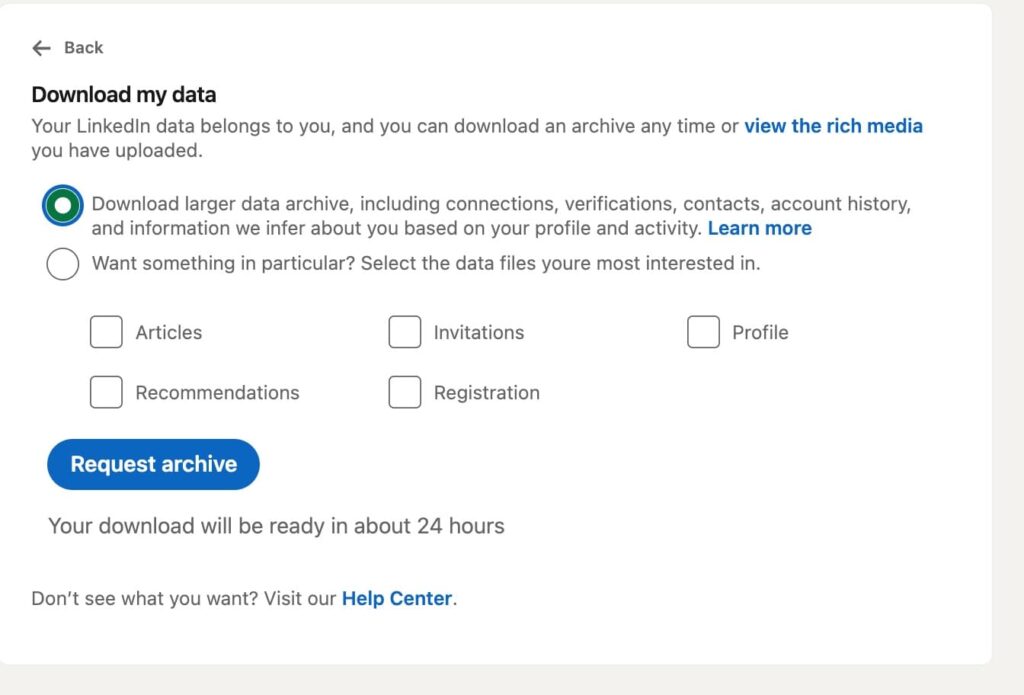
The archive arrives as a set of CSV files and PDFs you can re-import into a CRM, search through later, or keep as a record of who you were connected to in case you ever rebuild the network.
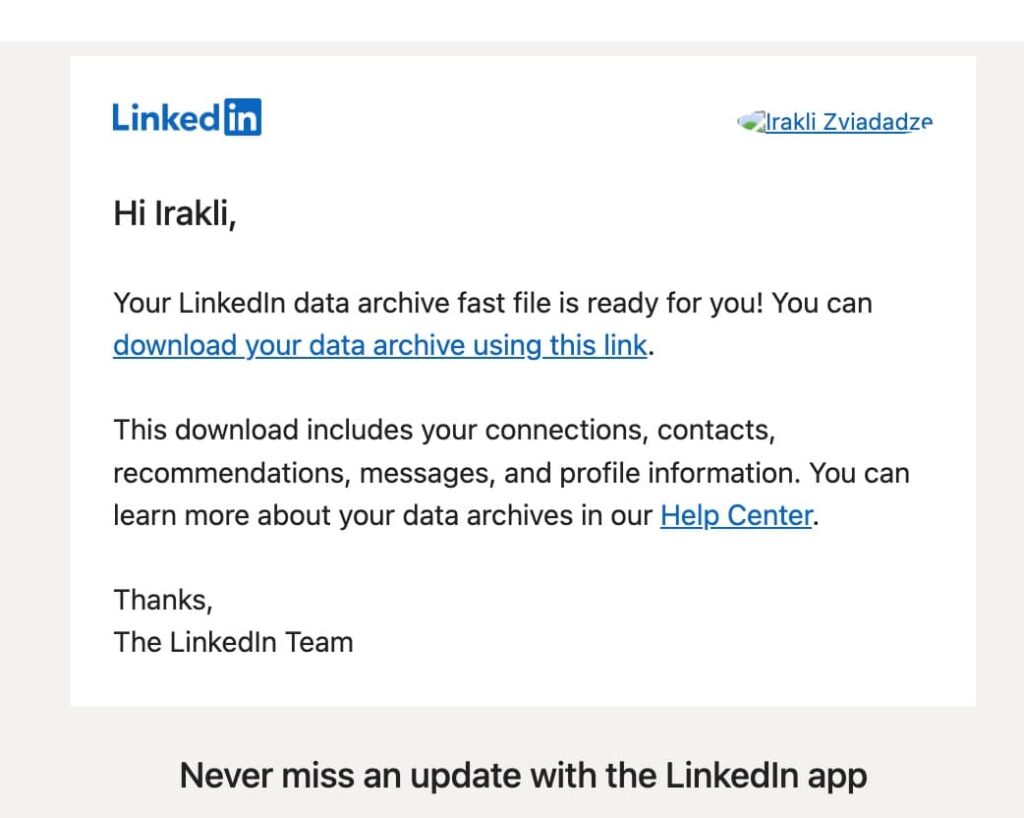
If you only request a partial export (connections list, for example), the link comes through in about ten minutes. The full archive can take up to 24 hours.
For a deeper walkthrough on pulling out structured connection data before you close, see our breakdown on exporting LinkedIn contacts.
Cancel Premium, Sales Navigator, or Recruiter subscriptions separately
Closing the account does not automatically cancel paid subscriptions. Premium subs renew at the end of each billing cycle until you actively cancel, so closing the account without cancelling first can leave you on the hook for the current billing period.
Enterprise-linked accounts are different: LinkedIn blocks the close request until your admin disconnects the seat, so resolve that ahead of time. For everyone else, pull up your billing history, cancel everything active, and confirm you are off the recurring charge before submitting the Close account form.
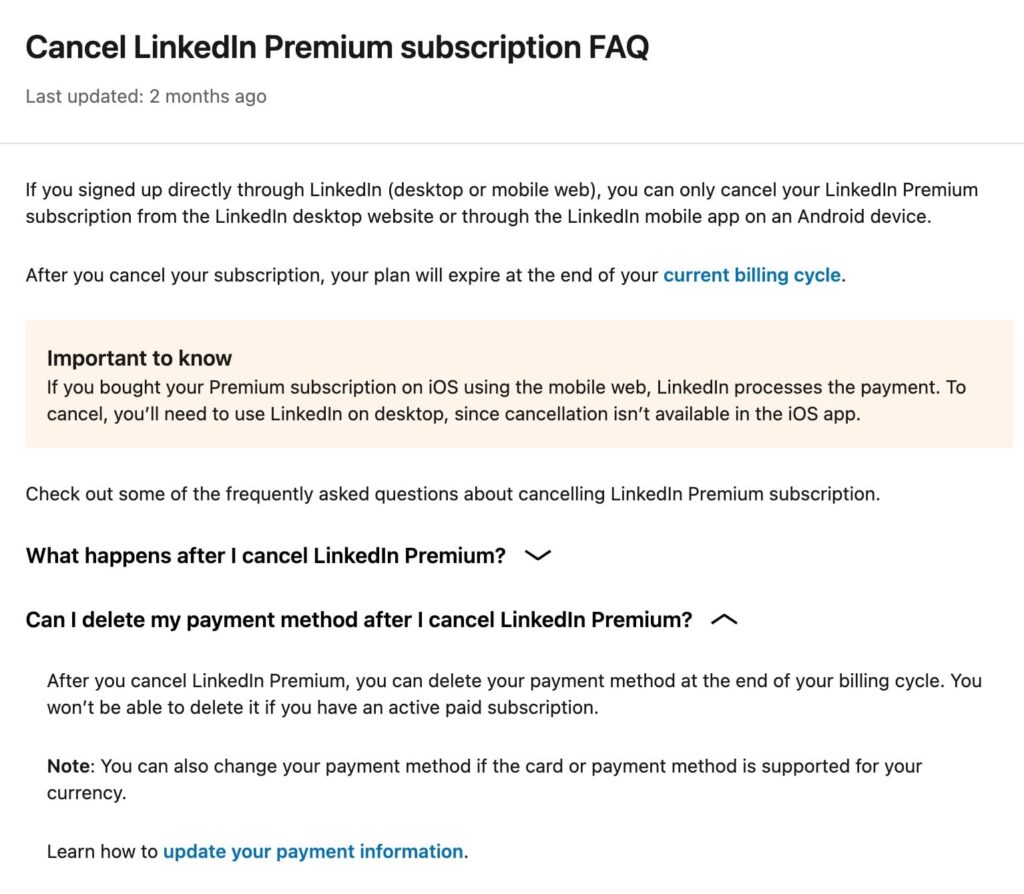
Cancel each active subscription at least one day before its next renewal date — your plan stays active through the end of the current billing cycle, but the next renewal won’t hit.
Disconnect Enterprise and Learning admin links
If a current or former employer added you to a LinkedIn Learning license or an Enterprise Recruiter seat, the Close account flow rejects the request with an error pointing to the admin contact.
The fix is to ask the admin to remove your seat, or contact LinkedIn support directly if the company that licensed you has since been acquired or wound down. Resolve this before you try to close — chasing down an old admin is the most common reason a deletion gets stuck for weeks.
Tell the connections that matter where you’re going
Once the account is closed, your inbox is gone, the messages are gone, and the only way the people who relied on the connection can reach you is through whatever contact info lives outside LinkedIn.
Pull a list of the 20 to 50 people you want to keep talking to, message them your email or another platform, and confirm they have it before you close. The connections-as-CRM problem is a real cost of deletion, and there is no rebuild path once the data is purged.
A simple template that works for most people:
“Hey [Name] — heads up, I’m closing my LinkedIn account in the next [X] days. Wanted to make sure we stay in touch. Best way to reach me going forward is [email / phone / Slack / Twitter handle]. Send me a quick reply so I know it landed.”
Send it once, get a confirmation back, and move on. You don’t need to explain why you’re leaving — most people won’t ask, and the ones who do can hear it on a call.
Optional: opt out of AI training (even if you stay)
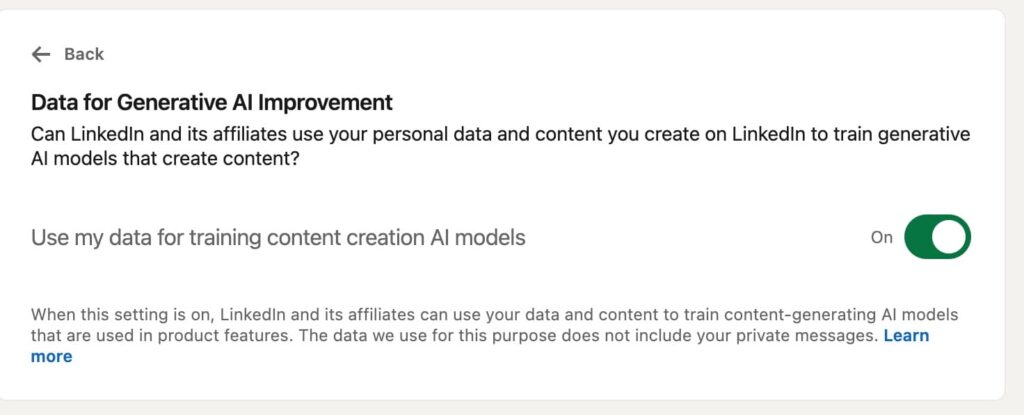
LinkedIn opted users in by default to having their profile and post data used for generative AI training, rolled out in the U.S. in 2024 and expanded to the EU, UK, Switzerland, Canada, and Hong Kong from November 3, 2025 onward
The setting is one toggle, and you do not have to delete the account to flip it. Open Settings & Privacy → Data Privacy → Data for Generative AI Improvement, and turn it off.
Why are people deleting their LinkedIn accounts in 2026? (and which reasons hold up)
The “I deleted LinkedIn” posts have a pattern. Four reasons keep coming up across threads, Substacks, and the deletion-themed posts on LinkedIn itself. Two are solid. Two have a workaround that does not require closing the account.
The AI training opt-out backlash
As mentioned, LinkedIn’s automatic opt-in for using member data to train generative AI was the inflection point. The U.S. rollout in late 2024 caught most users by surprise.
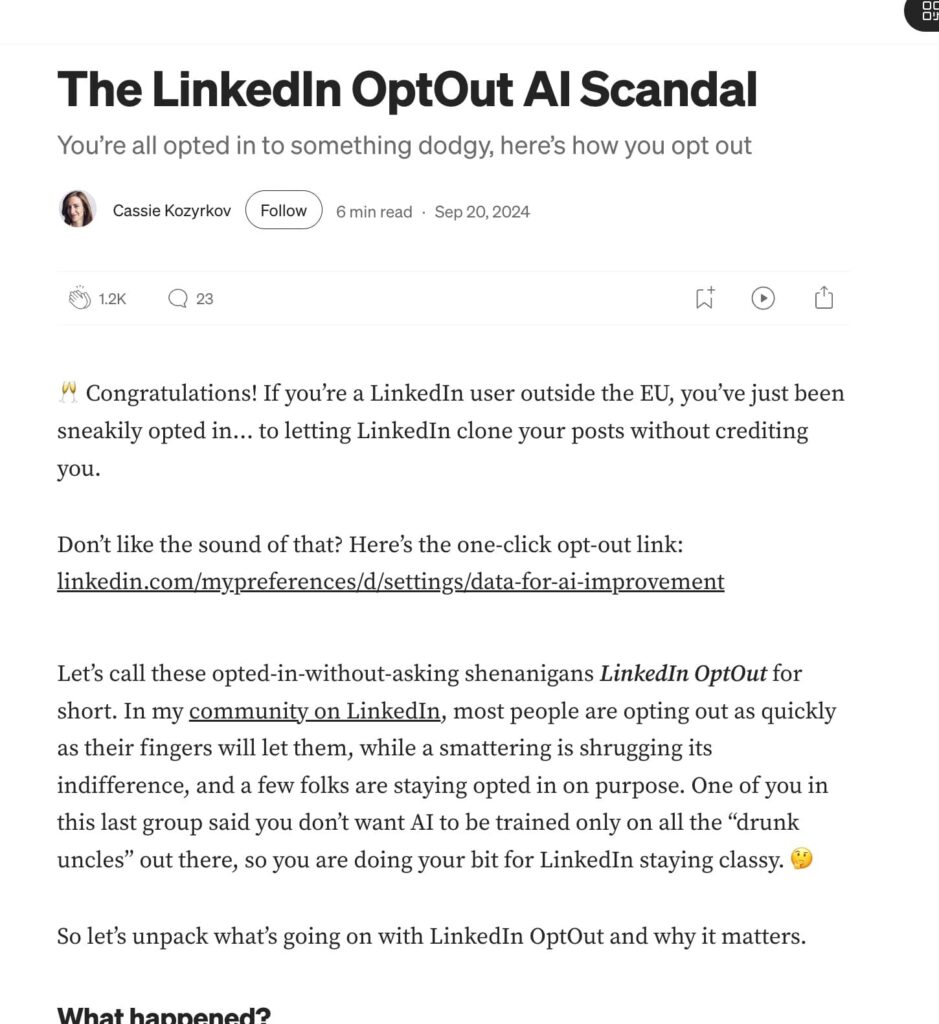
The EU and UK expansion in November 2025 brought a second wave of deletions from regions that previously had stronger default protections.
The platform feels increasingly performative
The “LinkedIn cringe” complaint is older than the AI controversy and harder to fix from a settings menu. The feed has shifted toward longer-form posts that read like personal essays, AI-generated thought leadership, and a recurring pattern of weaponized vulnerability used as a hook.
For users who joined for the network and the job market, the feed has become the cost of admission. The realistic move here is to mute the feed (turn off post recommendations, follow nobody, unfollow people you do not want in your home view) rather than delete the account that anchors your professional history.
Privacy concerns and LinkedIn’s breach history
LinkedIn has had multiple high-profile data exposures, including the 2012 hack that surfaced 6.5 million password hashes and a 2021 scrape that exposed data on over 700 million public profiles.
Privacy-minded users argue that the surface area is too large for the value the platform delivers them. This is a fair reason to delete if you genuinely do not use the platform.
If you do, the privacy controls (Profile viewing options, off-LinkedIn data, third-party app permissions, AI training toggle) collectively close most of the surface area without losing the account. The LinkedIn private mode breakdown covers the profile-visibility side of this in detail.
The “no ROI” concern
The remaining group of deletions comes from users who looked at how much time they were spending on LinkedIn against what they got out of it, and concluded the ratio was wrong. This is the most honest reason and the easiest to fix without deletion.
The premise is that LinkedIn has to be a daily activity to be useful, which is the assumption the “use it less” setup in the next section breaks.
If the platform sends you zero warm leads and never produces a single useful conversation, deletion is the right call. If it occasionally does, keep the door open and stop spending the hours.
How to turn your LinkedIn account into a 30-minute-a-week lead engine
This is the configuration most operators who nearly deleted ended up with. The account stays live, the feed gets muted, and Expandi Smart Campaigns handle the outreach so connection requests and follow-ups go out without your input.
You spend 30 minutes a week reviewing replies, and the rest of the time the platform runs on its own. The principle is simple: LinkedIn is a distribution channel, and channels do not need your daily attention if the workflow is automated.
The math is the reason this matters. Across the 70,000+ campaigns analyzed in our state of LinkedIn outreach report, LinkedIn DMs hit a 10.3% reply rate on average, more than double cold email’s 5.1%.
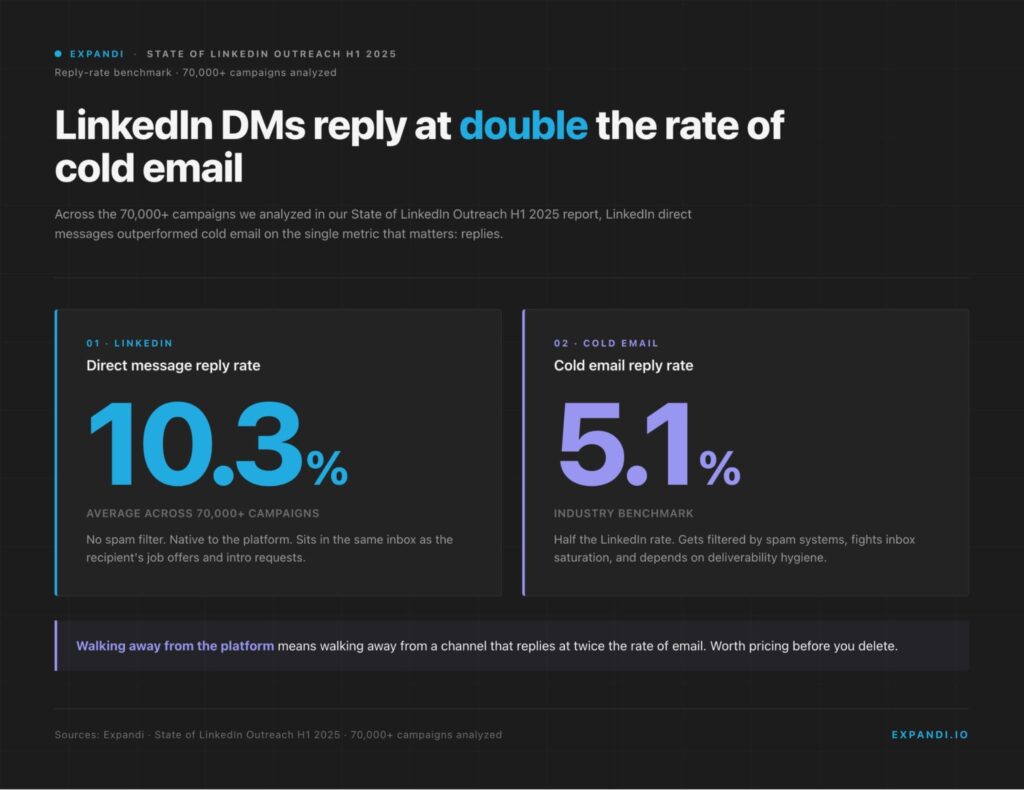
Deletion walks away from the time cost and the yield in one move, and that trade is what most deletion posts skip past.
Pull the audience that already engages with you
The people who view your profile, react to your posts, or visit your company page are warm signals sitting on LinkedIn’s side of the wall. Plenty of those signals come from people who could fit your ICP — the manual workflow is just too slow to follow up on most of them.
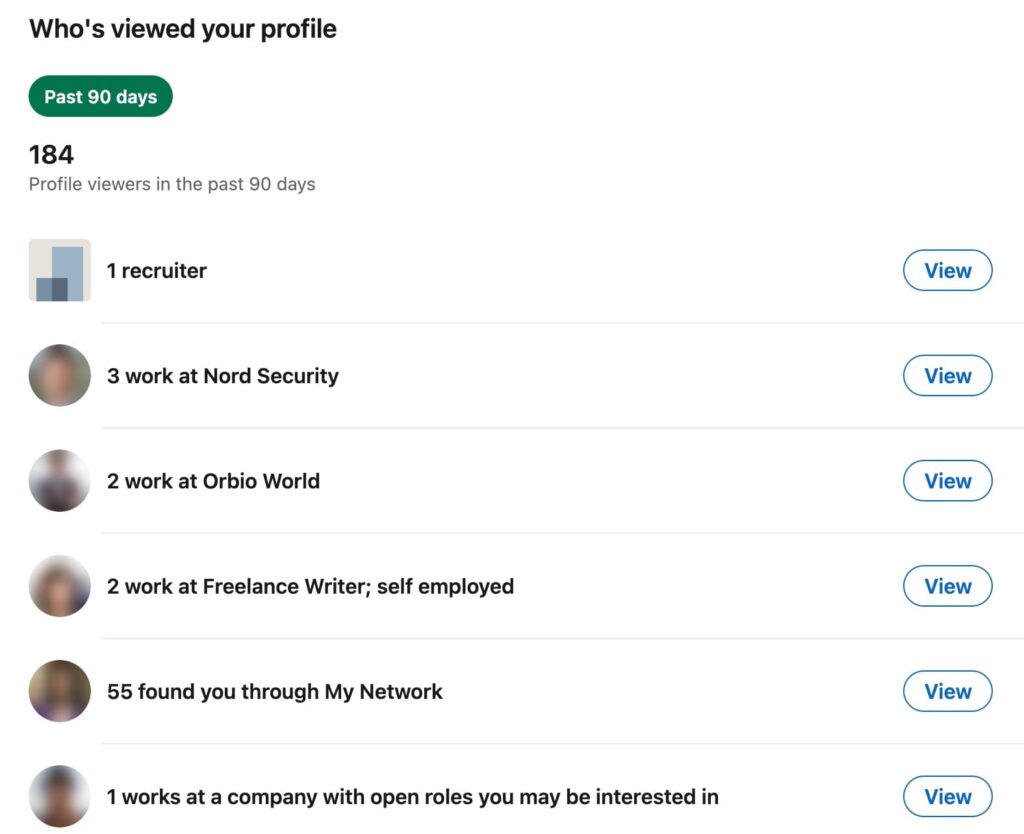
Expandi’s Inbound campaign auto-imports profile viewers and routes them into a sequence, and the Post Engagement URL lead-list type pulls leads who reacted to a specific post (up to 2,500-3,000 leads per post). That converts the platform’s existing inbound surface area into a pipeline source without you needing to log in daily.
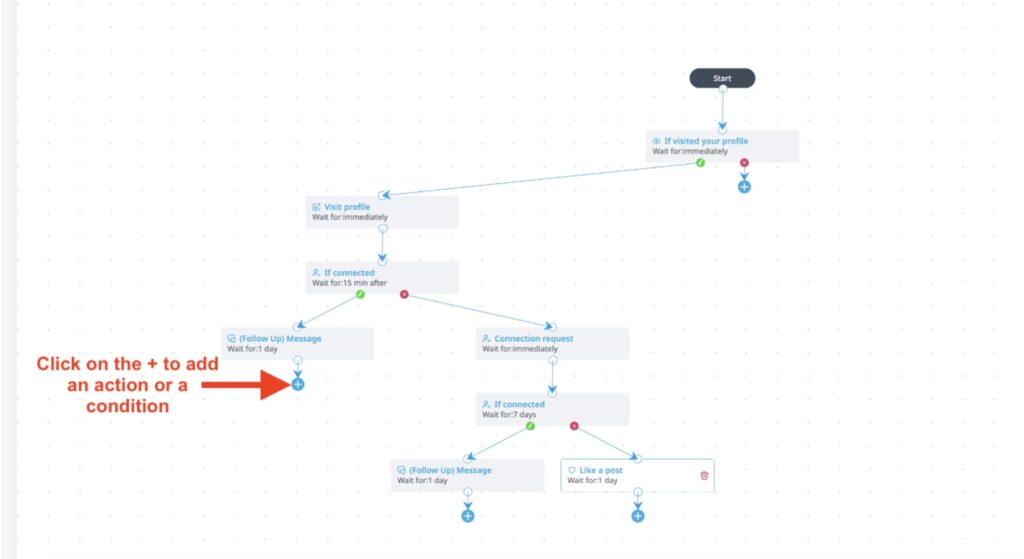
Our turn your LinkedIn presence into a lead engine breakdown covers the surrounding tactics for the same setup.
Set up signal-based campaigns that work without your attention
Smart Sequences combine 19 actions and 11 conditions into if-then logic that only escalates when a prospect engages. If they accept your connection, the sequence sends a follow-up. If they don’t, the sequence stops. If they view your profile a week later, a different track triggers.
The setup work is front-loaded. Once a campaign is built and tested, the day-to-day cost is reading replies rather than running outreach.
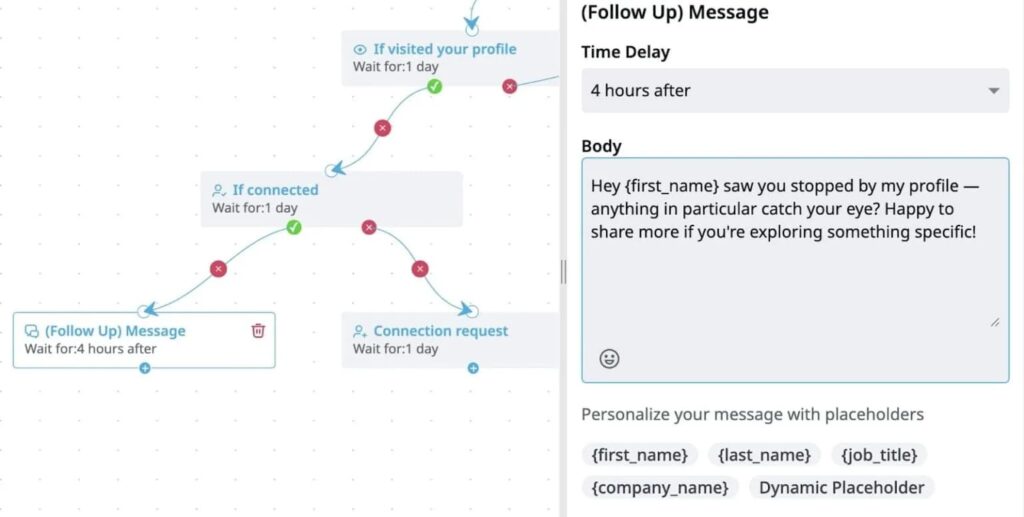
This pairs with the trigger based outreach approach for converting profile views, post engagement, and job changes into automated touchpoints.
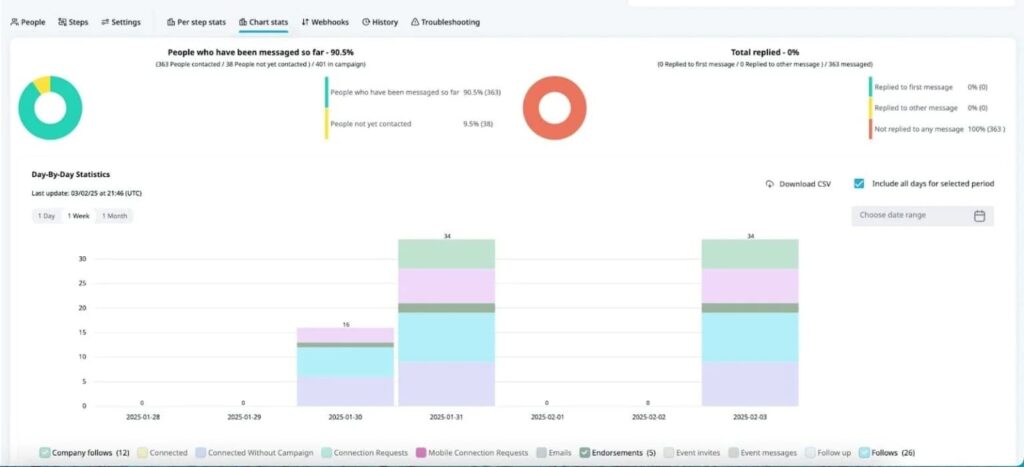
Run one final outreach push before you decide
If you are 70% of the way to deletion, run one campaign before you make the call. Pull the prospects who have engaged with your last six months of posts, set a Smart Sequence with a personalized opener, and see what comes back over four to six weeks.
You are running this to gather data on what the account is worth as a passive lead source, separate from the time you have been spending on it.
Deleting your LinkedIn account: frequently asked questions
Fourteen days from the moment you confirm closure. During that grace period the profile is invisible to other members but recoverable by signing back in. After 14 days LinkedIn begins permanent erasure of the profile, connections, messages, recommendations, endorsements, and followers, and the data is no longer recoverable.
For a few weeks, usually yes. If scrubbing the public footprint matters, submit a removal request directly to Google’s URL removal tool once your profile starts returning a 404.
Yes. LinkedIn releases the email address from a closed account once the permanent deletion completes (about 14 days after you confirm). You can sign up with the same email and rebuild from scratch, but the old profile, connections, and history do not carry over. Some users hibernate first specifically to keep that option open without losing their existing network.
Recommendations attached to your profile are removed when the account is permanently deleted. Recommendations you wrote for other people stay attached to their profiles, but the byline updates to show “LinkedIn Member” instead of your name. Endorsements you gave or received disappear the same way. None of these come back if you re-create the account later.
Hibernation hides your profile from view entirely, so the Who’s Viewed Your Profile feed pauses while the account is asleep. New visits do not register, and you do not see notifications. The moment you reactivate, your profile is visible again and the feed starts collecting visits from that point forward. Anything that came in during the hibernation window is not retroactively recovered.
One more thing before you delete permanently
Deleting a LinkedIn account is a five-click decision. Knowing what you are deleting — the daily scroll, or the account that anchors your professional history and your inbound channel — is the longer one.
Running a final outreach campaign on automation, before you decide, gives you data instead of a feeling about whether the platform is worth keeping.
Set up a Smart Sequence in Expandi, route inbound profile views into it, and let the campaign run on a dedicated IP with smart daily limits while you stop scrolling. Thirty minutes a week to read replies. The rest of the time, the platform works without your attention.Start a 7-day Expandi free trial (no credit card required) and see what the account is worth before you delete it.

You’ve made it all the way down here, take the final step