Quality and reliability: a 2026 checkpoint on what Expandi has shipped (and where we’re going)

In 2025, outreach volume went up while reply rates went down. Many sales teams spent the year running faster to stand still.
2026 looks different. Every initiative on our roadmap this year sits under one of two values: quality or reliability. Nothing gets prioritized ahead of those. Not feature count or shipping speed.
The first half of the year is largely shipped. Here is what that commitment looks like in practice, and what it should mean for your outreach.
Two values, one underlying thread
Platforms often chase scope: more channels, more integrations, more dashboards. We picked a narrower road on purpose.
Quality means every message, every filter, every campaign decision should raise the chance of a real conversation. Volume without quality is noise. Noise gets ignored, then reported, then restricted.
Reliability means your LinkedIn account stays healthy and your campaigns keep moving. When something goes wrong, you find out before your customer success manager does. No silent failures. No morning-after panic over stalled campaigns.
One thread runs underneath both. More of our customers now run Expandi as teams and agencies, across many LinkedIn accounts. So both values have to hold at that scale, not just for a single seat. That shapes a growing share of the roadmap, without coming at the expense of the solo operator who started here.
Quality: outreach designed to earn a reply
Reply rates keep compressing, so many teams opt for increasing the volume of messages. However, the answer is better matching, timing, and writing.
Better matching: ICP Filters
ICP filters now support exclude rules alongside include rules, with up to five endpoints per filter. Exclude by location, industry, company size, or job title. Job title takes free-text input for the long tail of roles that never fit a clean dropdown.
The result: leads that should never have been messaged, aren’t. Teams running multi-segment plays stop burning sends on accounts that were never the right fit.
Better timing: Signals and the Signal Center
Signals now live inside Builder campaigns, where the rest of your logic already runs. They pull prospects in the moment they show intent: a profile visit, a post engagement, a company page view. No manual list upload.
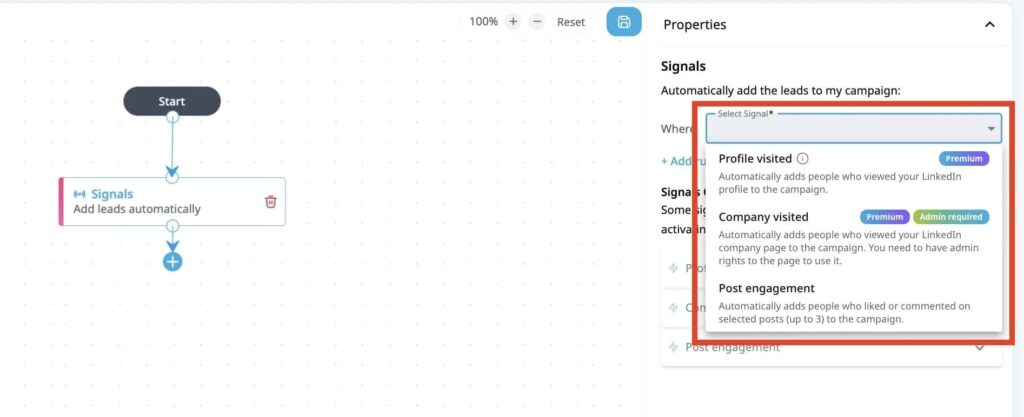
The premise is direct: message the people already paying attention. The Signal Center, now in beta, brings every signal captured across your workspace into one place. We wrote about why this shift matters.
Warm leads, found where they already are: Content
Cold lists start cold. People already posting and commenting on the topics you sell into are not.
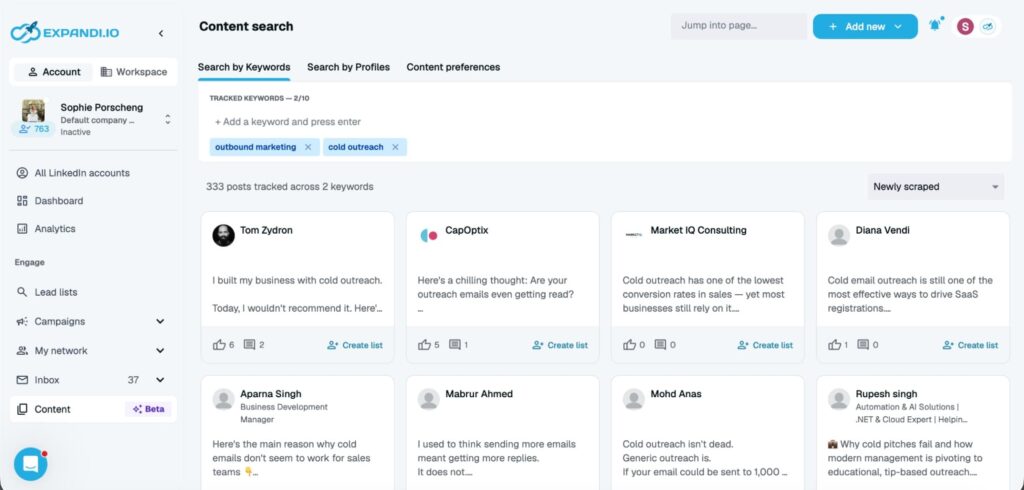
Content, now in beta, tracks up to ten keywords and ten profiles or company pages per LinkedIn account. Expandi collects the matching posts and the people engaging with them, so the manual hunt through the feed stops.
React, comment, follow the author, and sort posts by what is working, all inside Expandi. You warm a prospect before the first message, without opening another tab.
When a post is worth working, one click on Create list turns its engagers into a lead list that refreshes on its own, every seven days by default. Moving that list into a campaign is a separate step, on your terms.
Better writing: AI Hyper personalized messages
Classic templates still work when your list is tight. When it is not, AI Hyper personalized messages generates copy per lead using profile data, campaign context, and any signals attached to the lead.
You write the prompt. The model adapts per recipient, and you can preview real examples before launch. Global Instructions at the account level keep tone and constraints consistent across every campaign. More on personalization at scale without adding SDRs.
One builder, more room to personalize
Every campaign is now a Builder campaign. Start from a template for a common pattern, then take it anywhere: add a step, change the logic, rewrite a message for one segment. The template is a starting point.
This year we made editing a campaign far less punishing. You can insert a step between two existing ones, or remove a step, without tearing down the branch and rebuilding it. Editing used to be all or nothing. Now it is incremental.
You can also preview a message against a real lead before anything sends. Pick someone from your list and see exactly how the copy resolves for that specific person: every placeholder filled, the actual line they would read. A broken variable or an awkward sentence shows up while it still costs you nothing, instead of after it reaches them.
Why this belongs under quality: when adjusting a campaign means rebuilding it, people usually stop adjusting, and the outreach stays generic. Generic outreach gets ignored. A builder you can reshape step by step is one you keep improving, which is what earns a reply. Editing a campaign after it is already live is the next piece on this path.
Paid InMail, native inside Builder
Paid InMail is now a first-class step in Builder. If you have Sales Navigator, you already have the credits to use it.
The routing protects those credits. Open profiles get a free InMail. Closed profiles use a paid one, and free sends always go first, so you spend credits only where you have to. Set a per-campaign cap and the step respects it.
Credits are held, not burned. If you run out mid-campaign, leads wait and resume when your credits refresh, rather than failing. Replies land in your inbox and Global Inbox alongside everything else, and AI Hyper personalized messages work here too. Here is a full workflow around it with Sales Navigator.
Reliability: see it before it becomes a problem
The biggest source of support conversations last year was not a bug. It was silence. Campaigns stopped sending and users did not know why. We worked on that directly.
Automation Status: one view of your account’s health
Automation Status is a panel at the top of the Analytics page. In one glance it tells you:
- Whether your LinkedIn account is healthy and connected
- Whether you are inside active hours
- Whether any daily limit has been reached
- Whether any campaign has a critical issue (out of leads, limits set to zero, failed actions)
A traffic-light dot surfaces the worst issue detected. Every card has a direct CTA to the setting that fixes it. No hunting across five tabs.
Most “my campaign is not sending” cases come down to issues you could fix in under a minute, given visibility. Automation Status gives that visibility.
Smarter LinkedIn verification
Confirmation through the LinkedIn app used to stall accounts for hours. It now verifies quietly when your authenticator is available, with clean fallbacks for SMS. Fewer stalled accounts. Fewer manual resets. Less time between your account needing something and you knowing.
Imports that tell you what went wrong
CSV uploads used to fail quietly. If your list returned zero leads, you now see which field mapping failed and which rows were rejected, before the import commits. Validation runs at the right moment, not after the damage is done.
Step settings that mean what they say
One label caused more stalled campaigns than any bug. The control for how long a condition waits looked identical to a plain action delay, so people set a connection check to a few minutes and watched every lead route down the wrong path. The setting now reads differently for conditions and actions, so the most common silent failure stops at the source. And a limit range that includes zero now warns you, before a campaign quietly sends nothing.
The two values, at team scale
One seat working is not the same as fifty seats working. As more agencies and sales teams run Expandi across many accounts, both values have to scale with them. The features below earn their keep once more than one person shares a workspace.
Global Inbox
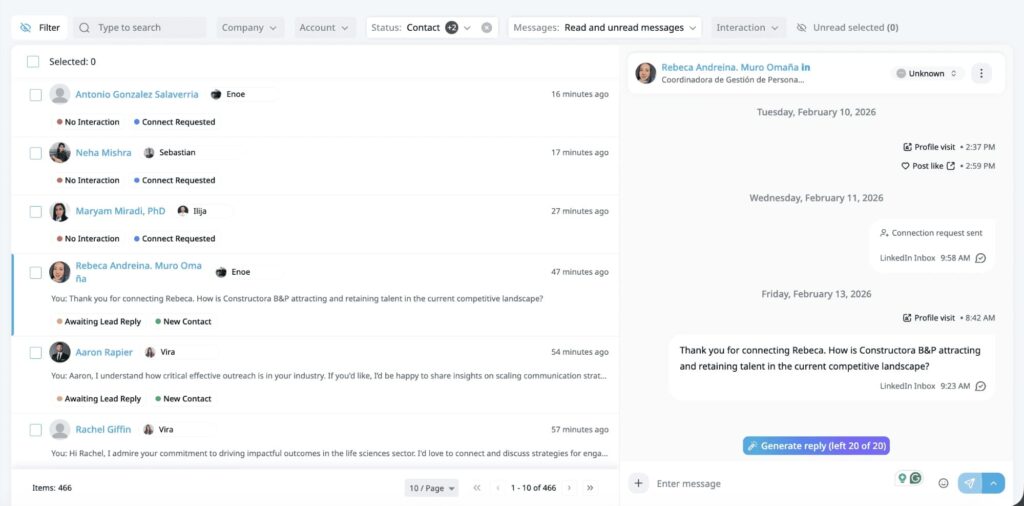
Managing conversations across every LinkedIn account used to mean hunting. Global Inbox brings every campaign conversation, from every connected account, into one view sorted by latest message. Each row shows a preview and who replied.
Filter by account, company, status, or whether a lead is awaiting your reply. Pause, resume, or transfer a lead to another campaign without leaving the inbox. More context in our Global Inbox announcement.
CRM integrations that keep data where it belongs
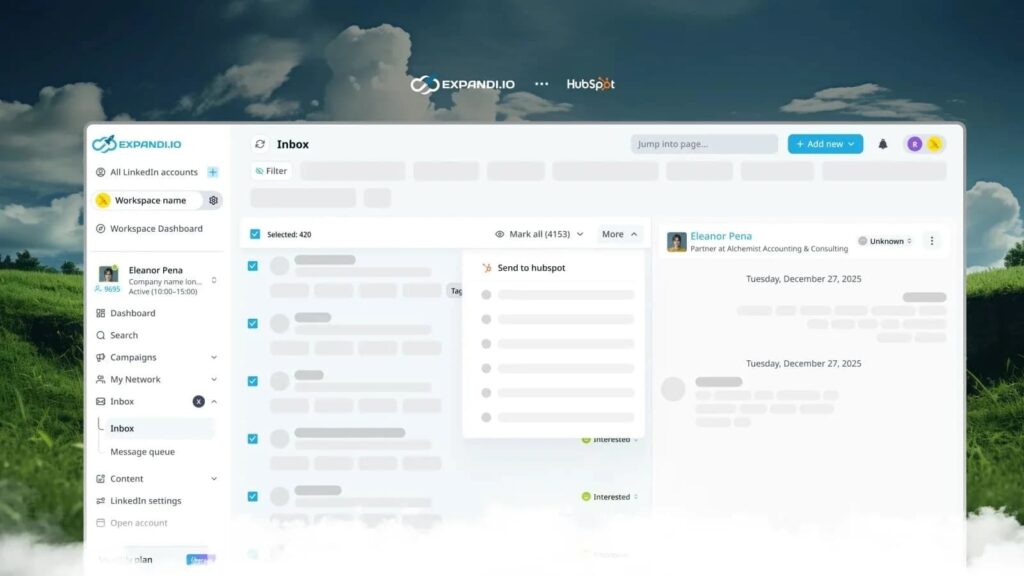
We ship native integrations with HubSpot, Pipedrive, and Salesforce. The difference is what flows across. While some tools push a contact and stop, Expandi logs the LinkedIn touchpoints that tell the story: connection requests, messages, profile visits, and follows, written straight to the CRM timeline.
Leads you mark interested sync automatically, by reply, by sentiment, or by campaign activity. Or push one with a single click. Either way, the record in your system matches what actually happened on LinkedIn, with no copy-paste.
Workspace Manager role
Admins used to hold the only keys to adding LinkedIn accounts. That role also controlled billing, which most teams don’t want their managers touching. We added a third permission level: Workspace Manager. Same account-level powers. No billing access. A quiet fix agencies had been asking for.
Event Pods: warm reach, pooled across a team
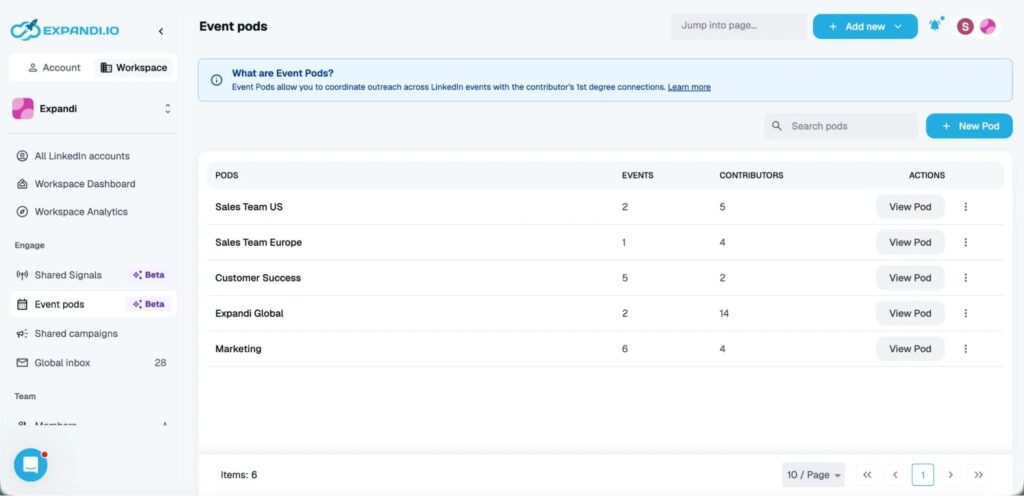
A LinkedIn event is a room of people who opted in to a topic. Event Pods turn your team’s accounts into the door to it.
One admin submits an event to the pod. Every member account joins it and invites their first-degree connections, filtered by job title, company size, or industry. Fifty accounts reach a network no single seat could.
What comes back is a list of attendees who chose to show up for a subject you own. That is a warmer starting point than any cold list, and it grows with the size of your team.
A cleaner platform
A quieter project ran underneath all of this: the interface itself.
The main menu is redesigned. The Analytics page is rebuilt, with Automation Status at the top of it. The Searches experience is rebuilt. Settings got a full overhaul. We also reworked the Workspaces view to be easier to navigate, since teams now spend more of their time there.
None of this was decoration. Fewer clicks to the thing you came for. Less noise around it. Cleaner defaults, so a new account is productive sooner. Unglamorous work, but worth every hour.
Why a checkpoint, and why now
We wanted to draw a line in the calendar and be honest about what got done, and what is next. Reading a commitment in a vision doc is one thing. Seeing it play out across a half-year of releases is another.
What is next, in short:
- More signal intelligence inside campaigns (reply sentiment, engagement depth)
- More proactive detection of account issues before they stop your sends
- Continued investment in multi-seat workflows for agencies and sales teams
None of that is a detour. Both values keep running.
The simplest test
A platform either makes your LinkedIn account healthier over time, or it does not. It either raises the share of messages that earn a reply, or it does not.
We bet the year on those two outcomes. The first half says we are on the road.





You’ve made it all the way down here, take the final step