Best lemlist Alternatives 2026: Top Lemlist Competitors to Consider


If you’re specifically looking for a tool to supercharge your LinkedIn efforts, lemlist is a great option. However, it’s got its flaws. You can’t generate leads directly from LinkedIn, nor does it offer dedicated features to safeguard your LinkedIn activities.
These reasons often prompt users to search for lemlist alternatives. In this article, we’ll discuss the top lemlist competitors to watch out for in 2026.
TL; DR: Which lemlist Alternative Should You Consider?
The full details are worth reading, but if you don’t have the time, here’s an overview to help you decide more quickly.
Do you want to find and engage leads on LinkedIn?
Choose Expandi: Best if you want to target and build relationships with your LinkedIn audience without worrying about your LinkedIn account being restricted.
Do you want a solution to source leads from the database and engage them?
Choose Apollo: Its vast database lets you identify and engage leads but be careful to verify its data.
Do you want to manage leads and track your conversations from a centralized dashboard?
Close works best for importing leads, tracking their status in the pipeline, and conversing with them at scale.
Is your concern about finding and verifying email addresses and phone numbers?
Hunter would be your preferred solution for finding missing email addresses and verifying for outreach purposes.
Are you tired of having your cold emails land in the spam box?
Instantly is your best option for warming up and auto-rotating email accounts to make sure your cold emails land in your prospect’s inbox.
Do you want an AI sales agent to run your cold email campaigns?
Artisan works best. Thanks to its AI sales agent, Ava, you can find leads within seconds and engage with them at scale.
What’s lemlist?
lemlist is a sales engagement and cold outreach platform designed to scale your cold outreach efforts. With its features, you can run highly personalized, multichannel outreach campaigns to engage your prospects and increase the likelihood of booking a meeting.
Starting with its B2B lead database, find your ideal buyers and filter results by specific keywords to discover targeted leads. You can also find and verify contact information (email addresses and phone numbers) to easily reach your contact.
Once you’ve identified targeted leads, use lemlist’s AI personalization feature to craft engaging messages beyond the first or company name. Include images, GIFs, or dynamic landing pages to help you stand out. The sales engagement tool also offers multi-channel outreach to engage prospects beyond emails. You can combine cold emails with LinkedIn actions, such as profile visits or a connection sequence, in a single workflow.
Overall, lemlist remains the tool to run your outbound campaigns more efficiently. By offering features such as a database and multichannel sequencing, you go beyond sending emails to initiating conversations that convert.
Key Features of lemlist
From testing the product, here are some features lemlist offers:
1. Lead database
lemlist claims to offer a 600M+ contact database that lets you access high-value accounts to supercharge your outbound campaigns. Upon getting these high-value accounts, filter the results with specific results such as revenue, job titles, funding, and tech stack to find precise leads that serve as the foundation for your outbound campaign.
Afterwards, use the platform’s email finder and verifier to obtain accurate contact information for leads. This process easily helps you to contact your prospects more effectively.
2. Personalization
Generic messages don’t cut it. lemlist goes beyond surface-level personalization, such as a person’s first name or company name. It leverages AI techniques, such as spintax and icebreakers, to tailor custom messages that address prospects’ needs. You can also include personalized images, GIFs, videos, or landing pages.
If you’re reaching out to a sales leader, marketer, or recruiter, these visuals make your messages stand out immediately. Besides, leveraging a lead’s behavior, such as a recent product launch or website visits, makes your outreach feel like well-researched homework rather than a random task.
3. Multichannel sequences
lemlist lets you expand your reach through its multichannel feature. Say you want to reach a prospect through emails, calls, and LinkedIn, this is where it happens. All you need to do is create a campaign sequence and combine your actions — cold emails, LinkedIn profile visits or connection requests, and calls – in a single workflow. This creates multiple touchpoints, increasing the chances of conversion.
4. Email deliverability
lemlist understands that email placement is essential for a successful outbound campaign. So, it has a specialized tool, lemwarm, to warm up your email account before running a full outbound campaign. As a result, your sender reputation improves over time, and your emails land in your primary inbox rather than promotions or spam.
Why You Should Consider a lemlist Alternative
As great as lemlist is, it has some flaws that may prompt you to consider a lemlist competitor. These flaws were gotten from review sites like G2 and Capterra, and they include:
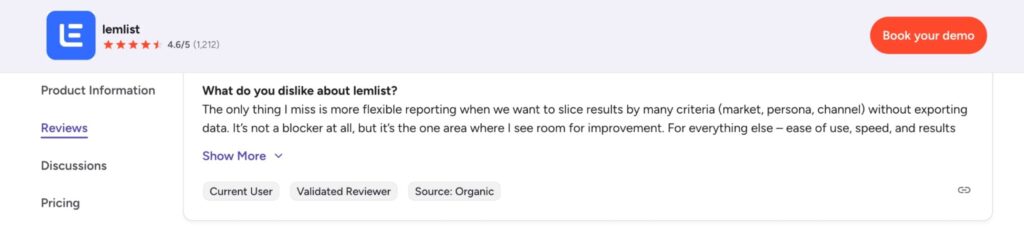
1. Limited reporting capabilities
One limitation of lemlist is the depth of analytics available for users. Although the campaign metrics are easy to track on the platform, you can’t easily break down your data by specific criteria such as market, persona, or channel. You’d have to export everything to gain deeper insights. This is an extra step that slows the decision-making process.
2. Iemlist is expensive
As a small team or business, this can affect your pocket. That’s because you’re not paying per month. You’re paying per user every month. As more members of your sales team use the tool, your budget compounds.
As one G2 user puts it, “The only other drawback is cost as you scale: once you add several users, higher volumes and more enrichment, lemlist is clearly not the cheapest option in the stack.” This doesn’t mean it isn’t valuable. The goal is to find a tool that delivers value while staying within your budget.
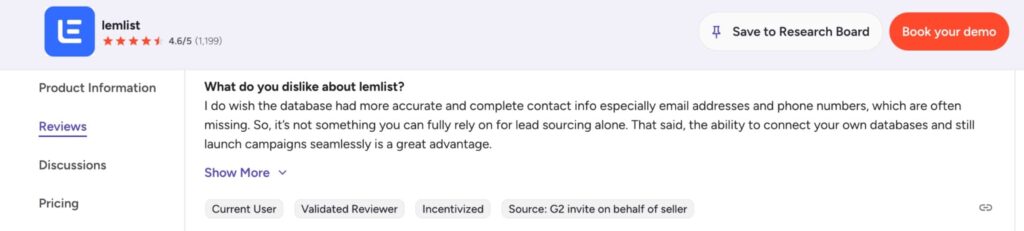
3. Inaccurate data
Accurate data is the bedrock of any outreach campaign. If lemlist can’t provide that, it creates a friction that makes your outbound campaign unsuccessful.
For instance, invalid or missing email addresses and phone numbers prevent you from reaching your prospects. This leaves you to switch tabs and pay for the data on another platform.
What’s lemlist’s Pricing Plan?
lemlist offers a 14-day free trial and a three-tiered pricing plan. After a deep analysis, here’s a breakdown of lemlist’s pricing and what each paid plan can get you:
| lemlist pricing | Price (Per User, Per Month) | ✅ What You Can Get | ❌ What You Can’t Get |
| Email Pro | $63 | Lead databaseLimited enrichment creditsAI-powered personalizationCRM integrations and APIEmail warmup and deliverability booster | No LinkedIn automationNo team collaborationNo unified inbox |
| Multichannel Expert | $87 | Everything in Email Pro LinkedIn automationWhatsApp automationBuilt-in call dialerUnified inbox | No LinkedIn account safetyNo LinkedIn account warmupNo team collaboration |
| Enterprise | Custom | Everything in Multichannel ExpertDedicated account manager1:1 onboarding supportPriority support | No LinkedIn lead generationNo LinkedIn account safetyNo team collaboration |
Is lemlist worth the cost?
If you’re a solo user who wants to run cold email campaigns at scale, lemlist is a perfect choice. But if you want to engage with your prospects across multiple channels, including LinkedIn, you’d have to subscribe to the Multichannel Expert plan, which starts at $87 per user/month.
In contrast, lemlist’s alternative, including Expandi, doesn’t require subscribing to a higher-tiered package to access features like LinkedIn automation. You can check Expandi’s pricing here.
Expandi: The Best lemlist Alternative for 2026
As a B2B business owner, LinkedIn remains the top platform for finding qualified leads to boost your business growth. We do not say this; the stat backs up research showing that LinkedIn drives 75% – 85% of B2B buyers from social media. How do you generate these leads from LinkedIn? Your best option is choosing a LinkedIn automation tool like Expandi.
Expandi is a renowned lemlist’s alternative that lets you extract leads from LinkedIn, engage them with personalized messaging, and follow up to scale your LinkedIn outreach efforts. The best part is that you don’t have to manually extract and engage leads. With a few clicks, you can pull targeted leads from LinkedIn and engage them to build meaningful relationships with them.
Aside from this, Expandi monitors your LinkedIn activities and implements safety measures to prevent your LinkedIn account from being restricted or worse, banned. With this approach, you reach your ideal buyers and increase the chances of converting them.
Why is Expandi the best lemlist Alternative for 2026?
If you’re exploring lemlist’s competitors, especially those focused on LinkedIn automation and safety, we recommend Expandi. The tool addresses your LinkedIn lead-generation problem without forcing you to subscribe to a high-tier plan. Here are some reasons we stand out:
1. You can generate leads from LinkedIn
Unlike lemlist, which only lets you automate LinkedIn outreach, Expandi goes beyond this. Whether you’re a salesperson, marketer, or recruiter, you can find your ideal buyers, filter by specific criteria, and get your desired leads.
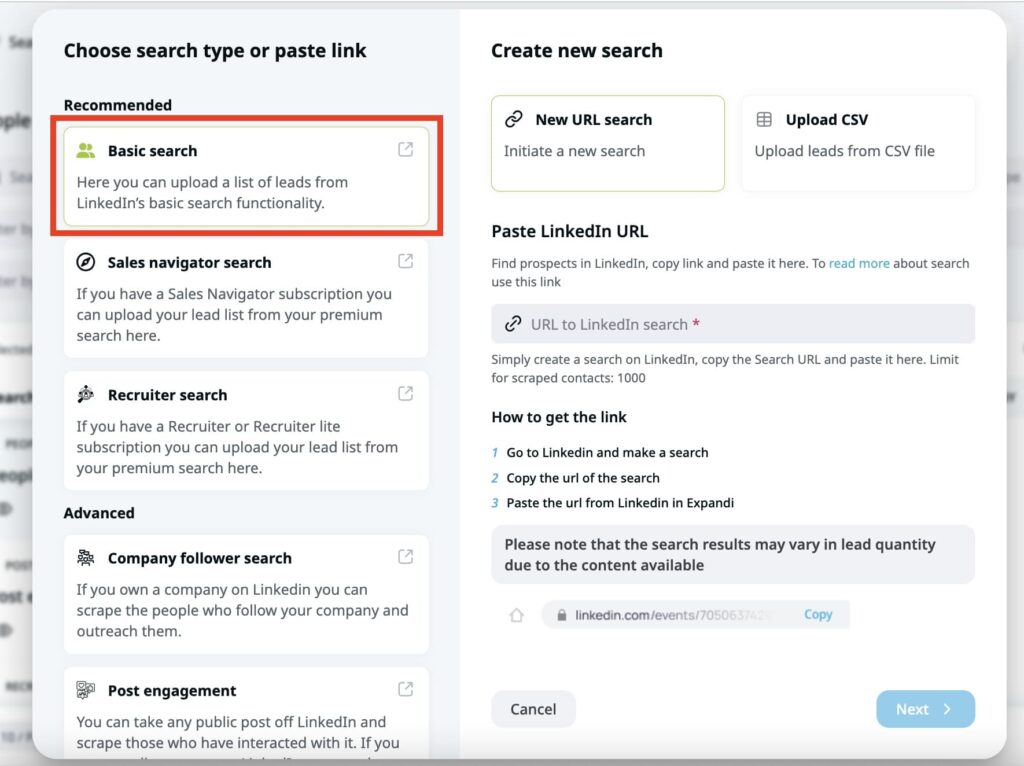
All you need to do is input the keyword in the search bar, get the results, and include them in your Expandi’s dashboard. Below is an example of how you can extract leads from the LinkedIn standard version. This helps you find the right prospects who align with your ICP and reach out to them for engagement.
After searching, export your LinkedIn contacts as a CSV file to perform other sales operations, such as outreach.
2. It’s compatible with every LinkedIn plan
Expandi works with every LinkedIn plan. From the free version, Sales Navigator (all tiers), and LinkedIn Recruiter, you can generate and engage your targeted leads.
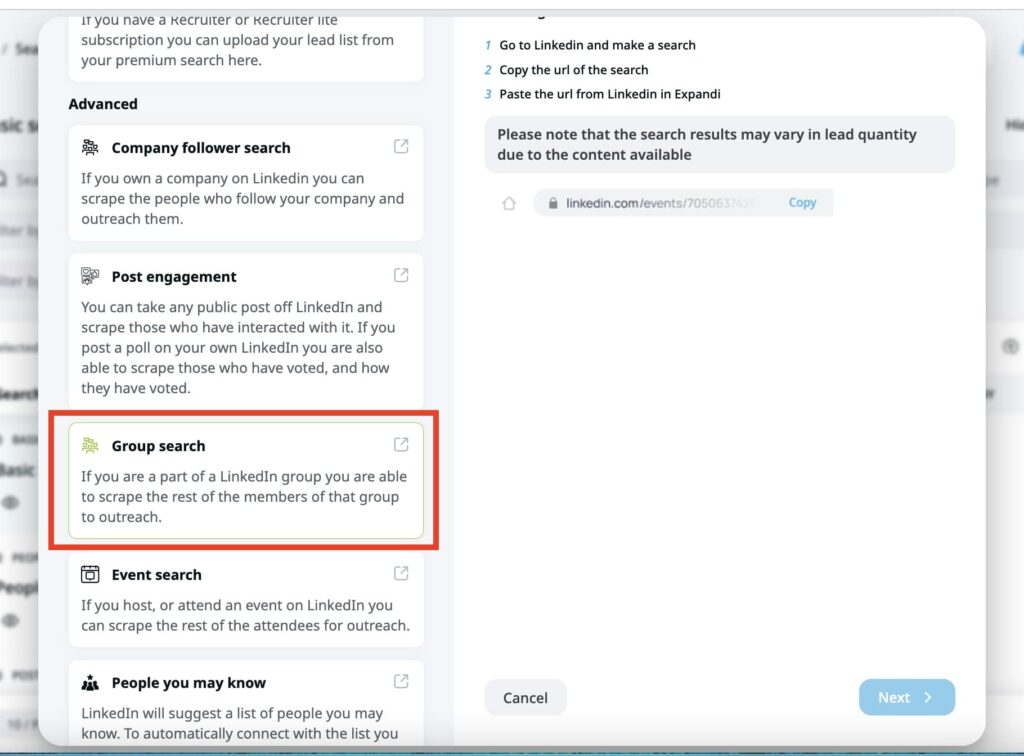
Additionally, the platform goes beyond extracting leads from LinkedIn search results. You can get leads from LinkedIn posts, groups, events, or company followers. This helps you to import leads beyond the basic search function and reach more prospects. Below is an example of using Expandi’s search feature to extract leads from LinkedIn groups.
3. It offers LinkedIn safety measures
Unlike lemlist, Expandi implements safety measures to protect your activities and reduce the risk of your LinkedIn account being restricted or banned. Say you want to extract leads from the LinkedIn standard version, you can only import 1,000 leads at once.
You can also set random delays to mimic human behavior when you send outreach messages on LinkedIn. This makes your LinkedIn actions look human rather than robotic. As a result, prospects warm up to those messages instead of ignoring them.
4. You can invite team members to collaborate
Every company thrives on collaboration. With Expandi, you can invite up to 20 team members to your workspace without paying a dime extra. Unfortunately, that’s not the case with lemlist where you have to pay per user.
As more users access the tool, your budget compounds. This can reduce productivity because only one team can access the tool at a time.
Expandi vs lemlist’s Pricing: Which One is Better?
Expandi is more affordable in the long run than lemlist. Unlike lemlist which charges per user, Expandi charges a monthly or annual fee. This makes a huge difference if you need multiple sales team members to use the tool.
For context, let’s say you have 5 members who need access. Here’s what lemlist’s Multi-Channel Expert Plan would cost:
- lemlist cost for 1 user: $87 × 12 months = $1,044 per year.
- lemlist cost for 5 users: $1,044 × 5 = $5,220 per year.
Now compare it to Expandi’s, which doesn’t charge per user and offers a 14-day free trial:
Expandi cost for up to 20 users: $79 × 12 months = $948 per year.
That’s $4,272 less than lemlist’s, and you get coverage for up to 20 users, not just five. So, if you want a tool that lets you generate, engage, and follow up on leads from LinkedIn without breaking the bank, Expandi is a clear choice.
Other Top 5 lemlist Competitors in 2026
Here are the other top 5 lemlist alternatives and competitors you should consider in 2026. Before diving into the details, here’s an overview to help you make quick decisions.
| Tools | Best for | LinkedIn Automation | Pricing |
| Expandi | LinkedIn lead generation and outreach | ✅ | Free trial available; paid plan starts at $79 per month. |
| Clay | Waterfall enrichment and automation | ❌ | Free plan available; paid plan starts at $134 per month. |
| Close | CRM | ❌ | Free trial available; paid plan starts at $39 per seat/month. |
| Hunter | Email finding and verification | ❌ | Free plan available; paid plan starts at $34 per month. |
| Instantly | Email warmup and deliverability | ❌ | No free trial; paid plan starts at $37.6 per month |
| Artisan | AI SDRs | ❌ | No public pricing |
1. Clay — For Waterfall Enrichment
Clay is a waterfall enrichment and automation platform that centralizes your sales operation. Think of it as a spreadsheet where each column performs specific tasks such as finding emails, verifying phone numbers, personalizing messages, and researching company data.
It’s perfect for sales teams that want to run their outbound game without switching tabs.
Key features of Clay
- Waterfall enrichment to find prospect’s valid email addresses and phone numbers.
- AI personalization to help craft messages that sound human at scale.
- Intent signals to prioritize prospects who are ready to buy.
I tested the waterfall enrichment to understand how it works. Clay pulls the data you need from over 100 sources. Say you want to find your prospect’s valid email address, Clay scans various sources like Hunter, Prospeo, and Datagma to check if they have it. If one tool (e.g. Hunter) doesn’t have the data, it proceeds to the next tool (e.g., Prospeo) until it gets the data you need.
From the “Actions” tab, I navigated to “Find work email” > “Full Configurations.” There, I selected the tools Clay should use to find the valid email addresses. With the other columns such as “Full name” and “Company domain” in place, I ran the operations and got this result.
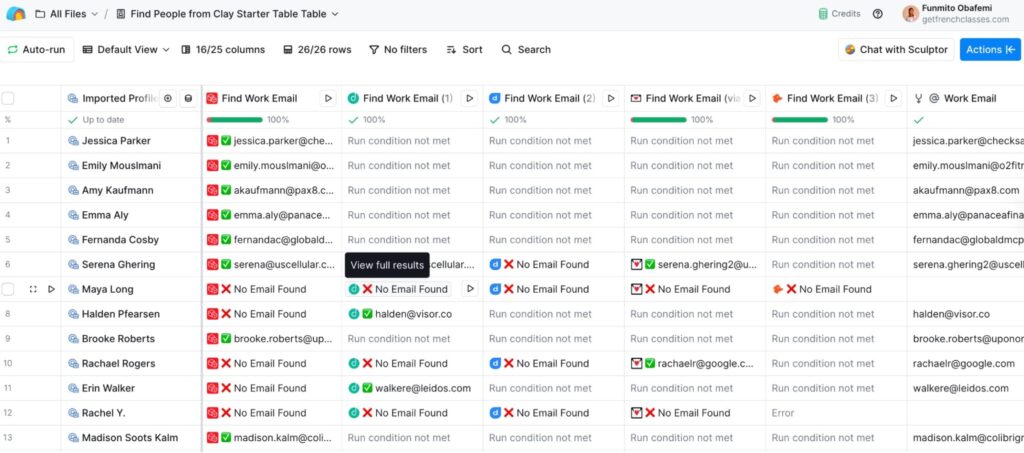
Although Clay offers waterfall enrichment feature, it’s not ideal for LinkedIn outreach automation. You can’t send connection requests or outreach messages, view profiles, or warm-up your LinkedIn account to prioritize safety.
Pros
- It’s easy to use. With a few clicks, you can find valid email addresses and automate other sales processes to supercharge your outreach campaigns,
Cons
- Users on G2 complain about the learning curve. With so many data sources, it can feel overwhelming until you master how to build workflows.
- Clay’s credit-based pricing model is expensive. If you don’t know how to use it properly, you’d waste lots of resources,
Pricing
Clay offers a free plan with limited credits to test out its features. But its paid plan starts at $134 per month and scales higher with more features.
2. Close — For CRM
Close is a CRM designed to help small sales teams streamline their conversations and close deals. It provides a comprehensive view of your entire sales pipeline, including each lead’s status and how to manage relationships effectively.
Key Features of Close
- A CRM that manages your leads’ information, tracks their status, and measures their performance.
- Built-in communication that lets you call, email, or send SMS without juggling many tools.
- Workflow automation to eliminate manual tasks and speed up activities. For example, you can automate follow-ups and trigger actions based on leads’ behaviors, such as email opens or missed calls.
In my testing, Close’s intuitive interface is user-friendly. You can create leads manually or import them as a CSV file. Make sure each column maps to its appropriate segment so you can perform other activities.
Once your leads are successfully imported, you can manage communications by sending an email or dialing their number. However, my biggest friction was setting up a workflow. After adding contacts, creating steps through an existing template generated an error message. So, I resorted to the manual approach.
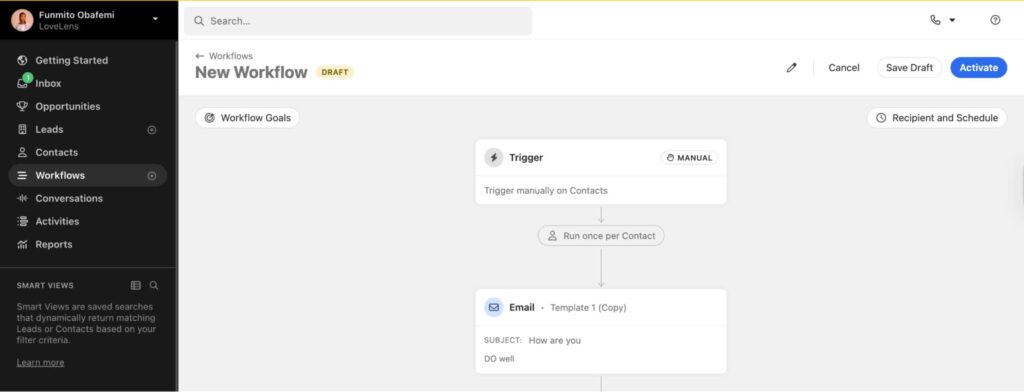
But once you get how it works, you can create diverse steps based on your lead’s behavior and build a relationship with them effectively.
Pros
- Close’s interface is user-friendly. With a few clicks, you can track and manage conversations in one place.
Cons
- Close doesn’t offer LinkedIn automation features. Just emails, calls, SMS, and WhatsApp to converse with your prospects.
- The platform’s reporting feature requires more customization. To generate insights across multiple accounts, one needs to export data rather than view performance within the platform.
- G2 reviewers also note that the learning curve is a bit complex. You’d need time to master and utilize the tool efficiently.
Pricing
Close offers a 14-day free trial, but its paid plan starts at $39 per seat/month and offers notable features such as unlimited contacts, multiple pipelines, and more.
3. Hunter – For Email Finding and Verification
Famous for data enrichment and verification, Hunter is another top lemlist competitor you can consider. It’s perfect for sales teams, marketers, and recruiters who want to obtain valid email addresses and phone numbers to reach their prospects.
Key Features of Hunter
- Email finder to find any prospect’s missing email address.
- An email verifier to validate the email addresses and help you reach your prospects.
- AI writing assistant to craft high-performing emails that engage your ideal buyers.
Getting your prospect’s email address costs credits. To do this, go to the Domain search bar, enter your prospect’s full name, and Hunter will show the corresponding email address and its verification status.
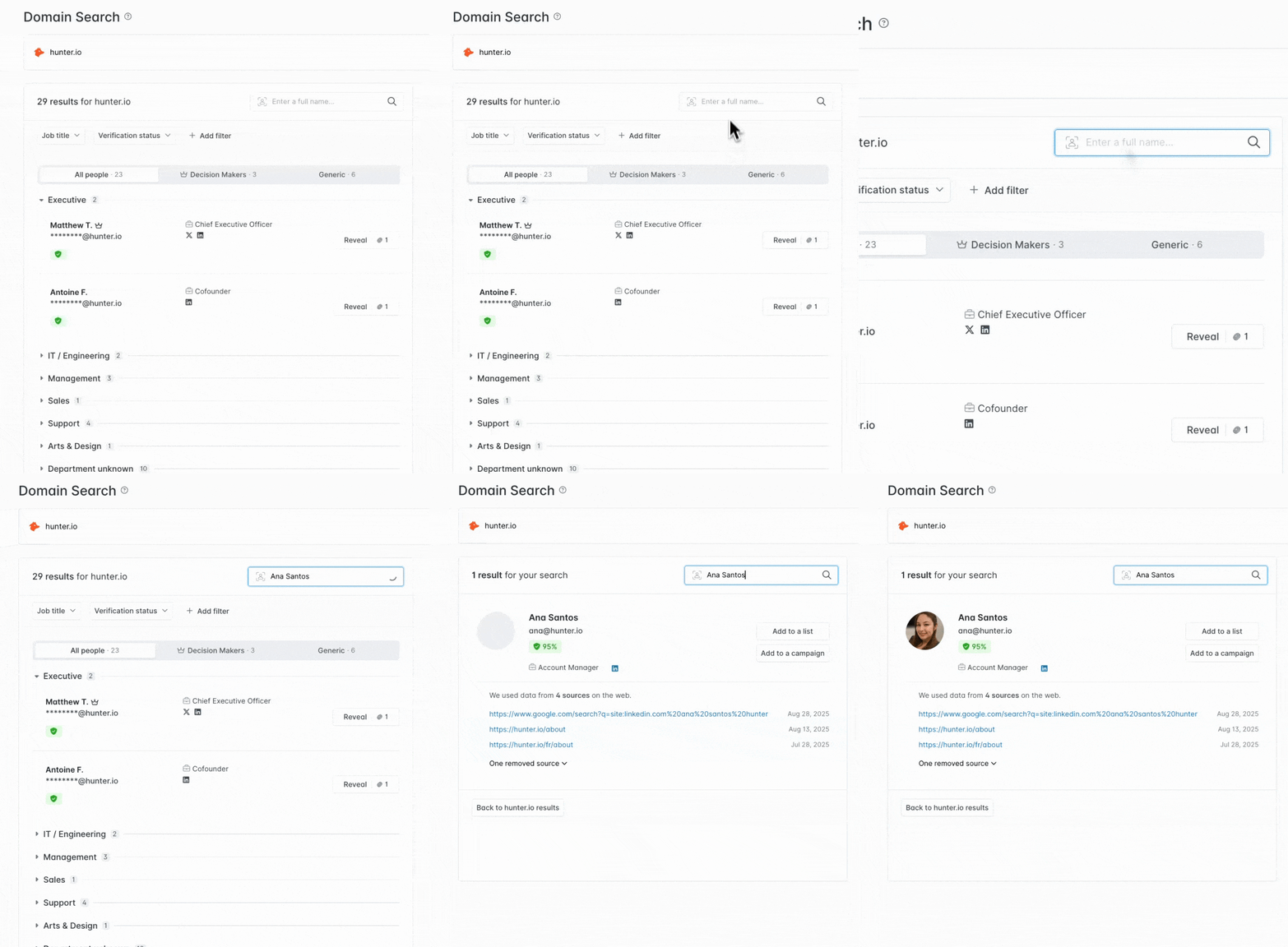
You’d also get other relevant details, such as job titles, industry, headcount, department, and more. While Hunter is easy to use, it gets expensive over time if you have to search for email addresses in bulk. Besides, it doesn’t work for LinkedIn automation like Expandi.
Pros
- The user interface is easy to navigate. With a few clicks, you can find your prospect’s email address.
- With no valid email address, you can’t reach your prospects. Hunter solves this problem by finding and verifying email addresses to help you contact as many prospects as possible.
Cons
- G2 reviewers complain that the tool is expensive to use, especially for small teams and businesses.
- It’s not suitable for LinkedIn outreach automation like Expandi.
Pricing
Hunter offers a free trial with limited credits, but its paid plan starts at $34 per month. Higher tiers include the Growth and Starter, which cost $104 and $209 per month, respectively. Enterprise plan requires a custom quote.
4. Instantly.ai — For Email Warmup and Deliverability
If you don’t want your cold email landing in spam, Instantly is a perfect choice. The email deliverability tool warms up your email account to ensure it lands in your prospect’s inbox. It’s perfect for sales professionals, marketers, and recruiters who run cold outreach campaigns at scale.
Key Features of Instantly
- Instantly offers a lead database to find qualified leads for your sales pipeline
- Warm up your email account to let cold emails land in the prospect’s inbox.
- Use AI prompts to personalize messages based on the lead’s behavior.
Pros
- It’s got an intuitive interface that is easy to use and navigate. You can send and manage bulk email campaigns at scale.
- Instantly offers helpful customer support to resolve customers’ queries and answer their questions.
Cons
- According to G2 reviewers, some features fail to work effectively. For instance, the scheduled emails fail to send, analytics don’t work correctly, or email campaigns. This affects the performance of your outbound campaigns.
- The email deliverability feature requires some improvement. Not all emails get sent, which affects your sender reputation score.
- Instantly doesn’t offer LinkedIn automation services. This would disadvantage users who generate and engage leads on LinkedIn.
Pricing
Instantly’s paid plan starts at $37.6 per month. Higher-tier plans like the Hypergrowth and Light Speed plans cost $77.6 and $286.3, respectively.
5. Artisan – For AI SDRs

Need an AI-powered employee to take charge of your sales workflow? Artisan is an ideal choice. With its sales automation platform and AI sales agent, you can generate qualified leads for your outbound campaign.
Although I couldn’t test the tool single-handedly, G2 reviews revealed that it handles a large volume of campaigns and reduces the time spent on outbound email.
Key Features of Artisan
- Find qualified leads to fill your sales pipeline.
- Personalizes email at scale to engage your prospects.
- Warm up email domains to ensure deliverability.
Pros
- Reduces the time spent on running cold outreach campaigns.
- Artisan’s customer support is helpful for resolving customers’ problems.
Cons
- G2 reviewers complain about a clunky user interface, which prevents a seamless customer experience.
- It doesn’t work for LinkedIn automation. If you use LinkedIn to generate leads, you may consider other options, such as Expandi.
Pricing
Artisan’s pricing details aren’t publicly available. Contact the sales team for a quote.
Get the Best lemlist Alternative for your Business
There you have it. The best lemlist alternative for 2026. If you want a tool that generates leads from a database, crafts personalized messages, and offers multichannel options, lemlist is a good choice. But if you want LinkedIn marketing tools without risking your LinkedIn account, Expandi is the best option.
Our LinkedIn automation tool supercharges your lead generation and outreach efforts, filling your pipeline with qualified opportunities and advancing your business growth. Book a demo with us today!






You’ve made it all the way down here, take the final step