LinkedIn Social Selling Index (SSI): How to Check and Grow It in 2026

Key Takeaways
- The LinkedIn SSI measures activity across four 25-point pillars, updating daily for a 0–100 total.
- A good score is 70+, with 75+ indicating thought leadership; industry and network percentile rankings matter most.
- LinkedIn rebranded its official page to “From SSI to AI” in mid-2025, treating SSI as a free, legacy metric.
- Connection request acceptance rates directly impact your score; untargeted volume lowers it.
- Expandi displays your SSI score on dashboard and analytics pages to align score trends with campaign performance.
LinkedIn Social Selling Index (SSI): How to Check and Grow It in 2026

Your LinkedIn Social Selling Index (SSI) is LinkedIn’s 0-100 score of how well you use the platform for sales, and a good SSI score is 70 or above. You’ll see it called the Social Selling Index, the LinkedIn SSI, or just SSI. All three name the same score.
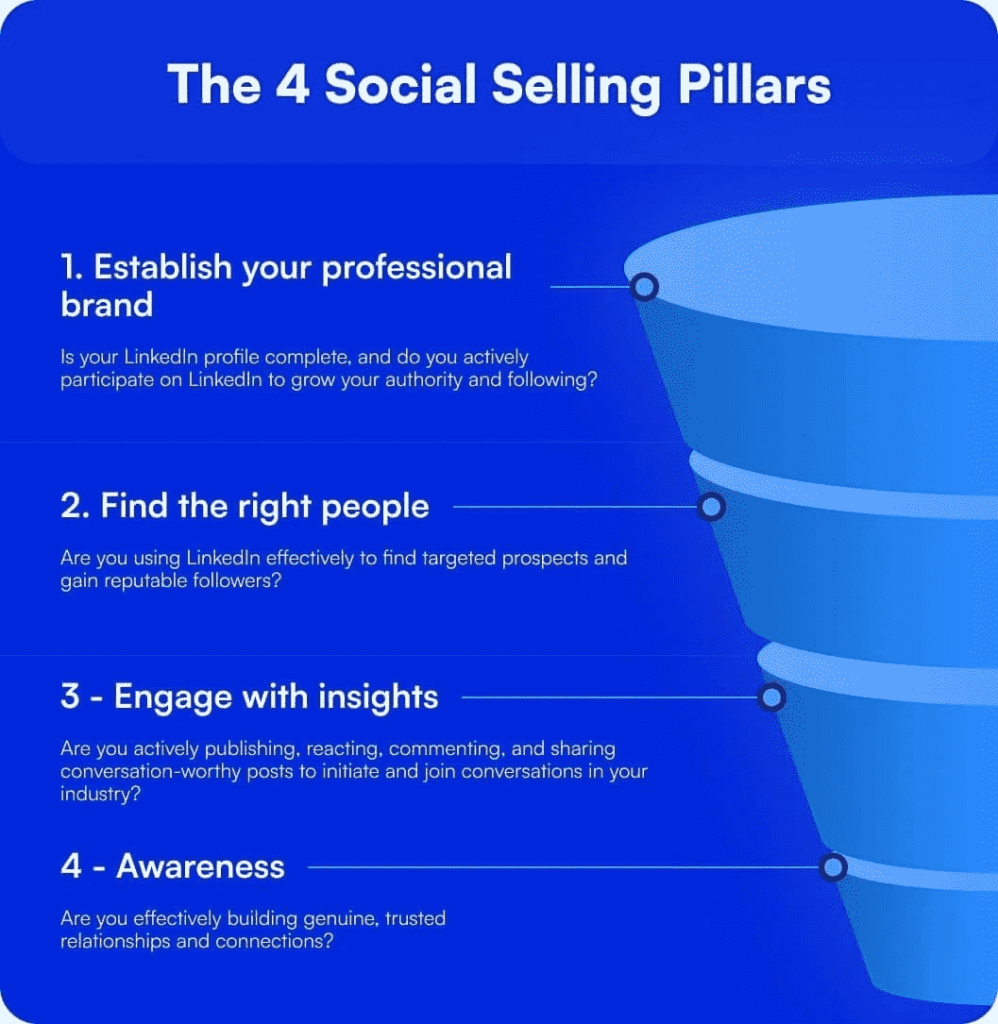
The Social Selling Index grades four pillars, each worth up to 25 points:
- Establish your professional brand: a complete profile and content that builds authority.
- Find the right people: deliberate prospecting with LinkedIn’s search and targeting tools.
- Engage with insights: posts and comments that start real conversations.
- Build relationships: decision-maker connections and accepted requests.
The advice here is grounded in our own outreach data: we track acceptance and reply rates across 13.2 million connection requests for our State of LinkedIn Outreach H2 2026 report, and acceptance rate is a scored SSI input.
Here’s what this guide covers:
- The score bands that count as good in 2026, and how to read yours.
- Where LinkedIn is taking SSI now that its official page points to AI tools.
- Three ways to check your LinkedIn SSI score in under a minute.
- The pillar-by-pillar plan to increase it, with the exact levers each pillar rewards.
- Whether team SSI deserves a spot in your reporting.
What is a good LinkedIn SSI score?
The Social Selling Index is a score from 0 to 100 that measures how effectively you use LinkedIn for social selling, and a good LinkedIn SSI score is 70 or above.
Scores between 40 and 69 are the working range for active LinkedIn users, 75+ puts you in thought-leader territory, and 90+ is the territory of full-time content publishers. LinkedIn publishes no official average, so treat the bands below as practitioner benchmarks and your dashboard’s percentile ranks as the real measure.
| Score | What it means |
|---|---|
| 0-39 | Underused. An incomplete profile, low engagement, and little prospecting activity. |
| 40-69 | The working range for active LinkedIn users. A solid baseline, with room in at least one pillar. |
| 70-74 | Good. Consistent activity across all four pillars of the Social Selling Index. |
| 75-89 | Excellent. Thought-leader territory. |
| 90+ | Elite. Full-time social sellers and heavy content publishers. |
The numbers LinkedIn does publish are outcome data.
Per LinkedIn’s social selling research, social selling leaders create 45% more opportunities than peers with lower SSI, are 51% more likely to reach quota, and 78% of social sellers outsell peers who don’t use social media.
Read that as correlation: a high Social Selling Index reflects the behaviors that create pipeline rather than causing them.
How the SSI score fits your LinkedIn outreach
LinkedIn’s help documentation spells out what feeds the Social Selling Index:
- Profile completeness and endorsements.
- Your connections and the acceptance rate of your connection requests.
- Engagement on posts and messages (including response rate).
- Prospecting activity like people searches, profile views, and days active. Sales Navigator usage counts too, if you have a seat.
For an SDR or an agency operator, that list reads like an outreach health check. Each pillar maps to a stage of the motion: your profile converts visits, targeting decides who sees your requests, engagement warms prospects before you reach out, and relationship quality decides replies.
A low pillar name indicates the fix:
- A weak professional brand score means your profile is losing the prospects your campaigns send to it.
- A weak find-the-right-people score means your targeting is off.
- A high total with one lagging pillar tells you exactly where your next five points are.
Run it as a weekly input next to real pipeline metrics, never as a KPI of its own. The score is the mirror. Replies, meetings, and pipeline are the goal.
Where LinkedIn SSI is headed in 2026
For years, the Social Selling Index was the badge metric for sellers on LinkedIn — in LinkedIn’s own words, “the go-to metric for sales professionals” and “a badge of honor signaling credibility and connection.”
In mid-2025, it replaced the official SSI page with one titled “From SSI to AI”, which says the score “no longer accurately reflects the modern sales environment” and points sellers toward AI features inside Sales Navigator instead.
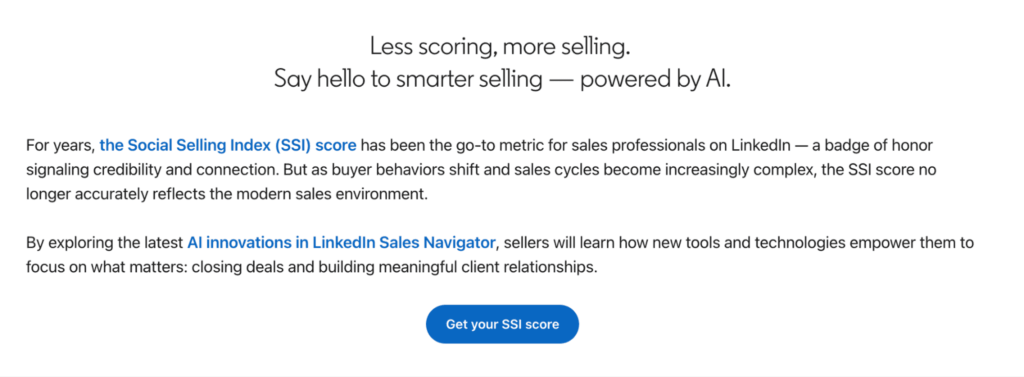
LinkedIn’s argument is that chasing a high score can pull sellers away from closing, and that the score only loosely tracks measurable sales outcomes.
The replacements LinkedIn is pushing in 2026:
- Lead Finder for automated prospecting.
- Message Assist for personalized outreach at scale.
- Account Alerts for real-time signals on target accounts.
- Relationship Map for navigating buying committees.
Per the same page, LinkedIn claims Sales Navigator users save 65 hours per year through its AI features.
None of this kills the score.
Your Social Selling Index still exists, still updates daily, and stays free to check on any LinkedIn account.
What changed is the job it does: SSI used to be the scoreboard, and now it works as a background diagnostic you check weekly while signals do the real-time work.
That shift matches where LinkedIn outreach is going generally.
The behaviors SSI proxies (profile visits, post engagement, decision-maker connections) are the same signals a signal-based outreach motion acts on directly, campaign by campaign rather than as a monthly score.
How to check your LinkedIn SSI score?
Here are 3 ways to check your LinkedIn SSI score, from fastest to most contextual:
Method 1: Check your SSI score with the direct link
- Log into LinkedIn and go to linkedin.com/sales/ssi.
- The score loads automatically and free for any account, paid or not.
- Bookmark it, since the score updates daily.
Method 2: Check your SSI score in Sales Navigator
Sales Navigator surfaces the same score inside the platform. On team contracts, admins can also pull SSI for every seat by hovering over Admin at the top of the page and selecting Usage Reporting.
Method 3: Track your SSI score in Expandi
Expandi shows your SSI score on your dashboard and account analytics pages, plus the workspace analytics page across every connected LinkedIn account.
This is useful for connecting score movement to specific campaign activity, and for agencies watching client seats side by side.

How do you read your LinkedIn SSI score?
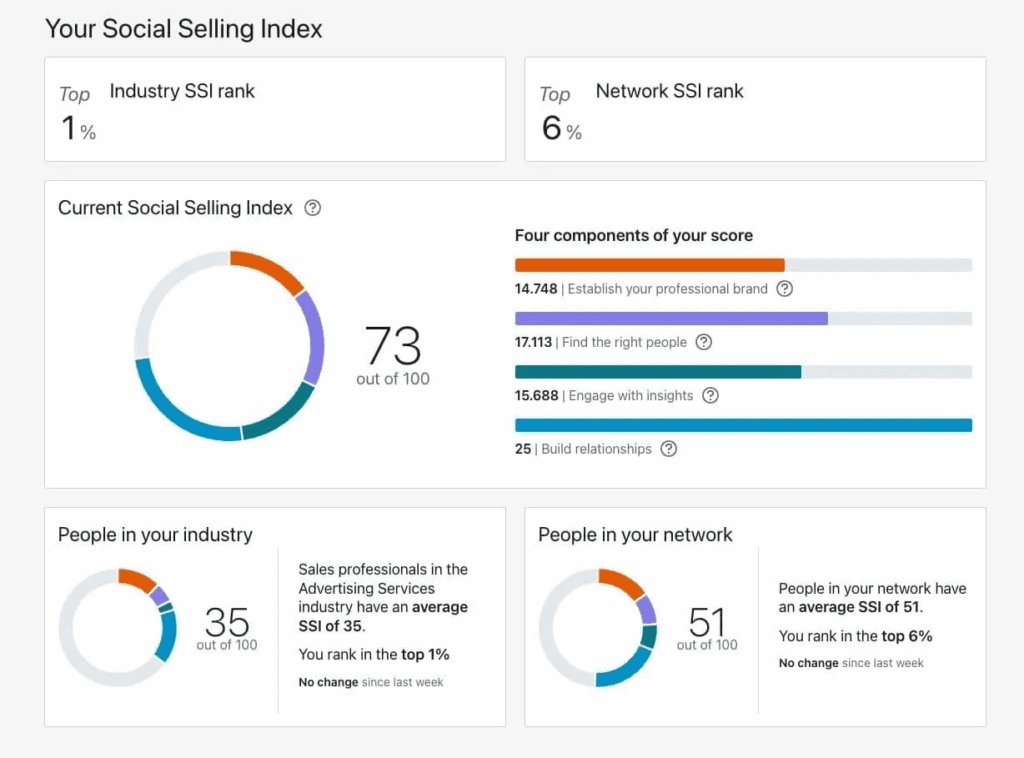
The dashboard splits your total across all four pillars, each scored out of 25. Read the split before the total, because the pillar profile tells you what to fix.
Practical steps for reading your SSI dashboard
- Start with the component breakdown: Don’t look at the total number first. Look at the four individual bars. If a bar is significantly shorter than the others, that’s your primary area for improvement.
- Ignore vanity metrics: The total score is just a high-level summary. Focus on the relative ranking (e.g., ‘Top 10% in your industry’). This tells you how you stack up against peers, which is the only benchmark that matters.
- Correlate with your calendar: If your score dropped, check your activity from the previous week. Did you stop posting? Did you pause prospecting? The score is a lagging indicator of your recent behavior.
- Don’t over-index on the total: A score of 70 isn’t ‘good’ just because of the number; it’s good if it’s the result of consistent, daily activity. A high score can be ‘faked’ by vanity engagement, so prioritize quality relationships over hitting a specific number.
Even a top-1% score can hide a weak pillar. We’ve seen Build Relationships maxed at 25/25 while Establish Professional Brand sat at 14.7/25. Even at the top of an industry, one pillar can carry slack.
Your Social Selling Index is also relative, never absolute.
The two ranks under the score, one against your industry and one against your network, do the real work: a 65 in a highly active industry can still put you in the top 25%. Context matters.
How to increase your LinkedIn SSI score in 2026
While LinkedIn keeps its precise formula confidential, the four core pillars are well defined with fully documented inputs, making the specific actions that drive each score clear and established.
Here’s how to increase your LinkedIn SSI score, pillar by pillar.
Pillar 1: Establish your professional brand
You raise the professional brand pillar by completing every profile section and publishing content that earns engagement.
This pillar checks whether your profile is complete and whether you post with authority in your space.
The profile side is straightforward.
Write a customer-focused headline:
- “Sales Manager at Lead Engine” says what you are.
- “Helping B2B SaaS teams generate 50% more inbound leads at Lead Engine” says what the prospect gets.
Your About section should read like a pitch to your ICP, with proof points. For the full section-by-section rebuild, see our guide on improving your LinkedIn profile.
Beyond the profile, this pillar responds to publishing. Long-form posts that speak to your ICP’s problems outperform generic industry commentary, and a strong hook in the first two lines decides whether anyone reads past them.
The payoff reaches past your own feed, and it shows up in our own H2 2026 data: accounts posting consistently with real engagement accepted connection requests at 30.5%, against the 28.5% platform average — a small, directional sample, but the direction matches the mechanism.

Your profile is also the landing page for every campaign you run, because prospects who get your connection request check it before they accept.
Michel Lieben, founder of ColdIQ, a sales prospecting agency, described that exact moment in a GTM Society interview:
“If I send you an outreach campaign … the first thing you’re gonna do is gonna look at my LinkedIn profile … And so if I have a LinkedIn profile with nothing on it, you would be like, okay … I received 40 other pitches in my inbox, why would I consider this guy?” — Michel Lieben, ColdIQ
A recap on what moves the professional brand pillar:
- Complete every profile section, including Featured, Services, and Skills.
- Post 2-3 times per week on a consistent cadence.
- Earn comments and reposts, which signal more than likes.
Pillar 2: Find the right people
You raise the find-the-right-people pillar by prospecting deliberately with LinkedIn’s search tools.
Its documented inputs are people searches, profile views, and days active, so intentional list-building counts as activity.
The biggest mistake here is volume without targeting.
Blasting requests at people outside your ICP tanks your acceptance rate, an input LinkedIn counts under relationship data, so poor targeting bleeds into two pillars at once.
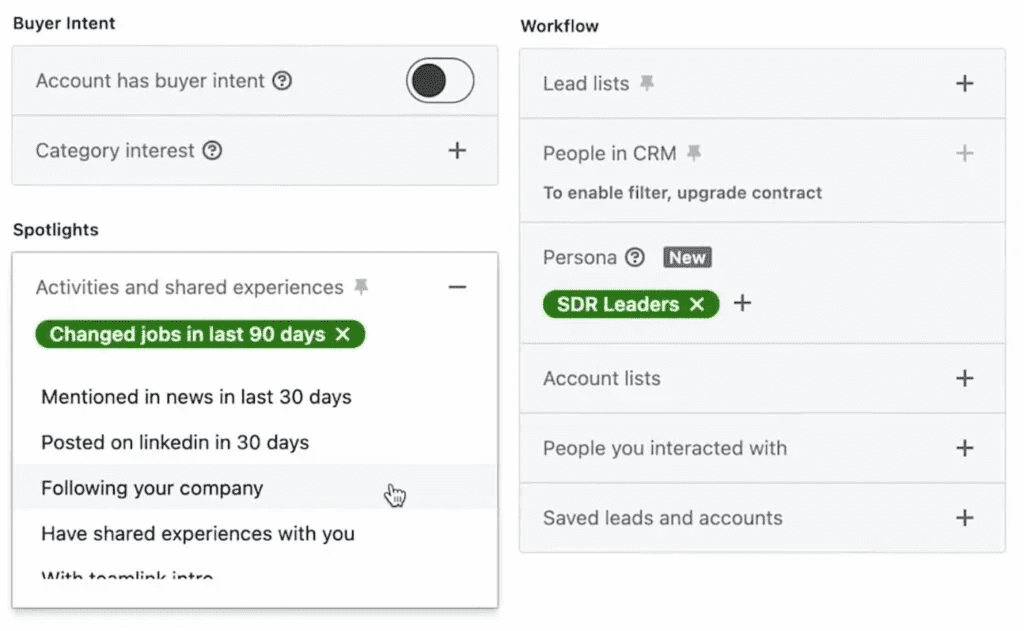
Use LinkedIn’s advanced search filters (industry, job title, location, company size, Boolean operators) to build a list that matches who you sell to. With Sales Navigator you get 50+ filters, including job changers and buyer-intent signals like profile views.
Once the list is targeted, an Expandi Connector campaign sends personalized connection requests at scale while staying inside LinkedIn’s connection limits. Referencing a prospect’s job title and industry in the request is enough personalization to beat a bare invite.
Warm signals repeatedly beat cold lists in our data.
Per our State of LinkedIn Outreach H1 2026 report, Inbound campaigns that auto-import your profile visitors reply at 13.4%, against the 10.3% average across all LinkedIn DMs. The people already showing interest are the right people to find.
A recap on what moves the find the right people pillar:
- Build lists that match your ICP
- Use Expandi Connector campaigns to send personalized connection requests on autopilot
- Import people into your campaigns who are already showing an interest in your profile/content
Pillar 3: Engage with insights
You raise the engage-with-insights pillar by posting content that starts real conversations and by commenting like a human. LinkedIn counts the engagement your posts receive and the engagement you give.
Comments are the strongest signal on both sides:
- A thoughtful two-sentence comment does more for this pillar than ten likes, and it starts the back-and-forth the algorithm rewards.
- “Great post {first_name}!” moves nothing.
Dave Schools, co-founder and CEO of Singulate, a platform for hyper-personalized marketing newsletters, put the standard this way in a GTM Society interview:
“It has to be pretty strategic, thoughtful, and engaging. Don’t just post and ghost. You’ve got to comment, be engaged, and follow up with people. It’s relational.” — Dave Schools, Singulate
One tactic that compounds posting and prospecting: paste any relevant post’s URL into Expandi’s content retargeting and it turns everyone who liked or commented — up to 2,500-3,000 people per post — into a lead list you can DM with a message referencing that post.
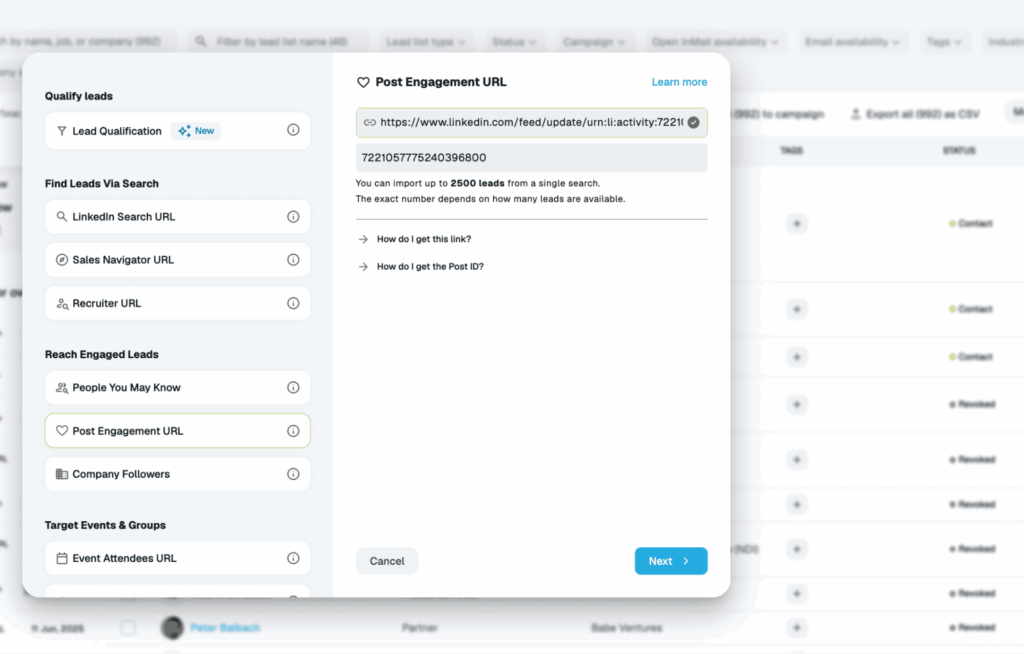
You’re reaching people already active on your topic, and every touch is pillar-relevant activity.
A recap on what moves the engage with insights pillar:
- Publish content that addresses your ICP’s problems and sparks conversation.
- Write thoughtful, strategic comments rather than generic replies to initiate dialogue.
- Engage consistently with others’ content to signal activity to the algorithm, rather than just posting.
Pillar 4: Build relationships
You raise the build-relationships pillar by connecting with decision-makers and getting your connection requests accepted.
LinkedIn’s documented inputs here are your connections and your acceptance rate, so who you add and how they respond both count.
Acceptance rate is the lever teams skip. A low rate tells LinkedIn your outreach lands flat, and it pulls this pillar down regardless of volume.
Per our State of LinkedIn Outreach H2 2026 report, the average sits at 28.5% across 13.2 million connection requests, so anything below that flags a targeting or warm-up problem.
The fix is warming leads before the request lands, and here’s how to boost your LinkedIn acceptance rate step by step.
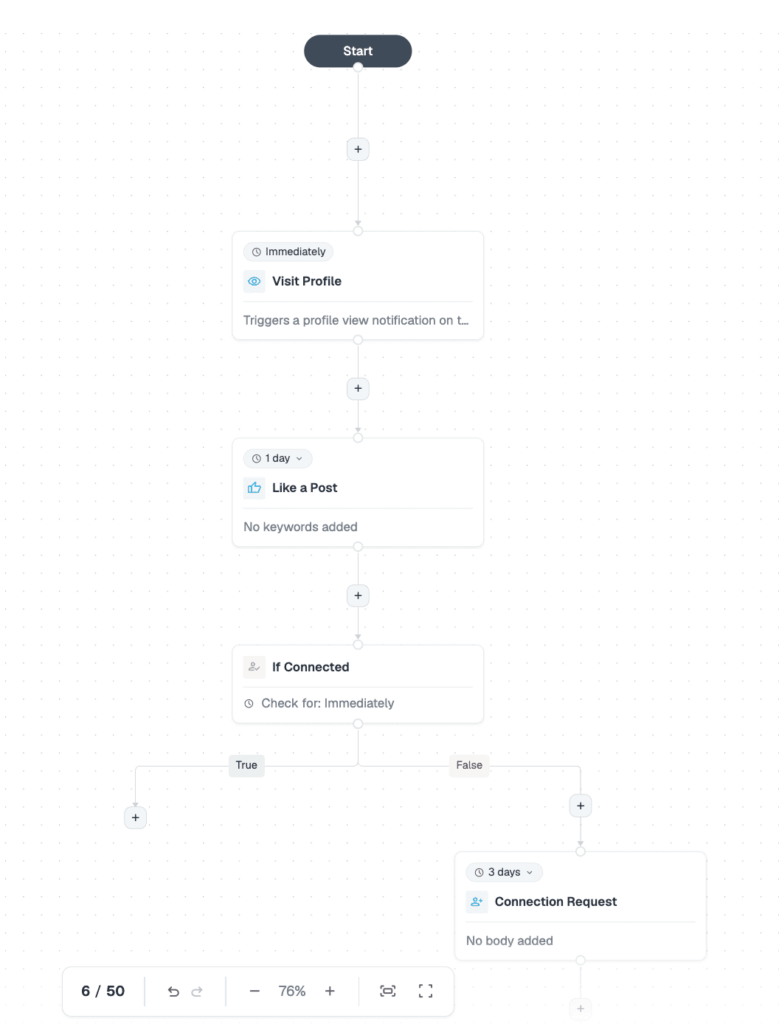
Expandi’s Builder campaigns automate the warm-up, so by the time the invite arrives, the prospect has already seen your name.
A basic Builder warm-up sequence:
- Visit the prospect’s profile (day 1).
- Like their most recent post (day 2).
- Send a connection request with a short personalized note (day 3-4).
- Follow up with a DM once they accept.
The pillar keeps scoring after the accept.
- Comment on their posts, acknowledge job changes, share something useful with no ask attached.
- Connect-and-ghost is the fastest way to stall this score.
A recap on what moves the build relationships pillar:
- Prioritize connecting with decision-makers and maintaining high acceptance rates.
- Warm up leads before sending requests by visiting their profiles or liking their posts.
- Nurture connections after they accept by actively engaging with their content, acknowledging their updates, and avoiding ‘connect-and-ghost’ behaviors.
Does team SSI matter in 2026?
Team SSI matters as a coaching diagnostic.
On Sales Navigator team contracts, your admin and your teammates can see your SSI score and a leaderboard of everyone on the team, per LinkedIn’s help documentation.
That makes the Social Selling Index one of the few LinkedIn activity metrics a sales leader can compare across reps without asking for screenshots.
Comparing pillar profiles across reps is where the value is:
- If the whole team scores low on find-the-right-people, your ICP definition or list-building process is the problem.
- One rep lagging on build-relationships points to their targeting or their connection note copy.
A consistent floor beats one star.
Five reps at 65 put more warmed, targeted activity into the market than one thought leader at 85 surrounded by dormant profiles.
For agencies and multi-seat teams, Expandi’s workspace analytics page shows the SSI score for every connected LinkedIn account, so you can watch client or team seats side by side without logging into each one.
Putting your LinkedIn SSI score to work
The LinkedIn Social Selling Index is most useful as a mirror.
- A weak pillar shows where your LinkedIn activity has gaps, and a rising score confirms your outreach and content habits are working.
- The teams seeing real pipeline movement are the ones targeting the right people, warming leads before the request, and posting content their ICP engages with.
The score follows the behavior either way.
If you want that activity running at scale without doing it manually, Expandi’s linkedin automation tool handles the execution: Connector campaigns, Builder warm-up sequences, content retargeting, and SSI tracking on your dashboard.
Start your free 7-day trial and see what moves your SSI score in the first week.
Frequently Asked Questions
The Social Selling Index (SSI) is LinkedIn’s 0-100 score of how effectively you use the platform for social selling. It grades four pillars at up to 25 points each: professional brand, finding the right people, engaging with insights, and building relationships. LinkedIn benchmarks your score against your industry and your network.
A good LinkedIn SSI score is 70 or above. Scores of 75+ put you in thought-leader territory, while 40-69 is the working range for active users. Because the score is benchmarked, your industry and network percentile ranks matter more than the raw number.
Complete your profile, post consistently, prospect with LinkedIn’s search tools, and keep your connection request acceptance rate high. Each of the four pillars is worth 25 points, so the fastest gains come from your weakest pillar. Targeted, warmed outreach moves the score faster than raw volume.
Not directly. The behaviors that raise your SSI, like posting consistently, earning engagement, and connecting with the right people, are what influence visibility. The score is a readout of those behaviors, and the reach comes from the behaviors themselves.
Daily. The score reflects your recent activity rather than your lifetime behavior, so a quiet month pulls it down and a burst of targeted activity can lift it within days.
No. Any LinkedIn user can check their SSI score for free at linkedin.com/sales/ssi. Sales Navigator adds team-level visibility, like admin reporting and a team leaderboard, but the score itself is available on a free account.
A low connection request acceptance rate, inactivity across posting and commenting, and an incomplete profile. Acceptance rate is the one to watch: volume without targeting drags the score down faster than doing nothing.





You’ve made it all the way down here, take the final step