Meet Global Inbox: Expandi’s Unified Inbox for Multi-Account LinkedIn Outreach

Key Takeaways
- Managing LinkedIn outreach across multiple accounts increases operational complexity and reduces visibility across conversations.
- Replies can slip through the cracks, so prospects lose momentum, and slower response times directly impact reply rates, meeting bookings, and overall campaign performance.
- A centralized inbox structure restores control by consolidating conversations, improving collaboration, and ensuring no opportunity is missed.
- Expandi’s Global Inbox is a unified inbox for multi-account campaign outreach that brings every campaign conversation from every LinkedIn account in your workspace into a single, sorted view.
Meet Global Inbox: Expandi’s Unified Inbox for Multi-Account LinkedIn Outreach

Running LinkedIn campaigns for one account is manageable. You check your inbox, respond to replies, and move on.
Running campaigns across 5, 10, or 20 accounts is an entirely different challenge. Conversations scatter. Replies sit unanswered because no one caught them in time. Team members cover some accounts and miss others. What started as a scalable outreach system starts to feel like a constant game of catch-up — and the leads that were warm yesterday are cold by the time you get to them.
For agencies and sales teams managing multi-account LinkedIn outreach, this is one of the most common operational bottlenecks. And it almost always comes down to the same root cause: there’s no single place to see everything.
In this article, we’ll cover:
- Why managing replies across multiple LinkedIn accounts creates friction, and what it costs you
- How response speed directly impacts conversion in outbound outreach
- What Global Inbox is and how it works
- The key things you can do from a single unified view: sorting, previews, engagement signals, filters, and campaign management
- How agencies and team leads can use it for oversight without micromanaging
- Practical tips for getting the most out of a multi-account inbox workflow
The real cost of a fragmented inbox
When each LinkedIn account lives in its own inbox, the only way to stay on top of replies is to check them one by one. Open account A, scan for new messages, switch to account B, repeat. Multiply that by however many accounts your team manages, and you start to understand why things fall through the cracks.
A few patterns show up consistently in multi-account outreach operations:
Missed follow-ups. Without a unified view, it’s easy to lose track of which conversations you’ve already responded to and which are still waiting. A lead who replied three days ago might have been seen — or might not. There’s no easy way to know without checking.
Slow response times. Speed matters in outreach. A prospect who replies today is more likely to convert today than they will be next week. But when replies are distributed across 10 separate inboxes and your team is manually cycling through them, response times stretch — and warm leads cool down.
Lost context. Managing conversations across accounts means the full picture of your pipeline is never in one place. Understanding how leads are progressing across all your outreach requires opening accounts individually, cross-referencing notes, and doing mental math no one should have to do.
No oversight without micromanagement. If you’re running an agency with multiple team members managing accounts for different clients, staying across the operation means either asking your team for updates constantly or spending your own time checking each account. Neither scales.
Why response speed is a competitive advantage in outreach
The link between response time and conversion is well-established in sales. Leads that get a reply within minutes of their message are significantly more likely to progress than those who wait hours. In LinkedIn outreach specifically, where conversations are shorter and buyers are busy, that window closes fast.
The challenge isn’t that teams don’t know this. It’s that their tooling makes acting on it difficult. When you can’t see all your replies in one place, prioritizing the most time-sensitive conversations becomes guesswork. You end up responding in the order you happen to check accounts, not the order that matters for conversion.
Prioritization is as important as speed. Not every reply requires the same urgency — and knowing which conversations to act on first is what separates an efficient outreach operation from a reactive one.
Introducing Global Inbox
Global Inbox is Expandi’s unified inbox for multi-account campaign outreach. It brings every campaign conversation from every LinkedIn account in your workspace into a single, sorted view — so your team can see what needs attention, respond faster, and manage leads without switching between accounts.
Here’s what that looks like in practice:
Instead of opening each account individually, you open one inbox. Every active campaign conversation is there, sorted by most recent message. The replies that need your attention are at the top. You can see what was said before you open a thread. You can spot which leads are actively engaging. And you can take action on a conversation without ever leaving the view.
One important thing to note: Global Inbox shows leads who are part of your active Expandi campaigns. This is intentional — it keeps the inbox focused and fast, surfacing only the conversations that are part of your outreach pipeline rather than every LinkedIn message across every account.
What you can do from Global Inbox
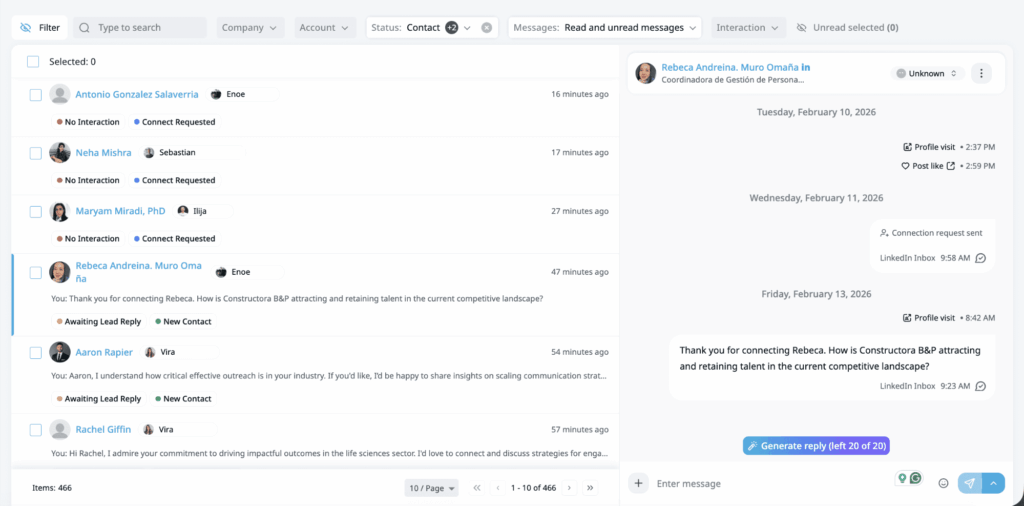
See every conversation, sorted by most recent message
Conversations are ordered from newest to oldest across every LinkedIn account connected to your workspace. If a campaign lead replied, it’s in the list — at the top if it just came in, further down if it came in earlier. No hunting, no switching, no missed replies.
Read the message before you open it
Each conversation shows a preview of the last message, with a sender indicator so you can tell at a glance whether you sent the last message or whether the lead replied. This is the difference between opening every conversation to check and knowing immediately which ones need a response from you.
Spot engaged leads — before you reply
Engagement signals appear alongside conversations in the list: profile visits, follows, post engagements. A lead who just visited your profile is telling you something. These signals help you prioritize by intent, not just by recency — so the conversations most likely to convert get your attention first.
Filter down to exactly what you need
Filters let you cut the inbox to the view that’s useful right now. Filter by:
- Account — focus on a specific LinkedIn account or client
- Company — view conversations for a specific managed company
- Status — filter by lead status or connection type
- Messages — see only unread conversations, or those awaiting your reply
- Interaction — surface leads who have replied, leads waiting for follow-up, and more
For agencies managing outreach across multiple clients, filtering by account is particularly useful for reviewing each client’s activity without leaving the unified view.

Manage campaign actions from the conversation
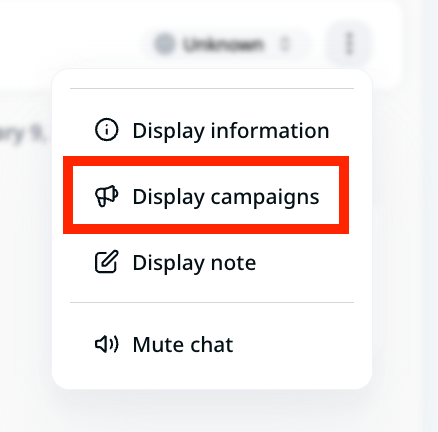
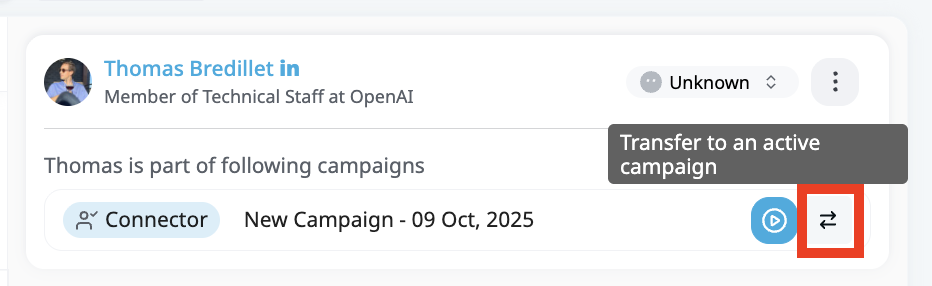
From any conversation in Global Inbox, you can pause a lead’s campaign, resume it, or transfer them to a different campaign — without navigating away. When a prospect says “follow up in Q2,” you handle it in context, right there, and move to the next conversation. No extra steps, no risk of forgetting to come back to it.
For agencies and team leads: oversight without micromanagement
Global Inbox is designed with team visibility in mind. Access is role-based:
- Workspace admins and members have full visibility across all LinkedIn accounts in the workspace
- Company managers see conversations for the accounts associated with their managed company
- Account managers see only the accounts they’re assigned to
For agency managers and team leads, this structure makes Global Inbox a practical oversight layer. You can review activity across all client accounts, see which leads are being handled and which are waiting, and identify gaps in coverage — all from the same view your team uses to reply.
The result is a cleaner operation: your team works from a single inbox rather than juggling accounts, and you have direct visibility into the pipeline without having to ask for it.
Practical tips for multi-account outreach teams
When multiple LinkedIn accounts are running in parallel, conversation management quickly becomes the bottleneck. Without a structured workflow, replies get buried, prioritization becomes reactive, and momentum drops. The goal is to reduce friction in daily inbox management and introduce a repeatable system your team can rely on.
Start every day in Global Inbox. Use it as your morning triage. Sort by most recent, scan message previews, and identify which conversations need an immediate response before you open anything else.
Use engagement signals to prioritize. A lead who replied and also just visited your profile is a high-priority conversation. Don’t let those sit while you work through older threads.
Filter by “Awaiting Reply” to find what’s waiting on you. This cuts through everything else and shows exactly which conversations need a response from your side.
Transfer leads while you’re in the conversation. When a reply tells you a lead is ready for a different campaign sequence — a nurture sequence after a positive response, for example — handle the transfer immediately from the conversation view rather than flagging it for later.
Use account filters for client reviews. If you’re in an agency managing multiple client accounts, build a habit of filtering by account to do a focused review of each client’s conversations. It’s faster than opening each account individually and keeps you in the context of the full pipeline.
Frequently asked questions about Global Inbox
Global Inbox is available to any Expandi workspace with multiple LinkedIn accounts connected. Access within the workspace is role-based.
• Workspace Admins – Full access to all accounts and all inbox actions.
• Workspace Members – Full access to all accounts and inbox actions.
• Company Managers – Access limited to accounts within their company, with full inbox actions.
• LinkedIn Account Managers (View & Edit) – Access only to assigned accounts, with inbox actions enabled.
• LinkedIn Account Managers (View Only) – Access only to assigned accounts, view-only permissions.
• Done For You Clients – Full access, equivalent to Workspace Admins.
Global Inbox is designed for outreach management: it shows contacts who are part of active Expandi campaigns. This keeps the inbox focused on the conversations that matter to your pipeline and ensures performance stays fast, even across large workspaces. For conversations outside your campaigns, the per-account inbox is still available.
Yes. Open any conversation and reply without leaving the inbox or navigating to a specific account view. You can also pause, resume, or transfer leads to different campaigns directly from the conversation.
It works alongside it. For conversations that are part of your active campaigns, Global Inbox gives you the unified multi-account view. For conversations outside your campaigns, the per-account inbox handles those. Most teams managing multiple accounts will find Global Inbox becomes their primary working view for day-to-day outreach management.
Yes. Use the search bar to find leads by name, job title, or company. This is especially useful when you need to quickly locate a specific conversation across all your connected accounts without scrolling through the full list.
You can reply to messages, pause or resume a lead’s campaign, transfer them to a different campaign, and mark conversations as unread. Everything happens in context, no need to navigate to the individual account view first.
Yes. The Messages filter lets you isolate unread conversations, and the Interaction filter surfaces leads who have replied or are awaiting your follow-up. Combining these filters is the fastest way to triage your inbox each morning.
Global Inbox is enabled at the workspace level. If your workspace has multiple LinkedIn accounts connected, reach out to your Customer Success manager or Expandi support to get it activated. Once it’s on, there’s no per-user setup, just open it from the Workspaces menu.
Stop cycling through accounts. Start closing from one inbox.
If you’re managing LinkedIn outreach across multiple accounts, you already know the cost of a fragmented workflow: slow responses, missed replies, and zero visibility into what’s actually happening across your pipeline.
Global Inbox changes that. One view, every account, every campaign conversation — sorted, filterable, and ready to act on. Your team responds faster, your leads stay warm, and you finally have oversight without the overhead.
Whether you’re running outreach for 5 accounts or 50, the workflow is the same: open Global Inbox, triage what matters, and handle it, all before your first coffee gets cold.
**Book a demo to see how Global Inbox fits into your outreach operation →**
If you’re already on Expandi, Global Inbox is already available. Open it from the Workspaces menu, no setup required.
If you’re currently running campaigns from a single account and considering adding another, this is where scaling starts to make a real difference. With multiple seats in one workspace, all reply streams stay organized in one place. Add a seat





You’ve made it all the way down here, take the final step