10 Best SocialPilot Alternatives 2026: Top SocialPilot Competitors Ranked


SocialPilot does the basics well. Clean interface, bulk publishing, reasonable pricing for small teams managing a handful of accounts.
The friction starts when you need more. Client approval workflows are locked behind Premium at $100/month. Advanced white-label reporting doesn’t unlock until Ultimate at $200/month. For agencies, those are two separate tier jumps to access features most competitors include by default.
If that’s where you’re hitting the ceiling, here are 10 tools worth considering in 2026, including their G2 ratings, current pricing, and our thoughts after testing several solutions across real outreach stacks.
Key Takeaways
- If you are primarily scheduling content across multiple social platforms on a budget, Buffer’s channel-based pricing and Publer’s free plan both offer more flexibility at the entry level than SocialPilot’s account-based model.
- For agencies managing multiple client accounts with approval workflows and client reporting, Sendible and Planable are built specifically for that operation: both include client dashboards and approval options without requiring a $100/month tier.
- Teams that need serious social analytics alongside scheduling should look at Sprout Social and Agorapulse. Neither is cheap, but both offer analytics depth that SocialPilot’s reporting does not match.
- If LinkedIn is a lead generation channel for your team, a content scheduler alone will not cover it fully. Use one of the alternatives on this list to handle publishing, and Expandi to run automated connection requests, message sequences, and prospect targeting. The two tools cover different parts of the same channel and work better together than either does alone.
10 Best SocialPilot Alternatives 2026: Top SocialPilot Competitors Ranked


What is SocialPilot and how does it work?
SocialPilot is a social media management platform that lets marketing teams and agencies schedule content, manage inboxes, and report on performance across 10+ social networks from one dashboard. It supports Facebook, Instagram, TikTok, X (formerly Twitter), LinkedIn, Threads, YouTube, Pinterest, Google Business, and Bluesky.
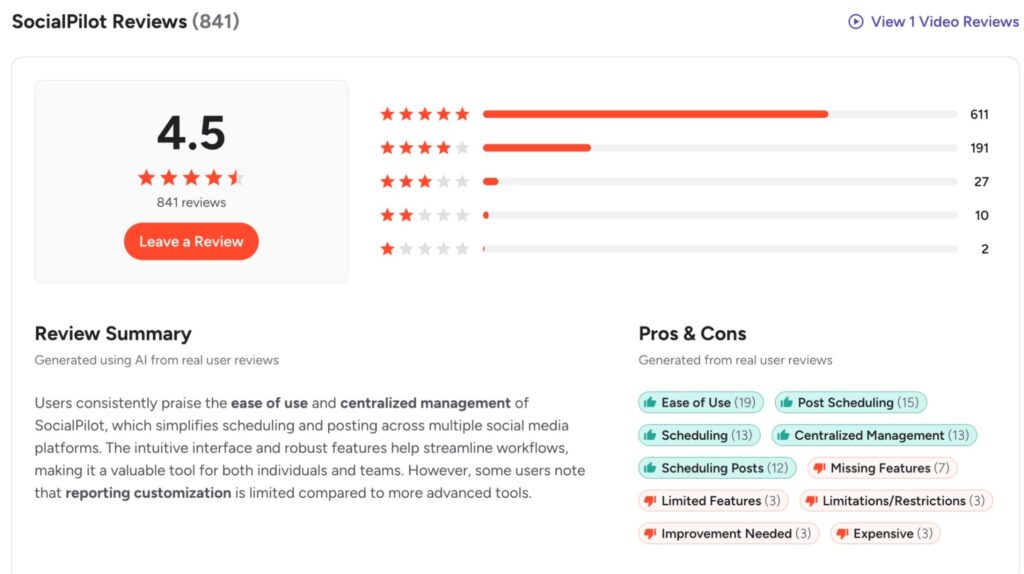
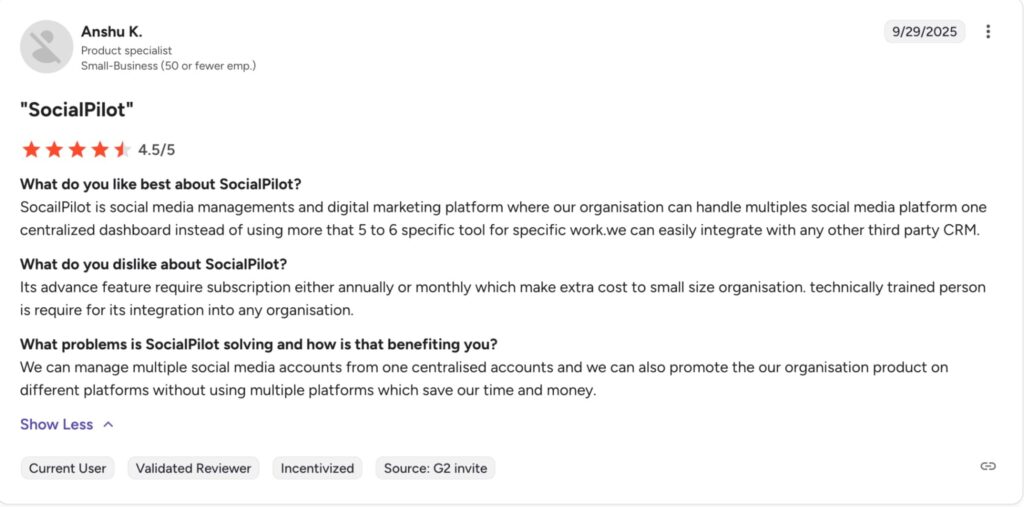
On G2, SocialPilot holds a 4.5/5 rating across 841 reviews. Users consistently highlight the bulk scheduling capability, the responsive support team, and the value at lower tiers as standout strengths. The most common criticisms point to limited analytics depth compared to tools like Sprout Social, occasional Instagram post failures, and the significant price jump between Standard and Premium plans.
The platform works as a publishing hub: connect your accounts, build a posting schedule, and manage content through a calendar interface. Teams collaborate on content creation, submit posts for client approval on Premium and above, and export white-labeled analytics reports.
But there are specific situations where SocialPilot starts to feel limiting and that’s when teams start looking at alternatives.
5 main SocialPilot features
Here is a quick look at what SocialPilot does well before getting into where it falls short.
Multi-platform scheduling
SocialPilot connects to 10 social networks and lets you create, customize, and schedule posts from a single editor. Platform-specific formatting: character limits, media requirements, and first comments, all can be adjusted per network before scheduling. This is the product’s core function and it works reliably across all supported platforms.
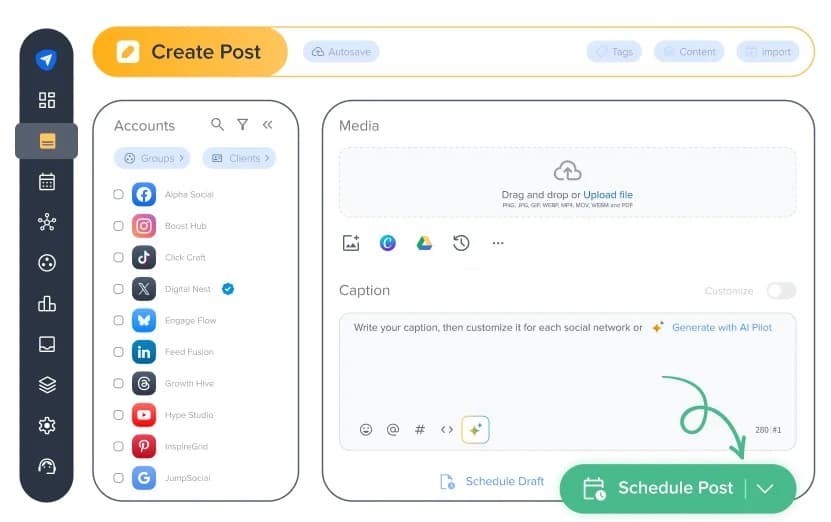
The scheduling interface includes a visual content calendar for spotting gaps in your publishing plan and rescheduling posts by dragging. Accounts can be grouped by project or client, keeping content pipelines organized when managing multiple brands simultaneously.
Bulk scheduling
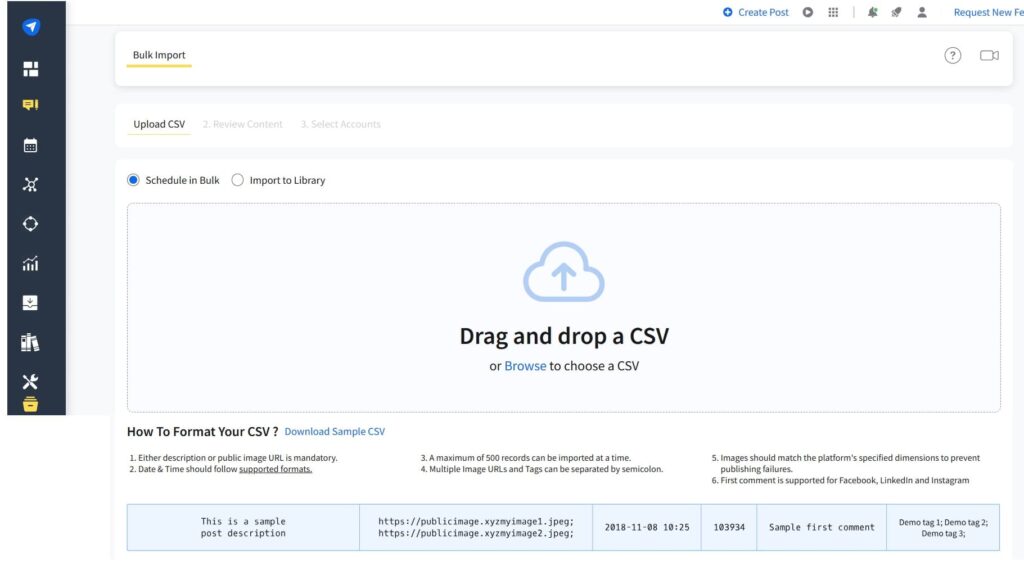
Bulk scheduling via CSV upload is one of SocialPilot’s most important features. You can upload up to 500 posts at once. Which is practical for teams planning content weeks in advance or repurposing evergreen material at scale. Each CSV row maps to a scheduled post with text, media, and target accounts.
Social inbox
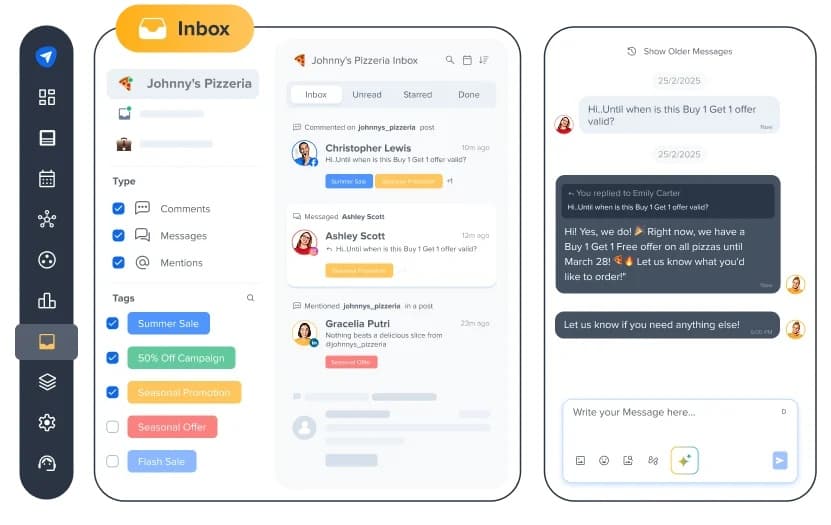
The Social Inbox consolidates messages, comments, and mentions from connected accounts into one view. Instead of toggling between platform apps, teams handle replies from within SocialPilot. Available from Standard and above.
Client approval workflows
Client approval lets agencies create posts and send a shareable review link to clients, who can approve or reject content before it publishes, without needing a SocialPilot account. This reduces the back-and-forth that slows content calendars down.
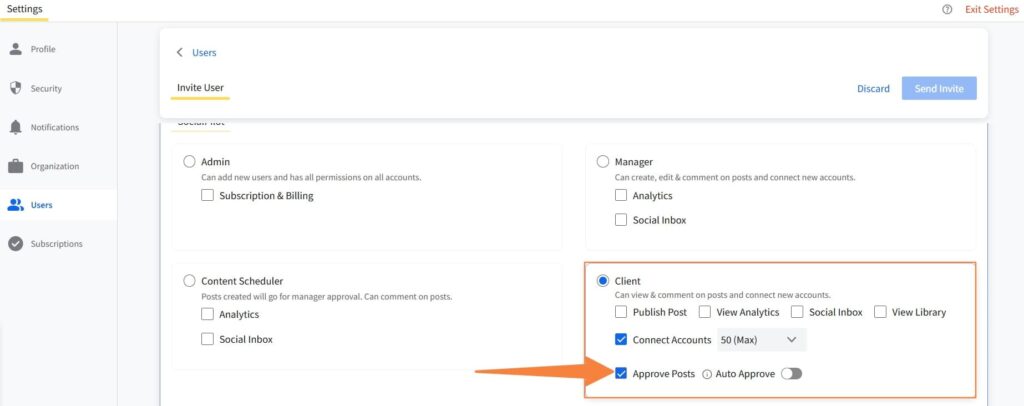
There are two separate approval features. Manager Approval Workflow: internal team review before a post publishes, unlocks at Standard ($40/month). Client Approval Workflows, which let clients review and sign off on content before it goes live, are gated behind Premium ($100/month). For smaller agencies, that is a consistent friction point.
White label reports
White-label reporting lets agencies brand exported analytics reports with their own logo and colors before sending to clients. Reports cover follower growth, engagement, and post-level performance across connected accounts. Basic white-label reports unlock at Premium ($100/month).
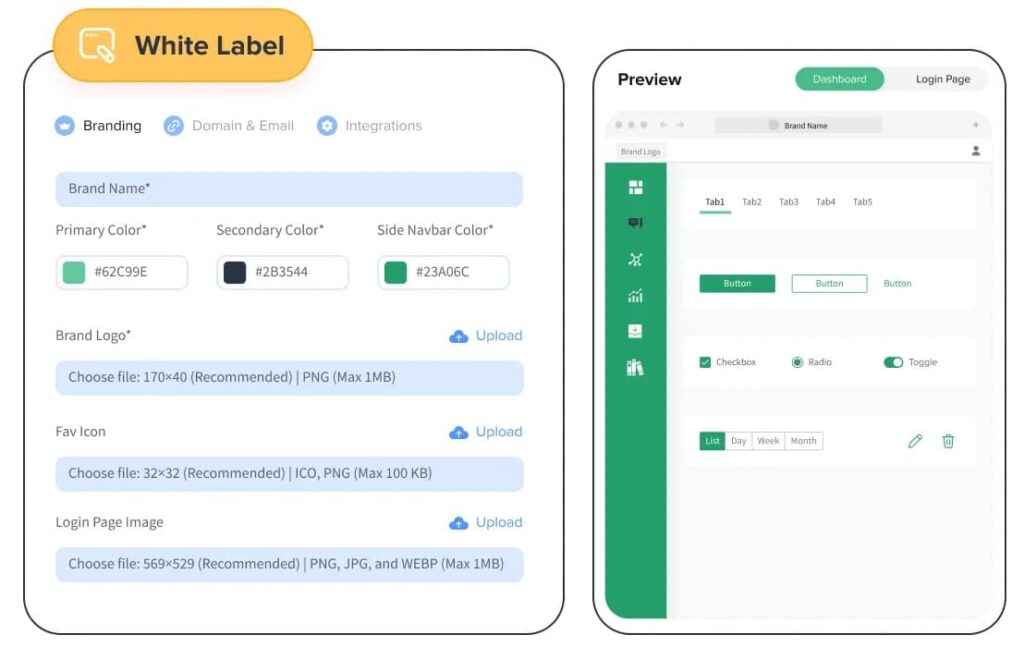
Advanced white-label branding requires Ultimate at $200/month.
Why consider a SocialPilot alternative?
Most teams start looking for a SocialPilot alternative for the same reasons: pricing that jumps steeply between tiers, thin analytics at lower plans, and agency features that are split across multiple tier upgrades.
1. The pricing jump between tiers is steep
The Standard plan at $40/month covers 10 accounts, 3 users, and team collaboration, which is a workable entry point for small teams. But the moment an agency needs client-facing approval workflows or advanced analytics, the price jumps to $100/month. That is a $60 increase just to unlock features most agencies consider essential.
The effective per-client cost compounds faster than the plan price alone suggests.
2. No free plan
SocialPilot offers a 14-day free trial, which is enough time to evaluate the core workflow. But once the trial ends, there is no free tier to fall back on.
For solo consultants or small teams still figuring out their social media stack, that is a friction point. If the budget is tight or you are not yet ready to commit, SocialPilot’s trial-only model forces the decision faster than some teams are ready for.
3. Analytics are basic at lower tiers
Standard analytics in SocialPilot cover follower growth, engagement rate, and post-level performance. If you are running data-driven content decisions and you’re comparing formats, analyzing audience segments, tracking paid versus organic, you hit the ceiling quickly.
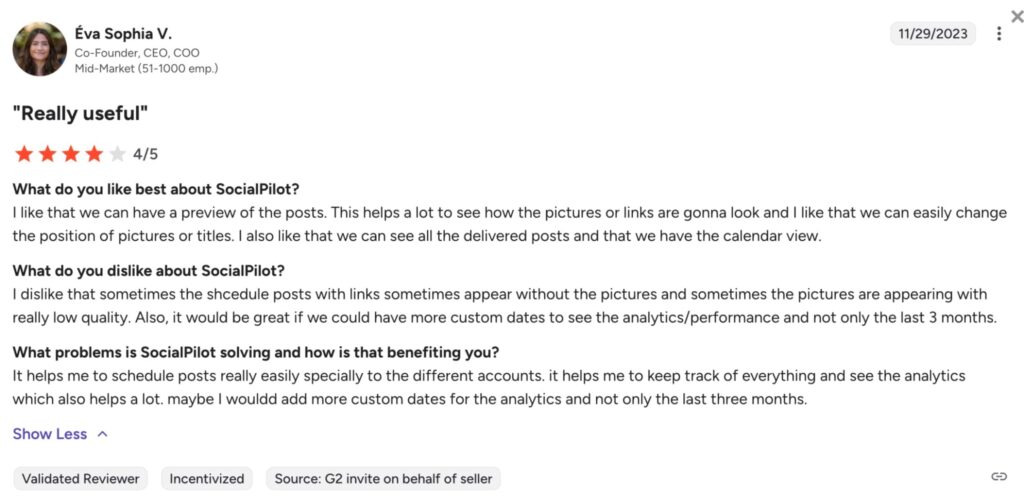
Teams that make strategy decisions based on data typically find SocialPilot’s analytics insufficient once they have been using it for more than a few months.
4. Client-facing features are split across two different tier jumps
Client approval workflows, which is the feature agencies actually need, are gated behind Premium at $100/month. Advanced white-label branding requires Ultimate at $200/month. Internal approval unlocks at Standard ($40/month), but that’s only useful inside your own team.
For agencies managing 3–5 clients, that’s three separate tier jumps to get a fully functional client workflow. Most agency-focused tools don’t split it that way.
5. No social listening at any tier
SocialPilot has no social listening at any tier: no brand mentions, no competitor tracking, no keyword monitoring. If that’s part of your strategy, you’re adding a separate tool and a separate cost on top of whatever plan you’re on.
SocialPilot pricing plan breakdown 2026
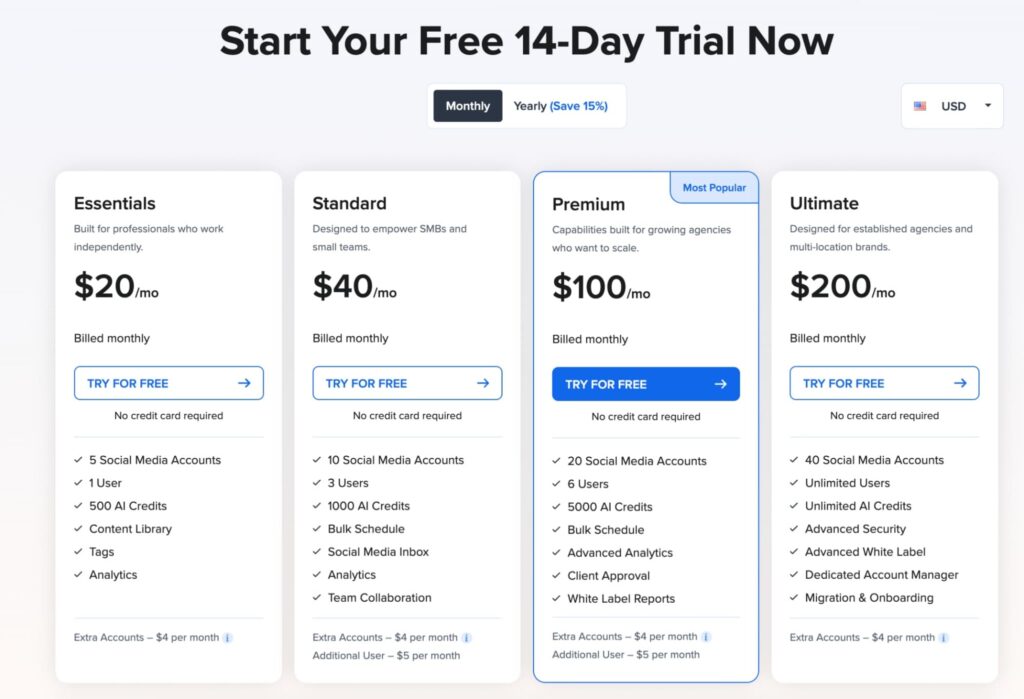
SocialPilot’s pricing is account-based. Meaning, you pay for the number of social accounts you can connect, with user seats included per plan. A 14-day free trial is available with no credit card required. SocialPilot pricing plans are as follows:
- Essentials – $20/month. 5 accounts, 1 user, 500 AI credits, content library, tags, and analytics.
- Standard – $40/month. 10 accounts, 3 users, 1,000 AI credits, bulk scheduling, social inbox, team collaboration, and manager approval workflow. No client-facing approval at this tier.
- Premium – $100/month. 20 accounts, 6 users, 5,000 AI credits, advanced analytics, client management, and client approval workflows.
- Ultimate – $200/month. 40 accounts, unlimited users, unlimited AI credits, advanced white label, dedicated account manager, and migration support.
- Enterprise – Custom pricing. Unlimited accounts and users, API access, and SSO.
The pattern to watch: client-facing features are split across two separate tier jumps. Client approval workflows require Premium ($100/month). Advanced white label requires Ultimate ($200/month). For agencies that need both, that means committing to the $200/month Ultimate tier. This stacking is the most common trigger for exploring SocialPilot alternatives.
Expandi: the best SocialPilot alternative for LinkedIn outreach
If LinkedIn is part of your pipeline, and not just your publishing calendar, Expandi is the first tool to add to your stack.
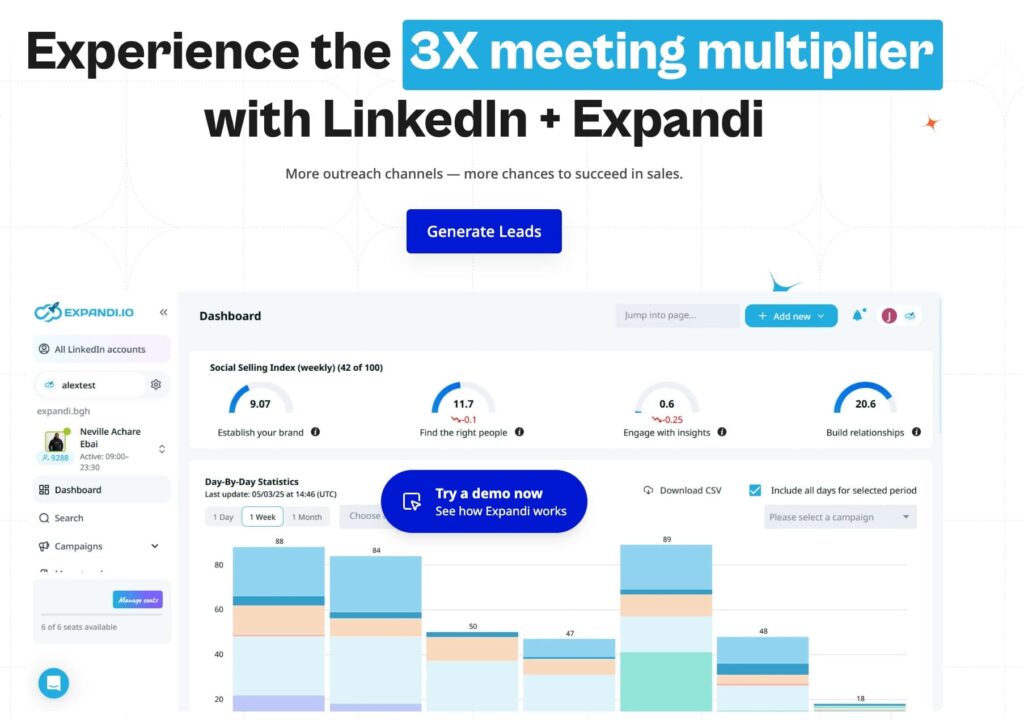
SocialPilot handles what you post on LinkedIn. Expandi handles who you reach. Many teams that use a content scheduler for LinkedIn have an unaddressed gap on the other side of the channel: actually getting in front of the right people. Scheduling posts builds visibility, while Expandi builds pipeline.
The two tools aren’t competing for the same job. They cover different halves of the same channel — and for teams where LinkedIn drives revenue, not just reach, Expandi is where the ROI shows up.
Here’s what that looks like in practice.
1. Cloud-based automation that stays within LinkedIn’s limits
Expandi runs entirely in the cloud, with a dedicated IP address per LinkedIn account.
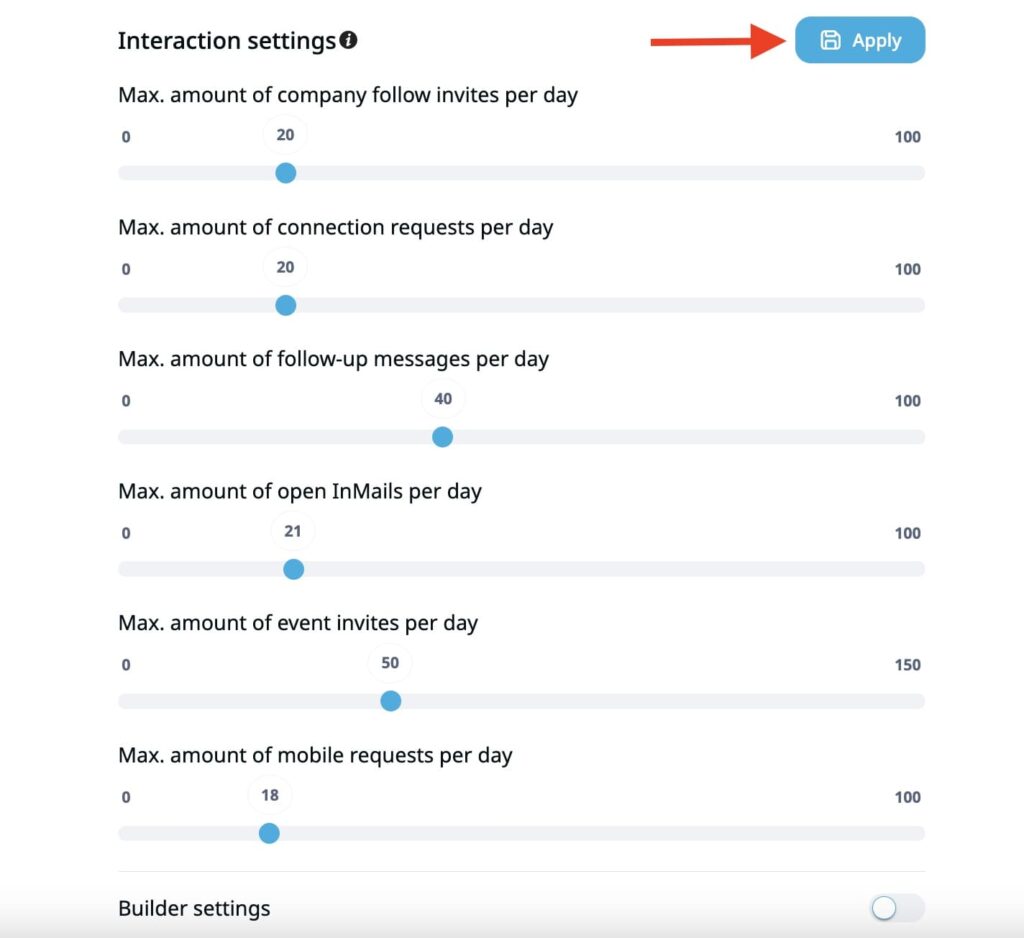
The platform enforces daily action limits that stay within LinkedIn’s acceptable usage thresholds and includes an account warm-up feature for new accounts. So that outreach runs consistently without triggering account restrictions, and to avoid getting your LinkedIn account restricted.
2. Smart sequences that adapt to prospect behavior
Instead of fixed drip sequences, Expandi’s campaign builder uses conditional logic. With 19 if-conditions and 11 actions, campaigns branch based on what prospects actually do: accept, ignore, reply, or view your profile.
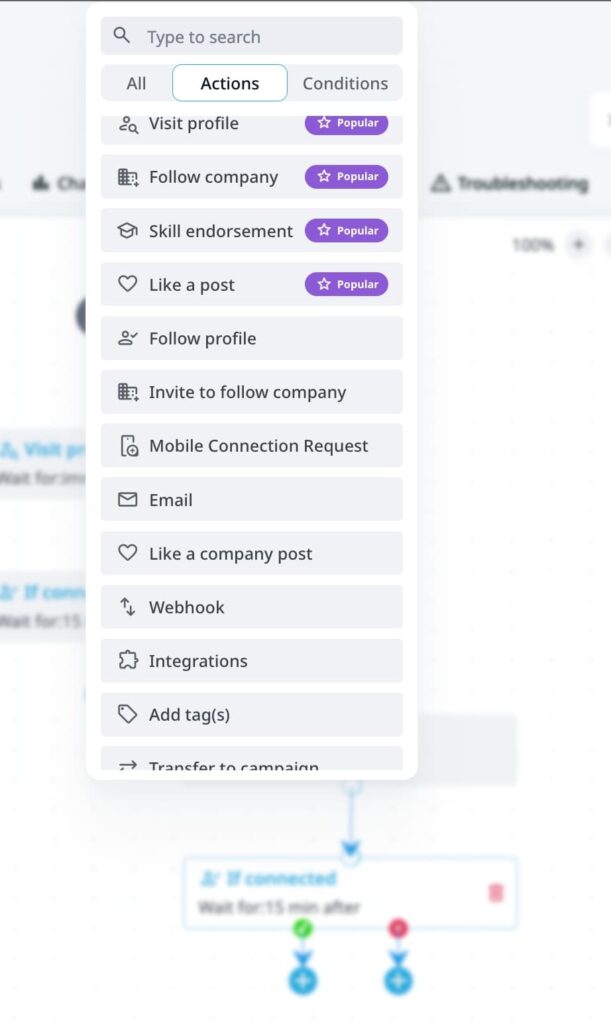
Paired with LinkedIn Sales Navigator filters, you define the targeting and Expandi handles the sequencing.
3. Omnichannel outreach from one campaign
Most outbound teams run LinkedIn and email as separate motions in separate tools, which means fragmented data, duplicate effort, and no visibility into how touchpoints connect. Expandi lets you combine both in a single campaign sequence.
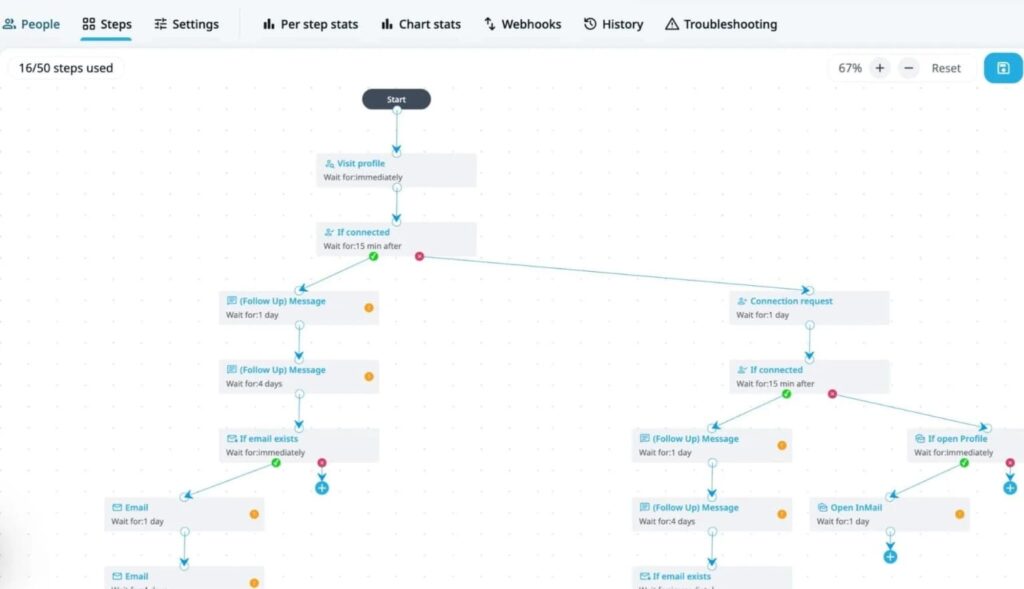
For example, a prospect gets a LinkedIn connection request, a follow-up message after acceptance, and an email if they haven’t responded: all triggered automatically based on behavior. This way, you see the full sequence performance in one place.
4. Agency-scale account management
Expandi is built for teams managing multiple client LinkedIn accounts simultaneously. Each client gets a separate workspace with its own campaigns, lead lists, and performance data. Team members can be assigned roles and permissions per workspace, and campaign management runs across all accounts from a single dashboard.
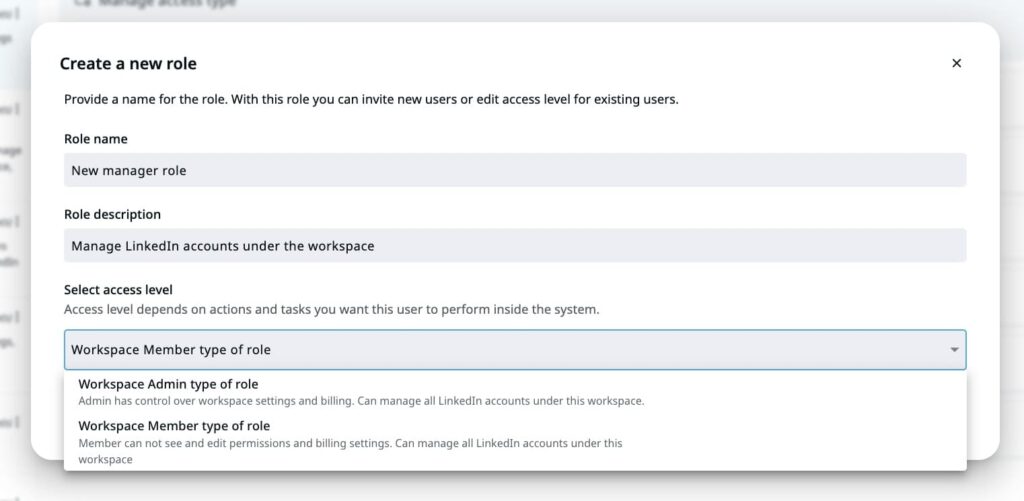
For agencies running outreach at volume across 5, 10, or 20+ client accounts, that centralized structure is what makes the operation manageable.
5. Audiences scraping from LinkedIn directly
Most outreach tools require you to bring your own list. Expandi lets you build audiences from LinkedIn sources directly: event attendees, group members, post engagers, Sales Navigator search results, or anyone who commented on a specific post.
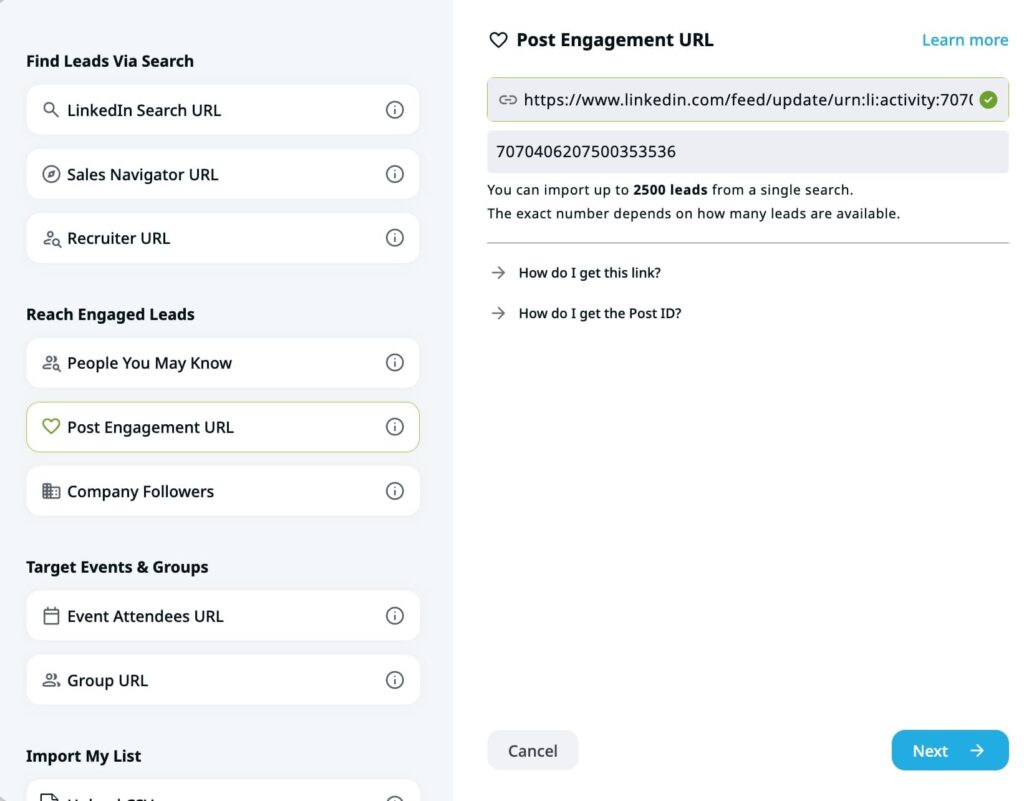
For teams combining content publishing with outreach, that last one is particularly useful.
You can schedule and publish content via SocialPilot, scrape the people who engage with it, and push them straight into an Expandi campaign as warm leads. The content and outreach motions feed each other without manual list-building in between.
Expandi pricing breakdown
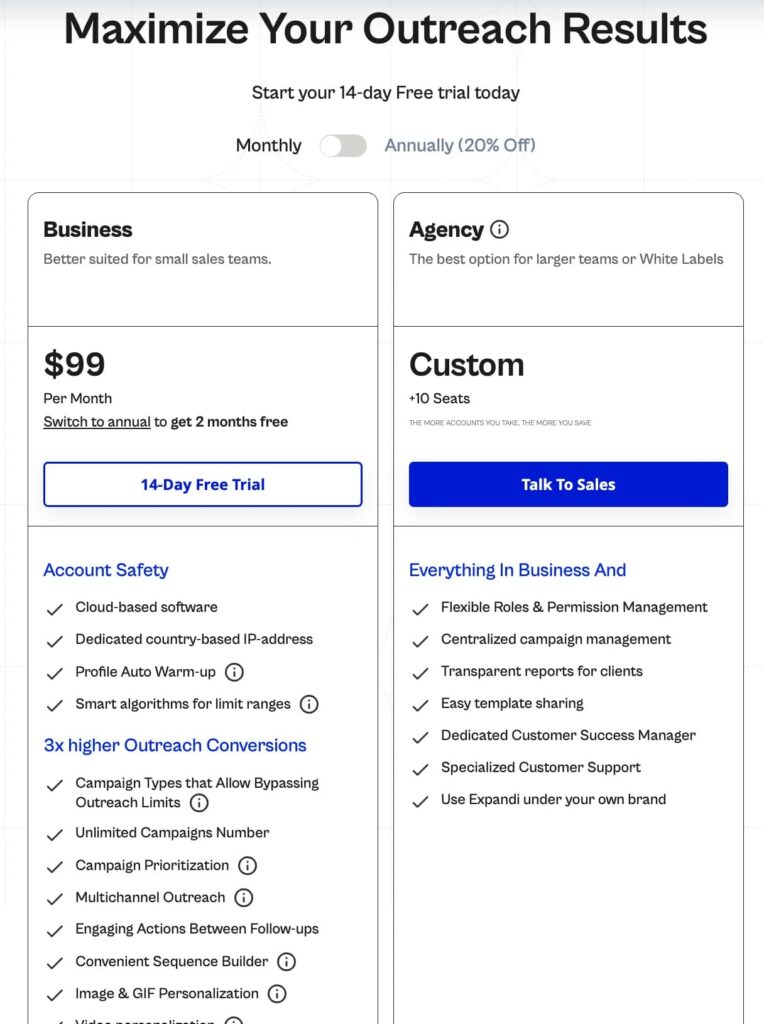
Expandi charges per LinkedIn account connected. The Business plan is $99/month, or $79/month billed annually, and includes the full feature set: smart campaigns, analytics, omnichannel sequences, and integrations.
For agencies managing multiple client accounts at scale, a dedicated Agency plan is available with volume-based pricing.
Compared to SocialPilot’s content-scheduling model, Expandi’s pricing reflects a different value proposition. The main ROI metric here is meetings booked and pipeline created through LinkedIn outreach.
If you are already using a scheduler for LinkedIn content, Expandi covers the other half of the channel. Start your 14-day free trial and see what your outreach pipeline looks like when content and prospecting run together.
Other top 9 SocialPilot alternatives in 2026
Depending on your outreach stack, objectives, and budget, here are 9 other SocialPilot alternatives worth considering in 2026.
1. Buffer
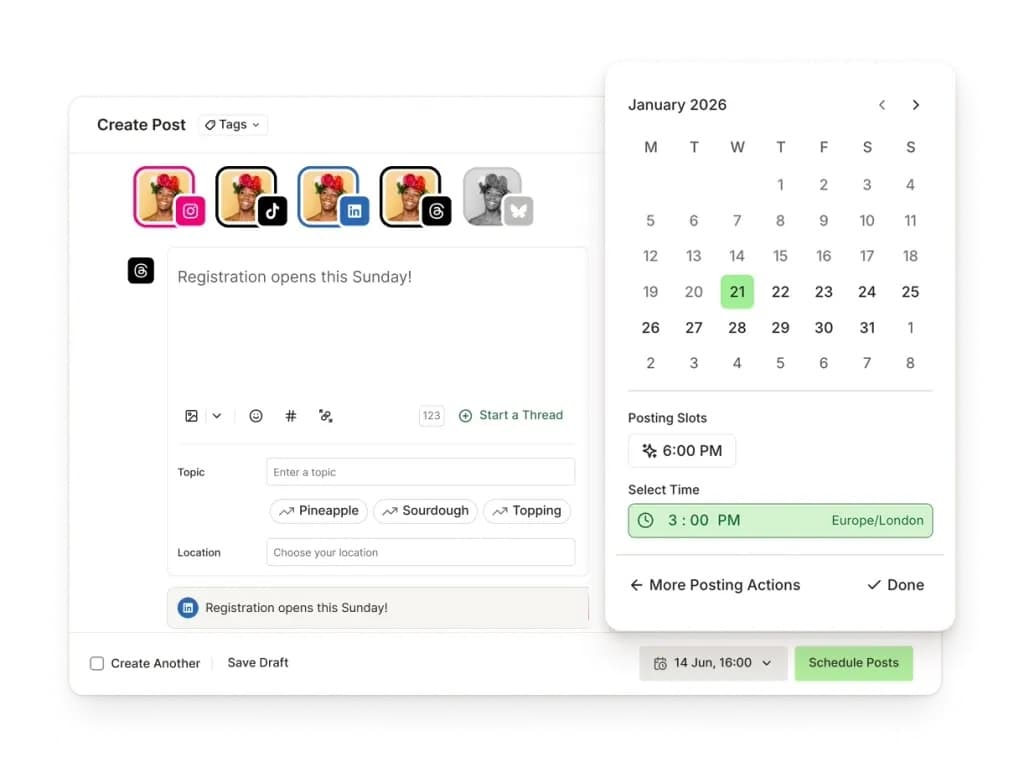
Buffer is the simplest social media scheduler on this list. Its strength is getting out of your way: connect your channels, write your posts, set a schedule, and Buffer handles publishing. The interface is deliberately minimal, and the pricing model is different from most competitors: you pay per channel rather than per account bundle.
Key features
- Channel scheduling – up to 3 channels on the free plan (10 posts per channel, refillable), unlimited channels and posts on paid plans. Visual content calendar with drag-and-drop queue management.
- Analytics – post performance, audience demographics, and engagement trends across connected channels. Included on all paid tiers without a plan upgrade requirement.
- AI assistant – caption suggestions, post writing help, and content idea generation. More practical for smaller teams that want help with content creation.
- Start Page – built-in link-in-bio tool that creates a landing page from your social accounts. Included on all plans, removing the need for a third-party service.
- Social inbox – consolidates comments and replies from connected channels on paid plans. Basic community management without the routing rules of more advanced tools.
Pricing
- Free plan: up to 3 channels, 10 scheduled posts per channel.
- Paid plans start from $6/channel/mo (unlimited scheduling, analytics, AI assistant, Start Page).
Buffer vs SocialPilot
Buffer wins on price at the entry level. If you are managing a small number of channels without complex client workflows, Buffer’s $6/channel model is hard to beat.
SocialPilot wins at agency scale. Bulk CSV scheduling for 500 posts, client approval workflows, and white-label reporting make it a better fit for agencies managing multiple clients at volume. Buffer’s approval workflow is simpler and less configurable.
Neither tool does LinkedIn outreach. For teams using LinkedIn to generate leads rather than publish content, Expandi’s LinkedIn outreach automation covers the prospecting side that scheduling tools are not built for.
2. Hootsuite
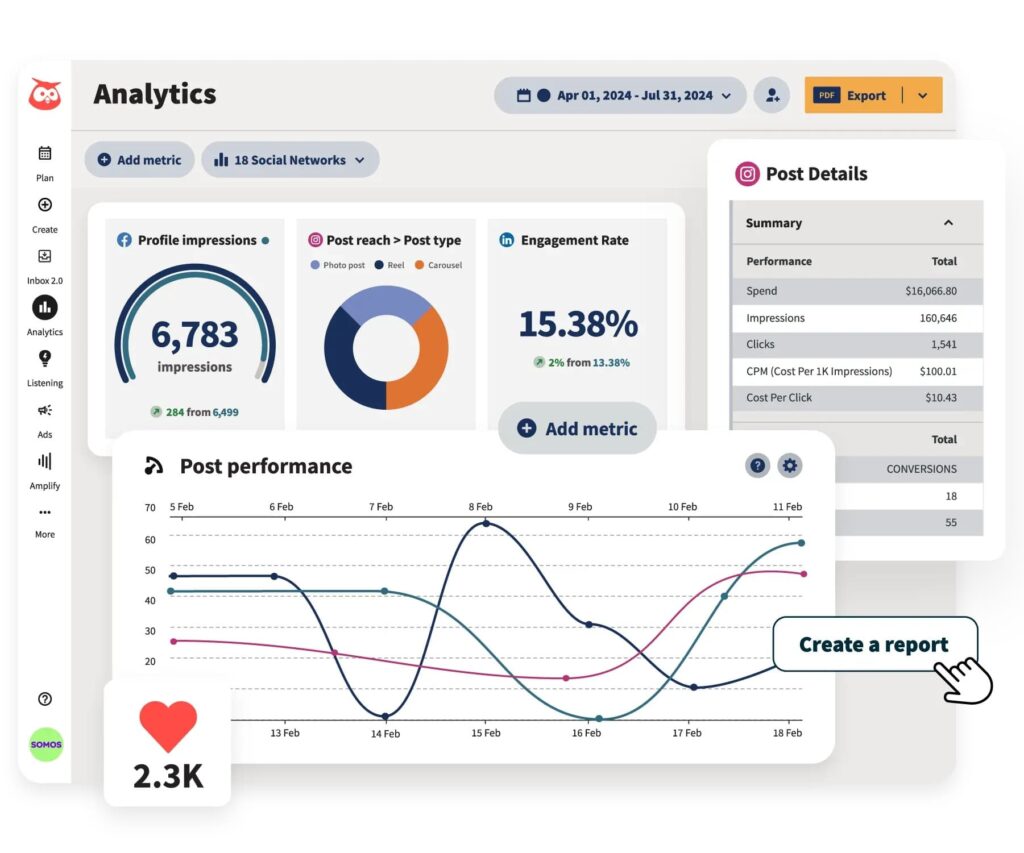
Hootsuite is the category leader in social media management by market share, and it has been for over a decade. The product’s breadth is its main advantage: unlimited post scheduling on Advanced plans, social listening, competitor benchmarking, ad management integration, and a mature ecosystem of integrations.
Key features
- Bulk scheduling – up to 350 posts at once on Advanced, with a visual calendar across all connected accounts. Customizable layouts by team, brand, or campaign.
- Social listening – monitors mentions, hashtags, and keywords across social platforms. Standard covers 7-day mention history; Advanced extends to 30 days. Not available in SocialPilot at any tier.
- Competitor benchmarking – tracks performance against up to 5 competitors on Standard, 20 on Advanced. Provides context that raw engagement numbers alone cannot.
- Inbox management – with auto-routing on Advanced, assigning messages to team members based on configurable rules. Handles higher message volumes more efficiently than SocialPilot.
- Integration depth – covers Salesforce (Enterprise), Canva, Google Drive, Dropbox, Zendesk, and dozens more. Meaningful for enterprise teams with complex martech stacks.
Pricing
- No free plan; 30-day free trial available.
- Pricing starts from approximately $199/user/mo billed annually (Standard plan).
Hootsuite vs SocialPilot
Hootsuite is more capable across almost every category: analytics depth, social listening, integrations, inbox management. The question is whether that capability is worth the cost difference. For enterprise marketing teams with budget and complex requirements, Hootsuite is the more complete product.
For SMBs and smaller agencies, SocialPilot’s pricing is considerably more accessible.
Neither focuses on LinkedIn lead generation. For teams doing LinkedIn prospecting, Expandi’s outreach automation handles the prospecting side that both Hootsuite and SocialPilot leave to other tools.
3. Sprout Social
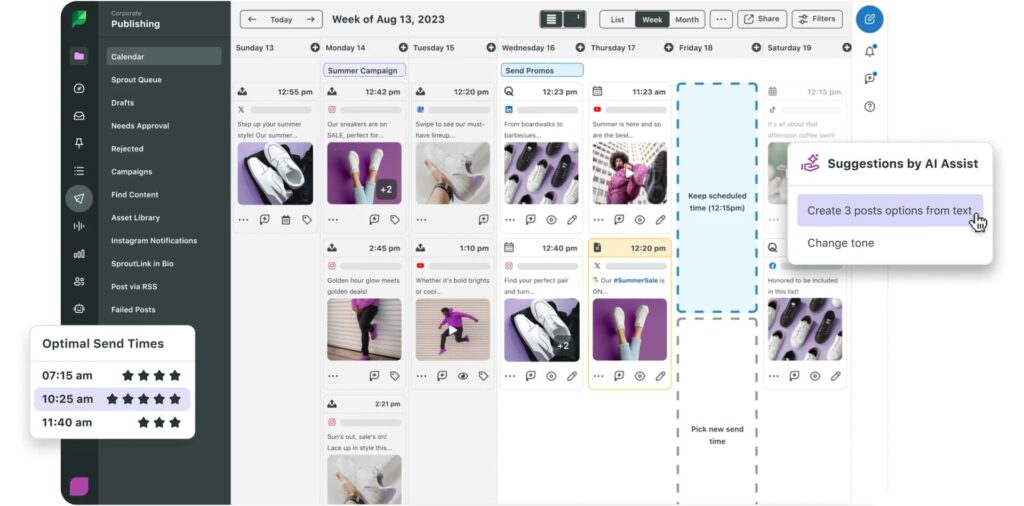
Sprout Social is positioned firmly at the enterprise end of the market. This SocialPilot alternative is not a realistic option for small teams or agencies with lean budgets. But it earns its price for organizations that need serious analytics, social listening, and collaboration at scale.
Key features
- Advanced analytics – custom report builders, audience demographic data, cross-channel performance views, competitor analysis, and executive-ready exports. A clear step change from most tools in this category.
- Social listening – tracks brand mentions, keywords, and competitor activity across social networks and the broader web. Available as a paid add-on. Meaningful for brands tracking reputation and competitive positioning.
- Smart inbox – consolidates messages and mentions with AI-powered tagging, sentiment detection, and message spike alerts. Routing and prioritization features reduce response time at high engagement volumes.
- CRM integration – with Salesforce and HubSpot, logging social interactions against contact records. Relevant for teams that want social data flowing into CRM pipeline tracking.
- Publishing and scheduling – with asset library, approval workflows, and visual content calendar. Standard publishing capabilities; the differentiation sits in the analytics and listening layers.
Pricing
- No free plan; 30-day free trial available.
- Pricing starts from $99/seat/month (Essentials: 5 profiles, basic publishing and reporting) up to $199/seat/month on Standard which adds inbox management and keyword monitoring, and $299/seat/month on Professional for unlimited profiles.
Sprout Social vs SocialPilot
Sprout Social is significantly more capable and significantly more expensive. If your organization has the budget and needs analytics depth, high-quality reporting, and enterprise-grade collaboration, Sprout is the stronger product. If you are an SMB or agency on tighter margins, SocialPilot covers most use cases at a fraction of the price.
Neither handles LinkedIn outreach. For teams complementing content publishing with LinkedIn prospecting, Expandi’s lead generation automation covers the workflow both Sprout Social and SocialPilot leave to other tools.
4. Sendible
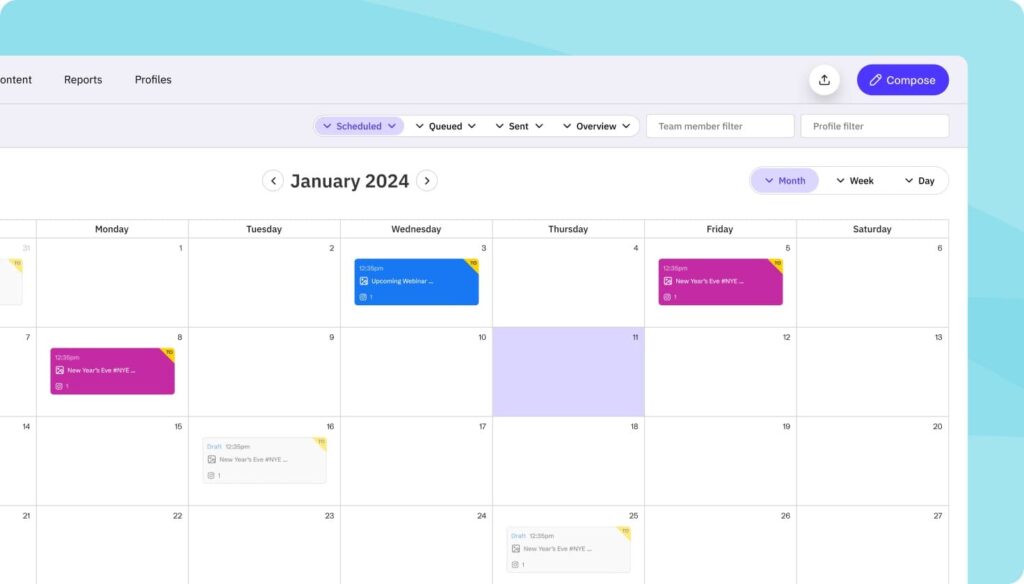
Sendible is a social media management platform built for agencies. Almost every design decision reflects a multi-client workflow: client dashboards, configurable approval chains, white-label options, and per-client analytics reports. It is consistently cited by agency operators as one of the cleaner multi-client management experiences in the category.
Key features
- Multi-platform scheduling – with RSS auto-scheduling that publishes blog content automatically across connected social accounts. Reduces the manual work of distributing long-form content across channels.
- Client dashboards – each client gets a branded reporting view, separate from the internal agency workspace. Available from Traction ($89/month) and above.
- Approval workflows – multi-step approval chains available on Scale and above. More configurable than SocialPilot’s single-step client approval, with the ability to route content through internal review before it reaches the client.
- Content libraries – store reusable assets: images, captions, branded templates, shared across the agency team. Reduces content creation time for recurring and evergreen campaigns.
- White-label reporting – branded report delivery that can be automated and scheduled for regular client distribution.
Pricing
- No free plan; 14-day trial available.
- Pricing starts from $29/mo (Creator: 1 user, 6 social profiles).
Sendible vs SocialPilot
For agencies, Sendible is generally the stronger choice. The agency workflow: client dashboards, approval chains, and RSS auto-scheduling, is more purposefully integrated throughout the product rather than gated behind a single tier jump. For the agency features SocialPilot gates behind Premium, Sendible includes them at a lower starting price
Neither tool offers LinkedIn outreach. If prospecting on LinkedIn is part of your workflow, in addition to scheduling content, Expandi handles that layer.
5. Agorapulse
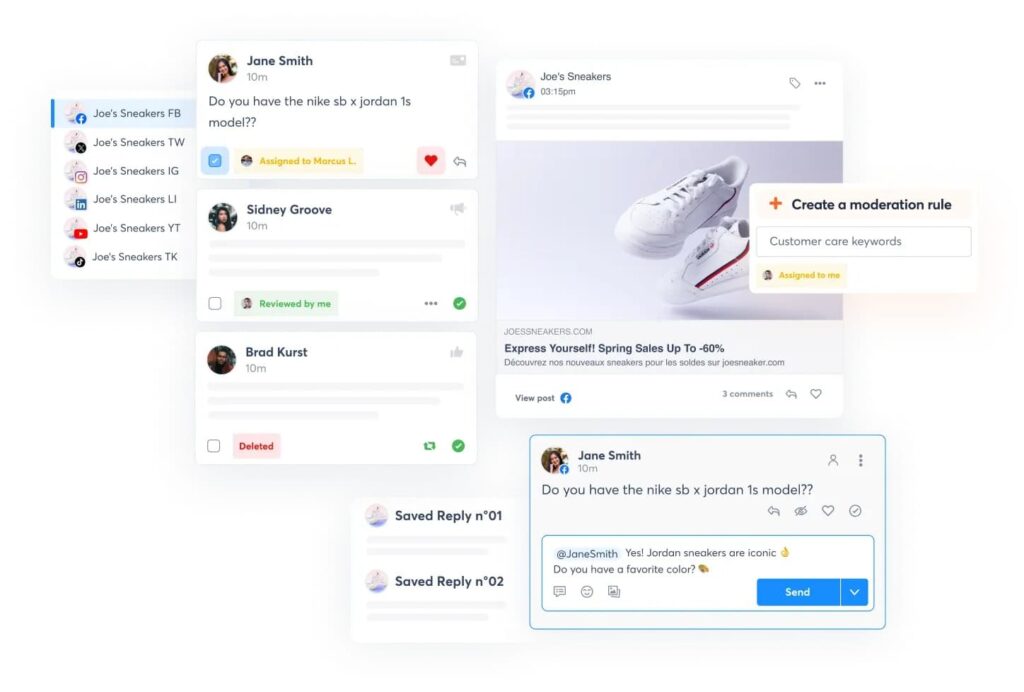
Agorapulse targets the mid-market: teams that need more structure than Buffer or SocialPilot provide, but do not want to pay Sprout Social prices.
The inbox management is notably strong: one of the more well-developed inbox tools in this category, with labeling, saved replies, moderation rules, and team assignment. The Advanced plan adds social ROI reporting that ties social activity to revenue via Google Analytics integration, showing which content and channels are driving traffic, leads, and conversions. For teams that need to connect social media work to business outcomes, this is a genuine differentiator from most scheduling tools.
Key features
- Inbox management – consolidates messages, comments, and mentions from all connected platforms into one view with labels, saved replies, and moderation rules. For high-volume teams, handling everything centrally cuts response time significantly.
- Social ROI reporting – tracks which content, channels, and team members are driving traffic, leads, and conversions. Useful for agencies that need to prove social impact beyond engagement metrics.
- Approval workflows – content moves through structured review before publishing, with internal comments and shared calendar views keeping clients and teams aligned.
- Competitor benchmarking – tracks competitor performance alongside your own, showing which formats and posting frequencies work for them. Gives context that raw engagement numbers alone do not.
- Scheduling and content calendar – drag-and-drop calendar with bulk scheduling, shared views, and a content library for reusable assets across all major platforms.
Pricing
- 30-day free trial, no credit card required.
- Pricing starts from $99/user/month (Standard: 10 social profiles, unlimited scheduling, basic inbox and reporting).
Agorapulse vs SocialPilot
Agorapulse wins if inbox management and social ROI reporting are priorities. The inbox is more capable, and the revenue attribution features address a gap SocialPilot does not attempt to fill. For community-focused teams managing high engagement volumes, the difference is noticeable.
For agencies managing many clients with moderate engagement volumes, SocialPilot’s account-to-price ratio is better.
For LinkedIn outreach, neither tool goes beyond content scheduling. Expandi handles the outreach side fully, filling in the gap that both Agorapulse and SocialPilot leave unaddressed.
6. Later
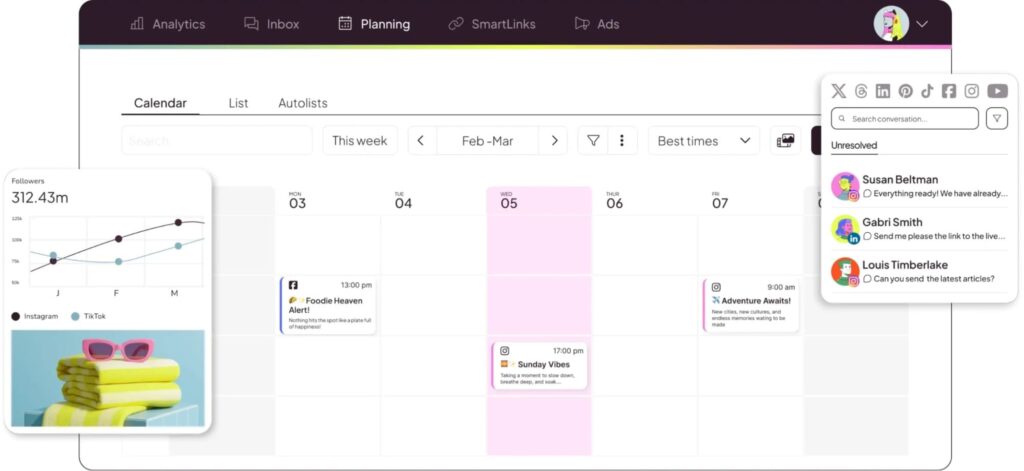
Later started as an Instagram scheduling tool and has evolved into a multi-platform solution, but its visual-content roots show: the image-first planning interface, grid preview, and link-in-bio tools are where the product shines. If your strategy is heavy on Instagram, Pinterest, or TikTok visual content, Later’s interface is purpose-built for that workflow.
The visual content calendar is Later’s strongest differentiator. You can drag photos and videos onto time slots and preview how your Instagram grid will look before posts go live.
Key features
- Visual content calendar – drag-and-drop scheduling with an Instagram grid preview showing how your feed will appear before posts publish. Purpose-built for brands with visual consistency requirements.
- Link in Bio – creates a clickable landing page tied to Instagram and TikTok bio links, with multiple link options and click analytics. Built into all plans.
- Media library – stores and organizes photos, videos, and user-generated content in a searchable asset library. Useful for brands managing large volumes of visual content.
- Multi-platform scheduling – covers Instagram, TikTok, Facebook, X, LinkedIn, Pinterest, and YouTube. Interface is optimized for visual content with platform-specific formatting options.
- Instagram analytics – Story analytics and hashtag performance on top of standard engagement metrics. Stronger for Instagram than tools built for broader channel coverage.
Pricing
- Free plan: basic scheduling for a limited number of social profiles.
- Pricing starts from $25/mo (Starter, billed monthly).
Later vs SocialPilot
Later wins for visual content creators and brands where Instagram and Pinterest are primary channels. The grid preview, visual calendar, and media library are features SocialPilot does not match. For content-heavy brand accounts with aesthetic requirements, Later’s workflow is more efficient.
SocialPilot wins for multi-client agency management. Bulk scheduling via CSV, client approval workflows, and white-label reporting are capabilities Later does not prioritize.
Neither tool is relevant for LinkedIn outreach. For teams using LinkedIn as a lead generation channel, Expandi’s automated connection campaigns and sequence builder handle the outreach while Later and SocialPilot handle the content.
7. Metricool
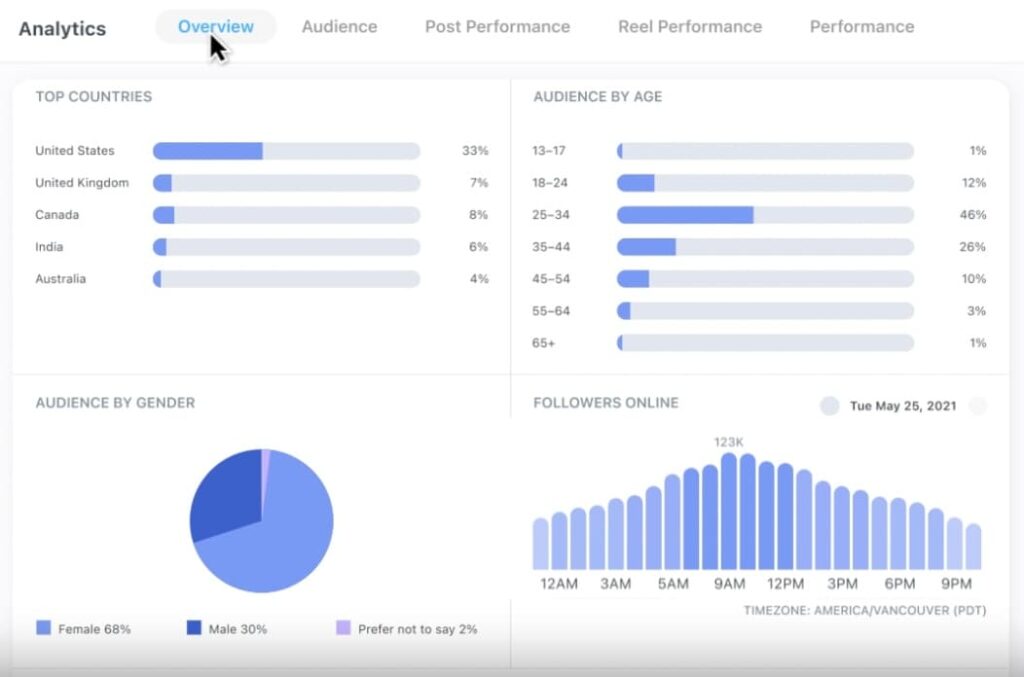
Metricool distinguishes itself through analytics depth at an accessible price point. Where most schedulers treat analytics as secondary, Metricool puts them at the center: tracking performance across social channels, website traffic via Google Analytics integration, and paid ad campaigns in one dashboard.
Key features
- Unified analytics dashboard – connects social performance, website traffic, and paid ad data in one view. Covers Facebook Ads, Google Ads, TikTok Ads, and Pinterest Ads alongside organic social – something few competitors include at this price point.
- Competitor analysis – benchmarks your content performance against a configurable number of competitor accounts. Available across paid plans with more competitors on higher tiers.
- Auto-publishing – covers Facebook, Instagram, TikTok, LinkedIn, X, YouTube, Pinterest, Google Business, Twitch, and Bluesky. One of the broader platform coverage lists in this category.
- Best time to post – automatically suggests scheduling windows based on historical audience engagement data, optimized for maximum reach.
- SmartLinks – link-in-bio tool with click analytics, included on all plans.
Pricing
- Free plan: basic analytics and scheduling for 1 brand.
- Pricing starts from $25/mo for managing up to 10 brands.
Metricool vs SocialPilot
Metricool wins on analytics breadth, particularly for teams running paid and organic campaigns simultaneously. Tracking ad spend alongside organic social performance and website traffic in one dashboard is a genuine differentiator that SocialPilot does not replicate.
SocialPilot wins on agency workflow: bulk CSV scheduling, client approval, and white-label reports are features Metricool does not prioritize to the same degree.
For LinkedIn outreach automation: running prospecting campaigns, tracking connection and reply rates, Expandi handles that dimension of LinkedIn activity.
8. Publer
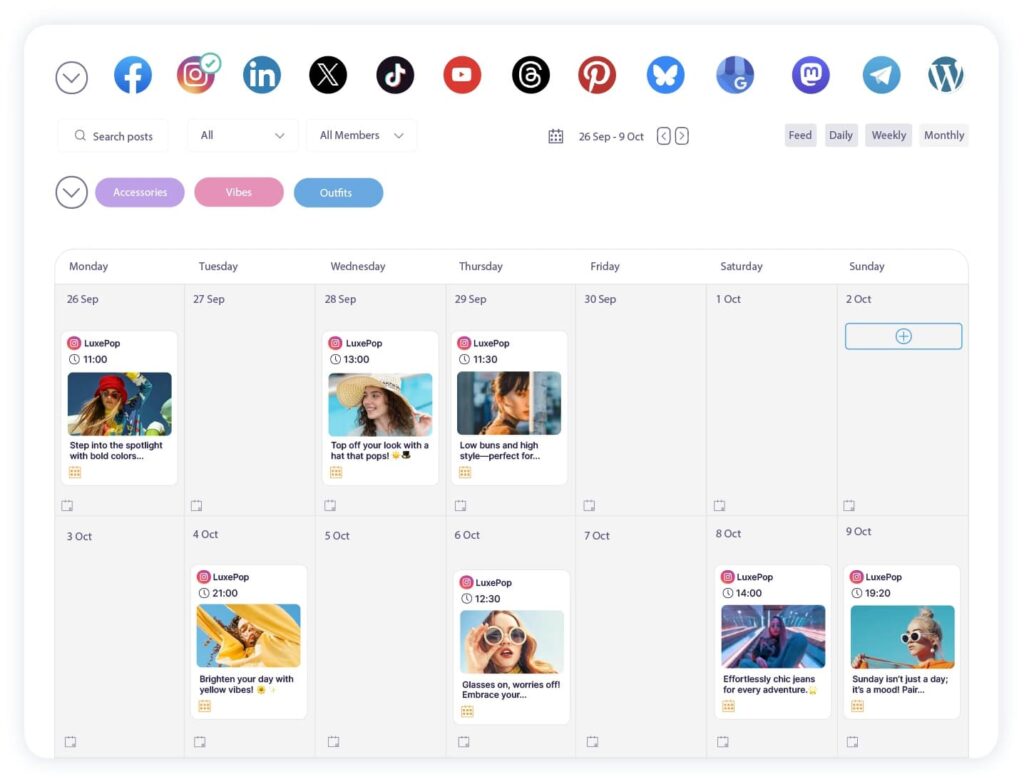
Publer is a newer entrant that has built a reputation for packing features into a competitive price point. The free plan is notably generous, and paid plans cover multi-platform scheduling, AI post generation, and link-in-bio tools at prices that undercut several established competitors.
The AI writing assistance is more deeply integrated than in most tools: Publer’s AI can generate captions, suggest hashtags, recycle top-performing posts, and create platform-specific variations automatically. For lean teams that need content output without a dedicated copywriter, this is a practical advantage over tools that treat AI as a bolted-on feature.
Key features
- AI post generation – creates platform-specific captions from prompts or existing content, including hashtag suggestions and post variations. More integrated than the AI assistants in most scheduling tools.
- Multi-platform scheduling – covers Facebook, Instagram, TikTok, LinkedIn, X, Pinterest, YouTube, Google Business, and more. Posts can be scheduled individually or queued in a recurring schedule.
- Content recycling – automatically re-queues top-performing posts on a configurable schedule, keeping evergreen content in circulation without manual rescheduling.
- Collaboration – draft, review, and approve content with team commenting on paid plans. Covers internal feedback before posts are queued.
- Link in Bio – with click tracking and multiple link options, included on all plans.
Pricing
- Free plan: up to 3 social accounts.
- Pricing starts from $5/mo for unlimited scheduled posts & drafts.
Publer vs SocialPilot
Publer wins on price at the entry level and on AI content generation depth. For a solo marketer or small team managing a handful of accounts, Publer’s pricing is more accessible than SocialPilot’s and most alternative tools on this list.
SocialPilot wins for agencies at scale. Bulk CSV scheduling for 500 posts, white-label client reports, and configurable approval workflows are capabilities Publer does not fully match for larger client rosters.
For LinkedIn outreach automation, neither tool offers prospecting workflows. So, if you want to focus on inbound as well as outbound, you can introduce Expandi to the mix to automate prospecting.
9. Planable
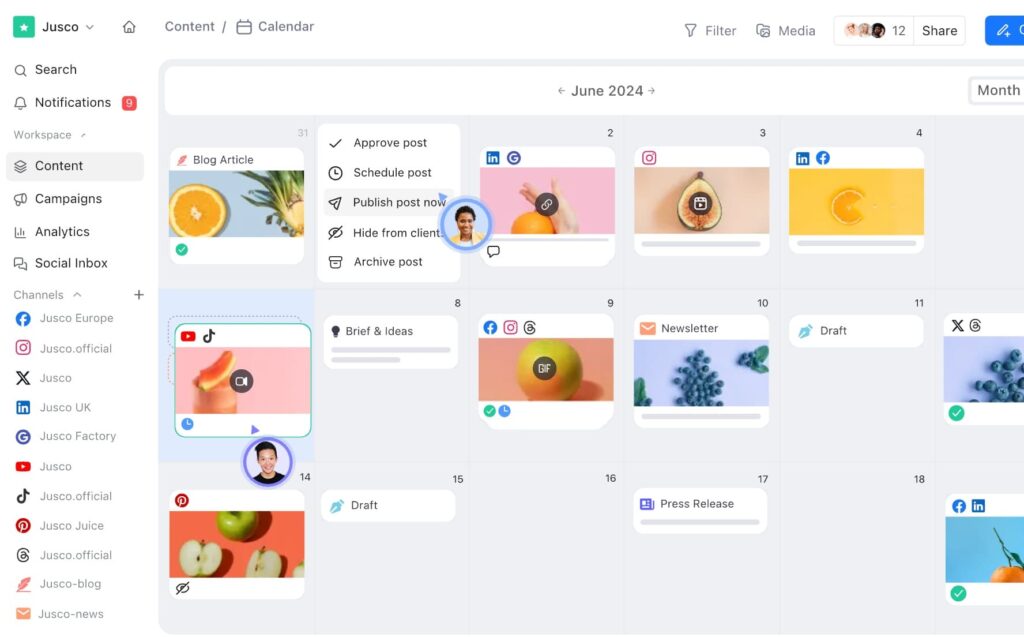
Planable is built around one workflow: content collaboration and approval. If your main friction point with social media management is the back-and-forth between content creators, internal reviewers, and clients, Planable’s approval-centric design addresses that problem better than almost any other tool on this list.
Key features
- Approval workflows – multi-level chains: internal review, client review, final sign-off. Each step is configurable and logged for audit trail purposes. This is the core product.
- Platform preview – shows exactly how each post will appear on Facebook, Instagram, LinkedIn, X, and other platforms before publishing. Reduces formatting surprises and revision requests.
- Feed view – displays scheduled content in the order it will appear in each platform’s feed, allowing teams to assess content flow and visual consistency.
- Collaboration – inline commenting on individual posts, version history, and @mentions for flagging specific reviewers. Built into the post preview interface.
- Publishing – direct scheduling to all major social platforms once content clears the approval chain.
Pricing
- Free plan: up to 50 posts total.
- Pricing starts from $39/workspace/mo (unlimited users per workspace).
Planable vs SocialPilot
Planable wins if content approval workflow is your primary pain point. For agencies with demanding clients or compliance requirements where every post needs documented approval, Planable’s approval-first architecture is more specialized and better suited than SocialPilot’s client approval feature.
SocialPilot wins on publishing at scale. Bulk scheduling, analytics, inbox management, and multi-platform publishing are more robust in SocialPilot than Planable.
For LinkedIn outreach beyond publishing, Expandi handles the prospecting and lead generation layer – pair it with whichever scheduler fits your content workflow, as the two tools operate in completely different parts of the LinkedIn stack.
SocialPilot alternatives: Frequently asked questions
Sendible and Planable are the strongest agency-focused alternatives to SocialPilot. Sendible includes client dashboards, approval workflows, and white-label reporting starting at $29/month – well below SocialPilot’s $100/month Premium tier where those features unlock. Planable is the better choice when content approval specifically is the core problem, thanks to its visual client review interface and configurable multi-step approval chains. For agencies also running LinkedIn outreach campaigns, Expandi handles that workflow separately from whichever scheduler you choose.
SocialPilot handles LinkedIn post scheduling: connecting your account and publishing content on a calendar. It does not support LinkedIn outreach automation or prospecting. If your LinkedIn use case is content publishing, SocialPilot works adequately. If your LinkedIn use case is lead generation and outbound prospecting, you need a dedicated LinkedIn automation tool like Expandi, not a social media scheduler.
SocialPilot’s paid plans start at $20/month for Essentials. Standard is $40/month and includes manager and content approval workflows. Premium is $100/month and is where client approval workflows unlock. Advanced white label is gated behind Ultimate at $200/month. Annual billing reduces all prices by 15%.
Several tools undercut SocialPilot’s $20/month entry price. Buffer starts at $6/month per channel. Publer’s paid plans begin at approximately $12/month billed annually. For teams that need client approval and white-label reporting specifically, Sendible’s Creator plan at $29/month is cheaper than SocialPilot’s Premium ($100/month), which is where those features unlock.
SocialPilot does not have a permanent free plan. It offers a 14-day free trial with no credit card required. After the trial, a paid plan is required. Several alternatives on this list offer functional free tiers as a permanent option for teams managing a small number of accounts without a subscription commitment.
SocialPilot is a mid-market social media scheduler focused on value and bulk publishing for SMBs and agencies. Hootsuite is an enterprise social management platform with unlimited profile scheduling, social listening, competitor benchmarking, and deep CRM integrations. SocialPilot is generally the better choice for budget-conscious teams and smaller agencies. Hootsuite is better suited for enterprise organizations with complex requirements and corresponding budgets.
Finding the right SocialPilot alternative for your stack
No single tool here does everything. That’s the point.
If your bottleneck is cost and you are managing a small number of channels without complex client workflows, Buffer or Publer handles the basics at a lower entry price than SocialPilot.
If you are an agency and client approval, white-label reporting, and multi-client management are the core requirements, Sendible gives you that workflow without requiring a $100/month tier.
If analytics depth is the deciding factor, Metricool and Sprout Social cover more ground than SocialPilot at their respective price points. The gap is noticeable once you need data to drive decisions.
Most of the tools above handle the content side well. But if LinkedIn is also a lead generation channel for your team, a scheduler alone will not cover it. Expandi handles that layer, and the two tools work alongside each other, not instead of each other.
Start your 14-day Expandi free trial and run your first LinkedIn outreach campaign alongside whatever scheduler you are already using.

You’ve made it all the way down here, take the final step