9 B2B Lead Nurturing Strategies Across LinkedIn and Email

A prospect replies to your email on Tuesday. But on Thursday, your LinkedIn follow-up arrives as if the conversation never happened. That’s where otherwise sensible B2B lead nurturing strategies come undone.
The solution is to build LinkedIn and email campaigns around buyer signals and link both channels to one prospect record. When the prospect replies, every remaining follow-up should pause.
The 9 strategies below will tell you how to build that workflow without padding the sequence with unnecessary follow-ups.
Key Takeaways
- Start when a prospect gives you a credible reason to reach out, such as a profile visit or post engagement.
- Keep LinkedIn sequences to 3 messages, as Expandi’s H2 2026 data found 9.8% reply rate at 3 messages and 5% at 5 or more.
- Give message #2 your strongest angle. Its 8.8% per-send reply was the best position in the sequence.
- Keep one prospect timeline across LinkedIn and email, then pause every remaining step when a reply arrives.
9 B2B Lead Nurturing Strategies Across LinkedIn and Email


What is B2B lead nurturing?
B2B lead nurturing is the process of keeping a relevant conversation moving until a prospect is ready for the next sales step. It uses what you know about the prospect to choose a useful follow-up and the right time to send it. This can help an MQL (marketing qualified lead) become an SQL (sales qualified lead) without forcing every lead into the same timetable.
Inbound nurturing often begins after a form fill or content download. Outbound leads may need the same patience. A prospect can fit your ICP and still have no project in the pipeline at the moment, or one member of the buying group may show interest before the others are involved. The B2B buyer journey explains why these paths rarely move in a straight line.
LinkedIn shows the context behind the outreach, including profile visits and job changes. Post engagement can add another reason to start a conversation. Email gives prospects another place to reply when they haven’t accepted your request or haven’t answered on LinkedIn. Both channels should point to the same contact history.
Why B2B lead nurturing breaks between channels
Lead nurturing usually breaks when LinkedIn and email sit in separate tools. Before sending a follow-up, the rep has to check both histories manually. This extra step makes it easy to miss a recent signal or send a LinkedIn message after the prospect has already replied by email.
Some teams call this multichannel lead nurturing. In practice, both channels need to update the same prospect record, including new signals and replies. The next rep can then see the full conversation before contacting the prospect again.
This also changes how teams should judge performance. A high activity count tells you little if the campaign keeps contacting people who have already answered. Start with replies and positive replies. Clean handoffs show whether sales receives the context it needs.
9 B2B Lead Nurturing Strategies That Work in 2026
Each step needs a relevant reason. Delays control the pace, but new information from the prospect should decide what happens next.
1. Start when a buyer signal gives you a reason
Signal-based nurturing starts after a prospect does something that suggests interest. A visit to your profile or company page gives your opener a specific “why now.” So does engagement with a post.
In Campaign Builder, the Signals action can add people based on profile visits and post engagement. Additionally, it can capture company page visits when the account meets Expandi’s access requirements. New matches sync approximately every 24 hours.
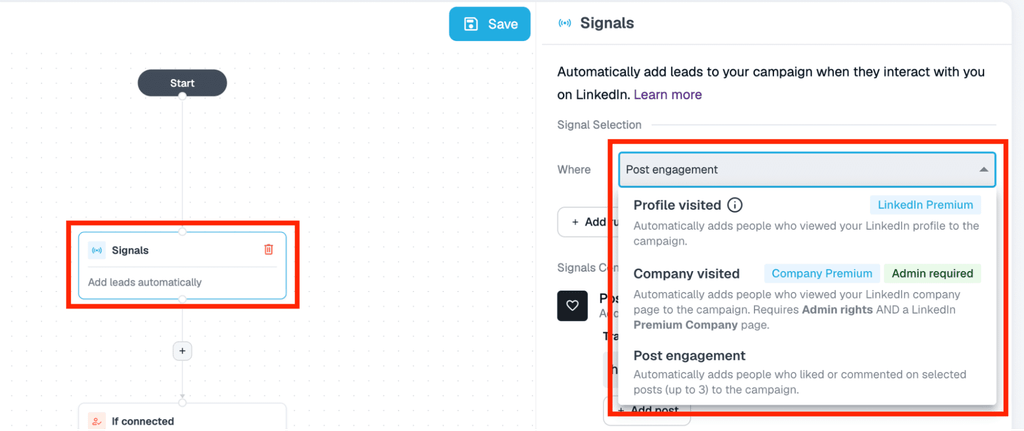
Use the signal as context, then ask a question that can confirm intent. A like to your post may show interest in the topic, but it doesn’t prove purchase intent. The person you contact can tell you what prompted the engagement.
If LinkedIn Sales Navigator is part of your workflow, use it to confirm that the person still fits your ICP before you approve the campaign.
For example:
Hi {first_name}, thanks for joining the discussion on {topic}. Your point about {detail} stood out. Is {problem} something your team is working on this quarter?
2. Create recognition on LinkedIn before you connect
A small, genuine interaction can make a connection request feel familiar. Visit the prospect’s profile and, when there’s a relevant recent post, engage with it before sending the request.
Expandi’s State of LinkedIn Outreach H2 2026 analyzed 240 single-connection request campaigns with at least 50 contacts each. Connection notes that referred to an existing relationship signal, such as a follow or a shared group, achieved acceptance rates 1.8x to 2.7x the 30.2% baseline. Shared network references also performed well.
Only use context you can verify. “Thanks for the follow” fits someone who followed you, and a group reference requires an actual shared group. The report is observational, as its results show associations and don’t establish causation.
Smart Campaigns can place a profile visit or relevant post like before the connection request. Keep the note focused on the existing context:
Hi {first_name}, I enjoyed your take on {topic} in {group/post}. Open to connecting?
3. Keep the LinkedIn sequence to 3 messages
Three messages gave the strongest campaign-level reply rate in Expandi’s sequence analysis. Across 2,966 campaigns, 3-message sequences reached 9.8% replies. Five or more fell to 5%, below the result for a single-message campaign.
3 messages reached a 9.8% reply rateThe analysis covered 2,966 campaigns. Campaigns with 5 or more messages fell to 5.0%.
This makes a concise sequence a sound default for LinkedIn lead nurturing:
1. A connection note or post-acceptance welcome.
2. A useful question or resource tied to the prospect’s role.
3. A contextual close that leaves the conversation open.
Count a written connection note as message #1. If you send the request without a note, the post-acceptance welcome becomes message #1.
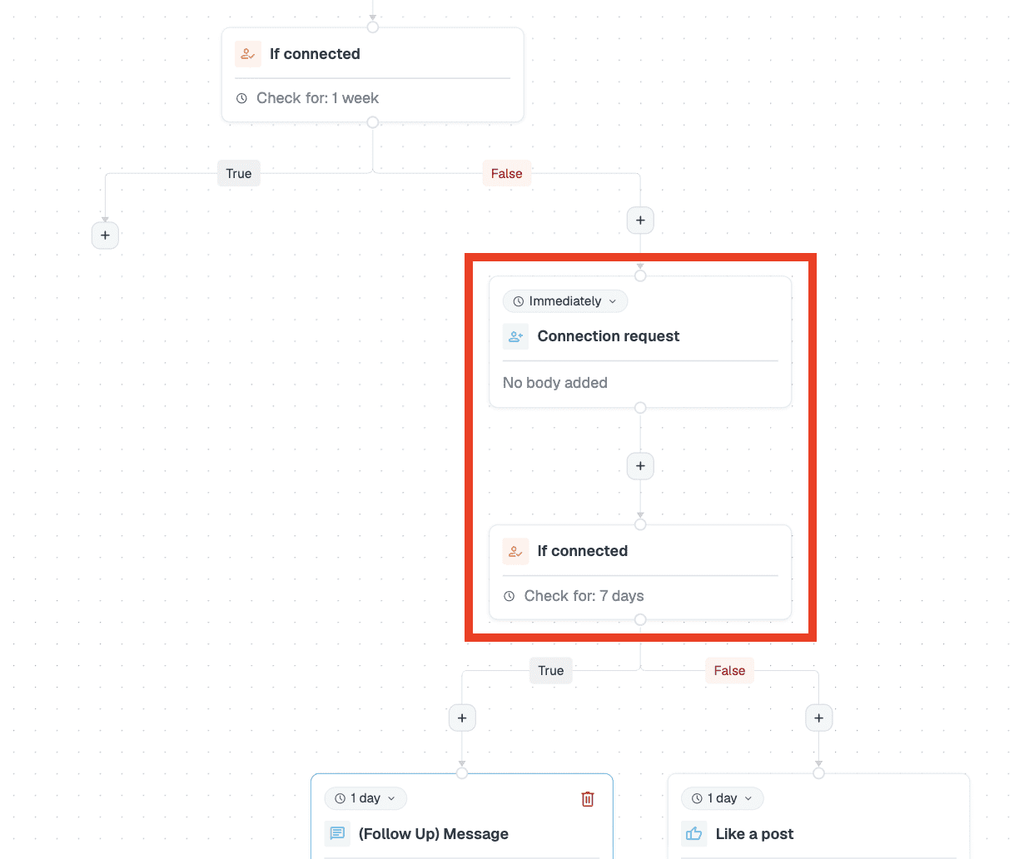
Campaign Builder can apply an “If connected” condition before the first post-acceptance message and add a delay before each follow-up. End the path after message #3 unless a fresh signal creates a new reason to return.
4. Put your strongest message second
Message #2 deserves the clearest reason to reply. It produced an 8.8% per-send reply rate in the H2 2026 analysis, which represents the best position in the sequence.
Make sure to do more than just bump the first message. Bring a short resource or one question that fits the prospect’s role, but a relevant observation can work as well.
Keep the wording compact. Messages between 151 and 200 characters reached an 8.5% reply rate across 57 campaigns and 30,121 contacted prospects, though message length was a weaker influence than targeting and context.
Message #2 had the highest per-send reply rateIt received 8.8% replies per send. Use this position for the question or resource most likely to earn a response.
Here’s a starting point:
{first_name}, I pulled together a short example of how {peer type} handled {problem}. Happy to send it if that is useful for {company_name}. Want a copy?
The example stays close to 2 sentences and ends with one easy decision.
5. Use email when the LinkedIn conversation goes quiet
Email can extend reach after LinkedIn has given you no answer. This is where email and LinkedIn outreach become one nurture motion, in which LinkedIn supplies the signal and social context, then email offers another place to respond.
The case for a post-connection step has grown stronger. Connection-note replies in Expandi’s dataset fell from 3.5% in May 2025 to 2.2% in April 2026. This leaves more accepted connections without an active conversation, so the post-acceptance message carries more of the work.
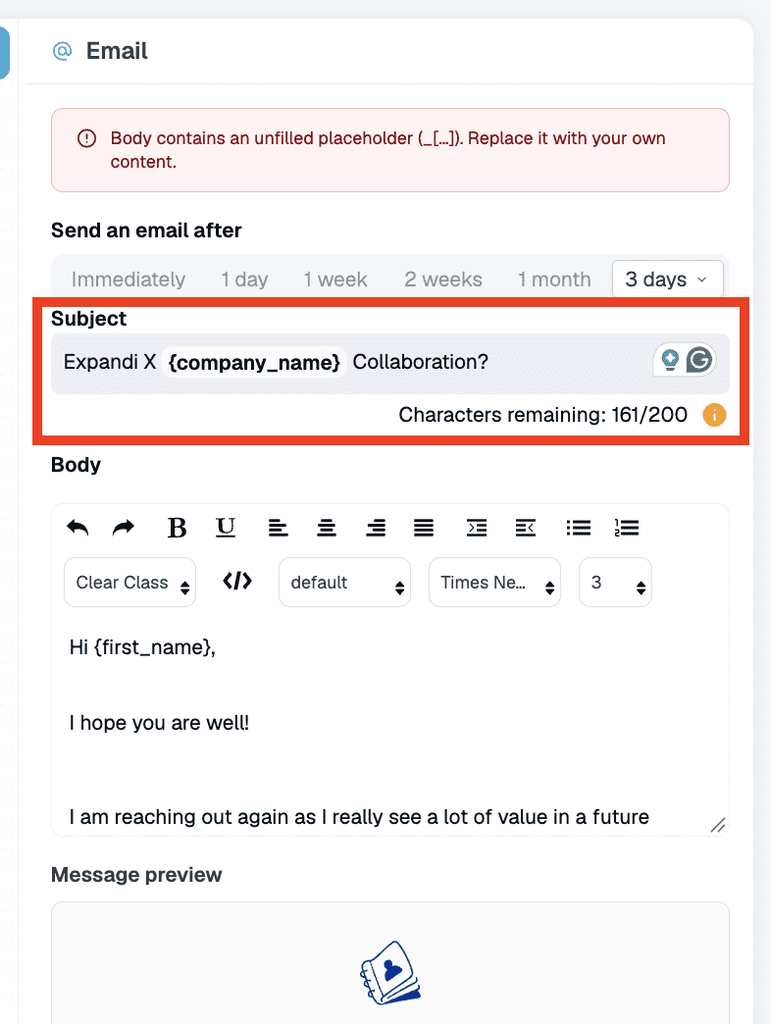
Expandi Email is in early access at publication time. Email replies can appear in the Global Inbox, where they are view-only. Reps still answer from the connected mailbox. Each mailbox connects to a LinkedIn account, and sync runs on intervals. Do note that Expandi doesn’t supply mailboxes or domains, nor does it detect spam placement.
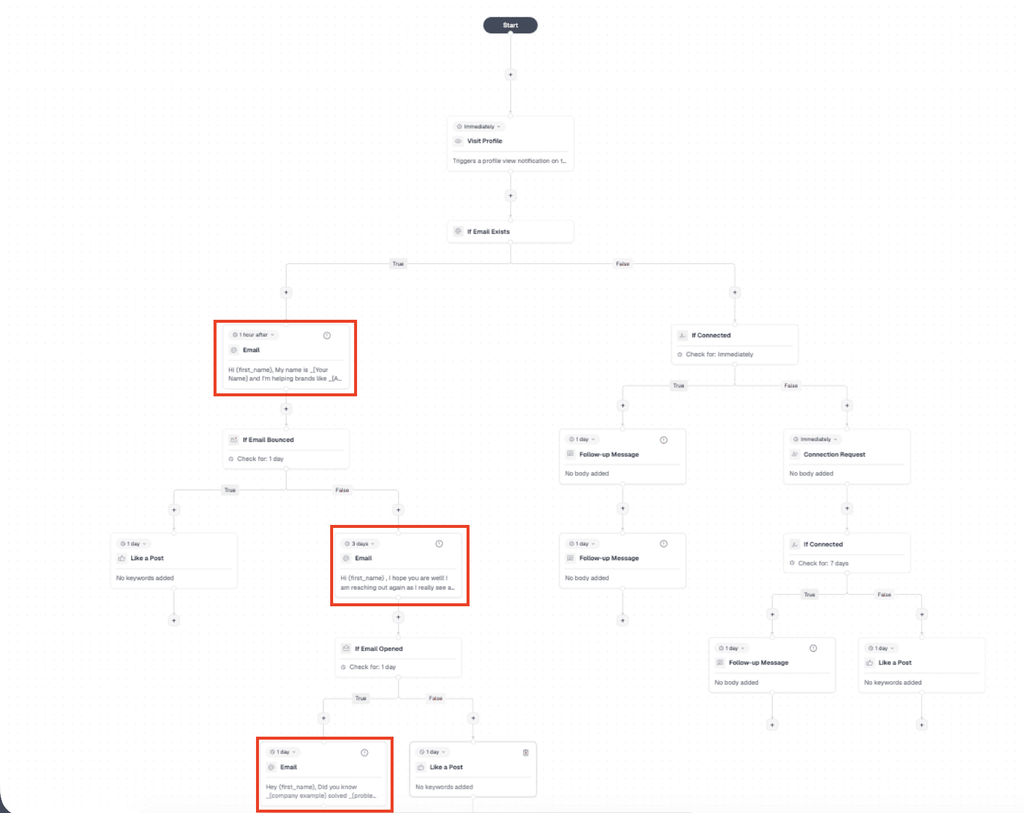
Use an email step for someone who didn’t accept the request or for a connection who stayed silent after your strongest LinkedIn message. Keep the angle consistent and change the wording:
Subject: Your point about {topic}
Hi {first_name}, you mentioned {detail} on LinkedIn. I have a short example of how {peer company} handled {problem}. Would it help if I sent it here?
6. Pause every scheduled step after a reply
A reply on either channel should pause the prospect’s remaining nurture steps. This prevents a scheduled LinkedIn follow-up from interrupting an active email conversation.
When a lead replies to a campaign email, Expandi pauses that lead before the next email is scheduled. It matches replies from the same email address, including replies sent in a new thread. Reply detection requires IMAP to be connected. Automatic replies also pause the lead, whereas bounced messages don’t.
When the prospect replies, a sales rep should take over and record the response in the shared timeline. Close the sequence after a direct opt-out. If the prospect gives you a later date, schedule the next nurture step around that timing.
A reply is the handoff pointOnce a prospect answers, remove them from the scheduled sequence and let a sales rep continue the conversation.
7. Keep every conversation on one timeline
A shared conversation timeline lets a rep see what the prospect has already received before responding. In the Global Inbox, use a “Nurturing” tag for interested contacts who are not ready to progress.
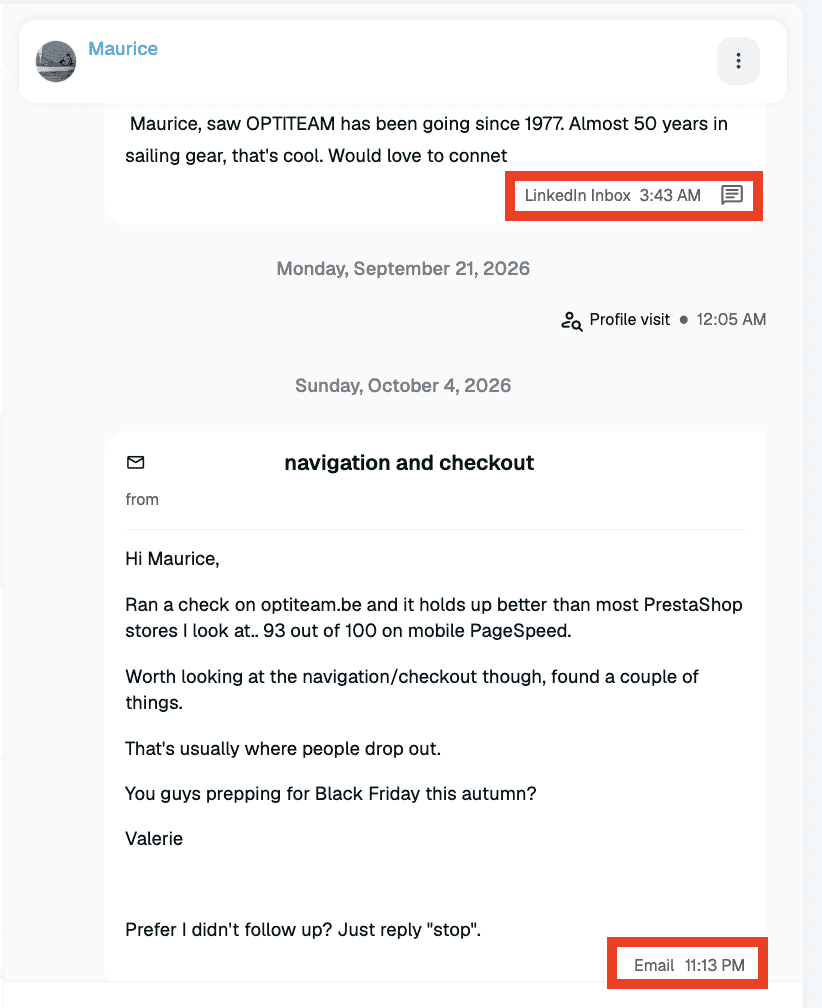
Email replies are visible on the timeline, but the message box in Global Inbox sends LinkedIn and Sales Navigator messages only. Reps answer email from the connected mailbox.
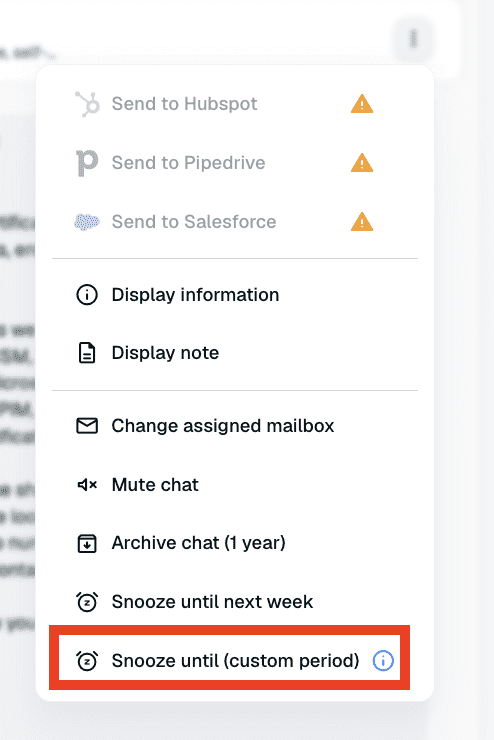
If a prospect gives you a specific future date, snooze the conversation until then. For example, a “check back in 2.5 months” reply should become a dated task tied to the prospect’s wording. In Global Inbox:
- Open the conversation in Global Inbox and apply the “Nurturing” tag.
- Choose the snooze option beside the message controls.
- Set the date that matches the prospect’s timing, such as 2.5 months from today.
- Add a short note with the reason for the follow-up, if your team’s process supports it.
8. Nurture the buying group as one account
Complex B2B deals need coordinated outreach to more than one stakeholder. Forrester’s 2026 business-buying research found that a typical decision involves 13 internal stakeholders and 9 external influencers. Gartner reported in 2025 that 74% of B2B buyer teams showed unhealthy conflict during the decision process.
One enthusiastic contact may be your champion, which is the person inside the account who supports the purchase and helps the deal move through the organization. Despite their enthusiasm and potentially strong influence, they still need colleagues to agree.
Use Workspaces and Shared Campaigns to coordinate activity across reps. Shared Campaigns let the workspace owner manage outreach from multiple LinkedIn accounts and track progress in one place. Shared Signals shows profile views, follows, post likes, and replies across connected accounts, so the team can review account interest before choosing the next contact.
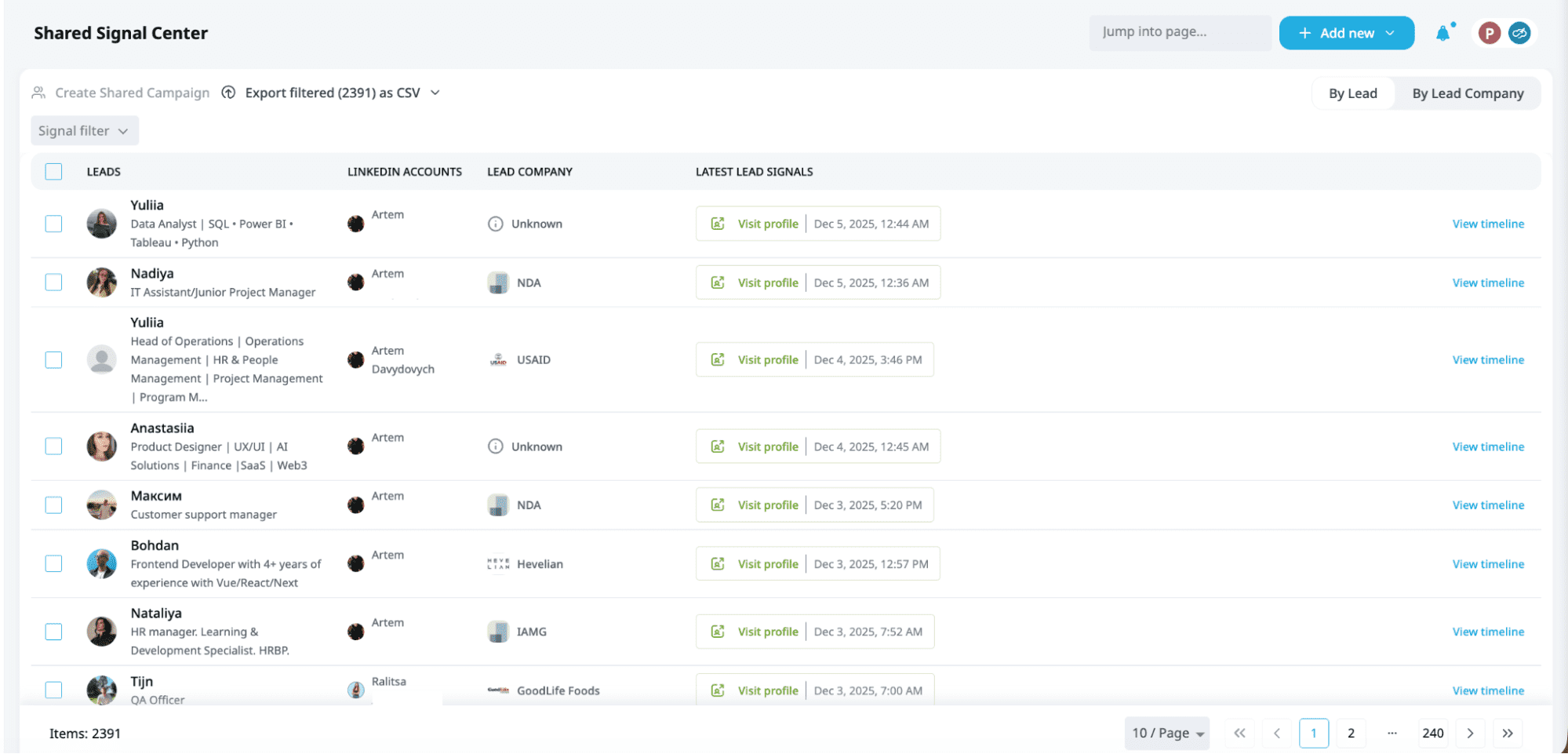
The sales manager should assign each stakeholder to one rep and note the person’s likely role in the decision. The next message can then build on the account history instead of starting from scratch.
9. Publish before you prospect
Consistent LinkedIn content can create recognition before the first request arrives. Expandi’s report found a 30.5% acceptance rate among 38 accounts that had at least 1,000 followers and published 3 posts that met the study criteria. The wider platform average was 27% to 29%. Since the sample included only 38 accounts, use the result as a directional benchmark.
JB Daguené, founder and CEO of Evergrowth, put the human reason plainly in a GTM Society interview:
“And especially in this agentic era, I think people want to see the human faces, the people behind the software.”
Posts and LinkedIn polls can become signal sources. LinkedIn Events can do the same. When someone engages, move the person into a relevant campaign through Signals.
Content is most useful here as context for a conversation. A poll vote can tell you which topic caught someone’s attention, but the follow-up still needs to ask what the answer means for their work.
Example: a LinkedIn and email lead nurturing sequence
This lead nurturing sequence starts with a buyer signal and gives LinkedIn the first conversation. Email enters only after LinkedIn stays quiet. The exact email conditions below should match the early-access behavior approved by Product before publication.
| Day or trigger | Campaign action | Why it is there |
|---|---|---|
| Day 0: signal | A prospect likes a post or visits your profile and enters the campaign. | The signal gives the outreach a current reason. |
| Day 0 | Visit the prospect’s profile and like one relevant recent post. | Your name appears before the request arrives. |
| Day 1, morning | Send message #1 as a short connection note that refers to the engagement that prompted the outreach. | Morning requests averaged about 32% acceptance in the H2 2026 send-time sample. |
| 3 days after acceptance | Send message #2 with your strongest question or resource. | Message #2 led the sequence at 8.8% replies per send. |
| 5 days without acceptance, or no reply after message #2 | Send email #1 from a connected mailbox using the same angle in different words. | Email gives the prospect another place to answer. |
| 4 days later | Send message #3 on LinkedIn or email #2, based on the last channel where the prospect engaged. | The final step adds context without restarting the pitch. |
| Any reply | Pause the remaining sequence. Tag interested, not-yet-ready prospects as “Nurturing” and snooze to the date they gave you. | Reply anywhere, stop everywhere. |
These lead nurturing examples can be adapted to the signal that started the campaign:
After a post engagement
Hi {first_name}, your comment on {topic} caught my attention. How is {problem} showing up for your team this quarter?
Message #2 with a resource
{first_name}, I found a short example from a {peer industry} team solving {problem}. I can send the two-page breakdown if it would be useful. Interested?
Email after no LinkedIn reply
Hi {first_name}, following up here in case email is easier. I have the {resource} I mentioned on LinkedIn. Want me to send it over?
Contextual close
I’ll leave this with you, {first_name}. If {priority} becomes active later, reply here and I’ll send the example we discussed.
How to measure B2B lead nurturing
Measure whether the sequence starts worthwhile conversations and hands them to the right person. Activity counts can help diagnose execution, but they don’t show whether the lead nurturing strategy is creating sales opportunities.
Track these 4 measures:
- Reply rate by step and channel: Show the number of replies beside the number of successfully sent messages used to calculate the rate.
- Positive replies: Define the responses your team counts as interested, then review ambiguous replies manually.
- Time from first signal to meeting: Use the first recorded buyer signal as the start and the booked meeting as the end.
- Reason a campaign stopped sending: Check daily limits, sending hours, account connection status, and whether the campaign has leads left.
The platform-wide connection acceptance rate was 28.5%, and 10.4% of outbound messages received a reply. Those figures come from 13,218,869 connection requests and 6,730,447 messages sent from May 2025 through April 2026. Compare your team with the relevant industry cohort and with its own previous campaigns.
When a campaign stalls, Expandi MCP can help you ask what happened in plain language. Use the answer to locate the setting or depleted lead source, then have a person approve any campaign change.
B2B lead nurturing example: UltB
UltB shows how an interest signal from one system can start a relevant LinkedIn follow-up. In Expandi’s published UltB case study, interested contacts from Close CRM were enrolled in a LinkedIn Connector campaign.
By the end of the month, the campaign had 907 interested contacts. Connection requests were sent to 719 of them, 52.85% accepted, and 18.92% of accepted contacts replied. UltB reported at least 5 booked appointments per week.
UltB’s result came from one customer campaign, so it shouldn’t be used as a benchmark. Its value here is the handoff, as interest recorded in Close CRM triggered a LinkedIn sequence that referred to that earlier interest.
Put your nurturing on one prospect timeline
Choose one nurture path and attach it to a credible signal. Set the campaign to pause when the prospect replies. Reps can then work from one current conversation instead of reconciling separate channel histories.
Expandi brings Signals, Smart Campaigns, Workspaces, and the Global Inbox into the same sales workflow. Teams can review what goes out and see the latest conversation context. A rep takes over when a prospect answers.
Try Expandi free for 7 days and build the sequence above for one well-defined audience.
FAQs about B2B lead nurturing
Let the sales cycle and the prospect’s timing set the duration. End the active sequence after 3 LinkedIn messages, then re-enter the account when the prospect’s stated date arrives or a credible new signal appears.
No. Separate tools can work if they share the same prospect status and stop their scheduled follow-ups after a reply. Expandi can combine LinkedIn and email steps in Campaign Builder. Email replies are visible in Expandi, but reps answer them from the connected mailbox.
Hand the lead to sales after a positive reply or a cluster of credible signals from the same account. Pass the conversation timeline and the signal that prompted outreach, so the rep understands why the contact is engaging. See the guide to qualified sales leads for a fuller handoff model.
Send one short LinkedIn message 3 to 4 days after acceptance, where you’re offering a resource or asking a role-specific question. If the request included a note, count that as message #1. Wait another 5 days before using email, and stop after the 3rd total message.
Lead generation identifies and attracts potential buyers. Lead nurturing develops the conversation after interest or fit has been established, until the person is ready for a sales step or gives you a future date to return.


You’ve made it all the way down here, take the final step