Best time to post on LinkedIn to maximize reach and attract inbound leads

The best time to post on LinkedIn is Tuesday, Wednesday, or Thursday during business hours in your audience’s time zone — not yours. Wednesday is the consensus strongest day across Buffer, Sprout Social, and Reactin. The studies disagree on whether morning or late afternoon wins; the exact window is a variable you test against your own audience.
But timing is only the first lever. The LinkedIn algorithm decides within the first 60–90 minutes whether your post is worth showing to anyone. What you do with the engagement after the post lands is what turns visibility into pipeline.
This guide covers the LinkedIn algorithm phases that determine whether your post gets seen at all, the day-by-day patterns the research agrees on, a test framework for finding your specific window, and the half most timing guides skip: what to do with the engagement after the post lands.
TL;DR: When to post on LinkedIn in 2026
Buffer’s analysis of 4.8 million posts puts the peak at 3pm-8pm on weekdays, with Wednesday at 4pm and Friday at 3-4pm as the strongest slots. Sprout Social’s 2-billion-post analysis lands earlier — Tuesdays 11am-5pm, Wednesdays 11am-4pm, Thursdays 1pm-5pm. Reactin’s 50,000-post analysis lands earliest of the three: Tuesday-Thursday, 9am-12pm and 5pm-6pm CET.
The common ground across all three: weekday business hours in your audience’s local time zone, with Wednesday as the consensus strongest single day. The disagreement is about whether morning or late afternoon wins — which is exactly the kind of variable you should test against your own audience.
One note that gets lost in most timing advice: post in your audience’s time zone, not yours. If you’re in Amsterdam targeting US East Coast buyers, 9am CET is 3am in New York — your audience is asleep. Schedule for their 9am, which is your 3pm.
Why timing matters more than you think: The Golden Hour explained
LinkedIn shows your post to only 2-5% of your network in the first 60-90 minutes. How that small group responds determines whether anyone else ever sees it. 70% of a post’s total reach is decided in this window.
This is due to LinkedIn’s algorithmic distribution system, which tests your content with a small group before showing it to others. Below is a breakdown of how the 3-phase LinkedIn algorithm distribution works.
Phase 1: Golden Hour test
The Golden Hour test begins the moment you publish your post. LinkedIn runs a controlled test by showing your post to a small segment of your first-degree connections, especially the most active ones, and the algorithm watches closely.
If people like, comment on, or share your post during this timeframe, LinkedIn considers the content worth showing to a wider audience and moves it to the second phase. If it doesn’t, the distribution stops here and never reaches the second and third phases. The post sits there, seen by almost no one, irrespective of how good the content is.
Phase 2: Engagement scoring
If Phase 1 produces a sufficient signal, LinkedIn runs a more thorough quality assessment to determine whether it should be shown to more people. At this stage, not all engagements are equal. Comments matter much more than other reactions like reposts or likes.
According to Vulse, comments carry 8 to 15 times more algorithmic weight than likes. This reflects LinkedIn’s goal of surfacing content that starts real conversations, not just posts people would scroll past or like.
It means the algorithm pays close attention to the quality of your comments at this stage. Comments that add to the discussion or are helpful to the audience matter more than quick replies like “Great post” or “Nice.”
This is why posts that ask questions or let people share their opinions perform better than posts that leave the readers nothing to respond to. Also, note that as people respond to your post, be available to reply to every comment.
According to Buffer, responding to comments on LinkedIn improves engagement by 30%. So, if you’re not available to respond to comments, don’t post yet. Instead, schedule it for a time when you’re ready to engage with more people and achieve a wider reach.
Phase 3: Expanded distribution
If your post does well in phase 2, LinkedIn starts showing it to more people outside your direct network (your 2nd- and 3rd-degree connections). This is where your post grows and reaches a bigger audience.
But each phase depends on the one before it. Phase 3 only happens if Phase 2 performs well. And Phase 2 only happens if Phase 1 performs well. See it as a chain reaction. If your post doesn’t perform well in the early stages, it won’t be pushed to a wider audience.
Although posting at the right time and engagement matter, they’re only a fundamental requirement. What matters more is showing up consistently. That tells the LinkedIn algorithm your profile is an active content source worth distributing to others.
Wes Bush, CEO and Founder at ProductLed, says part of their marketing playbook is a daily LinkedIn post. When asked about consistency, he adds, “Don’t worry about five likes or ten likes. Just keep doing it because over time, what you’re compounding is the goodwill.”
This means a perfectly timed post won’t do well if you rarely post. But someone who shows up regularly will often get better results even if their post isn’t entirely perfect.
Best time to post on LinkedIn by day of the week
Wednesday is the strongest day of the week to post on LinkedIn. Tuesday and Thursday are close behind. Monday and Friday are usable windows if you adjust your approach. Weekends receive the least engagement.
According to Reactin, Mondays are moderate because people have to settle into their workweek and clear their overloaded inboxes. So, avoid posting before 10 am.
As for Fridays, people are already in the check-out mode, winding up their week and planning for the weekend. So, a lighter, more personal tone outperforms strictly professional content.
That said, here’s a breakdown of the best time to post on LinkedIn by the day of the week.
| Day of the week | Best time to post | Engagement level |
|---|---|---|
| Tuesdays | 9 am to 11 am, 3 pm to 5 pm | Peak |
| Wednesdays | 9 am, 12 pm, 5 pm to 6 pm | Peak |
| Thursdays | 10 am to 12 pm | Peak |
| Mondays | 11 am to 1 pm | Moderate |
| Fridays | 9 am to 11 am only | Moderate |
| Saturday | Avoid posting | Low |
| Sunday | Avoid posting | Low |
The weekend question: Should you ever post on Saturday or Sunday?
No, unless your audience includes entrepreneurs, freelancers, or regions with different work-week cycles (for example, the Middle East, where Sunday is a workday). It’s the day with the least engagement, and for most B2B audiences, weekends are an empty room.
On Saturdays, professionals disconnect from their work mode to recharge or take a break, making your B2B content almost invisible to your target audience. On Sundays, executives and decision-makers do a quick scan of their inboxes and feeds to prepare for the week. But their engagement with brand content can be lower than on midweek.
Posting frequency: How often should you post?
Three to five times per week is the sustainable floor for B2B professionals who aren’t running a content team.
Below twice a week, the algorithm reads your profile as inactive and won’t push your posts beyond your first-degree network. Above five posts per week, the returns keep climbing — Buffer’s 2025 study found 6-10 posts per week add roughly 5,000 impressions per post on average, and 11+ posts per week add closer to 17,000 impressions per post and 3x engagement — but only if quality stays consistent. Volume without quality fills the feed and trains your audience to scroll past you.
The harder constraint isn’t algorithmic. It’s whether you can write three high-quality posts a week, every week, for a year.
Alina Vandenberghe, Co-founder and Co-CEO at Chili Piper, names the discipline: “My biggest transformation came from just feeling comfortable pressing the post button. It took me 12 months.” When asked about the result: “My social media posts influence 50% of my open opportunities.”
The ROI compounds, but it compounds late. The founders who hit Alina’s numbers are the ones who didn’t quit at month three.
What format should you post in?
Carousel and document posts generate the highest engagement at 6.6% average, up to 596% more than text-only posts. Native video is second at 5.6%. Text posts are the workhorse but need strong hooks and a clear structure.
| Content format | Average engagement | Dwell time | Best for |
|---|---|---|---|
| Document (PDF carousels) | 6.6% | High | Framework, data breakdowns, and tutorials |
| Native videos (30-90 seconds) | 5.6% | High | Thought leadership content, product or service demos, behind-the-scenes |
| Text only | 2.00% | Low-moderate | Personal stories, announcements, updates, and opinions |
| Post with external links | ~60% less reach | Very low | Avoid if possible |
Carousels work best on LinkedIn due to its high dwell time, which gamifies the reading experience and keeps people swiping through each slide. Research revealed that the average LinkedIn user spends 15-20 seconds per carousel post, compared to 8-10 seconds for text-only posts.
A 10-slide carousel, when viewed completely, can take about 30-60+ seconds of attention, which can trigger amplification by the algorithm.
As long as it’s designed with a clear cover slide and strong narrative structure — bold texts, italics, and bullet points to organize content — it’s more likely to be saved and shared than static posts.
Next are native videos that are between 30 and 90 seconds. Whether it’s a quick industry take, personal insights from experience, product or service demos, or behind-the-scenes content, they grab users’ attention, build trust, and deliver high reach and engagement.
Just make sure to upload natively to LinkedIn (not YouTube links) and add a caption so users can watch without sound.
Also, there’s a text post that still works as long as you provide genuine value. The key is to be specific and create posts that are highly relevant to your target audience. Start with a strong hook (a data point, a specific problem, or a contrarian take), include short paragraphs, an actionable takeaway, and a CTA.
How to find YOUR best time (not just the average)
The global data is a starting point, not a prescription. Your best time depends on your audience’s time zone, industry, seniority, and scrolling habits. It just needs a bit of testing to uncover it. Here’s a practical test framework to find out when your audience is actually listening.
1. Start with the consensus window
Begin with the overlap across the major studies: weekday business hours in your audience’s time zone, Tuesday through Thursday, with Wednesday as the strongest single day. If your audience is in New York or Paris, schedule your posts inside their business hours, not yours.
So if your audience is in New York and you live in Paris, avoid posting at 10am your time — your audience is still asleep. Schedule for 4pm your time, which lands at 10am in New York when they’re most active.
2. Test your posting time for a short period
Next, post at the same time for two weeks to get enough data and spot real patterns. But don’t let other factors get in the way. Here are some of those factors to watch out for during this window:
- A batch of new followers after a popular post, which may spike engagement
- A boost from a high-profile reshare, causing unusual visibility
- A major holiday or event that slows down LinkedIn activity in your industry.
Collect enough data to filter out these anomalies. Then, track the content performance in LinkedIn Analytics. Observe common metrics such as impressions, reactions, comments, and shares to identify what’s working.
To get real insights, don’t just look at the total figures — calculate the averages for each time slot. Instead of counting only likes, measure the reactions or comments per 1,000 impressions to identify the timeframe that delivered the most engaged audience.
3. Test different posting times for 2 weeks
Timing isn’t fixed but discovered. Shift the window by 2 hours earlier or later to uncover unique audience habits and surface patterns that the recommended timeframe won’t reveal.
For example, if you post at 9 am, try 7 am or 11 am next. This matters because your audience isn’t uniform. You could target the early-morning audience that checks LinkedIn before work, or the midday segment that scrolls during lunch.
Your audience may be in different time zones, work different schedules, and scroll LinkedIn at different times.
Sticking to a single window means you’re targeting one segment of your audience while others scroll past when your content is no longer pushed by the algorithm. Do this for two weeks to identify meaningful patterns and track their performance.
4. Refine and test timing continuously
Once you have two weeks of data from your original window and the shifted one, compare the results directly. Look at your LinkedIn impressions, engagement, and profile visits for each slot and choose the one that consistently outperforms the others.
But don’t stop there. Test other variables, such as days of the week, to understand how they differ. Test the content formats too. Educational posts, personal stories, and promotional content attract different levels of attention at different times. What worked for one format may not work for another.
Overall, note that this is a continuous process, not a one-time thing. What worked in Q1 may not work in Q3. Test, refine, and optimize continuously for consistent growth.
The missing piece: what to do after you post at the right time
Posting at the right time gets you visibility. What you do with the engagement turns visibility into pipeline. Timing guides typically stop at the first half, which is why posting on schedule alone rarely generates leads.
The content-to-pipeline loop has four steps.
1. Post at optimal time
When you post at the right time, your target audience sees it first and interacts with it through likes, comments, or shares. If the post gets enough early engagement, the algorithm pushes it to 2nd- and 3rd-degree connections beyond your immediate network.
Those readers visit your profile to learn more about who you are, what you offer, and how you can help them. The post’s engagement doesn’t just improve visibility; it moves the right people closer to becoming a lead.
2. Identify who engaged
Once you get enough traction on your post, identify those who actually engaged. These are the warm leads who show genuine interest in what you have to offer. Expandi’s Signals feature lets you identify these engagements so it doesn’t go to waste.
For context, suppose 50 people like, comment, or share your posts, the Signals feature automatically detects that engagement and routes those 50 people to a campaign without any rep’s intervention. On top of that, it adds new leads who engaged with your posts to the campaign every 24 hours.
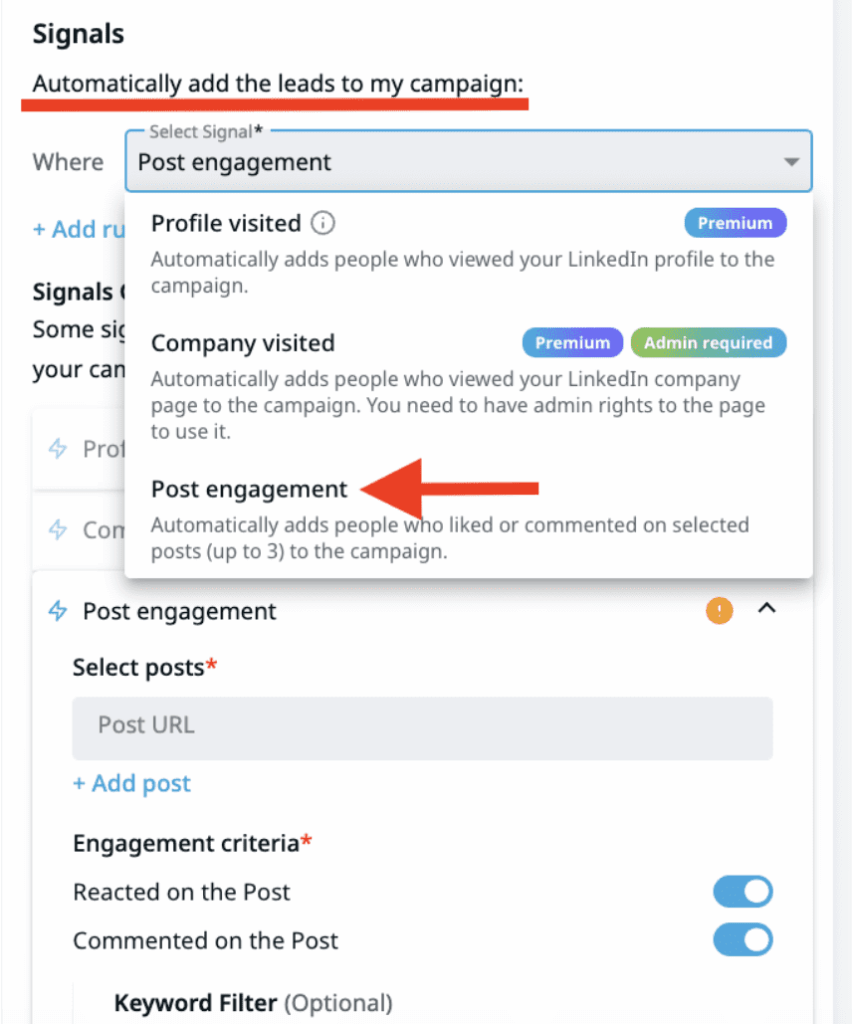
Note that only leads imported through the signal-based outreach can enter the campaign. Leads from your search results or CSV file won’t be linked to the campaign.
That said, here is how it works. From the Signals menu, choose “Post engagement” for Expandi to import those who liked or engaged with selected posts on your LinkedIn. You can add only 3 posts.
Next, add the LinkedIn post URLs. Note that once the steps are saved and the campaign is activated, you can’t modify the URLs, remove them, or add new ones. So, choose the correct link before activating the campaign.
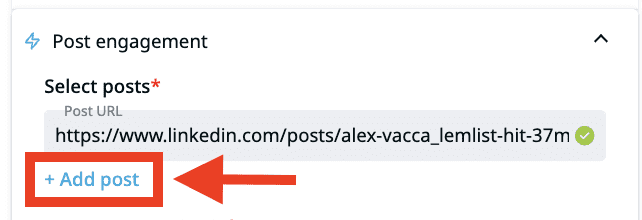
If you want to include multiple post links, click the “+Add post” button displayed under the URL bar.
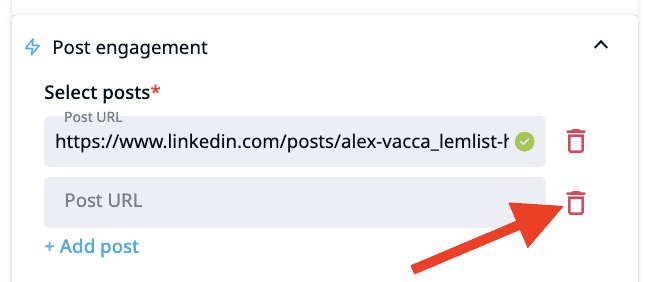
To remove any of the linked posts, select the trash icon to your right.
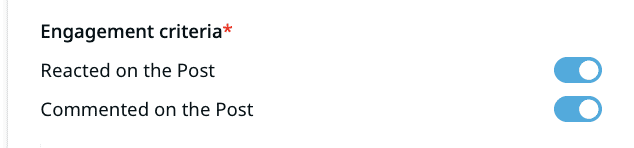
Select the engagement criteria. Toggle the buttons display to import those who liked or commented on your post(s). If the button is pressed, the action is enabled. If it’s not, it’s disabled and won’t perform that action.
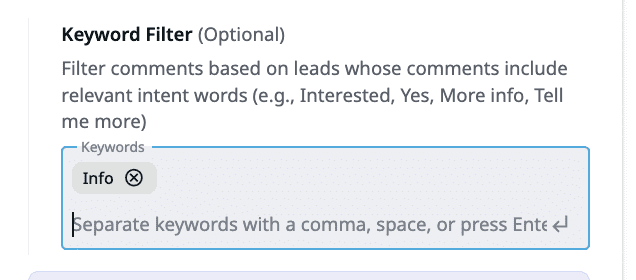
Finally, add keywords so that only leads whose comments contain those keywords are imported (Yes, tell me more, etc.). This step is completely optional.
3. Engage the leads within 24 to 48 hours
Reach out within 24 to 48 hours of someone engaging with your post, while the context is fresh. Wait five days and they won’t remember commenting, let alone what made them comment.
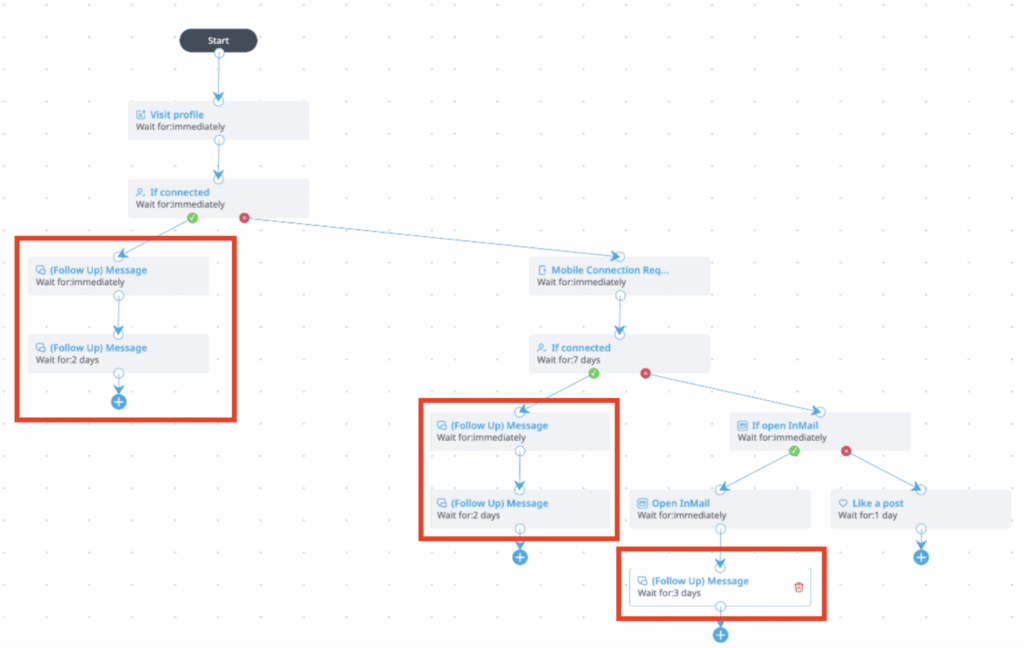
Smart Sequences handle the reach-out automatically. The play: send a connection request to the 2nd and 3rd-degree engagers with a personalized note that names the post and what they said. After they accept, wait two days before the follow-up — long enough that the request doesn’t read as instantly automated, short enough that the post is still in recent memory.
Nick Tomic, Founder and CEO at Face2Face, describes the exact play: “I had a post that got 50 comments. I used Expandi. I put an automation so that it would go through everybody who liked and commented. I added them on LinkedIn with a message saying, ‘Hey, I saw you engaged with my case study. I was wondering if you wanted to learn more.’ I booked a couple of demos from that.”
4. Start a conversation, not a pitch
Start a conversation with those leads naturally. Avoid being salesy so you don’t seem inauthentic and make everything feel transactional.
Instead, build trust first to create a relationship that doesn’t only focus on buying and selling. Understand their pain points and offer helpful solutions to increase the likelihood of long-term partnerships. This process will eventually warm them up to buy from you.
Expandi’s Campaign Builder lets you create a repeatable “post engagement to outreach” campaign you can run every week. It packages the entire outreach process — connection request, personalized follow-up, and value-add touchpoint — into a single automated workflow.
Instead of manually tracking who engaged with each post and where each lead is in the sequence, the campaign handles the process from the first contact to booked conversation. This gives you a repeatable experience without having to rebuild sequences from scratch.
Instead, every time you publish a post that receives engagement, the same campaign runs against the new batch of engaged leads without any manual intervention between steps. The result? Expandi users have automated over 29 million actions and seen a 22% connection rate and 7.2% reply rate.
Nick Tomic, founder and CEO of Face2Face, summarizes the strategy: “As you keep posting more content, as you keep winning, you can now use those posts, which are your trophies, and ask people, hey, how about my next trophy is about us.”
Maximize your engagement reach by having a system that doesn’t let the attention go to waste. As you post at the right time, reach out to prospects immediately and follow up to improve your LinkedIn outreach ROI.
Common timing mistakes that kill your reach
Here are five mistakes that cost you engagement even when your content is good.
1. Posting in your time zone instead of your audience’s
Post in your audience’s time zone to maximize visibility. Align with their 9-5 so your content appears when they are most active, not asleep. This helps increase reach and engagement.
2. Posting and disappearing on LinkedIn
The first 60-90 minutes require your active presence to respond to people’s comments on your post. Ghosting their comments kills engagement and prevents it from reaching a wider network.
3. Posting once a week
LinkedIn’s algorithm rewards consistency, as you can’t build momentum with one post. It would only limit your visibility and slow audience growth. Instead, post 3-5 times a week to increase engagement and algorithmic recognition.
4. Posting the same time on LinkedIn as Instagram or TikTok
Posting the same time on LinkedIn, Instagram, or TikTok harms your reach. Since LinkedIn peaks earlier than other social media platforms, posting at the same time could leave you confused and cause you to miss peak audience hours on each platform.
5. Chasing the “perfect time” instead of posting
There is no perfect time to post on LinkedIn. Alina Vandenberghe spent 12 months getting comfortable pressing the button. The best time to post is better than the perfect time you never use.
Turn your best-timed posts into a pipeline engine with Expandi
Posting at the right time gives your content a chance to grow. What you do with the engagement decides whether LinkedIn becomes a pipeline channel or a vanity metric.
Start an Expandi free trial. Connect the Signals feature to your highest-engagement posts so the system captures everyone who interacts. Run them through a Smart Sequence with a personalized opener that names the post they engaged with. Once the campaign works for one post, save it in the Campaign Builder so the same flow runs against every post going forward.
Want to learn how founders like Wes Bush, Alina Vandenberghe, and Nick Tomic use LinkedIn to drive real pipeline? Join the GTM Society.
FAQs about the best time to post on LinkedIn
Overnight (midnight to 5 AM) and weekends. Monday and Tuesday early mornings (before 9 AM) are also weak. Sprout Social and Buffer both confirm that Saturday and Sunday see the lowest engagement because LinkedIn is a workday platform. If your content goes live when your audience is offline, the algorithm’s Golden Hour test fails, and your post gets buried.
Yes. LinkedIn evaluates engagement in the first 60 to 90 minutes after publishing to decide whether to show your post to a wider audience. Posting at optimal times can increase impressions by 30 to 50% compared to off-peak hours. The algorithm rewards early engagement velocity. If nobody interacts in the Golden Hour, the post dies.
Carousel and document posts generate the highest engagement at 6.6% average, up to 596% more than text-only posts. Native video is second at 5.6%. Text posts still work well but need strong hooks and clear structure.
Yes. Buffer’s 2026 data shows replying to comments lifts engagement by approximately 30%. Responding within 15 minutes of a comment has the strongest effect because it falls within the algorithm’s initial evaluation window. Every reply also creates a new notification that brings the commenter back to your post, generating additional dwell time.
Post at your optimal time, then identify who engages (likes, comments, profile visits). Reach out within 24 to 48 hours with a personalized message referencing the post. Tools like Expandi’s Signals feature let you automatically detect post-engagers and trigger Smart Sequences, a personalized connection request followed by a value-add message, turning content engagement into warm pipeline conversations.



You’ve made it all the way down here, take the final step