How to Source 500+ Candidates Per Week on LinkedIn (Without Paid InMail Burning Your Budget)


Think you need to spend five figures a month on InMail credits to source at volume on LinkedIn?
A team of five recruiters using connection request campaigns inside one workspace can pipeline thousands of candidates per month, sync them to the ATS automatically, and replace most of the InMail spend with a flat-rate workflow.
Expandi’s analysis of 70,130+ campaigns shows messages to 1st-degree connections average 16.86% reply rates while cold InMail messages average 8.37%. The cheaper workflow actually performs better, and high volume LinkedIn recruiting automation runs on that gap.
In this article, you’ll learn the math, the conditional sequence setup, and the webhook that pushes candidates into your ATS.
The math of manual vs. automated LinkedIn sourcing
For most users, LinkedIn caps connection requests at 80–100 per week per account.
At the upper bound, one recruiter sending 100 requests per week reaches 5,200 candidates per year. Multiply that across a five-recruiter team and the team touches 26,000 candidates a year on connection requests alone.
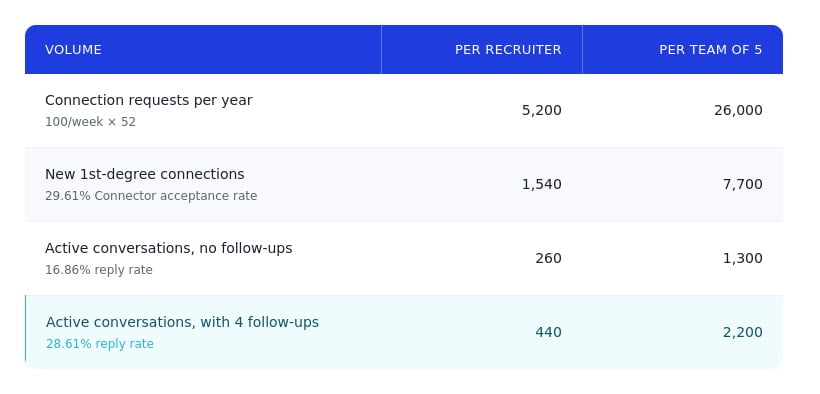
The 29.61%, 16.86%, and 28.61% benchmarks come from Expandi’s analysis of 70,130+ campaigns.
The gap between the no-follow-up and four-follow-up rows is where most of the lift sits: spaced-out follow-up roughly doubles the conversation count from the same connection volume.
Recruiting outreach likely performs at or above these sales-context numbers, since candidates respond more openly to a hiring conversation than to a SaaS pitch.
Most teams aren’t close to this volume.
Expandi’ssurvey of 2,200 sellers found 71% send 50 or fewer connection requests per week, less than half of LinkedIn’s documented cap. Recruiting teams often hit the same shortfall, for two reasons: workload and InMail spend.
When done manually, hitting 100 weekly requests per recruiter consumes a meaningful chunk of working hours: candidates found, notes written, sends logged, follow-ups scheduled, replies tracked.
Across five recruiters, the coordination overhead (avoiding duplicate outreach, syncing candidate stages back to the ATS) becomes its own problem.
Recruiter Corporate is $10,800 per seat per year, with 150 InMail credits per month bundled and additional credits at roughly $10 each. Five seats run $54,000 in base subscription cost alone.
The overage compounds fast. A five-seat team gets 9,000 bundled InMails per year. At ~70 InMails per week per recruiter — what “high outreach volume” actually looks like in practice — the team uses around 18,000 InMails a year, paying overage on the extra 9,000 at roughly $10 each. That’s ~$90,000 in InMail spend on top of the $54,000 base, putting annual LinkedIn Recruiter cost in the $140,000–$150,000 range before any promoted job posts or Talent Insights.
The per-message engagement doesn’t come out ahead either. LinkedIn’s own data puts InMail response rates at 10–25%, with a 13% minimum required to avoid suspension. Connection-request-plus-DM sequences sit at the upper end of that range or above, without the credit line item.
Automation collapses both bottlenecks.
A campaign gets set up once and runs: connection requests sent, accepted ones routed to a follow-up message, follow-ups spaced by conditional logic, replies surfaced in a shared inbox.
Recruiter time shifts to the parts that need judgment, vetting interested candidates and running conversations.
InMail still has a defensible role for candidates outside the 2nd-degree network or with locked-down profiles. But the high-volume top of the funnel doesn’t need it.
Setting up a high-volume recruiting campaign in Expandi
Three parts make up the setup: a candidate list, a sequence that respects the difference between recruiting and sales outreach, and conditional logic that routes candidates based on how they respond.
Building candidate lists with Sales Navigator filters
Sales Navigator is the most flexible source for recruiting lists. The filters that matter for sourcing differ from the ones sales teams use. For candidates, the strongest signals are:
- Job title and seniority level (for the specific role you’re hiring for)
- Industry and company size (to narrow to the relevant talent pool)
- Years in current position (a few years of tenure often correlates with passive openness)
- Posted on LinkedIn recently (signals active engagement)
- Geography (for hybrid or in-person roles)
Build the search in Sales Navigator, copy the URL, and paste it into Expandi’s Sales Navigator search campaign. Expandi pulls the list from the Sales Navigator search URL and feeds it into the campaign. Lead filtering and dedupe options are available in the campaign setup:
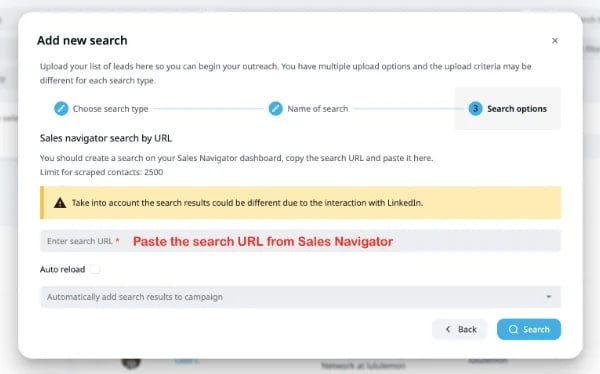
Teams without Sales Navigator can use Expandi’s other search types: post engagement search (scrape candidates who engaged with a hiring post or industry content), CSV upload from the ATS, or basic LinkedIn search.
Sequence structure for recruiting
Recruiting outreach has a different structural job than sales outreach. There’s no product to pitch, no objection to handle, no value prop to land. The whole sequence has one goal: get the candidate to express interest in a conversation.
A sequence that works for recruiting:
1. Connection request. Either no note (Mobile Connector campaigns send without one, and acceptance rates stay functional at 22.32%) or a one-line note that mentions a specific reason: recent post, mutual connection, or shared background.
Hi {first_name}, saw your recent post on {topic}. Would value connecting.
Hi {first_name}, noticed we both know {mutual_connection}. Would value connecting and learning more about your work.
2. Warm message (on acceptance). A brief introduction: who you are, where you work, why you’re reaching out. No role pitched yet. The goal is to get them comfortable replying.
Hi {first_name}, thanks for connecting. I lead recruiting for the {team_name} team at {company_name}, and your background in {specific_skill} caught my eye. Wanted to introduce myself and see if you’re open to a quick chat at some point.
3. The role message (3–5 days after the warm message). Specific role, specific reason they’d be a fit, clear ask.
Hi {first_name}, following up on my intro. We’re hiring a {role_title} on the {team_name} team. The role involves {specific_responsibility}, and given your work on {their_recent_project}, I think you’d fit well. Open to a 15-minute call this week or next?
4. First follow-up (5–7 days later). Reframe with a different angle, a different role, or a useful resource. Not “did you see my last message?”
Hi {first_name}, sharing a relevant resource: the {team_name} team recently published {article_or_post} on {topic}. Thought you might find it useful. Still happy to chat about {role_title} or other roles if you’re open.
5. Second follow-up (7–10 days later). A short, no-pressure close.
Hi {first_name}, last note from me on this. If the timing isn’t right, totally understand. Would it be okay to keep in touch for future roles? I’ll add you to our internal candidate pool and reach out when something relevant opens up.
Expandi’s 2025 outreach report data shows Messenger campaign reply rates climb from 19.31% with no follow-up to 28.61% at four follow-ups.
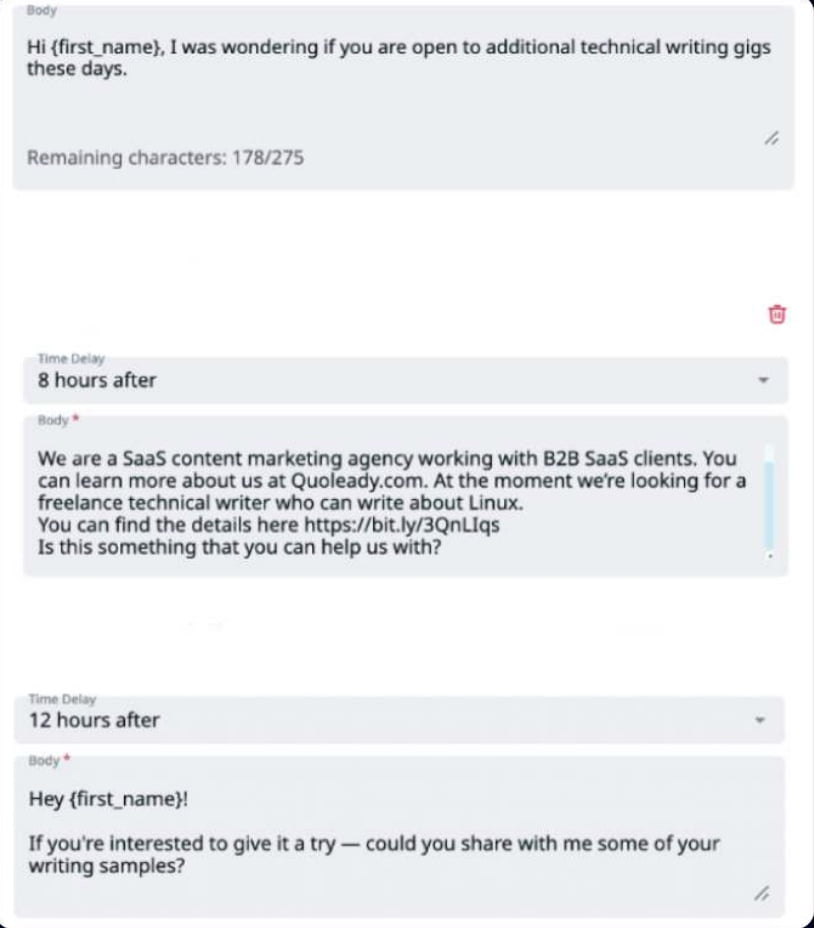
The takeaway for recruiting: persistent, spaced-out follow-up consistently beats one-shot outreach.
Conditional logic for recruiting
Each step needs a decision attached. For recruiting, the rules are simple:
- Connection accepted → wait 1–2 days → warm message. The wait avoids looking automated.
- No accept in 14 days → exit campaign. Move the candidate to a “passive” segment for re-engagement in a future quarter.
- Reply received at any step → exit automation. A live recruiter takes the conversation. Automation handles the opener.
- No reply after final follow-up → tag as “no response” and exit. Surface in a list for review.
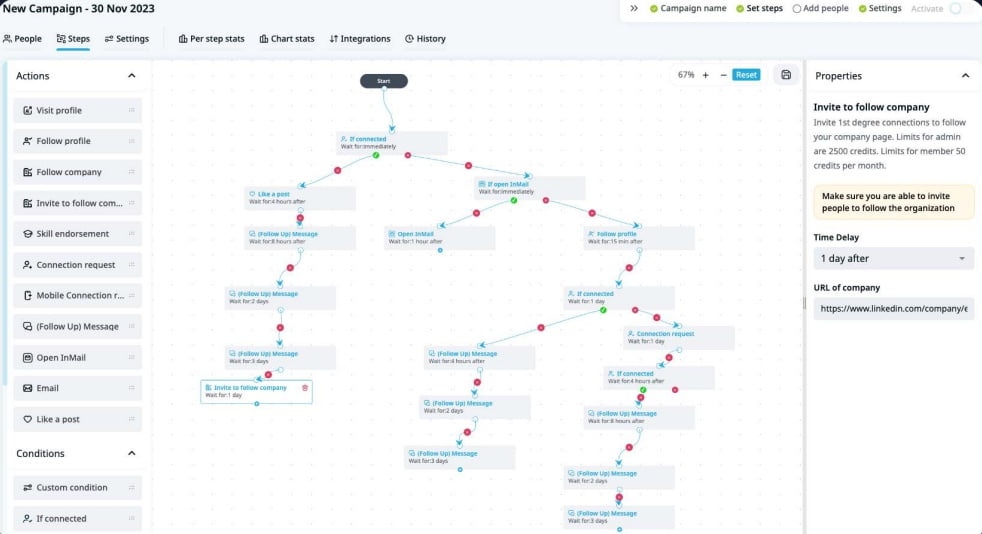
Expandi’s Builder campaign handles all of this through visual conditional logic, connecting steps with “if accepted” and “if no reply” branches.
Scaling across a recruiting team
A campaign built for one recruiter doesn’t automatically scale to five. Without shared infrastructure, the same problems that make manual sourcing painful at one-recruiter scale (duplicate outreach, lost context, inconsistent messaging, no visibility into what’s working) multiply when more recruiters join.
Expandi’s Workspaces feature handles this by giving the team one shared environment to operate from, and significantly reducing the hours that go into the process.
Multiple LinkedIn accounts, one workspace
Each recruiter connects their own LinkedIn account to the workspace, but campaigns, templates, and lead lists live at the workspace level. There’s no per-seat license fee for additional users; you can invite as many recruiters, hiring managers, or admins as needed without changing the subscription.
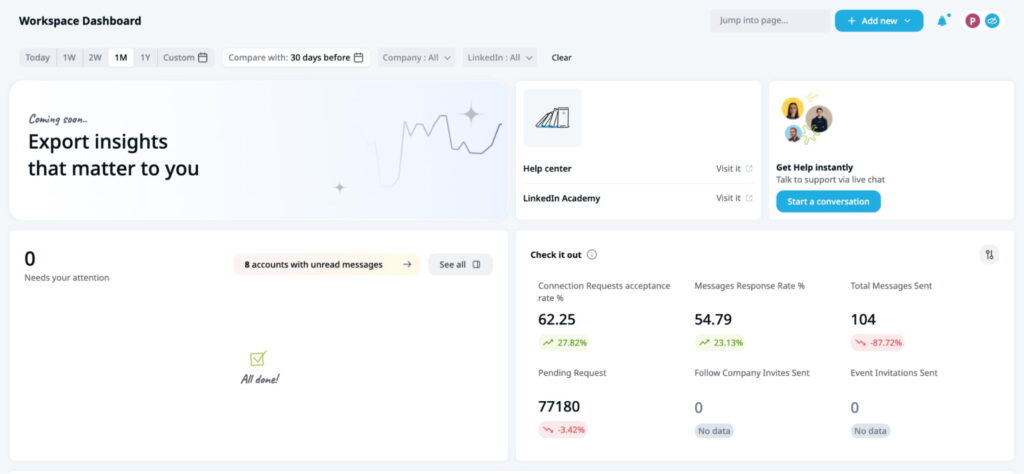
Users get a role with appropriate permissions — either a predefined role (Admin, Workspaces member, Company Manager) or a custom role built from Expandi’s 100+ permission settings — so hiring managers can see pipeline status without being able to modify campaigns.
Shared Campaigns and automatic lead splitting
A bigger coordination problem in multi-recruiter sourcing is duplicate outreach. Two recruiters reaching out to the same candidate makes the team look uncoordinated and reduces the chance either gets a reply.
Expandi’s Shared Campaigns solves this directly: a single campaign can be assigned to multiple recruiters, and the lead list is split automatically so each candidate is contacted by exactly one recruiter. No spreadsheets, no manual coordination.
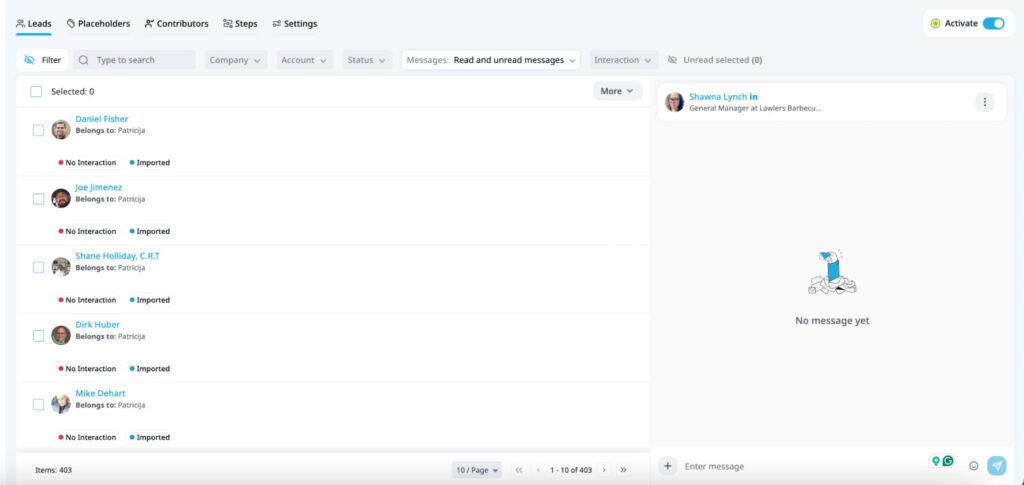
This also means the team can run one well-tuned recruiting sequence (built by whoever’s best at message craft) across all recruiters, rather than five different versions where some perform 2x better than others.
Shared inbox for live conversations
Once candidates start replying, the recruiter who owns that candidate needs to take over the conversation. Expandi’s Global Inbox surfaces all replies across all team LinkedIn accounts in one place. Each conversation shows who owns it, what stage they’re in, and what’s been said.
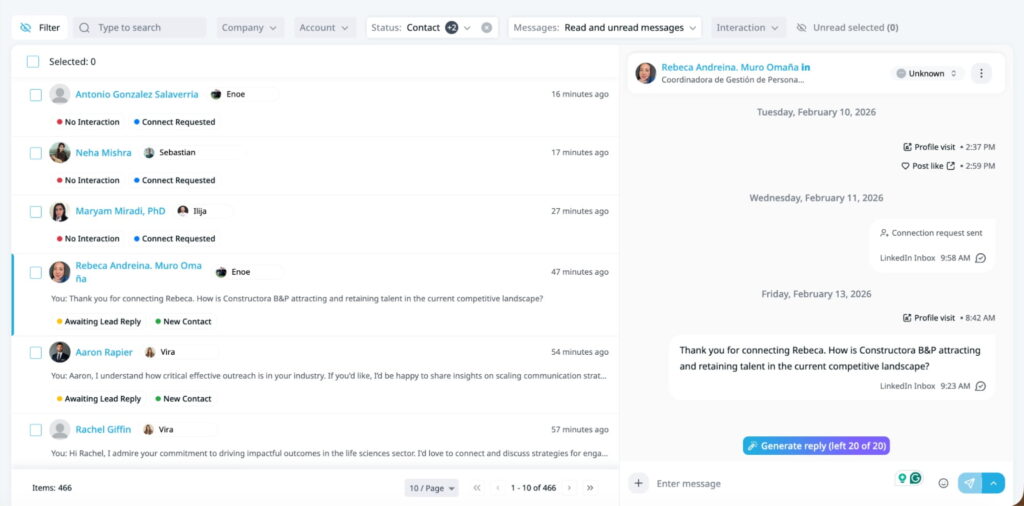
For team leads, the inbox doubles as a coaching surface: managers can see how conversations are progressing without asking for updates.
Template sharing and team-wide consistency
When one recruiter finds a message that performs well, sharing it across the team raises everyone’s reply rate.
Expandi lets recruiters share their best-performing campaigns and templates with the rest of the workspace in a few clicks. The team converges on what works rather than each recruiter inventing their own version.
Webhook to ATS integration
A recurring manual step in recruiting workflows is candidate data entry. A candidate replies on LinkedIn; the recruiter then clicks into the ATS, finds the candidate’s record (or creates one), pastes in the relevant context, updates the stage.
Multiply that across hundreds of candidates a week and the data-entry tax becomes its own bottleneck. It’s also the kind of work that quietly slips when recruiters are busy.
Expandi’s webhook system handles this automatically.
When a specific event happens in a campaign (connection accepted, reply received, candidate tagged with a stage label), Expandi fires a webhook to whatever endpoint you’ve configured.
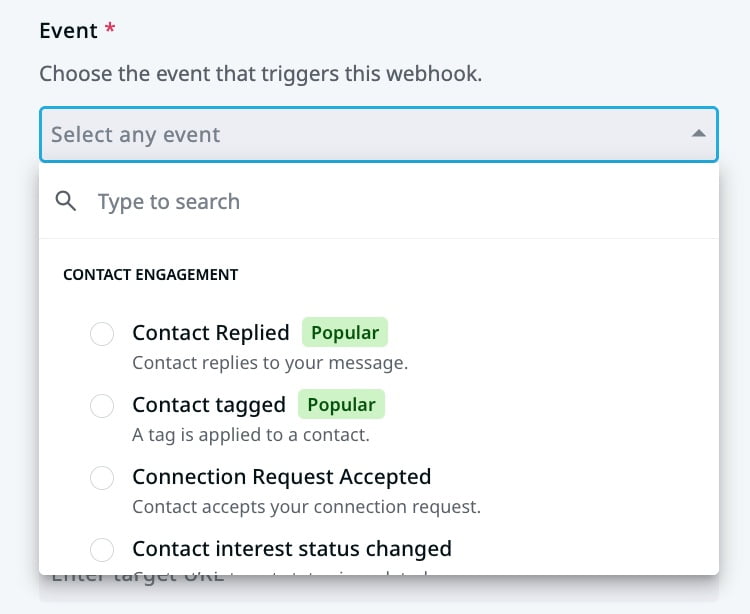
That endpoint can be your ATS directly if it accepts webhooks, a middleware tool like Zapier or Make.com, or a custom integration.
What triggers what
Common event-to-action mappings for recruiting:
- Connection accepted → create a candidate record in the ATS with role tagged, status “new lead”
- Reply received → update the candidate’s status to “responded” and copy the message into the ATS notes
- Candidate tagged “interested” → move the record to the “screening” stage in the ATS pipeline
- Candidate tagged “not interested” → archive the record with a reason code
The recruiter rarely needs to touch the ATS until the candidate is at a stage where actual human judgment is needed: screening, scheduling, evaluation. Mechanical steps (record exists, message sent, reply received) happen automatically in the background.
Setup paths
For ATSes that accept webhooks, Expandi can push events directly. For ATSes without native webhook endpoints, the standard pattern is Expandi → Zapier or Make → ATS, with the middleware translating Expandi’s webhook payload into whatever format the ATS expects.
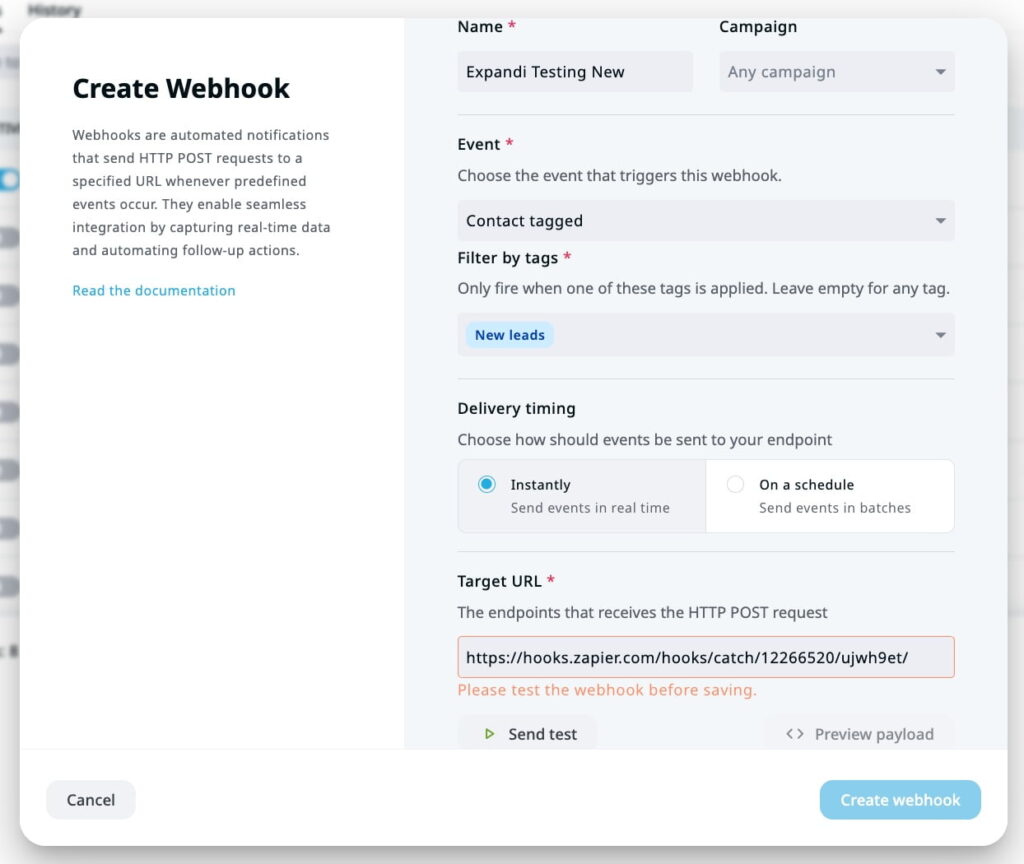
Setup happens once, typically in the first week of using Expandi, and rarely needs revisiting. The setup cost is a few hours; the ongoing benefit is that every candidate touched through Expandi shows up in the ATS with full context, no manual logging.
That’s the operational difference between a recruiting team that scales with automation and one that hits a ceiling because the data plumbing is manual.
3 use cases for smarter recruitment with Expandi
Learn how to close 2x more candidates using LinkedIn automation.

Compliance: LinkedIn automation in a recruiting context
LinkedIn’s terms of service restrict third-party automation tools, and the platform actively detects and limits accounts that look like bots. That includes spam patterns, unrealistic activity volume, and accounts that show no human behavior between actions.
Automation that mimics human behavior (sending through normal hours, respecting rate limits, varying activity patterns) operates in a gray area LinkedIn tolerates in practice.
Expandi’s safety architecture is built around this: gradual ramp-up for new accounts, daily and weekly limits aligned with what a human user would do, randomized timing between actions.
For recruiting specifically, there are additional considerations beyond LinkedIn’s terms.
- Account safety: A recruiter’s LinkedIn account is a real asset. Losing it mid-hire is costly to rebuild: new connections, lost message history, restored credibility. Expandi’s safety defaults respect LinkedIn’s 80–100 weekly cap on new accounts and ramp gradually. Higher volume (up to 300/week per account) is achievable once accounts are warmed up and Mobile Connector is layered in, but pushing past LinkedIn’s documented limits on a fresh account is what triggers restrictions.
- Candidate consent and GDPR: EU candidates fall under GDPR. The legitimate-interest basis covers cold recruiting outreach in most cases, but candidates have the right to opt out, and that opt-out has to be respected immediately. Expandi’s tagging system makes this easy to operationalize: a candidate who replies “not interested” or “remove me” gets tagged, the campaign exits them, and they don’t get re-touched in future campaigns from the same workspace.
- Honest framing: The fastest way to lose credibility is to pretend automation isn’t automation. Use a real recruiter’s name and account and don’t impersonate other employees. Expandi campaigns built this way send messages from the recruiter’s own account in the recruiter’s own voice; they don’t generate fake personas.
A candidate who realizes they’re talking to a bot pretending to be a person becomes a candidate who tells other candidates. The compliance argument and the brand argument are the same argument.
Real-world benchmarks
Setting expectations for a high-volume recruiting program needs concrete numbers at each step of the funnel. Here are the benchmarks recruiting teams can realistically plan around, drawn from Expandi’s platform data and LinkedIn’s own published research.
Connection request stage
- Connector campaigns: 29.61% acceptance rate (Expandi platform average; for warm targets)
- Mobile Connector campaigns: 22.32% acceptance rate (no personalization on the request itself; for raw volume)
- Builder campaigns with warm-up: 22% acceptance rate (lower because prospects are colder; warm-up offsets first-touch resistance)
Recruiting outreach likely sits at the higher end of these ranges because recruiter-to-candidate framing is more welcome than vendor-to-prospect framing. The 29.61% Connector benchmark is the realistic floor for a recruiter doing targeted outreach to candidates who match their ICP.
Reply stage
- Messenger campaigns to 1st-degree connections: 16.86% reply rate at baseline
- With 2 follow-ups: 22.47%
- With 4 follow-ups: 28.61%
- With 6+ follow-ups: 31.36%
- Cold paid LinkedIn Recruiter InMail: 10–25% range per LinkedIn’s own data
The pattern we see is this: persistent, spaced-out follow-up roughly doubles your reply rate compared to one-and-done outreach. A recruiting sequence with the initial warm message plus 3-4 follow-ups can realistically reach reply rates in the high 20s.
Funnel math
Apply these benchmarks to a single recruiter’s weekly volume:
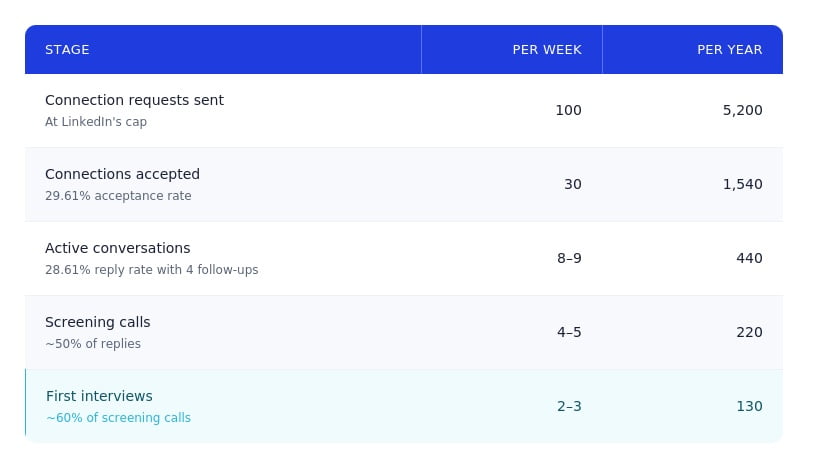
These are directional.
Conversion from screening to interview, interview to offer, and offer to hire varies significantly by role seniority, industry, and the strength of the recruiting brand.
“With Expandi, our recurring hiring process has been reduced from 3 months to 1-2 weeks,” confirms Iryna, Director of Operations at Quoleady.
A team with strong employer branding and well-defined target roles will see conversion rates above these floors; a team competing for hard-to-reach senior talent will see lower.
Setting up the first campaign
The case for connection-request automation in recruiting comes down to four things: scaling volume, saving costs, boosting engagement, and streamlining workflows.
The starting move is one campaign:
Build one list. Run one campaign on one recruiter’s account for two weeks. If acceptance and replies land near these benchmarks, expand to the team.Start a 7-day Expandi trial to set up your first recruiting campaign.






You’ve made it all the way down here, take the final step