Why Not to Buy LinkedIn Accounts for Outreach

Buying LinkedIn accounts looks like a shortcut, but it really isn’t.
Most cheap accounts are either fabricated or compromised — not worth the price, regardless of what you pay. The ones that do work temporarily get flagged by LinkedIn’s detection systems, which run continuously and group suspicious accounts with the real profiles they interact with.
And when the ban lands, it doesn’t always stay contained to the purchased account.
Beyond the platform risk, there’s legal exposure depending on how the account was obtained and where you operate.
This guide covers why the shortcut costs more than it saves, and how to build a multi-account outreach operation that doesn’t carry those risks.
Why outreach teams hit a volume ceiling
Salespeople often get frustrated with LinkedIn outreach because of the platform’s regulations. Take a look at the connection request’s limit, for example, it’s pegged at 100 per week.
According to Cleverly’s LinkedIn benchmark roundup, the average acceptance rate for LinkedIn connections is 30-45%. That means if you send 100 requests, about 30-45 people will likely accept if you get the targeting and messaging right.
In other words, fewer requests means a lower acceptance rate and less access to decision-makers on the platform. So, the desire to opt for a faster route arises.
If you acquire more LinkedIn accounts at a certain cost, you already have access to an established online presence. Whether it’s aged LinkedIn accounts or high-quality accounts with verified IDs, you can connect with as many people as you like.
Think about this. Suppose you connect with 80-100 people on an account per week, 10 accounts means 800-1,000 per week. This means you can bypass LinkedIn’s connections limit and reach more decision-makers who can move the pipeline forward to closed deals.
However, this move comes with a risk. What seems like an outright solution may quietly work against you in the long run. Here are the reasons below.
The market for bought LinkedIn accounts is structurally fraudulent
Bought LinkedIn accounts seems like a great offer. But it poses far more risks than the amount you’re offering. This section explores the market for bought LinkedIn accounts and what really happens after purchase.
What a real aged account is actually worth
Purchased LinkedIn accounts seem to be worth it. For example, an aged LinkedIn account builds instant credibility. The longer an account has existed and maintained consistent activity on LinkedIn, the more high-quality connections it has gained over time.
Besides, having a detailed activity record makes them appear legitimate because they already have the trust that brand-new profiles may lack. So, connecting with more decision-makers wouldn’t be a problem.
But here’s the truth: nobody sells an account that took months or years to build away. Given all the sweat and grind over the previous months, selling an aged account for $50, for example, raises lots of questions. Is this real? Or am I being scammed?
The bottom line is that the account’s cost sounds too good to be true for such a low rate. An account that took months to build isn’t going for $50. If it is, you’re not buying value; you’re buying a liability.
What happens after the purchase
If you eventually make the purchase, the LinkedIn account’s credentials won’t likely work. They’re either stopped at the point of registration, deactivated, or never functional to begin with. The remaining 20% that do activate are either fake or contain AI-generated profiles with no real history or actual trust signals.
It doesn’t matter whether it’s an aged, phone-verified, or bulk account. According to LinkedIn’s Engineering blogs, LinkedIn’s machine learning models would fish them out.
The platform’s downstream model identifies clusters of fake accounts based on shared attributes or abnormally distributed data controlled by a single bad actor. Additionally, its activity-based models also obtain more information on the account’s behavior to determine whether it’s fake.
There’s also the Isolation Forest algorithm, which specifically detects account takeovers and users who use automation to send spam. With all these technologies in place, LinkedIn’s community report shows that the platform’s automated defenses have successfully blocked about 83.79 million fake accounts between January and June 2025 alone.
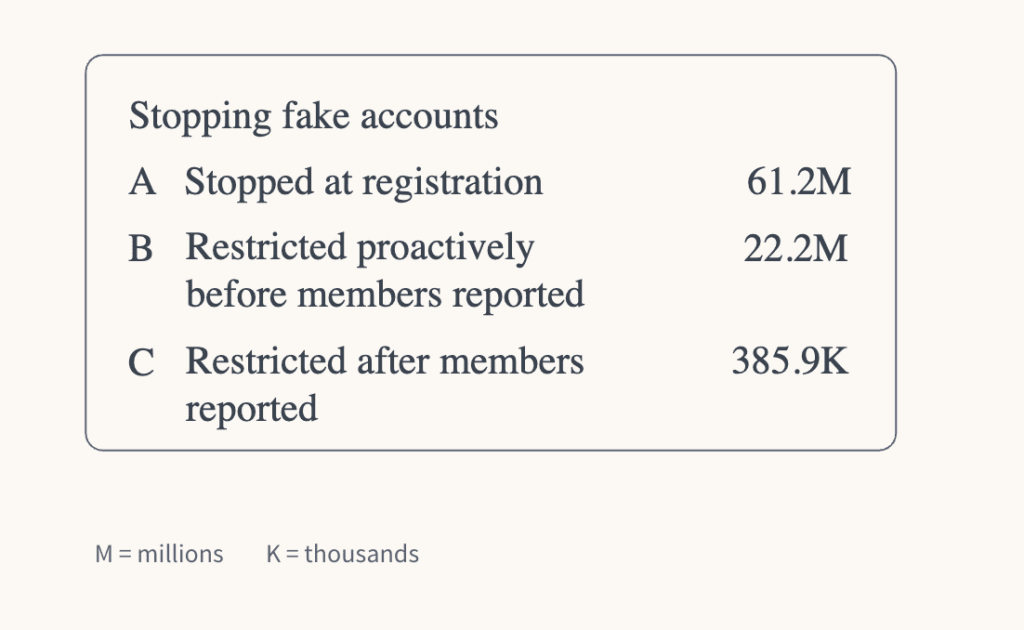
So, even if you get past the registration phase, you’re working on borrowed time. Your activity on the platform and how you interact with members can give you away. At the end, what looked like a scalable shortcut is becoming harder to execute over time.
The risk nobody warns you about: silent contamination
LinkedIn doesn’t just place an immediate ban. It quietly gathers data that are statistically justified before taking immediate action. Here’s an overview of how they work if you want to create a campaign on LinkedIn.
How LinkedIn links accounts before any ban
LinkedIn enforces its regulations seriously, monitoring user behavior through automated systems and manual reviews. Its automated detection process runs 24/7 to analyze behavioral patterns for inhuman consistency and suspicious activity.
For example, the platform tracks your IP address to detect unusual activities. If you log into multiple LinkedIn accounts from the same IP address, LinkedIn’s system registers that a single network source controls multiple profiles. While this activity doesn’t trigger an immediate ban, it flags the accounts for closer monitoring.
Likewise, LinkedIn checks your browser’s cookies for unusual activity. If you log in to a purchased account in the same browser you use for your primary profiles, LinkedIn can read residual cookie data that links the sessions together.
Even if you log out of one account before logging into another, the traces remain until the cookies are fully cleared. Since most users don’t clear cookies between sessions, LinkedIn collects data on accounts accessed from the same environment. So, while the ban isn’t immediate, the platform flags it.
Beyond your IP address and browser cookies, LinkedIn also collects your device fingerprint, which includes your browser version, operating system, installed fonts, hardware configuration, and more.
Even if you switch networks or use a VPN, your device still leaves the same fingerprints across sessions. LinkedIn matches accounts that are logged in from the same device, making IP masking less effective than you might think.
Your login timing is another factor LinkedIn checks. Its activity-based models focus on how and when you access accounts. So, if multiple purchased accounts consistently log in and out at the same time of day, or show login gaps that mirror each other, the platform treats it as coordinated control by a single user.
Since human behavior is naturally irregular, uniform timing across multiple accounts signals repetitive patterns, which LinkedIn’s automated system can flag. In all of these, note that no single factor gets an account banned immediately.
However, LinkedIn’s detection system builds a case by clustering accounts (your primary profile and the purchased ones) that exhibit these signals. Once the platform’s model scores the clusters and sees that it’s fake, it pushes its verdict to every individual account within that cluster, including your primary profile.
What “silent review” actually costs you
As mentioned earlier, LinkedIn silently reviews clusters of accounts whose behavior is unusual on the platform. But here’s what it actually costs you — and most of it happens while you think your account is working. First, it reduces your SSI score. Buying LinkedIn accounts indirectly violates three out of the four pillars of your SSI:
- Find the right people: Buying LinkedIn accounts means getting connections who don’t match your ICP. This sends a negative signal to LinkedIn’s algorithm that you’re not targeting the right people for your business.
- Engage by sharing insights: When you get low engagements (likes, comments, or shares) despite a reasonable number of connections, LinkedIn interprets this as low-quality content and deprioritizes your visibility accordingly.
- Build relationships: Purchasing accounts doesn’t earn you genuine trust or credibility. Connections don’t like your posts, reply to your messages, or have meaningful conversations with you. LinkedIn notices the absence of these relationships.
Consequently, LinkedIn quietly detects this mismatch as artificial growth and begins lowering your score, which affects your sales pipeline. According to LinkedIn, social selling leaders creates 45% more opportunities than peers with lower SSI. This means not only is your score affected, but your pipeline slowly leaks revenue.
LinkedIn’s silent reviews also suppress your organic reach. Once its automated system flags your accounts for manual review, your posts stop surfacing to second and third-degree connections. Your profile doesn’t appear in search results as it should. While everything looks normal on your dashboard, your actual visibility shrinks.
As your SSI score decays and your post’s reach becomes suppressed, your connection acceptance rate also drops. Decision-makers are less likely to accept requests from profiles that appear as low-quality. So, this creates a compounding problem where the shortcut produces worse results than the original approach.
How LinkedIn detects fake accounts
Before LinkedIn takes action against an account, it examines patterns — the signs that indicate an account is actually fake. For example, let’s say you manage multiple LinkedIn accounts and they log in at the same time; that’s a sign.
Or someone who already has a LinkedIn account attempts to create another one. These are the signals the algorithm watches. In this section, you’ll further learn about the behavioral triggers that LinkedIn uses to detect fake accounts based on cues from LinkedIn’s engineering blogs.
The 5 behavioral triggers
LinkedIn detects fake accounts upon registration of new ones. While signup attempts with a low abuse risk score are allowed to register right away, attempts with a high abuse risk score are prevented from creating an account.
As for accounts with medium abuse risk scores, you have to pass through the platform’s security checks to verify you’re a real person. If you succeed, you get to create an account. If it isn’t, the platform blocks it.
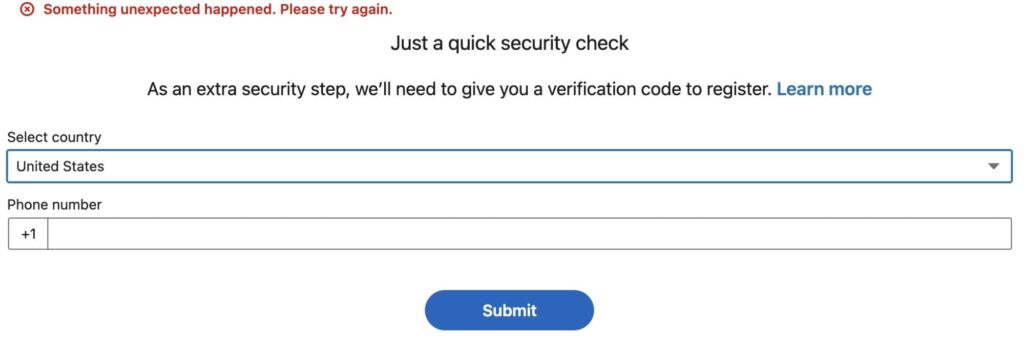
For example, as someone who has an existing LinkedIn account, I tried creating a second one. At the point of registration, the platform ran an extra security check to verify my phone number.
All attempts to get past this stage proved abortive. I used new names, created a new email address, and entered a different phone number. Yet, I didn’t get through. According to LinkedIn’s Engineering blog, its registration model blocks the creation of 5 million accounts in a single day. That shows how effective LinkedIn’s registration models are
Also, LinkedIn uses its automated system to analyze behavioral patterns, such as a low connection acceptance rate, to detect fake accounts.
Sending a high volume of connection requests that are rarely accepted signals that your outreach is unwanted or your profile lacks credibility to LinkedIn’s algorithm. If you perform this act from multiple accounts, LinkedIn’s downstream model will create a cluster from such accounts and flag them.
Additionally, when a person reports your profile or content, that signal goes directly to LinkedIn’s automated system. According to LinkedIn Help Center documentation, this action prevents the sender from sending further information and provides feedback that may be used to restrict the sender’s accounts.
An article published by LinkedIn Engineering Blog also confirmed that member-reported signals feed directly into LinkedIn’s automated system. Here’s what it says: “Members give us valuable information by reporting accounts that have not been caught by our models so that they can go through additional scoring and review.”
Next is robotic timing consistency. LinkedIn’s deep learning system is specifically designed to detect the consistency of automated outreach. As explained in one of LinkedIn Engineering’s blogs, their models analyze the sequence and timing of users’ actions to detect abusive patterns. So, even if you randomize the timing of your outreach messages, it still produces patterns that the model can detect.
Finally, LinkedIn detects fake accounts through AI-generated photos. In their 2024 engineering research on deepfake detection, their automated system was trained on over 105,900 AI-generated images using pixel gradients across various synthesis engines.
This was to determine whether the images were real. If the gradients looked uniform or revealed hidden repetition, it’s most likely AI-generated. So, if a purchased account uses an AI-generated photo (in most cases, they do), LinkedIn’s deepfake model would detect it and eliminate the fake accounts.
Why buying accounts is also a legal risk
So far, we’ve mentioned how purchasing LinkedIn accounts can violate the platform’s terms of service and result in restrictions. But that’s not all. Purchased accounts also carry legal risks, which you will learn about in this section.
In January 2025, LinkedIn filed and won a federal lawsuit against Proxycurl, a data-capture tool for HR professionals, for violating its user agreement. The case alleged that Proxycurls operated hundreds of thousands of fake accounts to collect personal and professional information on millions of users and sell it to their customers.
Although the company claimed it only scraped publicly available data, the legal risk couldn’t be avoided. Sarah Wright, VP of Legal at LinkedIn, states in her LinkedIn post, “I’m pleased to report that we’ve now resolved this case in a way that holds Proxycurl accountable for these harmful actions. This resolution requires Proxycurl to permanently delete all LinkedIn data obtained through unauthorized means and stop accessing LinkedIn unlawfully.”
As a result, Proxycurl has shut down its operations and has focused on an entirely new data platform. Additionally, LinkedIn sues ProAPIs, a data-scraping company that charges its customers up to $15,000 per month for LinkedIn data. LinkedIn complains that the company runs millions of fake accounts and violates its terms of service.
Although a verdict hasn’t been given, Sarah Wright says in a LinkedIn post, “We are deeply committed to safeguarding our members’ information. That’s why we continue to invest in advanced technology and dedicated teams to stop unauthorized data scraping, and when necessary, we take aggressive legal action to prevent misuse of member information.”
In short, LinkedIn takes its data policies seriously and would execute legal actions against a vendor that creates and sells fake LinkedIn accounts to its customers.
How to fix the volume math problem
The instinct to buy LinkedIn accounts is a response to a genuine infrastructure gap.
When outreach teams hit volume ceilings, they look for ways to bypass the limits, even if it means bending the rules. It’s important to figure out if you can get past this and build an outreach infrastructure that scales without resorting to purchased accounts.
1. Start with the seats you already have
Before you purchase an account for your LinkedIn cold outreach, run an audit first. Start by mapping every team member to reach out to targeted LinkedIn profiles such as SDRs, accounts, founders, and more.
These are not purchased accounts; they are real people who have built meaningful connections and can reach out on behalf of your company. A team of ten active LinkedIn profiles represents 800 to 1,000 LinkedIn connection requests per week.
It’s the same math that made buying accounts seem attractive. Except this time, the accounts are legitimate and won’t be detected by LinkedIn’s automated systems that put your primary profile or company’s reputation at risk.
2. Why warm-up protocol is non-negotiable
A real LinkedIn account won’t connect with 80 people on its first day on the platform. Such activity triggers LinkedIn’s automated system and prompts it to flag your account as a fake one. Instead, you start small with your account, stay consistent, and ramp up gradually.
For example, start by sending 10-15 requests per day, maintain that pace for at least a week, and gradually increase over two to four weeks until it reaches the target volume. Below is a concrete week-by-week approach for your LinkedIn warm-up plan:
- Before you start: Set the target baseline (e.g., 15 connection requests per day or 5 DMs per day)
- Week 1: Start at about 25% target per day (3-4 connection requests and 1-2 messages per day).
- Week 2: Increase to 35-40% per day (add 5 to 6 connection requests and 2-3 DMs)
- Week 3: Increase to 50-60% per day (add 7-8 connection requests and 3 DMs)
- Week 4: Continue increasing by 10-20% each week until you reach your baseline and maintain consistently.
During this period, you signal legitimacy to LinkedIn’s models and establish a behavioral baseline for future activities. Without this process, you would immediately spike to high volume and make your accounts look inauthentic to LinkedIn’s activity-based models, which can flag your behavior.
Read more: Boost your LinkedIn conversions with trigger-based outreach
3. The human-pattern settings that keep accounts healthy
Although warm-ups get accounts to send at more volume, human-pattern sending is what keeps them there. If you set up your LinkedIn message automation system to send identical message templates at the same time and volume, LinkedIn’s AI would detect the robotic consistency.
Consequently, you need to humanize your sending patterns. Here are three factors that address it:
- Send-time randomization: Distributes outreach messages at different times of day rather than sending them all at the same time. This creates irregularities when your requests are sent.
- Volume variation: Your outreach volume should fluctuate naturally – some days higher and some days lower. Sending 25 messages every single day makes your process look automated, no matter how authentic your account is.
- Message rotation: Rotating multiple message variants with genuine personalization makes interactions feel like a human choice rather than a scheduled process.
With all these processes and a high acceptance rate that makes your outreach look personalized and authentic, LinkedIn’s automated systems would be less likely to detect your accounts as fake or take actions against them.
How Expandi brings this together
While the three steps above can be managed manually across two to three seats, you can’t attempt such at scale. What you’d end up with is a time-consuming process that leaves your team exhausted.
Plus, the margin for human error is too wide, and a single slip across accounts can trigger LinkedIn detection models.
But Expandi solves your operational problem. Here, each seat runs from its own dedicated cloud environment with a unique IP address, so there’s no accidental overlap between accounts — no shared network signals or device fingerprints.
Besides, it maintains a human sending pattern that runs automatically in the background to avoid robotic consistency that triggers detections.
Thanks to these processes, Expandi has witnessed a 22% connection approval rate and a 7.22% reply rate with its Builder campaigns. Additionally, its Messenger campaign, which enables you to build relationships with 1st-degree connections, has seen a 16.86% reply rate across 20M+ campaigns.
You can also witness these growths without resorting to purchased accounts that compromise your firm’s reputation.
To get started, book a 14-day free trial today!
FAQs about buying LinkedIn accounts for outreach
No, “aged” is the most expensive scam tier. A genuinely aged account (2+ years, real connections) is worth thousands, not $50–$200. What sellers call “aged” is typically a fabricated history that doesn’t match the economic value.
Three things happen if LinkedIn detects a bought account: the account is restricted or banned, your primary account may enter silent review if linked by IP or device, and your SSI score may be suppressed before any visible action is taken. The ban is often the last event, not the first.
Real employee seats + proper warm-up protocol + cloud-based automation with human-pattern timing. This is the only approach that is both ToS-compliant and durable — and the performance data shows it outperforms bought accounts on every meaningful metric.




You’ve made it all the way down here, take the final step