How to Build Your Conference Pipeline on LinkedIn: The 4 Week Strategy


A team flies into a conference. They work the floor for two days, hand out cards, sit in on a few sessions, and fly home with a list of names. Some make it into the CRM. Almost none turn into pipeline.
The teams running pipeline at the same conferences arrived with most of their meetings already booked. That work happens four weeks earlier, on LinkedIn.
Leonard Eldic, who runs SaaStanak, names the cost in an interview with our team:
“My pain with conferences is that you usually spend more time traveling to the place and actually with logistics than with networking.”
By the time you’re standing at a booth, you’ve already lost half the hours you’d planned on people.
Splash’s 2025 Event Outlook Report finds 72% of marketers see prospects close faster after attending their events. That only matters if the right prospects walk up to you in the first place. Which is to say: the conference is the back half of the work. The front half is on LinkedIn.
This article walks through the four-week sequence: list-building, timing, message templates, and Expandi setup.
Why conference timing makes cold outreach warm
Cold outreach has to do all the contextual work. You explain who you are, what you do, why now. The event does that work for you. “We’re both at SaaStock next month” doesn’t need to be earned; the conference is the reason.
That shared context is what makes pre-event LinkedIn messages outperform standard cold outreach. According to the 2025 State of Event and Industry Benchmarks report, half of attendees say in-person B2B conferences offer the best networking opportunities. The benefit is only available to teams who booked the right meetings before they walked in.
In short, conferences aren’t just dates on a calendar when people agree to dine, drink, hear speeches, and return home. It’s a place where you leave with deep knowledge, friendships, and opportunities that you won’t always get via the cold outreach approach.
Pre-conference outreach is signal-based outreach with a calendar attached
A signal isn’t a prediction. It’s a real LinkedIn moment that tells you someone is paying attention right now. Profile views, post engagement, comments on the speaker lineup — these are people raising their hand without filling out a form.
The conference is one of the cleanest signals you’ll work with. Someone liking the conference page’s keynote announcement, commenting on a speaker’s panel teaser, or RSVPing to a sponsor’s booth event is showing intent on a clear timeline: they’ll be in the same room as you in four weeks.
Every section below treats those signals as the input to outreach, rather than the output of it.
The 4-week conference outreach timeline
Four weeks is the window where attendees have committed to the trip but haven’t filled their calendars yet. Earlier and the message lands before they’re thinking about it. Later and their meetings are already booked.
The sequence below covers each week leading up, plus the day of and the post-event follow-up.
Week 4 before: Build the list
There’s no conference without people. This is why you have to build an attendee list, which happens in four ways:
A. Public attendee, speaker, and sponsor lists
Most B2B conferences publish a speaker page, sponsor list, and partial attendee directory. These are the first scrape.
For paid events that don’t, the speaker and sponsor lists alone are usually enough to identify which companies are sending people.
Cross-reference each company against your ICP, then go to LinkedIn to find who from that company is likely to be there (Head of X, VP of Y, etc.).
B. Engagement-based list building from conference content.
This is the signal play. The conference itself, the speakers, and the sponsors will all post about the event in the weeks leading up. Whoever engages (likes, comments, shares) is self-identifying as an attendee or interested party. Use Expandi’s signal-based outreach to scrape engagement on those posts as the lists update.
You get alerts on those who interacted with your LinkedIn posts so you can capture the leads in real-time. This lets you create a targeted list that you can further contact about the event.
Michael Kamleitner, founder of Walls.io, runs this play from the exhibitor side every year.
“We really do care a lot about filtering down to our ICP… and then we are putting that into a customized outreach campaign. Otherwise you get crap traffic on your booth and that’s not worth the time.”
The logic carries over if you’re attending without a booth: a short list of right-fit names beats a long list of “they were there.”
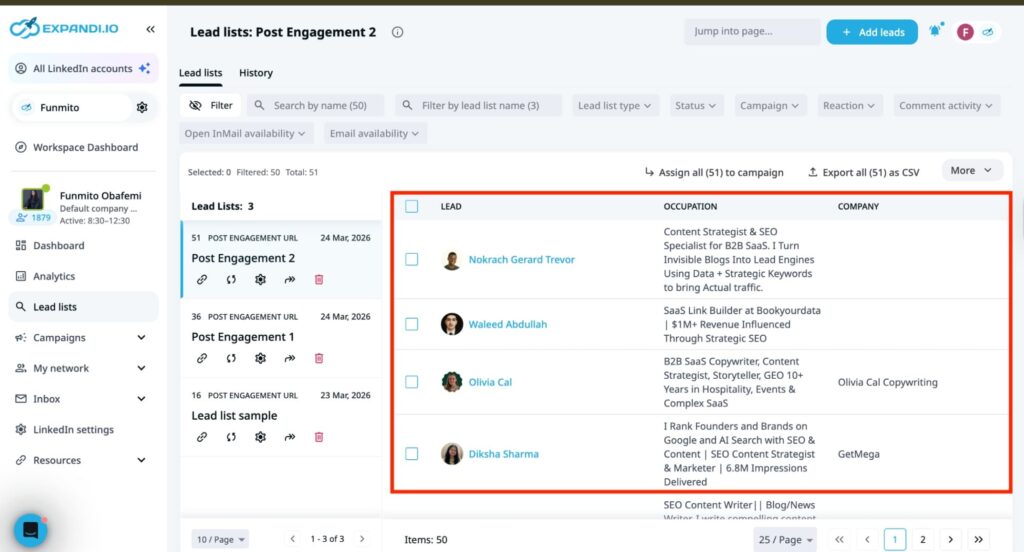
C. Filtering with LinkedIn Sales Navigator
Once you have your ideal attendees from your website or LinkedIn posts, use Sales Navigator to filter the list. First, log in and click “Lead Filters.” Next, search each attendee’s name and confirm if it’s the right person. Then, create a custom list and save each lead. Note that you can only cross-reference each lead one at a time on Sales Navigator.
So once you have your list, select the exact list and filter by location, industry, seniority level, or any criteria that match your ICP. After filtering, save the search and push to a LinkedIn automation tool for further engagement.
Week 3 before — connection requests go out
Your filtered list consists of two types of individuals — those who are your connection and those who are not your connection. For those who aren’t your direct connections on LinkedIn, sending a connection request should be the first step to warm up the relationships.
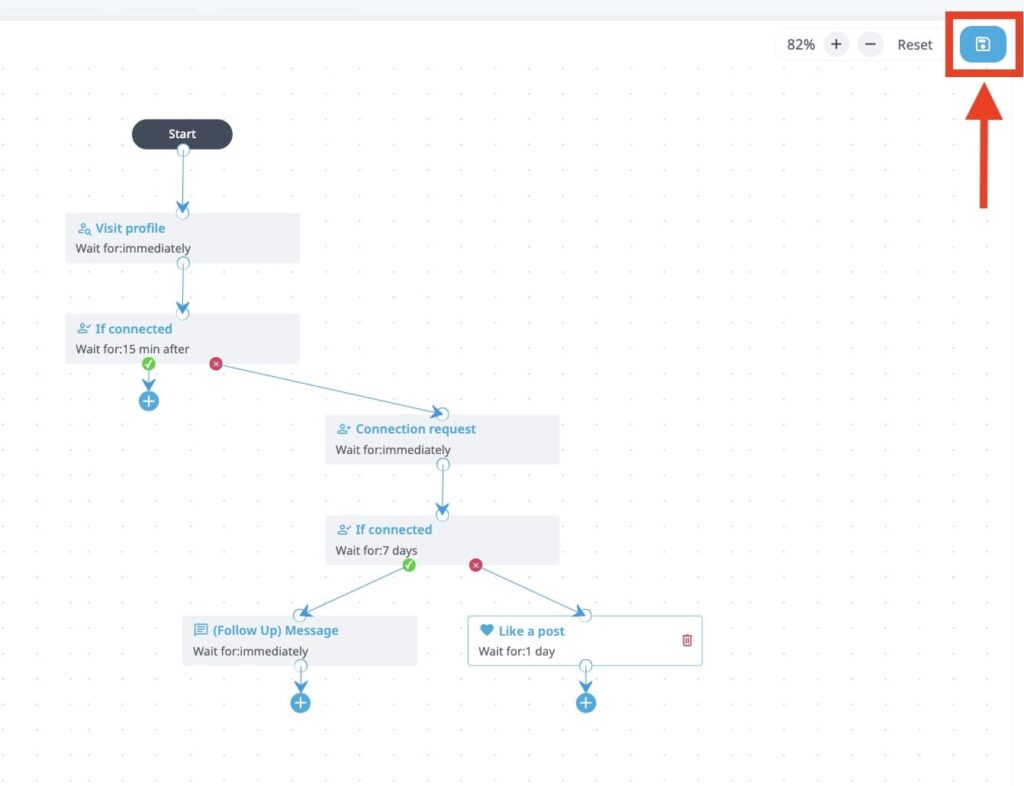
You can do this manually by sending out the request one by one, or automate the process to save time. LinkedIn automation tools like Expandi let you create a warm-up sequence that automatically sends connection requests. First, it would visit the lead’s profile and send the connection request (along with a personalized message if you add one).
If the user doesn’t accept, Expandi will automatically revoke the request sent. But if the user accepts, the system sends a follow-up message that you must have added to the system to start a conversation with them.
Week 2 before — message 1: “will you be at [conference]?”
Upon accepting your connection request, craft personalized messages to engage your potential attendees at scale. Avoid sending sales pitches that can kill conversations. Instead, send messages that reflect genuine interest. Keep it short with at most two to three sentences.
Reference the conference for shared context and mention any specific connection reasons based on their role or company. Also, don’t share vague requests like “let’s connect at the event.” Instead, be specific about what you want and ask questions that offer responses without pressure.
For example, a simple “Will you be at [conference]?” establishes shared context and creates a natural thread to follow up on a week later. Remember, the goal is to get a reply, not a reaction.
Week 1 before — the meeting ask
By the time you’re a week out from the event, the dynamic feels timely and easy to act on. Here, attendees are in conference mode. They’ve confirmed their travel, booked their hotel, and started thinking about who they want to see. Now you can ask to meet them.
In doing this, avoid asking for a general catch-up. Be specific and direct. Ask for a defined slot. Twenty minutes for a coffee, a specific time block at your booth, or a quick chat between sessions works better than a “Would love to connect.”
Also, if you’re exhibiting or speaking, use that to your advantage. It gives the attendees more reasons to meet you as they can see your product, attend your talk, or learn something specific. Overall, make requests that feel more natural rather than salesy to increase the chance of connecting with your prospects.
Day of the last-minute push
The day of the last-minute push has one goal: reach out to people who haven’t replied to you yet. Plenty of names on your list won’t have replied yet — not because they’re not interested, but because their week filled up. So, your job is to start a conversation without making them feel chased.
To do this, acknowledge what works for them, make the task as small as possible, and leave the door open without pressure. For example, you could craft something like:
“Looks like we are both at [conference] today. If there’s a gap between sessions, I’ll be at [location/booth] all day. No pressure, just a quick hello will work out.”
Sending this message makes showing up feel like less of a commitment. And if you use a LinkedIn marketing tool like Expandi, you get to plan your schedule and focus on other tasks.
Message templates for each stage
We’re sharing three templates per stage for teams attending the conference, plus two exhibitor variants. Make sure to personalize the placeholders before sending — anything that reads like a filled-in template gets ignored.
Also, tools like Expandi can help you scale personalized outreach, saving time and letting you focus on other demanding tasks, like closing deals.
Stage 1 — week 2 before: “will you be at the conference?”
Attending:
- “Hey [name], are you going to [conference]? I’m flying in for it and trying to line up a few conversations on [topic] while I’m there.”
- “Saw [speaker name] is on the [conference] lineup talking about [topic]. Are you planning to catch that one? Curious how it’s landing for someone in your seat at [company].”
- “Quick one. Are you at [conference] this [month]? If so, would be good to compare notes on [topic] in person.”
If you’re exhibiting or speaking, swap the opener:
- “Hey [name], will you be at [conference] this [month]? We’re exhibiting and wanted to connect with a few people before we get busy.”
- “Saw that [conference] is coming up. Are you planning to attend? Given what you’re working on at [company], I think [session/topic] will be worth your time. Happy to share a few thoughts on the matter.”
Stage 2 — week 1 before: the meeting ask
Attending:
- “Glad you’re going. Do you have 20 minutes for a coffee on [day]? Happy to work around your schedule and meet between sessions wherever works.”
- “I looked at the [conference] schedule and saw [session] on [day] looks close to what you’re working on at [company]. Planning to attend that one? Would be good to grab coffee beforehand and compare notes.”
- “Following up on my last message. Glad to hear you’ll be there. Do you have 20 minutes free on [day]? Happy to meet wherever works for you.”
If you’re exhibiting or speaking, swap the opener:
- “We’re exhibiting at [conference] next week. Do you have 20 minutes for a coffee on [day]? Happy to work around your schedule.”
- “[Mutual connection] mentioned you’d be at [conference] next week. We’d be exhibiting and would love to find 20 minutes to connect. Are you free on [day] between sessions?”
Stage 3: day of — the last-minute push
Attending:
- “We never managed to lock in time before today, but we’re both here at [conference]. Would you have 15 minutes this afternoon? It’ll be short and easy.”
- “Hope [conference] is going well so far. I have a gap between sessions 2 and 3 this afternoon if you want to grab a coffee. No prep needed, just a quick conversation.”
- “Just came out of the [session] talk. You’ve got a really strong point on [topic]. Are you still around? Would love to debrief over a quick coffee if you have 15 minutes.”
If you’re exhibiting:
- “We’re here at [conference] today. Booth [X] if you’d love to swing by.”
- “If your afternoon session wraps up and you want to wind down conversations, we’ll be at [location] from [time]. Would love to close out the day with a good conversation.”
Setting up the campaign in Expandi
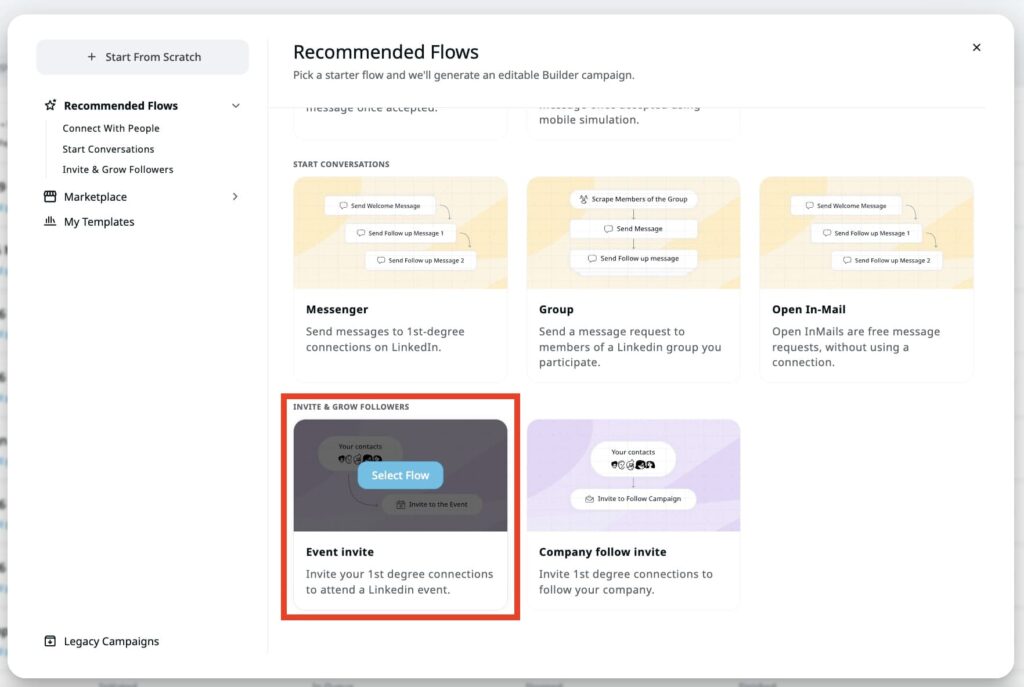
Expandi offers a pre-built campaign for event invites, but it only works for first-degree connections, the people you’re directly connected with on LinkedIn. Note that if you’re importing a CSV file for this campaign, the leads must be your 1st degree connections. Otherwise, the leads won’t receive your invite.
If the event date changes on LinkedIn after you’ve launched the campaign, the campaign won’t automatically pick up the new date. Reach out to support to update it.
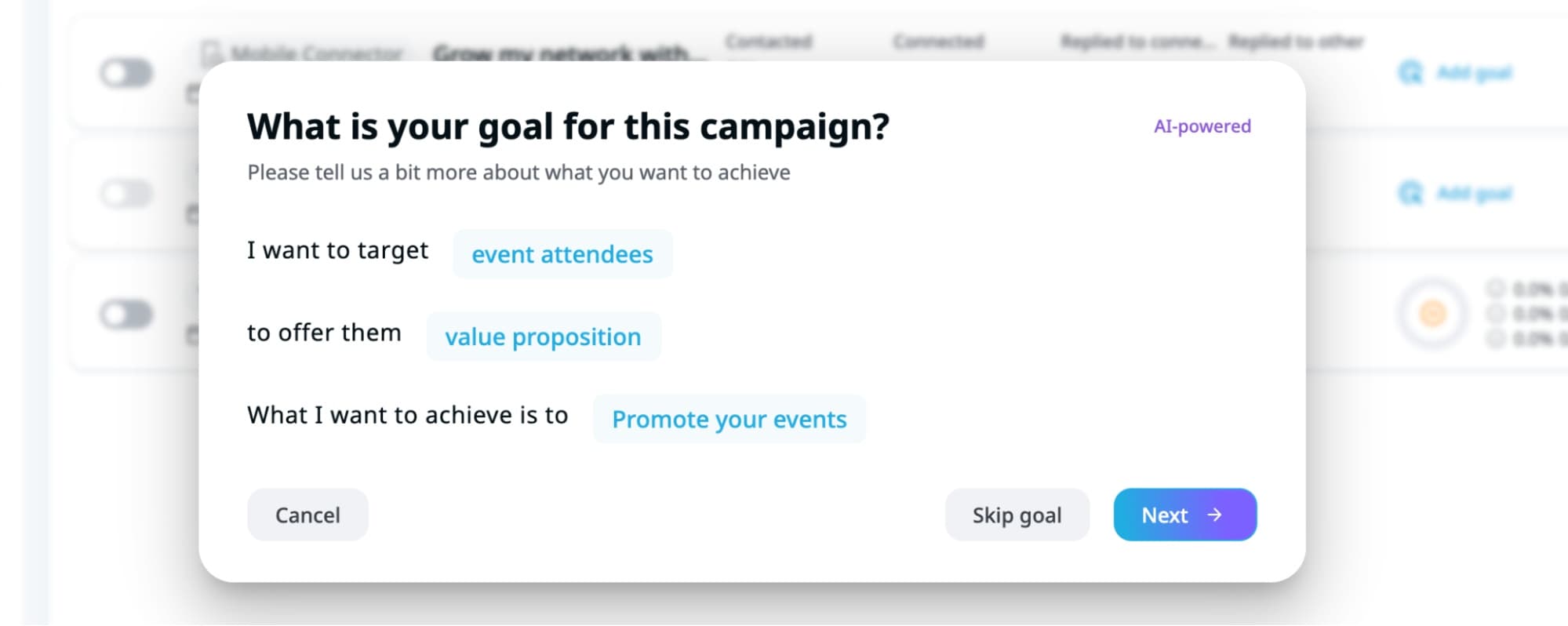
To get started with this feature, go to “My campaigns” on the left side panel of your Expandi dashboard and click “Add my campaigns.” Next, a pop-up window will appear asking you to state your goal. For this example, our goal was to target attendees and promote our events.
Then select the recommended flow, Event invite, which lets you send invites only to your 1st-degree connections.
Afterward, you’d be directed to the “Step” tab of the campaign, where you can customize your outreach sequence. Add more actions by clicking the + button to see other options such as profile visits, sending connection requests, follow-up messages, and more.
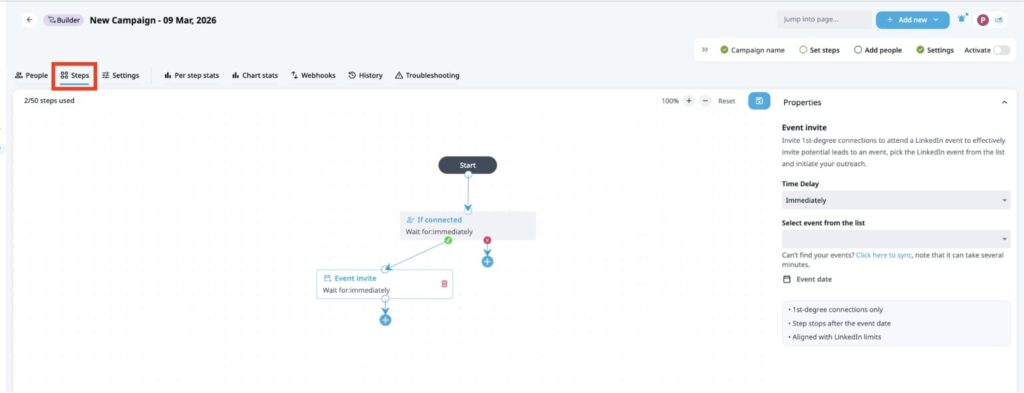
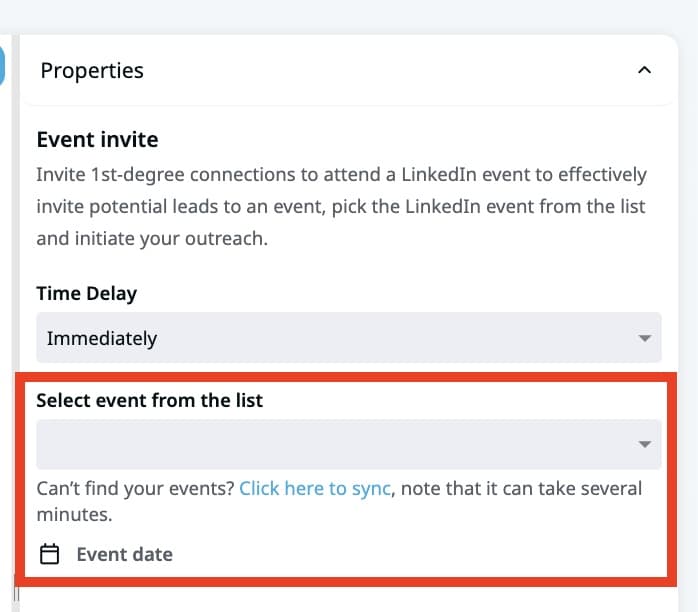
Then click the “Event Invite” action and select your event from the list.
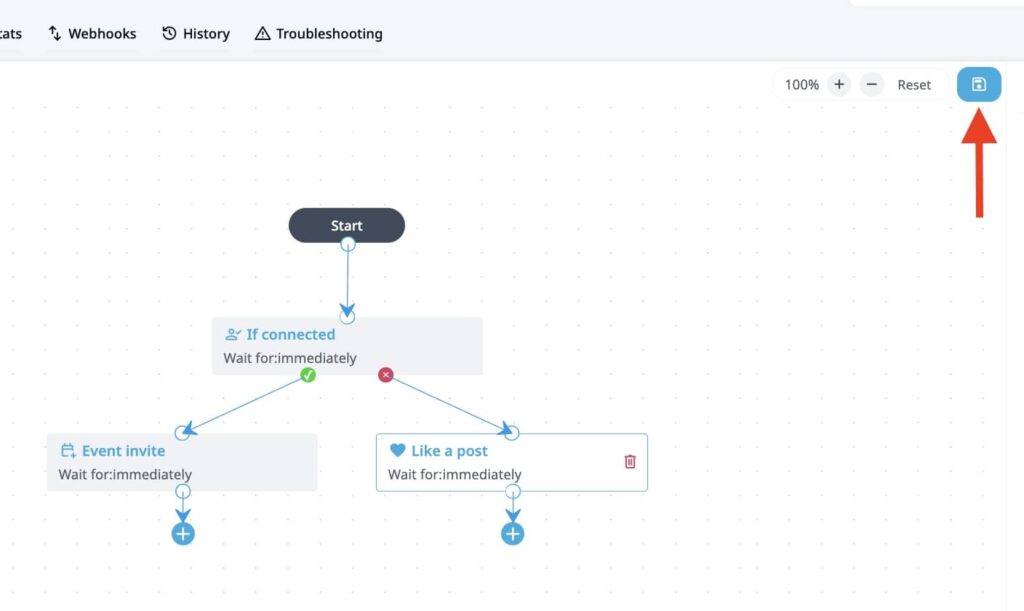
Once you’re done customizing your flow, click the “Save” icon to save all changes.
Once the changes are saved, click the “Settings” tab to adjust the campaign elements and its limits. Here, you can change the name of your campaign, the goal, the number of people to whom the invite will be sent, the sentiment analysis, or the schedule date.
Once you’ve adjusted the settings, save the changes. Then, proceed to adding people to your campaign.

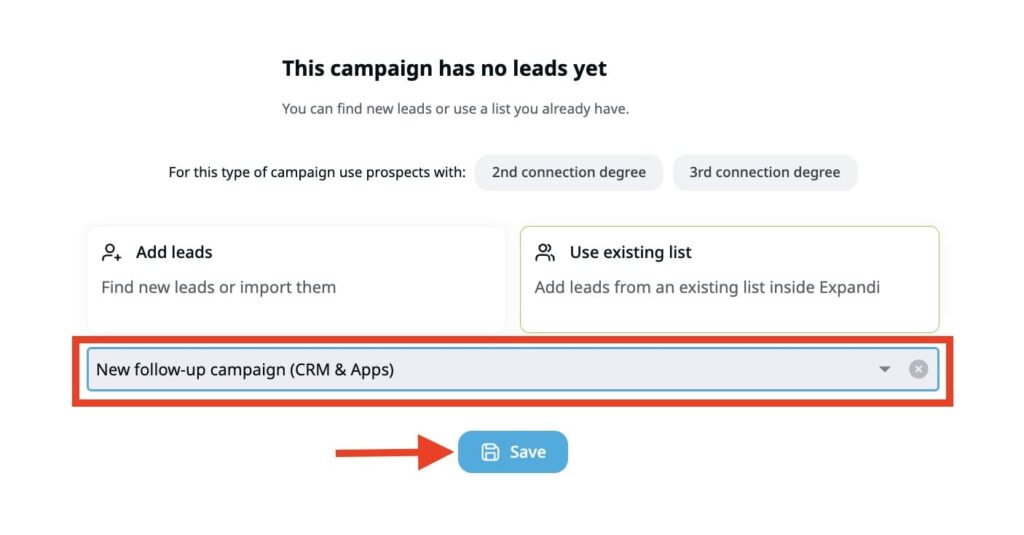
From the tabs above, click “People” >> “Add leads.” Choose whether you want to create a new lead list or import people via a CSV file. Since you have a filtered list on Sales Navigator, upload the file and map each column appropriately.

Then, Expandi will start importing your lead list. Once the leads are added to your campaign, don’t forget to save the changes.
Afterward, activate your campaign to start running the sequence. Expandi will mark your steps with a green check if they’re completed and ready for outreach. Then toggle the button at the far right of your screen.
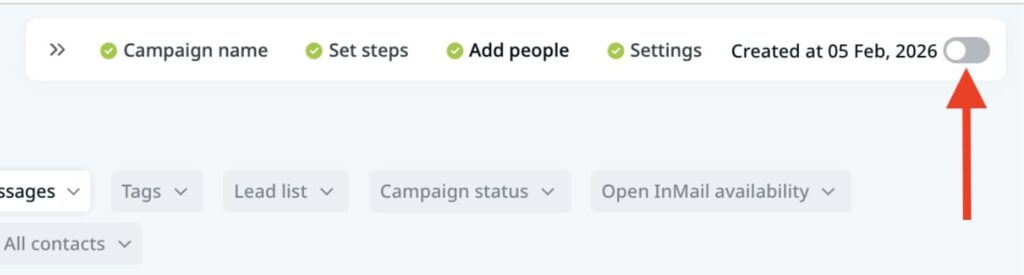
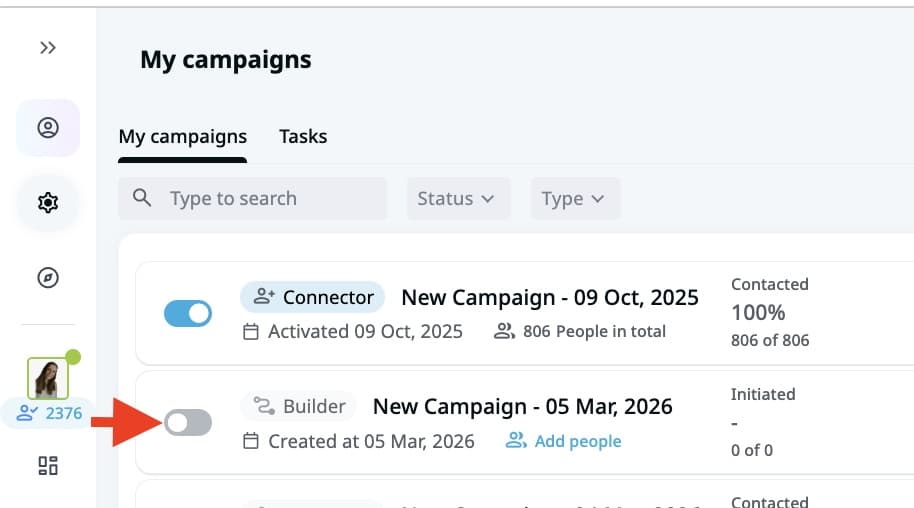
Once the toggle is active, it’ll turn blue, and you’ll be ready to invite your 1st degree connections to your event.
Post-conference: the follow-up sequence
Follow up by prospect type, with anyone you had a real conversation with — at the booth, between sessions, over dinner. They should get a message within 24 to 48 hours, while you’re both still mentally in the room.
The list of names you collected without a conversation (badge scans, suggested intros, attendees you didn’t get to) gets the longer cycle: 3 to 5 days, when their inbox has cleared and your message stands a chance of being read.
Then start the follow-up process by segmenting attendees into two or more categories:
- Qualified prospects
- Nurtured leads
Qualified prospects receive specific conference references. Mention the locations, cities, memorable sessions, shared experiences, or any other details that trigger memories of the conference. Include what you discussed, offer value by referencing solutions, and suggest the next concrete steps you would love to act on.
Avoid being generic. Instead of “Following up on the conference,” say something like “Saw you at the conference in Dallas.” Make the follow-up natural. Adding context warms up the relationship you may already have with your prospect.
For the nurtured list, send a LinkedIn request with event notes. Don’t pitch them yet. Instead, include relevant resources or solutions that could solve their problems. Even though they may not immediately buy from you, they could serve as referral sources in the future.
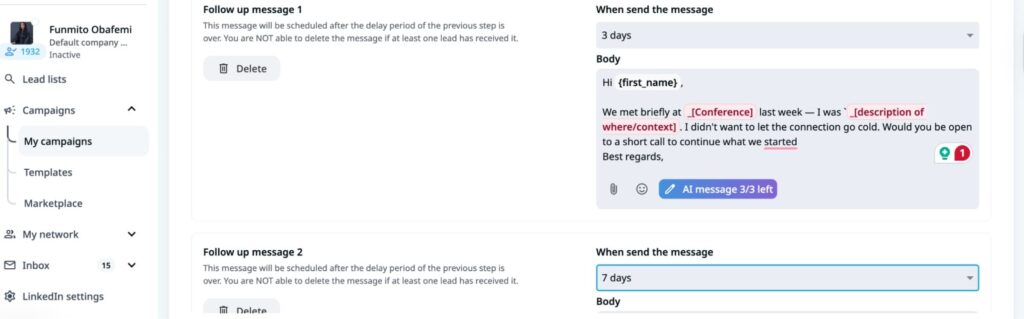
Finally, use tools like Expandi to automate follow-up. Choose an existing Expandi template and customize the flow to further engage your prospects and turn your LinkedIn presence into a lead engine.
Measuring conference ROI
Running a four-week campaign takes time and effort. Without measuring the performance, you’re left wondering whether it’s worth it. These four metrics help you gauge your performance to know whether your strategies are working.
- Meetings booked: This tells you how well your messaging and timing work across the four-week sequence. How many prospects responded to the campaign and agreed to meet? To track this, log every confirmed meeting against the specific outreach stage that generated it.
- Meetings attended: This is the show rate metric that shows how many of the booked meetings actually took place. A significant gap between booked and attended shows weak interest or a poor confirmation process.
- Pipeline generated: This is the revenue-impact metric that measures how many of the attended meetings resulted in real sales opportunities. To track this, tag every opportunity created within 30 to 60 days of the conference from the meeting as “conference” in your CRM.
- Pipeline ROI ratio: Divide the total pipeline generated by the actual campaign cost. So, if your campaign cost was $10,000 but it generated $90,000, that’s a 9x ratio. This number gives you something to work with when justifying the budget.
In short, tracking your campaign performance offers insights into what’s worked and where improvement is needed.
Use Expandi to build your conference pipeline in four weeks
Conferences generate a pipeline when you create a strategic plan and execute it. Pre-event outreach is what books the meetings. The on-site conversations and the follow-up sequence afterward are where most of the closing happens.
So, instead of showing up at the conference hoping to be lucky, plan it out accordingly. Use tools like Expandi to target potential attendees and reach out to them in a sequence to build meaningful relationships. This creates sales opportunities for your business.
Ready to start right now? Sign up for the 14-day free trial today!
FAQs about building conference pipelines on LinkedIn
A conference pipeline is a set of qualified opportunities generated through deliberate pre-event outreach, scheduled meetings, and post-event follow-ups, rather than waiting for chance conversations.
Start with the conference website to get the attendees. Then, search up their names on LinkedIn and filter with Sales Navigator to get a precise list.
No. Even when you can’t confirm someone’s attendance, the cost of asking is low and the question itself surfaces real interest. The week-two opening message — “Will you be at [conference]?” — works whether they’re going or not. If they are, you’ve started a conversation. If they aren’t, you’ve made contact with an ICP-fit prospect and given them a reason to remember you.

You’ve made it all the way down here, take the final step