Clay + Expandi: How to Build Hyper-Targeted LinkedIn Campaigns With Automated Enrichment

Sales teams pay $30,000 a year for tools like ZoomInfo, hand that data to an outreach tool, and wonder why their LinkedIn reply rates won’t move past 2%.
The emails bounce, the job titles are six months stale, and the personalization stops at {first_name}. By the time a contact hits an outreach sequence, the data behind the message has already gone off.
Clay + Expandi fixes the input.
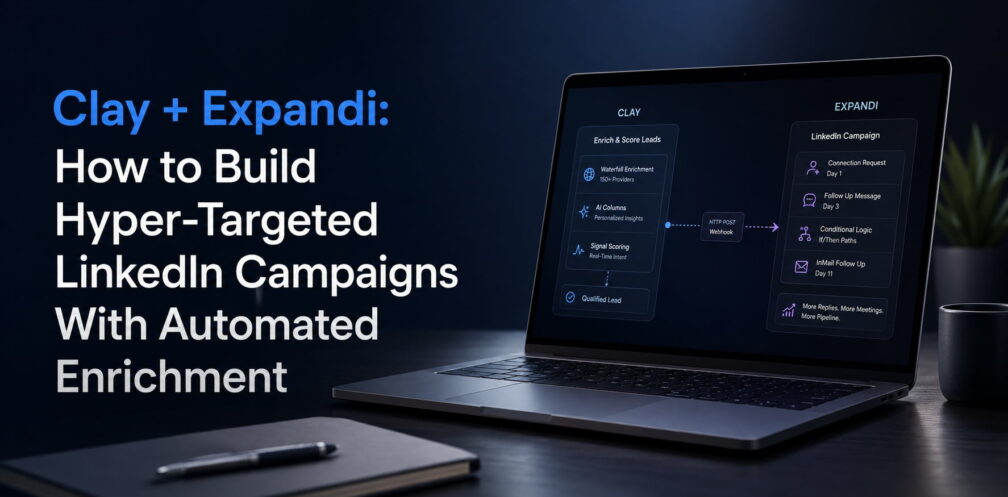
- Clay handles enrichment: waterfall lookups across 150+ providers, custom AI columns, and real-time signal scoring.
- And Expandi handles execution: cloud-based LinkedIn campaigns with dedicated IPs, conditional sequences, intent-signals, and native webhook triggers.
Connect the two, and a lead goes from “just qualified” to “received a personalized LinkedIn message” at the right time without a human touching it.
This guide covers the full setup: Clay table configuration, three integration methods (CSV, real-time webhook, and custom placeholder mapping), and an overview of what a real workflow of this might look like for a sales team running this exact stack.
For this guide, we teamed up with Ilija, an Expandi GTM engineer who regularly wires Clay into customer LinkedIn workflows. The walkthrough is based on real Clay-to-Expandi setups wired up for customers, cross-checked against Expandi’s reversed webhook documentation, and Clay’s live HTTP API docs.
Key Takeaways
- Clay replaces annual data contracts (ZoomInfo, Apollo) with pay-per-credit enrichment, starting at $185/month for Launch or $495/month for Growth, which is the tier needed to send outbound webhooks.
- Expandi’s reversed webhook accepts lead data from Clay as JSON with a LinkedIn profile URL plus optional custom placeholder fields, so leads enter a campaign the moment they qualify in Clay.
- Dynamic placeholders map Clay-enriched columns (company news, mutual connections, AI-generated intro lines) into Expandi message templates for unique personalization per prospect.
- CSV export is the fallback for one-off batches; webhook trigger is the default for teams running ongoing GTM motions.
- Expandi’s 14-day free trial lets you test the full webhook flow without committing, and pairs cleanly with Clay’s free tier for the initial setup.
Why and where most data-to-outreach workflows break
The pipeline most sales teams run looks something like this:
- Buy ZoomInfo.
- Pull a list.
- Export to CSV.
- Clean in Excel.
- Upload to an outreach or sales tool.
- Launch campaign.
Most Clay LinkedIn outreach setups break at the handoff between enrichment and execution.
Validity’s 2025 State of CRM Data Management report found that 76% of organizations say less than half of their CRM data is accurate and complete, and 37% of CRM users have lost revenue as a direct consequence of poor data quality. The problem is that many outreach tools receive stale, incomplete lead records and try to turn them into personalized messages.
“I’ve looked at around 200 underperforming campaigns in the past quarter. The pattern’s always the same. The list is way too big, the copy’s generic, and there’s no signal in the message about why this person, today. By the time the sequence runs, the automation is just delivering bad outreach faster. The list has been and always will be the strategy.” — Ilija Cosic, GTM Engineer at Expandi
The break happens in three places:
- The data layer is disconnected from execution. Enrichment happens in one tool, outreach happens in another, and the only bridge is a human exporting files.
- Enrichment is a batch event instead of a continuous process. A lead qualified three weeks ago gets messaged with job title data from a month before that.
- Personalization stops at first name. “Hi {first_name}, I saw your company is growing” is what you get when the outreach tool only has four fields to work with.
Clay and Expandi each solve one-half of this. Connect them, and the whole pipeline collapses into one flow.
What Clay does (the data layer)
Clay is a no-code data enrichment platform that pulls contact and company data from 150+ providers in a single “waterfall”. If the first provider doesn’t return an email for a lead, it automatically tries the next, then the next, until it finds one or exhausts the list. The result is materially higher find rates than any single-provider database and a lot less wasted credits.
Beyond basic enrichment, Clay tables support:
- AI columns — run a Claygent prompt over any row to generate a custom output (e.g., “summarize this company’s last three LinkedIn posts in one sentence”).
- HTTP API columns — send a POST request to any external webhook when a row meets a condition.
- Signal columns — detect hiring changes, funding events, tech stack changes, news mentions, and score leads in real time.
- Pay-per-credit pricing — data credits start at $0.05 each, with 100 free per month on the free tier.
The waterfall model matters because single-database enrichment has a ceiling. No individual provider has current, verified data on every contact. So stacking providers and defaulting to the next one when the first returns nothing lifts your find rate without paying for data you don’t need.
- Free: $0, 100 data credits per month, 500 actions per month.
- Launch: $185/month, 2,500 credits/mo, starts at 15,000 actions/mo.
- Growth: $495/month, 6,000 credits/mo, 40,000 actions/mo, HTTP API and webhooks unlocked.
- Enterprise: custom, annual commit.
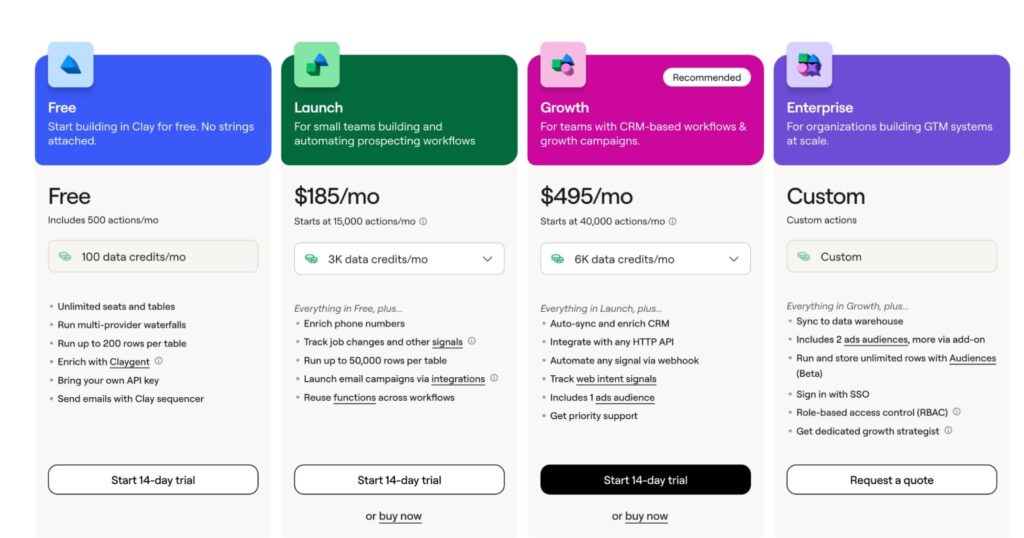
The Growth tier is the cheapest plan that unlocks outbound webhooks and HTTP API columns. That’s the one you need for real-time integration with Expandi.
For comparison, ZoomInfo’s Professional tier starts around $14,995/year, and most mid-market contracts land between $25,000-$45,000+ per year with mandatory annual commits. Clay’s Growth plan at ~$5,940/year covers most Clay use cases at a fraction of that spend, and teams only pay for credits they use.
Note: Apollo and ZoomInfo are adjacent tools to Expandi, serving different primary functions (sales intelligence and data). The comparison here is for teams evaluating the full enrichment-to-LinkedIn stack.
What Expandi does (the execution layer)
Expandi is a cloud-based LinkedIn automation platform built for safety and scale. Each account gets a dedicated country-based IP, a gradually-ramping profile warm-up, and smart daily limit algorithms that keep activity inside LinkedIn’s safe ranges.
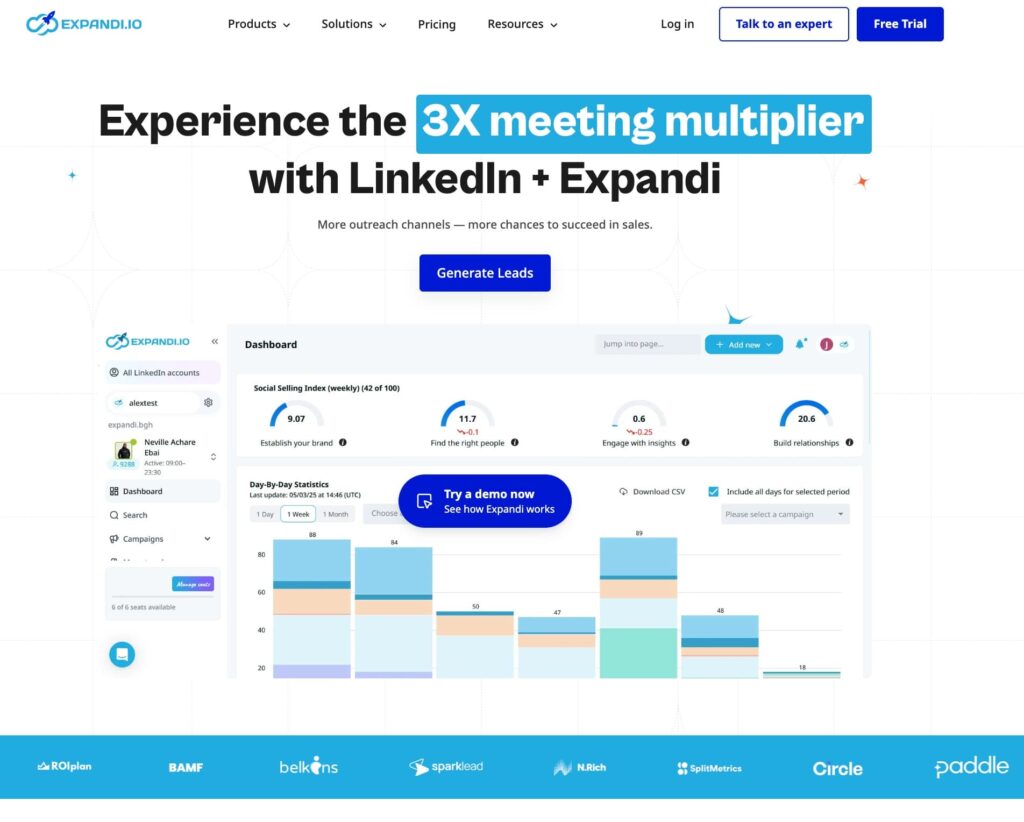
The parts that matter for a Clay integration:
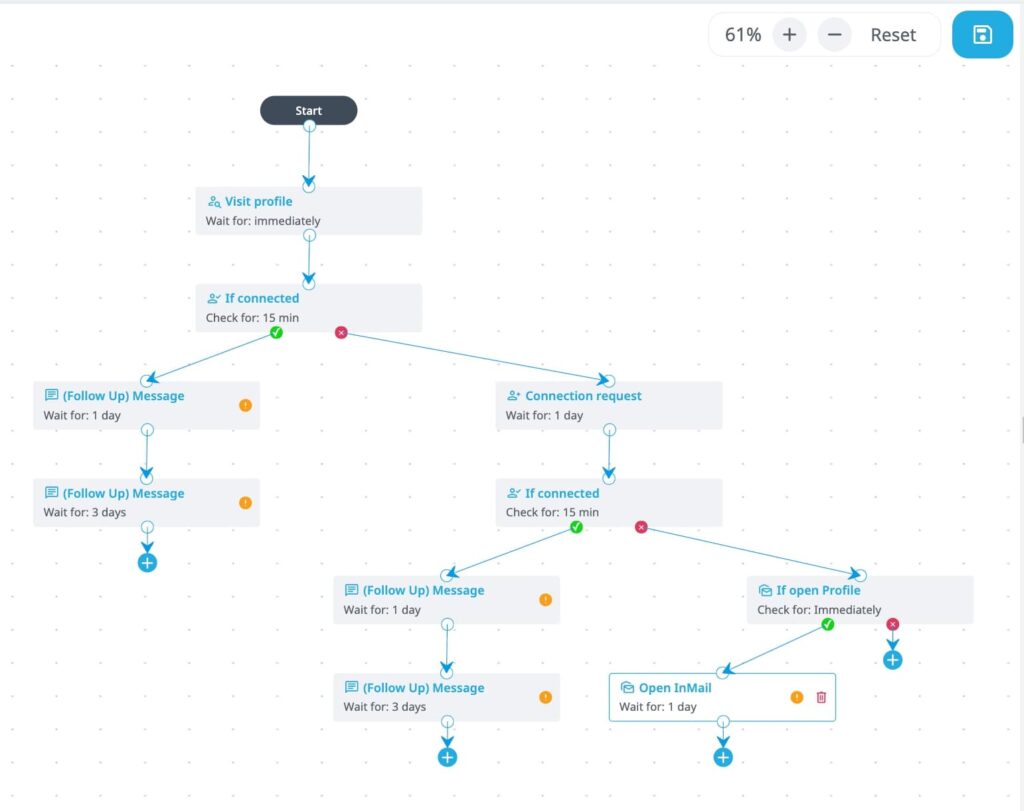
- Campaign builder — visual drag-and-drop with 19 action types and 11 conditional branches, so a single campaign can handle connection requests, profile views, follow-ups, and InMail in one flow.
- Reversed webhooks — every campaign has a unique inbound webhook URL; POST a LinkedIn profile URL to it, and the lead enters the campaign automatically.
- Dynamic placeholders — custom message variables that accept any text, mapped to individual leads, with fallback versions for missing values.
- Outbound webhook events — trigger external systems (CRM, Slack, Clay) when a lead accepts a connection, replies, or gets tagged.
- Native CRM integrations — HubSpot, Pipedrive, Salesforce for logging LinkedIn activity as CRM touchpoints.
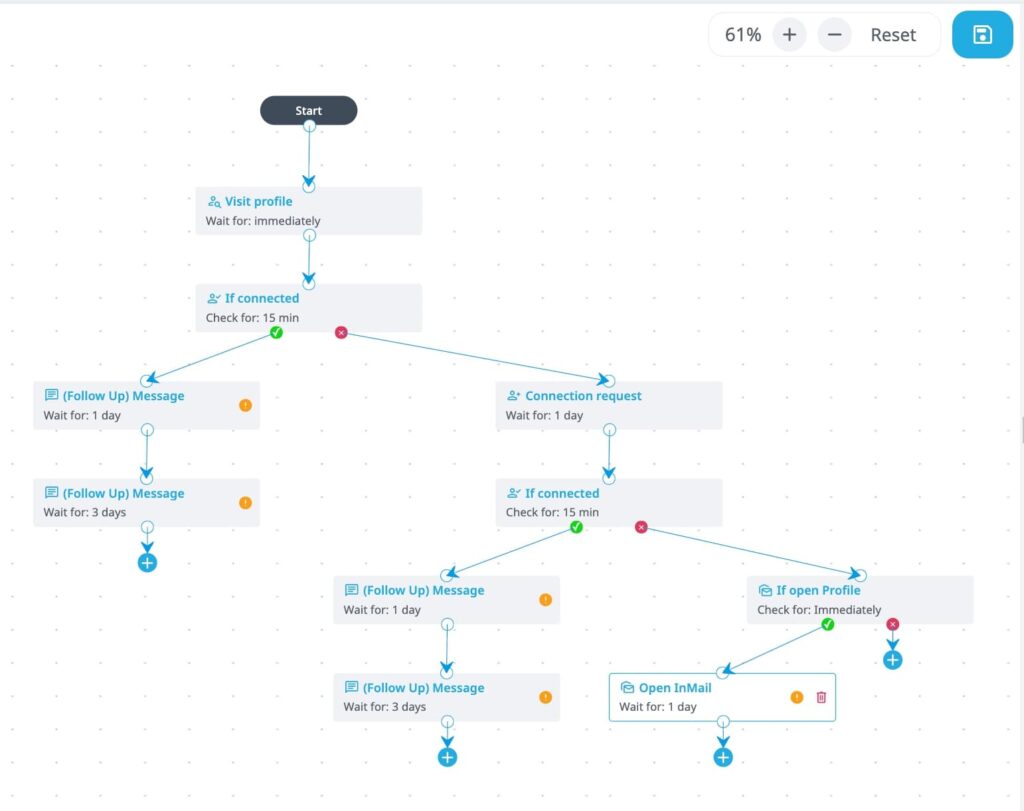
Expandi campaigns run as if-then flows. A real sequence might look like:
- View prospect profile on day 1.
- Send a connection request on day 2.
- If the prospect accepts send a follow-up message on day 4.
- If they reply tag them as interested and pause the sequence.
- If they don’t accept within 10 days fall back to an InMail.
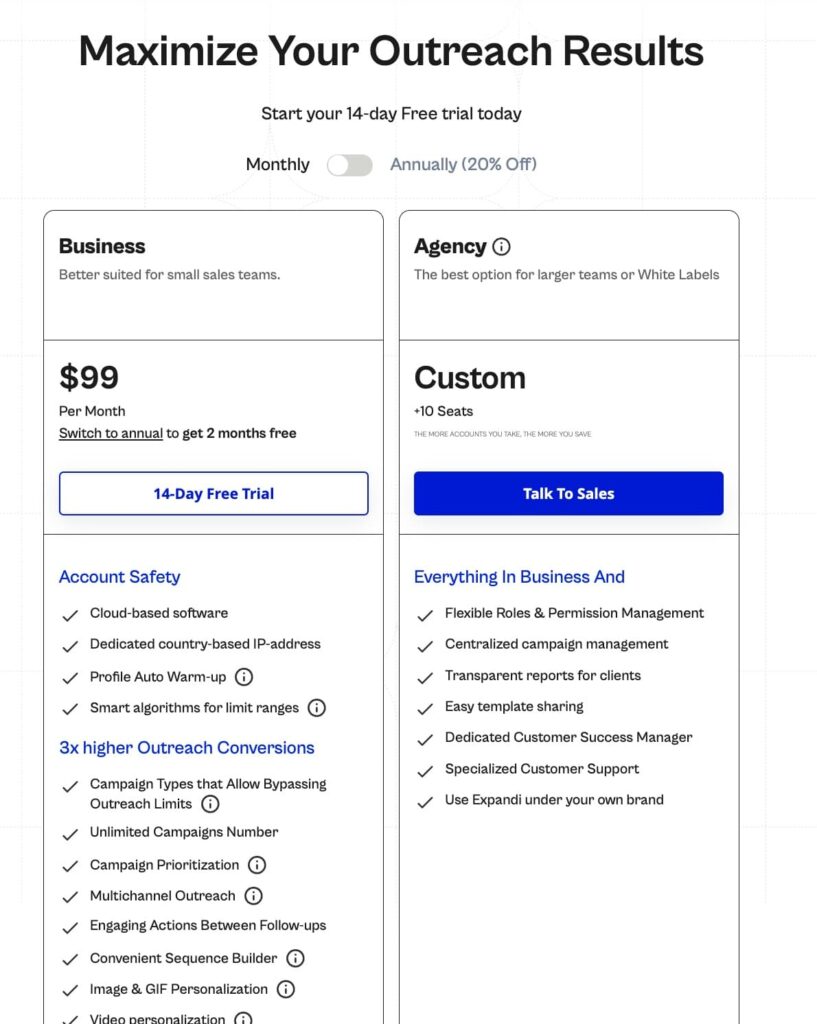
Expandi pricing is flat: $99/month per LinkedIn account (or $79/month billed annually), with a 14-day free trial and no seat minimums. The webhook functionality is included on every plan.
Three ways to connect Clay and Expandi
Pick the method that matches your GTM motion. Most teams start with Method 1, move to Method 2 once campaigns are running continuously, and layer Method 3 when they want true personalization at scale.
Method 1 – CSV export from Clay to Expandi lead list
Best for: one-off batch campaigns, first-time users testing the stack, teams not yet on Clay’s Growth plan.
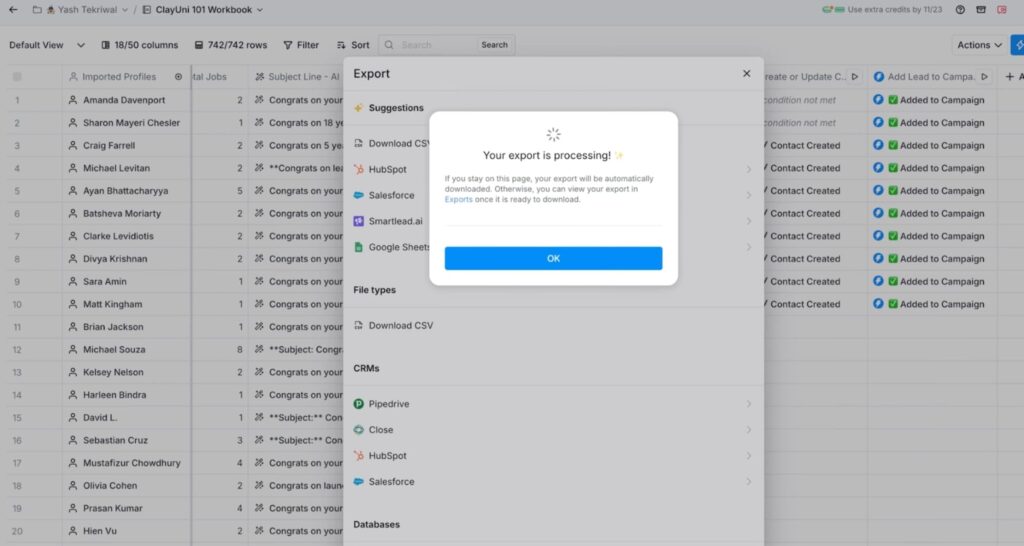
In Clay, filter your table to the qualified subset, click the three-dot menu on the table view, and export as CSV. The CSV must include a column with the full LinkedIn profile URL (Clay calls this “LinkedIn Profile URL”). Additional columns map to Expandi dynamic placeholders.
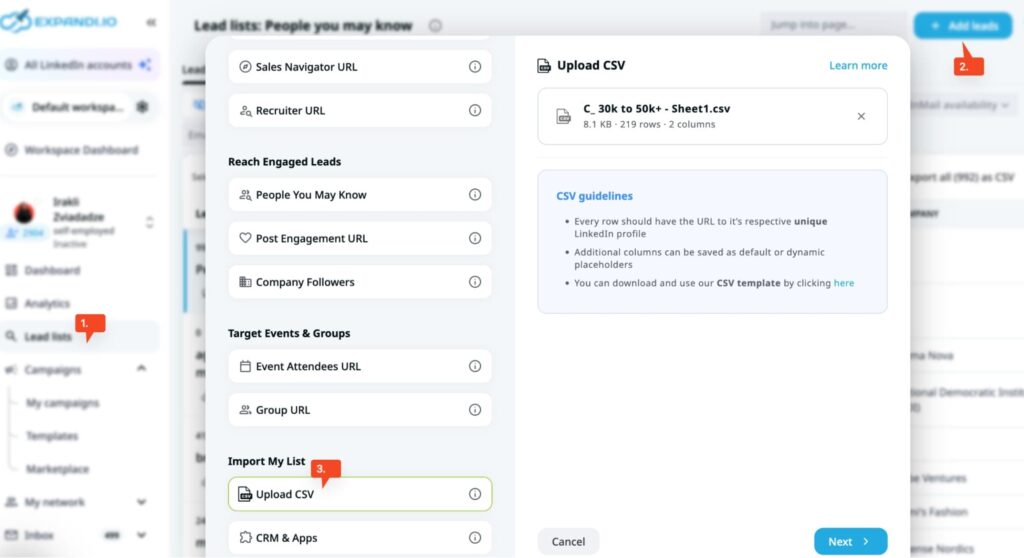
Then, in Expandi, go to Search, Imports, Upload CSV, map the LinkedIn URL column to the profile field, map any additional columns to dynamic placeholders, and attach the imported search to a campaign.
Limitations: it’s a snapshot. A lead who qualifies in Clay tomorrow sits in the table until someone runs another export. Fine for batch, bad for signal-triggered outreach.
Method 2 – Clay HTTP API column to Expandi reversed webhook (real-time)
Best for: teams running continuous enrichment, signal-triggered outreach (job change, funding, tech stack shift), and GTM engineering workflows.
This is the setup that makes the stack work end-to-end. A lead hits a qualification threshold in Clay (accepted company size + verified email + recent LinkedIn activity, say), and Clay fires an HTTP POST to the Expandi campaign webhook URL. The lead enters the sequence within seconds.
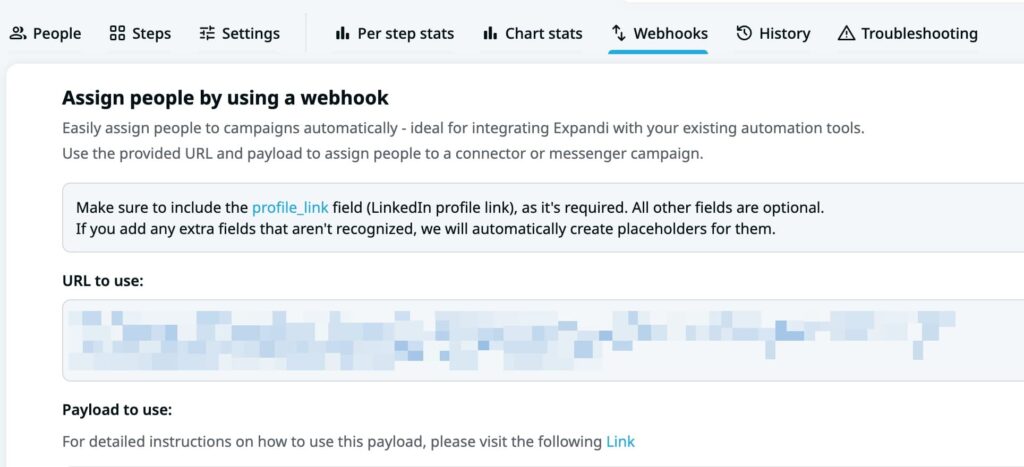
From Expandi’s side, open a campaign, go to the Webhooks tab, and find the “Assign people by using a webhook” section. Copy the unique URL. That’s the endpoint Clay will POST to.
From Clay’s side:
- Open your Clay table and click Add enrichment.
- Search for HTTP API and select it.
- Switch to the Configure tab (the default Generate tab uses AI to auto-build the config — fine if you prefer that route, but manual gives you more control for this).
- Under HTTP Method, select POST.
- In the API endpoint URL field, paste the Expandi reversed webhook URL you copied from your campaign’s Webhooks tab.
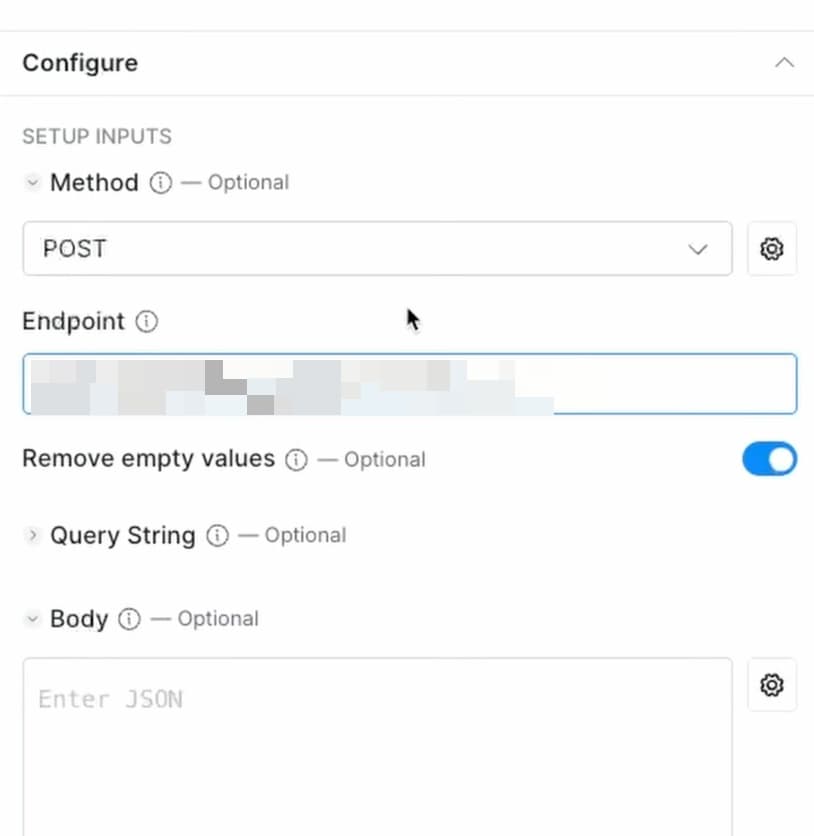
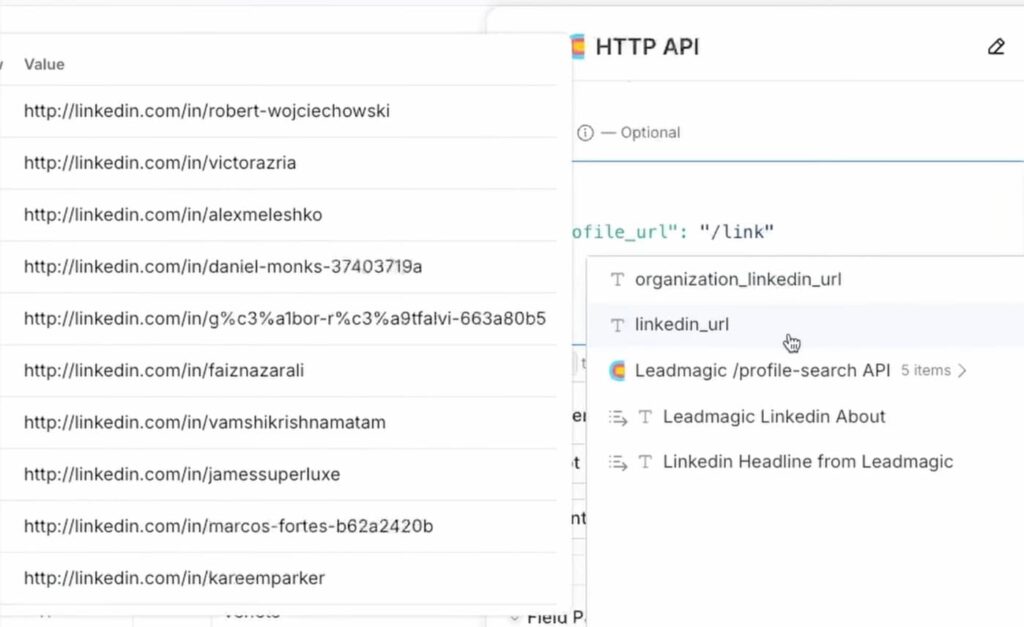
Scroll to JSON body and paste the payload structure. Minimum required is profile_link, plus any standard fields (first_name, last_name, company_name, job_title) and custom placeholders you’ve set up in Expandi. Use the /Column Name syntax (slash prefix, string values wrapped in quotes) to reference Clay columns:
{
“profile_link”: “/LinkedIn Profile URL”,
“first_name”: “/First Name”,
“company_name”: “/Company Name”
}
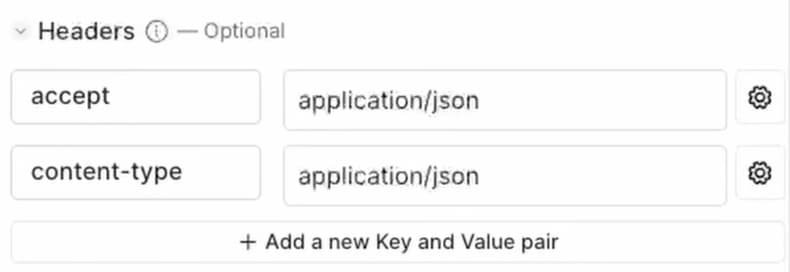
Under Header fields, add Content-Type: application/json (Clay often auto-sets this, but confirm it’s there).
Click Test to run on a single row and check that Expandi returns a 200 OK response and the lead appears in your campaign’s People tab.
Once the test passes, run the column on your full table.
One detail that trips people up: profile_link is case-sensitive in Expandi. If Clay returns a URL with mixed capitalization or query parameters, the lead won’t import cleanly. Add a formula column in Clay to normalize LinkedIn URLs before the HTTP API column fires.
Method 3 – Custom placeholders for Clay-enriched variables
Best for: teams running Method 1 or Method 2 that want unique per-prospect personalization beyond {first_name}.
Dynamic placeholders are Expandi’s custom message variables. Create one in Expandi (Placeholders – Create), give it a name like “intro_line”, and write a fallback value for leads missing the field.
In your Clay table, add an AI column that generates an intro line per row. Prompt example: “Write a one-sentence opener referencing this person’s most recent LinkedIn post. Keep it under 15 words and conversational. If there’s no recent post, write: Saw you’re active on LinkedIn.” Output that column as a string, make sure it’s under 300 characters (Expandi’s limit on dynamic placeholder values), and include it in the webhook payload or CSV matched to the placeholder you created in Expandi.
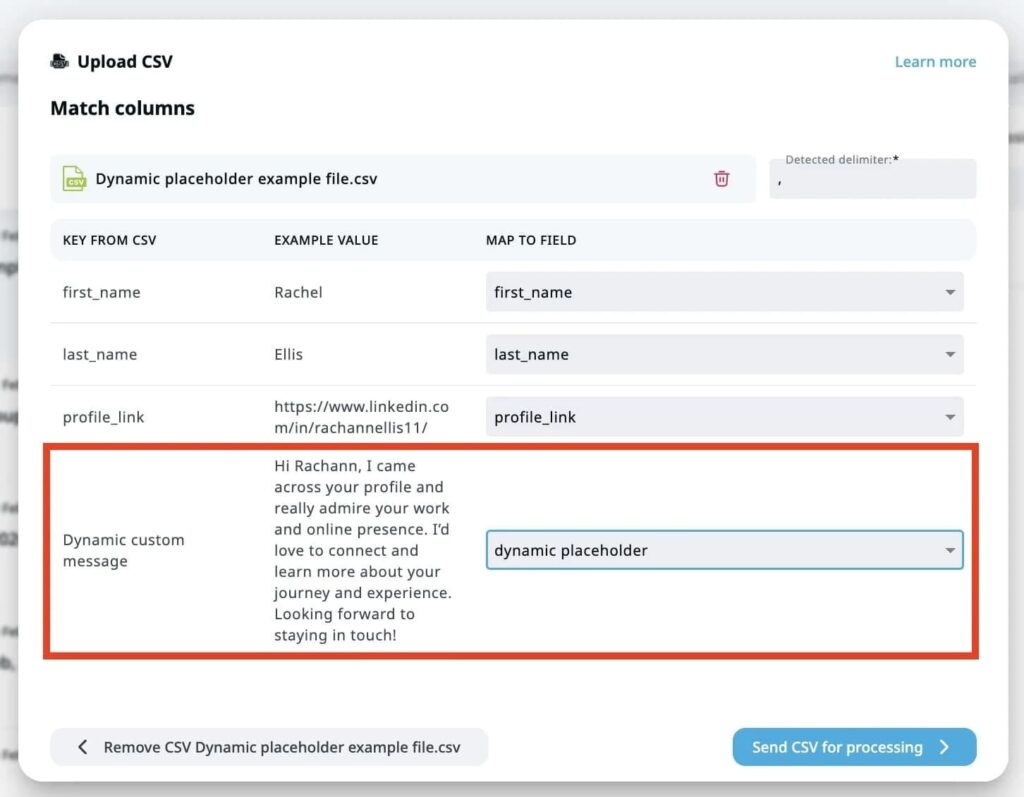
In the Expandi message template, drop {intro_line} into the first line. Write two versions of the message — one with the placeholder and one without — so leads without a valid intro line get the fallback copy automatically.
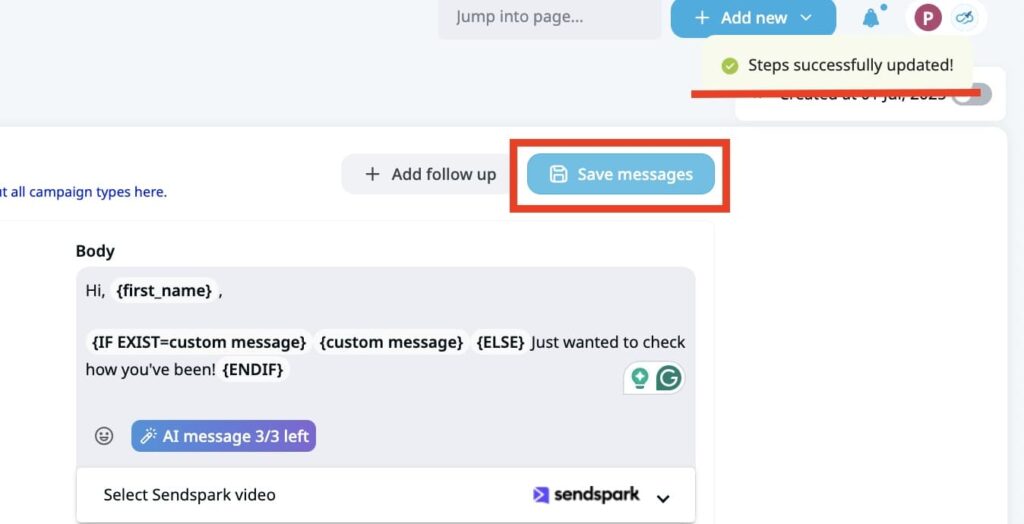
The combined effect: every lead enters the campaign with a unique opening line generated by Clay’s AI, based on their actual LinkedIn activity, delivered through Expandi’s sequence logic.
Step-by-step: building the Clay + Expandi stack
Step 1 – Set up the Clay table
Start with a source. Clay pulls leads from Sales Navigator URL imports, LinkedIn company searches, HubSpot audience syncs, or CSV uploads. Pick whichever feeds your ICP.
Add enrichment columns in this order:
- Waterfall email finder (e.g., Prospeo, then Hunter, then Apollo).
- Job title verification (against the LinkedIn profile).
- Company firmographics (size, industry, funding, tech stack).
- Signal columns relevant to your ICP (recent funding, hiring for X role, LinkedIn post activity).
- AI column for a custom intro line or personalization snippet.
Filter the table to only rows that pass your qualification threshold. Everything else stays in the table but doesn’t get sent to Expandi.
Step 2 – Configure the Expandi webhook
In Expandi, create the campaign first. Webhooks are campaign-specific, so the endpoint only exists once the campaign does.
Build the sequence — connection request, follow-up messages, InMail fallback, whatever the motion calls for. Write the message templates with any default placeholders ({first_name}, {company_name}) and your custom dynamic placeholders ({intro_line}, {recent_news}, etc.) in place.
Go to the Webhooks tab in the campaign. Under “Assign people by using a webhook” copy the URL from the “URL to use” field. That URL goes into Clay. (Make sure the campaign itself is activated — the toggle in the top-right corner of the campaign view should be on.)

Step 3 – Map Clay columns to Expandi placeholders
The JSON payload Clay sends must match what Expandi expects. Minimum required field is profile_link (a valid LinkedIn URL). Everything else is optional but maps to the placeholders you’ve set up in Expandi.
Expandi handles:
- Default fields: first_name, last_name, job_title, company_name.
- Custom placeholders: any additional fields matched to the placeholder names you created in Expandi’s Placeholders section.
Before going live, click the Test button in Expandi’s webhook view, paste a sample payload, and confirm the test lead shows up in the campaign’s Search. If the lead doesn’t appear, the most common cause is a malformed LinkedIn URL or a missing custom placeholder definition in Expandi.
Step 4 – Launch and monitor
Activate the Clay HTTP API column (or run the CSV import). Leads will appear in the campaign’s People tab as the column runs. Check the campaign Search to confirm leads are loading with the correct placeholder values.
Run the campaign for 48-72 hours before adjusting. Expandi’s daily limits will pace the sequence — you won’t see 500 connection requests fire on day one even if 500 leads are queued, because that’s how LinkedIn accounts get flagged.
A Clay + Expandi workflow blueprint
This is a template you can adapt, not a specific customer — swap in your own ICP, signals, and sequence.
- Pull ICP companies into Clay from Sales Navigator filtered search (e.g., 200-1,000 employees, software, US/EU).
- Enrich each row with decision-maker contacts (VP Engineering, Head of Sales, whoever buys your product) and verify emails via a multi-provider waterfall like Prospeo, then Hunter, then Apollo.
- Add signal columns that matter for your ICP — recent funding, hiring for a role that signals intent, a competitor mentioned in job postings, LinkedIn post activity in the last 30 days. Score each lead by how many signals they hit, then filter the table to only rows that pass your threshold.
- Add a Claygent AI column to generate a per-lead intro line. Example sales prompt: “One-sentence opener referencing this person’s recent LinkedIn activity, under 15 words. Fallback: Saw you’ve been active on LinkedIn.” That output becomes a custom placeholder passed into Expandi.
- Wire Clay’s HTTP API column to the Expandi campaign webhook (Method 2), with a conditional run formula so it only fires on qualified leads.
On the Expandi side, build a Smart Campaign that looks something like:
- Day 1: profile view.
- Day 2: connection request with the Clay-generated intro line in the personalized note.
- Day 4 (after accept): follow-up referencing the signal that qualified the lead.
- Day 7: second follow-up with a CTA.
- Day 11: InMail fallback for non-accepts.
“Our top-performing customers are building $1M+ pipelines in under $500/month. They stopped buying tools they didn’t need and got ruthless about the ones that actually drive revenue.” — Ilija Cosic, GTM Engineer at Expandi
Cost math: Clay Growth ($495/month) + one Expandi seat ($99/month) = ~$594/month per LinkedIn-active SDR, before unused credits. One line item replacing two most outbound teams pay for separately: data intelligence and sales engagement.
Common mistakes to avoid
These five issues show up every time a team wires Clay to Expandi without testing first, so fix them up front.
- Firing the webhook too early. If you POST to Expandi before the enrichment waterfall completes, you’ll send leads with missing email addresses and placeholder values filled with “null.” Gate the HTTP API column behind an “enrichment complete” check.
- Ignoring LinkedIn URL formatting. Expandi is case-sensitive on profile_link. A URL like linkedin.com/in/JohnSmith won’t resolve if the actual profile is linkedin.com/in/johnsmith. Use a Clay formula column to lowercase and strip trailing slashes before the webhook fires.
- Skipping placeholder fallbacks. Every Expandi dynamic placeholder needs both a “with placeholder” and “without placeholder” message version. If a Clay AI column returns an empty string for a lead, the fallback runs. Without a fallback, the lead skips that step.
- Over-qualifying. A common Clay mistake is stacking 12 filter conditions, ending up with 20 leads per week, and wondering why LinkedIn campaigns underperform. Start with 3-4 tight qualification criteria and tune from there.
- Running Clay credits dry mid-campaign. Clay’s credits are metered — if you blow through them on enrichment before the webhook fires, leads queue up in Clay but never hit Expandi. Set a credit budget per table and monitor usage in the Clay billing dashboard.
Beyond these operational fixes, the highest-leverage move is making sure every lead that fires the webhook was triggered by an actual intent signal.
“I reviewed 1,000+ outbound sequences last year. The ones converting at 30%+ reply rates had one thing in common. They didn’t start with a message. They started with a signal. A job change. A funding round. A hiring spike. A post about a problem they want to solve. Something changed in the prospect’s world and someone was paying attention.” — Ilija Cosic, GTM Engineer at Expandi
What this Expandi + Clay stack replaces
Most SDRs or sales teams run some version of this before switching to Clay + Expandi:
- ZoomInfo or Apollo for data: $15,000-$45,000+ per year, annual commit, seat-based.
- Salesloft or Outreach for engagement: $100-$150+ per seat per month, email + call sequences.
- Manual list cleaning in Sheets: 4-8 hours per week per SDR.
- LinkedIn outreach via browser extension: high account risk, low scale, no conditional logic.
- Other AI lead generation tools, which are anywhere from $37/mo to $200+/mo.
Apollo, ZoomInfo, Salesloft, and Outreach serve different primary functions (data intelligence and email/call engagement). They overlap with Clay + Expandi for teams evaluating the full GTM stack, but solve different problems.
The Clay + Expandi version: pay for the enrichment credits you use (~$150-$450/month), pay per LinkedIn account ($79-$99/month), skip the annual contract, and run LinkedIn as a first-class channel with the same signal quality as email outbound.
For teams doing heavy outbound email alongside LinkedIn, Clay also connects to tools like Instantly or Smartlead for the email layer, making it the enrichment hub for the full multichannel stack.
Set up your first Clay + Expandi campaign
Clay handles the enrichment. Expandi handles the LinkedIn execution. The webhook handles the bridge. Together, the stack replaces expensive data contracts and disconnected outreach tools with a pay-as-you-go pipeline that turns qualified signals into personalized LinkedIn outreach in real time.
See if Expandi is right for you or start a 14-day Expandi free trial directly. Create a campaign, grab the reversed webhook URL, and connect it to a Clay HTTP API column. You can have the full stack running before the end of the day.
FAQs about Clay + Expandi stack
Sales Navigator is optional. Clay can build lead lists from a regular LinkedIn company search, a HubSpot audience sync, or a CSV upload, and Expandi works with any LinkedIn account. Sales Navigator just gives you better filtering options when sourcing in Clay, so it speeds up ICP targeting on the front end.
Yes. Each Expandi campaign has its own unique reversed webhook URL, so a Clay table can carry multiple HTTP API columns, each pointing to a different Expandi campaign. Use Clay’s conditional run formulas to gate which column fires based on lead score or signal match, so high-intent leads route to a high-touch campaign while lower-intent leads go to a volume sequence.
Yes. The webhook accepts leads the moment the campaign is activated. Expandi queues them and releases them at whatever daily action rate your account is cleared for during warm-up (new accounts start around 5-15 actions per day). Feed leads from Clay starting day one and Expandi handles the pacing automatically.
Neither. Clay’s HTTP API column posts directly to Expandi’s reversed webhook URL. No Zapier or middleware required. Zapier is an option if you want a visual interface or additional automation steps between the two, but it’s not necessary.
The reversed webhook is a per-campaign endpoint that accepts POST requests to add leads. It’s the simplest integration method and what most Clay users need. Expandi’s full API covers broader programmatic actions (managing accounts, pulling campaign analytics, triggering specific lead actions) and requires API credentials.
Expandi’s daily send limits govern outreach, not webhook ingestion. You can POST thousands of leads to a campaign, but Expandi will pace the connection requests and messages based on LinkedIn’s safety thresholds. New accounts start around 5-15 actions per day during warm-up and scale toward Expandi’s standard ~100 connection requests per week once fully ramped.
Yes, via Hyperise integration. Expandi passes dynamic placeholders to Hyperise to generate per-lead images/GIFs, which requires a separate Hyperise subscription.

You’ve made it all the way down here, take the final step