B2B Data Enrichment in 2026: Tools, Solutions & Automated Workflows

Your CRM isn’t totally accurate. Wrong job titles, dead email addresses, and contacts who left the company eight months ago. For every time a rep reaches out based on that data, it’s a wasted touch at best, a credibility hit at worst.
The numbers back this up: 37% of CRM users say their companies lose revenue directly because of poor data quality. And it compounds fast — bad data doesn’t just kill individual outreach, it skews your segmentation, breaks your personalization, and makes your pipeline forecasts unreliable. On the flip side, clean, enriched data improves conversion rates by 12% and lifts revenue by 66%.
That gap — between the data you have and the data you need — is exactly what B2B data enrichment closes. This guide covers how it works, which tools are worth your time in 2026, and how to build a workflow that keeps your data accurate without adding manual work.
How data enrichment serves B2B businesses in 2026
Data enrichment serves B2B businesses in different ways, which include:
- Understand customers better: Data enrichment provides a more holistic view of customers, enabling sales and marketing teams to segment their audience by precise characteristics.
- Increased personalization: Data enrichment provides more detailed customer information, enabling more tailored messages and experiences. Subsequently, this drives more engagement than generic communications.
- Data-driven insights: When customer data is accurate and comprehensive, teams can forecast more accurately and generate strategic insights to make informed decisions.
With comprehensive customer information, personalized messages, and reliable insights, B2B businesses can accelerate movement across the pipeline and drive higher conversions. In the next section, we’ll look at the types of B2B data enrichment.
B2B data enrichment solutions: the six enrichment “modes”
B2B data enrichment falls into six types, which include:
1. Real-time enrichment (inbound)
Real-time enrichment updates the existing information in your database with additional information. It pulls data from internal sources like forms and signups, as well as external sources like social media and databases, to fill gaps in your customer data on the spot.
To sales and marketing teams, timing is everything. If someone from a target account visits your pricing page and fills out a form, real-time enrichment flags them as a priority and pulls out their job title or industry (for example) before the lead lands in your CRM. Your rep gets a real-time alert to reach out within minutes, not hours later.
2. Batch enrichment (CSV/CRM cleanup)
Batch enrichment processes data in bulk at scheduled intervals rather than in real-time. You feed it a list — your CRM records or a CSV file — and it fills in all the missing details and cleans up outdated information.
Many sales teams have thousands of contacts with missing job titles, wrong company names, or blank fields. Instead of doing it manually row by row, batch enrichment software clears it up in one go.
It’s also useful before sending any major outreach campaign, so you don’t send emails to the wrong people or waste your efforts with inaccurate data.
3. Waterfall enrichment
Waterfall enrichment is how you stop settling for gaps in your lead data. Instead of relying on a single provider and getting incomplete results, it queries multiple data sources in sequence — Provider A first, then B, then C — until it finds what it needs.
For sales teams doing high-volume LinkedIn outreach, this matters most when you’re trying to reach someone off-platform. Waterfall enrichment is what gives you the best shot at finding it without manually cross-referencing four different tools — more on them below.
4. Technographic enrichment
Technographic enrichment tells you what tools a company is already running — their CRM, their automation stack, their data infrastructure. For SDRs and sales leaders, that’s targeting logic.
If you sell a tool that integrates with HubSpot, filtering for companies already using HubSpot turns a cold list into a warm one — you already know there’s a potential fit.
If you’re going head-to-head against a competitor, technographic data tells you exactly where they’re entrenched and where they’re not. It also feeds directly into your outreach copy: mentioning a prospect’s existing stack in your opening line is one of the fastest ways to make a cold message feel relevant.
5. Intent/trigger enrichment
Intent or trigger enrichment tells you about a prospect’s signs when they are ready to buy your products or services. Say someone visits your pricing page; that’s a signal they are already considering your product, and you should act on it. Or perhaps a company is on a hiring spree; that’s a sign they’re considering new solutions.
With these signals, sales teams can prioritize the right account at the right time. They can also use those signals to personalize messages around what’s actually happening at that company.
A simple “Hi, we noticed you checked our pricing page. Here are other options you might find useful” can warm leads to you more than any cold message. When you reach out to people who are already paying attention to you, they’re more likely to convert.
6. Human-verified enrichment
Human-verified enrichment means a real person validates your data instead of relying solely on AI, databases, and other technologies.
If you work with an enterprise where a single incorrect piece of contact information can derail an entire account, human-verified enrichment can prevent this issue. Likewise, if you run high-stakes outreach where accuracy matters more than speed, you ensure every record is worth actioning.
In short, human-verified enrichment aims to achieve maximum accuracy or handle complex data that an automated system may miss.
15 best data enrichment tools to consider in 2026
Here are the 15 best data enrichment tools to consider in 2026.
TL;DR: Check this overview table below for a quick summary.
| Tool name | Category | Best for | Top features | Pricing |
|---|---|---|---|---|
| Expandi | CRM and CSV enrichment | LinkedIn lead generation | LinkedIn lead generation LinkedIn outreachAccount safety | Free trial available; plan starts at $79 per month |
| 6Sense | CRM enrichment | Technographic insights | Account prioritizationPredictive modellingTechnographic insights | Custom pricing |
| Cognism | Human-verified enrichment | Demographic Insights (Valid phone numbers) | Extensive databaseBuyer intent dataIntegrations | Request quote |
| Prospeo | Bulk enrichment | Demographic insights (Valid email addresses) | Email finder and verifierPhone number finder and verifierB2B database | Offers a free trial; plan starts at $37 per month/user |
| Clay | Waterfall enrichment | Demographic insights (Valid email addresses and phone numbers | Waterfall enrichmentIntent signalsIntegrations | Free trial available; plan starts at $167 per month |
| Reply | CRM enrichment | Demographic information | Real-time searchChrome extension | Free trial available; plan starts at $89 per month/user |
| Pipl | Intent enrichment | Demographic information and fraud alert | People and background searchFraud detection systems | Custom pricing |
| FullEnrich | Waterfall enrichment | Valid email addresses and phone numbers | Waterfall enrichmentPeople and company search | Offers a free trial; plan starts at $29 per month |
| ZoomInfo | CRM and CSV enrichment | Contact and company data | People and company searchBuyer intent dataSales engagement | Request quote |
| Common Room | Intent enrichment | Intent data | Intent signalsProspector 360Roomie AI | No free trial; plan starts at $1,000 per month |
| Trigify | Intent enrichment | Social signals | AI signalsAI agents | No free trial; plan starts at $149 per month. |
| Clearbit | Real-time enrichment | Contact and company data | 100+ B2B attributesWebsite visitor signalsIntegrations | Integrates with HubSpot’s pricing details |
| Datanyze | Technographic enrichment | Technographic insights and demographic information | Company and contact dataTechnographic | Free trial available; plan starts at $21 per month. |
| RB2B | Intent enrichment | Website visits | Website visitor signalsIntegrations | Offers a free trial; plans start at $79 per month. |
| Crunchbase | Real-time enrichment | Firmographic insights | Industry trends and predictionsAdvanced filters | Free trial available; plan starts at $49 per month. |
1. Expandi — For LinkedIn lead generation
Expandi is a LinkedIn automation tool to supercharge your outreach efforts. Unlike other tools, Expandi enriches your leads’ information from LinkedIn directly in real time. This means the data reflects what’s on the person’s profile, not outdated information from six months ago.
Here is how it works.
From your Expandi dashboard, click “Add leads.” Select your LinkedIn account type (e.g., standard LinkedIn or Sales Navigator). Return to your LinkedIn profile, search for your ideal buyers, and filter the list. Afterwards, paste the link into Expandi as shown in the image below. Then, click “next”.
Afterwards, name your lead list and choose whether you want Expandi to refresh the list based on a specific timeline (3 or 14 days). Also, tick whether you want Expandi to auto-assign leads to a campaign once it’s ready, and click “Confirm” as shown in the image below.
Wait for about two minutes for Expandi to extract the list from LinkedIn. There, you will find your enriched list, including your prospect’s full name, company name, job title, and status.
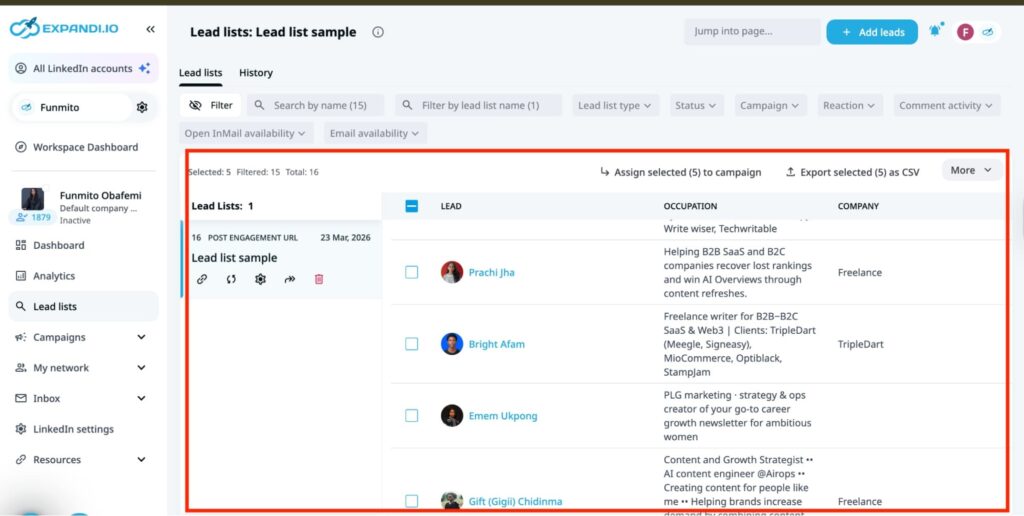
From this page, push your ideal prospect into a cold campaign without switching tabs. To do this, select your ideal prospects and click “Assign selected (x) to campaign.
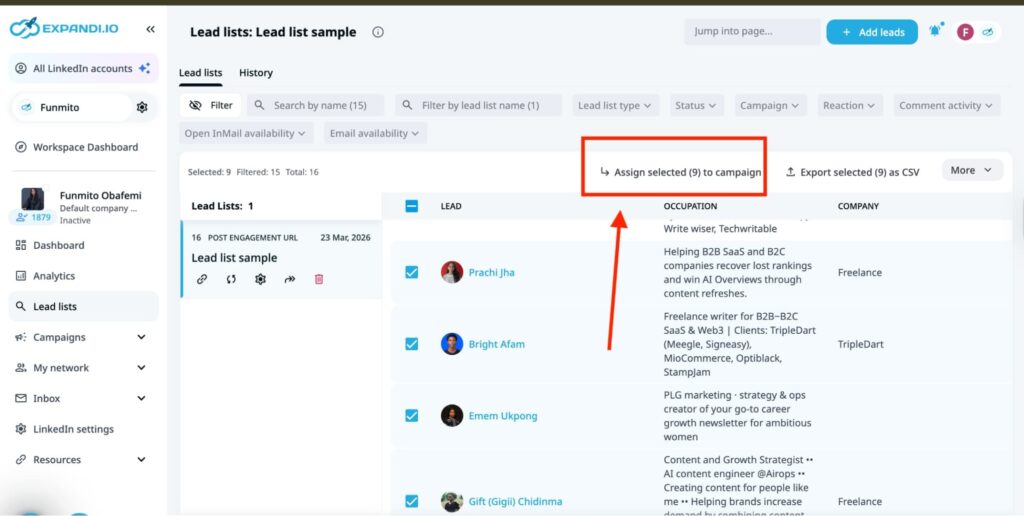
This will automatically push them into a cold sequence where you can automate connection requests, set up an initial outreach message, and send LinkedIn follow-up messages at intervals to increase your chances of receiving a response.
This helps you to start meaningful conversations with your ideal prospects. Expandi integrates with CRMs and other third-party platforms to transfer data and streamline your sales workflow.
Key features
- Lead generation feature to find targeted leads and enrich them with the right information.
- LinkedIn outreach to engage and follow up with prospects.
- Safety measures to prevent your LinkedIn account from getting restricted.
- Integrations with other third-party tools to streamline your workflow.
Pricing
Expandi offers a 14-day free trial. Its paid plan starts at $79 per month.
Case Study: How Expandi Helped Stormbreaker generate $1M in two years
Stormbreaker, an AI growth marketing firm, struggled with LinkedIn lead generation and outreach since 2019. They sought a tool that could automate the tedious part of the process. Unfortunately, most tools were too glitchy, buggy, or lacked cutting-edge functionality.
It was at this moment that Matt Cretzman, the CEO, discovered Expandi. Unlike other tools, Expandi’s ability to target people based on LinkedIn groups and posts, along with its hyper-personalization features, convinced Matt to use it.
Matt says, “Expandi’s always been on the forefront, leading the edge on tactics, advanced building strategies, and automation and personalization. Its ability to target groups and posts was very big since I think Expandi was one of the first tools to be able to scrape and build a list from a post on LinkedIn.”
With the LinkedIn automation tool’s scraping ability, they targeted leads who had liked or commented on any post. Then, they built a cold sequence, comprising an initial message and three follow-ups to each prospect at different intervals. The result? Over 50% response rate!
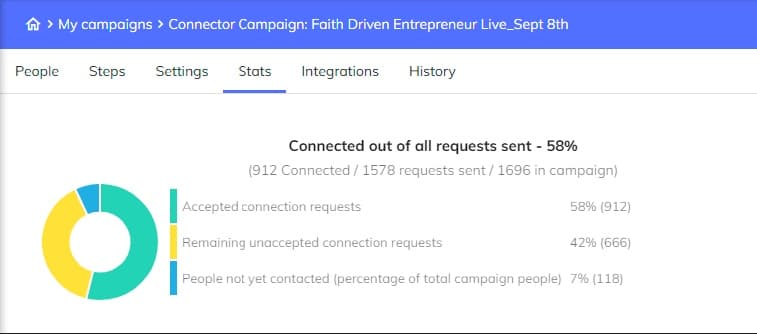
Besides, Expandi-powered campaigns got him to network with prospects in the sports industry. By the end of the first year, Stormbreaker earned more than $500,000 ARR. Today, they generate $60,000- $80,000 in MRR.
2. 6Sense — For technographic insights
Want a data enrichment tool for technographic insights? 6Sense is the perfect choice. Enter any desired technology into the search bar, and it will provide contextual details about that tool.
For this article, we entered HubSpot into 6Sense’s search bar as an example. The data enrichment platform offers valuable insights into HubSpot’s market share, top customers, competitors and alternatives, and employee details.
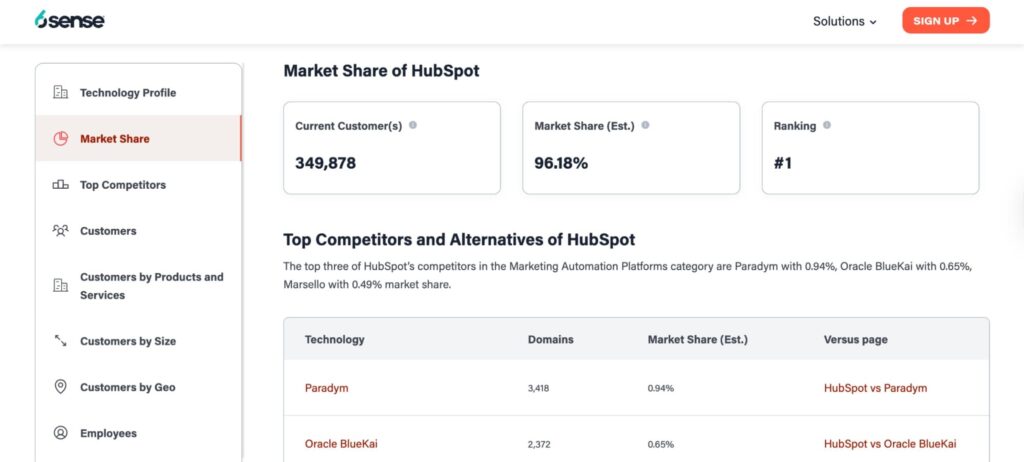
A competitor CRM can use this actionable intelligence to determine who to target, how to compete, and where to grow. The top competitors section, for instance, lets you define your ideal customer profile and prevents you from wasting time on prospects who aren’t a good fit.
Additionally, use the information to find market gaps. For example, our simple search revealed that HubSpot dominates the marketing and social media space, but not non-marketing verticals such as healthcare, education, legal, and more. As a competitor, that could be your niche. Meanwhile, for HubSpot, that could be a gap they can further investigate.
The whole essence of this is that 6Sense offers detailed information about a tool that makes it useful for sales and marketing teams, executives, investors, and the company itself.
Key features
- Detailed technographic insights to help companies identify market gaps and make informed decisions.
- Predictive modelling to analyze a vast amount of data and identify companies that are most likely to buy.
- Account prioritization to provide sales reps with a 360° view of their deals, accounts, and leads so that sales teams can know which opportunities to chase.
Pricing
6Sense’s pricing details aren’t publicly available. Contact them for a quote.
3. Cognism — For CRM enrichment
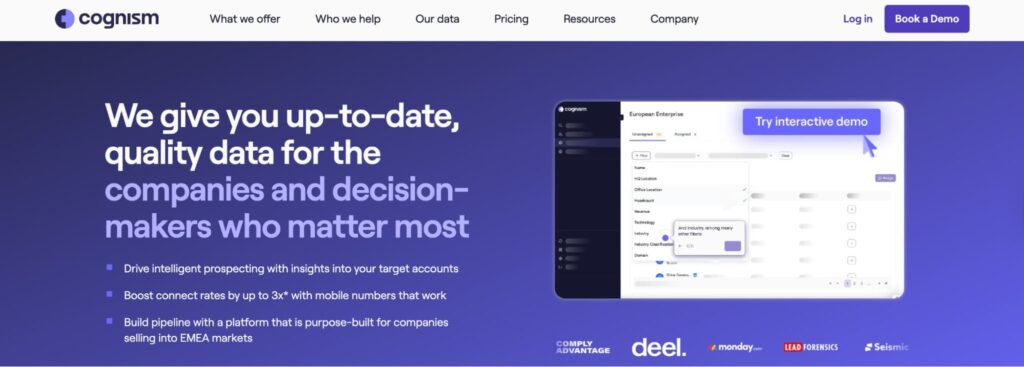
Cognism offers a vast database of companies and individual data, especially for the EMEA market. It’s perfect for businesses entering this region or seeking expansion.
Like other sales intelligence platforms, sales teams can upload a CSV file or use APIs to fill in missing prospect information, such as business email addresses, verified phone numbers, work history, revenue, and intent data. This keeps your CRM data clean and accurate for sales prospecting.
However, further G2 research shows that users complain about Cognism’s outdated records, especially for employees who no longer work for the firm. This can frustrate their outreach efforts.
Key features
- An extensive database to get prospects’ details and connect with them.
- Buyer intent data to determine prospects who are most likely to convert.
- Native integrations with CRMs and other sales tools for easy data transfer.
Pricing
Contact the sales team for a quote.
4. Prospeo — For email and phone number enrichment
Next on the list is Prospeo. The B2B data enrichment tool finds your prospects’ valid email addresses and phone numbers in just a few clicks. All you need to do is search for your target audience from Prospeo’s database, upload a CSV file, or enrich your CRM. Here is how to do this.
Let’s say you want to find a person’s email address via the search function. Start by inputting the person’s or company’s name in the search bar. If it’s a person, you must know their full name to get an exact match from the search result. However, if it’s a company, enter the company’s name, filter by specific criteria, and Prospeo will display the result.
Then, navigate to the email or phone number column on your screen. Select the desired contact, then click “Reveal email” to reveal the hidden information.
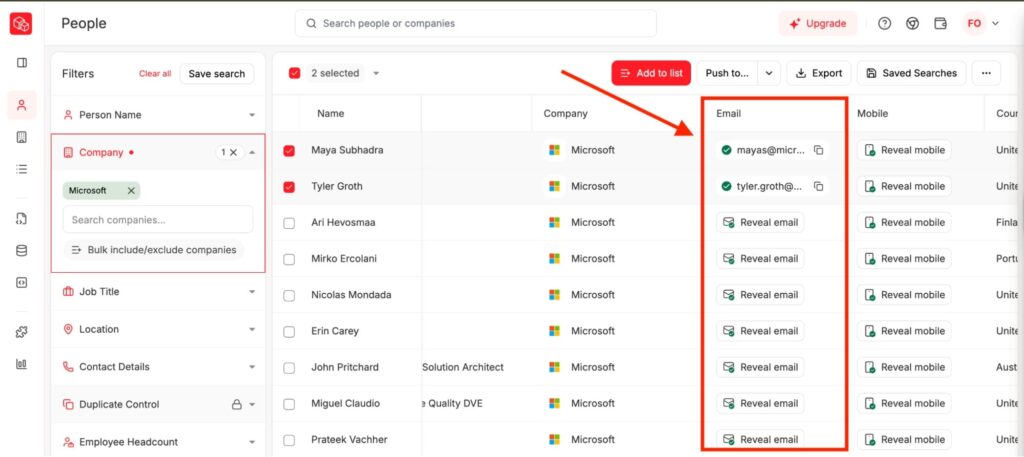
Note that Prospeo charges one credit for every email it reveals. Then, add to a list or push to your CRM or sales automation tool to boost your cold outreach campaigns.
Key features
- An email finder and verifier to find and validate prospects’ email addresses for effective outreach.
- A phone number finder to get your prospects’ phone numbers to contact them.
- B2B database to find your ideal buyers.
Pricing
Prospeo offers a free trial, but its paid plan starts at $37 per user per month.
5. Clay — For waterfall enrichment
Famous for its GTM engineering capabilities, Clay is another data enrichment tool you can consider. The platform adopts waterfall enrichment to find prospects’ valid email addresses and phone numbers.
Here’s how the waterfall enrichment works: Clay partners with various data providers, such as Hunter, Datagma, Prospeo, and others. So, when you ask for a lead’s email or phone number, it searches the provider (e.g., Prospeo) for the answer.
If it doesn’t get it, it proceeds to the next (e.g., Hunter) until it succeeds. Below is an example of its waterfall enrichment for email addresses
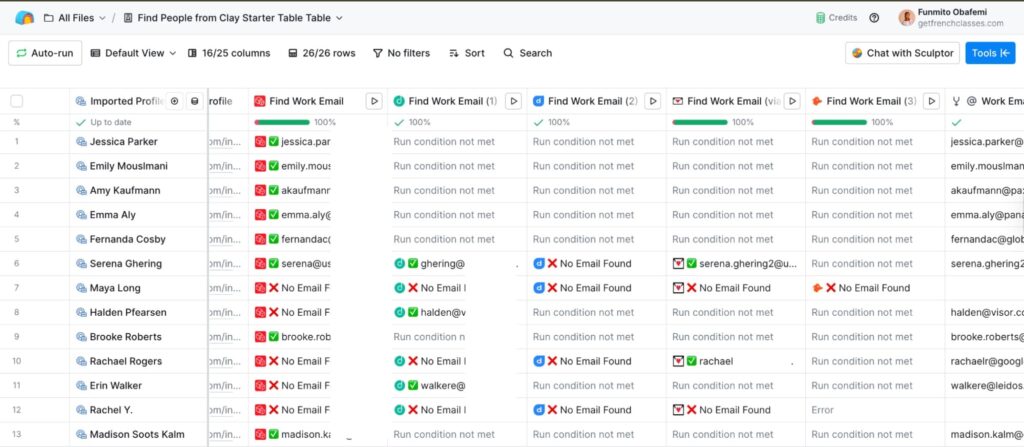
The same process also applies to finding phone numbers in the B2B prospecting tool. Once you have your lead list, click “Tools” >> “Find phone numbers” to see the various data providers you can use. Clay partners with over 50 third-party platforms to enrich your prospect’s data and make your workflow more efficient.
Key features
- Waterfall enrichment to find prospects’ email addresses and phone numbers.
- Intent signals to find the right prospects with the right opportunities at the right time.
- Vast integration with third-party platforms to create an efficient sales workflow.
Pricing
Clay offers a free trial with limited credits, but its paid plan starts at $167 per month.
6. Reply.io — For email and CRM enrichment
Reply leverages its Chrome extension, Findy, to find prospects’ email addresses on LinkedIn. All you need to do is install the extension to integrate with your browser. Then, open LinkedIn, search for the desired prospect, and visit their profile.
Upon landing on their profile page, Findy automatically gets their information. Add to a list or push to a CRM for your cold outreach campaign.
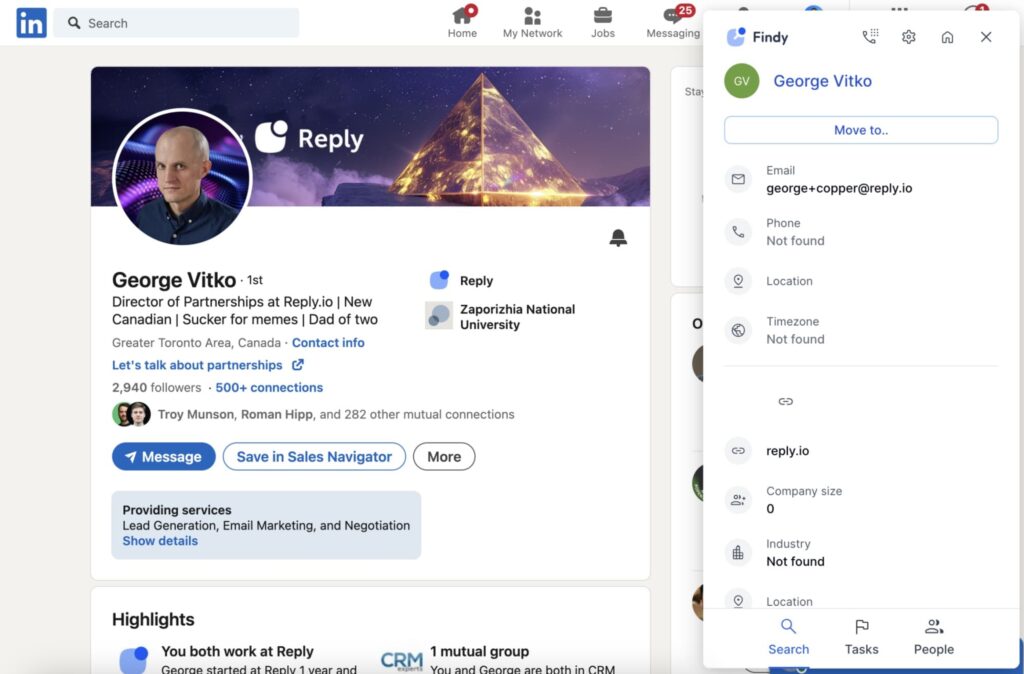
The sales engagement tool also performs other activities, such as building a targeted list, performing multichannel outreach, and delivering emails into the prospect’s inbox. It integrates with third-party platforms such as CRMs and marketing tools for easy data transfer.
Key features
- A Chrome extension to find prospects’ email addresses on LinkedIn.
- Syncs with CRM to update existing records.
- Real-time search for prospect details to retrieve additional information, such as names, companies, job titles, and other firmographic details.
Pricing
Reply offers a free trial, but its paid plan starts at $89/user per month.
7. Pipl — For digital identities and fraud detections
Want to know more about a lead beyond the surface information? Pipl is a perfect choice. Give the tool a piece of information about the prospect, such as their email address, phone number, or location. Then, it will uncover their full details, including whether they’ve been involved in fraud.
It provides in-depth insights, including your lead’s full name, social media profiles, location history, employment details, risk indicators, and more. Pipl also ensures accuracy, which makes the platform useful for trust cases such as identity verification and complaint (KYC).
Key features
- Find prospects’ details within a few clicks.
- Verify their identities to easily reach them.
- Fraud detection systems to flag high-risk accounts.
Pricing
Contact the sales team for a quote.
8. FullEnrich — For waterfall enrichment
FullEnrich offers waterfall enrichment to find your prospect’s email address and phone numbers. Similar to Clay, it partners with at least 20 data providers to search their databases. Once it receives your CSV file or CRM details, it searches each data provider’s database until it finds your leads’ contact information.
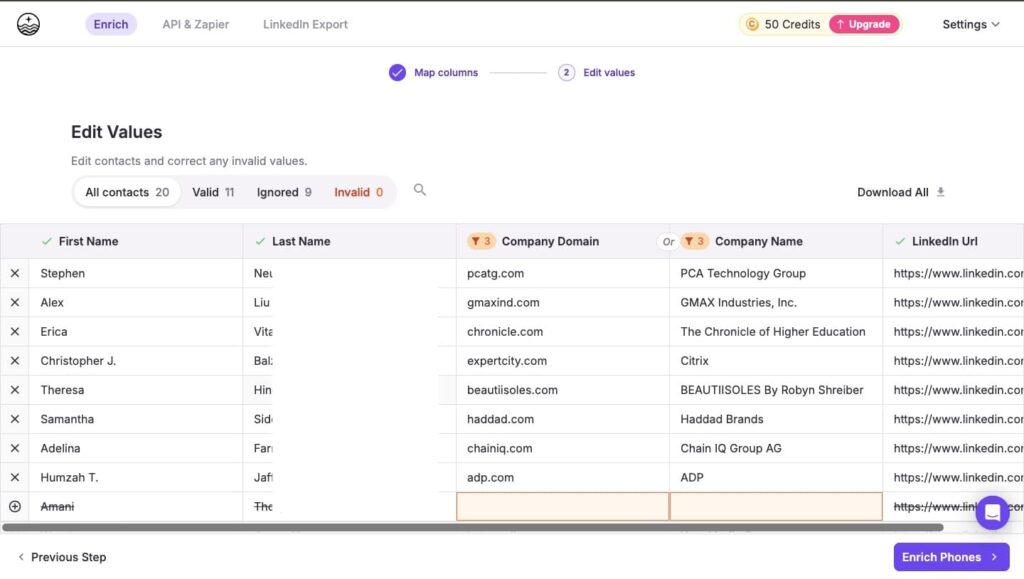
FullEnrich also helps with building your lead list. With its People and Company search feature, you can create a targeted list of leads and source their valid email addresses to boost your cold outreach campaigns.
Key features
- Waterfall enrichment to find prospects’ email addresses and phone numbers.
- People and companies search to build a list of their targeted leads.
- Integration with other platforms to streamline your workflow.
Pricing
FullEnrich offers a free trial, but its paid plan starts at $29 per month.
9. ZoomInfo — For CRM enrichment
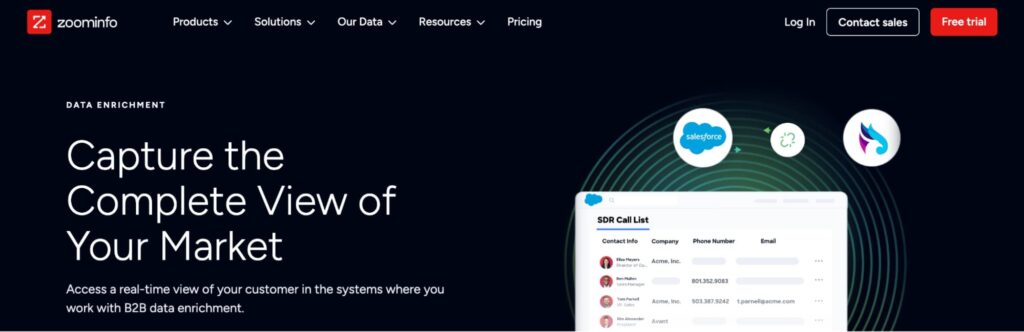
ZoomInfo is known for its extensive database that provides real-time data to connect you with your ideal buyers. It fills in missing details and updates records with accurate contact and company data. For example, you can use it to find your prospect’s names, job titles, company, work experience, and any other information.
Additionally, ZoomInfo claims to find your prospect’s contact information. However, users from sites like G2 complain about its inaccurate data.
Here’s how one user puts it: “Data accuracy can be inconsistent at times, especially for smaller companies or niche roles, and some contact information becomes outdated quickly.” So, you’d want to verify these details to avoid frustrating your sales efforts.
Key features
- CRM enrichment to fill in prospects’ missing details and update records.
- Buyer intent data to predict prospects who are most likely to buy from you.
- Sales engagement feature to streamline your phone and email outreach activities.
Pricing
Contact the sales team for a quote.
10. Common Room — For intent signals

Known for intent signals, Common Room is another data enrichment tool that boosts sales efforts. Here, you can find various kinds of signals – website visits, job changes, funding news, and product-led sales data.
Thanks to these signals, you can identify prospects who are most likely to buy your products. For example, a prospect visiting your pricing page is a strong indicator they’re considering your products. Likewise, a company that announced it raised new funds would require new services.
Your job is to harness information about your prospects, craft a pitch that resonates with them, and reach out to increase the chances of conversion.
Key features
- Intent signals to identify prospects who are most likely to buy from you.
- A Person360 feature that provides comprehensive details about your target audience.
- Roomie AI, an AI sales agent, to score leads and personalize outreach messages.
Pricing
Common Room’s pricing details start at $1,000 per month.
11. Trigify – For social intelligence
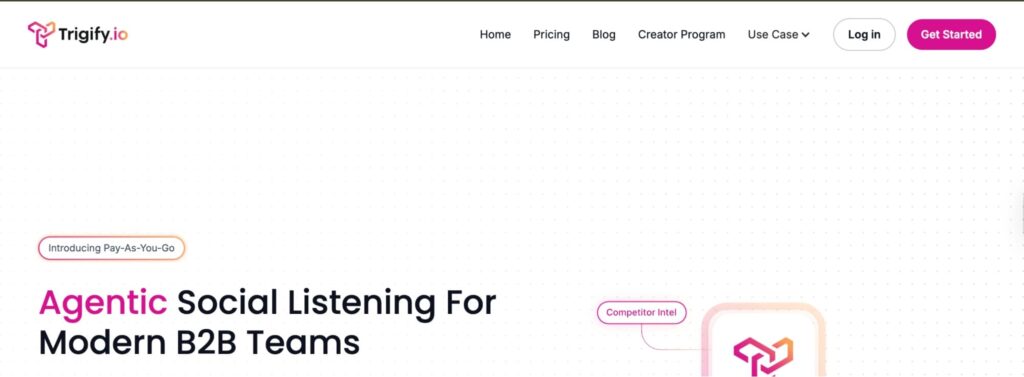
If you want a tool to monitor your prospects’ social media activity, Trigify is an ideal choice. The platform monitors your key conversations and provides real-time social media insights on your prospects.
It doesn’t matter whether it’s your ideal buyers or competitors’ customers. The AI sales tool monitors keyword mentions, tracks sentiment spikes, or checks product feedback to discover what people are saying about your brand.
For example, suppose a prospect replies to your LinkedIn post, or someone leaves a negative review of your products. Trigify lets you know. This intel helps you better understand your prospect and make informed business decisions.
Key features
- Provides actionable intel across your socials.
- Routes crucial insights to your sales teams.
- Integrate with various third-party platforms to streamline your workflow.
Pricing
Trigify offers both a monthly and a credit-based pricing model. While the monthly plan starts at $149, the credit model starts at $0.012 per credit.
12. Clearbit — Real-time enrichment
Although acquired by HubSpot, Clearbit offers real-time insights into targeted leads and accounts to supercharge your sales efforts. It gathers millions of data points, including contact information, technographic details, revenue, employee count, and location, from both private and public sources.
As a result, when a new contact is added to your CRM, Clearbit enriches the raw data with various attributes to fill in missing information and keep it up to date.
Clearbit is also renowned for turning anonymous web traffic into real buying signals. It identifies companies that visit your website and highlights whether they match your ideal customer profile. It integrates with CRMs like HubSpot and other marketing platforms to streamline your workflow.
Key features
- 100+ B2B attributes to provide context about targeted leads and accounts.
- Website visitor signals to identify anonymous accounts that visit your website.
- Native integrations with HubSpot and other marketing platforms.
Pricing
The pricing is integrated with HubSpot’s.
13. Datanyze – For technographic
Datanyze offers detailed insights about specific tools and technologies. With over 200,000 tools in its database, Datanyze displays valuable insights about these tools and their market shares.
For instance, let’s say you choose to know about Salesforce. Datanyze will display the firm’s products, revenue, funding history, employees, customer base, and key decision-makers.
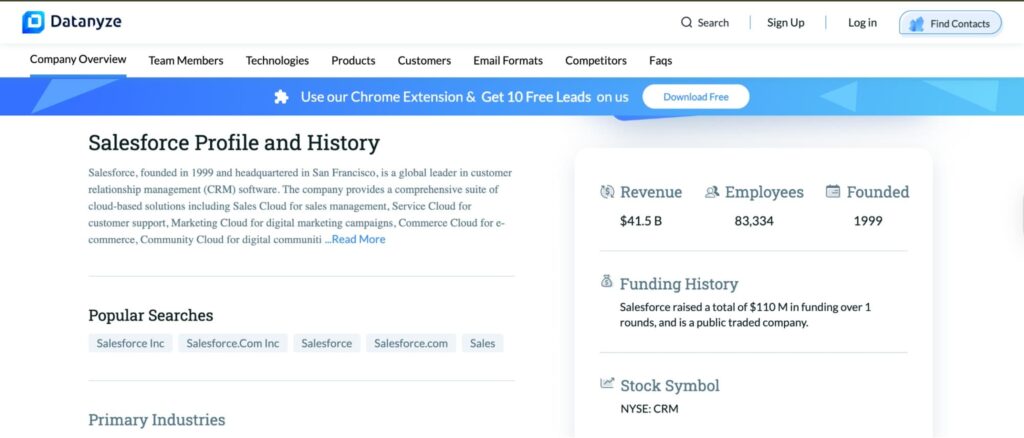
On top of this, Datanyze goes a step further by revealing the biographies of these decision-makers. There, you will find their full names, email addresses (work and personal), phone numbers, location, work history, and educational background. These details grant contextual insights that you can leverage when reaching out to them.
Key features
- Provides company and contact data to find your ideal buyers in real-time.
- Offers detailed insights about specific technologies, including their customer base and key decision-makers
Pricing
Datanyze offers a 90-day free trial, but its paid plan starts at $21 per month.
14. RB2B — Company and contact enrichment
RB2B deanonymizes your website visitors — actual people and companies. The data enrichment tool reveals your web visitors’ names, email addresses, and LinkedIn profiles to push to Slack or your CRM for further sales activities.
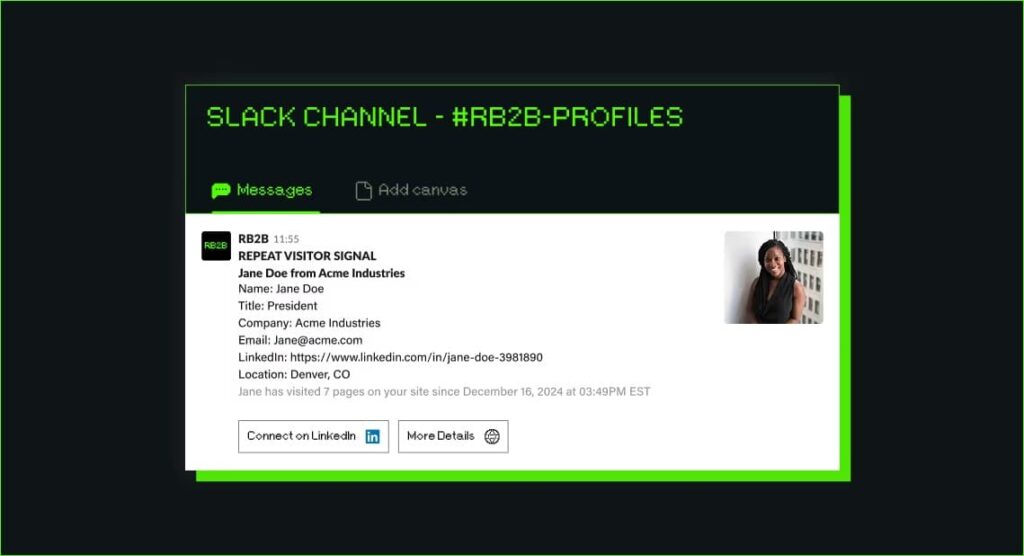
This helps identify where your prospect is in the buyer’s journey. For example, a prospect visiting your case study’s page may be considering your website. Meanwhile, someone visiting the pricing page may be considering a purchase. Having this information at hand helps you better understand how to approach prospects in order to convert them.
Key features
- Deanonymize web visitors by unveiling their names, email addresses, and phone numbers.
- Integrate with various applications to easily transfer data.
Pricing
RB2B offers a 7-day free trial, but its paid plan starts at $79 per month.
15. Crunchbase — For firmographic insights
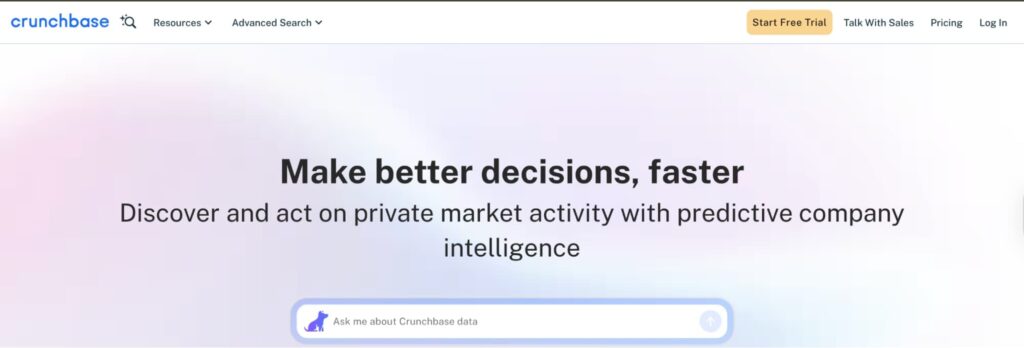
Our final option on the list is Crunchbase. The data enrichment tool is renowned for its firmographic insights on private companies. You can get company news, funding news, product launches, predictive insights, and industry trends to stay ahead of competitors and make informed decisions for your business.
You can also find targeted companies and filter by various criteria to find the right insights you’re searching for. Crunchbase is suitable for founders, investors, and sales professionals seeking the right info about a business.
Key features
- Obtain firmographic insights about selected companies to make informed decisions.
- Identify accounts and filter by various criteria to obtain the desired information.
Pricing
Crunchbase offers a 7-day free trial, but its paid plan starts at $49 per month.
B2B data quality + email enrichment best practices
Implementing some best practices improves the effectiveness of your data enrichment efforts and your overall B2B sales strategy. Here are three data enrichment best practices to help.
1. Define your objectives
Data quality isn’t a one-size-fits-all approach. Your objectives define whether it fits the specific context in which you intend to use it. So, define clear, actionable objectives that align with your business needs. Here are four ways to outline your data quality objectives.
- Identify the type of data you need to collect. Is it demographic, firmographic, or technographic?
- Set the process. How will you collect the data? Is it real-time enrichment, waterfall enrichment, or CRM enrichment?
- Define how you intend to use the data. Is it for lead targeting? To personalize interactions? Or map the buyer journey?
- State how you intend to measure business outcomes. Do you need to increase enrichment for a high-value customer segment by 30% in 90 days?
Having clear objectives will help guide your enrichment strategy and choose the most relevant data source for your business.
2. Audit and clean data regularly
Inaccurate data wastes time and frustrates your sales processes. Hence, the need to regularly cleanse your database arises. Here are some guidelines to do that.
- Remove duplicate entries to increase accuracy and efficiency.
- Standardize your data to ensure all information (names, email addresses, or phone numbers) follows a consistent format.
- Delete data that doesn’t meet pre-defined criteria to maintain relevancy.
- Append missing data to get a complete record.
- Create a routine to cleanse your data, perhaps weekly, quarterly, or monthly.
A proper routine of enriching and cleansing your data reduces wasted outreach and keeps your business information in good shape.
3. Improve data security
Although your data should be easily accessible, you should implement security measures to protect it. Use robust authentication methods to control access to sensitive data.
Also, check whether they comply with data privacy regulations, such as GDPR and CCPA. In short, protect your data from breaches and cyberattacks to maintain customer trust and comply with local regulations.
What to look for when choosing B2B data enrichment tools
With various B2B data enrichment tools in the market, you only need the right one that fits your business’s needs. Here are some factors to look for when choosing the right B2B data enrichment tools.
1. Ease of use
Is the tool easy to use and navigate? Does it have a learning curve that isn’t too steep to master? A data enrichment platform with a user-friendly interface saves time and allows users to harness its full potential.
2. Check the data quality
Many data enrichment platforms rely on real-time data collection and third-party integrations to provide current information. However, not all tools refresh their database regularly. While some update their databases daily or weekly, others rely on static, outdated lists.
So perform a data quality test before you commit to a platform. Request data samples and cross-check them against your CRM and other tools. A good data enrichment platform should provide accurate information that supports your sales efforts, and not frustrate them.
3. Consider pricing model and scalability
Some data enrichment tools charge per credit for each record you enrich. Others can offer a flat rate subscription model. Your job is to look beyond the base fee stated on their pricing page and understand how it impacts your budget and business.
For example, a credit-based pricing model will restrict your team from high-volume prospecting. Likewise, there could be hidden fees for add-ons such as global data coverage or engagement. To avoid this, negotiate a custom plan that aligns with your needs. Consider short-term contracts to test the tool before committing to it long-term.
4. Integration capabilities
A great data enrichment tool doesn’t work in isolation. Choose a tool that integrates seamlessly with your CRM, sales tools, and other platforms. This will help you to transfer data easily across multiple platforms.
5. Data privacy and compliance
Check whether your data enrichment platform sources data ethically and complies with regulations such as GDPR, CCPA, and the CAN-SPAM Act. Otherwise, you would risk paying hefty fines and face legal sanctions.
Enrich your database with Expandi’s real-time updates
There you have it! The top 15 B2B data enrichment tools for your business. Since all perform different functions, make sure to choose one that aligns with your business’s needs and objectives.
If you want a tool that enriches your database with real-time LinkedIn updates, we recommend Expandi. The B2B data enrichment tool lets you extract lead details in real time for prospecting. On top of this, you can build sequences to engage prospects at scheduled intervals without risking your LinkedIn account. Sign up for a 14-day free trial today to get started!
FAQs about B2B data enrichment
B2B data enrichment is the process of enhancing raw data with additional information to make it more refined and valuable for usage.
Some B2B data enrichment tools include Expandi, Clay, Cognism, 6Sense, ZoomInfo, and Clearbit.
Look out for the ease of use, data quality, integration capabilities, pricing model, and compliance with regulations before you choose a B2B data enrichment tool for your business.

You’ve made it all the way down here, take the final step