Lead Follow Up on LinkedIn: When to Message, What to Say, and When to Stop

Lead follow up works best when each message has a reason to exist. In Expandi’s analysis of 2,966 campaigns, 3-message sequences produced the highest reply rate. More persistence didn’t mean more replies: campaigns with 5 or more messages performed worse than campaigns that sent only one.
Glenn Miseroy, Co-Founder and CEO of Expandi, summarizes the finding well:
“Better targeting, shorter messages, and thoughtful follow-up consistently outperform unnecessary complexity.”
Key Takeaways
- Send 3 messages in total: Three-message campaigns replied at 9.8%, compared with 5.0% for campaigns with 5 or more messages.
- Give message #2 your best idea: It earned the highest per-send reply rate at 8.8%.
- Aim for about 2 short sentences: Messages between 151 and 200 characters reached an 8.5% reply rate, though length was a weaker factor than relevance.
- Stop after message #3: Resume the conversation only when the prospect replies or a new signal gives you fresh context.
Lead Follow Up on LinkedIn: When to Message, What to Say, and When to Stop


What is lead follow up and why is LinkedIn different?
Lead follow up is the process of contacting a prospect after an initial interaction so the conversation can continue. The trigger might be a new connection, an unanswered message, a profile visit, or a shared event.
Most lead-follow-up systems are built to prevent missed tasks. On LinkedIn, the system also needs to protect the conversation from over-automation. The sequence can run on schedule, but a person should take over as soon as the prospect replies.
Laura Hannan, Co-Founder of Pitch121, points out that “LinkedIn’s inbox functionality is quite basic.” Newer conversations push older ones down the list, so a relevant follow-up can bring an overlooked thread back into view.
| Approach | What it does well | Where it falls short |
|---|---|---|
| Manual follow-up | Gives the rep full control over each message | Tasks are easy to miss, and timing changes with the rep’s workload |
| Fully unattended automation | Keeps every delay and send consistent | It can continue after a reply or repeat a weak message unless the flow has firm stop rules |
| Automated sequence with human takeover | Handles the schedule and surfaces replies for a person | It still depends on accurate targeting and useful copy. The handoff rule has to be clear as well. |
For LinkedIn, the third option is the most practical: automate the sequence and hand the thread to a rep when someone replies.
How many follow-up messages should you send on LinkedIn?
If you’re wondering how many times to follow up on LinkedIn, we recommend sending 3 customer-facing messages in total. Expandi’s State of LinkedIn Outreach H2 2026 analyzed 13.2 million connection requests and 6.7 million outbound messages sent through 13,302 accounts from May 2025 to April 2026. In its sequence study, campaigns with 3 messages reached a 9.8% reply rate.
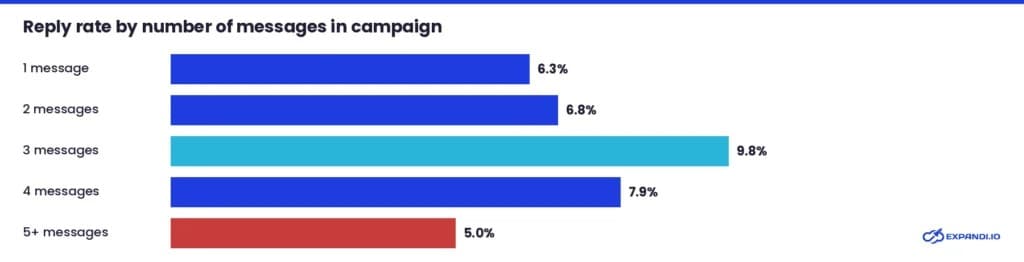
Message #2 deserves the most attention because it generated the highest per-send reply rate at 8.8%. At that point, the prospect has accepted the connection and can reply inside an existing thread.
These results show an association, so message count may not be the only reason for the difference. Campaign setup varies, and teams may also reserve longer sequences for prospects who are less likely to respond. Test a 3-message version against your current sequence to see how it performs with your audience.
How you count the 3 messages depends on whether the connection request includes a note. In Connector campaigns, Expandi’s analysis treats the note as message #1. That leaves room for 2 post-connection messages. Without a note, all 3 messages can follow acceptance.
Lead follow up templates to use on LinkedIn
The right follow-up depends on what happened before it. A prospect who accepted silently needs a different message from someone who replied and then disappeared.
| Conversation state | What it tells you | Follow-up rule |
|---|---|---|
| Connection request not accepted | You don’t have permission or context for another LinkedIn message | Don’t chase. Revisit only when a new signal appears |
| Accepted, no reply | The prospect opened the door but didn’t start a conversation | Send the strongest relevant message within 24 to 48 hours |
| Saw your message, then engaged elsewhere | The topic may interest them even if the first wording didn’t | Follow the new signal and change the angle |
| Replied, then went quiet | A conversation existed, but timing or priority changed | Send one contextual close that refers to their last message |
| Declined or opted out | The answer is clear | Stop the sequence and exclude the prospect from further outreach |
Each LinkedIn follow up template below matches one of those states. Adapt the wording to the prospect and keep any claim tied to information you can verify.
When should you send LinkedIn messages after connecting?
Send your first message 24-48 hours after the connection has been accepted.
Your message should make the reason for the connection request clear. Skip LinkedIn’s default thank-you message and give the prospect an easy question to answer.
This post-connection message has become increasingly important. Our data shows that replies to connection-request notes fell from 3.5% in May 2025 to 2.2% in April 2026, as more people accepted invitations without replying. Acceptance is now often silent, so the first message after it has to start the conversation.
Hannan’s approach begins with one simple instruction: “Show genuine interest in them.”
She recommends a general question that lets the prospect talk about a current priority without writing a long answer.
Template 1: Continue from a post
Hi {first_name}, thanks for connecting. Your point about {specific point} caught my attention. How is your team handling {related issue} at the moment?
Template 2: Continue from a shared tie
Hi {first_name}, good to connect after {group/event/mutual contact}. Is {topic} something you’re working on at {company_name} this quarter?
Only mention a LinkedIn tie you can verify. Expandi’s strongest connection-note examples referred to an existing tie and reached acceptance 1.8x to 2.7x the 30.2% baseline. Use the finding to shape your own opener. For more ideas, check these LinkedIn connection request templates.
Should I send a follow up LinkedIn message after no response?
Yes, but you need to change the reason to reply.
A follow up LinkedIn message after no response should add information. Wait 4 to 7 days after the previous message, then use message #2 to share your strongest resource or observation and end with one question.
Message #2 template: Offer something useful
Hi {first_name}, I found a short breakdown of {topic} that covers the issue you mentioned in {post/event}. Want me to send it over?
If that receives no answer, leave a longer delay before message 3. The final message can reframe the original offer, but it shouldn’t announce that this is your “last attempt.”
Message #3 template: Reframe the problem
One final thought, {first_name}: teams in {industry} often run into {specific issue} before {desired outcome}. If that’s on your list this quarter, I can share the setup we use.
Avoid “just checking in” and “bumping this.” Neither gives the prospect new or valuable information.
What to send in a LinkedIn message after a networking event?
Refer to the moment you shared.
After a networking event, send your LinkedIn message the same day or next day if you spoke directly. Refer to a specific moment, such as a session comment or a problem the speaker discussed, so it feels personal and creates a sense of community.
Event participant campaigns averaged a 14.21% reply rate in Expandi’s H1 2026 data, compared with 10.3% across LinkedIn DMs.
Template 1: You attended the same session
Hi {first_name}, your question during {session} really struck a chord for me. Has {issue discussed} come up at {company_name} too?
Template 2: You met in person
Good meeting you at {event_name}, {first_name}. You mentioned {specific challenge}, so I pulled together the example we discussed. Happy to share it here.
Template 3: They registered but didn’t attend
Hi {first_name}, sorry we missed each other at {event_name}. The session on {topic} covered a useful point about {detail}. Want the short recap?
If you didn’t get their name, use the LinkedIn event page or the comments under event posts. Expandi can also pull a list of event attendees after you join the event.
What to say in a follow up message on LinkedIn after a profile view or post engagement
Recent profile views and post engagement give you a good reason to send a follow up message on LinkedIn. Ask a neutral question about the action you noticed, since the person may simply have been curious.
Profile-visitor campaigns averaged a 13.4% reply rate in Expandi’s H1 2026 data. Expandi Signals can add profile visitors or post engagers to a Builder campaign and route them through the appropriate branch.
Profile-view template
Hi {first_name}, I noticed you stopped by my profile recently.I’d love to connect and learn more about what you’re working on. Maybe we can share some ideas or experiences around {topic/industry}?
Don’t pretend to know why someone viewed your profile. Ask, then let the answer set the direction.
Got great engagement on a recent LinkedIn post from potential customers and want to reach out? An effective LinkedIn direct message references their specific comment, keeps things low-pressure, and leads with value instead of an immediate pitch. Use what we like to call the “3-2-1” formula to formulate the perfect response.
The 3-2-1 Formula
- 3 sentences about their work or recent comment
- 2 sentences about a shared connection point
- 1 clear, low-effort question that is easy to answer
Post-engagement templates
“Hi [Name], really appreciated your comment on my post about [topic]—especially your point about [mention specific detail]. It got me thinking about how [relate it to a quick insight or challenge]. Curious how you guys are handling that over at [Company] right now?”
“Hey [Name], thanks for chiming in on my post earlier. Since you mentioned [topic/pain point], I put together a quick [checklist / framework / case study] on how we solved that exact thing. Would love to drop it over if you think it’d be useful for you?”
When they replied once, then went quiet
It happens to the best of us so don’t beat yourself up – it’s the nature of cold outreach and an opportunity to improve your messaging. Sometimes it has nothing to do with you or your message at all – people get ill, busy, distracted or locked out of their LinkedIn accounts. So if they’ve gone quiet on you after a good start, hit them with one last contextual close. Reference their own words and make the next step easy to accept or decline.
“Hey {Name}, just looping back to see if it still makes sense to pick up our chat about {specific topic}, or if you’d prefer I pause here?”
- Why it works: It is under 150 characters, which statistics show gets higher response rates, and takes pressure off replying.
“Hey [Name], figured I’d drop this [article / short insight / example] here in case it’s useful for what you’re tackling with [Company/Topic] right now. No need to reply if you’re swamped!”
- Why it works: You give before you ask, proving you care about their problems rather than just chasing a response.
If they don’t answer, stop. Their earlier reply doesn’t grant unlimited permission to keep asking.
Best practices for LinkedIn follow up messages
- Don’t pitch immediately: Treat the DM as a way to start a real human conversation, not to close a sale.
- Act quickly: Send the message within 24 hours of their comment or engagement while the context is fresh.
- Keep it short: Respect their time with scannable, bite-sized text.
- Avoid copy-paste: Personalize at least the first line to prove a human actually read what they wrote.
How to build a follow-up sequence in Expandi
Build the sequence around connection status and behavior. Expandi’s Campaign Builder lets you place warm-up actions before the request and branch on the If connected condition. You can then add delays between messages.
1. Build recognition before the connection request
Keep the warm-up short. View the prospect’s profile and engage with one relevant post. If you leave a comment, add something to the discussion. Hannan recommends that teams “work small, highly-targeted batches” and make the LinkedIn profile relevant to that audience.
Vague comments such as “great insight” don’t build familiarity. A useful comment responds to the point in the post and gives the author something to answer.
2. Set up the 3-message flow
- In Expandi, select Create a new campaign, followed by Create campaign from scratch. Expandi will open a blank Builder campaign.
- Add the warm-up actions that fit the audience. Then send the connection request.
- Add an If connected condition. Keep unaccepted requests out of the message branch.
- Send the first post-connection message within 24 to 48 hours of acceptance.
- Add a 4-to-7-day delay before the next message. Use this position for the strongest idea in the sequence.
- Add a longer delay before the final message, then end the branch.
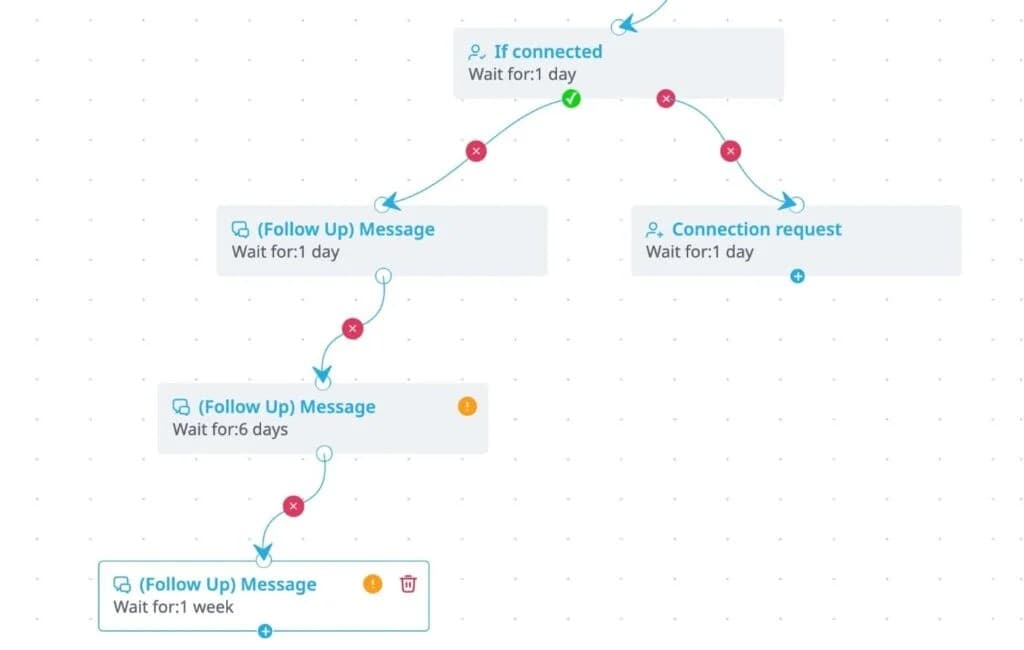
If the connection request contains a note, count it as one of the 3 messages. The 2 post-connection messages should then occupy positions 2 and 3.
3. Branch when a new signal appears
Use delays to control when each message is sent. If a prospect engages with a post after ignoring the first message, have the campaign send a follow-up that refers to that post. The original scheduled wording no longer fits the context.
Smart Campaigns can combine conditions with LinkedIn actions so the sequence follows connection status and engagement. Keep one end condition on every branch, and stop the automation on reply.
Expandi MCP can also prepare a campaign draft or explain why an active campaign stopped sending. It can’t activate a campaign or send a reply without approval, so the operator still controls what reaches the prospect.
See the current Expandi MCP capabilities before adding it to the workflow.
How to write follow-up messages to leads that add value
There’s nothing that will shut down a sale or meeting faster than repeatedly sending long, irrelevant or duplicate messages in your outreach campaigns.
1. Keep follow ups brief
Expandi’s most reliable message-length peak was 151 to 200 characters, where campaigns reached a reply rate of 8.5%. That fits about 2 short sentences.
2. Keep it relevant
Interestingly, length made less difference to reply rates than relevance. Reply rates for messages between 300 and 500 characters fell marginally to 7.6%, so deleting words won’t save an irrelevant offer. Start with the prospect’s situation and use message personalization to hyper-personalize the offer.
3. Keep each message focused on one reason to answer
Hannan’s advice is to “focus on one clear point” and make the answer easy. A useful way to plan the sequence is to give each message a separate job:
- Resource: Share a report or checklist connected to the prospect’s work.
- Reframe: Present the problem from another angle or narrow an offer that was too general.
- Short video: Show the relevant part of the product or process in under a minute.
A personalized video follow-up can be useful when a demonstration explains more than another paragraph. Keep the clip short and make its first frame recognizable to the recipient.
Personalized messenger campaigns reached a 16.86% reply rate in Expandi’s H1 2026 data, compared with 10.3% across LinkedIn DMs. The campaign types and audiences differ, so use the figures as reference points for your own tests.
4. Use AI for a draft, then rewrite it
AI can help you draft a shorter message and give you a couple of responses to choose from. Expandi can tag incoming replies by sentiment, helping your AI-assistant generate responses that actually hit the mark. Nonetheless, you should always review any AI-generated messages before sending.
In Expandi’s within-account analysis of 118 campaigns from 73 accounts, AI-generated messages were associated with an acceptance rate about 12% lower than human-written messages. Meanwhile, the two groups’ reply rates were effectively the same. These findings support using AI to prepare a draft, where the account owner or sales rep makes the final edit.
In Expandi, Sentiment Analysis tags replies as Interested, Maybe Interested, or Not Interested. Use the tag to organize the inbox, then read the message before deciding what happens next.
| Sentiment | What to do | Example response |
|---|---|---|
| Interested | Take over and answer the question or arrange the next step | “Happy to show you. Would Tuesday afternoon or Thursday morning work better?” |
| Maybe Interested | Address the stated concern once | “You mentioned implementation time. The shortest useful answer is {answer}. Want the full setup?” |
| Not Interested | Close politely and stop future follow-ups | “Understood. I’ll close this here. Thanks for letting me know.” |
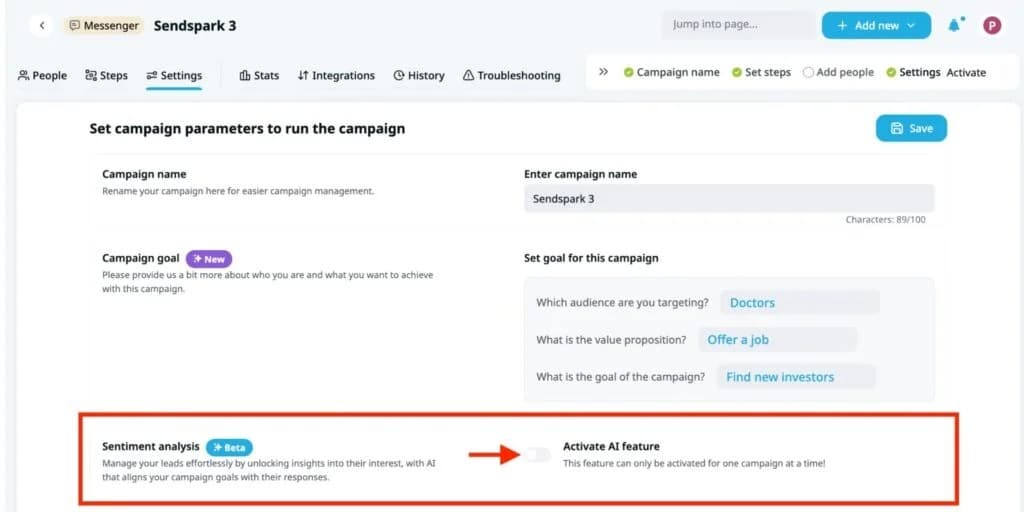
The Generate reply button can prepare a draft inside the conversation window. Read the thread before approving it. Teams can use Workspaces or the Global Inbox to assign access and handle replies without leaving the sequence unattended.
Our Expandi MCP now makes running AI-assisted workflows more streamlined and effective than ever before! Connect your AI-assistant of choice and run your outbound with a prompt. For tips of getting the most out of the MCP, read our guide on how to automate lead generation with Claude. The Expandi MCP can also help you automate outreach campaign optimization.
When to stop following up on LinkedIn
| What to look for | How to respond |
|---|---|
| Stop after message #3 if the prospect hasn’t replied | Campaigns with 5 or more messages returned a 5.0% reply rate, and another generic nudge gives the prospect little reason to reconsider. |
| Stop after any clear “no” and record what the person said | If they say the timing is wrong and give you a future date, end the current sequence and schedule one reminder for that date. |
| Reopen the conversation after several weeks if the context changes | A new role, a relevant post, another profile visit, or fresh engagement with your content can give you a reason to write. Check where the buyer is in the journey before deciding whether the signal deserves a follow-up. |
| Don’t send a theatrical breakup message announcing that you will never contact them again. | End the campaign quietly. If a useful signal appears later, you can return with a reason that stands on its own. |
| Audit your second message & account for slow months if your conversations keep stalling | Test the part of the sequence most likely to change the outcome. Message #2 earns the highest per-send reply rate, so make sure it’s on point. |
Stop rule: 3 messages with no reply ends the sequence. A new signal can start a new conversation, but it shouldn’t extend the old one indefinitely.
How to fix outreach that goes cold
If your cold outreach starts off piping hot and dwindles to a simmer repeatedly, it’s time to do some detective work. Here are a few things you can do to pinpoint the cause:
1. Audit your second message
If your first connection note has a healthy reply rate and then leads go quiet, test the part of the sequence behind the drop in engagement. Message #2 earns the highest per-send reply rate according to our research, so make sure it’s on point if you’re hearing crickets after that initial follow up.
2. Run an A/B test without changing the audience
Create two campaigns of the same type and split one lead list evenly between them. Change one element in message 2, then compare reply rate and positive responses after both campaigns have had enough time to finish.
| Test focus | Campaign A | Campaign B |
|---|---|---|
| Opening | References a recent post | References a stated role priority |
| Offer | Shares a checklist | Shares a short video |
| Question | Asks about the current process | Asks whether the topic is a priority |
| Delay | Four days | Seven days |
Expandi’s A/B testing workflow randomly and evenly assigns the selected lead list across the campaigns. Keep the audience and every untested message the same. If several variables change, the result can’t tell you which one helped.
Track message-level replies alongside the campaign total. Our lead generation KPI guide explains how to analyse reply rates alongside the number of replies and messages sent.
3. Plan for a slower January
In Expandi’s H1 2026 report, January was the weakest month, with 21.45% acceptance and 6.47% reply. At the same time, it was the highest-volume month, with more than 10,651 campaigns launched.
That doesn’t prove January caused the lower rates. After all, people may still be returning from the holidays, and besides, January had the highest campaign volume in the report. If results dip, compare January with the same segment in another month before rewriting the entire sequence.
Use slower weeks to test a new messaging or reach warmer audiences identified through Signals. Keep the 3-message cap even if results dip seasonally.
The lead follow-up formula
Use the original 5-part formula to check every sequence before launch:
- Trigger: Base the message on what happened before, such as an accepted connection, profile visit, post engagement, or shared event.
- Timing: Send the first post-connection message within 24 to 48 hours. The next delay should be 4 to 7 days, with more time allowed before message #3.
- Tone: Match the prospect’s level of formality and don’t write as though you know them better than you do.
- Tactic: Give each message one job, such as sharing a resource or asking a useful question.
- Takeover: Pause automation on reply so a person can read the thread and decide what comes next.
The 5 Ts give you a final check before launch. Set a clear stop rule, and make sure a person takes over as soon as the prospect replies.
Automate lead follow-up on LinkedIn with Expandi
Tired of running follow up sequences manually? Set up smart outreach campaigns that take leads down different paths depending on their reply behaviour. Connecting to the MCP and using signals to generate responses can help you A/B test and refine your messaging to keep reply rates healthy. Start your free 7-day Expandi trial and put the follow up formula to the test!
Frequently asked questions
For anyone asking how long to wait before following up, 4 to 7 days is a sensible starting point, followed by a longer delay before message #3. Expandi’s State of LinkedIn Outreach H2 2026 report found that reply rates stayed between 8.3% and 9.1% across the week, with Monday at 9.1%, and were almost flat throughout the day. Morning sends were associated with higher connection-request acceptance.
No. Withdraw stale requests according to your account process, then return only if a new signal gives you a relevant reason to connect.
For the workflow in this guide, keep the 3-message follow-up sequence on LinkedIn. The full exchange stays in one thread, and you can compare the result with Expandi’s 10.4% platform-wide message reply rate or a closer industry benchmark.
Check the LinkedIn event attendee list and comments, then match the person by company or role. Don’t guess if the identity is uncertain.
Expandi’s platform-wide message reply rate was 10.4% across 6.7 million outbound messages. Compare your campaign with its past results and the closest available segment because industry and audience temperature can move that number.


You’ve made it all the way down here, take the final step