Mass Message on LinkedIn: Complete guide to bulk messaging & automation (2025)

Suppose you intend to message 1,000 prospects on LinkedIn. If you spend just 5 minutes per prospect — searching for their names, personalizing the messages, and hitting the send button — that’s about 83 hours of manual work.
You’d spend 83 hours doing something you could automate within minutes. On top of every manual send comes the risk of errors and fatigue that leaves you tired and your message inconsistent and less impactful.
Now compare it to using a LinkedIn automation tool, which would take less than 30 minutes to complete the task. See the difference? Mass messaging on LinkedIn isn’t hard or time-consuming. With the right tool, you can automate every part of the process to save time and scale your outreach while keeping your mass messages personalized and consistent.
But how do you do this? In this article, you will learn:
- What LinkedIn mass messaging is and how it works
- How to automate sending mass messages on LinkedIn
- Best Practices To Keep In Mind When Sending Mass Messages On LinkedIn
Let’s get started.
What’s LinkedIn Mass Messaging and How Does it Work?
LinkedIn mass messaging refers to the process of sending personalized messages to multiple prospects on LinkedIn, rather than sending individual messages to each person. It enables you to connect with a large number of people simultaneously, initiating conversations and fostering meaningful relationships.
LinkedIn mass messages can be sent through LinkedIn connection requests, InMails, sponsored messages, follow-ups, and more. You can send these messages in two ways:
- Manually, without the use of automation tools
- Through LinkedIn mass messaging or automation tools like Expandi.
The manual mode of sending mass messages is inefficient. You must type the message, add contacts individually, and track everyone you’ve reached. It’s time-consuming, prone to error, and isn’t scalable.
On the other hand, automated LinkedIn mass messaging involves scheduling a message to be delivered to a group of recipients at a specific time. You write the message and use a LinkedIn automation tool to schedule and send it to a large number of recipients at once. This process is easy, saves time, and lets you build a good rapport with your potential customers.
In the next section, we will take a deeper dive into these approaches.
How to send mass messages on LinkedIn manually
Here’s a step-by-step process on how to send mass messages on LinkedIn at once.
- Go to your LinkedIn messaging section.
- Click the pencil icon to craft a new message.
- Enter multiple names you’d like to send mass messages to.
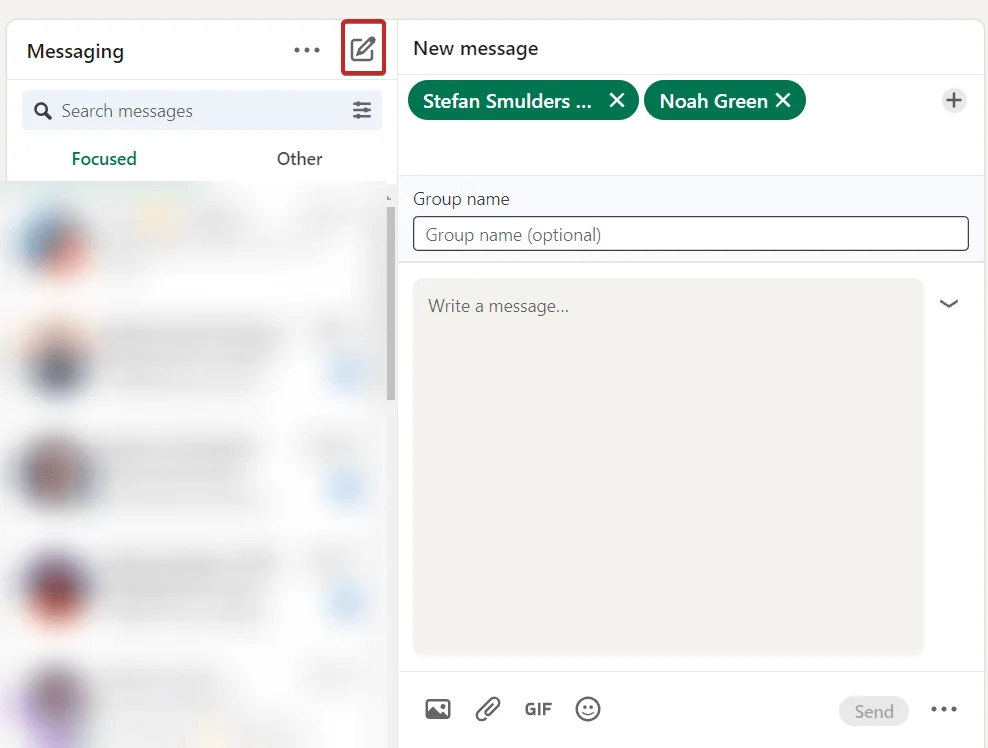
Technically, this adds the recipients to one group where all of them will see your message. Unfortunately, you can’t send LinkedIn connection requests and other kinds of messages en masse through this method. But we’ll cover how to automate that instead below.
How to automate sending mass messages on LinkedIn
Ready to automate sending mass messages on the platform? You’ll have to use a LinkedIn message automation tool. Automation software like Expandi lets you set up smart outreach sequences, based on actions and conditions.
The process is simple.
When sending automated mass messages on LinkedIn, you need to perform these three key steps :
- Identify your target audience.
- Create smart sequence steps (i.e., actions you’ll be automating).
- Leverage outreach templates with personalization tags.
1. Identifying your target audience
First, you start with LinkedIn prospecting to find your target audience. Use the LinkedIn search bar, groups, LinkedIn Sales Navigator, or CRM list to create a list of targeted profiles.
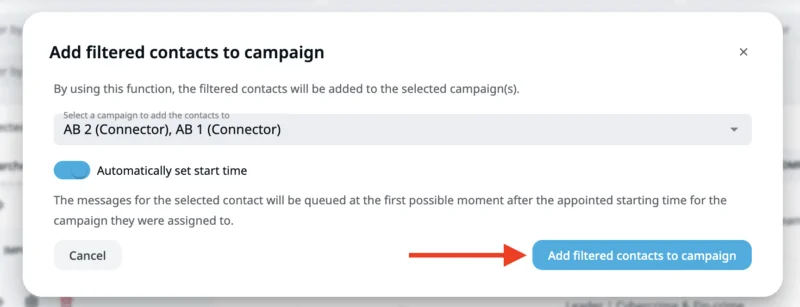
Here’s an example. Here, we input target keywords “marketing” and “CEO” to find those we intend to target.
2. Export your LinkedIn search into an automation tool
Once you’re done searching, export the result into an automation and outreach tool like Expandi. All you have to do is paste the URL. Exporting allows you to see the targeted profiles to whom you will send the messages, enabling you to track your outreach campaign more effectively.
3. Organize and manage targeted profiles
After exporting, make sure you’re sending messages to the individuals who fit your ideal customer persona. Hence, you can filter or manage your list as you want. Remove those who aren’t the right fit or segment the list for a more personalized approach.
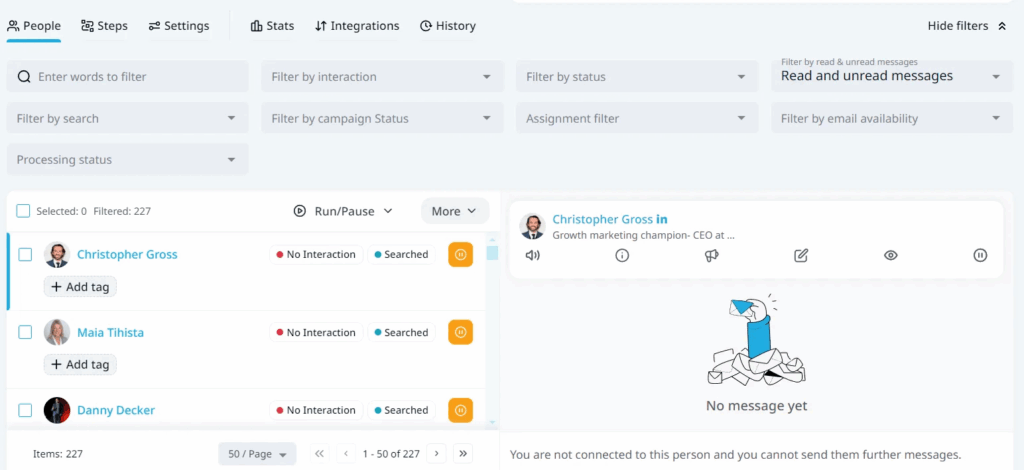
4. Automate mass message steps
With Expandi, you don’t have to send messages one-by-one. Instead, create campaign steps to deliver your messages to all your recipients. For instance, you can use a connection request template and customize the content to increase the chance of being accepted. You can also generate personalized messages through dynamic landing pages or placeholder tags to engage your prospects.

5. Set LinkedIn mass messaging automation limits
If you’re an avid LinkedIn user, you’d realize there are certain limitations around LinkedIn connection requests and messages. You’d want to abide by these rules to avoid having your account restricted, or worse, banned.
For context, here is an overview of LinkedIn limits on certain activities:
- 100 connection requests per week
- 100 messages per day
- 20-25 LinkedIn group messages per day
- 25 InMails per day (recommended but may vary)
Navigating these restrictions manually is time-consuming, especially if you have to message a lot of prospects (e.g., 1,000+ individuals). However, you don’t have to worry about navigating these limitations with Expandi. Our campaign prioritization feature helps spread these LinkedIn daily limits across all campaigns so you can effectively reach your prospects.
To do this, prioritize the accounts you want to spend your daily LinkedIn limits on. For instance, you can increase the priority of high-performing campaigns or decrease the priority of low-performing ones based on your settings. In short, Expandi lets you set these LinkedIn limits so you don’t overdo or risk having your accounts banned.
6. Launch and measure campaign performance
Once you’ve set the limits, launch your campaign. Then, look into the performance of your LinkedIn campaigns. Check your connection acceptance rate, open rates, reply rates, conversion rates, and other metrics.
This lets you identify what’s working and what requires improvement. Remember that your LinkedIn mass messaging outreach isn’t a one-time campaign. Continuously refine and iterate your strategies to achieve high-performing results.
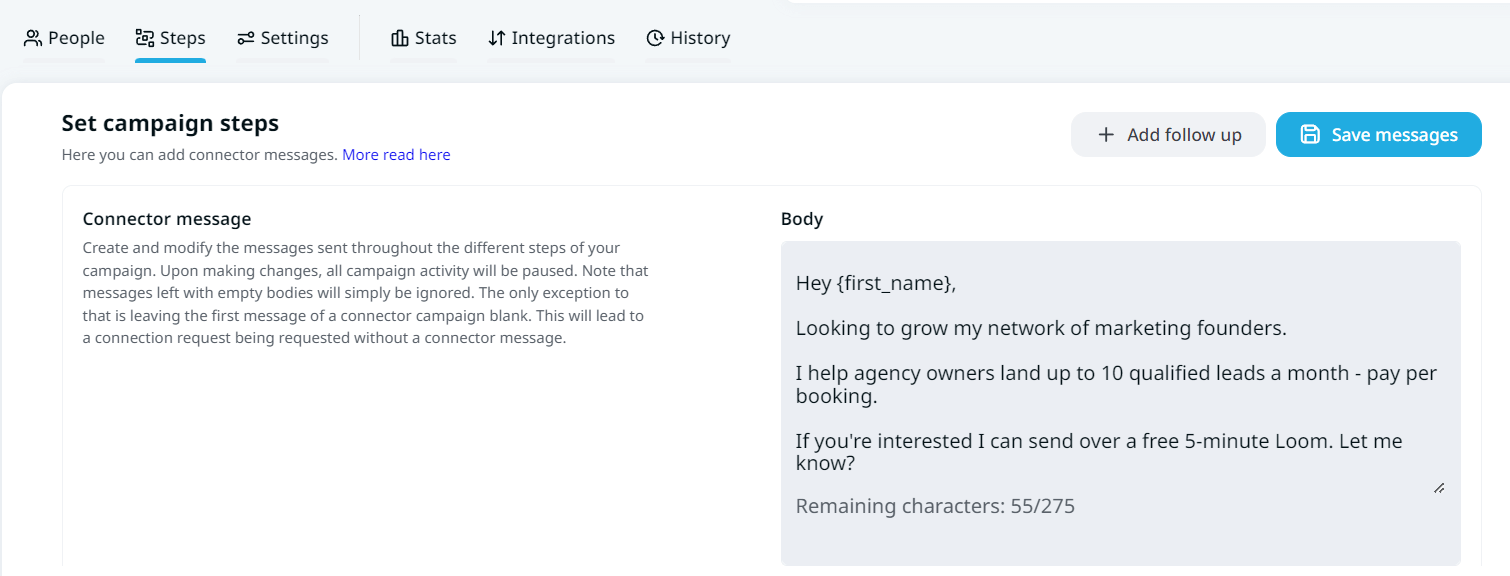
That’s the gist of it when it comes to sending mass messages on LinkedIn. As you see, setting up these campaigns is very straightforward. In the next section, we’ll show you some real-life use cases of how LinkedIn mass messaging on Expandi.
How does LinkedIn Mass Messaging Work on Expandi?
When setting up smart sequences for your mass messages with Expandi, you can customize the following elements as part of your outreach.
Actions (Use cases) of LinkedIn Mass Messaging:
Visit profile.
Follow profile.
Follow company.
Invite to follow the company.
Endorse skill.
Send a connection request.
Mobile connection request.
Send a follow-up message.
Send an Open InMail.
Send an Email.
Like a post.
Like a company post.
Conditions:
Custom condition when mass messaging on LinkedIn in Expandi
If connected.
If they followed you.
If they visited your profile.
If your email is opened.
If your email bounces.
If your email is clicked.
If email exists.
If Open InMail.
If your post is liked.
Here’s a simple workflow example of how this would work with a LinkedIn campaign to grow your network.
It’s also worth mentioning that you can set up different kinds of outreach campaigns when sending mass messages, depending on your goals. With a Connector Campaign, for example, your main objective is to simply automate sending connection requests at scale.
Some other examples of sending mass messages on LinkedIn include:
- Sending connection requests to potential leads.
- Sending follow-up messages to people you’re connected with.
- Automatically personalizing your follow-ups based on the lead profile.
- Scraping LinkedIn search results into a spreadsheet file to manage, qualify, and organize lead data as needed.
In the next section, we will take a look at why you should send mass messages on LinkedIn.
Why send mass messages on LinkedIn?
LinkedIn mass messaging offers various benefits, which include:
- Saves time and effort
- Smart sequences beyond basic automation
- Personalized campaigns
- Tracks campaign performance
1. Saves time and effort
When you mass message on LinkedIn, you reach hundreds or thousands of prospects at once, reducing the time you would spend if you were to message them individually. This creates an efficient process of expanding your network and focusing on other business activities.
2. Smart sequences beyond basic automation
LinkedIn automation like Expandi lets you send different types of messages, such as connection requests, group messages, InMails, follow-ups, and more. This allows you to reach more individuals through diverse ways.
Besides, you can set up smart sequences to reach prospects who fit your criteria by spreading your daily LinkedIn limits across all prospects. With this, you can reach more prospects without having your accounts restricted or banned.
3. Personalized campaigns
When mass messaging on LinkedIn, you must personalize your messages to initiate conversations with your prospects.
Personalization goes beyond including their first names. Make sure you mention something that’s relevant to the prospects, perhaps one that addresses their pain points, and showcase how you can solve it.
Also, consider using LinkedIn mass messaging tools like Expandi to craft personalized messages that resonate with your prospects. With effective typing templates and elements like dynamic text or image layers and placeholder tags, you can customize messages at scale, expanding your reach.
4. Tracks campaign performance
If you mass message on LinkedIn manually, chances are you would find it challenging to track your campaign performance. You can’t keep track of those you messaged or follow up with them. When you can’t measure your campaign, you don’t know what to continue or refine to optimize your campaign.
However, LinkedIn mass messaging tools, such as Expandi, keep track of your LinkedIn campaign performance. It provides insights into metrics such as connection acceptance rate, reply rates, number of leads generated, and conversion rates.
7 Best Practices To Keep In Mind When Sending Mass Messages On LinkedIn
LinkedIn automation is simple, on paper at least. But if you want to:
- Keep your LinkedIn account and outreach safe.
- Grow your network with the right people.
- Start building relationships with relevant, qualified leads.
Then, you’ll want to follow these best practices when sending mass messages:
- Define your ideal customer persona.
- Personalize your messages
- Include different follow-ups.
- Offer something of value instead of selling yourself directly.
- A/B test different outreach messages.
- Keep LinkedIn limits in mind so that your account doesn’t get suspended.
- Use LinkedIn Sales Navigator to make sure you’re targeting the right people.
1. Define your ideal customer persona
Before sending mass messages on LinkedIn, you need to define your ideal customer profile (ICP) first. Your ICP is the people who receive the most value from your product, service, and solution. You can identify them based on these four characteristics:
- Demographics —- age, gender, and job title for individuals; industry, company size, and annual revenue for companies
- Geographic details — location of the individual and company.
- Psychographic details — values, interests, pain points, and other personality traits.
- Behavioral aspects — purchasing history, online activity, and preferred mode of communication.
By analyzing these traits, you identify those who get the most value from your LinkedIn message, the product you sell, or the service you offer. LinkedIn is a great place to find them.
Matteo Arisi, Customer Success Manager at Expandi.io, highlights three key ways he identifies those who align with his ICP.
- Sales Navigator filters → Use filters for title, company size, geography, and even recent activity. Only target prospects who match your offer.
- Advanced keywords → Broad search isn’t enough. Include words people add in their bios and posts to find people who have a real interest. This is a total game-changer for reply rates.
- Group targeting → Join LinkedIn or Facebook groups. Your ICP may hang out there. Pull lists right from those groups, as they can be very active, interested, and much more likely to reply.
That said, here’s a real-life example of how we found clients relating to our ICP in an outreach campaign we launched, based on our Expandi vs Dux-Soup landing page.
Dux-soup is a LinkedIn automation web extension (our competitor). We wanted to reach their users to get them to try Expandi instead. So, we scraped their Facebook group of 4,200+ members, found their LinkedIn, and reached out with a message saying how we found them in that group.

The results?
- 72% acceptance rate.
- 49% reply rate.
- 40+ booked demos.
See our guide on LinkedIn lead generation strategy for more info on this specific campaign.
2. Personalize your messages
Generic messages get ignored. We don’t just say this; the stat backs it up. About 81% of buyers ignore irrelevant marketing messages.
So, if you want your prospects to reply to your LinkedIn mass messages, make it personal. People love it when a message mentions their names or says something related to them.
Percival Miseroy, CEO at Expandi.io, shares a hack to do this. He says, “Add real context. Reference a post, role change, or job ad to boost replies.” He also advises keeping messages short. According to him, “messages under 150 characters perform best.”
So, how do you personalize mass messages you send automatically at scale?
It’s simple. With Expandi, you can include the following personalization tags as part of your outreach:
- {first_name}.
- {last_name}.
- {job_title}.
- {company_name}.
- {dynamic_placeholder}.
Using these elements, you can craft templates for your mass messages, which might look like this:
TEMPLATE EXAMPLE
“Hey {first_name},
Looking to grow my network of agency owners living in Germany.
Saw you working at {company_name} and thought I’d reach out.”
Mentioning the prospect’s name in your outreach is nothing new, though.
If you want to take your personalization to the next level, consider using dynamic, visual personalization, which looks like this.

For more info on this kind of outreach, see how we used hyper-personalization to skyrocket our reply rate up to 55%.
3. Include follow-ups
In a 2025 Belkins’ study, soft-touch nurturing via LinkedIn drives a higher reply rate of up to 11.87%. Here is the reason. Not all leads will make the purchase right after receiving your first message. So, it’s always logical to include a follow-up message as part of your outreach.
With Expandi, this is as simple as adding a follow-up message step, with a relevant template. You can also combine LinkedIn messages with email follow-up for effective results.
Ilija Costco, GTM Engineer at Expandi.io, shares a follow-up strategy in a revenue predictor formula after analyzing a $2.3 billion pipeline generated on LinkedIn.
- 1 touchpoint: 9.3% conversion
- 3 touchpoints: 14.8% conversion
- 5–7 touchpoints: 19.2% conversion
- 8+ touchpoints: 16.1% conversion (diminishing returns)
In other words, while it’s great to follow up, don’t avoid this. Keep it between 5 to 7 touchpoints. Otherwise, anything above that will only result in diminishing returns.
4. Make a valuable offer
One thing that can prompt your prospect to give you a try is to make a valuable offer. Keep in mind that your prospects don’t know you. So, rather than selling yourself or getting them to book a call, offer a valuable solution that addresses their needs and solves their problems. Let them know what they stand to gain from the deal.
For instance, suppose your Fintech prospects waste time on manual data entry, your valuable offer could be an automation tool that extracts and validates customer data from documents, saving time and allowing them to focus on other business activities.
In short, position your messages in a way that’s valuable for them to care and reply to your message.
5. A/B test your messages
A/B test your messages to determine which message performs better. The best thing to do is to change only one thing at a time. For example:
- Different subject lines
- Different connection requests to see which one causes more people to connect with you.
- Different follow-up messages and CTAs.
- Different tone or style, and so on.
With Expandi, you can easily A/B test different campaigns and audience messages. Here is a step-by-step process.
- Create outreach campaigns you want to A/B test.
- Create a search you want to use for the campaigns (different audience verticals)
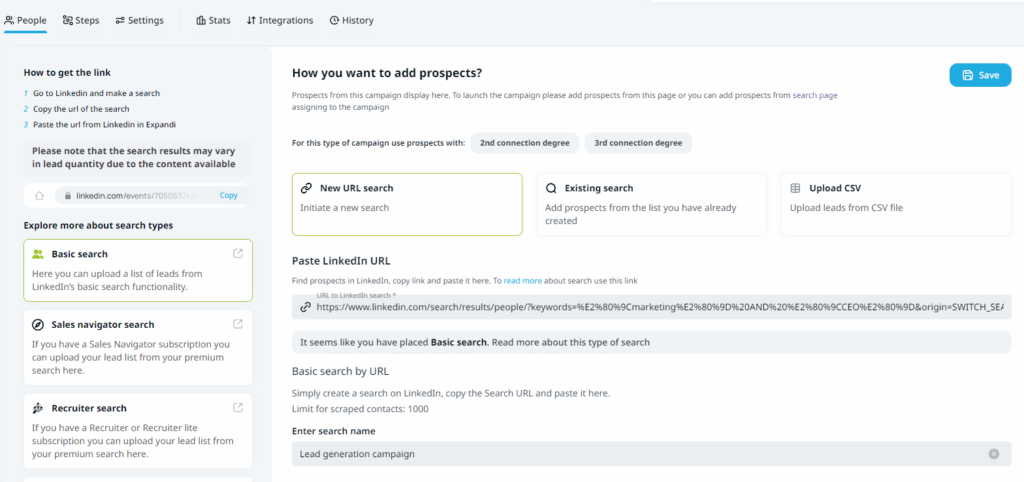
- Then, evenly split the prospects from your Search. Click on created search, and select Assign filtered contacts.
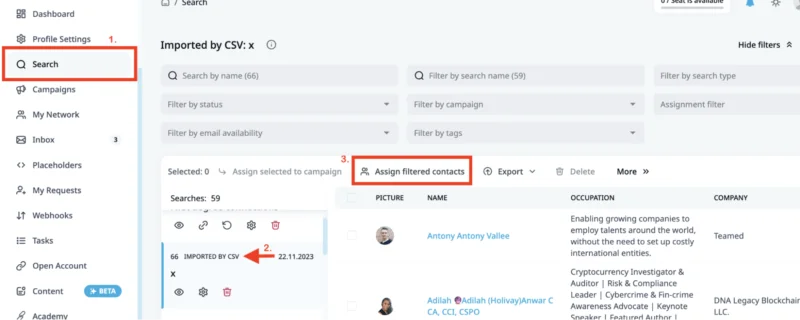
- Select both of the A/B testing campaigns from the drop-down menu and click Add filtered contacts to campaign.
- Finally, the leads are evenly split and assigned to your outreach campaigns. Now you can activate the campaigns and start testing.

6. Use LinkedIn Sales Navigator to improve your targeting
Finally, use LinkedIn Sales Navigator to send mass messages. The platform comes with lots of features designed to send bulk messages and streamline your efforts to expand your reach. According to LinkedIn, professionals who use the premium version to send mass messages witness:
- +17% higher win rates when saving leads on Sales Navigator.
- +42% larger deals when connecting with decision-makers.
- 15% more pipeline when finding customers.
All they need to do is target the right people and make LinkedIn outreach more personalized. However, you must note that sending mass messages on LinkedIn Sales Navigator isn’t optimized, as it often involves InMails, which don’t have a great reply rate. But you can send at scale using a LinkedIn dedicated platform like Expandi.
That said, here’s how to send mass messages on LinkedIn Sales Navigator.
- Find the right prospects with advanced search and filter features. Filter the list by industry, job title, geography, seniority level, and so on.
- Craft personalized messages to address the prospect’s needs and interests. Make sure your message is clear and concise. Include a call-to-action to persuade them to take an action.
- Use the Sequence feature in LinkedIn Sales Navigator to schedule and automate your outreach efforts.
Overall, use LinkedIn Sales Navigator to find your ideal prospects and send personalized messages to maximize replies and increase the chances of success.
Conclusion
Here is the recap: sending mass messages on LinkedIn is easy. You can even do it natively through the platform. However, that option wastes time and leaves you burnt out. And it’s not ideal when targeting recipients at scale (i.e., 100+ people).
Instead, the better option is to leverage automation.
This way:
- Mass messages are automatically sent in the background while you work on business activities. It’s like having a group of SDRs working for you, landing you meetings.
- You save time by not having to message each prospect one by one.
- You gain access to instant analytics to see how your mass messages are working. For example, based on your reply rate, you could experiment with a different template to increase the number of people replying to you.
Ready to start generating leads automatically on LinkedIn?
Start sending mass messages with Expandi! Our LinkedIn automation tool lets you set up your mass messages in minutes and send them automatically over a few days, depending on your LinkedIn daily limits. Grab your free, 7-day trial here!
FAQs about LinkedIn Mass Messaging
1. What’s LinkedIn Mass Messaging?
LinkedIn mass messaging refers to the process of sending personalized messages to multiple prospects on LinkedIn, rather than sending individual messages to each person. It enables you to connect with a large number of people simultaneously, initiating conversations and fostering meaningful relationships.
2. Can you mass DM on LinkedIn?
Yes, you can mass DM on LinkedIn, whether manually or using an automation tool. While the manual method wastes time and is prone to errors, the automated approach creates an efficient process to let you send messages to multiple individuals at once.
3. How do I message multiple people at once on LinkedIn?
You can message multiple people at once on LinkedIn with tools like Expandi. It lets you create campaign steps to deliver your messages to all your recipients. It also has a feature to use the LinkedIn daily spending limit effectively to prevent your account from getting restricted or banned on LinkedIn.


You’ve made it all the way down here, take the final step