What Are Impressions on LinkedIn? Key Factors to Consider + 6 Tips to Get More of Them

When was the last time you realized your content on LinkedIn wasn’t getting impressions? Rather than expecting conversations and visibility when you hit the publish button, you’re left with little or no impressions.
If this has happened to you, you’re not alone. Many professionals struggle with low LinkedIn impressions even when they share valuable insights with their audience. The problem isn’t your follower count. A 2025 report revealed that pages with fewer than 1,000 followers witnessed a 22.9% increase in LinkedIn impressions.
So, what could be affecting your LinkedIn impressions? In this article, you will learn the meaning of LinkedIn impressions, a good benchmark to aim for, and some tips on how to increase your LinkedIn impressions. Let’s get started.
What are the impressions on LinkedIn?
LinkedIn impressions indicate the number of times your content (posts, articles, videos) appears on someone’s feed. It doesn’t matter whether LinkedIn users interact with your content. As long as your content appears in someone’s feed, it’s counted as an impression, whether they like, comment, or repost it, or don’t engage with the post at all.
LinkedIn uses this metric to gauge your content’s reach. It reflects visibility by showing how many times your content is displayed in search results or members’ feeds. For example, suppose 1,000 people view a post you published on LinkedIn, you’ve got 1,000 impressions for that specific post. Even if 50 people engaged with that post, you still have 1,000 impressions.
Although not a clear-cut indicator of marketing success, LinkedIn impressions are key metrics that let you improve content quality and follower engagement.
A decline in LinkedIn impressions is a wake-up call to improve your LinkedIn engagement strategy so that the platform’s algorithm can boost your posts more often. Now that you know what LinkedIn impressions are, let’s explore how LinkedIn counts impressions.
Types of LinkedIn impressions
LinkedIn impressions are of various types, which include:
- Organic impressions are content that naturally appears on someone’s feed. They don’t require any advertising spend. The more interactions your post receives, the more likely the LinkedIn algorithm is to show it to your connections and their networks. This increases your posts’ visibility, boosting organic engagement.
- Paid impressions are the number of times the content is displayed in the audience’s feed through LinkedIn advertising tactics. They are mostly categorized as ads (sponsored content, text ads, event ads, etc). It’s perfect if you want to pay LinkedIn to show your content to a targeted audience and gain a wider reach.
- Viral impressions are the number of times your content appears in a user’s feed outside your direct network due to a high engagement rate. They get a lot of attention, mostly due to the post’s fun element, uniqueness, or relatability. However, many viral posts go beyond your audience and may receive engagement from unintended sources.
In the next section, you’ll learn how LinkedIn counts impressions and where to track it.
How does LinkedIn count impressions?
LinkedIn counts impressions every time your content appears on a user’s screen. If a user sees your post multiple times, that counts as multiple impressions. Here are different ways LinkedIn counts impressions for your posts:
- Feed appearance: When your content appears in someone’s feed on LinkedIn.
- Search results: When your post shows in someone’s search results.
- Profile: When someone visits your profile, they see your posts.
- Notifications: When your post appears in someone’s notification, they see it.
You can also check your impressions in three ways: the activity section of your profile page, the analytics section, and your company page.
Here’s how to track them.
1. Activity section of your profile page
From your profile page, scroll to the “Activity” section. There, you will find all the content you’ve created, including posts, videos, activity, and newsletters. Select the exact one you’re looking for.
Let’s say you want to track the impressions for one of your posts. Select any of your posts from the “Post” tab. Right under the post, you will see its total impressions.
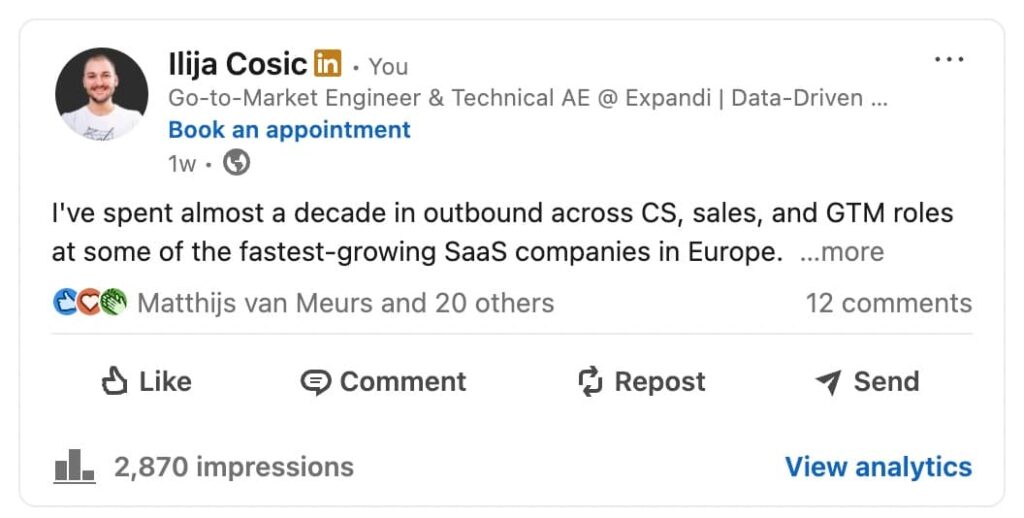
Then click “View analytics” to get a more detailed breakdown, including the number of people reached and the engagement rate.
2. Analytics section of your profile page
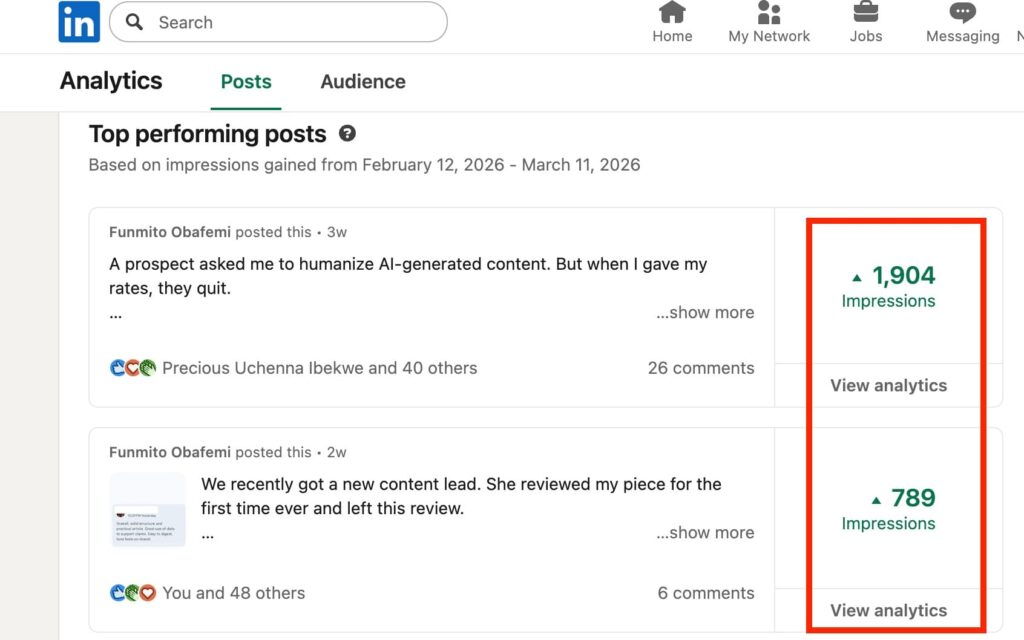
From your profile page, scroll down to the analytics section. Click “Show all analytics” > “Post impressions.” There, you will find all the impressions for all your posts.
3. Company page
From your company page, click the Analytics tab. There, you will find impressions broken down by whether they’re organic or paid. Plus, you also see other engagement metrics over various time frames. Note that only the company’s administrators have access to this data.
Why are impressions important on LinkedIn?
Wondering whether LinkedIn impressions matter to your business? Here are some reasons it does.
1. Get more visibility
Tracking LinkedIn impressions offers insights into how well your content is spreading among your intended audience. The more visibility your content has, the more likely it is to receive engagement, and the more people will remember your brand.
2. Refine your LinkedIn strategy
LinkedIn impressions can determine the effectiveness of your content strategy. If you get low impressions consistently over time, that’s a sign you need to refine your strategy.
Perhaps refine your message, change topics, try a new content format, or adjust the timing of your post. A great content strategy encourages you to craft better content, improving your LinkedIn impressions.
3. Improve personal branding and reach for businesses
For many personal brands and businesses, a higher number of impressions means more visibility on LinkedIn. Consequently, this attracts potential clients and other opportunities that advance your business’s growth.
Impressions vs views vs reach on LinkedIn
Impressions, views, and reach don’t mean the same thing on LinkedIn. While impressions are the number of times your content appears on a user’s screen, views indicate active engagement with your content. For example, when a user genuinely interacts with your content by pausing to read your posts or watching your videos.
On the other hand, reach is the number of individual users who saw your posts. Let’s say your posts have 2,000 impressions but only 1,000 reach. That means 1,000 people saw your content on an average of two times each.
| Metrics | What It Means |
|---|---|
| Impressions | Total times content is shown |
| Views | Someone actively opened your content |
| Reach | Number of unique users who saw your content |
What is a good number of impressions on LinkedIn?
There is no ideal benchmark for LinkedIn impressions. According to Kwansoo, personal profiles should aim for 500-1,000 impressions per post. Company pages typically receive 1,000 to 2,000 impressions per post with fewer than 1,000 followers.
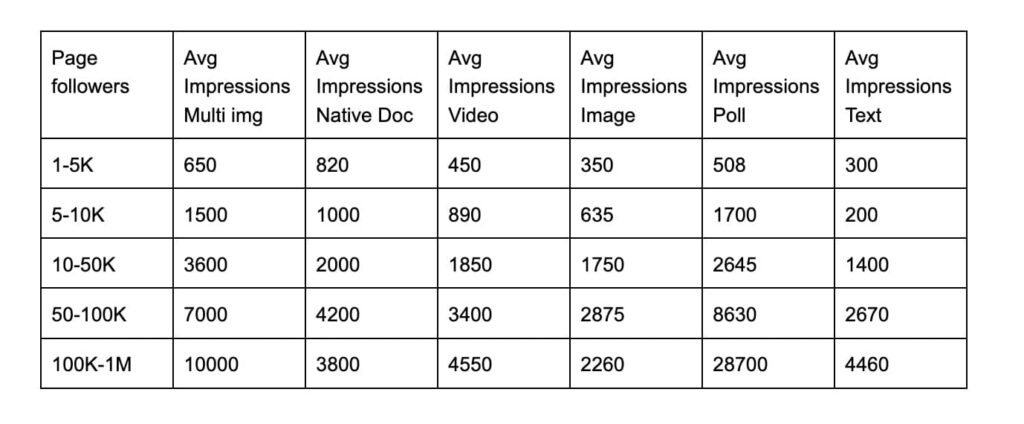
Additionally, a 2026 LinkedIn benchmark report broke down how follower count and content format influence LinkedIn impressions. Here, LinkedIn accounts with more follower counts get more impressions than smaller accounts.
However, the format of the content plays a huge role, with polls dominating LinkedIn impressions. On the other hand, text-based posts generate the fewest impressions. That said, here is a full breakdown of what makes a good impression on LinkedIn.
Factors affecting LinkedIn impressions as of 2026
Some factors can affect how many LinkedIn impressions you may receive:
1. Content quality
Organic impressions come from high-quality content — period. When your posts deliver real value, your target audience engages without being prompted to do so, and that engagement compounds your reach.
2. Posting frequency
The number of times you post influences LinkedIn’s algorithm to push your content on the platform. More posts equal more impressions. We don’t just say this; the stat backs it up with the average brand publishing about 3.3 times a week. Irregular posting starves the algorithm of signals to work with.
3. Content format
The type of content you publish — carousels, videos, polls, or text-only posts — influences how long a user spends engaging with your content. According to Buffer’s report, the best content format on LinkedIn is carousels (PDFs), which earned 278% more engagement than videos, images, and text-only posts.
4. Early engagement (The Golden Hour)
Early engagement acts as a signal that the content is worth distributing to a wider audience. According to Hootsuite, posts that receive strong interaction in the first hour are shown to second and third-degree connections more frequently.
How to increase impressions on LinkedIn
As you know, the more your LinkedIn impression increases, the more you get visibility and attract potential clients. And how do you do this? Here are 6 ways you can increase your impressions on LinkedIn.
1. Optimize your LinkedIn profile
See your LinkedIn profile as the landing page for your business, attracting or repelling potential clients. To avoid repelling your prospects, optimize your LinkedIn profile. Start with a professional headshot with a clear background as your profile picture.
Then, be specific about the kind of services you offer in your professional headline. An example is a screenshot of Maryna’s LinkedIn profile page below. There’s a professional headshot with no distractions in the background. Plus, her professional headline is straight to the point: “Sales Development Leader | SDR Coach. “
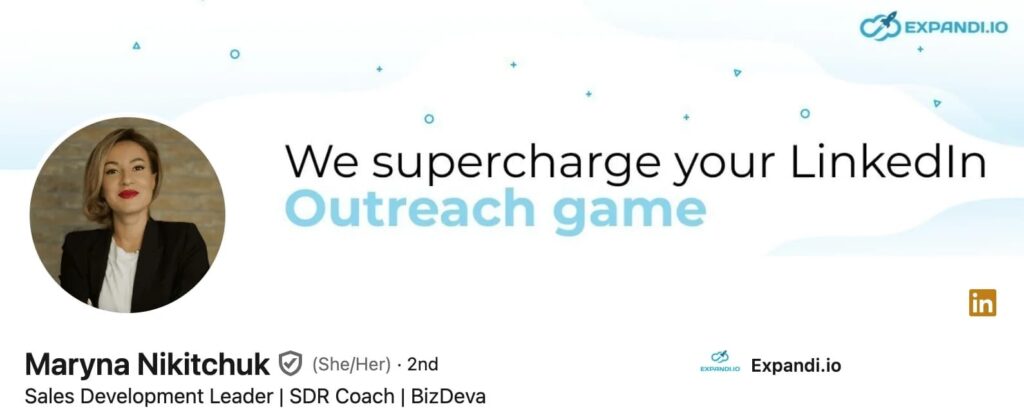
Also, include a detailed work experience, certifications, and testimonials to add credibility to the public. This prompts your audience to trust and engage more with your content, ultimately boosting your LinkedIn impressions.
For example, here are screenshots of Ilija Cosic’s work experience and LinkedIn impressions. As a GTM engineer, he posts about topics related to his work which prompts his target audience to engage more with his posts.
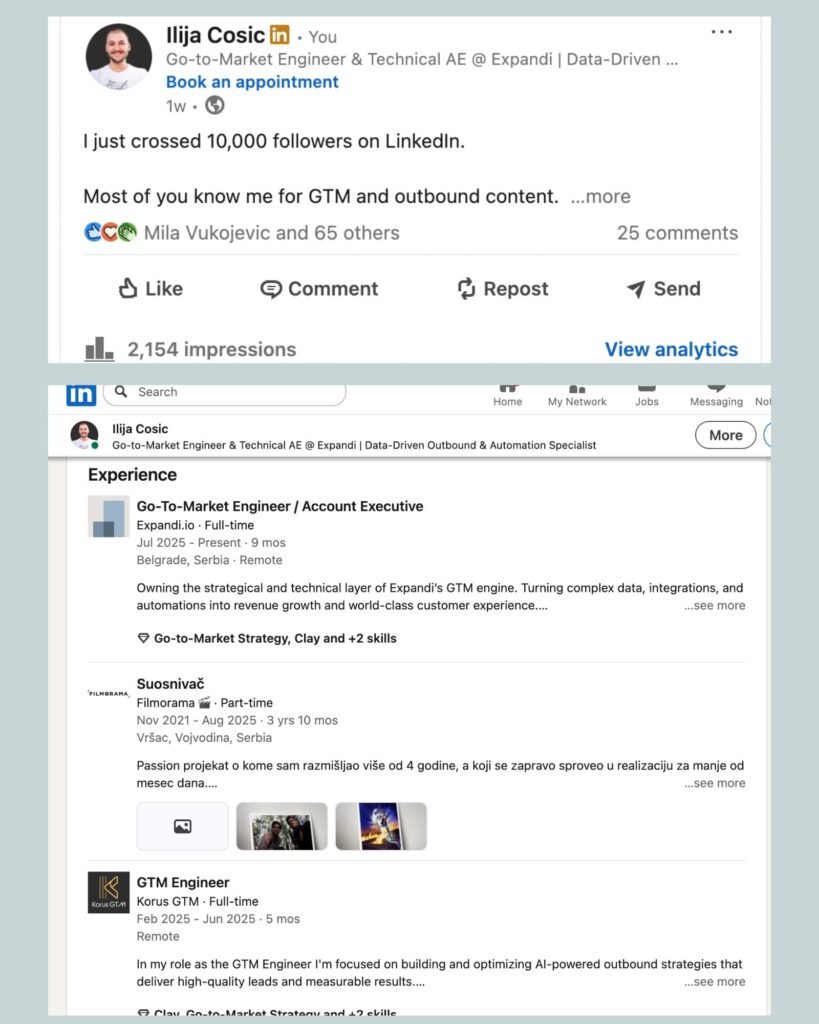
2. Post quality content
Next, create high-quality content. The kind that leaves readers to digest your work and encourages them to leave a like or drop a thoughtful comment. That’s what you should aim at. It will not only prompt your audience to trust you but also establish you as an authority in the field.
Here’s how to make sure you post valuable content:
- Address your target audience’s specific pain points or areas of interest.
- Use simple, clear, and concise language that communicates your ideas and aligns with your audience’s expectations.
- Add visuals such as PDFs (for carousel), images, or videos, to catch your audience’s attention.
Note that posting irrelevant content at a high frequency won’t increase your LinkedIn impressions. But when you create high-quality content that addresses your audience’s needs, you naturally get more views and increase engagement on LinkedIn.
3. Remain consistent
Your LinkedIn impressions won’t magically grow overnight. You need to put in the effort to see the results. And this doesn’t come from a few posts in a month.
Aim to post at least 3 times a week to see your LinkedIn impressions grow. Use LinkedIn’s native scheduler or a third-party tool to send your content out and stay consistent even when you’re less busy.
Michel Lieben, Founder and CEO at ColdIQ, shares his story about how consistency worked for him. The first few times he tried posting on LinkedIn, he gave up because he thought his posts were cringeworthy and was afraid of what people thought.
Finally, on his third attempt, he started posting again and remained consistent. He would publish his posts five times per week for three months straight. At first, he didn’t generate a single lead from these efforts.
Just when he was about to give up again, he somehow mustered the courage to post. This time, one of his posts went viral, resulting in 140k+ impressions, 600+ likes, 25 meetings booked, and 4 new signed clients. All because he remained consistent by posting on LinkedIn.
In short, consistency isn’t only about showing up when you’re energized. You have to show up even when you’re about to give up.
4. Network with others
Like the physical world, LinkedIn is a platform for networking. Be an active participant. Comment on others’ posts, connect with industry peers, or engage in LinkedIn groups and communities to build meaningful relationships with people.
Use Expandi, a LinkedIn automation tool, to find and connect with your ideal buyers from your LinkedIn posts, groups, events, and communities.
Suppose you want to connect with people from Linkedin groups, for example, navigate to the “Lead list” page >> “Add leads.” Select “Group URL,” enter the link, and name the list. Once that’s done, click the “Confirm” button and Expandi will retrieve the details of the group’s members.
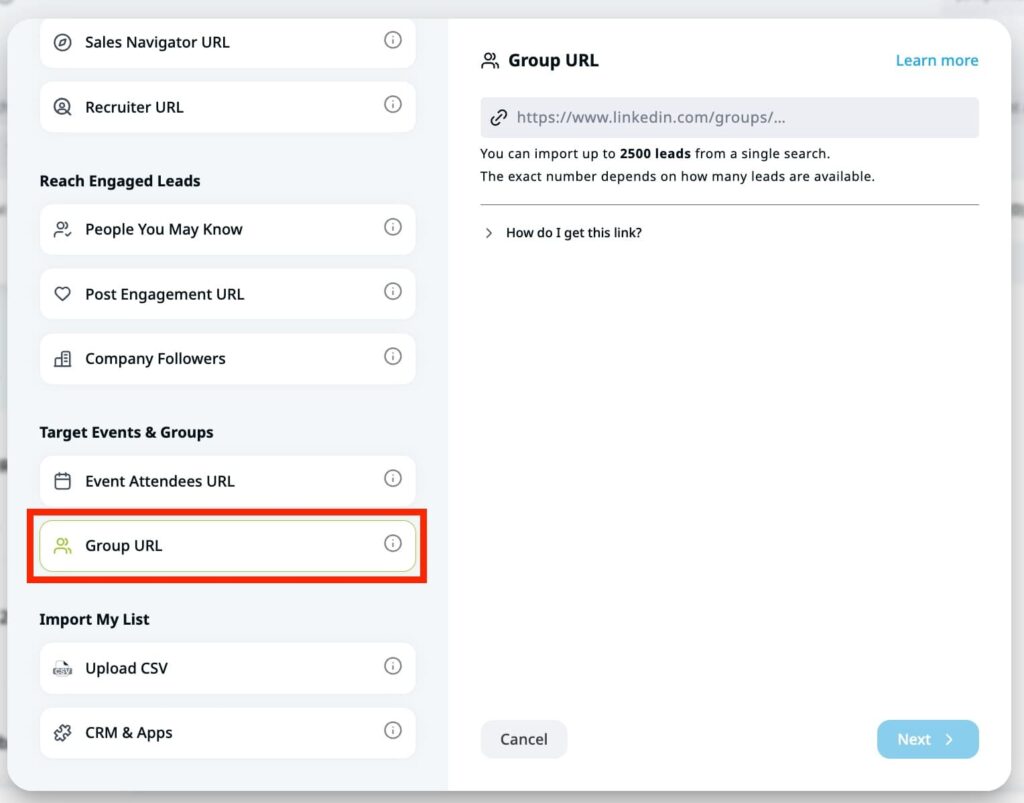
Then, create a sequence to connect with them.
5. Engage with people’s comments under your post
As the author of a LinkedIn post, your job is halfway done after you “hit” the publish button. The other half of the task is to reply to people’s comments. LinkedIn prioritizes the first 60 to 90 minutes of your post, which is the golden hour.
Once it senses early engagement, it sees your post as valuable and boosts its visibility. So, ask questions, run polls, and invite others to create discussions on your posts. The more people comment on your post and receive responses, the more the LinkedIn algorithm shares your post with people in and outside of your network.
6. Track and analyze your content performance
Although it’s not the most significant KPI, track your LinkedIn impressions to identify which of your content resonates the most with your audience. Low impressions signal that your content isn’t performing well, which can prompt LinkedIn to limit its visibility and fewer people to interact with your post.
On the other hand, high LinkedIn impressions indicate your content appeals to your audience. So, tweak your posts, try a new content format, or post at optimal times to increase engagement on LinkedIn.
Also, LinkedIn analytics tools such as Expandi provide data-driven insights into your LinkedIn activity, enabling you to make informed decisions about your content performance.
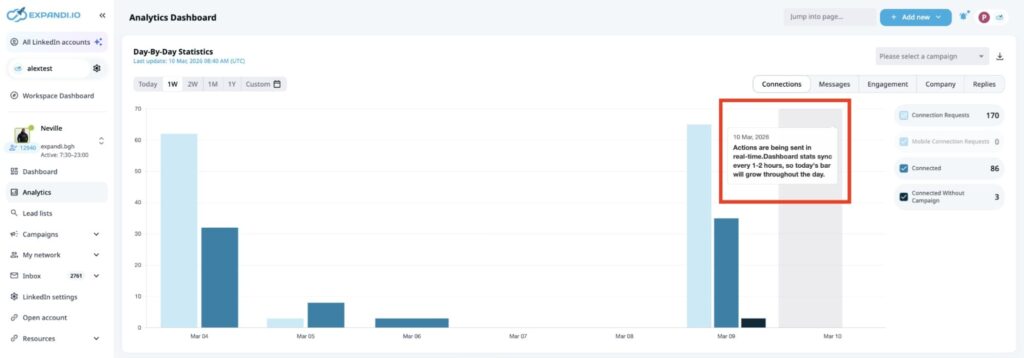
From this dashboard, you will find statistics of up to a year. It also includes LinkedIn impressions, the connections requests that were sent, your engagement rate, and reply rate.
Boost your LinkedIn impressions with Expandi
Knowing what drives impressions is one thing. Doing it consistently — posting 3+ times a week, engaging within that golden hour, tracking which formats land — is where most people fall off.
Expandi takes the repetitive parts off your plate.
Automate your outreach and engagement sequences so you’re active even when you’re not online, and use the analytics dashboard to see exactly which content formats and posting windows are driving your impressions up.
Book a demo today to get started!
FAQs about impressions on LinkedIn
No, impressions are not unique on LinkedIn. Instead, they represent the total number of times your content was displayed on LinkedIn. This means one user can generate multiple impressions.
Yes, LinkedIn impressions are the total times your content was displayed on a user’s screen. A good impression means your post resonates well with your audience, increasing visibility and more engagement.
To get 10,0000 impressions on LinkedIn, share valuable content. People love original content they can’t find anywhere else. As you post more valuable content, people will trust your content which will eventually get 10,000 impressions.
Impressions count every time your content appears on a screen, including repeat views by the same person, while members reached counts only unique individuals who saw it. Use members reached to gauge audience size and impressions to understand how aggressively the algorithm is distributing your content.





You’ve made it all the way down here, take the final step