LinkedIn Social Selling Index (SSI): How to Check and Grow It in 2026

LinkedIn gives you a score for how well you use the platform for sales. It’s called the Social Selling Index, and most people sitting at 35 have no idea what’s dragging it down.
However, LinkedIn itself is now telling people to stop obsessing over it. Their own Sales Navigator page says SSI “no longer accurately reflects the modern sales environment” and is pushing AI tools as the replacement.
So why does it still matter? Because as a diagnostic, it’s the clearest breakdown of which LinkedIn behaviors you’re underusing. A low score tells you exactly what to fix. A high score with one weak pillar tells you where your next 5 points are.
We’ve tested this firsthand running Expandi campaigns at scale. In one Connector campaign targeting profile visitors, we connected with over 53% of prospects before the campaign even finished. That kind of acceptance rate moves your SSI.
This guide covers what each pillar actually measures, what moves each score, and how to use SSI as a weekly health check without making it your north star.
- How does LinkedIn SSI fit in your outreach?
- Where the SSI score is headed in 2026.
- 3 Methods to instantly check your SSI score.
- How to read your LinkedIn SSI score.
- How to improve each of your LinkedIn SSI score pillar.
Key Takeaways
- SSI scores your LinkedIn activity across four pillars, 0-100. It updates daily and reflects your last 90 days.
- LinkedIn is officially de-emphasizing SSI in favor of AI tools, but the score still exists and is still the clearest activity diagnostic available.
- The industry average SSI sits around 35. A score of 75+ puts you in thought leader territory.
- Each pillar is worth up to 25 points. A high total score with one weak pillar tells you exactly where your next gains are.
- Acceptance rate on connection requests is the most overlooked SSI lever – volume without targeting pulls your score down.
- Expandi tracks your SSI inside your dashboard so you can monitor score movement alongside active outreach campaigns.
LinkedIn Social Selling Index (SSI): How to Check and Grow It in 2026

How The LinkedIn SSI Score Fits In Your Outreach
The Social Selling Index is a score between 0 and 100 that measures how effectively you use LinkedIn for social selling. It breaks your activity across four pillars, each worth up to 25 points, and benchmarks you against your industry and network.
This score is free to check here, updates daily, and reflects the last 90 days, not based on your lifetime behavior.
According to LinkedIn, social selling leaders generate 45% more opportunities than peers with lower SSI, are 51% more likely to hit quota, and 78% of social sellers outperform people who don’t use social media for sales.
This doesn’t mean SSI causes those results though, rather, it typically reflects the behaviors that do.
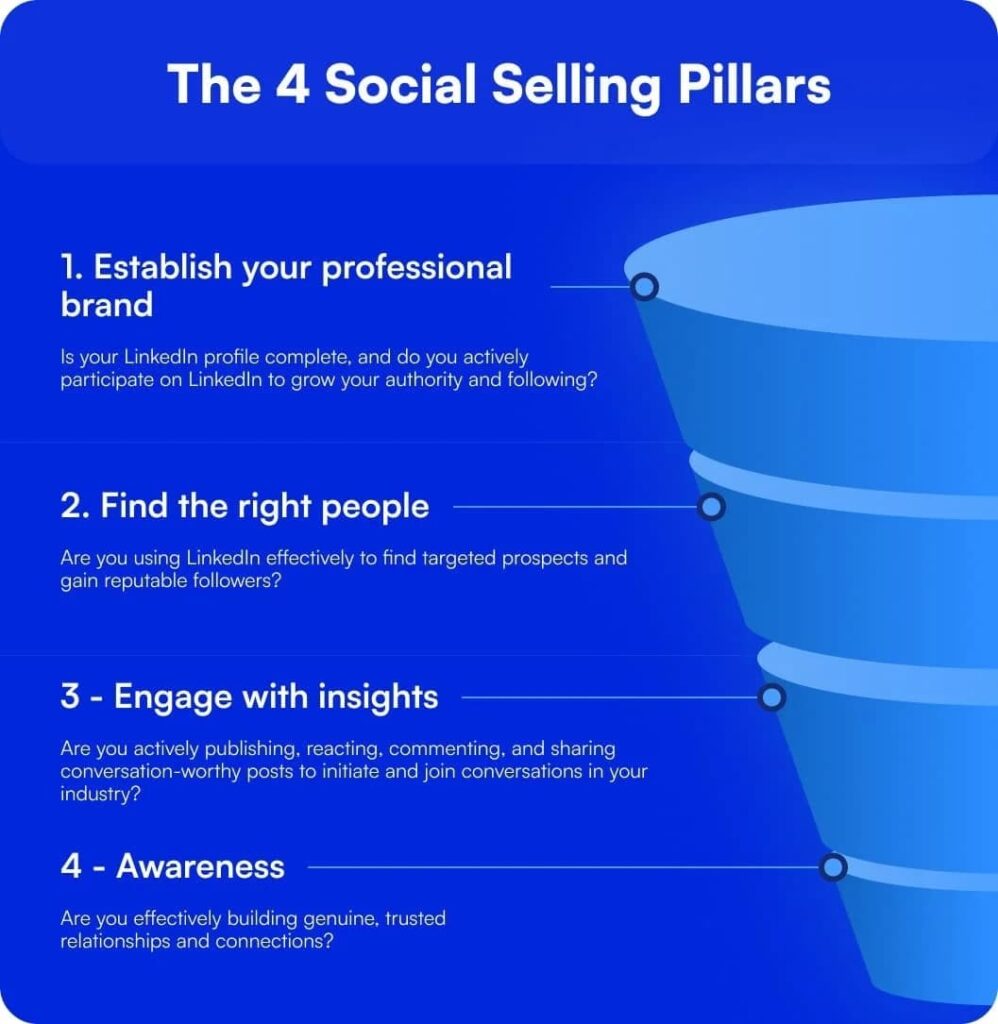
The four main pillars of SSI include:
- Establish your professional brand – Is your profile complete? Are you publishing content that builds authority?
- Find the right people – Are you using LinkedIn’s search and targeting tools to reach the right prospects?
- Engage with insights – Are you posting and commenting in ways that start real conversations?
- Build relationships – Are you building genuine connections with decision-makers, not just adding volume?
Where SSI Is Headed In 2026 and Why It Still Matters
LinkedIn’s own Sales Navigator page now says SSI “no longer accurately reflects the modern sales environment.”
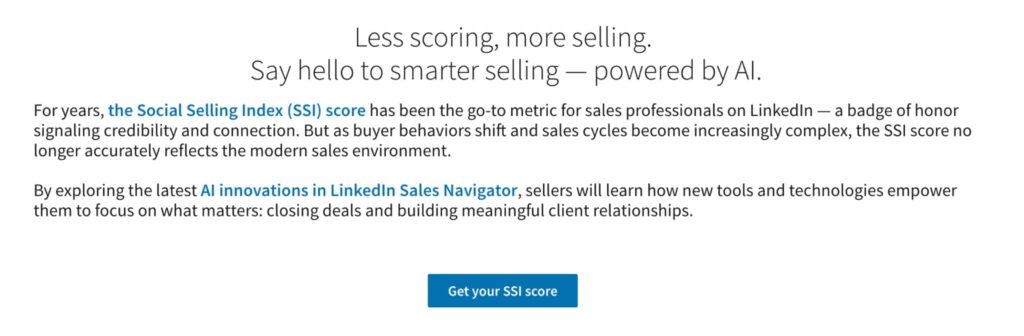
Their argument: chasing a high SSI score can distract sellers from actually closing deals. A high score doesn’t always correlate with measurable sales outcomes.
Their proposed replacement is a shift toward AI-powered tools:
- Lead Finder for automated prospecting.
- Message Assist for personalized outreach at scale.
- Account Alerts for real-time signals on target accounts.
- Relationship Map for navigating buying committees.
LinkedIn claims Sales Navigator users save 65 hours per year through these AI features.
This doesn’t mean LinkedIn SSI is gone, however. The score still exists, still updates daily, and is still freely accessible at linkedin.com/sales/ssi.
Instead, you should treat SSI as a diagnostic tool. Use it as a weekly health check, run it alongside real pipeline metrics, and don’t let chasing the number become the point.
How to Check Your LinkedIn SSI Score
Method 1: Direct link (free)
Log into LinkedIn, go to linkedin.com/sales/ssi. Score loads automatically. Bookmark it as the score updates daily.
Method 2: Via Sales Navigator
Click your profile image top right > select Social Selling Index from the dropdown. Steps vary slightly by plan.
Method 3: Via Expandi
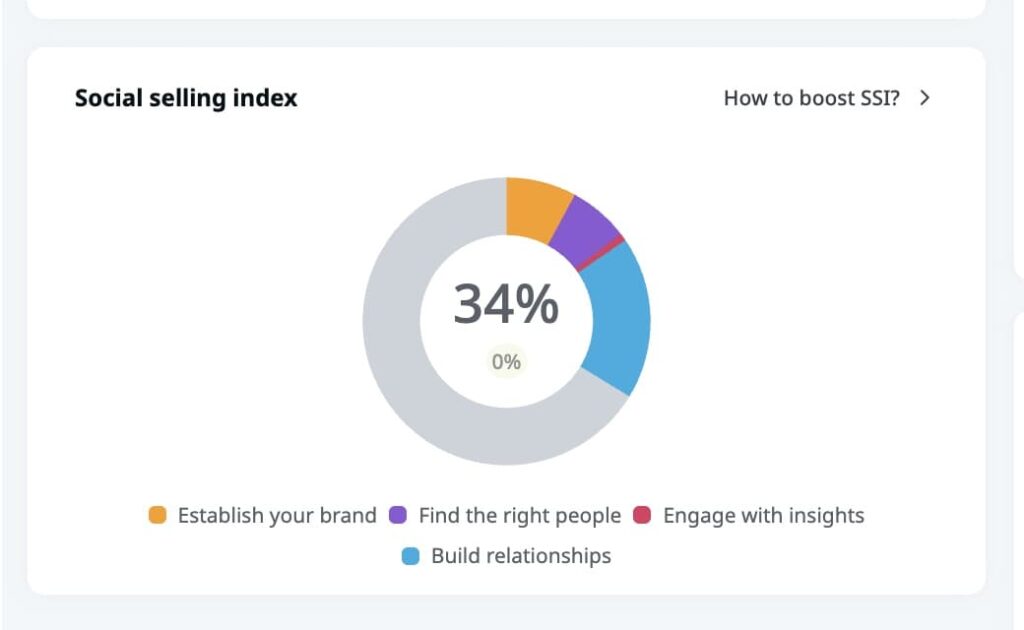
SSI is visible inside your Expandi dashboard, tracked over time alongside your campaign data.
Useful for connecting score movement to specific campaign activity week over week.
How to Read Your LinkedIn SSI Score
Here’s what your SSI score says about your LinkedIn activity.
| Score | What it means |
| 0-40 | Below average. Profile likely incomplete, low engagement, minimal prospecting. |
| 40-70 | Solid baseline. Where most active LinkedIn users land. |
| 70-75 | Strong. Top 10-15% in most industries. |
| 75+ | LinkedIn’s recommended threshold for thought leader status. |
| 90+ | Elite. Usually full-time social sellers, influencers, or heavy content publishers. |
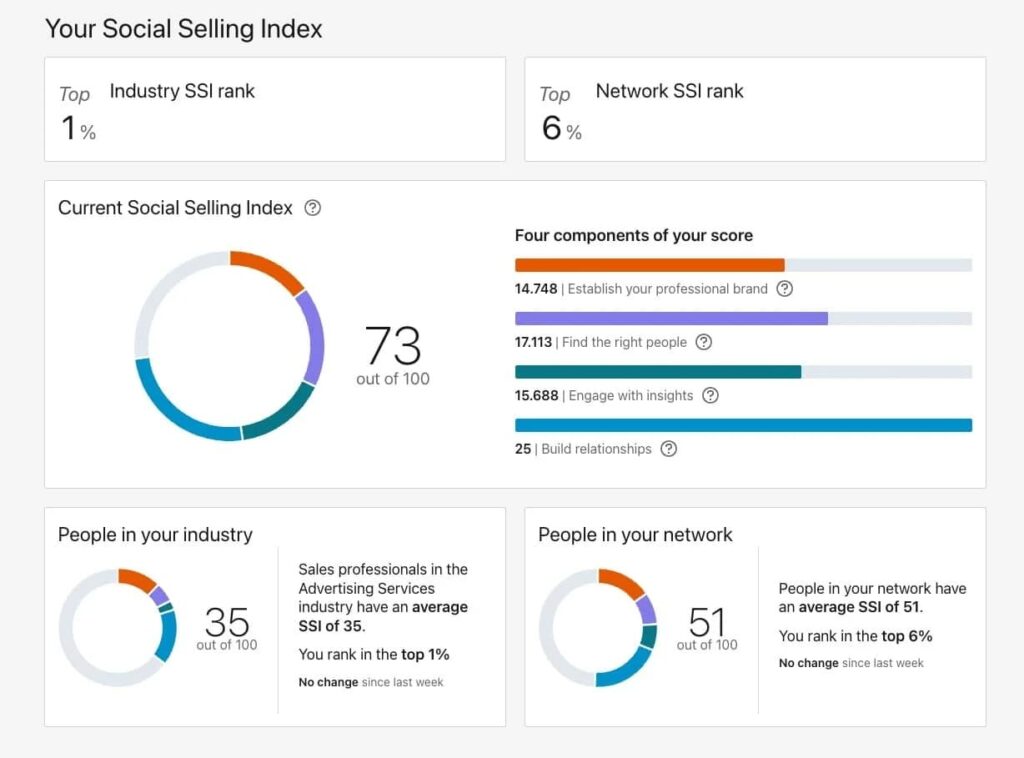
The dashboard breaks your score across all four pillars. Even a top-1% score can have a weak pillar. Build Relationships maxed at 25/25 but Establish Professional Brand sitting at 14.7/25 is a
real example — even at the top of your industry, there’s room.
Keep in mind, your SSI is benchmarked, it’s not an absolute. A 65 in a highly active industry can still put you in the top 25%. Context matters.
How to Increase Your LinkedIn Social Selling Index: Pillar by Pillar
LinkedIn doesn’t publish the exact formula behind each pillar score. But the four pillars are clearly defined, and the behaviors that move each one are well established. Here’s what actually works.
Pillar 1: Establish your professional brand
This pillar measures whether your profile is complete and whether you’re publishing content that builds authority in your space.
The profile side is straightforward. Your headline should be customer-focused, not job-title-focused. Instead of “Sales Manager at Lead Engine,” try “Helping B2B SaaS teams generate 50% more inbound leads at Lead Engine.” Your About section should read like a pitch to your ICP, with proof points – results, clients, outcomes, instead of a career summary.
Beyond the profile, this pillar responds to publishing activity. LinkedIn tracks whether you’re posting content that earns engagement. Long-form posts that speak directly to your ICP’s problems perform better than generic industry commentary. A strong hook in the first two lines is what gets people to click “see more” – treat those 220 characters like a subject line.
A few things that move this pillar specifically:
- Complete every profile section, including Featured, Services, and Skills
- Post at least 2-3 times per week consistently – cadence matters as much as quality
- Earn reposts and comments, not just likes – diverse engagement signals quality content to the algorithm
For more info on improving this pillar, see our full guide on improving LinkedIn profile tips.
Pillar 2: Find the right people
This pillar tracks whether you’re using LinkedIn’s search and targeting tools to find the right prospects, not just adding volume.
The biggest mistake here is scaling without targeting. Sending connection requests to thousands of people who don’t match your ICP tanks your acceptance rate, which directly drags this pillar down.
Use LinkedIn’s advanced search filters – industry, job title, location, company size, Boolean operators – to build a list that actually matches who you’re trying to reach. If you have Sales Navigator, you get 50+ filters including job changers, past customers, and buyer intent signals like profile visits and company page follows.
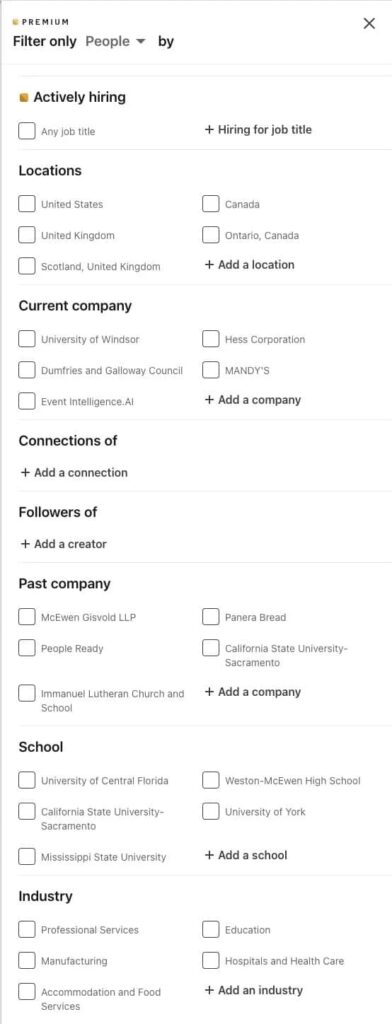
Once you have a targeted list, you can pull it into an Expandi Connector campaign to send personalized connection requests at scale within LinkedIn’s daily limits. Personalization here doesn’t need to be complex – referencing someone’s job title and industry in the request is enough to outperform a generic “I’d like to connect.”
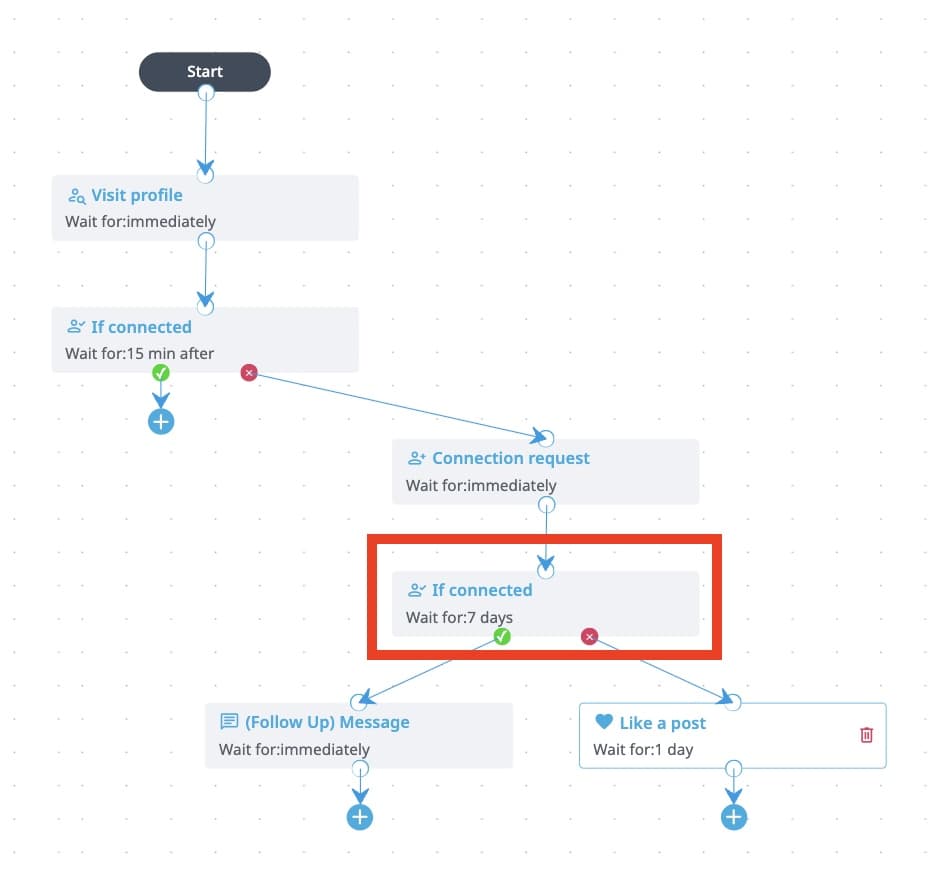
In one Connector campaign targeting people who had recently visited our profile, we connected with over 53% of prospects before the campaign finished. If needed, you can even set up next steps based on if the prospect will connect with you or not.
Pillar 3: Engage with insights
This pillar measures whether you’re posting and commenting in ways that start real conversations, not just broadcasting.
On the posting side, SSI tracks the engagement your content receives – reposts, comments, and likes. High-volume, diverse engagement on a post signals quality content to the algorithm, which boosts your visibility and this pillar score.
Comments are the gold standard of engagement – over likes or reactions. They signal genuine interest in the topic and create active back-and-forth that the algorithm rewards. A thoughtful two-sentence comment will do more for this pillar than 10 likes. “Great post!” moves nothing.
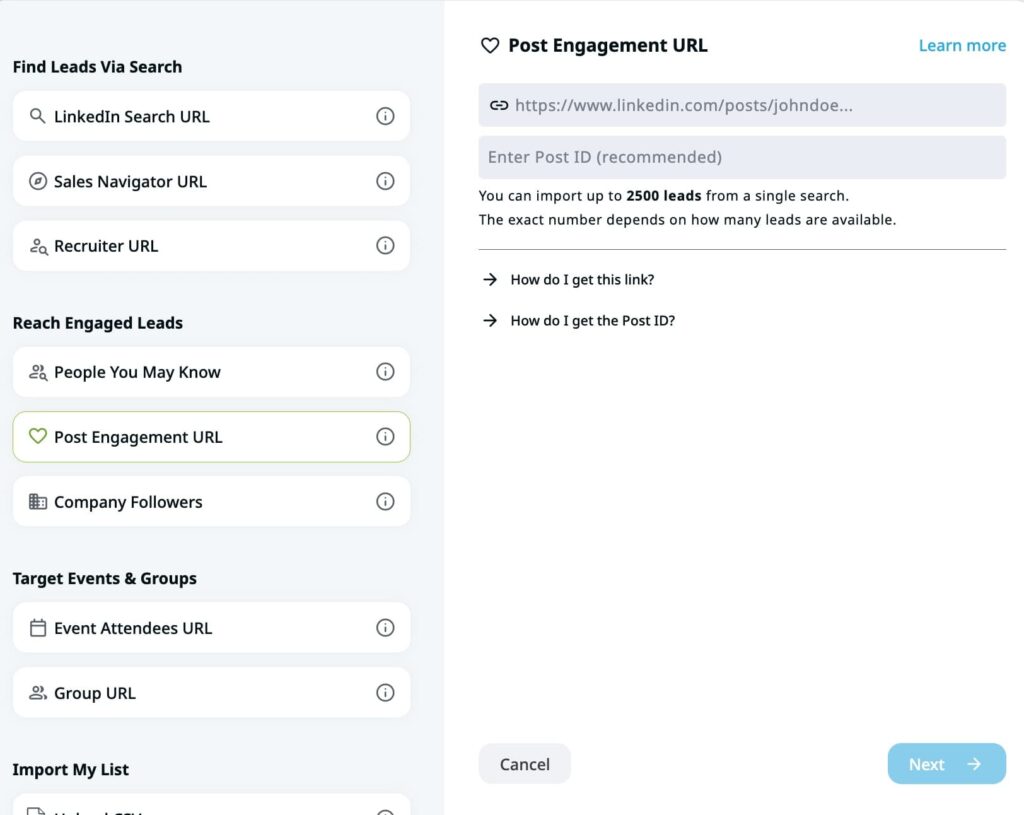
One tactic that compounds both posting and engagement: use Expandi to scrape everyone who liked or commented on a relevant post in your industry, then run a targeted DM campaign referencing that post. You’re reaching people already engaged with your topic, which means higher acceptance rates and better conversation quality.
Pillar 4: Build Relationships
This pillar looks at the quality of your network – how many decision-makers you’re connected to, how many of your connection requests get accepted, and whether you’re building real relationships or just adding numbers.
Acceptance rate is the lever most people ignore. A low acceptance rate tells LinkedIn your outreach isn’t resonating, which pulls this pillar down regardless of how many requests you send.
The fix is lead warm-up before the request.
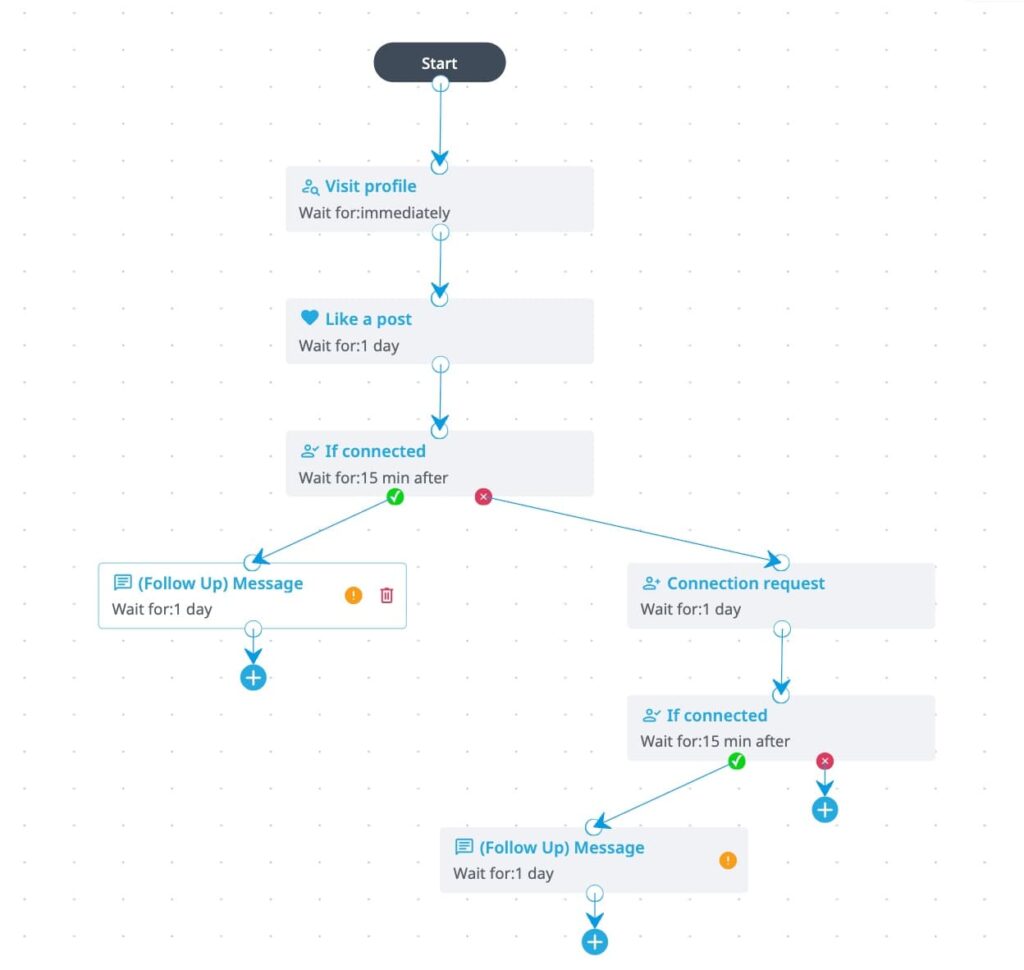
Expandi’s Builder campaigns automate a short sequence before you ever send a connection request: visit their profile, like a recent post, maybe engage with their content. By the time the request lands, they’ve already noticed you. The acceptance rate on warmed leads is meaningfully higher than cold requests.
Here’s how a basic Builder sequence looks:
- Visit profile (Day 1).
- Like their most recent post (Day 2).
- Send connection request with a short, personalized note (Day 3-4).
- Follow up with a DM once connected.
Once someone connects, the work isn’t done. Commenting on their posts, acknowledging job changes, sharing something useful with no ask attached – these are the behaviors that build the kind of relationships this pillar actually measures. Connect and ghost is the fastest way to stall your score here.
LinkedIn SSI FAQ
Not directly. SSI doesn’t function as an algorithm input that boosts your reach. The behaviors that raise your SSI – posting consistently, earning engagement, connecting with the right people – are what influence visibility. The score reflects those behaviors, it doesn’t cause the outcomes.
Daily. It reflects your last 90 days of activity, not your lifetime behavior. A period of inactivity will pull your score down, and a burst of targeted activity can move it up within days.
No. Any LinkedIn user can check their SSI for free at linkedin.com/sales/ssi. Sales Navigator gives you additional context on how your score breaks down, but the score itself is accessible on a free account.
Low connection request acceptance rates, inactivity across posting and commenting, and an incomplete profile. Of these, acceptance rate is the one most people overlook – volume without targeting will drag your score down faster than doing nothing.
Using LinkedIn SSI as a Signal, Not a Score to Chase
SSI is most useful when you stop treating it as a goal and start treating it as a mirror. A weak pillar tells you where your LinkedIn activity has gaps. A rising score tells you your outreach and content habits are working.
The teams that see real pipeline movement on LinkedIn aren’t the ones gaming their SSI.
They’re the ones doing the right things consistently – targeting the right people, warming leads before reaching out, posting content their ICP actually engages with, and building relationships that go beyond a connection request.
If you want to run that kind of outreach at scale without doing it manually, Expandi handles the execution – Connector campaigns, Builder warm-up sequences, content retargeting, and SSI tracking inside your dashboard – so the activity that moves your score is running in the background while you focus on the conversations that close.
Claim your free, 7-day trial, or talk to an expert here to see if Expandi is right for you.





You’ve made it all the way down here, take the final step