LinkedIn Inbox Management for Sales: Workflow, Templates & Best Practices

Once you’re running outbound at scale or getting consistent inbound interest, the LinkedIn inbox can quickly become a bottleneck if there’s no clear system behind it.
At Expandi, we work with sales teams, founders, and agencies who rely on LinkedIn as a primary outbound channel. And without proper inbox management, the pattern is always the same: reply times slip, follow-ups get missed, multiple reps message the same lead, and inboxes turn into a mix of hot opportunities and forgotten threads.
The result is a messy inbox with pipeline left on the table.
If you want to convert replies into meetings and revenue, you need a clear system for LinkedIn inbox management.
So, in this guide, I’ll be breaking down how high-performing sales teams manage LinkedIn messages in 2026 with a clear operational workflow. We’ll cover all things inbox triage, response-time SLAs, lead routing, follow-up cadence, and ownership rules that actually work for SDRs, AEs, founders, and agencies.
Here’s what you’ll learn:
- What is LinkedIn inbox management for sales?
- Why LinkedIn inbox management is important for sales teams.
- LinkedIn inbox management sales workflow: step-by-step.
- How to organize your LinkedIn inbox for sales (systems that scale).
- 5 LinkedIn inbox sales messaging best practices to increase reply rates.
- Copy-paste friendly LinkedIn inbox message templates for sales.
- Tools & safe automation for LinkedIn inbox management.
- Top KPIs to track (and benchmarks to aim for).
- 5 Common inbox management mistakes (and fixes).
- LinkedIn inbox management SOP.
- FAQ: LinkedIn inbox management for sales.
- Final thoughts.
Key Takeaways
- Speed wins: Define an inbox SLA (e.g., outbound replies ≤ 24h; warm/inbound same business day).
- Triage beats chaos: Check the inbox 2x daily and prioritize warm replies and inbound first.
- Every thread needs a status + next step: If a conversation doesn’t have a clear state and action, it will get dropped.
- Follow-ups should add value: Use a cadence (Day 0 / 2 / 5 / 10 / 20) and avoid “just checking in” follow ups.
- One lead, one owner: Prevent duplicate outreach with explicit routing + handoff rules (SDR → AE after qualification).
- Track the right KPIs: Response time, follow-up completion rate, reply rate by intent stage, meetings booked, and qualified threads.
- Use inbox management and automation tools responsibly: Automate reminders, templates, routing, and tracking. Avoid mass blasting or set-and-forget spam. With Expandi, you can run outreach + manage replies in one inbox, filter conversations by status/interest, prevent multiple contributors targeting the same lead (shared campaigns), and use AI-assisted drafts to reply faster while keeping messages human.
LinkedIn Inbox Management for Sales: Workflow, Templates & Best Practices


What is LinkedIn Inbox Management For Sales and How Does It Work?
LinkedIn inbox management for sales is the process of organizing, prioritizing, and responding to LinkedIn messages in a structured way so conversations consistently move toward a clear next step, such as a meeting, qualification, or follow-up.
Inbox management applies sales operations principles to messaging.
This includes defined response-time SLAs, conversation categorization, ownership rules, follow-up cadences, and clear criteria for when a lead is qualified, nurtured, or closed out. As opposed to treating the platform as an ad-hoc communication channel for DMs.
Done well, LinkedIn inbox management directly impacts:
- Sales outreach response time.
- Reply and follow-up rates.
- Speed-to-lead for inbound messages.
- Meetings booked from LinkedIn conversations.
- Overall pipeline consistency.
Who this is for
LinkedIn inbox management matters most for:
- SDRs handling daily outbound replies and follow-ups.
- AEs managing active deal conversations in LinkedIn DMs.
- Sales teams scaling LinkedIn without losing control or accountability.
- Founders running LinkedIn-led outreach or thought leadership.
- Agencies managing multiple client inboxes or shared campaigns.
If you’re running a shared inbox for LinkedIn messages, ownership rules become non-negotiable
Why LinkedIn Inbox Management Is Important For Sales Teams
When someone replies on LinkedIn, the clock starts. Speed-to-lead is one of the biggest controllable levers in outbound, and it directly impacts conversion.
Research shows that:
- Odds of qualifying a lead decrease by 400% when the response time goes from 5 to 10 minutes.
- A 1-minute response time can lead to 391% more conversions.
- 82% of consumers expect responses within 10 minutes.
All this to say, the faster you reply to leads, the better.
On LinkedIn, that “speed advantage” compounds because conversations are informal and fast-moving. The longer a hot reply sits, the more likely it is they book with someone else, cool off, or the thread gets buried.
Common pain points teams hit once volume increases:
- Missed follow-ups: Good replies get lost under new notifications, and “I’ll reply later” turns into “never replied.”
- Conversations with no next step: Lots of back-and-forth, but nothing that moves the deal forward (no CTA, no calendar ask, no qualification).
- Inbox overload + context switching: Reps bounce between DMs, email, CRM, and notes.
- Inconsistent messaging across reps: Different tones, different offers, different asks = uneven reply rates and messy reporting.
- No clear ownership / duplicate outreach: Two people reply to the same lead (or nobody does), which kills trust and wastes pipeline.
The cost of all this comes down to slower response times, lower booked-meeting rate, duplicated work, and an empty pipeline.
This is why high-performing teams often define a simple inbox process with a clear SLA (service-level agreement). A shared expectation for how quickly messages must be handled.
LinkedIn Inbox Management Workflow Step-by-Step for Sales Teams
High-performing sales teams treat the LinkedIn inbox like a queue with priorities, ownership, and deadlines.
This workflow is designed to be lightweight enough for SDRs and founders, but structured enough to scale across teams and agencies.
Keep in mind, everyone’s workflow is different. This is only one way you can approach managing the LinkedIn inbox. Consider adapting based on your flow as needed.
Step 1 – Daily inbox triage (10-20 minutes, twice per day)
Inbox triage is about deciding what matters now and who gets priority, not replying to everything immediately.
Run this twice per day (morning + afternoon) in this order:
- Warm replies.
- People who replied positively, asked a question, or showed buying intent.
- Inbound interest.
- Profile views, referrals, and replies to content-driven outreach.
- Pending follow-ups.
- Threads where you promised to circle back or propose next steps.
- Low-intent / nurture conversations.
- Acknowledge, then move on.
Response-time targets (example SLA):
- Warm / qualified replies: same business day.
- Outbound replies: within 24 hours.
- Low-intent or “not now”: within 48 hours (or scheduled follow-up).
The goal is to prevent high-intent conversations from getting buried under noise.
Step 2 – Categorize conversations using a simple sales taxonomy
Every LinkedIn thread should live in one clear bucket. If it doesn’t, it gets ignored.
Use a small, consistent taxonomy:
- New inbound – First response from someone you didn’t message recently.
- Warm / engaged – Asking questions, positive intent, back-and-forth.
- Follow-up needed – No reply yet, but still active.
- Qualified → schedule call if clear fit and interest.
- Nurture / not now – Timing issue, future follow-up potential.
- Not a fit – Wrong ICP, wrong timing, or explicit no.
- Closed-won / referral – Converted or passed along.
This categorization drives priority, follow-up cadence, and ownership accordingly.
Step 3 – Use a LinkedIn-friendly follow-up cadence
LinkedIn follow-ups should feel human, spaced out, and progressively clearer.
Example cadence:
- Day 0: Initial reply or response.
- Day 2: Light follow-up (short, friendly).
- Day 5: Value-based nudge (insight, resource, observation).
- Day 10: Clear CTA or reframe.
- Day 20: Polite close-the-loop message.
What changes over time:
- Messages get shorter and faster.
- CTA becomes more explicit.
- Angle shifts (problem → outcome → next step).
Avoid copy-pasting the same follow-up. Each touch should add clarity, not pressure.
Step 4 – Drive every thread to a clear next step
Conversations stall when there’s no direction.
Every reply should move the thread toward one next action:
- Book a call.
- Answer a specific question.
- Confirm timing.
- Pause and revisit later.
Some examples of good “next step” language:
- “Does it make sense to explore this together?”
- “Would it help to walk through this on a quick call?”
- “Happy to revisit this later – when should I follow up?”
Meeting asks that convert better:
- Offer two time options.
- Keep the ask low-friction.
- Tie the meeting to a clear outcome, not a generic “chat”.
- Always be clear and direct with what the next step is.
Step 5 – Logging and pipeline hygiene
If it’s not logged, it didn’t happen.
For every meaningful LinkedIn conversation, capture:
- Current status (category).
- Next follow-up date.
- Intent level.
- Lead source (outbound, inbound, content, referral).
Then push to CRM when:
- Buying intent is explicit.
- A meeting is booked.
- The lead is sales-qualified.
This keeps LinkedIn aligned with pipeline instead of operating it as a silo.
How to Organize Your LinkedIn Inbox for Sales Using Systems That Scale
A LinkedIn inbox only works at low volume until replies increase or multiple people touch the same account. After that, organization stops being “nice to have” and becomes operational hygiene.
The goal isn’t to over-engineer the inbox. It’s to create simple systems that reduce decision fatigue, prevent dropped leads, and make ownership obvious.
Daily / weekly / monthly inbox routine
Daily (non-negotiable)
- Run inbox triage twice per day.
- Reply to all warm and inbound conversations within SLA.
- Update conversation status and next step.
- Schedule follow-ups instead of “remembering” them.
Weekly
- Review all open conversations with no next step.
- Close dead threads (“not now”, “not a fit”, nurture).
- Check follow-ups due in the next 7 days.
- Align on handoffs (who owns what).
Monthly
- Audit reply times vs SLA.
- Identify stalled conversations and lost momentum.
- Review which message types and CTAs convert best.
- Clean up inactive or duplicated threads.
This cadence keeps inbox volume under control without constant context switching.
Another option teams use is aiming for inbox zero for SDRs. Not necessarily aiming for zero messages, but zero conversations without a clear status or next step.
Tagging system for your LinkedIn inbox management
To get the most out of your LinkedIn inbox, you need enough structure to answer questions fast:
- Who is this?
- Where are they in the funnel?
- How urgent is this?
- What happens next?
For example, a practical tagging system looks like this:
Persona
- Founder.
- SDR.
- Head of Sales.
- Marketing.
- RevOps.
Stage
- New inbound.
- Engaged.
- Qualified.
- Nurture.
- Not a fit.
Priority
- High (reply today).
- Medium (reply this week).
- Low (scheduled follow-up).
Next action
- Book meeting.
- Send resource.
- Follow up.
- Push to CRM.
The key rule: every open conversation must have a next action. If it doesn’t, it will be forgotten.
Shared inbox rules for sales teams and agencies
Inbox chaos usually comes from unclear ownership.
For teams managing LinkedIn at scale, make sure to define lead routing rules for outbound so every reply is assigned to one owner (SDR vs AE vs founder):
Ownership
- One conversation = one owner.
- The first responder owns the lead unless reassigned.
- Ownership changes only at clear handoff points (e.g. SDR → AE).
Handoffs
- Handoff only after context is added (status, notes, next step).
- Never leave a conversation “in limbo” between roles.
- Confirm handoff internally before messaging the lead.
Collision prevention
- One person messages a lead at a time.
- No parallel outreach to the same account (i.e. LinkedIn and email at the same time at this stage).
- Clear visibility into active conversations across the team.
Escalation
- Warm or qualified replies get prioritized automatically.
- Stalled high-intent conversations are reviewed weekly.
- Urgent inbound goes to the fastest available owner.
These rules are what prevent multiple reps from messaging the same lead or letting hot conversations die silently.
5 LinkedIn Sales Messaging Best Practices to Increase Reply Rates
Inbox management only works if the messages themselves are worth replying to. Even with perfect triage, routing, and SLAs, weak messaging will stall conversations and clog your inbox with “maybe later” threads.
The best-performing sales teams treat LinkedIn messages like mini sales conversations. There are no “proven” templates you can copy-paste to any context.
But below are some core best practices you can follow to consistently improve reply rates and keep inboxes moving.
Keep LinkedIn messages short for short wins
LinkedIn is not email. People read messages between meetings, on mobile, or while scrolling their feed. Long blocks of text get skimmed or ignored.
As a rule of thumb, aim for:
- 2-4 short lines.
- 30-70 words max.
- One idea per message.
Bad example (too long):
“Hey {first_name}, hope you’re doing well. I wanted to reach out because we help B2B companies improve their sales outreach and pipeline generation through LinkedIn automation and personalization. I’d love to learn more about your current process and see if there might be a fit…”
Better example (short and readable):
“{first_name}, quick question.
Saw your post on scaling outbound. Once outbound volume picks up, most teams struggle to reply to LinkedIn DMs fast enough.
Is inbox response time something you’re actively tracking right now?”
Short messages lower the “time-to-reply” barrier, which directly improves response rates and keeps your inbox moving.
Lead with context
The fastest way to get ignored on LinkedIn is opening with context instead of why you’re reaching out.
High-performing messages start with context:
- A role-specific observation.
- A trigger event or intent.
- A relevant problem they’re likely dealing with (e.g. based on their new role, recent post, etc.).
Examples of context-first openers:
- “Saw you’re hiring SDRs – usually a sign pipeline is ramping…”
- “Noticed you’re running LinkedIn ads alongside outbound…”
- “You popped up while I was researching RevOps teams in SaaS…”
Avoid generic openers like:
- “I help companies like yours…”
- “I wanted to introduce myself…”
- “Saw you work at {company_name}.
- “Hope this message finds you well…”
Ask one clear question per message and match tone to intent
Every LinkedIn message should have one clear purpose. Multiple questions create friction and slow replies.
Bad example:
- “Would you be open to a quick call, or should I send more info, or maybe loop in someone else?”
Good example:
- “Worth a quick chat to compare how you’re managing LinkedIn replies today?”
Best practices:
- One question per message.
- Avoid “let me know” endings.
- Make the reply easy (yes/no, short answer).
Clear questions lead to clear outcomes, which makes conversations easier to categorize, route, and progress inside a sales inbox.
At the same time, the tone of that question should match the intent stage of the conversation.
Not every LinkedIn conversation is at the same stage, and your tone should reflect that.
For example:
- New inbound / warm reply → fast, helpful, conversational.
- Qualified interest → direct, outcome-focused.
- Nurture / not now → low-pressure, insight-based.
Example of a new inbound reply:
- “Thanks for reaching out, happy to share more. What are you currently using LinkedIn for: inbound, outbound, or both?”
Qualified conversation:
- “Sounds relevant. Want to look at this together for 15 minutes this week Wednesday or Thursday?”
Nurture response:
- “Makes sense. I’ll share one idea we’ve seen work and leave it there for now.”
Matching tone to intent keeps conversations moving forward instead of stalling.
Follow-ups must add new value
Most people follow up just for the sake of following.
Most replies happen on the follow-up. Woodpecker found that a campaign with so many as one follow-up converts about 22% more prospects. If you’re reaching a 9% reply rate on average, adding at least one follow-up to your sequence can bump it up to 13%. There is no golden rule, but 3-5 is the norm.
But this is only for when each follow-up you send adds something new.
Effective follow-ups:
- Add a new angle.
- Share a short insight or value.
- Reference a common challenge you know they’re facing.
- Reframe the ask.
Example of a weak follow-up:
- “Just checking in on this, {first_name} 👋”
- “Hey {first_name}, just bumping this up.”
Example of a strong follow-up:
- “Quick follow-up. We’ve seen teams miss replies once inbox volume hits ~30-40 threads/week. Curious if that’s something you’re running into too?”
Value-first follow-ups keep conversations alive without feeling spammy and reduce the number of “dead” threads sitting in your inbox.
Know when to move off LinkedIn
LinkedIn is great for starting conversations, but it’s not always the best place to close them.
Most people’s inboxes are full, and it’s easy to miss DMs.
Signals it’s time to move:
- More than 6-8 back-and-forth messages.
- Scheduling friction.
- Clear buying or evaluation intent.
Simple transition message:
- “Might be easier to take this off LinkedIn. Want to switch to email or grab a quick call?”
- “Glad to set up a time for this next week. What’s the best email to send over an invite?”
This keeps your LinkedIn inbox clean and prevents long threads from turning into inbox clutter.
LinkedIn Inbox Message Templates for Sales (Copy/Paste Friendly)
These templates are designed for real inbox usage, not mass blasting. They assume you’re replying inside an active LinkedIn inbox and want to move conversations forward cleanly.
Each template includes:
- When to use it.
- 1-2 variations.
- One clear CTA.
Important: Use them as a starting point and adapt to your voice. There’s no one-size-fits-all LinkedIn message. Adjust wording, tone, and examples based on your ICP, relationship, and intent stage.
Reply to inbound interest
When to use it
Someone replies positively, asks for more info, or shows light curiosity.
Template A (qualification-first)
- “Thanks for reaching out, {first_name}. Quick question – are you mainly using LinkedIn for inbound, outbound, or both right now?”
Template B (problem-first)
- “Appreciate the message, {first_name}. What’s the biggest challenge you’re running into with LinkedIn outreach today?”
CTA: short answer to qualify intent.
Follow-up after connection accepted
When to use it
Connection request accepted, no message sent yet.
Template A (context + question)
- “Thanks for connecting, {first_name}. I noticed you’re scaling {relevant activity}. How are you currently handling LinkedIn replies once volume picks up?”
Template B (light curiosity)
- “Glad to connect. Curious, is LinkedIn something you actively use for sales conversations today, or more passive?”
CTA: simple yes/no or short explanation.
Follow-up after no reply (soft + value)
When to use it
Initial message sent, no response after 2–5 days.
Template A (insight-led)
- “Quick follow-up. We’re seeing teams miss replies once inbox volume crosses ~30-40 threads/week. Is that something you’re dealing with at all?”
Template B (reframe)
- “When you’re doing outreach, do LinkedIn replies sit with sales, marketing, or just whoever sees them first today?”
CTA: acknowledge the message with a short reply.
Meeting scheduling message
When to use it
Clear interest or qualified intent is present.
Template A (two-slot close)
- “Sounds relevant. Worth a quick 15-minute chat to share a few ideas on how to improve this? I’m free Wed or Thu morning.”
Template B (low-friction)
- “Happy to walk through this briefly. Want to grab 15 minutes this week or should I send over a couple time options?”
CTA: confirm time or move to calendar.
“Not now” nurture response
When to use it
Prospect says “not a priority,” “check back later,” or “not now.”
Template A (acknowledge + value)
- “Makes sense. I can share one idea we’ve seen work for teams at your stage and leave it there for now.”
Template B (permission-based)
- “Got it, appreciate the clarity. Mind if I check back in a few months once priorities shift?”
CTA: permission to follow up later.
Polite breakup / close-the-loop
When to use it
Multiple follow-ups, no response, or conversation has gone cold.
Template A (clean close)
- “I’ll pause here for now so I don’t keep pinging you. If inbox management becomes a priority later, feel free to reach out.”
Template B (last check)
- “Last note from me – should I close the loop on this, or is it worth revisiting later?”
CTA: close the thread or reopen intentionally.
Tools & Automation For LinkedIn Inbox Management
Inbox management often breaks down when everything relies on memory and manual effort. At scale, sales teams need light automation to stay consistent without crossing into spammy or risky behavior.
The goal of automation here is to protect response times, reduce human error, and keep ownership clear as volume increases.
Here’s how to do this with tools and automation responsibly without getting your LinkedIn account suspended.
What to automate in LinkedIn inbox management
Responsible automation should support humans and the operational layer of inbox management, such as:
- Reply reminders & follow-up tasks – So warm conversations don’t get forgotten after day one.
- Message snippets & templates – For common replies (inbound interest, scheduling, nurture).
- Conversation tracking & status updates – Knowing which threads are new, active, waiting, or closed.
- Lead ownership & routing – Ensuring two reps don’t reply to the same prospect, a common issue in teams and agencies.
- Outcome and KPI tracking – Replies, meetings booked, and qualified conversations created.
This is where tools designed specifically for LinkedIn workflows outperform generic CRMs or inboxes.
What NOT to automate
LinkedIn is increasingly strict about automation behavior. Teams get into trouble when they automate the wrong things such as:
- Mass, unsolicited message blasts.
- Aggressive follow-up cadences with no new value.
- Multiple reps targeting the same lead simultaneously.
- Fully AI-written messages sent without human review.
- “Set-and-forget” outreach with no inbox monitoring.
These behaviors increase the risk of account restrictions and damage trust with prospects.
Where Expandi fits (and how sales teams use it)
This is where LinkedIn-native tools like Expandi become relevant.
Expandi is built for teams that want to manage LinkedIn conversations at scale without losing control or compliance. Instead of pushing volume, it focuses on inbox structure, ownership, and safety.
Teams use Expandi for:
- Inbox-level automation (reminders, follow-ups, tracking).
- Shared campaigns, so contributors don’t target the same lead.
- Lead ownership control, critical for agencies and SDR teams.
- AI-assisted message suggestions, reviewed and edited by humans.
- Human-like sending limits that align with LinkedIn’s usage thresholds.
In practice, this means teams can scrape targeted lead lists, run outreach, and manage replies from a single inbox. Conversations can be filtered by status (replied vs. no interaction), interest level (interested, maybe, not interested), and outcome (e.g. exported to CRM or closed).
Teams can also use AI-assisted replies to draft responses faster while keeping messaging consistent.
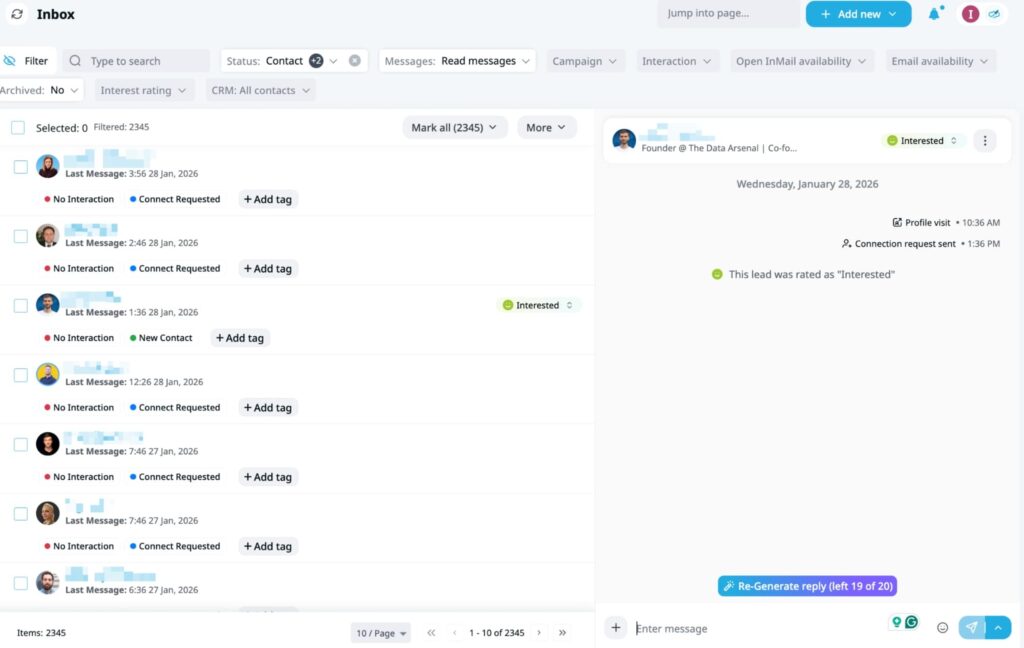
This kind of structure makes it easy to spot warm replies, enforce response-time SLAs, and ensure every lead has a clear owner without turning LinkedIn into a spam channel.
Wondering if Expandi is right for you?
Learn more or talk to an expert here.
Compliance note (important)
Any LinkedIn automation tool should be configured conservatively and used as a support system. For full transparency, using robots or automation goes against the LinkedIn user agreement.
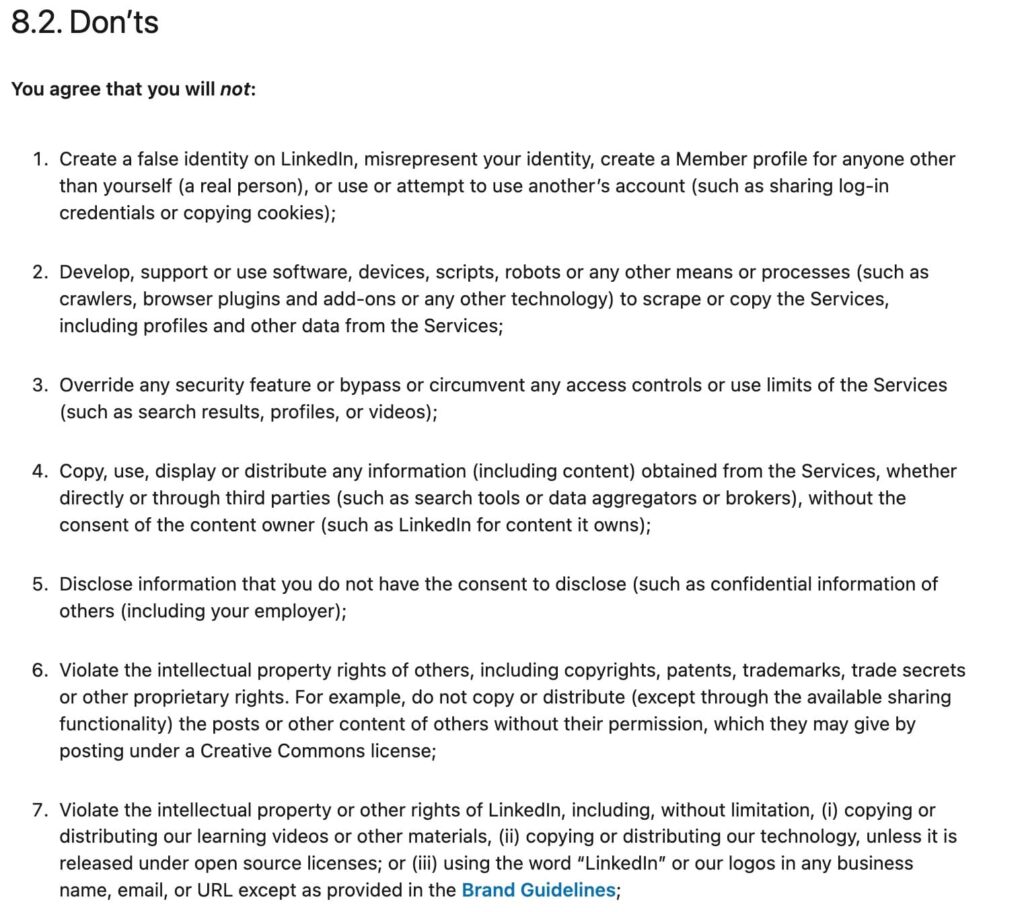
It’s easy to get your account suspended if you overdo automation and blast 100s of replies or connection requests within an hour.
However, if you use automation that mimics human behavior and stays within LinkedIn’s usage limits, it can be a safe and effective way to manage inbox workflows at scale.
Best practices include:
- Keeping daily activity well below LinkedIn’s hard limits.
- Prioritizing replies to warm and inbound conversations.
- Reviewing AI-generated messages before sending.
- Using automation to assist inbox management instead of replacing it fully.
- Following the LinkedIn connections limit to ensure compliance.
When used this way, automation helps teams move faster and stay safe.
KPIs to Track for LinkedIn Inbox Management (and Benchmarks to Aim For)
If you don’t track inbox performance, you can’t improve it. High-performing sales teams treat the LinkedIn inbox like any other revenue channel: they define clear KPIs, review them regularly, and tie them back to pipeline outcomes.
You don’t need dozens of metrics. A small set of inbox KPIs is enough to spot bottlenecks, enforce SLAs, and improve conversion from conversations to meetings.
If you want a simple starting point, high-performing sales teams typically aim for:
- Response time
- Outbound replies: within 24 hours.
- Warm / inbound messages: same business day (ideally within a few hours, the sooner the better).
- Follow-up completion rate
- 90%+ of planned follow-ups sent on time.
- Reply rate
- No universal “good” number. Aim to improve your baseline by 20-30% over 30 days. For B2B, 10-25% response rate is considered average.
- Meetings booked
- Track per rep, per week/month based on capacity (not vanity totals)
- Qualified conversations created
- Track how many threads reach a clearly defined “qualified” state (pain + role + intent)
- For more info and detailed analysis, see our guide on how much does lead generation cost.
Now, let’s take a look at everything in more detail.
| KPI | What it measures | Starting benchmark | How to improve |
| Median response time | How quickly reps reply once a prospect responds | Within 24 hours for outbound Ideally within few hours for warm/inbound (sooner the better) | Define SLAs, schedule daily inbox triage blocks, assign clear ownership |
| Follow-up completion rate | Whether planned follow-ups actually get sent | 90%+ of follow-ups sent on time | Log next steps, set reminders, review missed follow-ups weekly |
| Reply rate | Engagement with your LinkedIn messages | No universal target. For B2B, 10-25% is a common working range. | Improve targeting, shorten messages, add value in follow-ups, A/B test scripts |
| Meetings booked | Conversions from replies into calls | Track per rep, per week/month (capacity-based) | Reduce meeting friction, move qualified threads off LinkedIn faster |
| Qualified conversations created | How many threads reach a defined “sales-qualified” state | Track trend week-over-week | Clarify qualification criteria, tighten messaging + routing |
Note: Majority of these data and numbers are based on our Social Outreach in 2025 report. For this, we looked at 100,000+ real campaigns within Expandi to study their reply benchmarks, connection strategies, and automation. For more info on how to automate and scale smartly and other real examples, see the full report.
Now, let’s look at the KPI breakdown in detail to see what each one means.
Median response time
This is the single most important inbox KPI.
Response time measures how long it takes to reply once a prospect responds. The longer the delay, the colder the conversation gets and the harder it is to recover momentum.
How to use it
- Set an SLA (e.g. reply within 24 hours for outbound, faster for warm/inbound).
- Review weekly at team level, not just per rep.
- If this slips, pipeline usually slips right after.
Follow-up completion rate
This measures execution discipline, not copy quality.
A low completion rate usually means:
- No clear next step was defined.
- Follow-ups aren’t logged anywhere.
- Inbox overload causes threads to get forgotten.
How to use it
- Every conversation should end with a next action.
- Track whether that follow-up actually happened.
- Anything below ~90% signals inbox chaos.
Reply rate
Reply rate shows whether your messaging earns engagement, but it only makes sense in context.
Cold outbound, warm replies, inbound interest, these all behave differently. That’s why a single “good” reply rate is misleading.
That said, here are some practical benchmarks you can use as directional ranges:
- Cold outbound LinkedIn DMs (to new connections / low intent): ~5-15% is a realistic working range (some teams report ~6-10% depending on market competition and seasonality).
- Warm replies (they engaged with content / visited profile / accepted connection + showed signals): ~15-30%+ (because you’re not starting from zero context).
- Inbound interest (they message you first / ask a question): often 40-70%+, because the “why now” is already present.
- LinkedIn InMail (Sales Navigator): often cited around ~10-25% depending on targeting + personalization.
How to use it
- Measure your current baseline first.
- Improve message quality and follow-up value.
- Track trend over time, not absolute numbers.
Meetings booked
This is where inbox management turns into revenue.
Instead of tracking total meetings, track:
- Meetings booked per rep.
- Meetings booked per week/month.
- Conversion from “reply → meeting”.
How to use it
- Reduce friction in meeting asks (two time slots, low-pressure CTA).
- Move qualified threads off LinkedIn when intent is clear.
- Use this KPI to spot reps who reply but don’t convert.
Qualified conversations created
This KPI measures whether your inbox work creates real sales opportunities.
A “qualified conversation” should be clearly defined internally (for example: right role, relevant problem, some level of intent).
How to use it
- Add a simple qualification tag or status.
- Review weekly with sales/RevOps.
- If replies are high but qualification is low, messaging or targeting is off.
5 Common LinkedIn Inbox Management Mistakes (and How to Fix Them)
Even teams with good messaging and solid tools lose pipeline because of small execution mistakes inside the inbox. These issues compound quickly once volume increases.
Below are the most common LinkedIn inbox mistakes we see, and how high-performing teams fix them.
Over-following up with no new value
Following up works, but only when it adds something new.
The most common mistake is sending follow-ups that exist purely to “bump” the thread:
- “Just checking in”.
- “Wanted to follow up on this”.
- “Circling back 👋”.
These messages don’t move the conversation forward. They create noise, reduce trust, and train prospects to ignore future messages.
How to fix it
Treat every follow-up as a new reason to reply:
- Add a new insight or observation.
- Reference a common challenge you see in similar teams.
- Reframe the question or CTA.
- Share a short resource or takeaway.
If you don’t have anything new to say, it’s usually better not to follow up at all.
Asking for a meeting too early
Another common mistake is jumping straight to a call before intent is clear.
This often shows up as:
- Asking for a meeting in the first reply.
- Pushing a demo without understanding their context.
- Treating every response as buying intent.
This creates resistance and leads to a lot of “not right now” threads that never progress.
If they DO get on a call with you immediately, chances are, they might be unqualified.
How to fix it
Earn the meeting through the conversation:
- Use early messages to understand role, context, and problem.
- Ask one or two lightweight qualification questions first.
- Transition to a meeting only once relevance is clear.
Inbox management improves when meetings are the natural next step, not the default ask.
No clear owner of a conversation
In team inboxes, this is one of the fastest ways to lose deals.
Typical symptoms:
- Two sales reps replying to the same lead.
- Everyone assuming “someone else will handle it.”
- Threads sitting untouched because ownership isn’t defined.
This is especially common in lead generation companies, SDR teams, and shared LinkedIn accounts.
How to fix it
Every conversation needs a single owner:
- Assign ownership as soon as a reply comes in.
- Define handoff rules (SDR → AE, inbound → outbound, etc.).
- Make it clear who is responsible for the next steps and follow-ups.
Ownership clarity alone can dramatically reduce missed replies and duplicate outreach.
Not closing loops (leaving threads open)
Most inboxes are full of conversations that never clearly ended.
Examples:
- “Let me think about it” with no follow-up scheduled.
- “Not a priority right now” left hanging.
- Conversations that simply stop with no conclusion.
These threads create inbox clutter and make it harder to see what actually needs action.
How to fix it
Close loops intentionally:
- If it’s a “not now,” acknowledge it and set a clear next follow-up (or park it).
- If it’s a no, confirm and move on.
- If it’s qualified, push it into the next system (calendar, CRM, email).
A clean inbox is about having fewer unfinished ones.
Replying without prioritization (everything treated the same)
Another common mistake is treating every LinkedIn message equally.
In reality, inboxes usually contain a mix of:
- Hot inbound interest.
- Warm replies from outbound.
- Low-intent questions.
- “Glad to connect” replies.
- Old nurture threads
When everything gets the same response speed and attention, two things happen:
- High-intent leads wait too long.
- Low-intent threads steal time and focus.
This is how teams miss opportunities even though they’re “active” in the inbox.
How to fix it
Introduce simple prioritization rules tied to intent and SLA:
- Inbound / qualified replies → same-day response (ideally within hours).
- Warm outbound replies → within 24 hours.
- Low-intent or nurture threads → scheduled follow-up, not immediate action.
Tag or categorize conversations as soon as they come in so reps know:
- What needs attention now.
- What can wait.
- What should be parked or closed.
Inbox performance improves dramatically once urgency is driven by intent, not just message order.
Pro tip: To save time, with Expandi’s inbox management, you can set filters for:
- Interest level (interested, maybe, not interested).
- Status (contact, new contact, connect requested, etc.).
- Messages (read, unread).
- And more.
LinkedIn Inbox Management For Sales Teams
Below is a one-page LinkedIn inbox management SOP summarizing the workflow, SLAs, and follow-up rules from this guide.
1) Daily inbox rules
- Check LinkedIn inbox 2× per day (AM / PM).
- Always prioritize in this order:
- Warm replies & inbound interest.
- Active conversations with next steps.
- Scheduled follow-ups due today.
- Response-time SLA:
- Reply within 24 hours for outbound replies
- Warm / inbound replies: same business day.
2) Conversation ownership
- Every conversation has one owner.
- No shared ownership, ever.
- Ownership is assigned immediately when a reply comes in.
- Owner is responsible for:
- Replying within SLA.
- Setting the next step.
- Updating status.
3) Conversation status (mandatory)
Each thread must always be in one state:
- New.
- Engaged.
- Qualified.
- Nurture / not now.
- Closed (won / not a fit).
If a conversation has no status, it’s broken.
4) Next-step rule
Before leaving any thread, define one next action:
- Reply now.
- Follow up on a specific date.
- Schedule a meeting.
- Close the loop.
No next step = lost pipeline.
5) Follow-up rules
- Every follow-up must add new value.
- Insight, angle, clarification, or resource.
- Never send:
- “Just checking in”.
- “Bumping this”.
- Use a clear cadence (example):
- Day 0 → 2 → 5 → 10 → 20
- Maximum 4-5 follow-ups.
- Log the next follow-up date immediately.
- After final follow-up:
- Close the loop.
- Or move to nurture.
6) Qualification & handoff
- Mark as qualified only when:
- Right role.
- Relevant problem.
- Clear intent signal.
- Once qualified:
- Ask for a meeting.
- Or push to CRM / next system.
- SDR → AE handoff happens only after qualification.
7) Exit rules to keep inbox clean
- Move to CRM when:
- Meeting is booked.
- Buying intent is confirmed.
- Close loops intentionally:
- “Not now” → acknowledge + set future follow-up or park.
- “Not a fit” → confirm and close.
- No open-ended threads allowed.
8) Weekly hygiene check (10-15 min)
- Review:
- Threads without next steps.
- Overdue follow-ups.
- Replies outside SLA.
- Clean up:
- Close dead conversations.
- Reassign ownership if needed.
- Reset follow-up dates.
FAQ: LinkedIn Inbox Management for Sales
High-performing sales teams typically check LinkedIn messages at least twice per day (morning and afternoon).
For teams running active outbound or receiving inbound interest, this cadence helps maintain fast response times without constant context switching. Warm or inbound replies should ideally be handled the same business day, while outbound replies should follow a defined SLA (commonly within 24 hours).
There’s no single perfect cadence, but a LinkedIn-friendly follow-up sequence usually looks like this:
• Day 0: Initial message or reply.
• Day 2: First follow-up (new angle or clarification).
• Day 5: Second follow-up (value or insight).
• Day 10: Third follow-up (reframed CTA).
• Day 20: Final close-the-loop message.
Each follow-up should add new value. “Just checking in” messages hurt reply rates and clutter inboxes.
The simplest way is to apply a lightweight status to every conversation, for example:
• New inbound.
• Warm / engaged.
• Follow-up needed.
• Qualified (move toward meeting).
• Nurture / not now.
• Not a fit.
• Closed / referral.
Every thread should have a clear status and next action. This makes inbox triage faster and prevents qualified conversations from getting buried.
Yes, but not all of them.
Most teams only push conversations into a CRM once there’s qualified intent, such as:
• A meeting booked.
• Clear buying signals.
• An active evaluation.
Logging every cold message creates noise. Aim to log qualified conversations that have potential for pipeline.
Short messages perform best on LinkedIn.
As a general guideline:
• Conversational tone.
• 2-4 short lines.
One clear question, idea, or CTA.
LinkedIn messages are read quickly, often on mobile. Short, focused messages lower the friction to reply and improve response rates.
Teams managing LinkedIn at scale usually rely on three rules:
• Single owner per conversation.
• Clear SLAs, response-time expectations for outbound vs inbound
• Defined handoff rules. For example, SDR → AE once qualified
Without ownership and routing rules, replies get missed and leads get duplicated.
A common benchmark is:
• Outbound replies: Within 24 hours.
• Warm or inbound messages: Within the hour (the faster, the better).
Faster response times keep conversations warm and significantly increase the likelihood of booking a meeting.
Parts of it can, but not everything.
Safe automation includes:
• Follow-up reminders.
• Message snippets or templates.
• Conversation and status tracking.
• Task creation and logging.
What should not be automated is mass, unsolicited messaging or aggressive sequences. Inbox automation should support human conversations.
Final Thoughts: Turn LinkedIn DMs Into a Sales System
To recap, LinkedIn inbox management is about building a system that makes it easy for your team to do the right thing, every day, even when volume increases.
When inboxes lack structure, small issues compound:
- Replies slip.
- Follow-ups get missed.
- Ownership becomes unclear.
- Good conversations die quietly.
The teams that win on LinkedIn in 2026 rely on clear workflows, defined SLAs, consistent follow-ups, and simple ownership rules.
If you take one thing from this guide, let it be this:
Your LinkedIn inbox is part of your sales pipeline. Treat it with the same discipline you apply to email, CRM, and deal management.
Want to manage LinkedIn inboxes at scale without chaos?
Expandi is built for teams that rely on LinkedIn for outbound and inbound sales.
In one place, you can:
- Run LinkedIn outreach safely and compliantly.
- Manage replies with clear statuses, ownership, and SLAs.
- Filter conversations by interest level, reply status, or CRM sync.
- Use AI to assist with replies while keeping messages human.
Learn how Expandi works and claim your free, 14-day trial here.



You’ve made it all the way down here, take the final step