How to Get Your First 10 SaaS Customers Using LinkedIn

Every business requires revenue to stay afloat. While there are many ways to generate revenue, customers remain a key source of revenue for many businesses. For B2B SaaS businesses, LinkedIn remains the best channel for getting your first 10 customers.
Research revealed that 75% of B2B buyers use social media; 50% use LinkedIn as a trusted source. So, how do you get these buyers? This article explores a step-by-step guide on how to get your first 10 SaaS customers with insights from top B2B sales experts. Let’s get started.
Why LinkedIn is Key to Getting Your First 10 SaaS Customers
Unlike other social platforms, LinkedIn is the main hub for business professionals. It’s where you can find, connect, and engage with key decision-makers who can drive revenue growth for your business. We don’t just say this; the stats back it up: 75-85% of all B2B leads come from LinkedIn alone, outperforming other platforms in lead quality and conversions.
This makes the professional networking platform germane to B2B SaaS businesses. It doesn’t matter whether you’re selling products, networking professionally, or recruiting staff; you need LinkedIn.
Besides, the platform’s first-party data about companies and decision-makers makes it effective for targeted outreach. As a result, SaaS businesses can find their ideal buyers, connect with them, and build relationships that result in sales opportunities.
How to Get First SaaS Customers from LinkedIn
Getting your first SaaS customers from LinkedIn seems like a tough job. But it’s doable. With the right strategies, you can get your first clients from the platform. Let’s check out this 7-step strategy on how to get first SaaS customers from LinkedIn.
1. Optimize your LinkedIn Profile
Imagine your LinkedIn profile as your physical store. You definitely wouldn’t want it to look rough or unattractive, which could turn potential customers away. The same logic applies to your LinkedIn profile.
You want to give it the best look so that when a prospect lands on your page, they’re drawn to you. You want to share social proof of what you’ve achieved, explain the value clients can get from you, and build a stronger connection to pave the way for future opportunities.
But how do you do this? In the next sub-sections, we’ll take a look at what makes up a good LinkedIn profile and how to optimize it to attract potential clients. Before we go deeper, here’s a simple checklist to keep in mind for optimizing your LinkedIn profile.
- Upload a professional photo
- Add a visually appealing banner
- Write a clear, value-focused headline
- Include relevant details and social proof in your about section
- Complete all the sections
A. Upload a Professional Photo
A poor selfie or blurry picture won’t work on LinkedIn. Use a high-quality image that clearly shows your face and shoulders. Make sure the background is plain and simple. A noisy background can pull attention away.
Also, dress professionally and take your photo in a well-lit environment. Put on an expression that’s friendly and approachable. For instance, a smile or natural expression can make your prospects warm up to you.
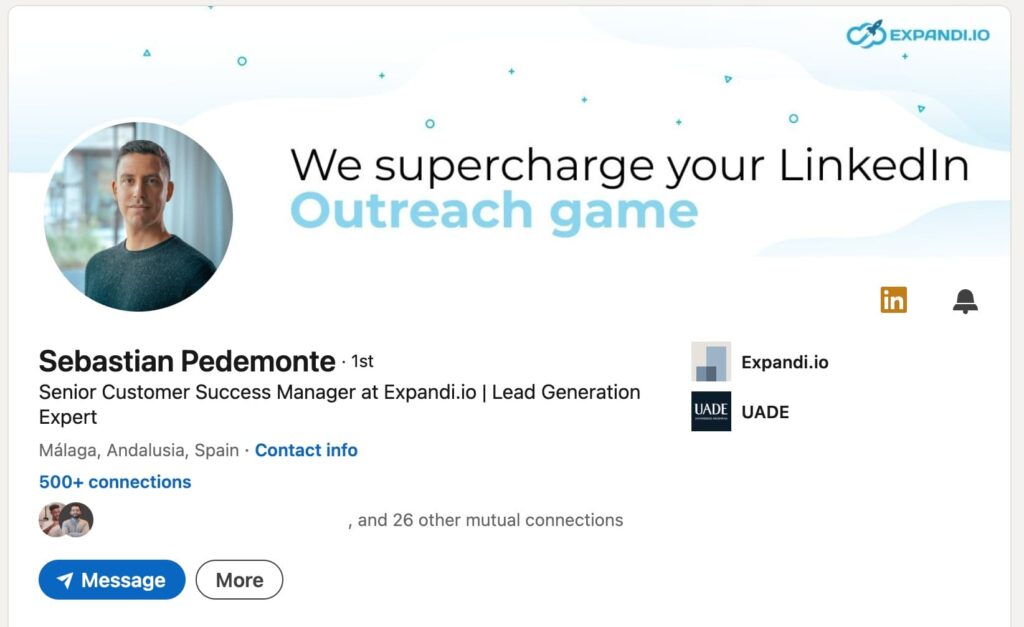
For example, this profile picture of our Senior Customer Success Manager at Expandi is clear, neutral, and professional.
B. Add a Visually Appealing Banner
When a prospect lands on your LinkedIn page, your banner is another element that attracts them. Your banner appears above your LinkedIn profile picture and should visually communicate your unique value proposition.
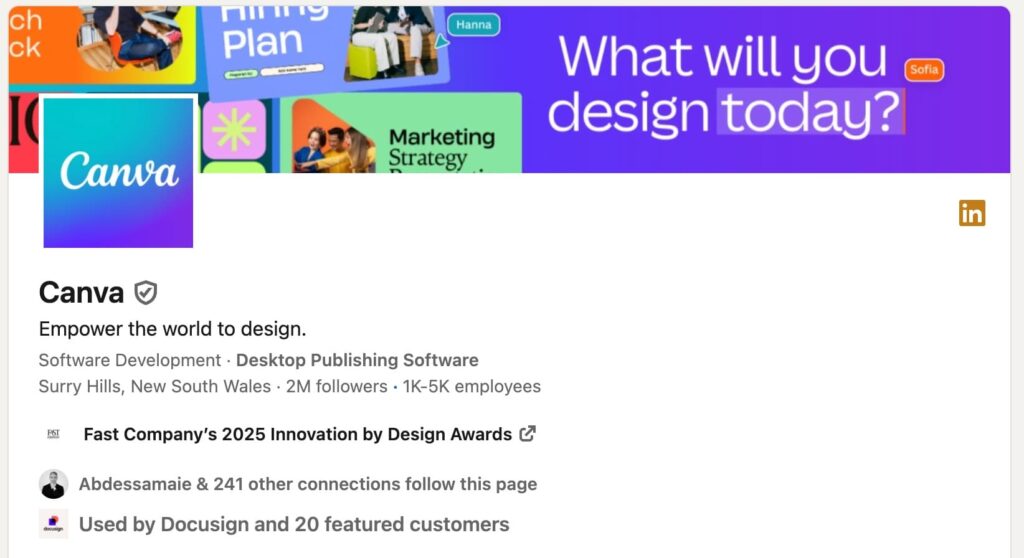
For example, this Canva LinkedIn banner communicates what the brand offers: design. Anyone visit the page understands that it’s their core service and ethos.
C. Write a Clear, Value-Focused Headline
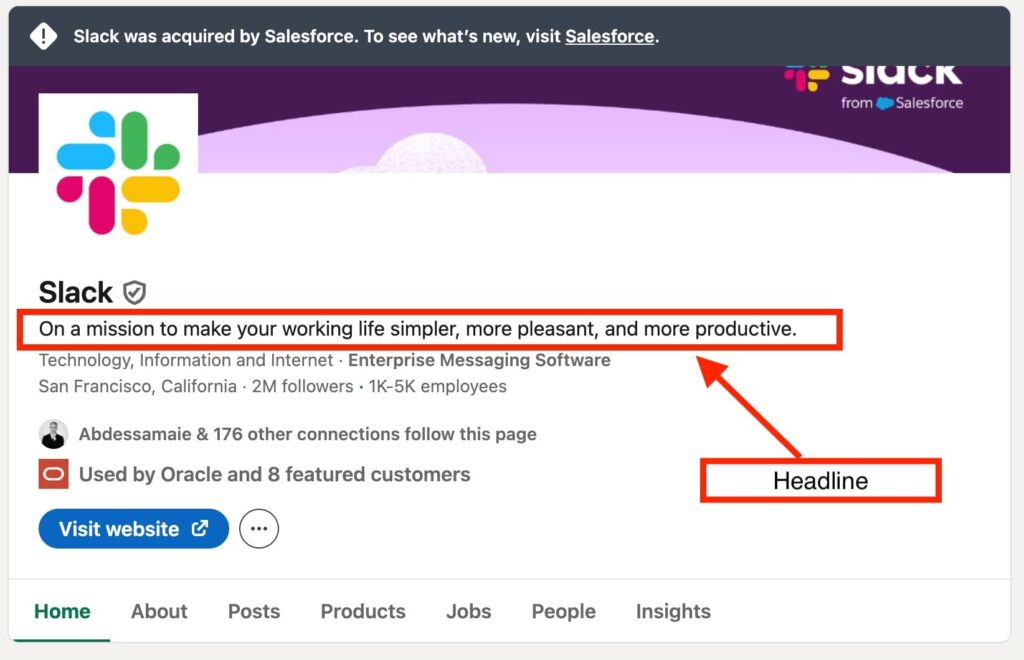
This is the short text that appears under your profile picture or company name. It’s your professional tagline that goes everywhere with you on LinkedIn —- whether you send connection requests, make a comment under someone’s posts, pop up in search results, and any other LinkedIn activities.
This attests to why you must optimize your headline. So, what makes a headline stand out?
- Keep it short, simple, and accurate.
- Make it catchy. It should grab people’s attention quickly.
- Be truthful about who you are. State what you do and who you benefit in a single, easy-to-understand sentence.
- Use relevant keywords and phrases. Use keywords that relate to your role and industry. For instance, if you’re into social media marketing, a “social media manager” is a perfect tagline.
Ask yourself. If a recruiter were to search for your skills, what would they search for? Write that answer in a single, comprehensible sentence. Slack, for example, clearly states its value in their headline by telling users what they benefit — “To make working life simpler, pleasant, productive.”
D. Include Relevant Details and Social Proof in Your About Section
Your about section is where you give extra details about your professional story. It’s where you give a clear snapshot of your unique selling, the pain points you solve, and the results you’ve achieved.
A combo of your career story backed by social proof works best for this. For example, rather than saying something generic, you could say, “Booked 50 meetings that tripled a client’s ROI within 12 months.” Be specific about what you achieved and integrate the right keywords naturally in your about section.
2. Identify and Target your Prospects
If you broadly target prospects, chances are you’re wasting time and resources on unqualified leads who aren’t ready to buy from you. That’s why you need to find your ideal clients.
There are two ways to do this: define your ideal customer profile (ICP) and use LinkedIn Sales Navigator, or use the standard version (if you haven’t paid for the premium).
Defining your ideal customer profile (ICP)
Your ICP is the individuals or companies who should be selling to. They are the ones most likely to benefit from your solutions. Having a defined ICP lets you know who to target in the market. Your ICP in business should include any of these details:
- Job titles or roles (e.g., VP of Sales)
- Industry
- Company
- Location
- Triggers (job hires, funding announcement, etc.)
- Tech stack
Tap into LinkedIn Search
If you don’t have a paid plan, LinkedIn search lets you find your ideal clients. Simply type the job title from your ICP into the search bar.
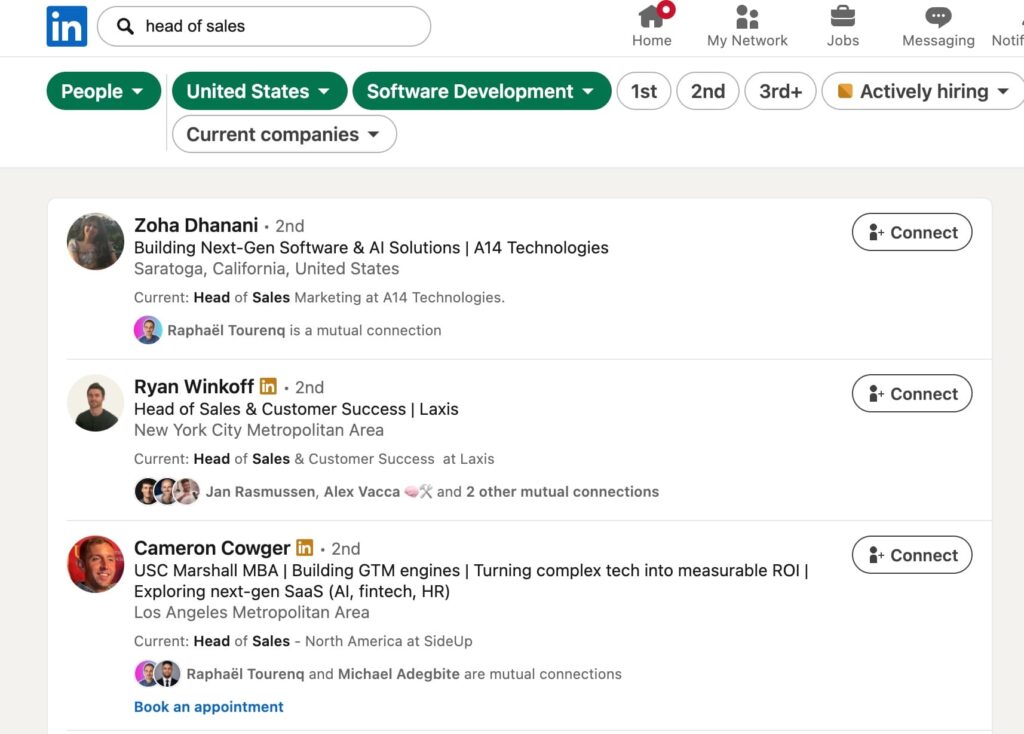
For instance, if you intend to connect with “Head of Sales” at companies, simply type the keyword “Head of Sales” into the search bar and filter by different criteria such as industry (e.g., software, finance), location (e.g., United States), and so on.
The screenshot below is the result of such an example.
For more precise targeting, use Boolean search operators such as:
- AND operator to include two terms in your search result (e.g., CMO and SaaS)
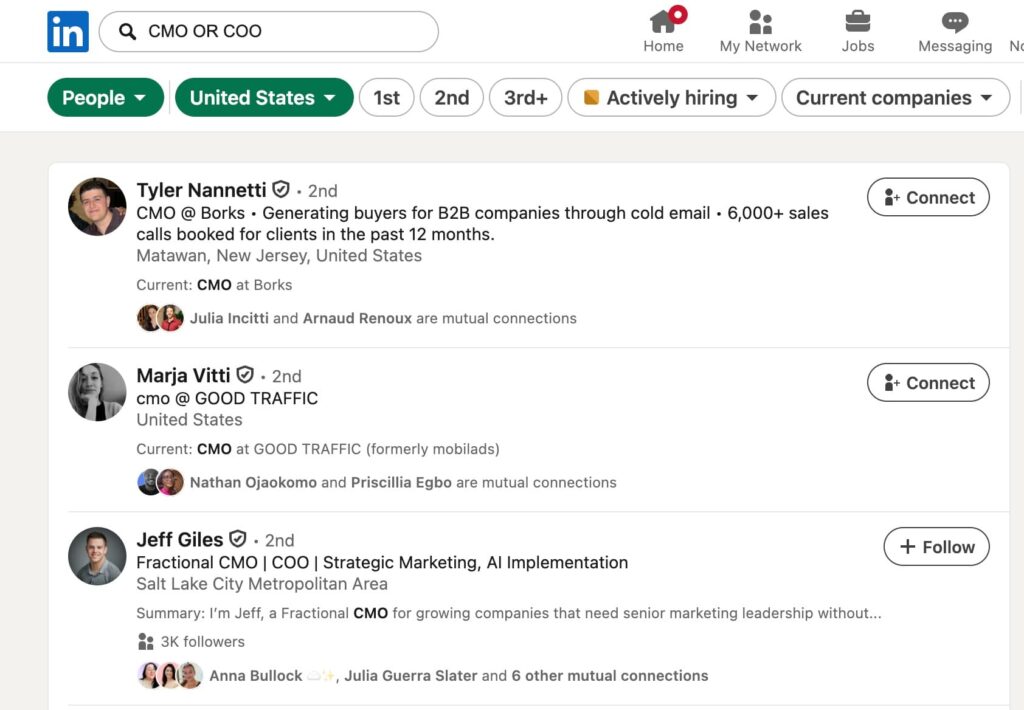
- OR operator to include either of the two terms (e.g., CMO OR COO as seen in the screenshot below)
- NOT operator to exclude a specific term (e.g., CMO NOT Head of Product)
While the LinkedIn search feature is free and easy to use, it’s also limited. For instance, you can only use basic search filters. For instance, you can access only 1,000 contacts per search. This explains why you need a tool that grants more access — LinkedIn Sales Navigator.
Use LinkedIn Sales Navigator
LinkedIn Sales Navigator offers more features to find more clients. With advanced filters, lead recommendations, and the ability to track and save leads’ activities, you can easily connect with prospects.
For example, the advanced search filters include up to 25 options, such as job title, location, company headcount, recent activities, and more. Having these features helps to supercharge your LinkedIn lead generation efforts.
3. Engage Your Potential Client
After identifying your prospects, build relationships with them to increase the likelihood they will buy from you. Here’s a step-by-step process for doing this:
- Engage with people’s posts
Yes. I put engagement before sending personalized connection requests. I’ll tell you why. When you like people’s posts, drop an insightful comment, share, or repost, you get on their radar and build a connection that goes beyond “just selling.”
You don’t look like the random salesperson who sends hundreds of generic messages with some tools. Instead, you warm the connection naturally, increasing the chances of buying from you. After all, long-term relationships matter to you more than acceptance rates.
- Personalize connection requests
Upon engaging with your posts for some time, send the connection requests. You can add a short, relevant note to increase the chances of acceptance. Avoid pitching them immediately.
Instead, reference any of these in your personalized notes — an insight you liked from their post, a comment they shared on a recent post, a trigger event like funding news, an industry trend, or a mutual LinkedIn connection. Finding a topic of common interest helps to build rapport and engage leads.
Your LinkedIn connection message template can look like this:
“Hi [Name],
I saw you [post/event/trigger] earlier and thought to reach out for more insights. I’d appreciate it if you accept the invite.
Thanks.”
Send a valuable DM to warm them up (avoid booking calls immediately. Send valuable resources or appreciate them for connecting.
4. Reach out via LinkedIn Direct Message
Once they’ve accepted your connection requests, reach out via DM. According to a LinkedIn outreach report, the response rate on LinkedIn is 101% higher than that of a cold email. The more you receive positive responses from your prospects, the higher the chances of conversion.
Here are some LinkedIn hacks for crafting outreach messages that generate positive replies:
- Personalize your message. Mention a specific post, shared connection, or recent event to spark their interest.
- Offer value. You could offer a free resource that helps your prospect or complements their recent achievement.
- Keep it concise. According to Alex Vacca, Co-founder at ColdIQ, “messages under 150 characters get more replies than longer ones.”
- Use voice notes and videos: They interrupt the usual pattern and catch people’s attention.
- Use tools like Expandi for LinkedIn message automation.
After you’ve done all these, never stop engaging with other’s posts. It boosts visibility and helps you to nurture your prospects effectively.
5. Follow-up via Multi-channel Outreach
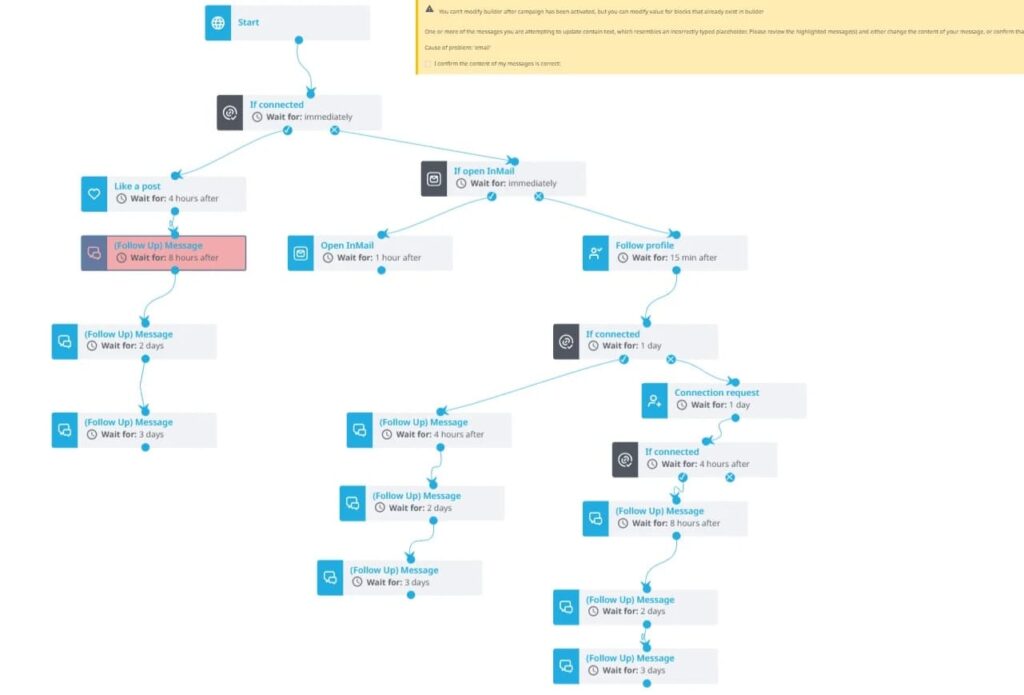
Here’s another hack: don’t rely solely on LinkedIn. Its impact is limited. Instead, opt for a multichannel campaign that lets you reach different prospects across diverse channels. For instance, if you mass message on LinkedIn , you can gently nudge them with an email after 3 days. This keeps your brand top of mind and prompts them to respond.
Fortunately, Expandi offers this multichannel outreach feature. You can create sequences (LinkedIn messages and email follow-ups) to engage prospects across multiple channels, all from within the platform. Here’s what a multichannel outreach campaign looks like with Expandi.
6. Publish Valuable Content
It’s no news that businesses use organic content to build brand awareness and generate new leads. In case you wonder whether there is a return on these activities, yes. According to a report, LinkedIn’s organic ROI averaged 229% over 3 years.
Your LinkedIn posts, articles, and engagement with people’s content all drive revenue growth for businesses without them paying a dime. As good as this sounds, it takes time. The same report also revealed that the average time to see the first lead result takes about 6-8 months.
This means you have to be consistent in the game before you see results. But how can you post for 6-8 months to generate leads on LinkedIn? Let’s find out below.
Post content weekly
Ideally, post at least 2-5 times a week to tell the algorithm you’re committed and keep your brand on top of your prospect’s mind. Offer value to showcase your expertise. Weekly posts establish authority and tend to make your prospects trust you more. Some content formats you can explore with LinkedIn include:
- Carousels: Use carousels to visually guide your prospects on how to solve a problem.
- Industry trends: Keep people updated about what’s happening in the industry and tell them your expert opinion about it.
- Quick wins and losses: Let people know what you recently achieved or failed at. Use storytelling methods to create lessons that provide insights.
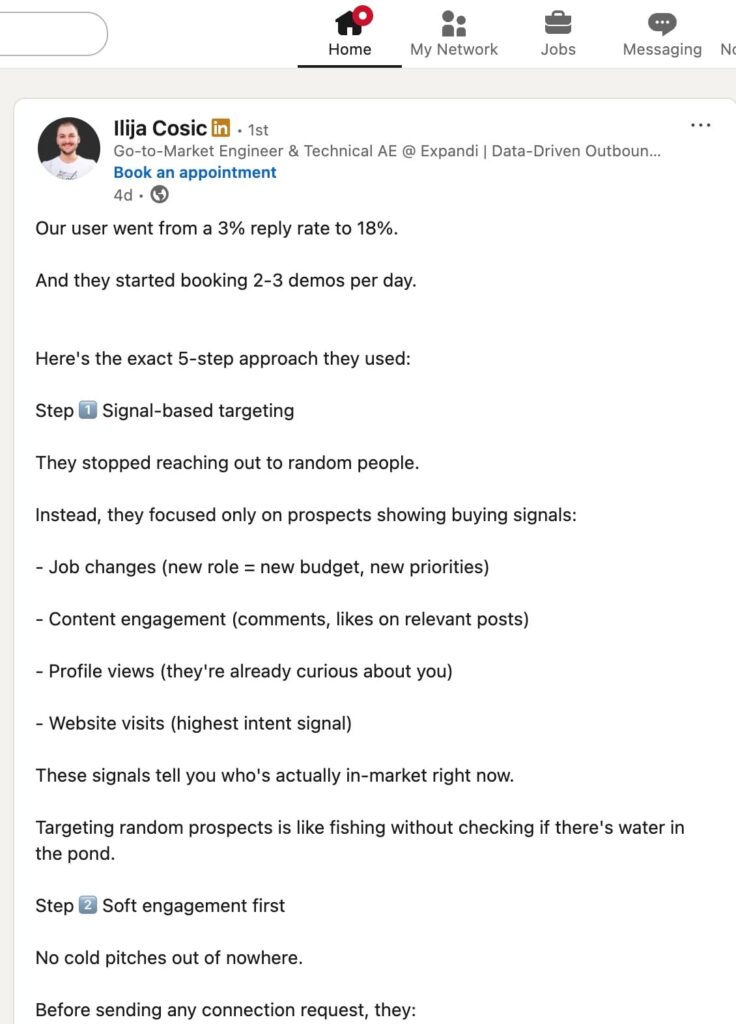
- Case studies: Talk about the problems your clients faced, how you helped them solve them, and the outcome they achieved. Use numbers and testimonials to boost credibility. For example, here is a post by Ilija Cosic, Technical Account Executive at Expandi, about how they helped a user increase their reply rate from 3% to 18%. He didn’t only talk about the wins but share the processes.
Also, include a CTA to your post to persuade readers to engage with your post. For example, you can ask a question to trigger conversations, tell them to comment with specific words for valuable resources, or share a link to perform the desired action.
7. Set time apart for micro-engagement
As mentioned earlier, your prospects need to warm up to you. But that doesn’t mean you should give up once they’ve become a lead. Continue interacting with others’ posts. Spend at least 5 minutes a day liking, commenting, sharing, and reposting others’ content.
Commenting is super vital. Avoid generic comments such as “Great post!” or “This is insightful.” Instead, tell us what makes their posts insightful. Add your experiences if necessary. By commenting on others’ posts, you’d reach your second-degree connections (the network of the original author’s posts). This helps to boost visibility and expand your reach to new audiences.
8. Collaborate with Influencers
Last but not least, partner with influencers. Contact individuals with significant followings on LinkedIn to spread the word about your business’s offerings (products or services). Have the create posts about your offerings to reach more audience and gain new clients.
According to Domitille de Saint-Exupery, CMO at lemlist, they tried this hack, and it drove about 10% of the brand’s revenue ($40M ARR) in 2025. Influencer marketing went beyond paying creators. Instead, they implemented these steps:
- Partner with creators whose ICP already trusts. People readily buy from a creator they trust.
- Co-build the content before scaling. Go back and forth where necessary.
- Set an attribution model to prioritize your efforts.
- Run an outbound campaign on people who engage with the creators.
- Scale by replicating with other top creators. Test new formats and platforms to determine which works best.
Land Your First SaaS Customers from LinkedIn with Expandi
Still wondering how to get first SaaS customers? Well, it involves lots of processes. The good news is you don’t have to shoulder the burden alone. With LinkedIn automation tools like Expandi, you can simplify your lead generation efforts.
Whether it’s identifying and targeting qualified leads, sending outreach messages, or following up on LinkedIn prospects. We are here to help. Our powerful LinkedIn automation features let you find the right leads easily to fuel your sales pipeline and drive revenue growth.
Plus, you don’t have to worry about LinkedIn limits. We implement safety measures to safeguard your LinkedIn activities and protect your account from getting restricted or banned. Book a demo call with us today to enjoy these benefits!



You’ve made it all the way down here, take the final step