How to Turn Your LinkedIn Presence into a Lead Engine: 4 Tested Tactics to Try

Treating LinkedIn content and outreach as two separate jobs? Well, they shouldn’t be.
Belkins, a lead-generation agency, ran an experiment: post 8 pieces of content per month, including thought leadership and success stories, then target the people who engaged with it.
Two posts went viral (15,000+ views each). The team followed up with outreach to the right accounts.
This resulted in 17 confirmed appointments and 70% higher LinkedIn connection acceptance and reply rates.
That’s what could happen for you too, if you combine your LinkedIn content with outreach rather than treating them in isolation.
In this article, we further show how to do this. We break down how to combine LinkedIn content with outreach to turn your LinkedIn presence into a lead engine. Let’s get started.
Why isn’t your LinkedIn presence generating leads?
Many professionals wonder why they’re not generating leads from LinkedIn. But the cold truth is they’re doing it all wrong.
A report by Martal Group revealed that 17% of sellers send cold outreach with zero personalization. Just unsolicited messages or overly promotional content that prompt the prospects to ignore their messages or report them as spam.
On top of this, they fail to target the right audience.
In a podcast interview, Stefan Smulders, Co-founder at Expandi, said, “Many companies doing LinkedIn outreach have the perception that it’s about making connections as much as possible.” Basically, they use a spray-and-pray approach that generates leads inconsistently.
The fix is straightforward: a reliable and sustainable framework that constantly fuels your LinkedIn pipeline with qualified opportunities.
4 ways to improve your LinkedIn presence and start generating leads
Below, we’ll share four tested tactics that will help you turn your LinkedIn presence into a lead-generating engine, as well as three key tools that can help you automate a part of this process and save time and resources.
1. Optimize your LinkedIn profile
Your LinkedIn profile either impresses or deters your prospects. To create a lasting impression, make your profile work for you by optimizing the information it offers.
Start by completing the information on your profile page. According to research, a LinkedIn page with complete information gets 30% more weekly views. Here’s what you need to focus on:
- Profile picture: Use a professional photo with no distracting background. It humanizes your profile page and prompts people to engage with it.
- Headline: Your LinkedIn headline is the first piece of text your prospects see in their feed or search results. Be specific and showcase the value you offer clearly to your prospects. E.g., “Founder at XYZ Company | Helping businesses with the right GTM tools for effective outreach.”
- About section: Keep it short and engaging. Describe who you are, what you do, and why it matters. Focus on how you solve problems for businesses.
- Experience and skills: Include your work details with specific examples of how you helped a business solve a problem. Share relevant case studies and skills to show your expertise.
These small tweaks can change how a prospect perceives your brand and encourage them to get connected with you on LinkedIn.
2. Create valuable content regularly
Once you have optimized your LinkedIn profile, it’s time to stay visible and reinforce your presence on the platform. To do this, experts say it’s crucial to post at least three times a week on LinkedIn to stay top-of-mind for your audience and reach new platform members.
Share valuable content that can help your audience: discuss an industry hack or a lesson you just learned, or solve a problem for free in a post. The best hack is to follow this formula: identify a specific problem your client faces, explain how you solved it, and teach them how to apply it to similar situations.
Now, we know creating relevant and useful content takes time, so here’s a tool that can help you speed up the process.
Creating LinkedIn content with Scripe
Scripe, an AI-powered LinkedIn content tool, helps sales teams, marketers, and founders ideate, draft, and create content faster.
You can write posts yourself or import files from various sources (documents, videos, or audio files) so that the AI sales tool breaks these uploads into relevant topics and prevents you from running out of content ideas.
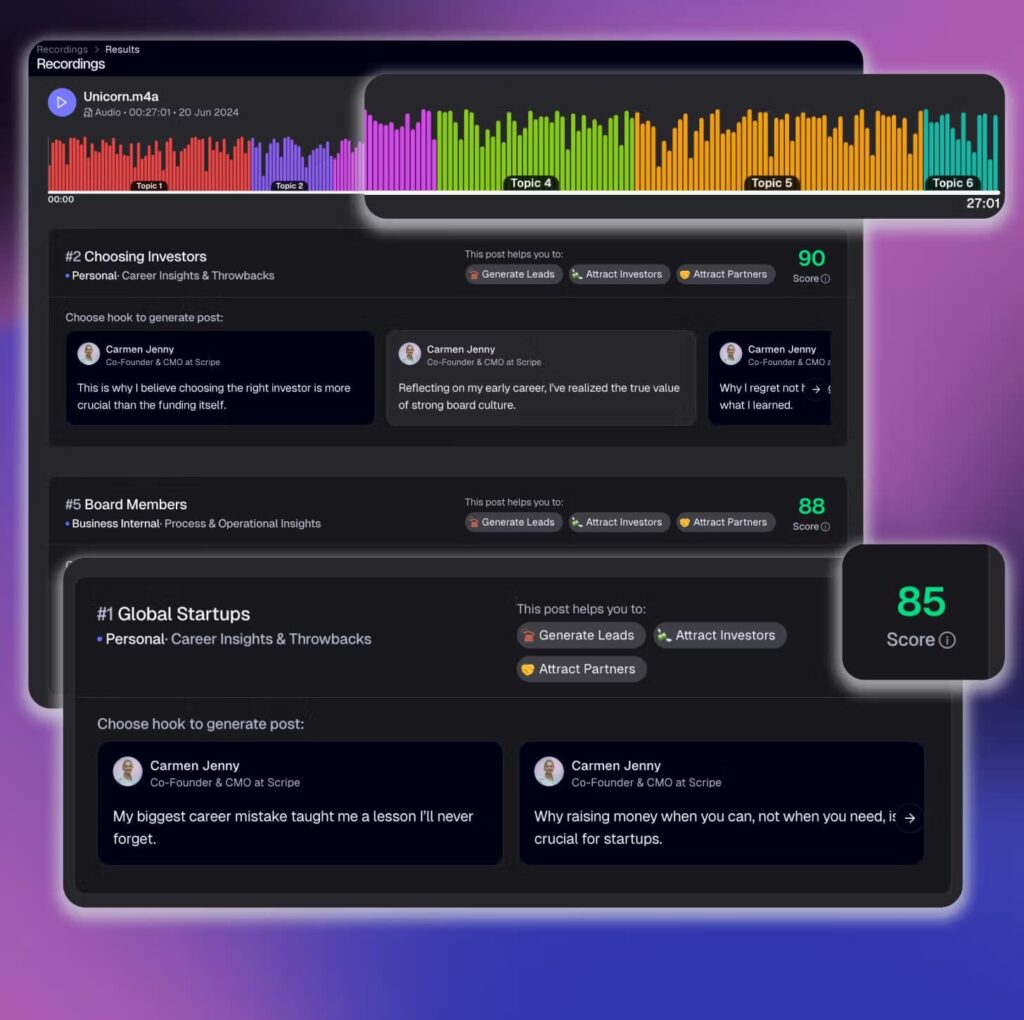
Additionally, its AI agent further refines these ideas to align with your voice and writing style, making the posts sound just like you. Overall, Scripe is a perfect choice if you struggle to post consistently on LinkedIn.
Although posting valuable content is crucial, engagement is what moves the needle.
3. Engage leads actively
Posting content isn’t enough. You must engage your audience as well. Like, comment, share, and repost other people’s content — meaningfully.
For example, identify 20 profiles that liked your posts or share a similar target audience with you. Spend about 15 minutes each day engaging with their posts and leaving thoughtful comments.
Not the “great post” comment, but the one that adds more value to their post and offers your experience. Suppose someone posts about a sales challenge they’re facing, for example, share the solution that worked for you. Your comment, which showcases your expertise, gets seen by others and establishes authority.
Besides, they’d gradually warm up to you, unlocking the door to a genuine relationship. LinkedIn’s B2B trend study revealed that executives are 62% more likely to reply to messages from individuals they’ve seen interact with their feed multiple times. In other words, you show up, contribute value, and they likely respond.
Also, track and further engage with people who interact with your posts. That’s a sign they may be interested in your solutions. Suppose 50 people like your post about a solution to a problem you know they’re facing. It could be a sign they’re interested in learning more, so you can offer them a valuable resource you’ll use as a lead magnet.
Engaging on LinkedIn can be much more straightforward and efficient than it may sound.
Use Expandi to automate your LinkedIn outreach process rather than letting those interactions go to waste. Our tool lets you create sequences that engage your target audience and foster meaningful relationships.
Capturing signals with Expandi
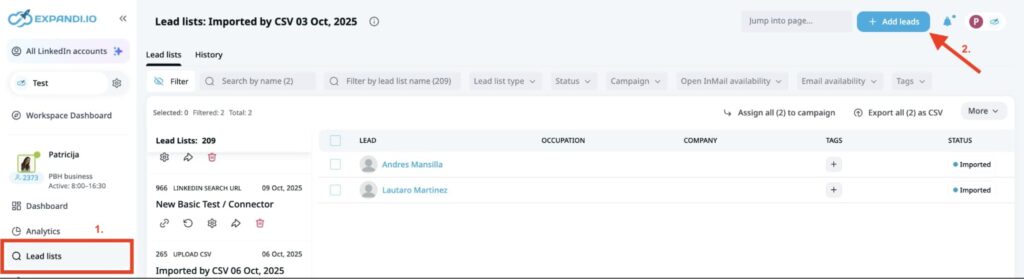
On your LinkedIn profile page, copy the link to one of your posts. Then, return to your Expandi account. Click “Lead list” >> “Add lists” on the dashboard.
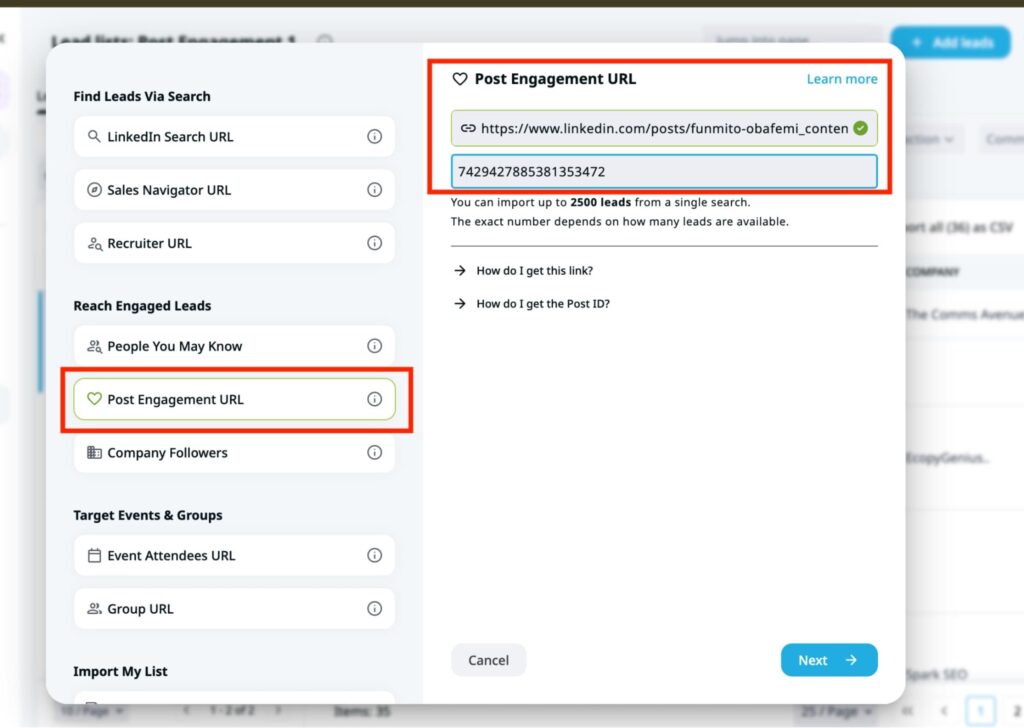
Then, choose “Post Engagement URL” and paste the link you copied earlier from your LinkedIn post, and insert the post ID. The post ID is a series of figures in your post URL.
Click “Next” and name your lead list with any preferred title. Tick the box to decide whether you want Expandi to auto-update your list and assign it to a campaign. Afterwards, “confirm.”
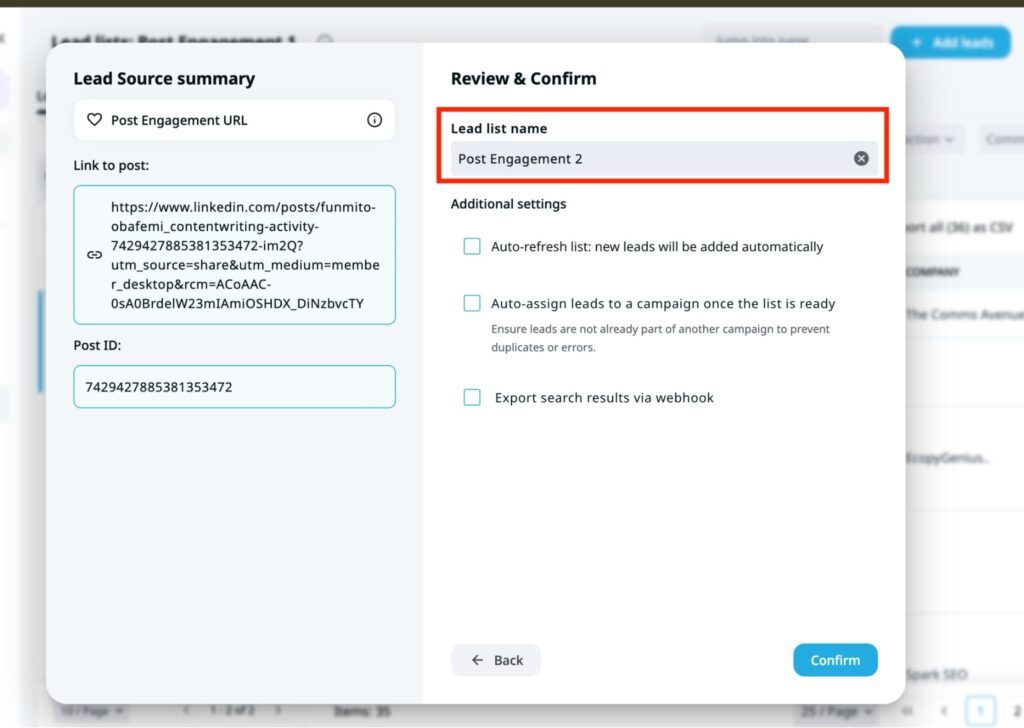
Wait for about two to three minutes, and Expandi will extract the people who engaged with your LinkedIn posts in real-time, alongside their job titles, company name, and status as shown below.
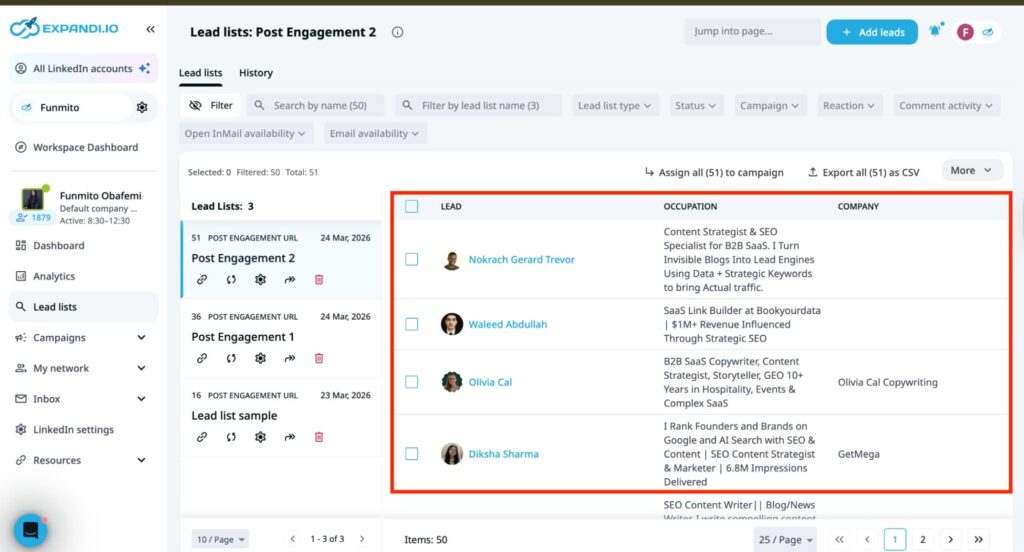
Then proceed to the next step: engaging them in a warm outreach through LinkedIn message automation.
Automating warm outreach with Expandi
Now that you have the list of people who engaged with your post, follow up with them through a sequence. Send connection requests, messages, and follow-ups to connect with your ideal buyers on a deeper level and build genuine relationships. Here’s how to do that with Expandi.
After the second step, the LinkedIn automation tool lets you route the leads extracted from your post to a campaign. To do this, create a campaign first. Click “Add new campaigns” from the Campaign section on the dashboard.
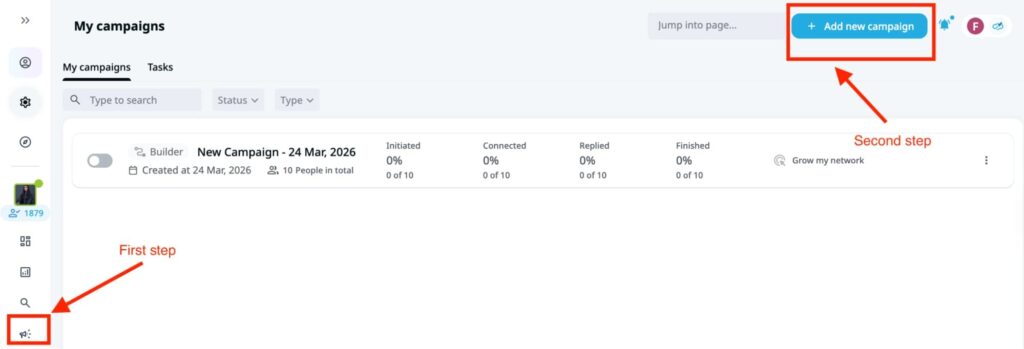
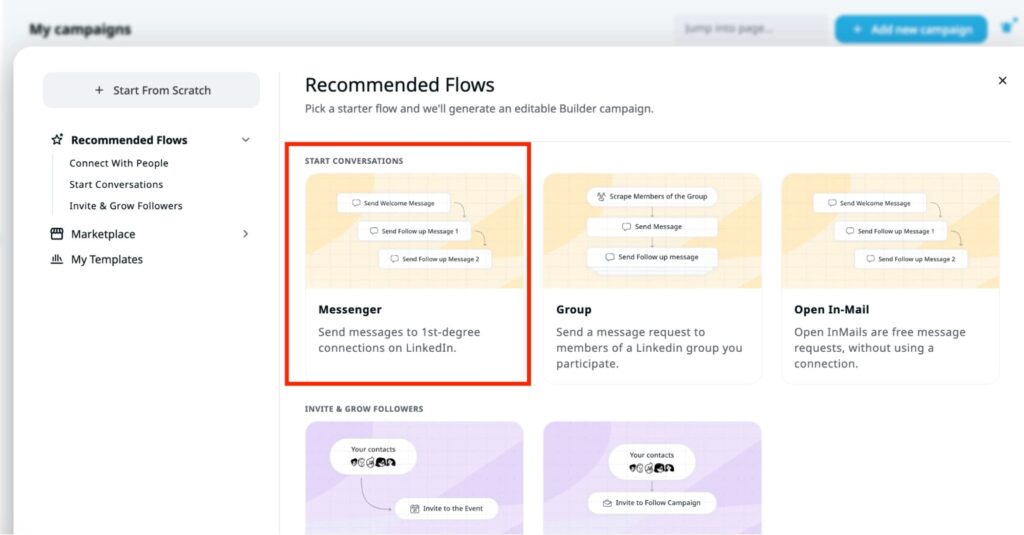
Next, state your goal (your target audience and what you intend to achieve) or skip the stage. Click “Next” and choose “Messenger” flow in the “Start conversations” tab.
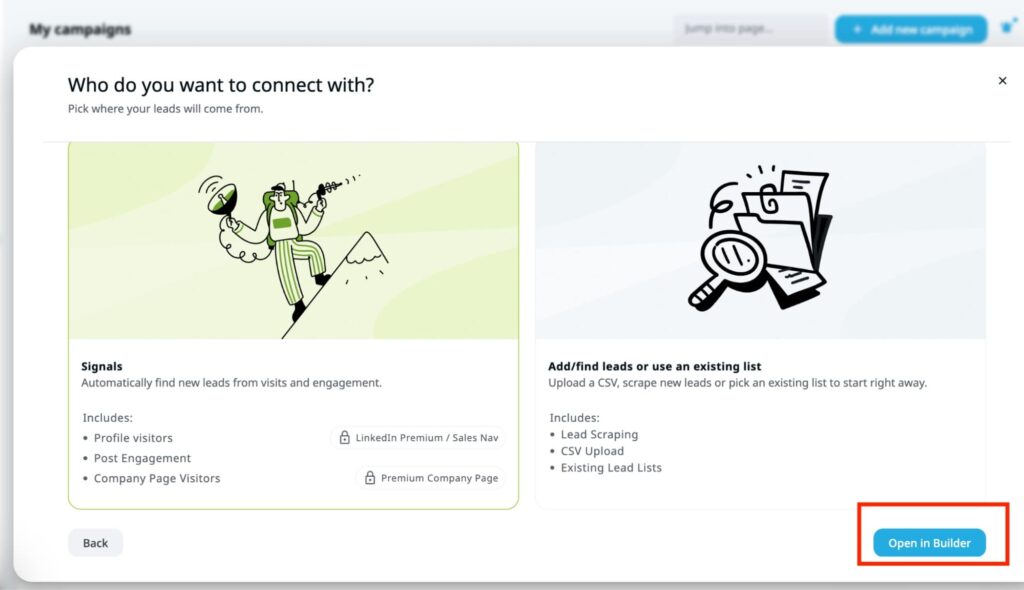
Then choose “Signals” to find leads from profile visits or post engagements. If you’re using a CSV file, here’s where you will upload it. Once you choose your preferred option, click “Open in Builder” to open the sequence.
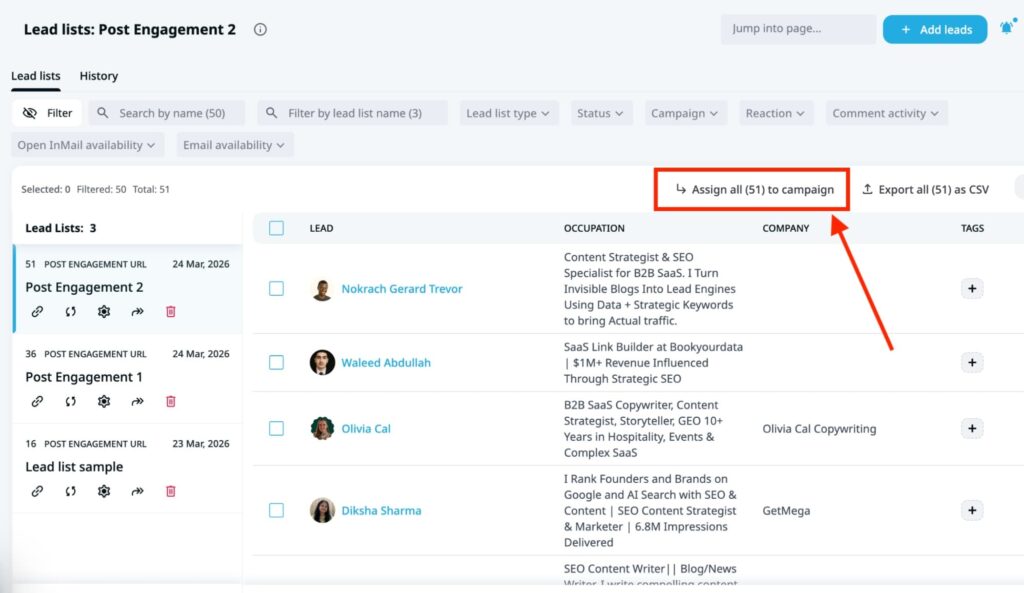
Then return to the “Lead list” section of your Expandi dashboard. Choose the lead list containing the people who engaged with your post earlier. Select the number of people you want to reach and click “Assign (x) to campaign” to route them to the campaign you created.
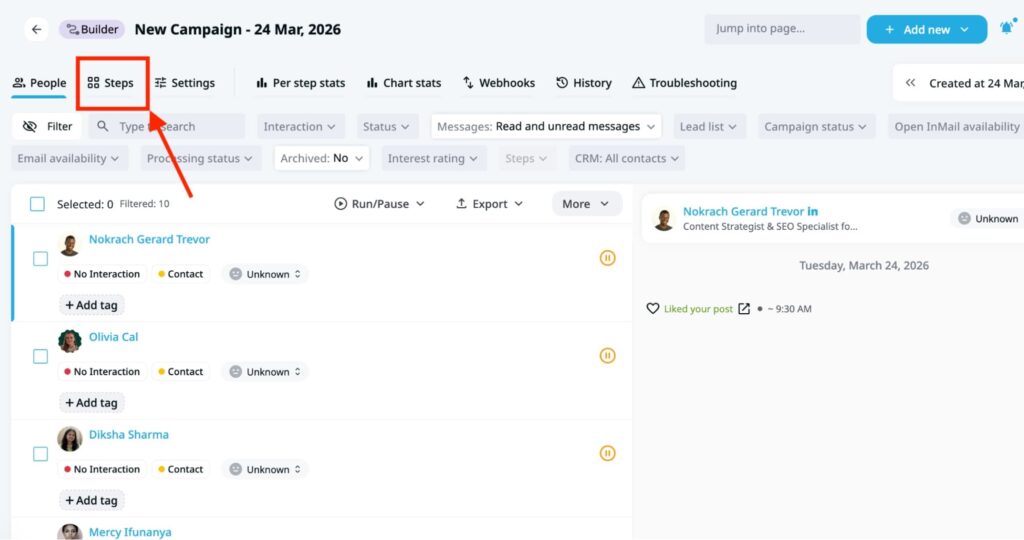
Then return to the Campaign section and choose an existing campaign to display routed leads. Afterwards, click “steps” from the displayed section.
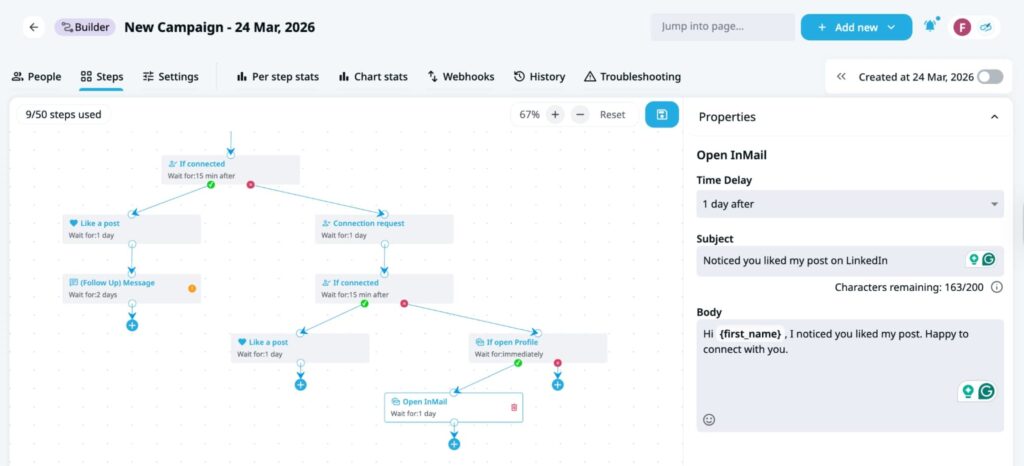
You will see a workflow that lets you build a smart sequence to engage leads who recently interacted with your posts. This is where you customize your LinkedIn activities, whether you want to visit a profile, like a post, send connection requests, or follow up on prospects.
For instance, in the screenshot below, I started with “visiting the lead’s profile.” If they’re connected to me, then I ask Expandi to like or comment on a post. Next, it waits for two days before sending a message.
If they’re not connected, Expandi can send a connection request and wait a day for them to accept it. If they accept, like their post. If not, send an InMail message to engage them. Personalize these messages with the most appropriate variable on the right side of the screen to reduce manual efforts.
Finally, build the sequence to your preference, toggle the “activate” button to run your campaign. Sit back to watch Expandi engage your leads and warm them up to have conversations with you.
4. Build relationships to close deals
Finally, follow up to increase the chances of receiving a response. Research revealed that multiple touches on LinkedIn (3-5 actions) can increase reply rates from 1% to over 5%. So, follow up with your leads at intervals to keep your brand top of mind.
Also, avoid being too salesy. Instead, show genuine interest in what they’re building. Instead of saying, “Book a demo on my website,” think, “What’s the biggest bottleneck you’re facing right now?” It prompts them to open up, builds trust, and encourages them to respond to your messages.
That said, here’s how to follow up with leads and push their details into a CRM for closing.
Pushing leads into CRM
Once you’ve gotten a reply from your LinkedIn follow-up message, push the leads to your CRM. Expandi integrates with top CRMs, including HubSpot, Salesforce, and Pipedrive, to easily transfer data and prevent leads from falling through the cracks.
Here’s how to connect Pipedrive with LinkedIn through Expandi and push their details into the CRM.
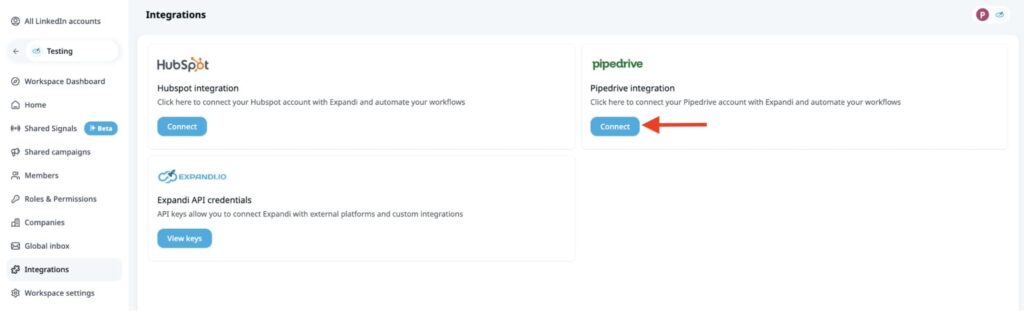
First, choose “Integrations” from the left side of your Expandi dashboard. Choose Pipedrive and click “Connect” to integrate both tools. Enter your Pipedrive login details, and Expandi will automatically connect the tools.
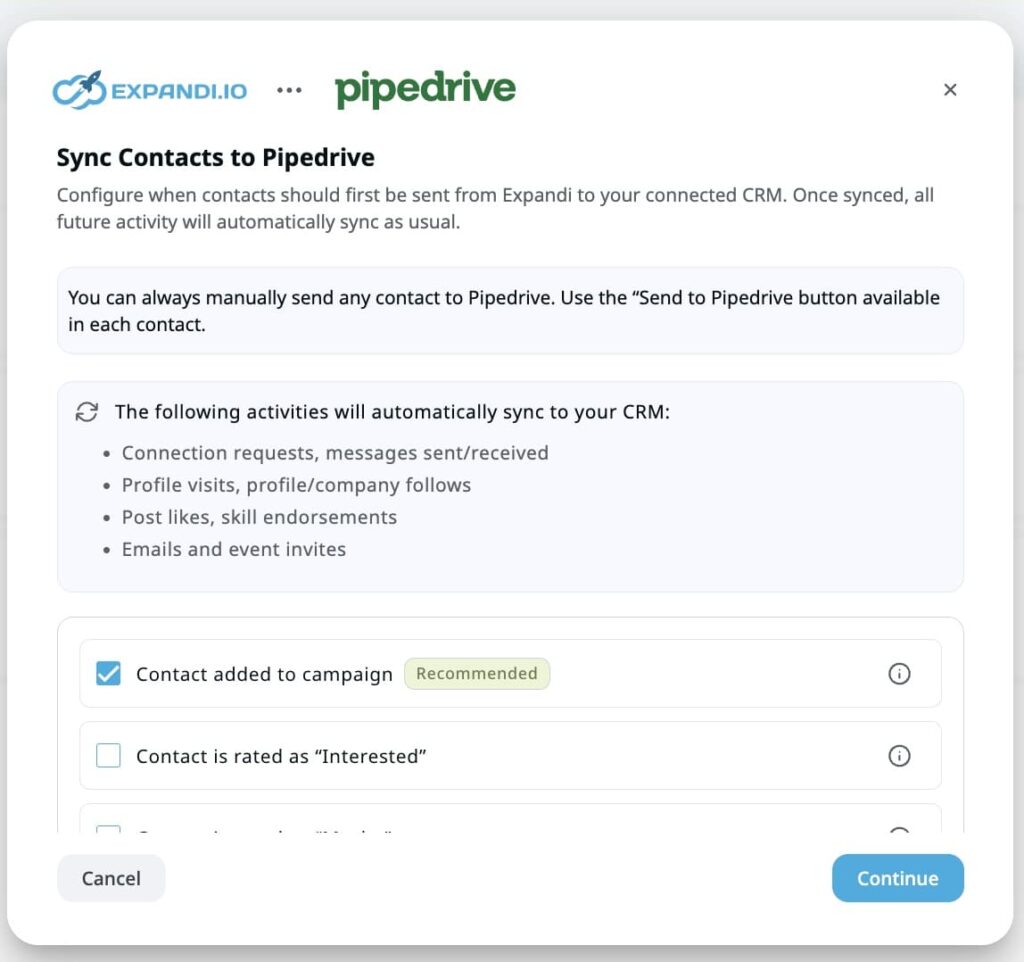
Afterwards, select the action you wish to perform in Pipedrive. For example, adding or updating a contact in Pipedrive. Tick the checkboxes that matter most to your workflow.
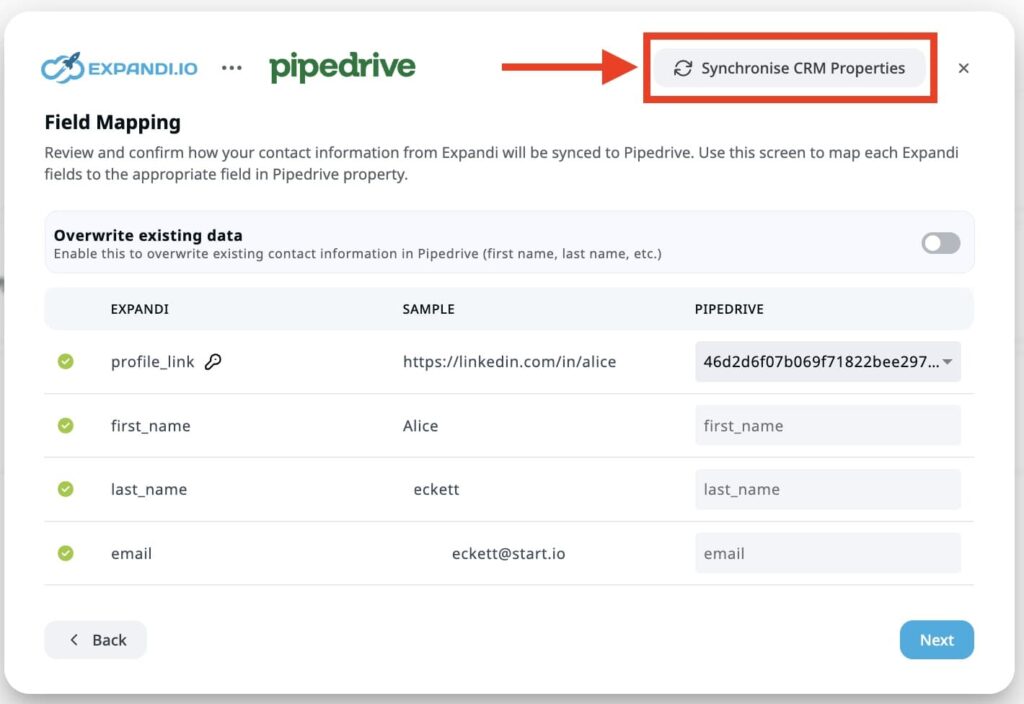
Next, click “Continue,” map the fields to the appropriate columns, and synchronize the CRM properties.
Then, click “Overwrite existing data” to continuously update the data in Pipedrive from Expandi. After reviewing all fields, click the “Next ” button to review “Integration setup.” Then, click “Complete setup.”
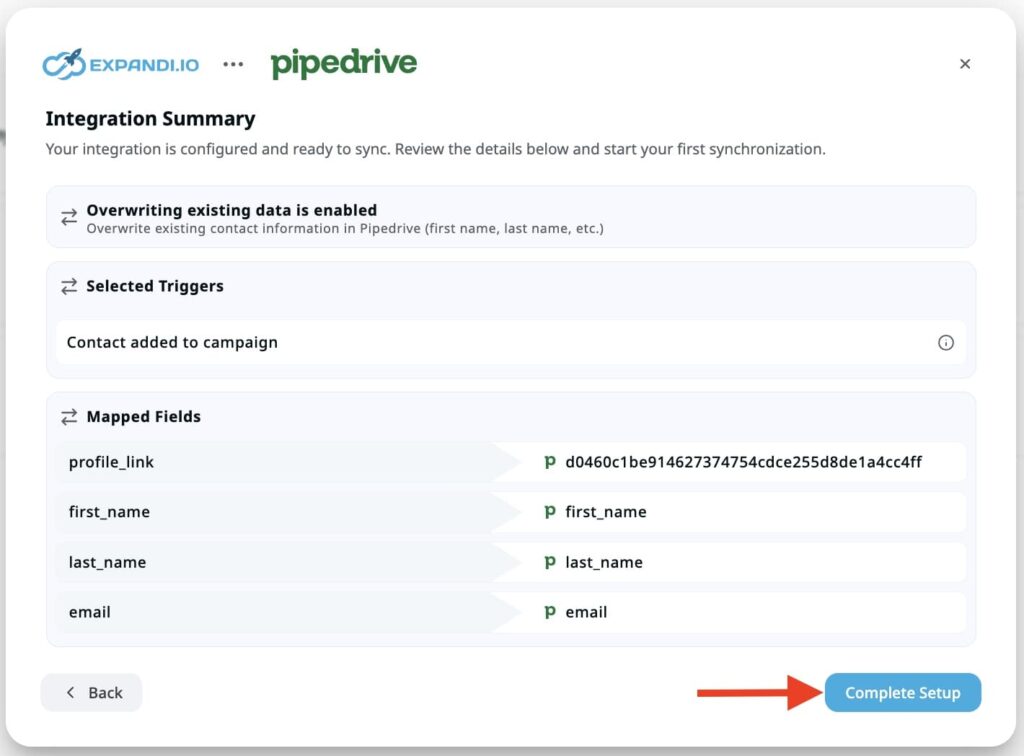
This will integrate the tools and allow easy transfer of contact data between both platforms. Then, add leads from the Campaign section on Expandi. In your Campaign dashboard, select the total number of leads you want to export to Pipedrive. Click “More” >> “Send to Pipedrive”
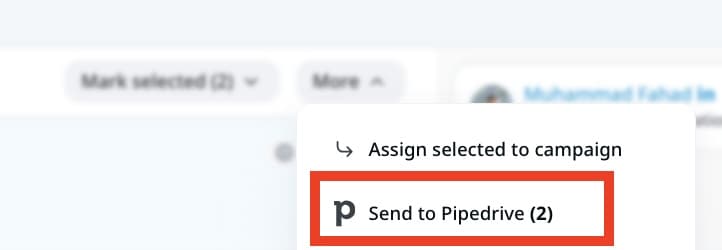
Expandi will automatically send those leads into Pipedrive, where you can track their status in the buyer’s journey.
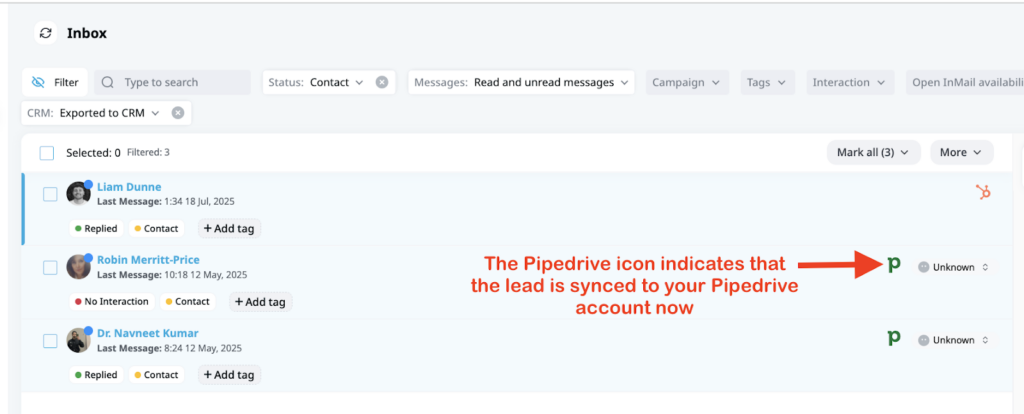
To confirm that Expandi has sent those leads, you will see the Pipedrive icon on the right side of your screen. This shows that your selected leads in Expandi have been pushed to the CRM, Pipedrive.
Why these tools work together
Most LinkedIn strategies treat content and outreach as parallel tracks that never meet. Scripe and Expandi close that gap by turning one into the fuel for the other.
Here’s how the loop works in practice:
- Scripe keeps you posting consistently: 3+ times a week, in your voice, without the content running dry. That consistency is what generates the engagement signals worth acting on.
- Expandi captures those signals automatically: Every like, comment, and profile view from your posts becomes a targetable audience, pulled into a lead list in real time.
- Smart sequences do the follow-up: Expandi reaches out to those warm leads while your content is still fresh in their mind, with branching logic that adapts based on how they respond.
- Your CRM closes the loop: Every conversation that gains traction syncs straight to HubSpot, Pipedrive, or Salesforce. No manual exports, no leads falling through the cracks.
The compounding effect is the point. The more consistently you post, the more signals Expandi captures. The more signals it captures, the bigger and warmer your outreach pool becomes, and your CRM sees all of it.
Use Expandi to generate qualified opportunities from LinkedIn
Most LinkedIn outreach fails because it starts cold. This framework doesn’t; it starts with people who already showed interest and builds from there.
Optimize your profile so the right people take you seriously. Post consistently so you generate signals worth acting on. Let Expandi turn those signals into warm conversations. Push the best ones into your CRM and close.
That’s the full loop, from LinkedIn post to booked meeting, without the spray-and-pray.Ready to run it? Sign up for a 7-day free trial today!

You’ve made it all the way down here, take the final step