LinkedIn Lead Generation Strategy: 13 Plays Backed by 13.2 Million Connection Requests

Key Takeaways
- A LinkedIn lead generation strategy is a repeatable system for finding the right prospects on LinkedIn, starting conversations with them, and moving those conversations to a qualified meeting.
- Across 13.2 million connection requests sent through Expandi between May 2025 and April 2026, 28.5% were accepted and 10.4% of outbound messages received a reply.
- Industry changes results more than anything about the sender: acceptance ranged from 17.5% in Consumer Electronics to 40.1% in Broadcast Media, while sender seniority moved acceptance by only about 3 points.
- Three-message sequences produced the highest reply rate (9.8%). Sequences with five or more messages fell to 5.0%, below a single message.
- Connection notes that referenced an existing tie, such as a follow or a shared group, were accepted at 1.8 to 2.7 times the 30.2% baseline.
- Connection requests sent between 7 and 11am were accepted at roughly 32%, compared with about 24% in the evening. Day of the week made little difference.
- Within the same accounts, AI-generated messages were accepted about 12% less often than the senders’ own human-written messages, with no difference in reply rate.
LinkedIn Lead Generation Strategy: 13 Plays Backed by 13.2 Million Connection Requests


Considering you’re here reading this, you’re probably aware about all the wonderful benefits of LinkedIn lead generation and automation for B2B sales teams. Or maybe you’re ready to start generating high-quality, B2B leads that actually sign up for your demos and don’t ghost you. If you fall into either of those categories, then you’ve come to the right place because I’m about to show you the LinkedIn lead generation strategies that work for not only me but our customers too.
Here at Expandi, we’re kind of the go-to authority on LinkedIn automation tools and lead generation strategies. Why’s that? Because we actually know what we’re talking about.
I’ve personally tried all the growth-hacks and strategies we’ve covered in our blog. I’ve done the outreach, seen the results, tweaked the cold messages to improve reply rates, spoken with leaders in sales and GTM, and dived deep into the analytics of my campaigns and those of our Expandi customers.
What is a LinkedIn lead generation strategy?
A LinkedIn lead generation strategy is the plan a sales or marketing team follows to turn LinkedIn members who match its ideal customer profile into qualified leads. It covers four decisions: who to target, how to build the prospect list, what to say in the connection request and follow-up messages, and how to measure whether it is working.
This guide focuses on outbound LinkedIn lead generation, meaning prospecting and messaging, rather than LinkedIn Ads and Lead Gen Forms. Every recommendation below is based on Expandi’s State of LinkedIn Outreach H2 2026 report, which analyzed 13,218,869 connection requests and 6,730,447 outbound messages across 13,302 active Expandi accounts between May 2025 and April 2026. The findings are associations, not controlled experiments, so treat them as benchmarks to test against rather than guarantees.
What results should a LinkedIn lead generation strategy produce?
A typical LinkedIn outreach campaign should expect around 28.5% of connection requests to be accepted and around 10.4% of outbound messages to receive a reply. Those are the platform-wide averages from Expandi’s 13.2 million connection requests, and they give you a baseline for judging your own campaigns.
| Metric | Platform average | What it measures |
|---|---|---|
| Connection acceptance rate | 28.5% | Share of connection requests accepted |
| Message reply rate | 10.4% | Share of outbound messages that receive a reply |
| Connection-note reply rate | 3.0% | Share of connection-request notes that receive a reply |
Source: Expandi, State of LinkedIn Outreach H2 2026.
External studies land in a similar range. Belkins reported a 26.4% acceptance rate in its 2025 outreach study, and Cleverly describes 30–45% as a healthy range for 2026.
The platform average hides wide variation by industry, message structure and timing. The more useful question is what rate to expect for your segment, which is where the eight plays below start.
“There are more tools, more AI, and more automation than ever, but the fundamentals still determine who wins.” — Glenn Miseroy, Co-Founder and CEO of Expandi
The 13 plays of a data-backed LinkedIn lead generation strategy
1. Choose your target segment by industry, not by who is sending
Industry is the only demographic factor that meaningfully changes LinkedIn outreach results. In Expandi’s data, connection acceptance ranged from 17.5% (Consumer Electronics) to 40.1% (Broadcast Media), while sender seniority kept acceptance inside a narrow 26.3% to 29.4% band and company size moved it by about 3 points.
Reply rates show the same pattern. Staffing and Recruiting reached an 18.9% message reply rate, roughly double the platform average and double Computer Software’s 8.8%. Recruiting messages often offer something the recipient wants, which vendor outreach to software buyers does not.
What this means for your strategy:
- Benchmark each campaign against the rate for your target industry, not the 28.5% platform average.
- Do not assume a senior title on the sending profile will lift results. A VP and an SDR reaching the same audience saw roughly the same acceptance rate.
- If you sell into a low-acceptance industry, budget for more connection requests per booked meeting.
The full industry table is in the appendix of the H2 2026 report.
2. Build your prospect list from the source that costs least
LinkedIn Sales Navigator lists performed only marginally better than CSV imports. Across nearly 11,000 single-source campaigns and 2.2 million contacted prospects, Sales Navigator leads accepted at 19.8% versus 18.5% for CSV imports, and reply rates were identical.
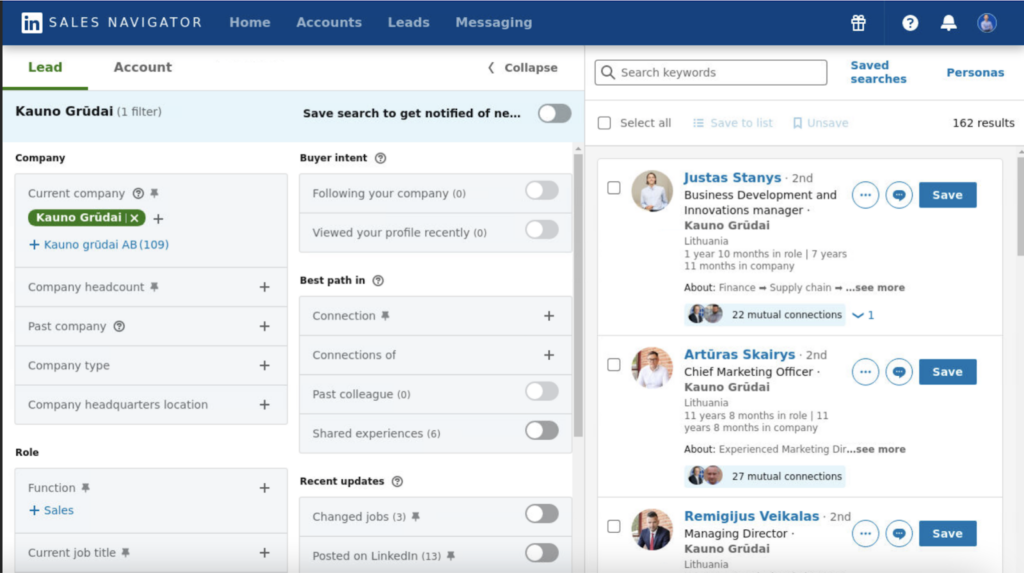
That gap works out to about one extra accepted connection per 77 requests. Choose your list source based on cost, workflow and where your best-fit prospects already are, not on an expectation that one source converts better. Sales Navigator lead lists remain useful for their filters and job-change alerts; a well-built CSV from your CRM or an enrichment tool performs almost as well.
3. Warm prospects up before you send a connection request
Prospects who already recognize your name are more likely to accept. Expandi’s research found that accounts with at least 1,000 followers and consistently engaged posts accepted connection requests at 30.5%, compared with 27% to 29% across the platform. The sample was small (38 accounts), so treat this as directional.
Two ways to create recognition before the request arrives:
- Post regularly on topics your target buyers care about, so your name appears in their feed first.
- Add pre-connection touchpoints such as viewing the prospect’s profile, liking a recent post or following their company page. In Expandi, our Campaign Builder can schedule these steps before the connection request goes out.
4. Write connection notes that reference an existing tie
Connection notes that mention something the sender and prospect already share get accepted far more often than cold introductions. In single-request campaigns with a 30.2% baseline, the top-performing opening lines were accepted at 1.8 to 2.7 times that rate.
| Opening line pattern | Prospects contacted | Acceptance rate |
|---|---|---|
| Thanks the prospect for following | 435 | 81.1% |
| Thanks the prospect for joining the sender’s group | 2,106 | 63.6% |
| Written in the prospect’s language (Spanish) | 1,371 | 62.8% |
| Short company greeting with no ask | 2,860 | 60.9% |
Source: Expandi, State of LinkedIn Outreach H2 2026.
The common thread is that accepting feels like acknowledging someone the prospect already knows.
Practical ways to create that tie:
- Reference a shared group, event, community or mutual connection.
- Mention a post the prospect engaged with, if you are targeting engagers on a specific post.
- Write in the prospect’s own language when it differs from yours.
- Keep the note low-friction. A short greeting with no pitch outperformed longer positioning statements.
Only use a tie that is true. A “thanks for the follow” note to someone who did not follow you reads as automated. For more examples, see LinkedIn connection message templates.
5. Run three messages per sequence, not five
Three messages is the most effective sequence length for LinkedIn outreach. Across 2,966 campaigns, three-message sequences produced a 9.8% reply rate, while sequences with five or more messages dropped to 5.0%, lower than sending a single message.
| Messages in sequence | Campaigns | Prospects contacted | Reply rate |
|---|---|---|---|
| 1 | 619 | 203,520 | 6.3% |
| 2 | 412 | 134,879 | 6.8% |
| 3 | 784 | 277,395 | 9.8% |
| 4 | 429 | 122,567 | 7.9% |
| 5 or more | 722 | 208,336 | 5.0% |
Source: Expandi, State of LinkedIn Outreach H2 2026.
A fifth unanswered message is likely to read as spam, and campaigns that need five touchpoints may be aimed at less receptive audiences. If your current sequences run longer than four messages, test a three-message version against them and compare reply rates.
6. Put your strongest pitch in message 2 and keep it to two sentences
The second message in a sequence earns the highest reply rate per send, at 8.8%. In a connector campaign, message 1 is the connection note, which prospects cannot reply to until they accept. Messages 2 and 3 arrive after the prospect has already let you in, so replying takes no extra effort.
Length matters less than having one clear ask. In single-message campaigns, messages of 151 to 200 characters, about two short sentences, had the highest reliable reply rate at 8.5%, against a 6.8% baseline. Longer messages did not collapse: 301 to 500 characters still replied at 7.6%.
A simple structure for message 2:
- One sentence that ties to something specific about the prospect or their company.
- One sentence with a single question or offer.
7. Use AI to draft messages, then rewrite them yourself
Unedited AI-generated outreach did not outperform human-written messages in Expandi’s data. When each account’s AI-personalized campaigns were compared with the same account’s own templates, human-written messages were accepted about 12% more often, and reply rates were effectively identical.
A cross-account comparison made AI look better (20.4% versus 17.3% acceptance), but that was selection bias: the accounts that adopted AI were already stronger operators. The practical approach is to use AI for a first draft, then edit it with what you know about the prospect’s role, industry and current problems.
Expandi’s message personalization supports both custom variables and AI drafting, and earlier Expandi campaigns that went beyond first-name personalization show the kind of detail that makes a message feel written for one person.
8. Send connection requests in the morning
Connection requests sent between 7 and 11am were accepted at roughly 32%, compared with about 24% for requests sent in the evening, an 8 to 10 point gap. Reply rates, by contrast, stayed flat throughout the day.
Day of the week mattered far less. Acceptance stayed between 26.5% and 30.4% and reply rate between 8.3% and 9.1% across all seven days, so there is little to gain from rescheduling campaigns around a specific weekday. The timing analysis used Amsterdam local time, so align the morning window to your prospects’ time zone.
9. LinkedIn content retargeting
Here’s another simple lead generation hack. All you need is a popular post from an influencer in your niche. Then, you scrape all the comments/likes on it and reach out to them. It’s really simple.
- Find a post with a significant engagement rate (in this case it was a viral post with 501 likes and 678 comments).
- Copy link to post from LinkedIn.
- Log in Expandi, create a new search, select ‘Post engagement’ and paste in the copied link.
- Optional: Create similar content your target audience will enjoy.
- Create a connector campaign and reach out to your list of leads from Expandi (feel free to copy our proven templates) and mention that you also like the influencer’s content in your request message.
The results:
- 72% acceptance rate.
- 40% responded to the follow-ups.
Why it works:
- Mutual interests.
- By bringing up the post they liked, you’re not being intrusive and have something in common to talk about – without being too random or spammy.
- By letting them know you create similar content – they have a reason to connect with you.
See the full content retargeting lead generation strategy and the exact templates we used here.
10. Personalization that goes beyond first and last name
Have you realized how most LinkedIn growth-hacks stop personalization at using your leads’ first and last names? Here’s an outreach strategy that goes beyond that and uses dynamic personalization. With it, your outreach messages come out different each time – depending on who the campaign is addressed to.

As an example, I wanted to target authors who had written about LinkedIn automation tool alternatives, reach out to them and let them know about Expandi. Here’s what I did.
- Wrote down my leads’ names, their website name, and a solution they had mentioned in the article.
- Used dynamic personalization tags in my outreach templates.
- Mentioned specific information from their articles for some highly-personalized outreach.
The results:
- 69% Acceptance rate.
- 83% Responded to the follow-ups.
Why it works:
- Targeting a very specific group of people.
- It mentions something unique within each message – so that the people receiving them don’t think it’s automated.
See the full case study article here.
11. How do you target companies by the technology they use?
Technology-based targeting means building a prospect list from companies that use a specific software product, then opening the conversation with that shared context. The technology a company runs tells you what it has already bought, what it is likely to need next and what problems its team deals with every day, which gives you a genuine reason to connect.
The approach works for most B2B offers, because almost every product either replaces, integrates with or depends on another tool. Some examples:
- Competitive switching: a SaaS company targets businesses using a competitor’s product, especially one that has raised prices or been discontinued.
- Integration partners: a reporting tool targets companies using the CRM or ecommerce platform it integrates with, such as HubSpot, Salesforce or Shopify.
- Agencies and consultants: a Shopify agency targets stores on that platform, or a HubSpot partner targets companies running HubSpot without an in-house admin.
- Services tied to a stack: a cybersecurity or cloud consultancy targets companies hosted on a specific cloud provider.
- Recruiting: a recruiter targets companies using a specific technology, then contacts hiring managers who will need engineers with those skills.
How to run a technology-based LinkedIn campaign
1. Build a list of companies that use the technology. Search for the technology in a technographic data tool such as BuiltWith, confirm the match and filter by your target country. Export the list of company domains as a spreadsheet.
2. Find the decision-makers at those companies. Turn the company list into named contacts with LinkedIn profile URLs. You can do this with an account search in LinkedIn Sales Navigator, an enrichment tool, or a profile finder such as PhantomBuster’s LinkedIn profile URL finder. If you also plan to email, an email finder such as FindThatLead can add verified addresses.
3. Qualify the list and set it up in Expandi with Expandi MCP. Expandi MCP connects AI assistants such as Claude or ChatGPT to your Expandi account, so you can describe your ideal customer profile in plain language and let the assistant do the setup. It can qualify leads against your ICP, build a custom list, save details such as the technology name as message placeholders, and link the list to a campaign.
An example prompt:
“Check the leads in my ‘HubSpot users – UK’ list against our ICP: VP or Head of Sales at B2B companies with 50 to 500 employees. Remove anyone who doesn’t fit, save the technology name as a placeholder, and link the list to a new campaign.”
4. Draft a three-message campaign that mentions the technology. Ask the assistant to draft the campaign flow, including timing between steps. Mention the technology in the connection note, because a shared reference point is what lifts acceptance (see play 4), and keep the sequence to three messages (see play 5).
An example connection note:
“Hi {first_name}, I saw {company} runs on {technology}. We work with a lot of {technology} teams on [problem]. Would be good to connect.”
Review every message before anything goes out. Expandi MCP drafts campaigns and replies for your approval; it cannot activate a campaign or send messages on its own, and it works within your account’s daily limits, warm-up and sending hours.
5. Monitor results and handle replies. Once you activate the campaign, ask the assistant for acceptance and reply rates, where prospects drop off in the funnel, or why a campaign sent fewer actions than expected. It can also surface new replies with lead context and draft responses for you to approve.
Results from an earlier technology-based campaign
In an earlier Expandi campaign, built manually with the steps above, I targeted US companies using a specific website visitor-tracking tool and mentioned that tool in the connection request. The campaign reached a 73.6% acceptance rate, and almost 50% of prospects replied to the follow-up messages.
That is well above today’s 28.5% platform average, and it reflects a single, narrowly targeted campaign rather than a typical result. Two things drove it: every prospect was a high-fit company, and the connection note gave each of them a specific reason to accept. The full walkthrough and templates are in this LinkedIn outreach strategy guide.
12. Increase brand awareness with a PDF lead magnet
For this strategy, you need an offer. In our case, we created a lead magnet PDF which we wanted to give back to our target audience and provide free value. So, the goal with this outreach strategy is to reach our client via several channels (LinkedIn, Facebook ads) and to provide value (free growth hacking PDF). Essentially, we’ll be connecting with our audience on LinkedIn, scraping their info, and then use Facebook ads to retarget them on an entirely different channel. Here’s how:
- Create a relevant, valuable PDF offer for your target audience.
- Run a detailed search for your target market on LinkedIn (ideally, using LinkedIn Sales Navigator).
- Import that search to Expandi and create a personalized, high-quality outreach sequence (or copy ours from the full guide).
- Create a retargeting Facebook ad campaign for brand awareness (with a custom banner, encouraging users to sign up for a demo).
- Connect Facebook custom audiences to your Expandi list via Zapier and Hunter.io. Essentially, we’re using Zapier to connect Expandi to your Facebook Custom audience. And Hunter.io to grab your leads’ contact information. Zapier is just the middleman here. Run those ads and enjoy your booked demos of warm leads.
The results:
- Highly personalized outreach to warm leads on different channels (LinkedIn, Facebook ads).
- Providing value first of all (free PDF) and then retargeting those warm leads with a custom audience Facebook ads, which makes them more likely to sign up for a demo.
See the detailed step-by-step explanation of how to set up this brand awareness outreach strategy and increase your reach over your leads here.
13. Poach your competitor’s audience
Why bother defining your target audience and going through detailed LinkedIn filters when you can just steal your competitor’s audience instead? If you happen to have a better product or offer (bold claim) this LinkedIn outreach strategy works even better. It goes something like this:
- Build a comparison page where you compare your product/service to that of your competitor’s (make sure you’re doing a fair comparison). We used our Expandi vs Dux-Soup page here.
- Find your competitor’s Twitter page and use TexAu to extract their twitter followers to a CSV spreadsheet file. Then, use their find a LinkedIn profile API to turn your list into LinkedIn profiles.
- Connect Zapier and Expandi via Webhooks.
- Set up Facebook ads and connect them to Zapier to retarget your audience via ads.
- Reach out via Expandi and send a request with this template:
“Hey {first_name}, Saw you’re also a follower of (competitor’s name) on Twitter! I take it you’re active on (platform) and interested in (subject)? I was wondering if you’d like to exchange lead generation strategies if so. What do you think?”
The results:
- A whole lot of booked demos full of warm leads.
[vc_column_inner width=”1/3″] [vc_column_inner width=”1/3″] [vc_column_inner width=”1/3″] Why it works:
- Reaching out to an audience who already has a general idea of your niche and similar products.
- Your leads are open to being educated as to why your product is superior (if it is). Though, they might not know about your benefits or what makes your tool superior, they’ll be glad to listen if it will benefit them. Do this right, and you’ll be tapping into an audience who might become extremely loyal to your brand.
Bonus LinkedIn Lead Generation Tips
Having the proper outreach campaign is only one part of a successful lead generation strategy. Here are some other lead generation tips you should keep in mind when doing marketing on LinkedIn.
1. Start with your profile
LinkedIn lead generation starts with your profile, because that’s where most people go when they receive a message from a stranger. First impressions are everything. So, you should treat your LinkedIn profile as your personal landing page. It should inspire trust, professionalism, and have a clear, visible offer.
With your profile, you’ll want to convert your offerings into a certain outcome (solution of working with you). Take the above tagline – “Up to 10X more Social Selling leads | Guaranteed success with “The Top 3 LinkedIn Outreach Strategies” Guide ♟” This is a great way to inspire people to click on your profile as they know what they’re getting into. Check out our tips for improving your LinkedIn profile and use our free LinkedIn profile grader tool to see where you could improve your profile.
And once there, your summary, work experience, and recommendations should clear up any objections your leads might have. Learn how to fully optimize your LinkedIn profile top to bottom and other essential steps to take before launching an automated campaign here.
2. Define your audience properly
We talked about how important it is to define your audience above. People are tired of being retargeted with the same outreach methods that sound spammy and try to sell with the first message. So, to avoid sounding sales-y straightaway, make sure you know your buyer persona properly. You should also know:
- What Facebook and LinkedIn groups they hang out in.
- What type of LinkedIn posts they engage with and which influencers they follow.
- What type of content they create, what are their pain points, and where your product or solution comes into play.
Become an expert at building your ideal customer profile by reading our guide before you build a sales lead list.
3. Choose your tools wisely
There are a TON of LinkedIn automation tools out there. Some safer than others. And if you’re thinking of doing LinkedIn lead generation, you should be following ethical outreach best practices and making safety a top priority.
Expandi was built with those principles in mind. That is why it comes with advanced features to make sure your LinkedIn profile stays safe while you’re automatically generating leads:
- Mimics human behavior.
- Action limits.
- Delay between actions.
- Cloud-based.
- Smart limits.
- Auto-warm up feature.
- Country-based, dedicated IP address.
- Smart inbox and chat.
- And more.
Expandi was also specifically designed for growth-hackers, agency owners, and people running multiple LinkedIn accounts. With an easy-to-use dashboard and unified inbox, LinkedIn lead generation and automated campaigns become extremely convenient to manage and track.
How do you keep a LinkedIn account safe while generating leads?
LinkedIn’s help center on prohibited software and extensions states that it does not permit third-party software that automates activity on the platform, and LinkedIn can restrict accounts that it detects using such tools. No automation tool removes that risk entirely.
LinkedIn also limits how many connection invitations a member can send each week. LinkedIn’s help pages describe the limit without stating a number, and most vendors report that it sits at around 100 invitations per week for most accounts. Pending invitations that are never accepted can count against you, which is another reason a high acceptance rate matters.
Practical ways to reduce risk:
- Keep daily activity moderate and spread it across the working day.
- Improve acceptance rate through targeting and connection notes (plays 1 and 4), so fewer requests sit pending.
- Withdraw old pending invitations periodically.
- Avoid running the same LinkedIn account through several automation tools at once.
Cloud-based tools such as Expandi run campaigns from a dedicated, country-based IP address with action limits and profile warm-up, which are designed to reduce detection risk rather than eliminate it. LinkedIn account restricted? Here’s what you need to do to regain full access.
How do you measure and fix a LinkedIn lead generation strategy?
Measure every campaign against two lead generation metrics: acceptance rate and reply rate. Then compare them with the benchmark for your target industry. Where the gap appears tells you which part of the strategy to fix.
| Symptom | Likely cause | What to change first |
|---|---|---|
| Acceptance well below your industry benchmark | Wrong audience, weak profile or a cold connection note | Tighten targeting (play 1), add a real shared tie to the note (play 4), add warm-up steps (play 3) |
| Acceptance near benchmark, reply rate below 10% | Follow-up messages are not landing | Rewrite message 2 as a two-sentence, single-ask message (play 6) |
| Reply rate falls after message 3 | Sequence is too long | Cut to three messages (play 5) |
| Acceptance drops in afternoon or evening sends | Send window | Move connection requests to a 7–11am window in the prospect’s time zone (play 8) |
| AI-personalized campaigns underperform | Unedited AI copy | Edit AI drafts before sending (play 7) |
Two trends are worth watching over time:
- Expandi’s data shows the reply rate on connection-request notes fell from 3.5% in May 2025 to 2.2% in April 2026, because more prospects now accept without replying to the note. That makes the post-connection message more important, not less.
- January was also the weakest month in the H1 2026 report, with 21.45% acceptance during the highest-volume period of the year.
What earlier Expandi campaigns show about shared context
Several earlier campaigns run on Expandi produced acceptance rates far above today’s 28.5% platform average. Each one targeted a narrow audience and opened with context the prospect already shared, which matches the pattern in play 4.
| Campaign | How prospects were found | Acceptance rate | Reply rate to follow-ups |
|---|---|---|---|
| Post-engagement outreach | People who liked or commented on a popular niche post | 72% | 40% |
| Personalization beyond first name | Authors who had written about LinkedIn automation tools | 69% | 83% |
| Technology-based targeting | Companies using a specific website technology | 73.6% | Almost 50% |
These were single, highly targeted campaigns, so they show what is possible with a narrow audience and a genuine shared reason to connect, not what a typical campaign should expect.
Which tools does a LinkedIn lead generation strategy need?
Most LinkedIn lead generation strategies use three types of tools:
- A prospecting tool such as LinkedIn Sales Navigator, a CRM export or an enrichment tool, to build the target list.
- An outreach tool to run connection requests, follow-up messages and pre-connection touchpoints on a schedule. Expandi is a cloud-based LinkedIn outreach automation and outreach tool with Smart Campaigns, personalization and a shared inbox.
- A CRM to track which conversations become qualified opportunities. Here are some of the best LinkedIn CRMs for seamless integration.
Read our recommendations for some of the best LinkedIn AI tools for everything from content to outreach.
Put your LinkedIn lead generation strategy to work with Expandi
The strongest LinkedIn lead generation strategies are built on a short list of proven moves:
- Target by industry.
- Give every prospect a real reason to accept.
- Run three messages.
- Put your best pitch in message 2.
- Send connection requests in the morning.
- Measure every campaign against the benchmark for your segment, so you know which part to fix.
None of these plays needs a bigger team. They need a system that runs them consistently and shows you the numbers.
Try Expandi free for 7 days. Set up your first campaign with the plays above, or connect Expandi MCP and let your AI assistant build the list and draft the sequence for you to approve. You can then see where your acceptance and reply rates land against the benchmarks in this guide. You won’t be charged unless you choose to subscribe.
Want to learn from people running outbound every day? Join GTM Society, the free community for GTM practitioners created by Expandi. Founders, SDRs, agency owners and GTM operators share playbooks there, and you can hear from more than 70 GTM leaders, with no paywalls.
FAQs about LinkedIn lead generation strategy
What is the average LinkedIn connection acceptance rate?
The average LinkedIn connection acceptance rate was 28.5% across 13.2 million connection requests sent through Expandi between May 2025 and April 2026. Rates vary widely by industry, from 17.5% in Consumer Electronics to 40.1% in Broadcast Media.
Is LinkedIn good for B2B lead generation?
Yes. LinkedIn lets you search for prospects by job title, company, industry and location, and message them directly. In Expandi’s data, about 1 in 10 outbound LinkedIn messages received a reply, and results improve further with industry-specific targeting and shared-context connection notes.
How many follow-up messages should a LinkedIn sequence have?
A LinkedIn outreach sequence should have three messages in total. Three-message sequences reached a 9.8% reply rate in Expandi’s data, while sequences of five or more messages dropped to 5.0%, below the rate for a single message.
What is the best time to send LinkedIn connection requests?
The best time to send LinkedIn connection requests is in the morning. Requests sent between 7 and 11am were accepted at roughly 32%, compared with about 24% in the evening. The day of the week had little effect.
How long should a LinkedIn outreach message be?
A LinkedIn outreach message should be around 150 to 200 characters, or about two short sentences. That range had the highest reliable reply rate in Expandi’s data at 8.5%. Having one clear question or offer matters more than hitting an exact length.
Do you need LinkedIn Sales Navigator for lead generation?
No. Sales Navigator leads were accepted at 19.8% versus 18.5% for CSV imports in Expandi’s data, and reply rates were identical. Sales Navigator is useful for its search filters and alerts, but a well-built list from another source performs almost as well.
Is LinkedIn automation allowed?
LinkedIn does not permit third-party software that automates activity on its platform and can restrict accounts that use it. Automation tools reduce the risk with action limits, dedicated IP addresses and randomized timing, but none can guarantee an account will never be restricted.



You’ve made it all the way down here, take the final step