Best LinkedIn Recruiter Message Templates for 2026

Recruiting on LinkedIn has changed.
What used to work a few years ago (generic InMails, long introductions, and mass copy-paste outreach) now gets ignored by most candidates.
Today, top candidates receive dozens of recruiter messages every week. If your outreach doesn’t feel relevant, human, and intentional from the first line, it gets skipped.
At Expandi, we work closely with recruiters, hiring teams, and agencies who rely on LinkedIn as a primary sourcing channel. Over time, we’ve seen exactly what separates recruiter messages that get replies from those that get ignored, and it has very little to do with “clever” copy.
When outreach isn’t structured properly, strong candidates slip through the cracks.
That’s why effective LinkedIn recruiter message templates in 2026 focus on context, clarity, and timing. Instead of copy-paste-friendly templates that you can use for every situation.
Below, we will cover recruiter message templates you can use as a starting point. However, to get real results, you’ll need to adapt them to your ICP, role seniority, market, and what actually motivates your target candidates.
This guide is built for recruiters looking for professional LinkedIn message templates that feel relevant, intentional, and human.
Below, we’ll break down:
- How to write effective LinkedIn recruiter messages in 2026 (5 pro principles).
- 15 Best LinkedIn recruiter message templates for any context.
- How to create and use LinkedIn recruiter message templates (best practices).
Key Takeaways
- LinkedIn recruiter message templates only work when they’re adapted to candidate context, intent, and timing.
- High-performing recruiters lead with relevance and intent, instead of clever openers or buzzwords.
- One message should always drive one clear outcome, multiple CTAs kill replies.
- Passive and active candidates require different tone, pacing, and follow-up strategy.
- Templates should be scenario-based (passive, senior, referral, follow-up), not role-based alone.
- Follow-ups must add new context or value, following up with “just checking in” messages hurts credibility.
- Use templates to standardize structure, then personalize the signal every time.
- Tools like Expandi help recruiters apply templates at scale while keeping outreach human, compliant, and intentional.
Best LinkedIn Recruiter Message Templates for 2026


How to Write Effective LinkedIn Recruiter Messages in 2026
Before using any recruiter message templates, it’s important to understand what drives replies on LinkedIn today. A strong recruiter message template on LinkedIn is about aligning the message with candidate intent, timing, and context.
However, candidate inboxes are crowded, attention spans are shorter, and generic outreach is easy to spot.
Recruiting on LinkedIn is competitive because it works at scale:
- LinkedIn has 1B+ professionals.
- 7 people are hired every minute.
- 5.7M+ talent pros actively using the platform.
- And 1.1M+ companies sourcing and hiring there.
The recruiters who consistently get responses follow a few clear principles.
1. Context beats creativity
Clever openers don’t matter if the message feels irrelevant. Candidates reply when they immediately understand why you reached out to them specifically.
That context can come from their role, seniority, recent career move, domain experience, or the type of problems they’re likely solving today. If the first two lines don’t answer “why me?”, the message gets ignored.
Focusing on relevance first always beats creativity.
2. Personalization is about signals
Using a first name or current company isn’t real personalization anymore. In 2026, candidates expect recruiters to understand their career context.
Strong personalization is based on signals like:
- Role progression.
- Years of experience.
- Industry focus.
- Leadership scope.
- Or recent changes.
For example: “You’ve moved from individual contributor to team lead in the last two roles, which stood out as we’re hiring someone to build a function from scratch.”
3. Clarity wins over curiosity
Many recruiter messages try to be vague or “creative” to spark interest, using buzzword phrases such as:
- “Exciting opportunity”.
- “Fast-growing team”.
- “Marketing ninja wanted.”
That approach creates friction. Candidates are far more likely to respond when they clearly understand:
- Why you’re reaching out.
- What the role broadly involves.
- What you want them to do next.
If the candidate has to guess what you want, they won’t reply.
Bad example:
“We’re looking for a marketing ninja to join our fast-growing team and disrupt the space.”
Better example:
“We’re hiring a Senior Marketing Manager to own demand generation for our B2B SaaS product…”
4. One message, one outcome
A common mistake is stacking multiple CTAs into a single message: asking if they’re interested, requesting a CV, and suggesting a call, all at once.
Each message should drive one clear action only, whether that’s replying “yes,” accepting a connection, or booking a call.
5. Timing and intent matter more than volume
For years, the most common outreach advice was simple: send more emails, send more DMs, follow up more often. This used to work years ago because:
- Inbox competition was low – Fewer recruiters were using LinkedIn aggressively. Candidates weren’t receiving dozens of messages per week, so even average outreach stood out simply by showing up.
- Automation wasn’t widely accessible – Most outreach was manual or semi-manual. Volume itself signaled effort, and follow-ups felt human rather than system-driven.
- Candidate expectations were lower – LinkedIn wasn’t yet saturated with templated messages. Candidates were more forgiving of vague intros, generic language, and exploratory “quick chats.”
Today, AI and automation have flattened the playing field. Anyone can send high volumes of messages instantly, which means:
- Volume no longer differentiates you.
- Generic follow-ups feel automated.
- Persistence without context feels spammy.
So, what matters is intent.
Active job seekers and passive candidates behave differently on LinkedIn. Treating them the same leads to low response rates.
Passive candidates need context and low-pressure next steps, while active candidates expect speed, clarity, and direction.
A professional recruiter message template on LinkedIn clearly explains why you’re reaching out, what the role involves, and what action you’re asking the candidate to take.
15 Best LinkedIn Recruiter Message Templates for 2026
Before diving in, it’s worth setting expectations.
These LinkedIn recruiter message templates aren’t theoretical. We’ve seen variations of them across real recruiting campaigns in Expandi and have produced reply rates ranging from around 10% on cold, highly competitive profiles up to ~55% in high-intent or well-timed outreach scenarios.
These examples are designed as professional LinkedIn message templates for recruiters, built to work across seniority levels, industries, and candidate intent. The difference isn’t the template alone though.
Results depend on candidate intent, role seniority, timing, market conditions, profile optimization, and overall, how well each message is adapted to your ICP.
In the higher-performing cases, recruiters were using structured sequences, intentional follow-ups, and automation to stay consistent without losing relevance. That’s where tools like Expandi help apply these templates at scale while keeping outreach human.
P.S. In 2025, we analyzed 100,000+ real B2B social outreach campaigns across LinkedIn – looking at reply rates, connection behavior, follow-up timing, and what separates high-performing outreach from the rest.
Those findings are published in our free report, The State of B2B Social Outreach, which breaks down what’s working right now across – including reply benchmarks, personalization patterns, and automation strategies you should use for in your recruiter campaigns.
Download the PDF version of this report
Get all of our insights about the State of LinkedIn Outreach in a beautiful, shareable PDF by using the link below.
If you want to understand the data and best practices behind these templates – download the report for free and use it as a playbook for smarter outreach.
1. Passive candidate – context-first connection
When to use: Cold outreach to a passive candidate you’ve never interacted with.
Purpose: Explain why without pitching a role.
Key elements: Specific career signal, low pressure, no aggressive CTA.
LinkedIn message template:
“Hi {first_name},
I came across your profile while looking for people with experience in {{specific skill / domain}}.
Your background in {{clear signal}} stood out.
Not sure if you’re open to new roles right now – would it make sense for me to send over more information?”
2. Senior / high-signal candidate – minimal connection
When to use: Senior, in-demand profiles where brevity matters, but vagueness kills credibility.
Purpose: Earn attention by demonstrating you understand their work and are reaching out intentionally.
Key elements: Concrete signal, clear reason for outreach, no role pitch, permission-based next step.
LinkedIn message template:
“Hi {first_name},
I’m reaching out because of your work in {{specific initiative / scope / problem they’ve owned}} at {{company or context if relevant}}. I’m speaking with a small group of people who’ve built or led {{specific thing}} at this level, and your background stood out for that reason.
I’m not sure if you’re open to new roles right now, but would it make sense for me to share why I reached out and what I’m working on?”
3. Career progression signal outreach
When to use: Candidates who’ve clearly moved up in scope, responsibility, or complexity over time.
Purpose: Show you understand their trajectory and are reaching out for a specific reason.
Key elements: Career pattern recognition, forward relevance, confident close.
LinkedIn message template:
“Hi {first_name},
I noticed you’ve moved from {{earlier role}} into {{current role}} over the last few years, with increasing ownership around {{specific responsibility / scope}}.
That kind of progression is exactly what I’m seeing in people who do well in the environment I’m hiring for.
If this is something you’d consider exploring at some point, I can outline what the role involves and why your background fits.”
4. Post-connection – clear intent follow-up
When to use: After a connection request is accepted.
Purpose: Move from connection to substance without small talk.
Key elements: Clear intent, relevance upfront, single next step.
LinkedIn message template:
“Thanks for connecting, {first_name}.
I reached out because of your experience owning {{specific responsibility / scope}}. We’re hiring for a {{role}} role where that exact skill set is central to the work.
If this is worth exploring, I can walk you through what the role actually involves and how it’s different from similar positions.”
5. Passive candidate – keep-on-radar outreach
When to use: Strong passive candidates where forcing timing would backfire.
Purpose: Establish relevance without creating pressure.
Key elements: Low urgency, future relevance, trust-building tone.
LinkedIn message template:
“Hi {first_name},
I wanted to reach out because your background in {{specific area}} aligns closely with the type of roles I work on. I’m not hiring for you right now, but your profile is the kind I keep coming back to.
If it makes sense, I’m happy to keep you in the loop when something genuinely relevant comes up.”
6. InMail – justified and direct
When to use: When you can’t connect first and need to earn the InMail.
Purpose: Explain relevance fast and avoid sounding transactional.
Key elements: Direct relevance, no fluff, opt-in close.
LinkedIn message template:
“Hi {first_name},
I’m reaching out because of your experience with {{specific problem / system / scale}}. I’m hiring for a {{role}} role where that background is unusually important, which is why I’m being direct.
If this is something you’d want to understand better, I can share what the role looks like in practice.”
7. Active job seeker – fast and clear
When to use: Candidates signaling active interest (open to work, recent changes, recruiter engagement).
Purpose: Reduce friction and move quickly.
Key elements: Speed, clarity, outcome-focused close.
LinkedIn message template:
“Hi {first_name},
I noticed you were open to new opportunities. I’m hiring for a {{role}} role focused on {{specific responsibility}}, and your experience lines up closely with what the team needs right now.
Would you be against me sharing the role details and next steps?”
8. First follow-up – no reply
When to use: No response to the initial message, but you have additional or clarifying context to add.
Purpose: Re-anchor relevance by explaining why this is worth replying to, not by reminding them you exist.
Key elements: New context, relevance clarification, respectful exit option.
LinkedIn message template:
“Hi {first_name},
I wanted to follow up with a bit more context on why I reached out. The role I mentioned is focused heavily on {{specific responsibility / problem}}, which is where your experience with {{clear signal}} stood out.
If this isn’t relevant right now, no worries at all. I just wanted to close the loop rather than keep you guessing.”
9. Second follow-up – new angle
When to use: No reply after your first message and one context-driven follow-up.
Purpose: Reframe the outreach with a different reason to care (not “checking in”).
Key elements: New angle, sharper relevance, easy yes or no.
LinkedIn message template:
“Hi {first_name},
I wanted to add a bit more context on why I reached out. This role owns {{specific responsibility or problem}} from day one, working directly with {{stakeholders / systems / scale}}.
That’s why your experience with {{specific signal from their background}} stood out when I was looking at profiles.
If that kind of scope is relevant, I can share the full picture. If not, totally fine – just wanted to give you enough context to decide.
If that’s in your wheelhouse, I’ll send the details. If not, I’ll stop following up.”
10. Warm referral-based outreach
When to use: You were referred by a mutual contact or introduced indirectly.
Purpose: Leverage trust without leaning on it too hard.
Key elements: Referral context, specific relevance, grounded close.
LinkedIn message template:
“Hi {first_name},
{referrer_name} suggested I reach out given your experience with {{specific area or project}}.
I’m currently hiring for a {{role}} role where that background shows up in a very real way.
If it’s useful, I can share what the role actually looks like and why {referrer_name} thought of you?”
11. Event or community follow-up – continue a real thread
When to use: You met them at an event, webinar, Slack/LinkedIn community, or had a meaningful exchange.
Purpose: Build on shared context instead of restarting from zero.
Key elements: Shared moment, specific reference, natural transition.
LinkedIn message template:
“Hi {first_name},
Good meeting you at {{event / community}}. Your point about {{specific topic they mentioned}} stuck with me.
I’m hiring for a {{role}} role where that exact challenge comes up early. If it’s helpful, I can share more context on what we’re building and why I thought of you after that conversation.”
12. Past candidate – what’s changed
When to use: You’ve spoken before and they were close, but timing or fit wasn’t right.
Purpose: Reopen the loop with a clear reason.
Key elements: Acknowledged history, what’s different now, decisive close.
LinkedIn message template:
“Hi {first_name},
We spoke previously about {{past role / process}}, and I wanted to reach back out because the scope has changed meaningfully since then.
The role now owns {{new responsibility or focus}}, which maps much closer to where you were strongest.
If timing is better now, I can walk you through what’s different. If not, no problem at all.”
13. Step-up opportunity
When to use: The role is a clear progression from their current position.
Purpose: Position growth without implying stagnation.
Key elements: Respectful framing, growth context, optional exploration.
LinkedIn message template:
“Hi {first_name},
I noticed you’ve been operating at {{current scope}} for a while, with growing ownership around {{specific responsibility}}.
We’re hiring for a {{next-level role}} role where that experience translates directly into broader impact.
If you’d like, I can share how the role expands on what you’re already doing.”
14. High-volume hiring
When to use: You’re hiring for multiple similar roles but still want relevance.
Purpose: Qualify interest efficiently without sounding automated.
Key elements: Clear role definition, relevance filter, fast path forward
LinkedIn message template:
“Hi {first_name},
I’m hiring for several {{role}} roles focused on {{specific responsibility}}, and your background in {{key area}} fits what the team needs right now.
If this aligns with what you’re looking for, I can share the role details and how the process works.”
15. Hyper-personalized, dynamic GIF/image to stand out
When to use:
A-tier candidates where a normal message gets ignored (niche skill, senior, scarce talent). Use after connect or via InMail.
Purpose: Create a pattern interrupt that reinforces relevance and makes replying feel safe + low effort.
Key elements: Signal-first opener, visual supports context, stands out and disarms with humor.
Example template:
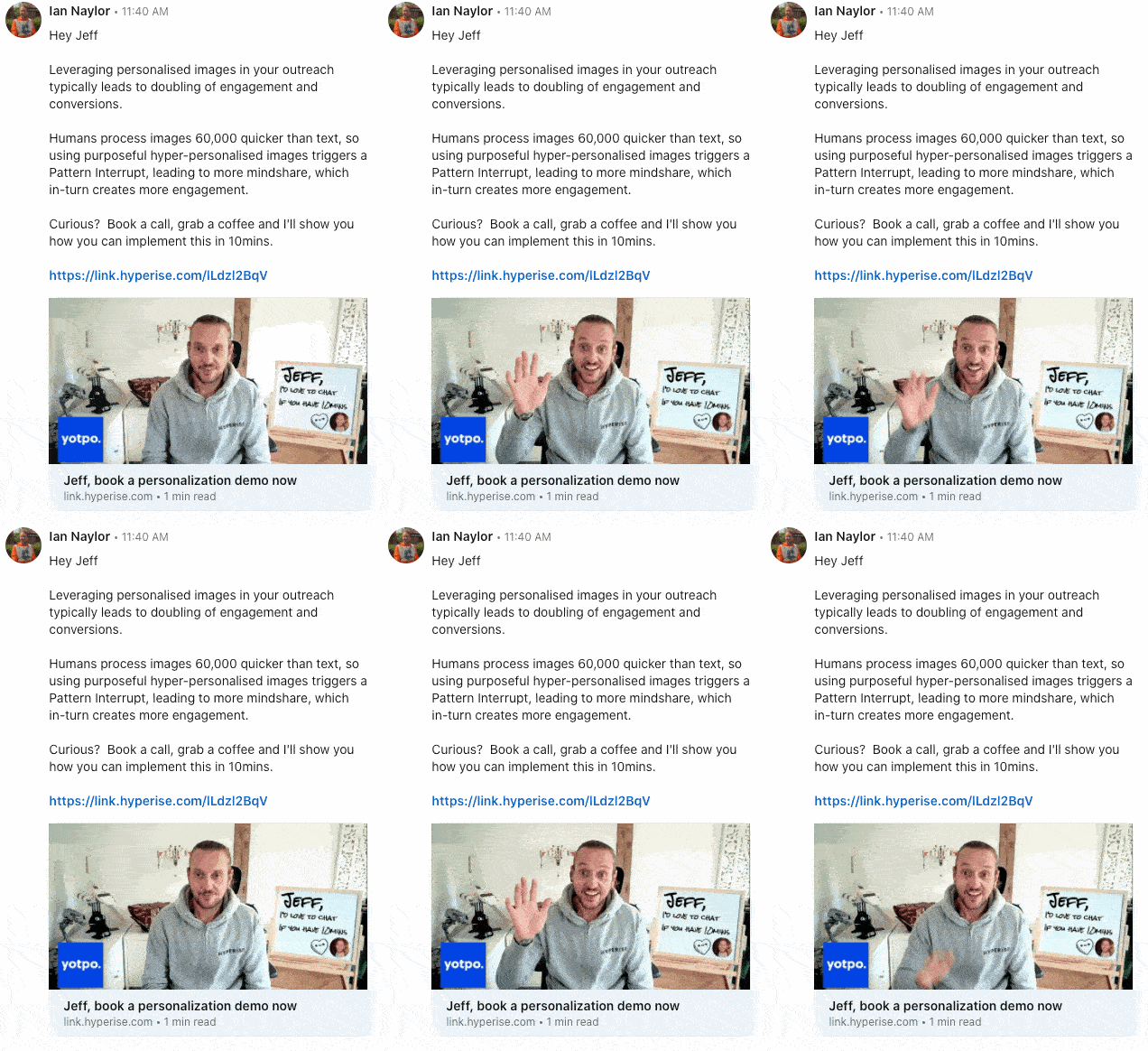
For more info on how this works and how to set it up, see how Expandi uses personalization.
How to Create and Use LinkedIn Recruiter Message Templates (5 Best Practices)
The templates above give you structure, but high reply rates never come from copying text.
They come from how well a message matches the candidate’s context, intent, and timing.
So, below are the best practices we see high-performing recruiters follow in 2026 when creating and using LinkedIn recruiter message templates.
1. Create templates inside LinkedIn Recruiter
If you’re wondering how to create a template in LinkedIn Recruiter, it starts by saving reusable message drafts inside the Recruiter composer and adapting them based on candidate intent.
LinkedIn Recruiter allows you to save message templates and reuse them across searches and projects.
According to LinkedIn’s own data:
- Recruiters see up to 69% higher InMail response rates when using LinkedIn Recruiter’s AI-assisted outreach features compared to traditional methods.
- Teams report saving 4+ hours per recruiter per role, largely by reducing manual profile review and repetitive messaging.
- Recruiters using Recruiter tools review significantly fewer profiles while still finding qualified candidates, improving focus and message relevance.
With LinkedIn Recruiter, you can:
- Save and reuse message templates across projects and searches.
- Insert dynamic fields (like name, role, company, or project context) to speed up personalization.
- Manage templates at the individual or team level, keeping outreach consistent without locking everyone into the same wording.
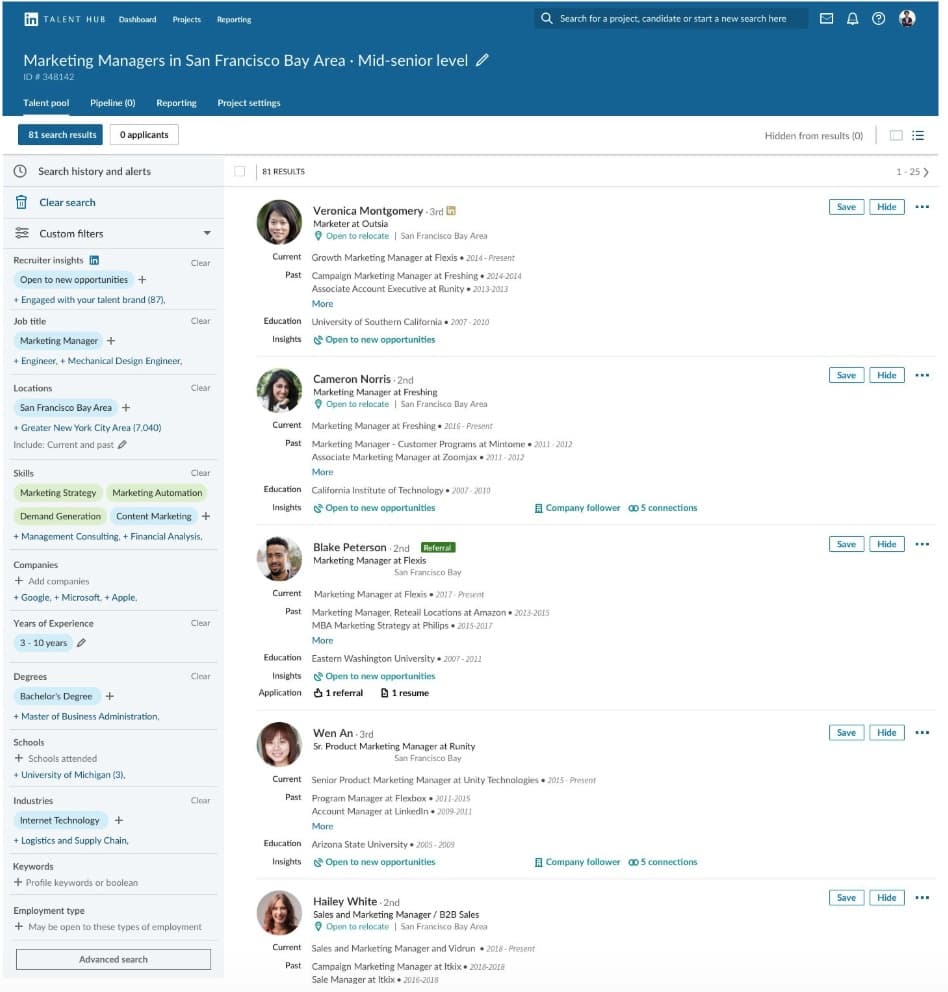
For more info, see our guide to LinkedIn account types.
2. Match each recruiter message template to candidate intent
One of the biggest mistakes recruiters make is using the same LinkedIn recruiter message template for everyone with the same job title.
Instead, templates should map to intent:
- Passive candidates → context-first, low-pressure.
- Active candidates → direct, fast, outcome-driven.
- Senior candidates → minimal, high-signal.
- Past candidates → what’s changed.
This is why the templates earlier are grouped by scenario.
3. Use templates to control outcomes
Every recruiter message should have one clear outcome during their outreach:
- Reply yes/no.
- Accept a connection.
- Review details.
- Schedule a call.
If a template includes multiple CTAs, it will underperform and stall conversations. As a rule of thumb, if you can’t describe the desired reply in one sentence, the template is too broad.
4. Don’t reuse the same CTA across all templates
This is subtle, but using the same close (“would it make sense to…”) in every message:
- Feels automated.
- Reduces credibility over time.
- Makes follow-ups harder.
Instead, vary the close based on:
- Seniority.
- Urgency.
- Intent.
- Relationship stage.
5. Automate structure and repetitive actions
While templates are helpful, systems are what scales your LinkedIn recruiter message outreach.
High-performing teams use automation to:
- Enforce consistent structure.
- Manage follow-ups.
- Avoid duplicate outreach.
- Stay within safe LinkedIn connection limits.
- Manage inboxes.
This is where tools like Expandi are useful. Recruiters use Expandi to:
- Run structured LinkedIn outreach sequences.
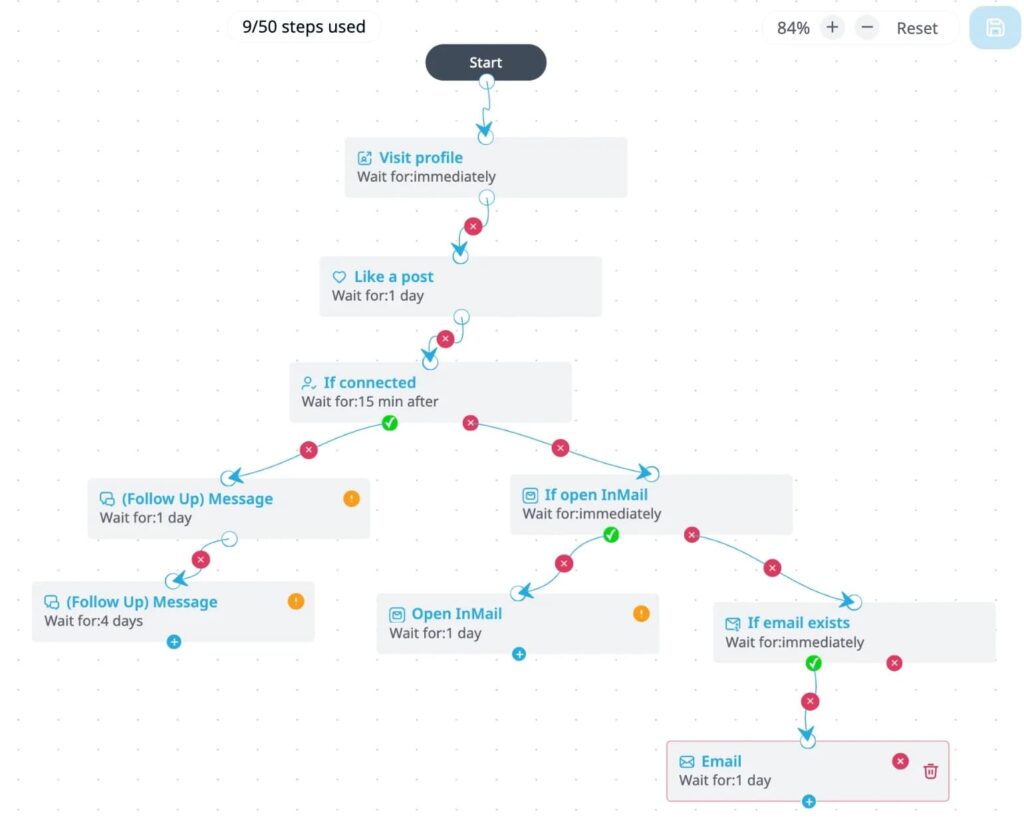
- Apply templates at the right step (connect → follow-up → re-engage).
- Automate reminders and follow-ups without mass blasting.
- Personalize messages at scale using signals.
Example flow recruiters can use within Expandi to reach candidates.
Using Expandi, Quoleady slashed hiring time by 4x. Learn how here.
FAQ: LinkedIn Recruiter Message Templates
LinkedIn recruiter message templates are reusable message drafts that help recruiters send consistent outreach faster. They’re meant to standardize structure while still allowing recruiters to personalize the “why you” for each candidate. Templates work best when adapted to your context, audience, and offer.
If you’re wondering how to create a template in LinkedIn Recruiter, start by drafting a message in the InMail or message composer and saving it as a reusable template. Recruiters typically reuse the structure and adjust the candidate-specific signal before sending.
Professional LinkedIn recruiter message templates are clear, relevant, and respectful of the candidate’s time. They explain why the recruiter is reaching out, what the role broadly involves, and what the next steps are.
You can reuse the same recruiter message template on LinkedIn as a starting point. But the signal and close should change for each candidate. Reusing templates without adapting context is one of the main reasons reply rates drop.
Most recruiters perform best with 10-15 LinkedIn recruiter message templates, each mapped to a different scenario like passive candidates, senior roles, follow-ups, or referrals. Fewer, well-used templates outperform large libraries that rarely get applied correctly.
LinkedIn Recruiter Message Templates: Final Thoughts
LinkedIn recruiter message templates aren’t magic. They don’t win replies on their own, and they definitely don’t replace human judgment.
What works in 2026 is combining:
- Clear context.
- Intent-based messaging.
- Disciplined follow-ups.
- And systems that help you stay consistent without sounding automated.
The recruiters who get results are focusing on sending better, more intentional messages, using templates as a guiding framework.
If you take one thing from this guide, let it be this:
A good recruiter message feels written for one person, even when it’s sent at scale.
Expandi is built for recruiters and hiring teams who rely on LinkedIn as a primary sourcing channel.
With Expandi, you can:
- Apply recruiter message templates inside structured outreach sequences.
- Scrape LinkedIn recruiter and Sales Navigator search filter results.
- Personalize messages based on real candidate signals.
- Manage follow-ups and inbox messages.
If you want to see how high-performing recruiters use templates, automation, and personalization together, start a free trial or book a demo to see how Expandi fits your workflow.
For more info, try Expandi for free or talk to an expert here.




You’ve made it all the way down here, take the final step