One prospect. One conversation. One motion.
Your prospects never lived on one channel, so your outreach never really did either. It lived in two tools that couldn’t see each other. Now LinkedIn and email run as one motion in Expandi: one campaign, one sequence, one timeline, one rule for when someone answers.
- Gmail
- Outlook
- Custom SMTP/IMAP



What outreach looks like when both channels work the same lead
Close the channel gap
You are the integration, manually
- Two tools work the same prospect.
- Someone keeps them in sync by hand.
- A reply on one channel is invisible to the other.
- Follow-ups go out after a yes.
- Nobody sees the whole conversation.
Reply anywhere, stop everywhere
- LinkedIn and email in one campaign and timeline.
- A reply on either channel pauses both.
- Every send checked right before it goes.
- One view of what works, by channel and mailbox.
- A paused prospect shows why it stopped.
We didn’t add a channel. We removed the seam.
-
01 Unified Inbox
Every message, every email, one conversation
LinkedIn messages, Sales Navigator InMails and emails sit on one chronological timeline per prospect. It’s there in your inbox, and in the Global Inbox if your team works across several LinkedIn accounts. Whoever opens Maria sees the whole conversation, not the half that lives in their tool.- Email shown properly: subject, who it went to, the message with its signature, and a thread counter when it gets long
- A colleague can pick up a conversation that started on LinkedIn and carried on by email
- Nobody lines up two tools to work out what was said.

-
02 Analytics
See which channel gets the replies
Email gets its own view in campaign, account and workspace analytics, right next to LinkedIn. Email replies count toward the campaign’s reply number, so you read one campaign, not two dashboards that never quite agree.- LinkedIn and Email side by side in the same view
- Filter by mailbox to see which sender gets the replies
- Replies by day, so you see the trend, not just the total
- One answer to "how is this campaign doing".
-
03 Campaigns
One sequence, both channels
Add cold email steps to the same campaign as your LinkedIn steps, and build one sequence across both. Connect, follow up by email, message again on LinkedIn: one set of rules, and one place to change it when you learn something.- Email steps live in the Campaign Builder you already use
- Every prospect is bound to one mailbox, so they hear from one person
- One place to change the sequence, both channels follow.


More coverage, same discipline
Every mailbox, its own range
Several mailboxes per LinkedIn account, each with its own status and limits.
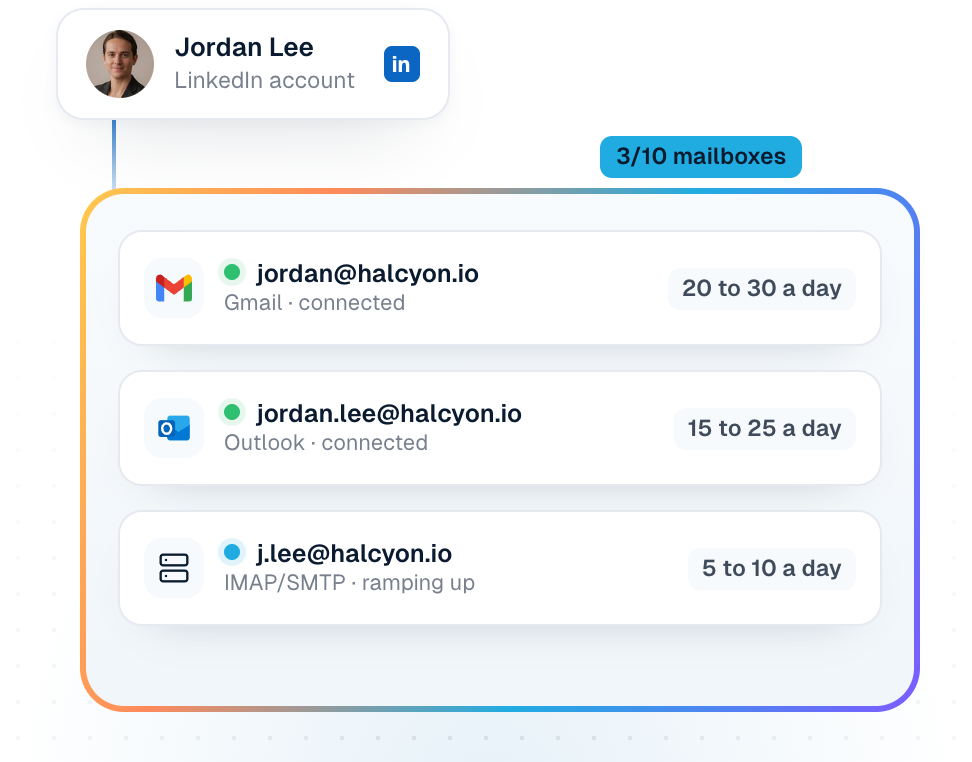
Each mailbox ramps up, then sends inside its range
A new mailbox starts slow and builds up on a schedule. After that it sends inside a daily range you set, not the same fixed number every day.

One sender per prospect
Each prospect is bound to one mailbox, so every email and follow-up comes from the same person, never a rotating pool. You can change which mailbox from the inbox.

Know why sending stopped
If a mailbox disconnects, its prospects pause with the reason on screen, and pick up again once you reconnect.

Frequently asked questions
Not yet. Email is in beta and we switch it on in batches, working through requests in order of priority. Requesting it doesn’t switch it on by itself: you join the queue, and we email you when your account is on. Already on Expandi? Request it with the address on your account. New to Expandi? Start a free trial, then request it with the same address so we can switch it on there.
You need a LinkedIn account. Mailboxes connect to a LinkedIn account in Expandi, and email steps run in the same campaigns as your LinkedIn steps.
Your own: Gmail, Outlook, or any other provider using your server details. You can connect up to five per LinkedIn account, and each one gets its own ramp-up and daily sending range.
A reply from the prospect on LinkedIn, or one that lands in any of your connected mailboxes. Either marks them as replied and pauses the rest of their campaign. Bounces are not replies. They’re flagged as bounces so you can fix the address.
Not yet. You read the whole conversation on the prospect’s timeline in the inbox, and you reply from your own mailbox. Your reply shows up in Expandi the next time the mailbox is checked.
Not yet. Email steps run in your own campaigns for now. Whoever opens the prospect in the inbox still sees the whole conversation, LinkedIn and email.
Your connected mailbox keeps working. What’s new: you can connect more mailboxes to the same LinkedIn account, each with its own ramp-up and daily range. A reply in any connected mailbox pauses the prospect, your emails show on their timeline in the inbox, and if a mailbox disconnects you see why.
Not yet. You connect your own, up to five per LinkedIn account. Mailboxes you don’t have to set up yourself are upcoming.
However you reached them.
One prospect, one conversation, one rule for when someone answers. Email is in beta, and we switch it on in batches, by request.
New to Expandi
Start a free trial, then request Email with the same address so we can switch it on there.
Already on Expandi
Request Email with the address on your account. We’ll switch it on in a coming batch and let you know.