LinkedIn Employee Advocacy That Books Meetings: Turn Your Team’s Posts Into Pipeline


Key Takeaways
- An employee advocacy program pays off when every post leads to conversations, not when it hits an impressions target.
- Make posting cheap for your team: ideas, drafts in each person’s voice and expert input by voice note. Scripe handles that side.
- Warm up prospects before and between posts by reacting and commenting where they already are.
- Pull the people who engage with each rep’s post, filter them by ICP, and follow up from the author of the post.
- Keep it running with a weekly rhythm: post, pull engagers, filter, reach out, review.
Your reps posted twelve times this month. The dashboard says 40,000 impressions. Your pipeline report says nothing changed.
That gap is where most LinkedIn employee advocacy programs quietly die. Getting colleagues to post is hard, so teams celebrate when it finally happens and stop there. But every like, comment and profile visit is a person raising their hand, yet nobody follows up.
This guide is the full play: how to get 5 to 20 employees posting consistently, then the exact steps to turn the attention those posts create into conversations from each rep’s own LinkedIn account.
Why most employee advocacy programs stall at impressions
Most employee advocacy programs stall because they measure reach and never act on it. Attention that nobody follows up on is lost within days, and leadership eventually asks what all that posting actually achieved.
The posting itself is not the problem. In our State of LinkedIn Outreach H2 2026 report, accounts with 1,000+ followers and posts that received consistent engagement had 30.5% of their connection requests accepted, against 27 to 29% across the platform. The sample was small (38 accounts), so treat it as anecdotal. But it highlights an important reality: people say yes more often to a name they have already seen in their feed.
So the fix is not to post more. It is to connect two jobs that usually live in different departments:
| Job | Who usually owns it | What it produces |
|---|---|---|
| Getting the team to post | Marketing | Familiar names, likes, comments, profile visits |
| Talking to the people who engaged | Sales | Conversations and meetings |
When marketing runs the first job and nobody runs the second, you get loads of impressions but no conversations or pipeline. When both run on the same weekly rhythm, every post feeds a list of warm people to talk to. The seven steps below cover the full worfklow.
Step 1. Build an employee advocacy program your team will actually join
People join an employee advocacy program when posting takes less effort than skipping it. Nobody refuses because they think LinkedIn is pointless. They refuse because a blank text box on a Tuesday afternoon loses to every other task on their list.
This is the part Scripe, a LinkedIn content system for B2B teams, is built for. In practice that looks like this:
- A knowledge base fed with your website, newsletters and docs, so drafts start from what your company actually knows.
- Ideas from outlier posts in your market, so nobody starts from scratch.
- A draft per person, in their own voice. One idea can become posts for several colleagues, each with their own angle.
- Expert input by voice note. Send a colleague a question on WhatsApp or by email, they answer by voice, and the answer lands on the idea board.
- Approvals the manager can trust, so nothing goes live that should not.
- Scheduling, plus colleague engagement in the first hour, and post analytics per post and profile.
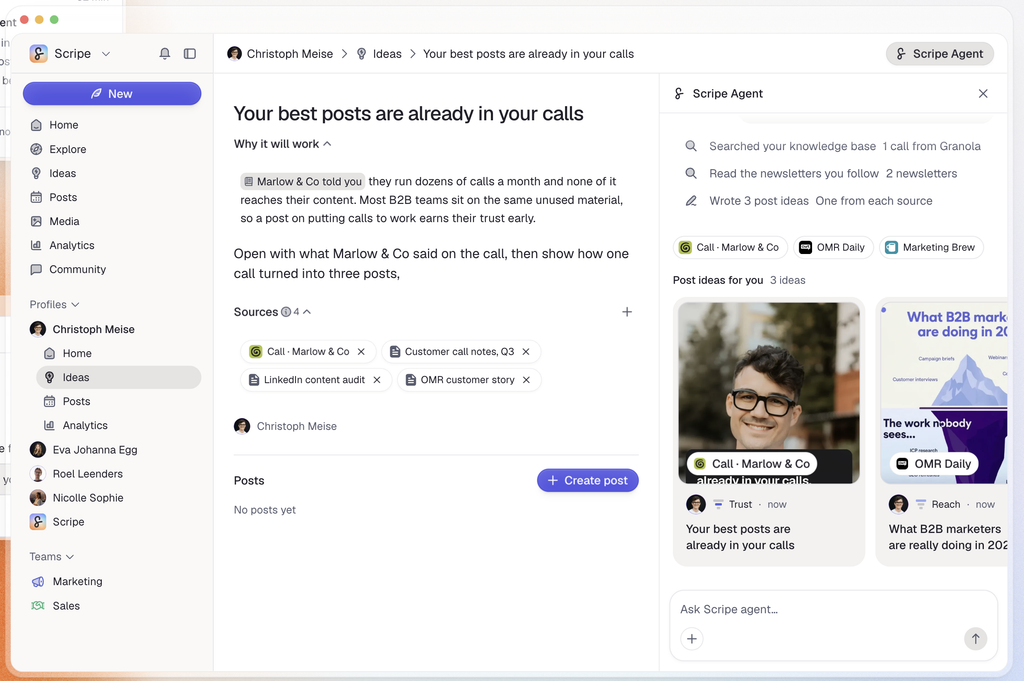
Scripe’s own customer stories show what that does to participation. hy, a consulting group, got 10 to 12 executives posting consistently with a marketing team of three. ColdIQ moved from 1:1 coaching to a shared system and now has 20+ GTM team members posting consistently.
Pick 3 to 4 content pillars tied to your ICP
Your content pillars decide who engages, so choose them by who you sell to. If your team posts about leadership lessons and you sell to RevOps leads, you will collect engagers who are nice people but terrible prospects.
A quick test for each pillar: would the person you want a meeting with stop scrolling for this? Three or four pillars that pass that test beat ten that don’t. For a sales team selling outbound software, that might be pipeline problems, hiring and ramping reps, and lessons from real deals.
Give colleagues a role, not a chore
Not everyone has to write. Most programs fail because they ask every person for the same thing, a weekly post, when people have very different amounts of time and appetite.
Split the work into roles instead:
- Authors post once or twice a week. Usually reps, a sales leader and a founder.
- Experts answer one question a week by voice note. Product, CS or engineering colleagues who know things buyers care about but will never write a post.
- Engagers react and comment in the first hour after a colleague’s post goes live. Five minutes, a few times a week.
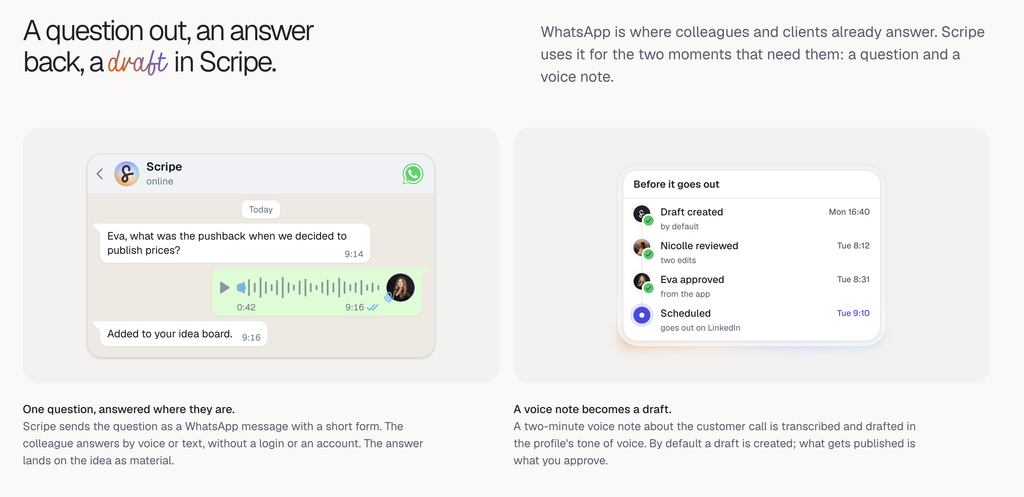
This matters for the rest of the play too. Authors are the people whose engagers you will follow up with, so the reps who carry quota should be authors.
Step 2. Warm up prospects before you post
Warm up prospects by showing up on their posts first, so your rep’s name is familiar when the rep’s own post lands in their feed. Someone who saw your rep’s thoughtful comment on Monday has a reason to stop on that rep’s post on Thursday.
Doing this by hand means scrolling the feed hunting for the right people and the right topics. Most reps give up after a week. That’s where a LinkedIn automation tool like Expandi comes into play:
- Track keywords your buyers post about, such as “outbound pipeline” or “SDR hiring” (coming soon as part of Expandi 3.0)
- Track profiles and company pages of the accounts on your lead list.
- React and comment inside Expandi, without opening another tab.
Keep the comments real. One line that adds something (a question, a number from your own experience, a mild disagreement) does more than “Great post!”, which everybody has learned to scroll past.
Step 3. Treat every engager as a signal
Every like, comment and profile visit on a rep’s post is a signal, but they don’t all mean the same thing. Rank them by how much effort the person spent, and match the follow-up to the signal.
| Signal | What it usually means | How to follow up |
|---|---|---|
| Comment | They had a thought and wanted the author to see it. The strongest signal. | Reply to the comment publicly first, then continue in a message that picks up their point. |
| Profile visit after a post | The post made them curious about who wrote it. | A light message that references the post and asks one question. Needs LinkedIn Premium or Sales Navigator to see. |
| Like or reaction | They agreed, or were scrolling politely. The weakest signal on its own. | Only reach out if they fit your ICP. Reference the topic, not the like. |
| Repeated engagement | They engaged with two or more posts from your team. | Prioritize them this week, whatever the signal type. |
One rule holds across all of them: never write “I saw you liked my post”. It reads like surveillance. Reference the topic instead, because the topic is what they actually cared about.
Expandi Signals collects post engagers, profile visitors and company page viewers and can add them to a campaign, syncing new matches about every 24 hours. Post engagement works on a free LinkedIn account. Profile and company page signals need LinkedIn Premium or Sales Navigator. For a deeper look at timing, see our guide to trigger-based outreach.
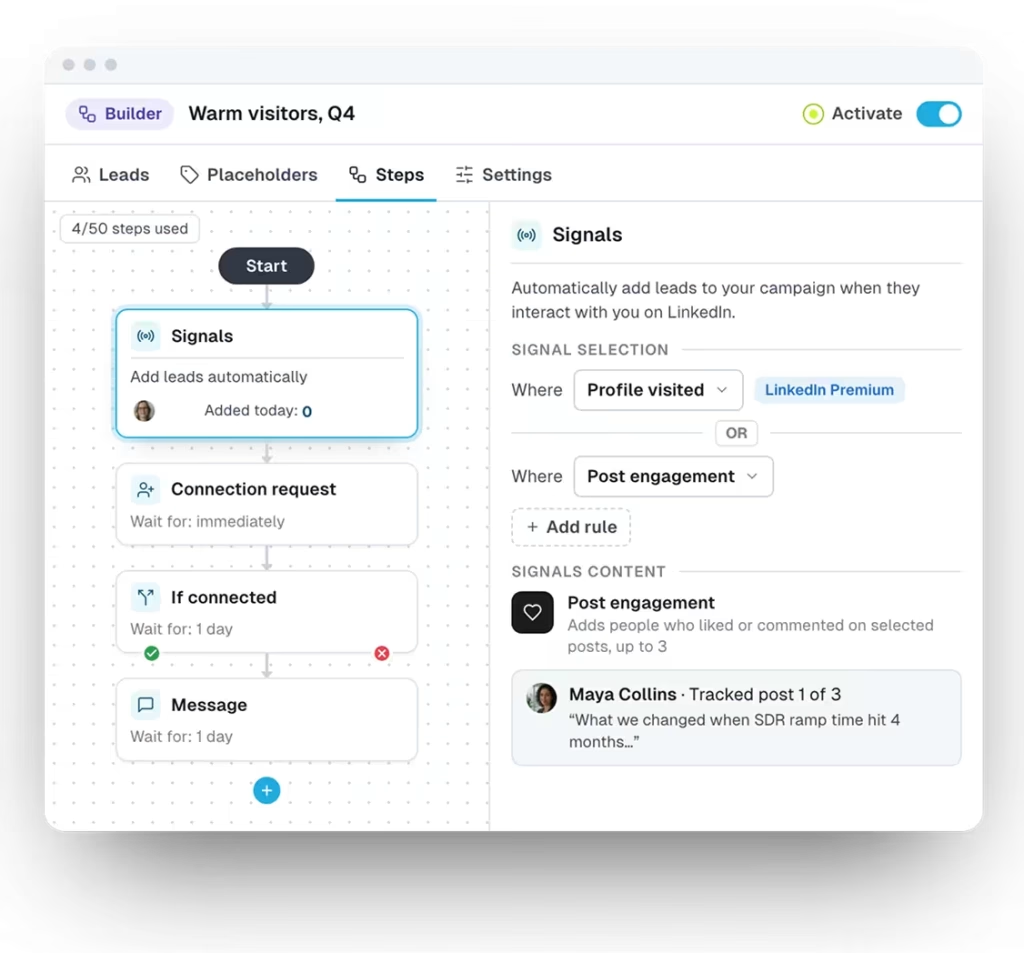
Step 4. Filter engagers by ICP before you reach out
Pull the people who engaged with each rep’s post, then keep only the ones who fit your ICP. A post with 200 reactions might hold 15 people worth a message. The other 185 are colleagues, peers, recruiters and people who like everything.
With Expandi Post Engagement, the steps are short:
- Copy the URL of the rep’s post.
- In Expandi, choose Post Engagement as the lead source and paste the URL. Expandi pulls everyone who reacted or commented.
- Filter by the fields that define your ICP: job title, seniority, company and industry. Drop your own colleagues and existing customers.
- Add the people who pass to a campaign that runs from the author’s LinkedIn account (Step 5).
Our guide to LinkedIn post engagement outreach walks through the setup screen by screen.
What this looked like when we ran it. We used the same mechanic on our own pipeline: we picked a high-engagement post on outreach and personalization, pulled everyone who reacted or commented, and ran a connector campaign with a note that mentioned the post. From 142 people, it booked 17+ demo calls. That was 2020 and LinkedIn has changed since, but the principle has not: the LinkedIn outreach strategy guide covers how we would set it up today.
Two filtering mistakes to avoid:
- Don’t filter so tightly that you only keep perfect-fit titles, because a manager who engaged is often a better entry point than a VP who didn’t.
- Don’t skip the filter because the list is small. 10 well-chosen messages beat 40 that half the recipients find odd.
Step 5. Follow up from the person whose post they engaged with
The follow-up should come from the author of the post, not from a shared SDR account or a company page. The prospect engaged with a person. A message from that same person continues a conversation. A message from someone else starts a cold one.
It also explains why the opener works. In the H2 2026 report, connection notes that referenced an existing tie (a follow, a shared group, a shared network) were accepted at 1.8 to 2.7 times the 30.2% baseline. Engaging with someone’s post is that kind of tie.
What to reference:
- the topic of the post
- the specific point they made in their comment
What to skip:
- the fact that they engaged
- a pitch in the first message
- a calendar link before they have replied
Keep it short. In the same report, single messages of 150 to 200 characters had the highest reliable reply rate, at 8.5%. That is about two sentences. Here are two examples, both under 200 characters:
After a comment
Hi {first_name}, your point about SDRs spending half the week on research stuck with me. Is that what you’re seeing on your own team right now?
After a reaction, from an ICP-fit prospect
Hi {first_name}, I’ve been writing about why outbound pipeline stalls in Q4. Curious whether that matches what you see at {company}?
If they don’t reply, follow up, but not forever. Campaigns with three messages had a 9.8% reply rate in our data, while five or more dropped to 5.0%, below a single message. Plan for three touches and put your most useful message in the second one.
Need some inspiration? Use our free LinkedIn connection message generator to explore options backed by what we know works!
Step 6. Run it as a team
Run the outreach side of your employee advocacy program in one shared workspace, with each rep on their own LinkedIn account. That keeps the follow-up personal while the manager still sees the whole picture.
In Expandi, Workspaces put multiple LinkedIn accounts in one shared environment. For this play, the setup looks like this:
- One campaign template, many authors. Build the post-engagement follow-up once, then run a copy on each author’s account so every engager hears from the person they engaged with.
- Ownership stays clear. When two reps post on the same topic, the same prospect can engage with both. Decide upfront that the first post they engaged with wins, so nobody double-touches.
- Replies land in one inbox. The Global Inbox brings conversations from every account into one place, so a reply never sits unread because its rep is out for the week.
- The manager sees what is happening. Which posts produced engagers, how many fit the ICP, how many replied. That turns a coaching conversation from “post more” into “your posts on hiring pull the right people, do more of those”.
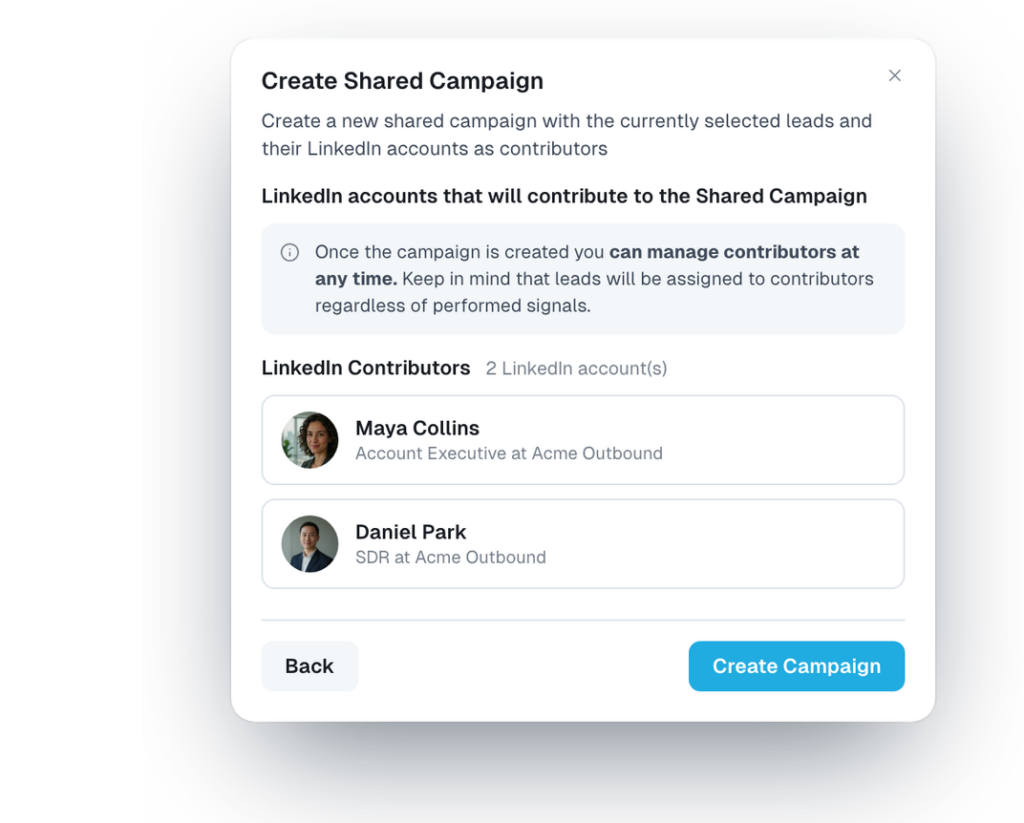
One caution: don’t pool every engager into a single campaign sent from one account. It breaks the whole logic of Step 5.
Step 7. A weekly rhythm that keeps it going
A weekly rhythm keeps the program alive after the launch energy fades: post, pull engagers, filter, reach out, review. Here is a version a sales team of 5 to 20 can keep without a dedicated program manager.
| When | What happens | Who | Where |
|---|---|---|---|
| Monday | Pick this week’s posts from the idea board, collect expert input by voice note | Marketing lead, experts | Scripe |
| Monday to Friday, 10 minutes a day | React and comment on tracked prospects and keywords | Each author | Expandi Content |
| Tuesday to Thursday | Posts go live, colleagues engage in the first hour | Authors, engagers | Scripe |
| 24 to 48 hours after each post | Pull engagers, filter by ICP, add to the author’s follow-up campaign | Each author, or RevOps for the team | Expandi |
| Daily | Answer replies, book meetings | Each author | Expandi inbox |
| Friday, 30 minutes | Review the week | Sales lead and marketing lead together | Both |
The Friday review is where most programs drift, so give it a fixed agenda:
- In Scripe analytics: which posts got the most impressions and profile views, and which authors are falling behind.
- In Expandi analytics: how many engagers each post produced, how many fit the ICP, and how many replied. Use the Expandi MCP to set up a scheduled weekly task in Claude or ChatGPT to pull the analytics for you, analyze performance & explore opportunities for improvement.
- The one question that matters: which topics produced conversations? Move next week’s ideas toward those.
Don’t be surprised if, after a month, your best conversation starters are posts with modest impressions. Knowing which ones they are is half the value of running both sides together.
Honest limits
This play works, but it has limits worth knowing before you promise leadership a number.
- A small post brings a small list. A rep with 600 followers might get 20 engagers on a good post and three ICP fits. That is still three warm conversations a week per author, but it adds up through consistency, not through any single post.
- Profile visitors need a paid LinkedIn plan. Post engagers work on a free account. Profile and company page visitors need LinkedIn Premium or Sales Navigator.
- Giveaway posts attract freebie collectors. “Comment ‘guide’ and I’ll send it” fills the list fast, with people who wanted the PDF, not a conversation. Filter harder on those posts, or skip them for this play.
- Respect LinkedIn’s limits. More authors means more accounts, not more volume per account. Each rep’s account should stay inside its daily limits and warm up gradually. Expandi runs every account with warmup and configurable limits, but no setting replaces sensible pacing. Learn more about LinkedIn connection limits here to keep your account safe and avoid your LinkedIn account being restricted.
Turn your employees LinkedIn posts into conversations
You don’t need the whole program running to start. Take the last post one of your reps published, pull the people who engaged, filter them by ICP and send three short messages from that rep’s account. You’ll know within a week whether the list holds real prospects.
Start your free Expandi trial to run the follow-up side, and pair it with Scripe to keep your team posting effortlessly. For more on connecting content and outreach, read how to turn your LinkedIn presence into a lead engine and how to build trust before the first message.
FAQS
You can start with three to five authors. What matters more than headcount is that the people posting are the ones who will follow up, usually reps and a sales leader. Experts and engagers can join later in lighter roles.
Rarely. Posts about the problems your buyers have, and what your team has learned solving them, attract the right engagers. Product posts mostly attract existing customers and competitors. Keep product posts the exception, and let the follow-up conversation carry the product.
Track the chain, not just the top: posts published, engagers per post, ICP-fit engagers, replies, meetings booked and pipeline created. Impressions tell you whether posts are being seen. Meetings tell you whether the program is worth the time.
Treat each account as its own account and the risk stays manageable, though no setup removes it entirely. Each one has its own limits and needs its own warmup, and adding authors should spread the work, not raise the volume per person. Expandi applies warmup and configurable daily limits per LinkedIn account.
Yes. Agencies already run LinkedIn content for client teams, and the same structure applies: each client’s authors post, and follow-up runs from each author’s own account inside a separate workspace per client. The brand reach and awareness guide covers a related play built around lead magnets.
No, for the core of it. Posting, engaging and following up with post engagers all work on a free account. Premium or Sales Navigator only adds profile and company page visitors as extra signals.



You’ve made it all the way down here, take the final step