
Every reply your outreach earns, in one inbox
7-day free trial

A warm reply is only
warm for so long
-
The reply lands with someone who’s out
A prospect answers Daniel on Thursday afternoon. Daniel is off until Monday, and nobody else on the team knows the reply is sitting there. -
Half the conversation lives in a mailbox
They got your LinkedIn message and wrote back by email. To read the whole exchange, someone opens two tools and lines the messages up by date. -
Monday review starts with “let me check”
Who’s waiting on an answer from us? When every rep works from their own inbox, finding out means asking each of them.

See every conversation,
and who it’s waiting on
One list for the whole workspace
Checking for replies shouldn’t mean logging into every rep’s account. Every campaign reply lands in one list, newest first, and you can see at a glance which ones are waiting on your team. Whether you run one account or twenty, nothing warm sits unseen.
- Nobody opens five accounts in a row to check for replies.


The whole conversation, in the order it happened
A prospect who got your LinkedIn message and answered by email shouldn’t turn into two half-conversations. Global Inbox keeps both in one thread, so whoever picks it up knows what was said and what comes next. Campaign emails sit in the same thread, properly labeled, so you can follow an email exchange on its own and jump from your email to their reply.
- Nobody lines up two tools to work out what was said.


Know what they did before you answer
“Not sending” is the most expensive question in outbound, because the answer is usually buried three screens deep. Ask instead. You get a cause you can act on, and after that your rates, with the leads behind every number.
- A “not until Q1” reply moves to your nurture campaign without leaving the inbox.


Let your AI read the inbox first
Connect the AI you already use and ask it about your replies. It reads each thread with the lead’s context and writes a draft for every one that needs an answer. The drafts wait in Expandi, and you approve what sends.
- Show me this week’s unread replies, warmest first, and draft an answer to each.
- I’m picking up Daniel’s conversation with Luis. Catch me up and draft the next message.


Campaign conversations, shared by role
-
Admins and members see every LinkedIn account in the workspace
-
Company managers see the accounts in the company they manage
-
LinkedIn account managers see the accounts they’re invited to, with edit or view‑only access


Everything that leads to the reply, and what comes after
Give each person the access they need
Roles decide who sees which LinkedIn accounts and who can reply, so a manager sees the whole team and a rep sees their own.

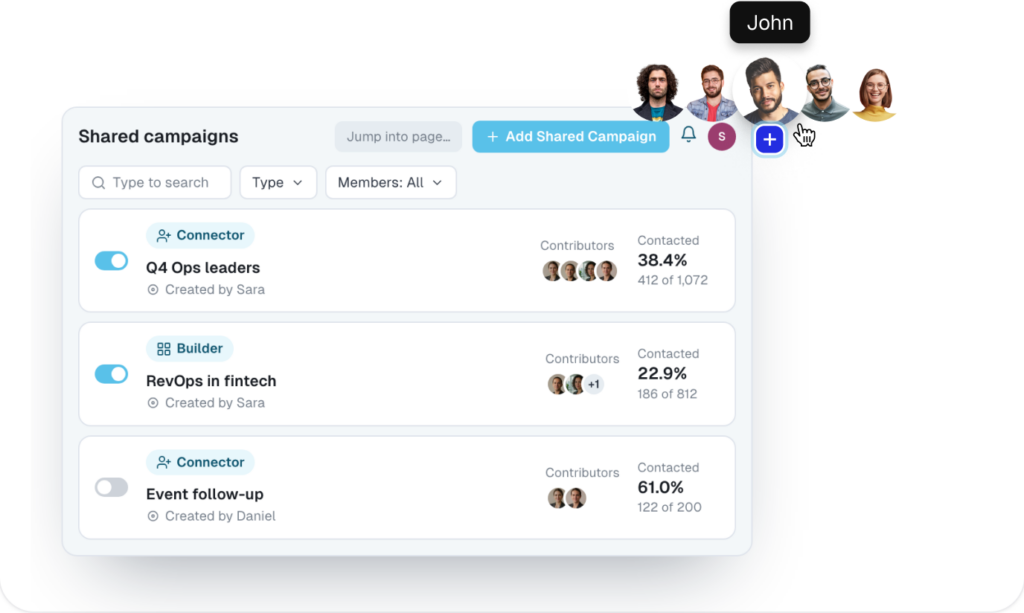
Run Shared Campaigns across your whole Workspace.
Build one campaign for the whole team and Expandi splits the leads between your reps, so each prospect hears from one of you.
Know who to reach out to, and why now
Profile visits, post engagement and company page visits land in Signals Center, so you reach out while the moment is warm.

Keep your CRM and your AI in step
Send your leads to HubSpot, Pipedrive or Salesforce so the whole team works from the same record, and connect the AI you already use through Expandi MCP.

Frequently asked questions
No. Global Inbox works the same whether you run one account or twenty. Every campaign reply lands in one list, newest first.
Conversations started by your campaigns, with the LinkedIn messages and campaign emails of each one in a single thread. Personal messages stay private.
Roles decide it. Admins and members see every LinkedIn account in the workspace. Company managers see the accounts in the company they manage. LinkedIn account managers see the accounts they’re invited to, with edit or view-only access.
Campaign emails sit in the same thread as the LinkedIn messages, properly labeled, so you can follow an email exchange on its own and jump from your email to their reply.
Answer to be added.
No. The AI writes a draft for each reply that needs an answer and saves it in Expandi. You review the drafts and approve what sends.
