How to Automate LinkedIn Responses Without Losing Context (Using Expandi + n8n)

Your campaign is finally landing replies. Then twelve of them stack up while you’re in meetings, the warmest one cools off, and by the time you answer at 10pm the thread has gone quiet.
The bottleneck is the inbox. And the fix is to automate LinkedIn responses with a human still in the loop:
- Expandi fires a webhook when a lead replies.
- n8n pulls the full conversation and drafts a contextual answer.
- You approve or edit it in Slack or email, and it sends back through LinkedIn.
We run outreach across thousands of campaigns at Expandi and we find that conversations rarely die because the messaging was wrong. They die in the gap between a lead answering and a human noticing. Closing that gap, without handing your voice to a robot, is what this system does.
Below:
- The three ways teams handle replies and why two of them lose deals.
- The five-step workflow that powers this automated LinkedIn responses playbook.
- The exact Expandi and n8n setup.
- How to remove yourself from the loop once you trust it.
- Common issues to expect and solve.
Why slow LinkedIn replies leak deals
A warm reply has a half-life measured in hours, and the longer it sits, the more the conversation reads like you forgot about them.
The classic speed-to-lead research is blunt on this: respond within five minutes and you’re 21x more likely to qualify a lead than if you wait 30, per the MIT/InsideSales study. It measured web-form leads, but the lesson carries straight to LinkedIn replies.
Follow-through is where reps fall apart, too: 48% of salespeople never make a single follow-up attempt, according to Saleslion’s roundup of sales research.
Automation is then what closes the gap, and the teams using it feel the difference. Per HubSpot’s 2024 sales automation data:
- 70% of sales professionals who use AI for outreach say it gets them a higher response rate.
- And SDRs estimate saving around two hours and fifteen minutes a day by automating manual tasks like note-taking and scheduling.
Reach for the wrong kind of automation, though, and you end up sounding worse than silence.
Three main ways to handle automated LinkedIn responses
Every team managing LinkedIn replies lands on one of three models.
| Approach | Speed | Quality | Scales? |
|---|---|---|---|
| Fully manual | Slow | High | No |
| “Dumb” automation | Fast | Low | Yes, badly |
| AI + human-in-the-loop | Fast | High | Yes |
Two of them force a trade you shouldn’t have to make.
Fully manual
You read every reply and write every answer yourself.
The quality is high and the voice is yours, but it doesn’t survive volume.
Past a handful of active conversations a day, replies slip, the warmest leads wait the longest, and your reply time stretches from minutes to days.
“Dumb” automation
You wire up canned auto-replies or a rules-only bot that fires the same templated message at anyone who responds.
This is fast but obvious. A lead asks a specific question and gets a boilerplate non-answer, which reads worse than a slow human reply because it proves nobody is listening.
AI plus a human in the loop
An AI reads the full thread, drafts a reply that fits the conversation, and routes it to you for a one-tap approval before anything sends.
You get the speed of automation and the judgment of a person on every message. This is the model the rest of this guide builds, because it’s the only one that handles reply volume without the quality dropping.
Why use Expandi and n8n to automate LinkedIn responses
Expandi is the only part of this stack that can see a LinkedIn reply when it lands.
LinkedIn’s API doesn’t expose inbound messages to third parties, and the native n8n LinkedIn node only publishes posts.
It can’t read an inbox or fire when someone responds. Expandi can, because every conversation runs inside its own cloud-based outreach layer on a dedicated country-based IP, so its webhook fires on the real reply event and hands n8n a clean payload with the message and the lead’s data.
That’s the piece a generic automation tool has no way to replicate.
n8n is the logic layer that turns that payload into a sent reply. It:
- Pulls the conversation context.
- Runs the AI.
- And routes the draft for your approval, all through no-code nodes you connect on a canvas.
Expandi sees the reply and sends the answer. n8n decides what the answer should be.
How the automated response system works: the 5-step workflow
The system chains five steps across Expandi, n8n, and an AI model so that a LinkedIn reply turns into an approved answer.
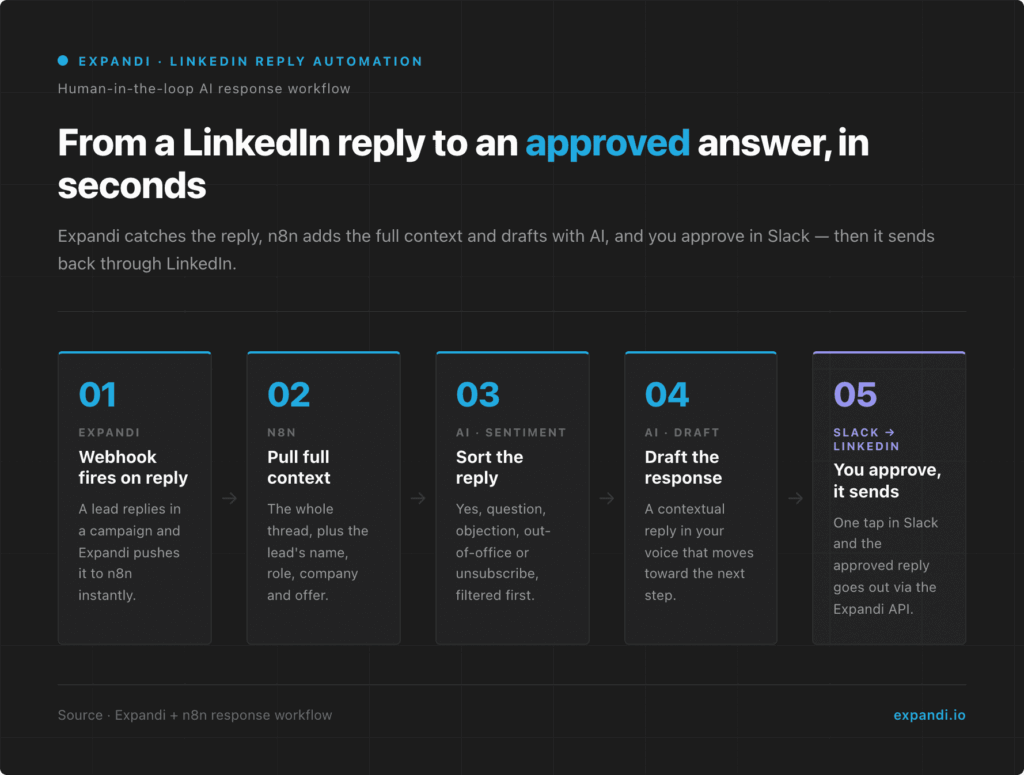
Here is what happens between a lead hitting send and your reply going out.
Step 1: Expandi fires a webhook when a lead replies
When a prospect responds inside an Expandi campaign, Expandi fires a webhook carrying the reply and the lead’s data to n8n.
The trigger lives inside Expandi’s outreach layer — no scraper polling an inbox, no Chrome extension to break. Expandi syncs LinkedIn conversations every few hours during your account’s active window, so n8n hears about a reply on the next sync.
Not instant, but faster than a human catching it, and nothing gets missed.
Step 2: n8n pulls the full conversation context
n8n takes the webhook payload and assembles the context the AI needs to answer well:
- The entire message thread.
- The lead’s name.
- Role, company, and which campaign and offer the conversation started from.
Feeding the whole thread, rather than only the last line, is the biggest driver of draft quality.
Step 3: Sentiment analysis sorts the reply
Before drafting anything, n8n runs the reply through a quick sentiment and intent check.
Is this a warm yes, a question, an objection, an out-of-office, or an unsubscribe?
Sorting first means you don’t waste an AI draft on an auto-responder, and genuinely hot leads can be flagged for priority.
It also stops the system from cheerfully replying to someone who asked to be left alone.
Step 4: AI drafts a contextual response
With the full thread, the lead’s details, and the sentiment label in the prompt, the model drafts a reply in your voice that answers what the lead said and moves toward the next step.
The draft is a starting point you still approve.
Step 5: You approve or edit before it sends
The draft lands in Slack or email with two buttons: approve, or edit.
- Approve, and n8n posts the reply to Expandi’s reversed webhook. Expandi adds the lead to a pre-built one-step messenger campaign, populates its message with your approved text (passed in as a placeholder), and sends it from your LinkedIn account on the same safe limits as the rest of your outreach.
- Edit and your change goes out instead. Nothing reaches a lead without a human glance, so the speed is automated and the judgment stays yours.
How to set up LinkedIn response automation in Expandi and n8n
To build the response automation end to end:
- In Expandi, open the campaign you want to monitor and add a webhook with the Contact replied trigger event so a new reply fires an event to n8n with the lead and message data.
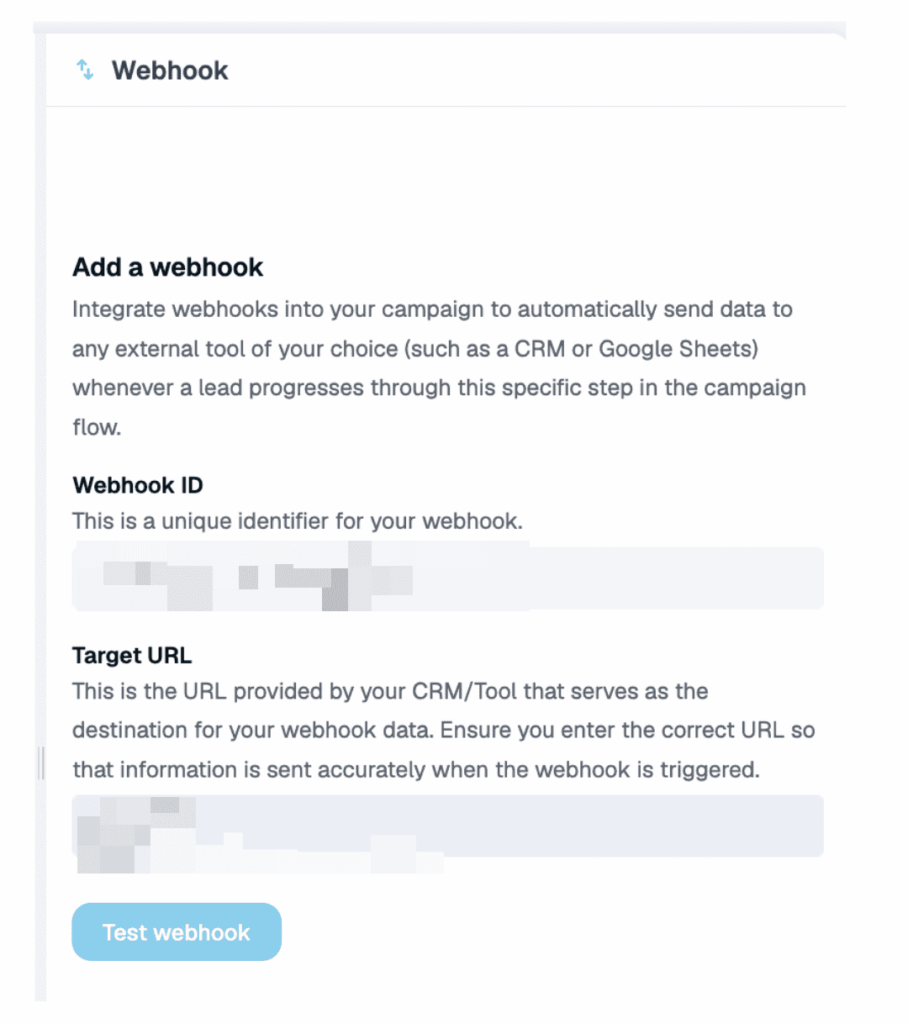
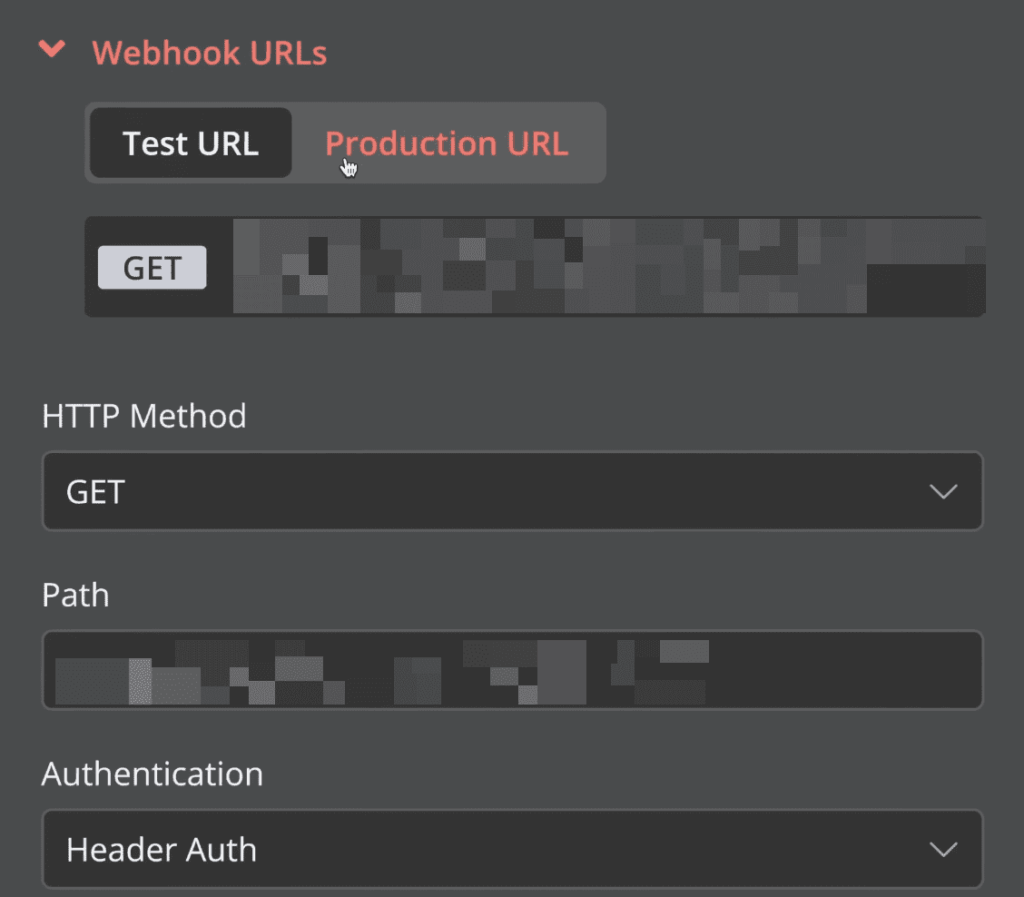
- In n8n, create a workflow that starts with a Webhook trigger node and paste in the URL Expandi sends to. Send a test reply to confirm the payload arrives.
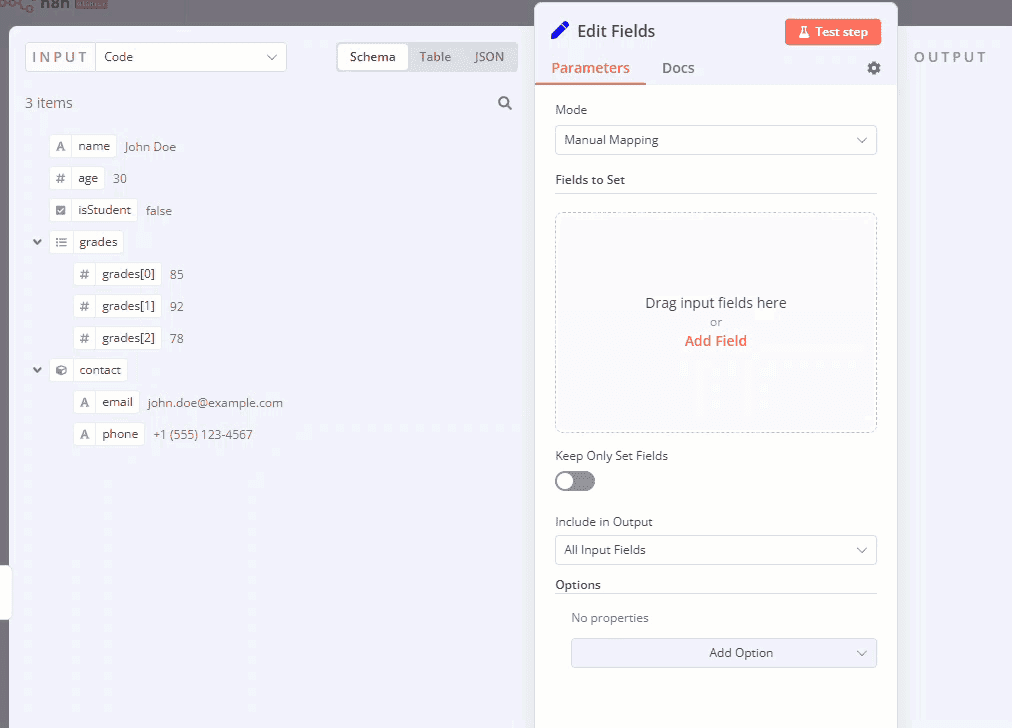
- Add a Set (Edit Fields) node (or a Code node) that shapes the context the AI needs: the full thread, the lead’s name, role, company, and the campaign or offer it came from.
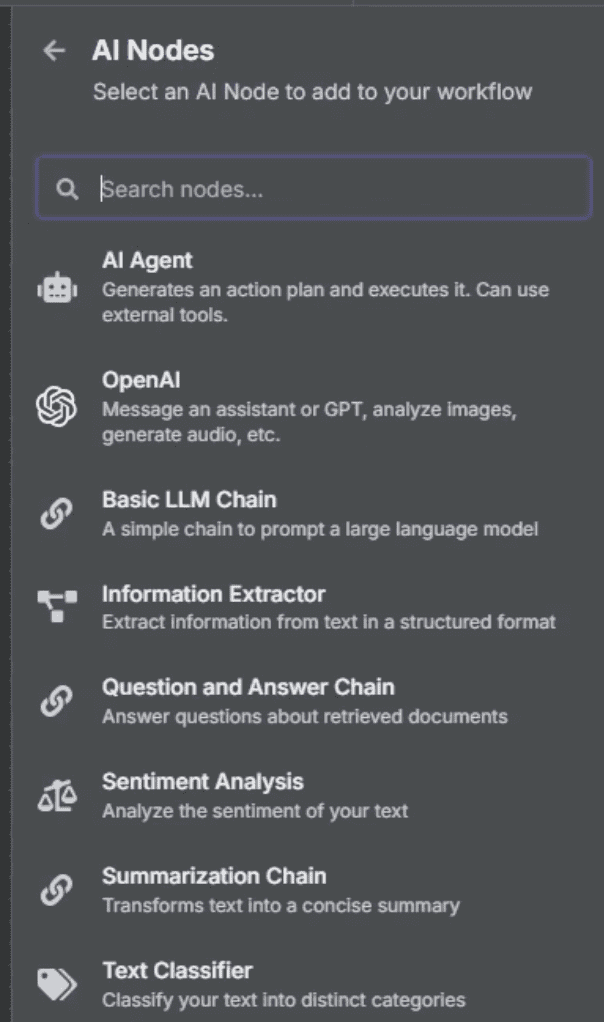
- Add an AI node (OpenAI or your model of choice) that classifies sentiment, then a second AI node that drafts the reply using the thread, the lead details, and the sentiment label.
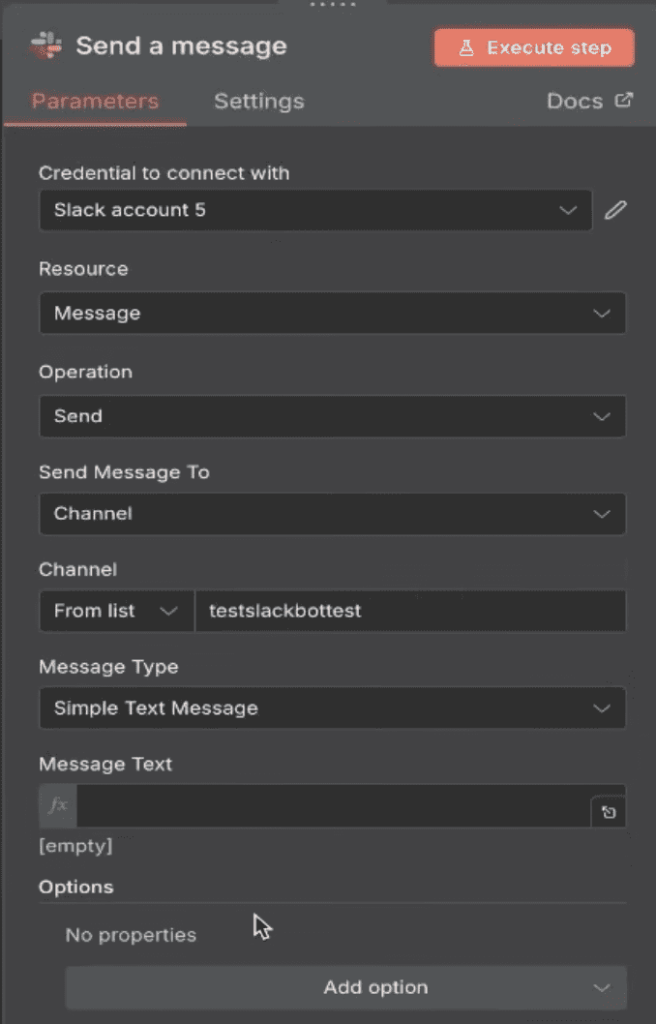
- Route the draft to a Slack or email approval step with approve and edit options.
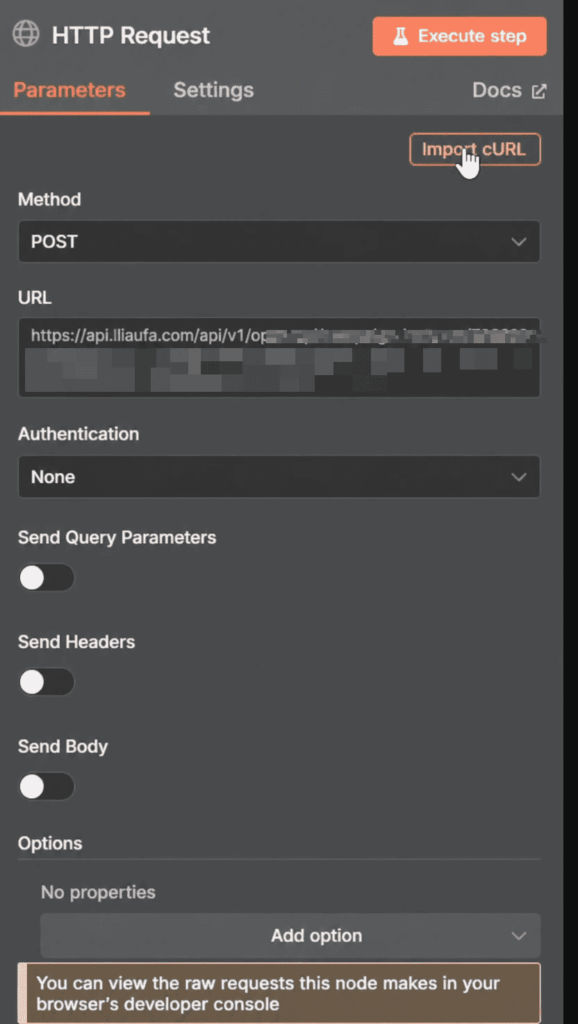
- On approval, hand the reply back to Expandi so it sends from your LinkedIn account on the same safe limits as the rest of your outreach. To do this, pre-build a one-step messenger campaign in Expandi whose message body is a single placeholder (e.g. {approved_reply}).
Then add an HTTP Request node in n8n that posts to that campaign’s reversed-webhook URL, passing the lead’s profile link and the approved text into the placeholder. Expandi adds the lead, fills in the message, and sends it. Test on a dummy lead before pointing your live workflow at it.”
The draft quality comes down to the AI node’s prompt. Give the model five things every time:
- The full conversation thread, so it answers the whole exchange rather than a fragment.
- The lead’s info: name, role, and company, pulled from the webhook payload.
- Your offer and who it’s for, so the reply stays on message.
- Your tone in a line or two, so it sounds like you and not a help desk.
- The next step you want, whether that’s a booked call or a qualifying question.
For a node-by-node walkthrough with the exact OpenAI prompt and Slack approval block, follow our companion guide on the step-by-step node configuration for the full Expandi and n8n build.
Advanced: removing the human from the automated LinkedIn response loop
Once you trust the drafts, you can let some replies send themselves and keep the approval gate only where it matters.
Automate the obvious replies, and route the rest to a person.
How to set up conditional auto-send
Use the sentiment label from Step 3 as the switch.
Branch the workflow: simple, low-risk replies (a clear out-of-office, a ‘thanks, not now’, a basic logistics question) can send automatically, while anything that looks like a warm lead, an objection, or an unusual message gets routed to you for approval.
The AI handles the boring volume while you handle the conversations that decide deals.
Start conservative
Begin with the human in the loop on every reply for the first week or two, and read what the AI drafts.
As you see which categories it nails consistently, move those to auto-send one at a time.
Widen the autonomy as the drafts earn it, and keep a human gate on anything that touches a real opportunity. A bad auto-sent reply to a hot lead costs more than the time it saves.
Four common issues with automating LinkedIn replies (and quick fixes)
Problems with a LinkedIn response automation fall into four buckets. Quick fixes for each:
The webhook isn’t firing
Replies come in but n8n stays silent.
Check that the Webhook action is active on the right campaign in Expandi and that the URL in your n8n trigger node matches exactly. Send a fresh test reply and watch the n8n execution log to confirm the payload lands.
Fix: re-copy the n8n webhook URL into Expandi, then re-test.
The AI drafts off-brand or robotic replies
The drafts read generic or miss the point of the message.
This is almost always a context problem rather than a model problem. Make sure you’re passing the full thread rather than the last line, and tighten the prompt with your tone, your offer, and a clear instruction on the next step.
Fix: add voice and offer detail to the prompt and feed the whole conversation.
Approval notifications never arrive
Drafts are generated but nothing reaches Slack or email. Check the credentials on your approval node and that it’s pointed at a channel or address you watch daily.
Fix: re-authenticate the Slack or email node and send a test draft through.
Rate limits or API errors on send
Approved replies fail to send. This usually means an API authentication issue or you’ve hit a sending limit.
Confirm the reversed-webhook URL (with its key and secret) is correct, and keep send volume inside LinkedIn’s safe ranges.
Fix: regenerate the key/secret in Expandi if auth fails, and let the campaign’s limits pace the sends.
Don’t want to build it? Expandi does this in-app
The Expandi-plus-n8n system is the most flexible way to automate LinkedIn responses, but it asks you to build and maintain a workflow.
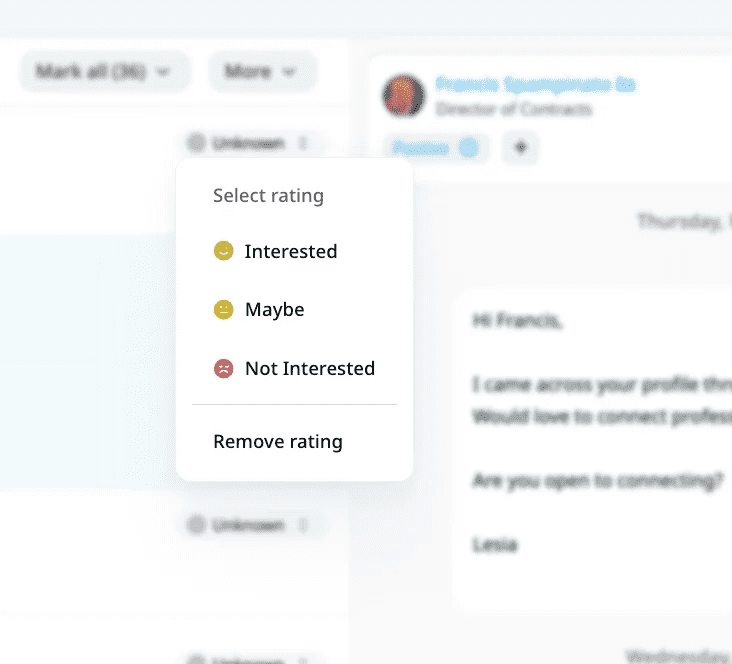
If you’d rather skip the wiring, the same outcome already lives inside Expandi. The Expandi AI Analyzer suggests an answer to each lead’s question or objection from within the conversation, and tags every incoming reply by intent: Interested, Maybe, Not Interested — so your warmest threads rise to the top of the queue.
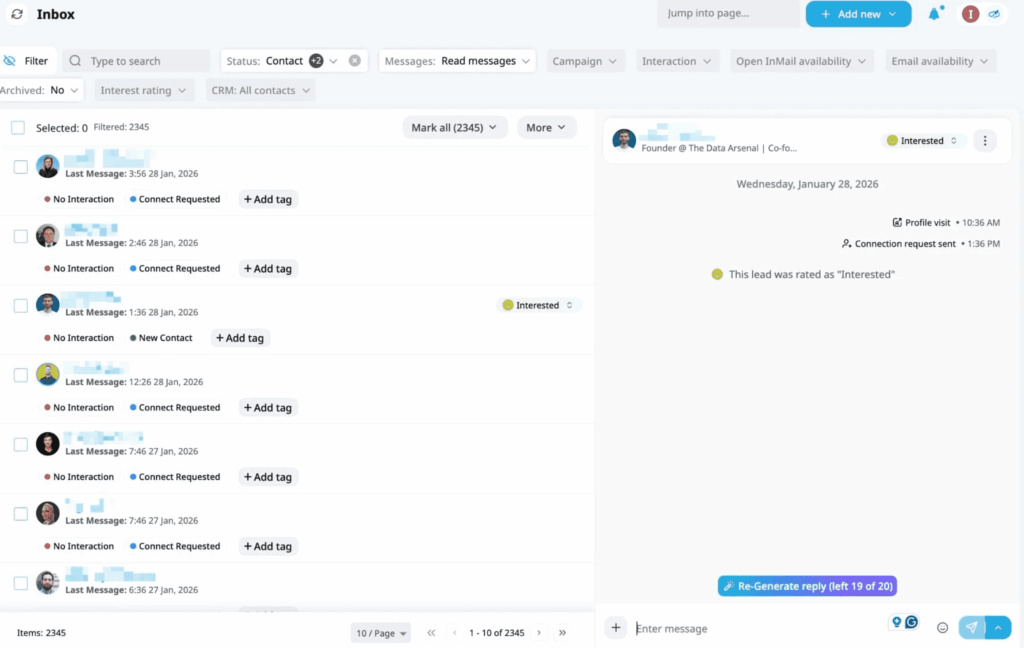
Handling several seats at once, the Global Inbox pulls every account’s conversations into one view, so nothing gets buried under a login you forgot to check.
The n8n build buys you full control over the logic while the native tools buy you speed to set up.
Close the reply gap with Expandi
Your outreach is already working. The deals leak out in the inbox, in the hours between a lead replying and you noticing.
Automating LinkedIn responses with a human in the loop closes that gap: Expandi catches the reply, n8n drafts the answer in context, and you approve it, so every conversation gets a fast, human response.
Try Expandi free for 7 days and connect your first webhook-driven response workflow.
Automating LinkedIn replies: frequently asked questions
It’s a setup where AI drafts your LinkedIn replies but a person approves each one before it sends. The automation reads the full conversation and writes a contextual response, then routes it to you in Slack or email for a one-tap approval or quick edit.
You get the speed of automation with a human check on every message, so nothing generic or off-base reaches a lead.
Yes. The Expandi and n8n workflow is built with no-code nodes you connect visually, with no scripts to write.
If you’d rather skip building entirely, Expandi’s AI Analyzer drafts replies and sorts them by sentiment inside the inbox with no workflow setup at all. Either path gets you automated responses without writing code.
It is, as long as you respect LinkedIn’s activity ceilings. Each Expandi seat runs on its own country-based IP, with randomized daily caps and human-like timing between actions, and because a person signs off on every draft, what goes out reads the way you’d write it yourself.
Keep send volume in the safe range and avoid blasting identical canned messages, and response automation stays well within safe-use territory.





You’ve made it all the way down here, take the final step