What the BrowserGate report changes about choosing a LinkedIn outreach tool

If your LinkedIn outreach runs through a Chrome extension, the safety of your account depends on LinkedIn not detecting what you have installed and not enforcing against it.
That is the central finding of the BrowserGate investigation, published in March 2026 by Fairlinked e.V., a European association of commercial LinkedIn users. The report documents what Fairlinked describes as a global browser-scanning operation run by Microsoft on the LinkedIn platform.
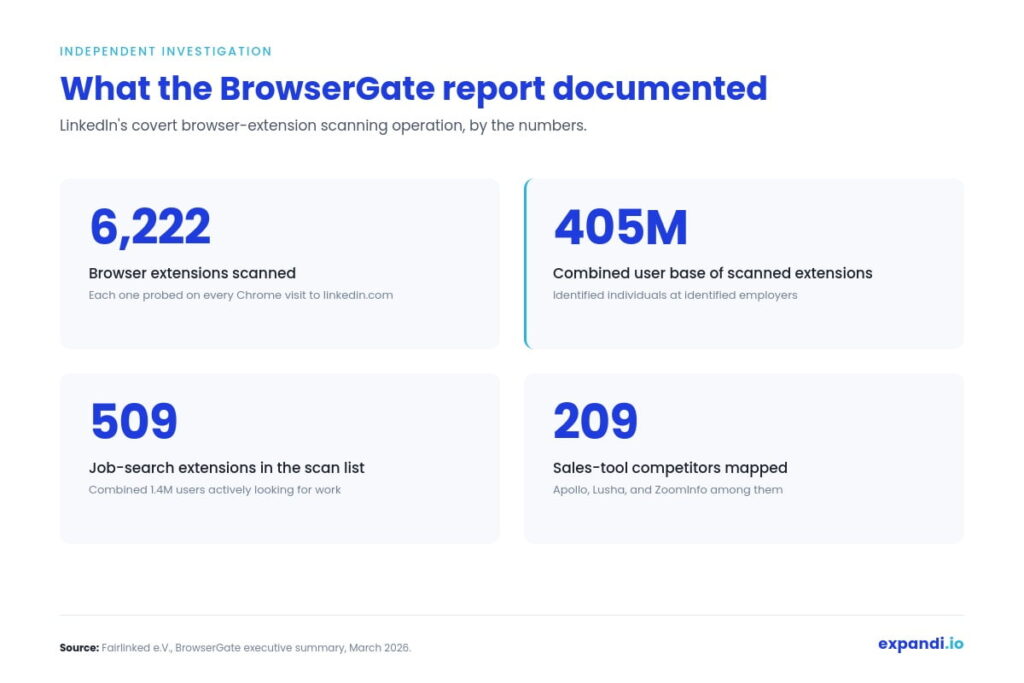
According to BrowserGate, the scan covers 6,222 specific software extensions and runs against a combined user base of roughly 405 million people.
The list breaks down into categories Fairlinked documents in detail: 762 LinkedIn-specific tools (extensions built for LinkedIn productivity, content creation, and networking), 209 sales and prospecting platforms that compete with LinkedIn’s own Sales Navigator (Apollo, Lusha, and ZoomInfo among them), and 509 job-search extensions, among others.
If your outreach stack relies on a Chrome extension that touches LinkedIn, whether for message automation, prospecting, or enrichment, your use of it is detectable by LinkedIn and tied to your identity on the platform.
What the BrowserGate report actually documented
The research describes a JavaScript payload that LinkedIn loads in the background when a user opens the site. The script bruteforces detection of installed extensions through a combination of fingerprinting techniques, then matches each hit back to the LinkedIn account viewing the page.
A few details from the executive summary worth pulling out.
The scanned extensions span far more than outreach tools. The list includes extensions tied to:
- Political affiliation
- Religious practice
- Disability and neurodivergence accommodations
- Job-search activity (BrowserGate notes 509 job-search extensions on the list)
The 209 sales-tool category alone targets the customer bases of competitors to LinkedIn’s own Sales Navigator product, a roughly $1 billion annual revenue line for LinkedIn.
LinkedIn has not disclosed any of this in its privacy policy. There is no mention of extension scanning in any public-facing document from Microsoft or LinkedIn.
Fairlinked frames the scanning in the context of LinkedIn’s September 2023 designation as a ‘gatekeeper’ under the EU’s Digital Markets Act, with a March 2024 compliance deadline. That regulation requires platforms in the gatekeeper category to allow business users access to data generated through their use of the platform.
Why this is a structural problem for browser-based outreach tools
A Chrome extension that automates LinkedIn actions lives inside your browser. When you open LinkedIn, the extension runs in the same page context as the platform itself.
That shared context is what allows the extension to click buttons, scrape profile data, and queue connection requests on your behalf. It is also what makes the extension visible to any detection script LinkedIn chooses to run.
The BrowserGate findings confirm that LinkedIn is running detection against thousands of these extensions today. What LinkedIn does with the data, on what timeline, and against which accounts are open questions.
Fairlinked further alleges that LinkedIn has already used the scan data to send enforcement emails to users of third-party tools, citing a sworn affidavit from LinkedIn’s Senior Engineering Manager filed in German court proceedings in February 2026.
LinkedIn disputes the characterization. The structural argument here doesn’t rest on that enforcement claim, only on the fact that the data is being collected and tied to identified individuals.
Two things follow:
- Anyone running outreach via a browser extension that’s on the BrowserGate list is doing so on a platform that can identify them by name and role, with their specific tool of choice attached to the record.
- The mitigation is structural rather than behavioural: the fix is to use tools that don’t sit in your browser in the first place.
Where cloud-based tools like Expandi sit in this picture
Expandi runs from the cloud. There is no Chrome extension to install. The platform connects to your LinkedIn account through a dedicated country-specific IP and executes outreach actions from its own infrastructure, not from inside your browser session.
That architectural difference is the relevant one here. When BrowserGate’s script runs in your browser, it scans the extensions you have installed locally.
A tool that doesn’t live in your browser doesn’t appear in that scan, because there is nothing in your local environment to detect.
Expandi’s cloud architecture predates the BrowserGate report by years. Cloud-based execution has been the default safety configuration from the start, alongside country proxy selection, account warm-up routines that ramp gradually rather than on day one, and configurable daily action limits.
The BrowserGate findings give that architecture a sharper rationale than it had a year ago.
A short comparison of the two approaches:
| Browser extension tools | Cloud-based tools | |
|---|---|---|
| Where the automation runs | Inside your Chrome browser | On a remote server with a dedicated IP |
| Visibility to LinkedIn’s scan | Listed on BrowserGate’s documented inventory | Not in scope — no local extension to detect |
| Tied to | Your browser profile, your identity | Your account session, your assigned proxy |
| What LinkedIn sees | Browser-side: an extension acting in the page | Server-side: a logged-in user behaving on the site |
What you should do about it
If your outreach today runs through a browser extension, three practical moves.
- Audit your installed extensions. Pull up your browser’s extension list and check it against the categories BrowserGate identified: outreach tools, scrapers, prospecting platforms, CRM connectors. The full 6,222-extension list is searchable on BrowserGate’s site.
- Isolate, if you have to keep an extension in your stack. Move LinkedIn-touching extensions out of your main browser profile and into a dedicated profile that you only use for that purpose. This reduces the surface area, though it does not change the detection picture once you log into LinkedIn from that profile.
- Evaluate whether the work needs to live in your browser at all. Connection requests, message sequences, profile views, follow-up logic, and signal-based triggers can all run from the cloud with the same outcomes and without the local footprint. The browser-based execution model was a workaround for an earlier era of LinkedIn automation. It is no longer the only option, and after BrowserGate it is no longer the safest one.
Why Expandi is the safest LinkedIn automation platform
Cloud-based execution is the layer of Expandi’s safety architecture that the BrowserGate findings put a spotlight on. It is one layer of several.
The full configuration was built on the assumption that LinkedIn would keep tightening detection and enforcement over time. That is more or less what has happened, and the architecture is now doing the work it was designed for.
Structural defaults (true on day one)
Expandi runs from its own infrastructure rather than from inside your browser. There is no extension to install, no add-on to your Chrome profile, no local agent for detection scripts to fingerprint, and no shared page context with LinkedIn itself. Every action runs server-side from a dedicated session: connection requests, messages, profile views, signal-based triggers.
Each Expandi account is assigned a country-specific IP address that stays consistent across sessions. Your LinkedIn account does not appear to log in from Amsterdam on Monday and Singapore on Tuesday.
From LinkedIn’s perspective, the login pattern is stable and geographically coherent, which is closer to how a real person uses the platform than a rotating-proxy setup would be.
The on-ramp (how a new account comes online)
New LinkedIn accounts, and especially accounts that have not run automation before, do not get to send 300 connection requests in week one.
Expandi’s recommended warm-up ramps activity gradually over the first weeks, with starting volumes well below LinkedIn’s hard limits and a build-up curve that mirrors how a human SDR onboarding to a new role would behave.
This is the part of the safety setup that prevents the “new account suddenly sending 100 connections a day” pattern that triggers restrictions.
Ongoing controls (what you tune over time)
Configurable daily action limits — Every action type has its own daily cap that you set per account: connection requests, messages, profile views, follow-ups, InMails.
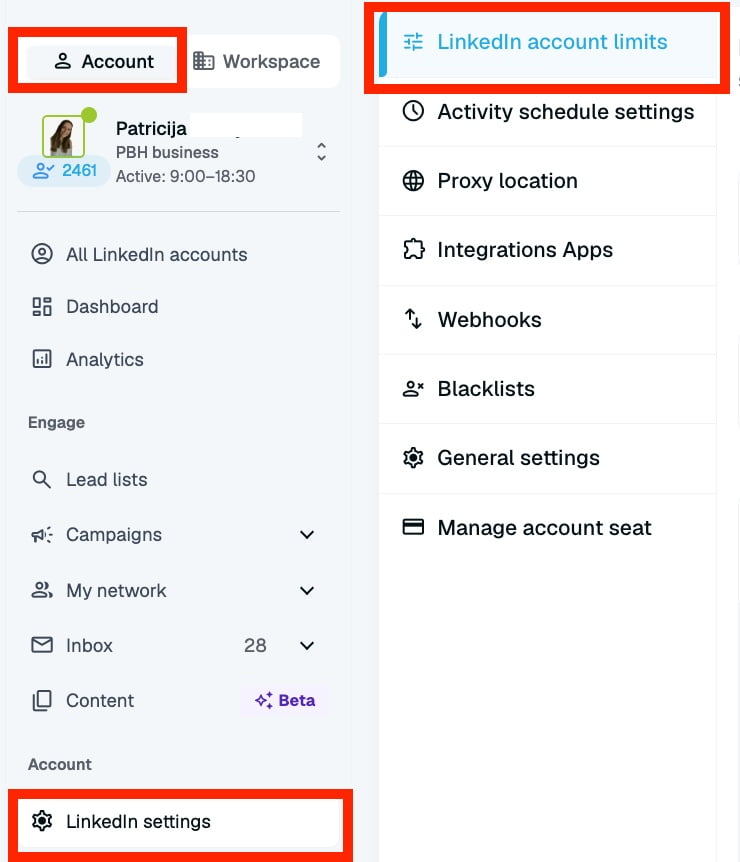
Defaults are conservative; maximums sit well within LinkedIn’s documented thresholds. Accounts running multiple senders or higher-volume campaigns get separate limit profiles so one campaign cannot starve or overload another.
Interaction settings — Delays between actions, randomisation of timing windows, working-hours constraints, and behaviour patterns that mimic human cadence are all configurable at the account and campaign level.
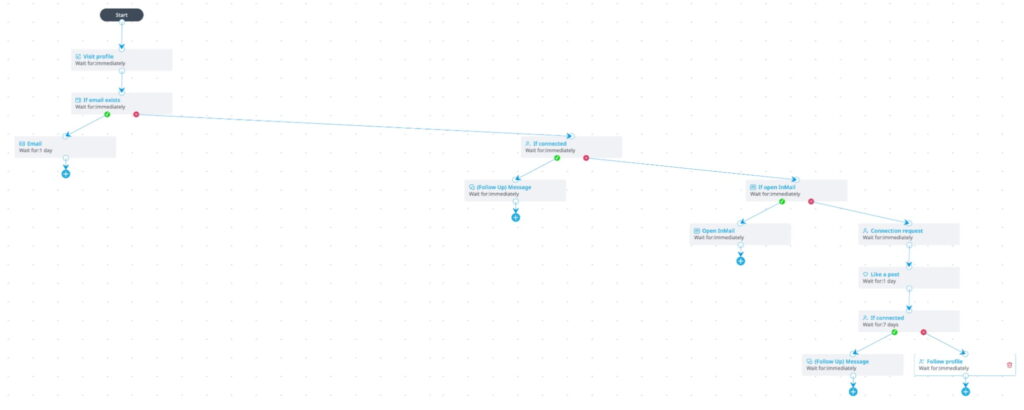
The aim is to match the behaviour of an attentive human user on the platform: realistic delays, working-hours constraints, randomised timing rather than fixed intervals.
Mobile Connector campaigns — LinkedIn enforces separate caps for connection requests sent through the web interface versus those sent through the mobile app.
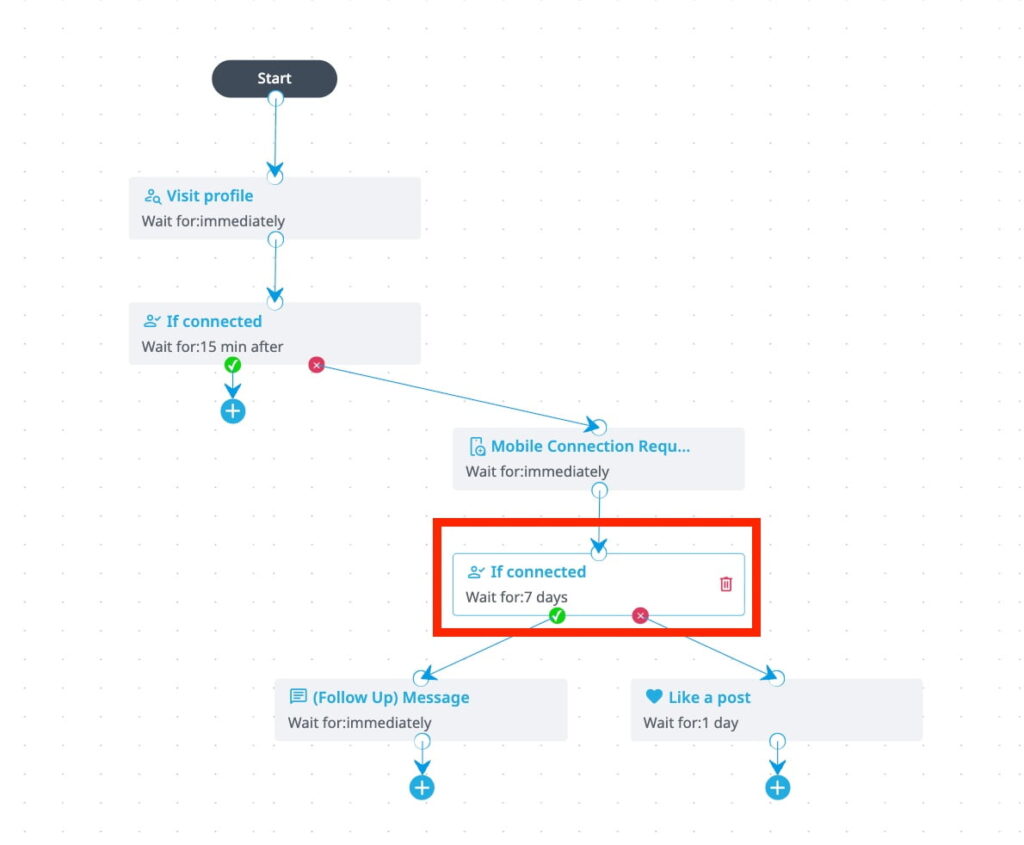
Mobile Connector lets Expandi accounts send mobile-pattern connection requests from inside the platform, which adds up to 100 additional connection requests per week per account. It works inside LinkedIn’s own tiered limit system, using the gap between mobile and web limits rather than circumventing either cap.
Social Selling Index visibility — SSI is LinkedIn’s own health score for an account. Expandi surfaces it in the main dashboard so you can see whether your account profile, network, and engagement are trending up or down over time.

If an SSI score starts dropping, that is an early signal that something in your usage pattern has shifted — worth catching before LinkedIn does.
None of these layers, in isolation, is a guarantee. But when you stack them together, they support the kind of long-term, high-volume account use that Expandi is built for. You get up to 300 connection requests per account per week, running for as long as the campaigns make business sense.
Build the right architecture for safe LinkedIn outreach
The case for cloud-based LinkedIn automation does not rest on any single research finding. It rests on a structural fact: a tool that lives in your browser shares an identity surface and a behaviour signature with the platform it is automating. BrowserGate’s March 2026 findings put numbers on what that visibility looks like in practice. The architecture problem stands on its own.
For teams running LinkedIn outreach as a serious channel, the right question is structural. Does the model you’re using give the platform less to detect, or more? Browser-based execution gives it more. Cloud-based execution gives it less.
If you want to see what cloud-based execution looks like at the campaign level, the Expandi product walkthrough covers the campaign builder, the safety configuration, and the signal-based outreach setup that runs end-to-end without ever touching your browser.
Frequently asked questions about LinkedIn outreach extensions
Fairlinked publishes a searchable version of the 6,222-extension list at browsergate.eu. You can search by extension name or by the Chrome Web Store ID (the long string at the end of the extension’s URL). If it appears on the list, LinkedIn has been able to detect it on visitors who have it installed. The list includes outreach automation tools, prospecting platforms, scrapers, CRM connectors, and many other categories.
No automation tool can guarantee that. LinkedIn’s enforcement decisions involve many factors, including activity volume, account age, profile completeness, network behaviour, and reports from other users. What cloud-based execution does is remove an entire category of detection surface from the equation: the local browser footprint. It also makes safety controls (warm-up curves, action limits, working-hours patterns, and interaction-randomisation settings) configurable from a single place rather than dependent on what each user has set up in their own browser. Lower detection surface plus consistent controls is the structurally safer setup, even if it is not a guarantee.
It helps with one detection vector (behaviour signatures) but leaves the others untouched. A careful Chrome extension still appears on extension fingerprint scans, still shares the same browser session and IP as your personal browsing, still depends on local updates to keep up with platform changes, and still occupies the same DOM context as LinkedIn’s own code. Lower volume reduces the rate at which detectable patterns emerge. It does not change what is detectable in the first place.
The BrowserGate report does not document specific enforcement actions tied to extension detection, and we have not seen public evidence of mass enforcement linked to the scan. What the report establishes is that the data is being collected and attached to identified individuals. What LinkedIn does with that data and on what timeline are open questions. The structural argument for moving off browser-based tools does not depend on enforcement having happened yet. It depends on it being a one-decision-away risk that cannot be mitigated from inside the browser.
They are a different category, not necessarily a safer one. A mobile-based tool runs from your phone or from an emulated mobile session, which means it does not appear in browser extension scans. But it still operates inside the LinkedIn app’s session, which carries its own fingerprinting surface and behaviour-detection signals. The actual safety profile depends on where the tool runs. A tool that requires installation on your physical phone shares many of the same problems as a Chrome extension, just on a different device. An emulated mobile session running on your local machine has many of the same coupling issues. Server-side mobile-pattern execution sits in a different category entirely: nothing runs locally, and the session pattern is consistent across actions. The Mobile Connector campaigns inside Expandi work this way.


You’ve made it all the way down here, take the final step