15 Best LinkedIn CRM Tools for 2026

Key Takeaways
Choosing the right LinkedIn CRM depends on your sales motion. Enterprise teams often benefit from Salesforce or Dynamics with Sales Navigator integration, while HubSpot, Pipedrive, Salesflare and Zoho offer flexible solutions for SMBs. For relationship-heavy or social-selling workflows, tools like folk, Nimble, or Breakcold are ideal. The best LinkedIn marketing setup typically pairs a dedicated LinkedIn automation tool like Expandi with a CRM to maintain clean pipeline data.
Outgrowing your spreadsheets? When your LinkedIn outreach starts scaling, ‘remembering to follow up’ isn’t a strategy…it’s costing you deals.
To help you stop losing deals to manual tracking, I’ve stress-tested 15 top LinkedIn-compatible CRMs. Whether you need enterprise-grade power or a nimble tool for social selling, here is exactly how they stack up in 2026.
Here’s what you’ll understand by the end of this guide:
- All 15 LinkedIn CRM tools compared: main features, use cases, who each one is for, and pricing.
- Which CRMs have free plans and which are trial-only.
- What to look for in a LinkedIn CRM before you commit.
- How sales teams pair their CRM with LinkedIn outreach at scale.
The best LinkedIn CRM tools and integrations for 2026
Not every LinkedIn CRM does the same job. So, the tools below cover different use cases.
Each one is included because it solves a real LinkedIn workflow problem: whether that’s managing conversations, syncing LinkedIn data into a CRM, improving follow-up speed, or keeping outbound activity structured as you scale.
Here’s a quick overview before we begin. The tools below differ on three axes: depth of LinkedIn CRM integration, native Sales Navigator embeds, and sales workflow focus.
| Tool | Category | Best for | Starting price | Free plan? | Key strength |
|---|---|---|---|---|---|
| HubSpot CRM | All-around LinkedIn CRM | Teams using HubSpot tools who want LinkedIn tied to pipeline | From $20/mo | Yes (2 users) | Native Sales Navigator integration + unified contact timeline |
| Salesforce Sales Cloud | Enterprise CRM | Complex pipelines, territories, forecasting, RevOps control | From $25/mo | Yes (Free Suite) | Deep customization + enterprise-grade reporting |
| Microsoft Dynamics 365 Sales | Enterprise / Microsoft-native | Outlook + Teams-first organizations using Sales Navigator | From $65/mo | No | Microsoft ecosystem integration + Relationship Sales bundle |
| Pipedrive | SMB pipeline CRM | Founder-led or small SDR teams needing follow-up discipline | From $19/mo | No | Visual pipeline + activity-first workflow |
| Salesflare | Automated B2B CRM | SMB B2B teams prospecting on LinkedIn who don’t want manual CRM entry | From $29/mo | No | Auto-captured email, meetings and relationship history + LinkedIn sidebar |
| folk | LinkedIn-first CRM | Relationship-heavy sales, partnerships, warm outbound | From $30/mo | No | Notes, tags, and long-term relationship context |
| Zoho CRM | Budget-friendly CRM | SMBs needing flexibility without enterprise pricing | From $20/mo | Yes (3 users) | High customization at lower cost |
| Close | High-velocity outbound CRM | Reps moving from LinkedIn to calls + email fast | From $19/mo | No | Built-in calling + execution-focused UI |
| Freshsales | Modern automation CRM | Growing teams wanting automation + lead scoring | From $11/mo | No | Built-in AI scoring + multichannel workflows |
| Attio | Modern flexible CRM | Custom data models + AI-powered workflows | From $44/mo | Yes (3 seats) | Flexible structure + AI search (Ask Attio) |
| Nimble | Social selling CRM | Solopreneurs + small teams capturing LinkedIn contacts | From ~$29/mo | No | One-click LinkedIn contact capture (Nimble Prospector) |
| LeadDelta | LinkedIn network manager | Founders organizing large LinkedIn networks | From $25/mo | No | Tagging + segmentation of existing connections |
| Breakcold | Social-selling CRM | SDRs engaging prospects via LinkedIn activity | From $59/mo | No | Unified social feed inside CRM |
| NetHunt CRM | Gmail-native CRM | Teams living in Gmail closing LinkedIn-sourced deals | From $30/mo | No | CRM fully embedded inside Gmail |
| LinkedIn Sales Navigator (CRM Apps) | LinkedIn-native integration layer | Enterprise teams embedding LinkedIn inside CRM records | Around $80-$180/mo | No | Advanced lead filters + CRM-embedded LinkedIn data |
Now, let’s take a look at each CRM in detail.
1. HubSpot CRM – best all-around, all-in-one LinkedIn CRM (especially with Sales Navigator)
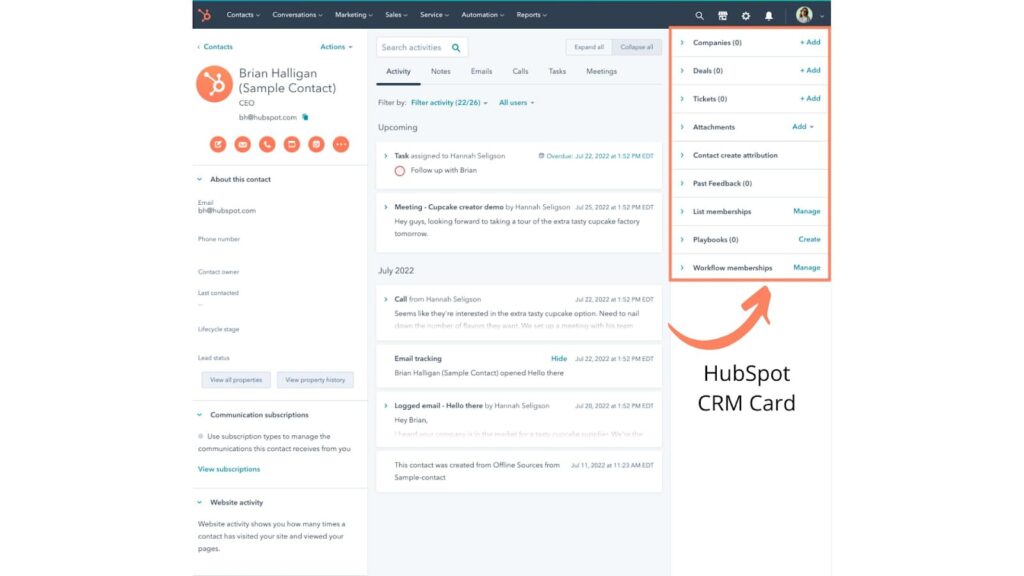
HubSpot CRM is a default shortlist entry for teams using LinkedIn seriously, mainly because of its native LinkedIn Sales Navigator integration and CRM-first design.
HubSpot lets you pull LinkedIn context directly into contact, company, and deal records, so LinkedIn stops being a separate prospecting tool.
Connect it to Sales Navigator and it becomes a strong LinkedIn CRM setup for teams that want LinkedIn activity tied to pipeline and revenue.
Key features
- Native LinkedIn Sales Navigator integration – View LinkedIn profiles, mutual connections, job changes, and activity inside HubSpot records.
- Unified contact & company timelines – Emails, calls, notes, tasks, and LinkedIn interactions live in one activity feed.
- Pipeline & deal tracking – Move LinkedIn leads from first touch to closed-won without CSV exports or manual syncing.
- CRM-native automation & workflows – Trigger tasks, follow-ups, and deal stage updates based on engagement.
- Chrome extension – Log LinkedIn activity, emails, and notes to HubSpot while prospecting.
What I like about it
HubSpot is a solid all-around option if you want a bit of everything and don’t want to overcomplicate your stack.
It works especially well if you’re already using HubSpot tools for marketing, CRM, or support, since LinkedIn data plugs into a system your team already works in.
For the setup itself, our walkthrough of the LinkedIn integration for HubSpot CRM covers the steps.
Who it’s for
- B2B sales teams already using HubSpot.
- SDRs and AEs working daily in LinkedIn Sales Navigator.
- Companies that want LinkedIn activity tied directly to pipeline and forecasting.
Pricing
- Free CRM – free for up to 2 users.
- Starter – $20/mo per seat ($7/mo billed annually).
- Professional – $100/mo per seat ($90/mo billed annually).
- Enterprise – from $150/mo per seat.
Verified user review
“I enjoy using Hubspot Sales Hub as opposed to other CRM tools because HubSpot is easily organized and very user-friendly. As someone who has used 3 different CRM tools in the past 3 years, Hubspot stands out as having the simplest layout to navigate and easiest learning curve. Companies, contacts, opportunities, and quotes are linked to one another so you can toggle back and forth simply to find the information you need.” – verified Sales Executive.
2. Salesforce Sales Cloud – best for enterprise pipelines + deep LinkedIn workflows
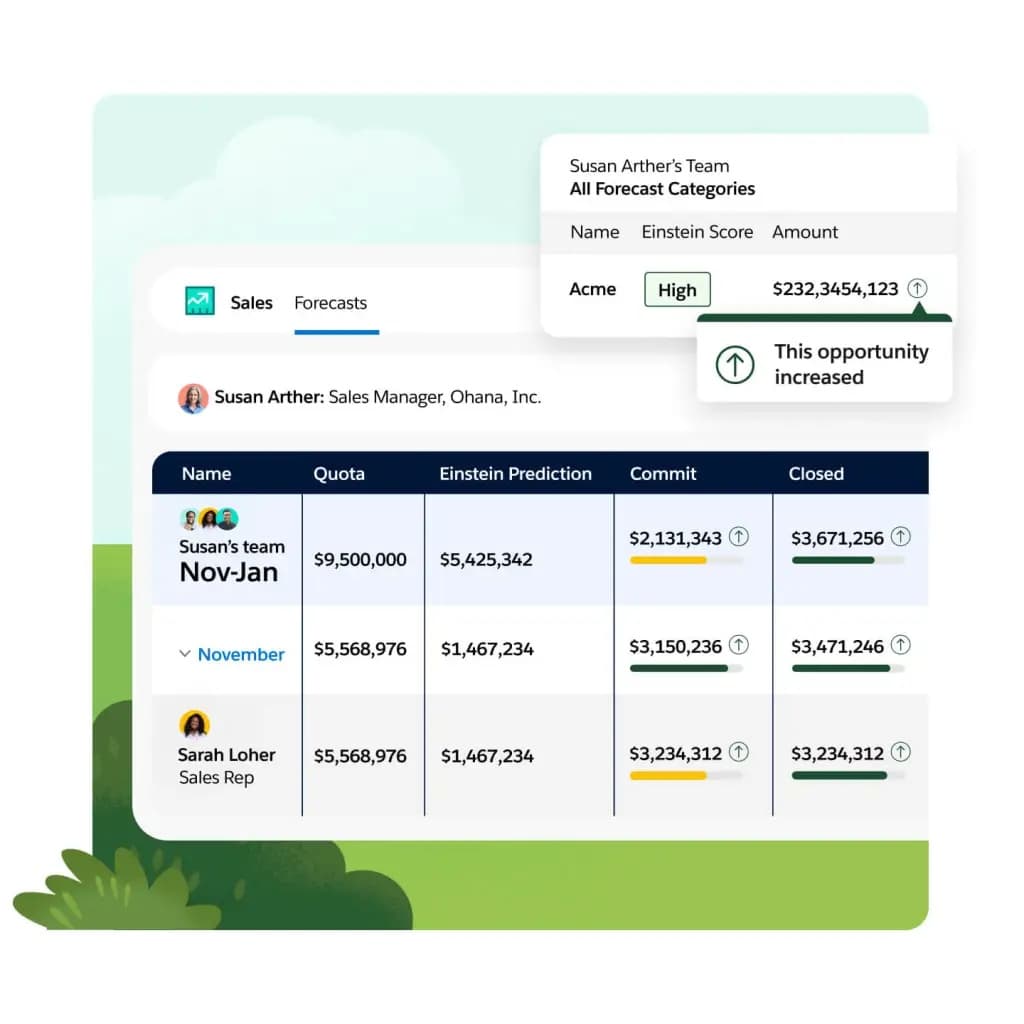
Salesforce Sales Cloud is what you pick when LinkedIn is a serious channel, and you need a CRM that can support complex pipelines, forecasting, permissions, multiple teams, and heavy reporting.
Mature outbound organizations want LinkedIn activity inside the system of record, visible next to the deal.
They want reps to see who’s connected, who changed jobs, and what account is being warmed up, while they’re inside the opportunity. Salesforce is the CRM enterprise sales teams go to for that kind of end-to-end control.
Key features
- Pipeline + forecasting at scale – Multiple pipelines, roles, reporting, governance.
- Automation + process control – Think: “if lead becomes SQL → assign sequence → update stage → create tasks”.
- Scales across teams – Sales, RevOps, CS, without turning into spreadsheet chaos.
- Works well with Sales Navigator CRM workflows – LinkedIn context sits closer to deal execution.
What I like about it
Once you have multiple reps, segments, territories, and a real forecasting cadence, a “light CRM + LinkedIn plugin” setup collapses.
Salesforce holds up well as sales processes become more complex, allowing LinkedIn activity to feed a structured B2B sales pipeline that stays inside the system.
Who it’s for
- Enterprise teams running multi-stakeholder deals.
- Teams with RevOps support (or at least someone owning process + data hygiene).
- Teams using LinkedIn as a core channel, but needing it tied to pipeline.
Pricing
- Free Suite: Limited features.
- Starter Suite: $25 user/month.
- Pro Suite: $100 user/month.
- Enterprise: $175 USD/user/month (billed annually).
- Unlimited: $350 USD/user/month (billed annually).
Verified user review
“What I like best about Salesforce Sales Cloud is how it helps me manage the entire sales lifecycle efficiently from a single platform. On a daily basis, I use it to capture and manage leads, qualify prospects, create and track opportunities, update deal stages, and schedule follow-ups. This keeps my pipeline well organized and ensures that no leads or opportunities are missed.” – verified Growth Specialist.
3. Microsoft Dynamics 365 Sales – best for Microsoft-native teams using Sales Navigator
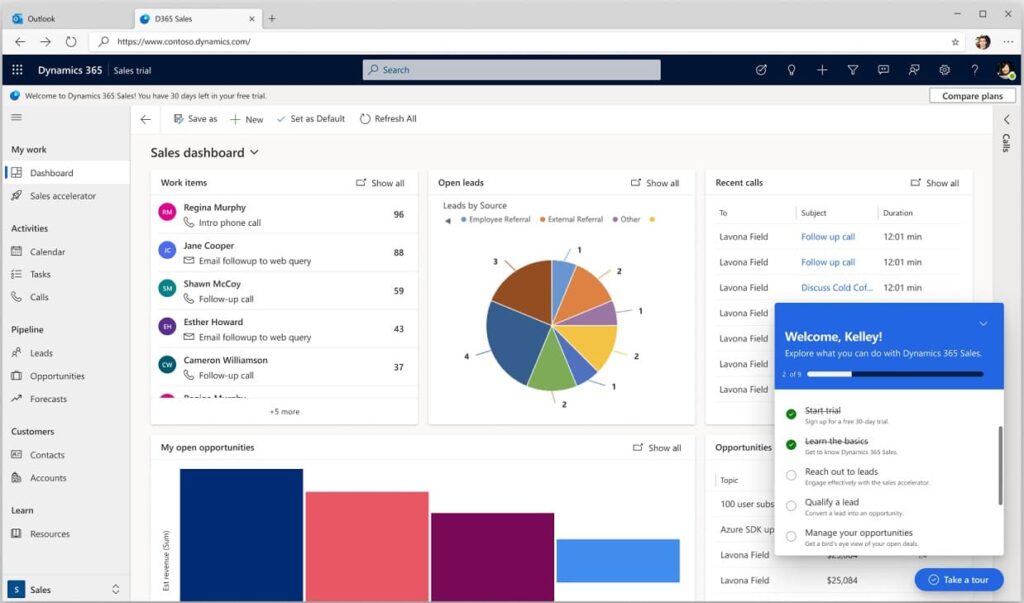
If your company runs on Microsoft (Outlook, Teams, Power Platform), Microsoft Dynamics 365 Sales is one of the cleanest “LinkedIn CRM” setups, because Microsoft explicitly packages a bundle that includes LinkedIn Sales Navigator for sales teams that want LinkedIn embedded into the day-to-day CRM workflow.
Key features
- Sales force automation + dashboards – Core CRM execution for managing leads, accounts, opportunities, and pipeline with built-in reporting.
- Copilot capabilities – AI-assisted summaries, insights, and workflow support available across Dynamics 365 Sales tiers.
- Microsoft Relationship Sales – Bundles Dynamics 365 Sales Enterprise with LinkedIn Sales Navigator for embedded relationship insights (10-seat minimum, pricing varies).
- Native Microsoft ecosystem fit – Designed to sit inside Outlook and Teams, reducing friction and improving CRM adoption without forcing a new operating system.
What I like about it
Dynamics is strongest when you want LinkedIn and CRM to feel like one motion inside the Microsoft ecosystem. The “Relationship Sales” packaging is also a signal: Microsoft expects real sales teams to use LinkedIn context directly in the sales workflow, without bouncing out to a separate browser tab.
Who it’s for
- Microsoft-first sales teams (Teams + Outlook-heavy).
- B2B teams that want LinkedIn Sales Navigator connected to CRM work.
- Mid-market and enterprise teams that care about governance + reporting.
Pricing
- Dynamics 365 Sales Professional: $65 user/month (paid yearly).
- Dynamics 365 Sales Enterprise Edition: $105 user/month (paid yearly).
- Dynamics 365 Sales Premium: $150 user/month (paid yearly).
- Microsoft Relationship Sales: Variable (includes LinkedIn Sales Navigator, 10-seat minimum).
Verified user review
“I primarily use Dynamics 365 CRM for managing our partner accreditations and reviewing their history with us as customers. It’s incredibly helpful to have all of that information in one place, making it easy to track interactions, keep records up to date, and ensure we’re supporting our partners effectively… The only drawback is that the system can sometimes feel a bit clunky – certain tasks take more steps than expected, and the interface isn’t always the most intuitive” – verified International Marketing Manager.
4. Pipedrive – best for LinkedIn-driven SMB teams that want simple pipeline hygiene
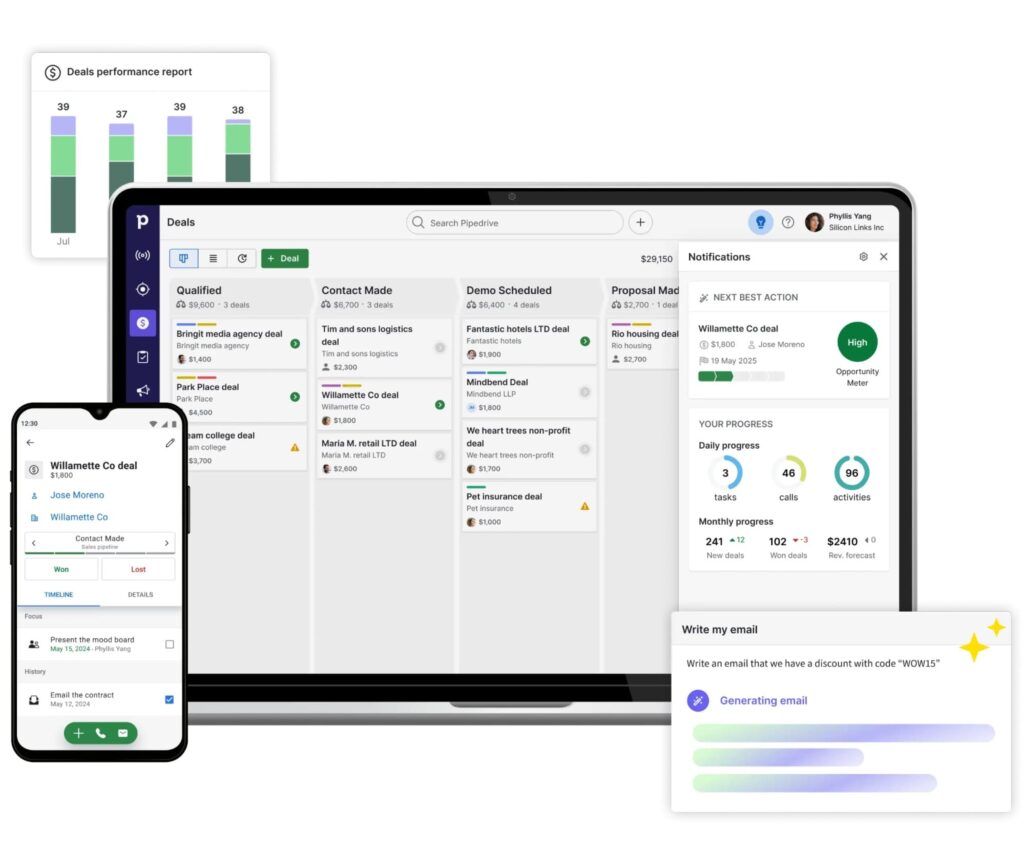
Pipedrive is a lightweight CRM built around follow-up discipline: keeping leads from stalling, next steps clear, and reps aware of what to do next.
For LinkedIn, it can be a fit if you don’t want a CRM that requires RevOps to operate and your outbound looks something along the lines of:
LinkedIn outreach → reply → quick qualification → move into a pipeline.
Key features
- Visual pipeline management – A deal-focused pipeline view that helps reps spot stalled leads and prioritize follow-ups.
- Activity-first workflow – “next action” mindset, which matches how LinkedIn convos progress.
- Integrates cleanly into lightweight outbound stacks where LinkedIn is the conversation source, and CRM is the system of record
What I like about it
The place LinkedIn campaigns break is right after the first reply. The bottleneck is keeping momentum and running a consistent follow-up cadence, more than finding leads. Pipedrive is good at turning a chat into a tracked deal quickly – the foundation of a working LinkedIn sales pipeline.
P.S. Pipedrive also works well with Expandi. See how to connect Pipedrive with LinkedIn for the full setup.
Torn between the two SMB favorites? Our Pipedrive vs HubSpot breakdown compares them head to head.
Who it’s for
- Founder-led teams and small SDR teams.
- Agencies managing lightweight pipelines per client.
- SMB sales teams that want structure without enterprise overhead.
Pricing
- Lite: $19/per seat/mo.
- Growth: $34/per seat/mo.
- Premium: $64/per seat/mo.
- Ultimate: $89/per seat/mo.
Verified user review
“I find Pipedrive easy to use and user-friendly, which makes navigating my sales process a breeze. It’s aesthetically pleasing, so it’s not overwhelming when I look at it. It’s very easy to complete tasks, helping me stay organized. The setup was very easy because it walked me through every single step. If I missed something, I could easily find where to navigate and make the necessary changes.” – verified Account Executive.
5. Salesflare – best B2B CRM that pairs prospecting with automatic relationship tracking
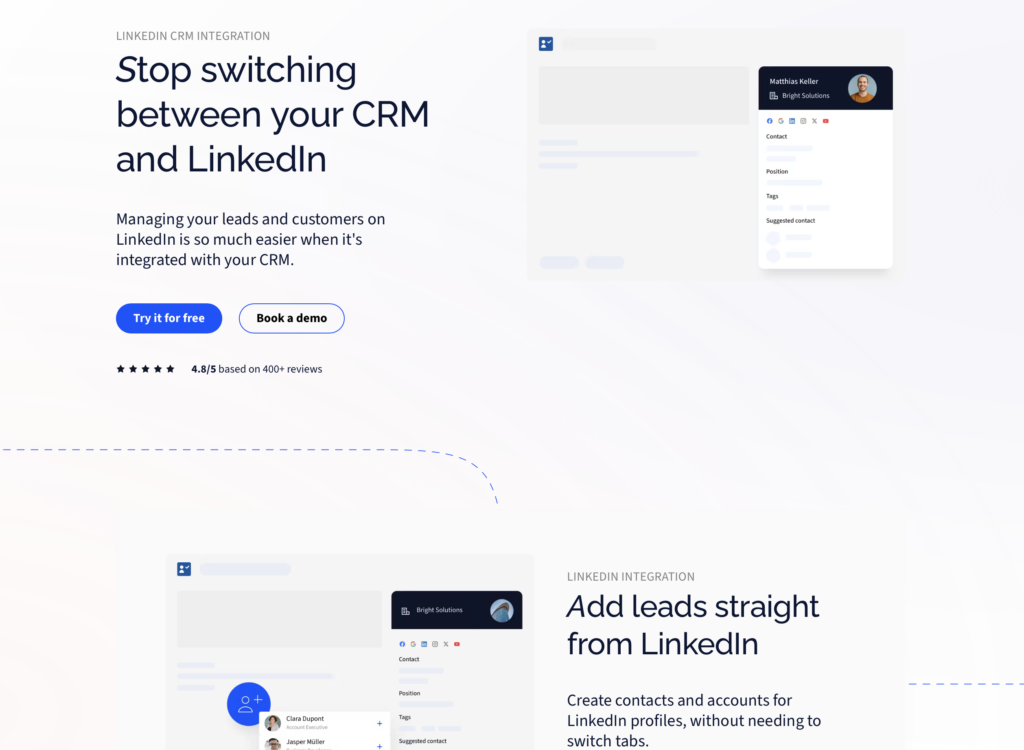
Salesflare is a B2B CRM for small and medium-sized teams that don’t want to spend their afternoons on data entry. It plugs into your email, calendar and LinkedIn, then builds the record for you: emails, meetings and the full relationship history land on the contact without anyone logging them.
For LinkedIn-led sales, that closes the usual gap. You find someone on LinkedIn, add them to the CRM from the sidebar, find their email address, and the conversations that follow get tracked on their own.
Key features
- Automatic data capture – Emails, meetings and contact details are pulled in from Google Workspace or Microsoft 365, including details parsed from email signatures.
- LinkedIn sidebar – Add people to the CRM straight from their LinkedIn profile and find their email address in a click.
- Built-in lead search and email finder – Find new prospects and add them to your pipeline without switching tools.
- Email sequences and tracking – Send personalized sequences from your own mailbox, with opens, clicks and replies logged back to the contact.
- Works with your AI – Salesflare MCP lets you query and update the CRM from ChatGPT, Claude and other AI tools.
What I like about it
Most CRMs go stale once LinkedIn outreach picks up, because someone has to type everything in. Salesflare removes most of that typing. The relationship history builds itself, so when a LinkedIn conversation moves to email and then to a meeting, the context comes with it.
Who it’s for
- SMB B2B sales teams that want a CRM that fills itself in.
- Founders and small sales teams working in Gmail or Outlook and on LinkedIn every day.
- Teams that tried a CRM before and stopped updating it.
Pricing
- Growth plan: From $39 per month, per user, billed annually
- Pro plan: From $49 per month, per user, billed annually
- Enterprise plan: From $99 per month, per user, billed annually
- Free trial: up to 30 days.
Verified user review
“I’m an expert on Go-To-Market-Actions for young ventures, therefore I’ve tried and have implemented most CRM systems on the market. Salesflare is the one we use ourselves. The company has constantly added features – from email-campaigns out of the CRM to rights management to manage teams and so forth. It works out of the box and is very easy to integrate.” – Jan, Verified Customer
6. folk – best LinkedIn-first CRM for relationship management
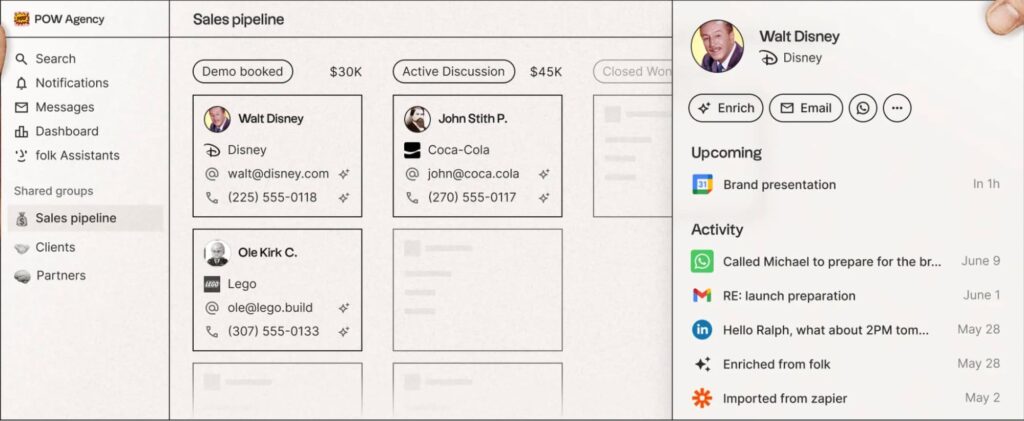
folk is built around the idea that a lot of revenue (and partnerships) come from relationships, and LinkedIn is where those relationships start.
folk treats LinkedIn as the start of a long-running relationship: you capture contacts from LinkedIn, enrich them, and keep context attached as things evolve.
folk feels closer to a relationship workspace than a hardcore forecasting machine.
Key features
- Relationship-first contact management – Save LinkedIn connections with notes, tags, and interaction history, so context outlives your memory.
- Network-focused organization – Built for staying warm across hundreds of relationships at a time.
- LinkedIn-as-CRM workflow – Turns LinkedIn connections into real CRM contacts with history, tags, and owners.
What I like about it
folk is relationship-shaped. If your LinkedIn activity is more about the long game (partners, communities, creators, warm outbound, agency relationships), folk can feel more natural than forcing everything into a rigid opportunity pipeline.
Who it’s for
- Founder-led outbound where relationship context matters.
- Partnerships / agencies / community-led GTM teams.
- Teams that want a LinkedIn-native way to organize contacts without Salesforce-level complexity.
Pricing
- Standard: $30/member/mo ($24 billed annually).
- Premium: $60/member/mo ($48 billed annually).
- Enterprise: From $100/member/mo ($80 billed annually).
Verified user review
“I loved the simple setup and easy integration. You install, connect your email and WhatsApp and install the Chrome plugin for LinkedIn, and you are running. The learning curve is easy, and the value it brings to my business is huge.” – verified SMB Owner.
7. Zoho CRM – best budget-friendly CRM with flexible LinkedIn integrations
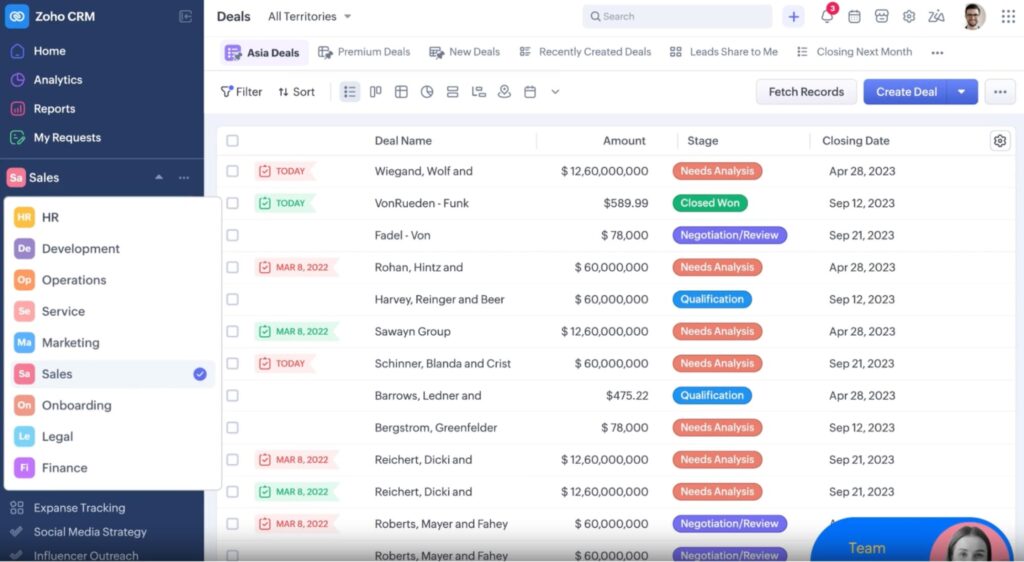
Zoho CRM is a strong option when you want a full-featured CRM without enterprise pricing. LinkedIn context comes in through extensions, Sales Navigator workflows, and automation tools.
For teams that want control, customization, and affordability, Zoho gives you a lot of surface area to work with.
Key features
- Customizable CRM pipelines – Build multiple pipelines, deal stages, and rules without enterprise overhead.
- LinkedIn integrations via extensions & APIs – Pull LinkedIn context into contact records using Zoho tools or third-party connectors.
- Workflow automation – Automate follow-ups, assignments, and alerts when LinkedIn leads convert.
- Strong reporting layer – Dashboards and analytics without needing a RevOps engineer.
What I like about it
If you’re willing to configure your stack a bit, Zoho gives you CRM depth similar to bigger platforms, without locking you into expensive contracts. It’s especially solid for teams that want flexibility and will set up integrations intentionally.
Who it’s for
- SMBs that want CRM depth without the Salesforce pricing.
- Teams using LinkedIn alongside email, calls, and inbound.
- Operations and outbound teams that want control over workflows.
Pricing
- Free: Limited features.
- Standard: $20/user/mo ($14 billed annually).
- Professional: $35/user/mo ($23 billed annually).
- Enterprise: $50/user/mo ($40 billed annually).
- Ultimate: $65/user/mo ($52 billed annually).
Verified user review
“Zoho CRM stands out as a reliable and affordable option, especially for small to mid-sized businesses. Its intuitive interface makes navigation simple, though mastering some of the more advanced features may require a bit more time. The setup process is easy to follow, aided by clear instructions and ready-made templates that help streamline the experience. Zoho CRM is designed for daily use and excels at managing ongoing sales activities and customer relationships.” – verified Senior Customer Success Executive.
8. Close – best CRM for LinkedIn-driven outbound teams that live in conversations
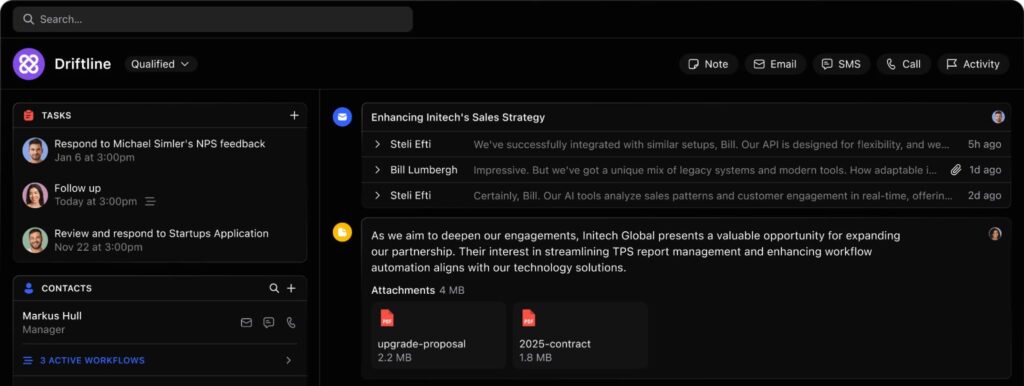
Close is built for sales teams that move fast and talk to prospects all day. As a CRM, it focuses on execution: calls, emails, follow-ups, and momentum.
Key features
- Activity-centric CRM – Calls, emails, tasks, and notes stay front and center.
- Fast deal movement – Designed to move conversations forward while metadata stays out of the way.
- Chrome extensions & integrations – Log LinkedIn outreach into contacts without heavy admin work.
- Built-in calling + email – Reduces tool switching once conversations move off LinkedIn.
What I like about it
Close is built for execution. If LinkedIn is where your conversations start but deals move forward over calls and email, Close keeps reps on the next action, with CRM upkeep cut to a minimum.
Who it’s for
- Outbound and cold calling sales teams.
- SMBs and mid-market teams doing high-volume outreach.
Pricing
- Solo: $19/per seat/mo.
- Essentials: $49/per seat/mo.
- Growth: $109/per seat/mo.
- Scale: $149/per seat/mo.
Verified user review
“I find Close incredibly useful for tracking everything with easy-to-use smart views and simple filter adjustments. It’s great for seeing where my deals are in the sales cycle. I love the call recording feature because it ensures I remember conversations. The phone application is handy, allowing me to work on the go. I appreciate how simple it is to use both the desktop and phone apps. Close is the easiest, most user-friendly, and most affordable CRM I’ve used.” – verified Finance Manager.
9. Freshsales – best modern CRM with built-in automation for LinkedIn leads
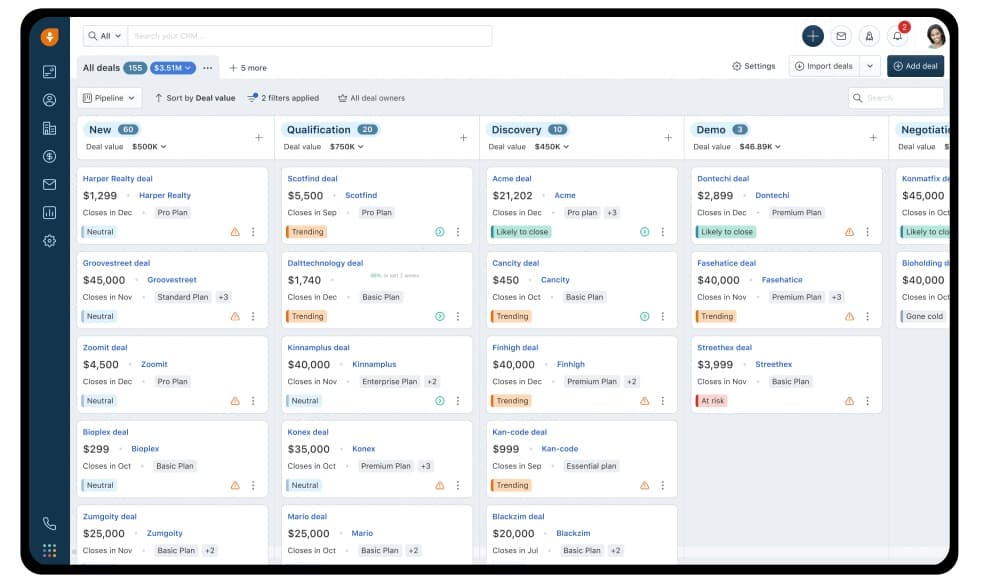
Freshsales (by Freshworks) hits a middle ground that a lot of teams need. It’s lighter and easier to adopt than legacy CRMs, but still gives you automation, lead scoring, and reporting without a long setup cycle.
LinkedIn fits into Freshsales through integrations, enrichment, and workflow triggers.
Key features
- AI-powered lead scoring – Prioritize LinkedIn leads based on engagement and behavior.
- Built-in phone & email – Convert LinkedIn replies into multichannel follow-ups fast.
- Automation rules – Trigger tasks, sequences, and alerts when LinkedIn leads engage.
What I like about it
Freshsales feels modern without being restrictive. It’s a good “step up” CRM when spreadsheets and lightweight tools stop working, but enterprise CRMs feel like overkill.
It has less friction for reps compared to older CRM platforms.
However, it’s not positioned as a LinkedIn-first CRM. It works best when LinkedIn starts the conversation, but execution quickly moves into calls, email, and a structured pipeline.
Who it’s for
- Growing SMBs transitioning into structured sales.
- Teams combining different channels (LinkedIn + inbound + outbound).
- Companies that want automation without complexity.
Pricing
- Growth: $11/user/mo.
- Pro: $47/user/mo.
- Enterprise: $71/user/mo.
Verified user review
“The look and feel is friendly, and easy to navigate. This is important when you spend so much time on a CRM. Mass mailing – easy; saving templates – easy; diary calls, appointments easy, visual pipeline is great too… however integration capability with Linkedin would be good” – verified COO.
10. Attio – modern, flexible CRM for LinkedIn-sourced relationships
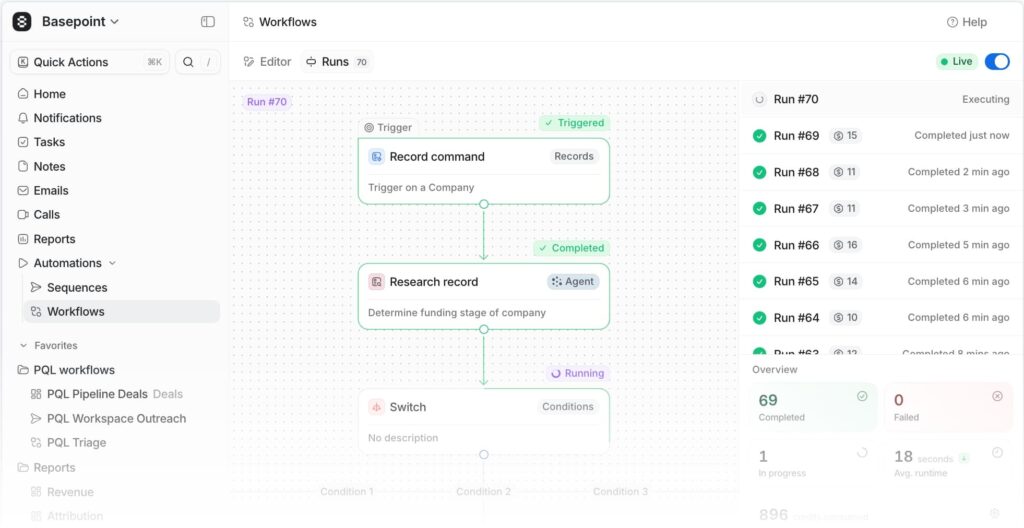
Attio is a “modern CRM” option for teams that start relationships on LinkedIn, but want a clean system to organize people + companies + context their way.
Attio turns LinkedIn-sourced contacts into structured records, with enrichment and a flexible data model you can shape around how your GTM works.
Key features
- Flexible data model – Customize how people, companies, deals, and relationships connect, beyond the standard Leads → Contacts → Opportunities shape.
- AI-powered search & insights (Ask Attio) – Use natural language to query your CRM, summarize records, surface insights, and assist with tasks like prospecting and lead scoring.
- Automatic enrichment – Enrich LinkedIn-sourced contacts with company and person data so records don’t stay thin or stale.
- Unified activity timeline – View emails, notes, and relationship context together so LinkedIn-origin conversations don’t lose history once they move channels.
- Workflows + reporting – Build automations and real-time reports on top of your own data model.
What I like about it
Attio feels like a CRM designed for teams that care about clean data and usable context.
Attio can be a good fit if LinkedIn is your starting point and the system of record needs to live elsewhere. It turns connections into usable records you can organize, search, and build on over time.
Who it’s for
- Founder-led or lean GTM teams where LinkedIn is a primary channel.
- Teams that want flexibility (custom structure) more than “default CRM pipelines”.
- Relationship-heavy outbound (partnerships, agencies, community-led GTM, warm outbound).
Pricing
- Free: up to 3 seats.
- Plus: $44/user/month ($35 billed annually).
- Pro: $99/user/month ($79 billed annually).
- Enterprise: Custom.
Verified user review
“I like how customizable Attio is. I’ve been able to add my invoice information and billable hours as their own category of item, which means I can track the amount spent and hours logged per client in one central platform. Having all my connections, video recordings, and conversations in one place is a huge time saver and keeps things simple… Setting up workflows can be tricky the first time you do it. There is lots of information available to help, but it still just doesn’t feel simple” – verified CEO.
11. Nimble – best for LinkedIn and social selling
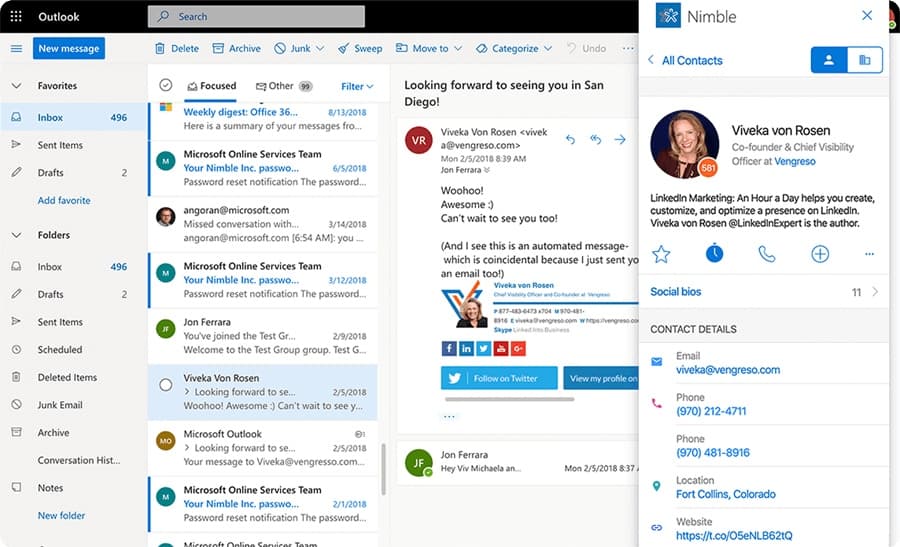
Nimble positions itself as a relationship-first CRM, with LinkedIn as a primary data source.
The core idea is simple: capture contacts where you find them (LinkedIn, email, web), enrich them automatically, and keep follow-ups from slipping through the cracks.
LinkedIn is handled through Nimble Prospector, a browser-based workflow that lets you create and update CRM records directly while browsing LinkedIn, without any copy-pasting or tab-switching.
Key features
- Nimble Prospector (LinkedIn + browser capture) – Create and enrich contact records directly from LinkedIn profiles while browsing, with one-click capture and hover-based enrichment.
- Relationship management at the core – Contact records are built around people, history, notes, and interactions.
- AI prospecting + enrichment – Automatically pulls in social, email, and company data so LinkedIn-origin contacts don’t stay thin.
- Built-in email + sequence automation – Run 1-to-many emails and follow-up sequences from your own CRM inbox.
What I like about it
Nimble is designed for people who live on LinkedIn and want a fast way to turn profiles into usable CRM records.
Then, you can stay on top of follow-ups without building a complex stack. The Prospector workflow is the main differentiator as it removes a lot of the friction that causes LinkedIn conversations to die after the first reply.
Who it’s for
- Solopreneurs and small teams selling through relationships.
- Consultants, agencies, and service businesses using LinkedIn daily.
- Teams that want CRM + outreach (email + LinkedIn) in one place, without enterprise complexity.
Pricing
- One plan: $29.90/per seat/mo ($24.90 billed annually) – includes AI-powered email creation tools, 25,000 contact records, and 2 GB storage per seat.
Verified user review
“The interface is clean, intuitive, and not bloated like other platforms I’ve used. I love being able to quickly scan my dashboard, see who I need to follow up with, and take action. If your business is built on networking, referrals, and real human connections—this tool fits like a glove… Some of the reporting features feel pretty limited, especially if you’re trying to get a big-picture view of your pipeline or run detailed filters. It’s definitely built for simplicity, which is great—until you want to scale up.” – verified Customer Retention Strategist.
12. LeadDelta – best for cleaning up and working your existing LinkedIn network
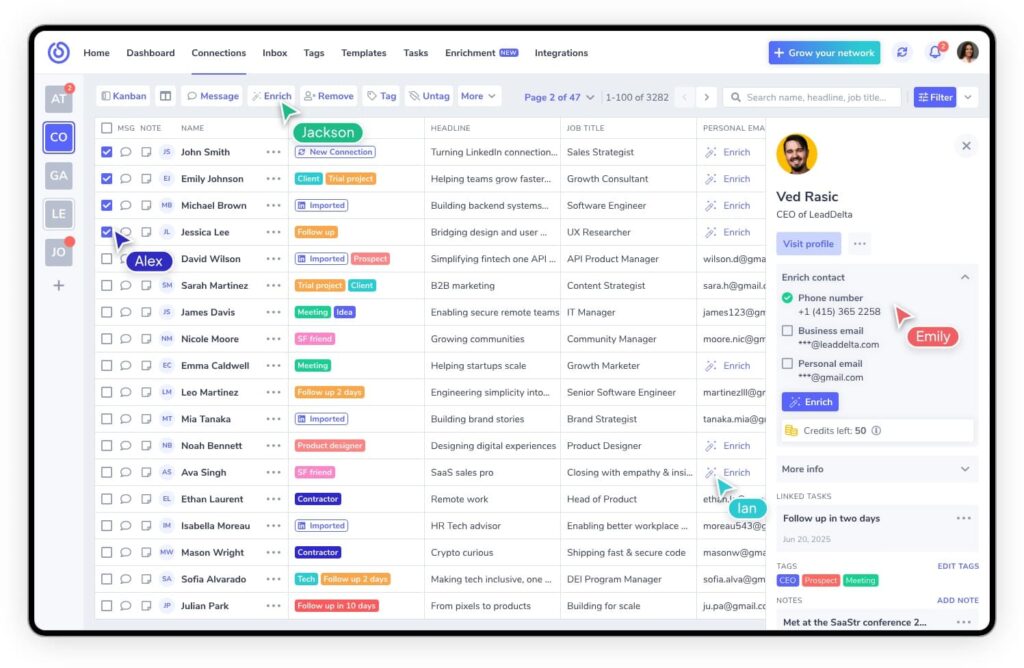
LeadDelta plays a different game from the full CRMs on this list: it works on top of your LinkedIn network itself.
Through tags, notes, and filters, you can structure your existing connections, segment them, and prepare for outreach.
Key features
- Connection tagging + segmentation – Organize large LinkedIn networks into usable segments (industry, relationship stage, priority lists).
- Notes + context on connections – Keep relationship history attached to the person so you’re not relying on memory.
- Team workspace – Useful when multiple people need shared visibility into a network beyond one founder’s account.
What I like about it
LeadDelta is ideal if you already have a network but don’t know how to operationalize it.
If your LinkedIn workflow is more relationship + follow-up than pure pipeline stages, this is one of the cleanest ways to make LinkedIn connections act like a real database.
Who it’s for
- Founders, recruiters, partnership teams, community-led GTM.
- Anyone sitting on 5k-50k connections and losing track of who matters.
Pricing
- Starter: $25/user/mo.
- Pro: $55/user/mo.
- Business: $99/user/mo.
Verified user review
“LeadDelta gives my team a very clear overview of our networks and who knows who making it much easier for us to collaborate on new sales and marketing opportunities. We’re utilizing their tags, notes, and filters to keep all of our connections organized and manage our pipelines.” – verified Marketing Specialist.
13. Breakcold – best social-selling CRM for staying present on prospects’ LinkedIn activity
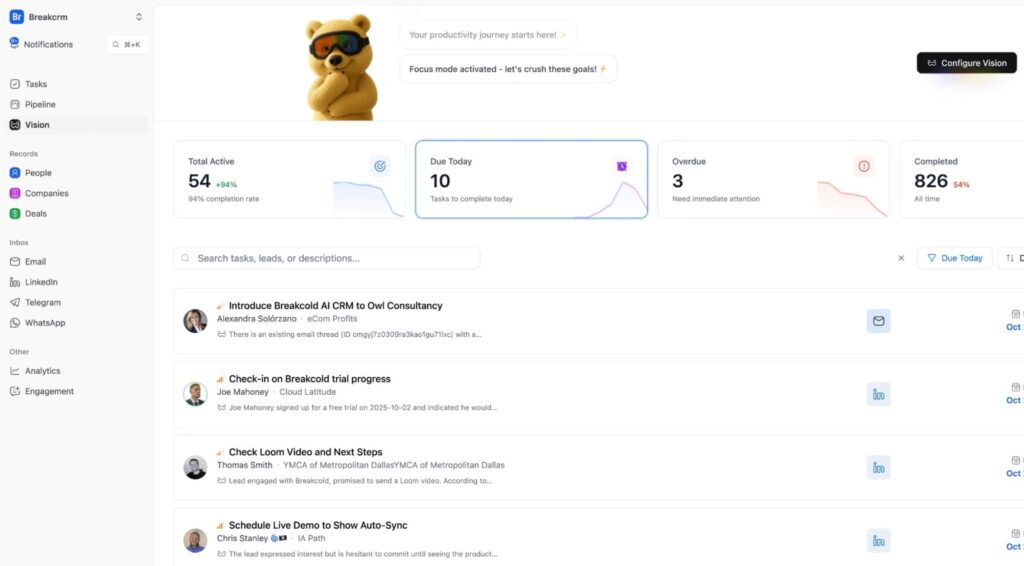
Breakcold is a social-selling CRM focused on staying visible and relevant.
It pulls LinkedIn-style social activity into a workflow so you can engage consistently and then convert that attention into conversations.
Key features
- Unified social feed for prospects – Keep tabs on target accounts/people so engagement is part of the sales workflow.
- Contact + pipeline management – Track leads and movement without needing an enterprise CRM just to stay organized.
- Multichannel outreach workflow – Designed for social selling that turns into email/calls once the convo starts.
What I like about it
Breakcold is one of the few tools that treats LinkedIn engagement as the main system. If your team’s best deals come from being present, this fits that workflow.
Who it’s for
- SDRs doing social selling.
- Agencies managing warm outbound for multiple clients.
- Anyone who wants to grow their network and build connections.
Pricing
- One plan: $59/mo – includes 1 seat, 2 connected accounts, and a monthly AI-action allowance. Extra seats are $10/mo each.
Verified user review
“It provides a convenient and easy-to-use front end for LinkedIn. It allows you to organize your LinkedIn data the way you want to see it. Managing your data through a CRM e.g., following leads, their posts and engaging with them is a boon, compared to native LinkedIn where it is a chore. Having everything in one place saves a lot of time and has helped my productivity.” – verified Coach.
14. NetHunt CRM – for Gmail-native teams who want LinkedIn capture + CRM in one place
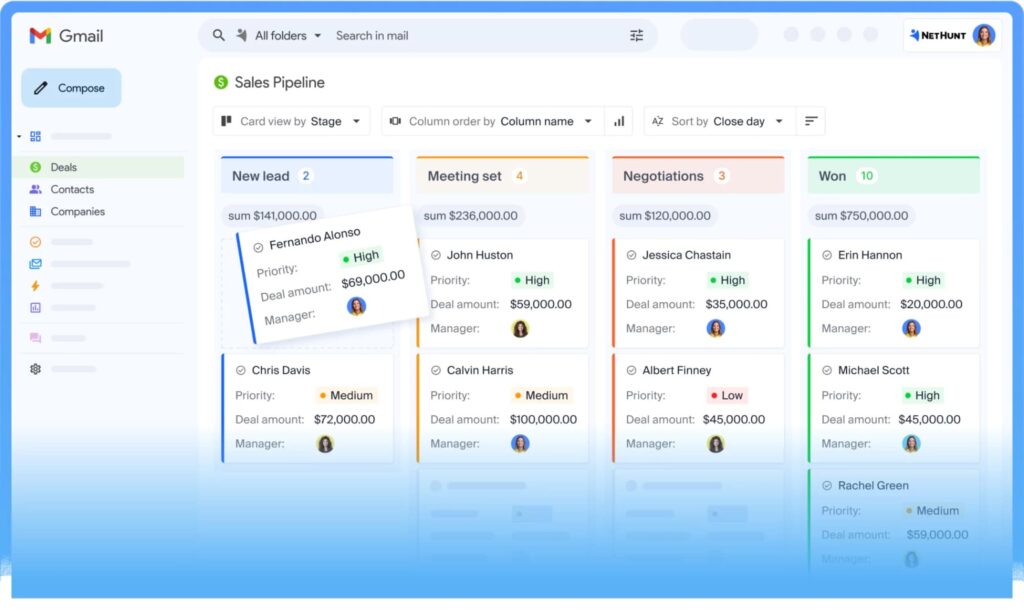
NetHunt is a CRM that lives inside Gmail, which matters because a lot of LinkedIn-led deals ultimately get closed in email threads.
If your reps live in Gmail all day, NetHunt reduces the “switching cost” that kills CRM adoption.
Key features
- Gmail-native CRM workflow – Run pipeline + contact management where reps already work (inbox-first).
- Browser capture + enrichment – Built to turn web/LinkedIn browsing into structured contact records (less copy/paste).
- Automations + sequences – Follow-ups and task logic, so LinkedIn conversations keep moving after the first reply.
What I like about it
NetHunt lands well with teams that want CRM hygiene without living in yet another tab. Inbox-native CRMs win on consistency.
Who it’s for
- SMBs and mid-market teams living in Gmail.
- Recruiters and agencies where “inbox + LinkedIn” is the whole day.
Pricing
- Basic: $30/per user/mo.
- Basic Plus: $42/per user/mo.
- Business: $60/per user/mo.
- Business Plus: $84/per user/mo.
Verified user review
“Most CRMs do the basics well, email syncing, deal flow, etc… What they lack, is the ability to manage relationships with people that eventually become deals. This is where Nethunt comes in – its a highly, easily customizable CRM with a killer app – LinkedIn messaging sync.” – verified CEO.
15. LinkedIn Sales Navigator CRM apps – best LinkedIn-native layer for enterprise CRMs
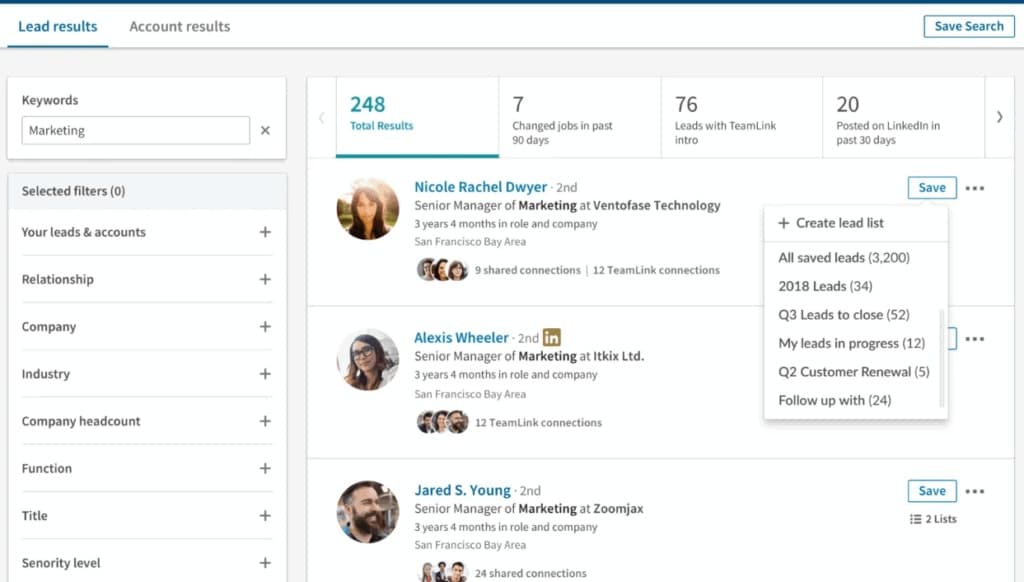
LinkedIn Sales Navigator sits in this list as an integration layer rather than a CRM: the most direct way to make LinkedIn behave like part of your CRM workflow when you’re on big platforms.
If your team already runs on Salesforce, HubSpot, or another major CRM, it surfaces LinkedIn context inside records and keeps the workflow consistent. New to the tool itself? Start with how to use LinkedIn Sales Navigator.
Key features
- CRM-embedded LinkedIn context – Bring LinkedIn info into the records and opportunities where deals are managed.
- Advanced Sales Navigator lead & account filters – Use job changes, seniority, company growth, intent signals, and saved searches, then surface that context directly inside CRM records.
- Admin + IT-friendly deployment – Designed for structured rollout (permissions, governance, centralized install).
What I like about it
This is the cleanest option when the organization already has a CRM “source of truth” and you want LinkedIn context to show up where reps execute: lead, account, and opportunity records. Still weighing whether the subscription earns its cost? The benefits of LinkedIn Sales Navigator break down where it pays off.
It also works well alongside Expandi. A common setup is using Expandi to run LinkedIn outreach and engagement, then pushing qualified responses or enriched leads into your CRM where deals, forecasting, and follow-ups live.
For example, reps can source and track prospects in LinkedIn Sales Navigator, engage them via Expandi sequences, and push replies or matched contacts into the CRM through Expandi’s CRM integration. So, LinkedIn activity turns into pipeline without manual exporting or copy-pasting.
Who it’s for
- Mid-market + enterprise teams standardized on a major CRM.
- RevOps-led teams that want a single workflow across sourcing, outreach, and CRM.
Pricing
- Included as part of your Sales Navigator + CRM ecosystem pricing (varies by CRM and Sales Navigator package).
- Sales Navigator by itself ranges from roughly $80 to $180 per user/mo depending on plan, billing cycle, and region (LinkedIn shows exact pricing in-product).
How to choose a LinkedIn CRM Tool?
Choosing the right LinkedIn CRM isn’t just about the features on a spec sheet, but about how well the tool fits your specific sales rhythm. Once you have a shortlist, your biggest priority should be the integration mechanics.
How your CRM integrates with LinkedIn ultimately determines whether you’re spending your day selling or wrestling with manual data entry.
Here are the questions we suggest you ask yourself while choosing your tool:
1. Where does LinkedIn sit in your sales motion?
Is LinkedIn just top-of-funnel, or where real conversations happen?
- LinkedIn → email/calls → deals → You need strong pipeline tracking and follow-up execution.
- LinkedIn-first, relationship-heavy → You need notes, tags, and long-term context more than rigid stages.
- Sales Navigator-led outbound → You need LinkedIn context embedded directly into CRM records.
Michael Kamleitner, founder of Walls.io, a social wall platform for events and marketing teams, described the lightweight end of this spectrum in a GTM Society interview:
“LinkedIn is actually a great tool to help you with organizing all these connections. So another way I’m using LinkedIn personally is like a CRM, like my personal CRM. I’m using LinkedIn Sales Navigator. I’m setting up lists for all types of things.” — Michael Kamleitner, Walls.io
2. How much structure do you need?
- Lightweight → Fast-moving SMB or founder-led sales.
- Flexible → Non-standard GTM motions and relationship-heavy workflows.
- Heavy → Forecasting, territories, and RevOps ownership.
3. Does it reduce admin or add more of it?
Consider features like:
- One-click LinkedIn contact capture.
- Automatic tasks and follow-ups.
- Context stays attached when convos move off LinkedIn.
4. Can it scale with outreach volume?
- Manual LinkedIn workflows break fast.
- Low volume → Almost any CRM works.
- High-volume or multi-rep outbound → Automation + reliable CRM sync decide whether the system holds.
- And if sourcing volume is the constraint rather than tracking, a dedicated B2B prospecting tool covers that layer before the CRM ever sees the lead.
How to get the most out of your LinkedIn CRM Tool
Now that you’ve identified the right CRM for your needs, the next step is building a workflow that effectively bridges your LinkedIn activity with your sales pipeline.
Many high-performing teams we’ve spoken to over the years have found that expecting a single tool to handle everything is a recipe for complexity. Instead, they often split the job, using specialized tools to play to each platform’s strengths:
In practice, that means:
- One tool for finding and engaging people on LinkedIn.
- One tool for tracking deals, follow-ups, and revenue.
A typical modern LinkedIn stack looks like this:
- LinkedIn Sales Navigator → Lead sourcing and advanced filters.
- Expandi → Running LinkedIn outreach, follow-ups, and engagement at scale.
- LinkedIn-friendly CRM → Pipeline, tasks, forecasting, and reporting.
Stefan Smulders, founder of Expandi, puts it this way:
“The top-performing teams treat LinkedIn like a primary outbound channel. They track conversations in their CRM, automate follow-ups, and send thousands of messages monthly – without compromising personalization.” — Stefan Smulders, Expandi
Start building your LinkedIn CRM stack
If you’re serious about scaling LinkedIn outreach without losing control of your pipeline, pairing your CRM with a LinkedIn automation tool like Expandi is one of the cleanest ways to do it.
You get:
- LinkedIn outreach that runs safely at scale.
- CRM data that stays clean and usable.
- Zero copy-pasting, screenshots, or forgotten follow-ups.
See if Expandi fits your stack: start your free 7-day trial.
Frequently Asked Questions
A LinkedIn CRM is any system that helps you turn LinkedIn connections and conversations into structured records you can track, follow up on, and convert into deals.
That can be:
• A traditional CRM with LinkedIn Sales Navigator integration (HubSpot, Salesforce, Dynamics).
• A LinkedIn-first or relationship-focused CRM (folk, Nimble, Attio).
• Or a hybrid setup where LinkedIn outreach runs in a dedicated tool, and the CRM acts as the system of record.
The best CRM for LinkedIn depends on how you sell.
If you want LinkedIn Sales Navigator embedded directly into pipeline + reporting, pick a CRM with a native Sales Navigator integration (like HubSpot, Salesforce, or Pipedrive). If LinkedIn is more relationship-driven (partnerships, warm outbound), a LinkedIn-first CRM (like folk or Nimble) can be a better fit. For automatic data capture, Salesflare is a top choice.
No. LinkedIn Sales Navigator is a prospecting and intelligence tool, not a CRM.
It’s ideal for lead generation, tracking buying signals, managing saved leads, and accounts. Deal stages, follow-ups, sales tasks, forecasting, and revenue reporting all live elsewhere.
Teams pair Sales Navigator with a CRM plus an outreach tool for exactly that reason.
If you’re using LinkedIn for casual networking, maybe not.
But if you’re using it to do outreach at scale, manage multiple conversations, book meetings, then, without a CRM, you’re relying on memory and manual work.
That breaks fast once volume increases or multiple people are involved.
They solve different problems.
LinkedIn automation tools run outreach: connection requests, follow-ups, and message sequences.
CRMs track outcomes: replies, deals, tasks, pipeline, and revenue.
Trying to use a CRM to run LinkedIn outreach is painful. And trying to use a LinkedIn automation tool as a CRM breaks once deals get real.
Yes. HubSpot CRM is free for up to 2 users, Zoho CRM is free for up to 3 users, and Attio is free for up to 3 seats – all three connect to LinkedIn through browser extensions or integrations. Free tiers cover contacts and pipeline. Native Sales Navigator embeds and deeper syncing sit behind paid plans.
For small teams, HubSpot CRM (free plan plus native Sales Navigator integration on paid tiers), Zoho CRM (from $14/user/month billed annually), and Pipedrive (from $14/user/month billed annually) cover the widest range of LinkedIn workflows. Solopreneurs who mainly need LinkedIn contact capture get there faster with Nimble’s single $29.90/month plan.



You’ve made it all the way down here, take the final step