How to Increase Brand Awareness on LinkedIn: The PDF Lead Magnet Growth Hack

Right now, roughly 95% of your potential buyers aren’t ready to buy what you sell.
When they finally are, they lean toward a vendor they already recognize. So the brand awareness you build today decides the pipeline you win next year.
The fastest way to increase brand awareness on LinkedIn: Give your ideal buyers a genuinely useful free resource: a PDF lead magnet — through automated, value-first outreach, then stay top of mind across channels.
When we ran this playbook, leading with the resource rather than a sales ask, we hit around 40% connection acceptance rate and tripled the follow-up replies.
From one LinkedIn profile, we sent the same PDF giveaway to two batches of 500 cold, in-ICP prospects:
- One with a personalized, written connection note.
- One with a blank request.
The blank, no-pressure version won on both acceptance and replies.
The lesson held: when the first touch gives rather than asks, people let you in.
This is the opposite of waiting to be found.
You go to the exact buyers you want recognition from and give them something worth keeping before any pitch, which builds awareness with people who would never have searched for you yet.
Below:
- What brand awareness on LinkedIn really buys you.
- How to build a lead magnet people keep and the value-first sequence and targeting behind it.
- How to stay top of mind across channels after the first message.
Key Takeaways
- Brand awareness on LinkedIn means being recognized by your future buyers before they’re in the market. Since only about 5% are in-market at any time, the brand you build now decides who they shortlist later.
- This growth hack builds that recognition directly: give a genuinely useful PDF lead magnet to cold, in-ICP prospects through value-first outreach, with no pitch attached.
- Lead with value, not a sales ask. In our own run, a blank, no-pressure connection request beat a written pitch on both acceptance (around 40%) and follow-up replies.
- Awareness compounds when you stay top of mind across channels: an email step, LinkedIn retargeting, and content keep your brand in front of the same people until they’re ready.
- Expandi runs the outreach from cloud-based, dedicated-IP accounts with smart sequences and an AI Analyzer that personalizes every message, so the campaign builds awareness at scale without putting your account at risk.
How to Increase Brand Awareness on LinkedIn: The PDF Lead Magnet Growth Hack


What brand awareness on LinkedIn really means (and why it drives pipeline)
Brand awareness is the share of your potential buyers who recognize and remember your company before they need it.
On LinkedIn, you build it two ways:
- By being visible through content, an optimized profile, and engagement.
- And by reaching the right people directly with something worth their attention. This second route is the one this guide is built on.
Here is why it is worth the effort.
At any given moment, around 95% of business buyers aren’t in the market for what you sell, per the LinkedIn B2B Institute’s 95-5 rule. They will buy eventually, just not today. Which makes the time before they’re shopping the only window you have to become familiar.
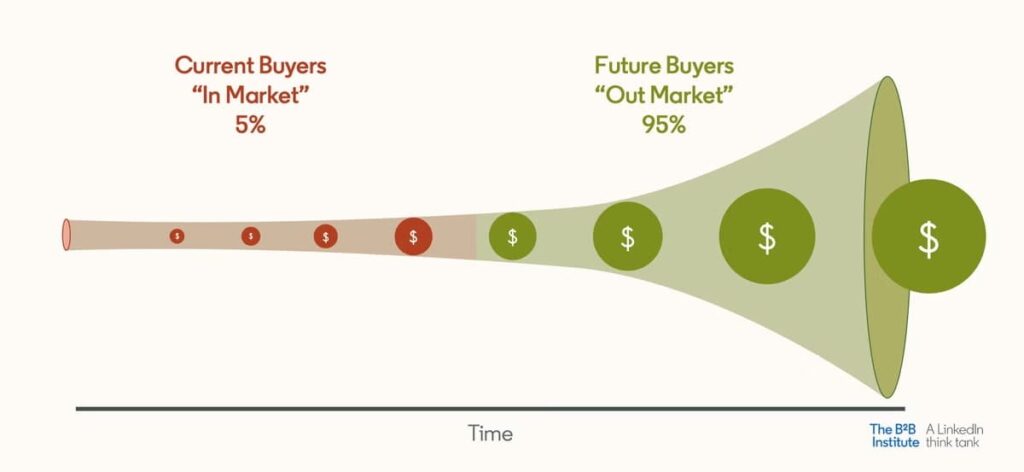
The catch is what happens when they do enter the market. 85% of B2B buyers walk in with a day-one list of vendors already in mind, Bain found. Earn a place on that list early, or spend the sales cycle trying to dislodge whoever did. Brand awareness is how you get on the list before the buying starts.
LinkedIn is where that recognition gets built for B2B.
The platform has more than 1.3 billion members, and 85% of B2B marketers rate it their highest-value social platform, so it’s where your buyers already spend their professional attention.
Here’s the part that trips teams up: brand awareness on LinkedIn takes more than posting and collecting likes.
Likes and comments from people who’ll never buy feel good and change nothing.
Real awareness means landing with the specific buyers you want as customers, and the fastest way to do that is to reach them directly and hand them something genuinely useful. That’s the play the rest of this guide walks through.
The brand awareness growth hack: give value before you pitch
The play is simple: create a free resource your ideal buyers want, deliver it to them on LinkedIn through automated, value-first outreach, then stay in front of them across channels until they’re ready to talk.
You lead with something genuinely useful and save the pitch for later, so the recognition compounds from the first touch.
It works because of reciprocity. When you help someone before asking for anything, you build goodwill that pays off long after the interaction.
“Over time, what you’re compounding is the goodwill that you build with everyone who you’ve helped along the way.” — Wes Bush, founder of ProductLed, a product-led growth consultancy, in his GTM Society interview.
That goodwill is the awareness.
Every prospect who downloads your resource now associates your brand with something helpful, whether they buy this quarter or next year. It turns a cold contact into warm outreach before you’ve pitched anything.
You need four things to run it:
- An outreach engine: LinkedIn automation tools like Expandi run the LinkedIn and email outreach from a cloud-based, dedicated-IP account, so the campaign sends safely at scale while you stay out of the inbox.
- A lead magnet: a genuinely useful free resource: a PDF guide, a template, a checklist, or a teardown. Specific beats broad.
- A target list: the exact people you want recognition from, built in LinkedIn Sales Navigator (or standard LinkedIn search, Expandi works with both).
- A top-of-mind layer: an email step inside the same sequence, plus optional retargeting ads, to keep showing up after the first touch.
Here’s how to build each piece, starting with the resource you’ll give away.
Step 1: Build a lead magnet worth downloading
Your lead magnet is the whole play’s currency, so it has to be worth more than the inbox space it takes.
The best ones solve a specific, painful problem for your ICP in a way they can act on right away.
Think a real framework, a teardown, a swipe file, or a calculator they’ll use.
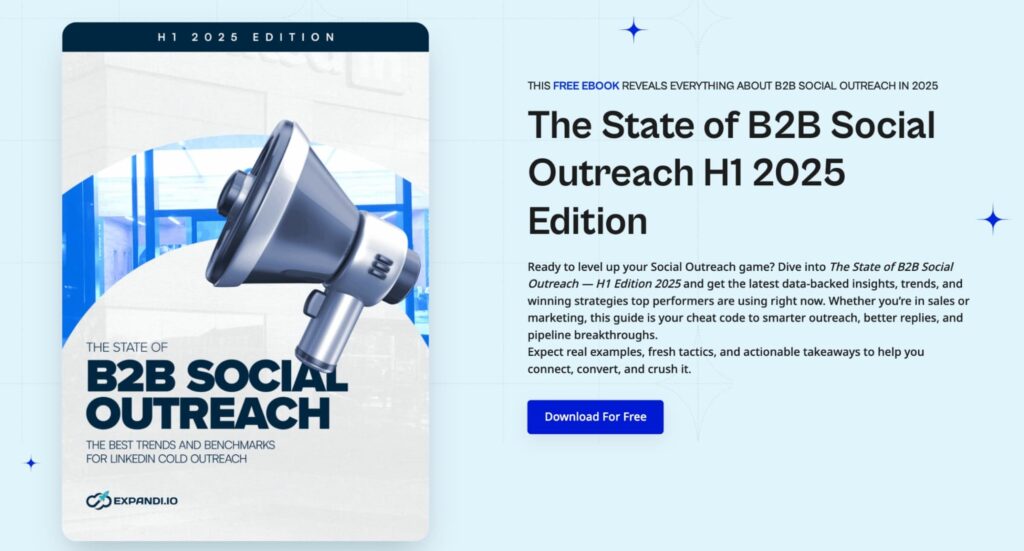
For this play, the resource doubled as proof of expertise: a PDF of our top LinkedIn outreach strategies, with step-by-step tactics the reader could run the same week. It demonstrated the thing it was teaching, which made the brand impression stick.
Two rules keep a lead magnet working as an awareness tool:
- Keep it ungated for these contacts. You already have their attention on LinkedIn, and a second form kills the goodwill. Send the file or a clean landing page link directly.
- Brand it consistently. The cover, the colors, and the profile sending it should all look like you, so the resource and the sender reinforce each other in memory.
Whoever sends it is the face of the brand impression, so the next step is making that profile land.
Step 2: Optimize your profile so the brand lands
The moment you reach out, the first thing a prospect does is check your profile, so your profile is the brand impression.
Before you send anything, get the photo, banner, headline, and About section working as a billboard for the value you’re about to give.
This is exactly why a real LinkedIn presence makes outreach land in the first place.
“…the first thing you’re gonna do is look at my LinkedIn profile… and if I have a LinkedIn profile with nothing on it you would be like, I received 40 other pitches in my inbox, why would I consider this guy?” — Michel Lieben, founder of ColdIQ, a sales agency that tests GTM tools and builds outbound for B2B teams, told GTM Society.
Treat the profile as part of the campaign.
A quick profile optimization checklist: a clear headshot, a banner that names who you help and how, a headline written for the buyer (the outcome you create, in plain words), and an About section that reads as useful.
It’s the same trust-building work behind any LinkedIn social selling motion. With the offer and the profile ready, the next decision is who sees them.
Step 3: Target the right people, cold or warm
Brand awareness only pays off if you build it with the right people, so targeting is where this play is won or lost. You have two ways to find them:
- Go cold with precise filters.
- Or go warm by reaching people who just engaged with your content.
The warm route lands better, the cold route reaches further, and you can run both.
Cold and precise: Sales Navigator
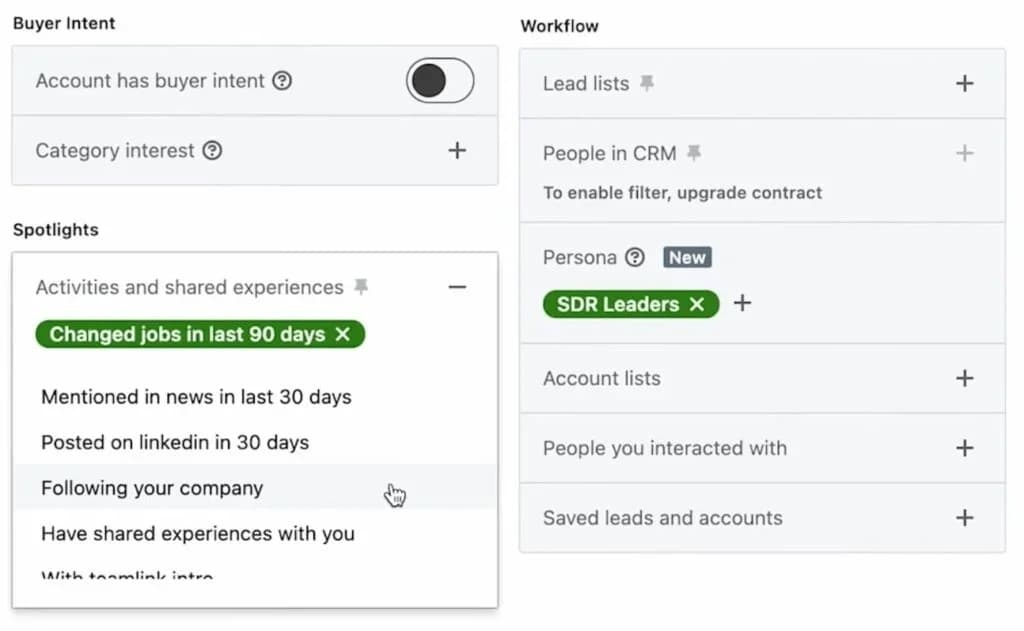
When you want buyers who don’t know you yet, Sales Navigator builds a precise list of 2nd- and 3rd-degree connections that fit your ICP. A simple filter stack works for this campaign:
- Keywords or job titles that match your buyer (for a growth-tactics PDF: Head of Growth, Demand Gen, VP Marketing)
- Geography for the region you serve
- Relationship set to 2nd and 3rd degree, so you reach new people
- Seniority or function that matches who acts on your resource
Then filter to people who have posted recently: active users are far likelier to see and accept your request. Keep the list tightly on-ICP. A smaller, relevant audience builds more useful awareness than a big, loose one.
Warm and high-intent: target people who engaged with your post
The higher-converting angle flips the order.
Post about the resource first: share a teaser and ask people to comment a keyword to get it, let the comments and reactions come in, then pull everyone who engaged into the campaign.
Expandi’s content retargeting feature scrapes a post’s commenters and reactors: up to a few thousand per post, straight into a lead list. These people raised their hand, so the connection request and the handoff land far warmer than a cold touch.
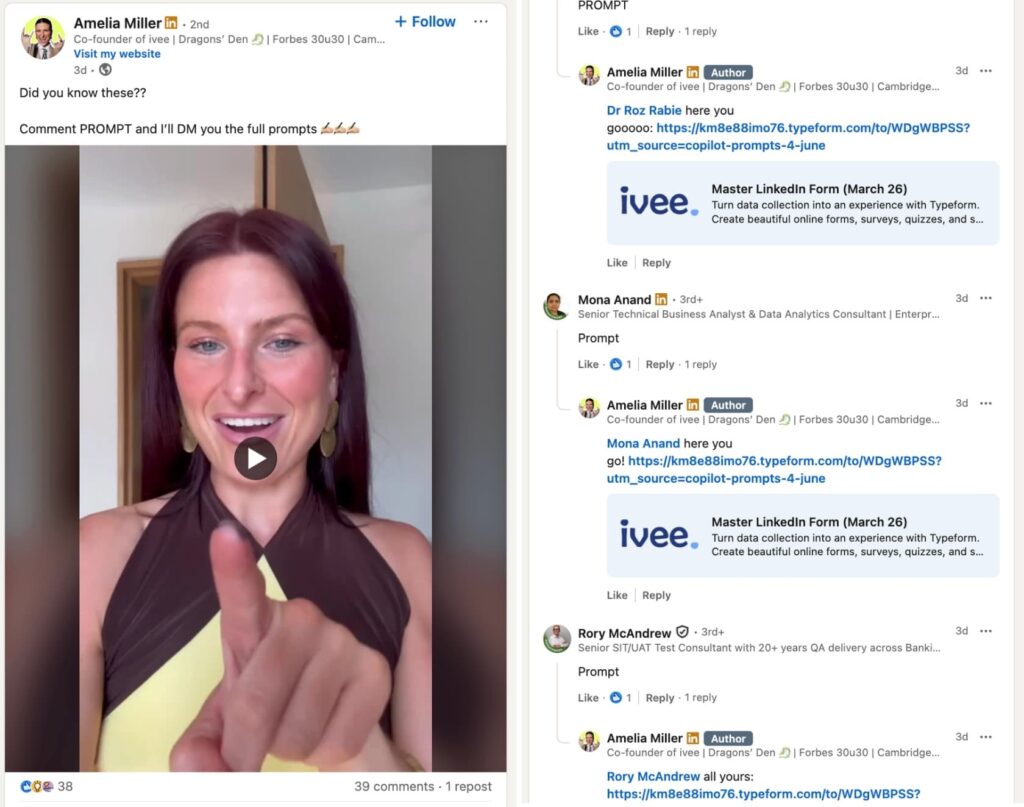
Run it on your own post, or on a relevant industry leader’s post where your buyers already gather.
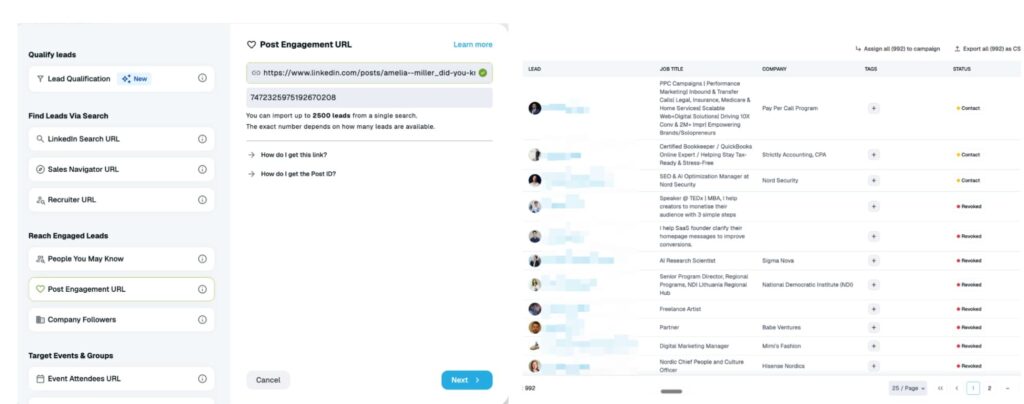
Either way, you now have an audience worth reaching. Next, the outreach that turns a profile view into a remembered brand.
Step 4: Launch a value-first sequence (and run it safely with Expandi)
The sequence has one job: deliver the resource and build recognition, with zero pressure.
A connection request, a thank-you that hands over the PDF, and one or two light follow-ups: then it stops the moment someone replies. Keep the pitch out of this sequence entirely. Awareness is the only goal.
The reason we’re focusing on LinkedIn for the delivery and not emails is because of the replies.
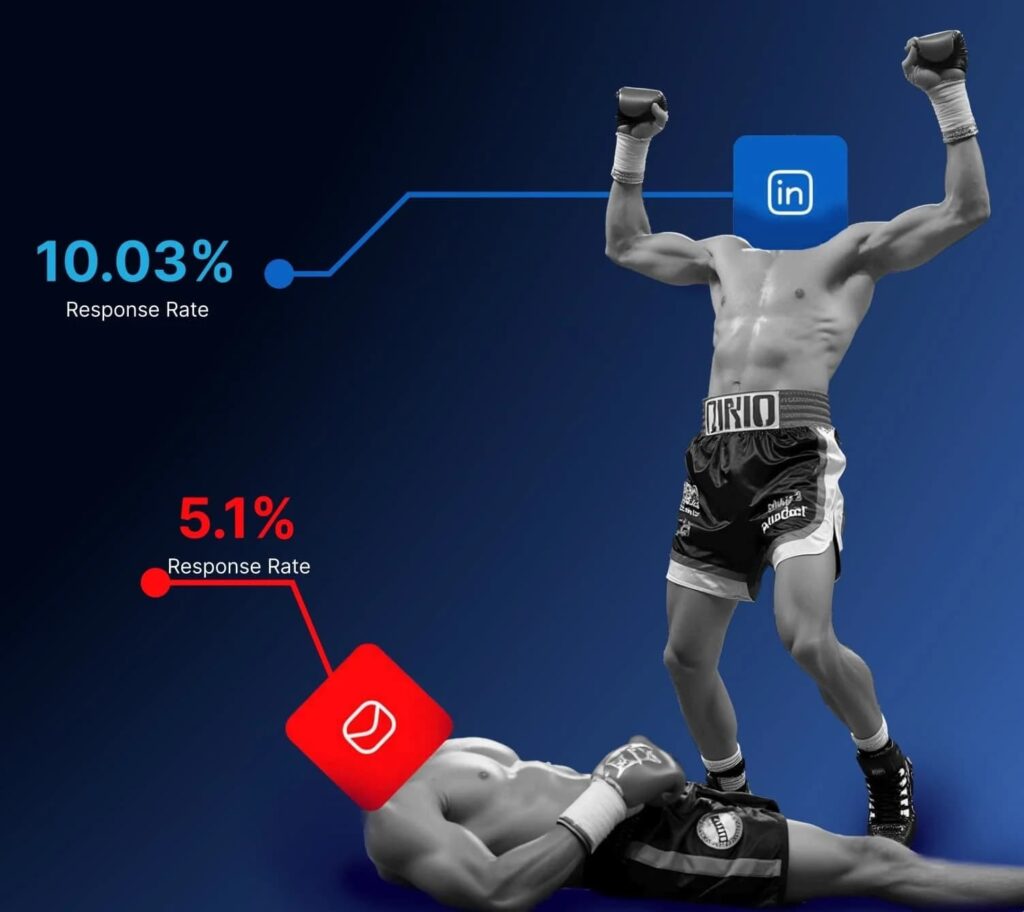
Across the 70,000+ campaigns in our State of LinkedIn Outreach report, we found that LinkedIn DMs reply at 10.3% on average, double the 5.1% cold email pulls.
Treat that as the floor. Leading with a free resource lifts you above it, and reaching people who just engaged with your post lifts you further. Our signal-triggered campaigns reply at 13-14%, and messenger campaigns reach up to 16.86%. Giving first, to a warm audience, is what moves the number.
Here’s a clean, value-first sequence you can lift and adapt. Swap the bracketed hooks for something real, and let the {placeholders} auto-fill from each profile:
Connection request
“Hi {first_name}, I put together a short guide on [specific outcome. e.g., booking more meetings from LinkedIn] and thought it might be useful for someone doing [their role]. Happy to send it over if you’re open to it.”
Message 1: the handoff (after they accept)
“Thanks for connecting, {first_name}. As promised, here’s the guide: [link]. I think it’s genuinely useful for [their role or goal]. Would love your honest take if you get to it.”
Message 2: light follow-up (5-7 days later)
“Hope the guide was helpful, {first_name}. Anything in there you’d want me to go deeper on? Happy to share what’s working for other [their role]s right now.”
If these people came from a post they engaged with, warm the opener up further by referencing it: “Thanks for commenting on the post. Here’s the guide I promised.” The touch then lands as a promised follow-through.
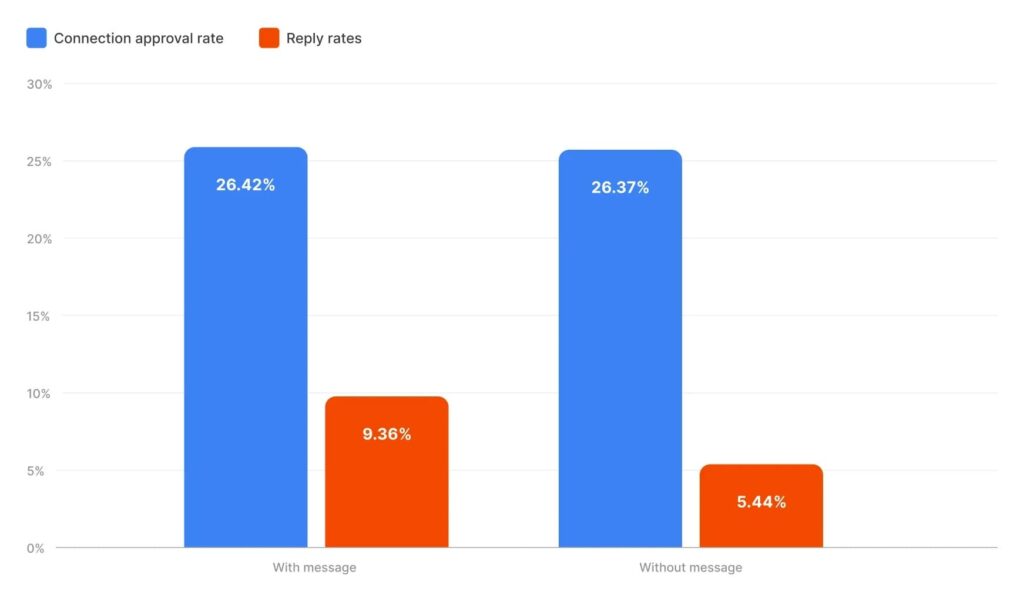
One counterintuitive find from our own run: the version with a blank connection request (no note at all) got accepted more often than the written one, and pulled far more follow-up replies.
It tracks with the benchmarks.
Across the 20M+ Expandi outreach attempts Belkins studied, acceptance barely moved with a note versus without (26.42% vs 26.37%). A strong profile and a relevant offer often do more than a clever opener, so test both on your audience.
Sending this by hand caps out fast. Expandi runs the whole sequence from a cloud-based account with a dedicated IP, so it sends on schedule, paces like a human, and stops on reply automatically. Setup is three moves:
- Import your Sales Navigator search. In Expandi, open Lead lists, choose Add leads, pick the Sales Navigator URL type, and paste your search URL. LinkedIn caps each import at 2,500 leads per list, so switch on Auto-refresh list to pull in new matches automatically as the search updates.
- Build a Connector campaign. Add your connection request and follow-ups, set the delays (give the first follow-up at least 5-7 days), and the campaign handles the rest.
- Personalize at scale. Use {placeholders} for the basics, and let Expandi’s AI Analyzer reword each message per lead, so one template reaches a thousand people in a thousand different ways.
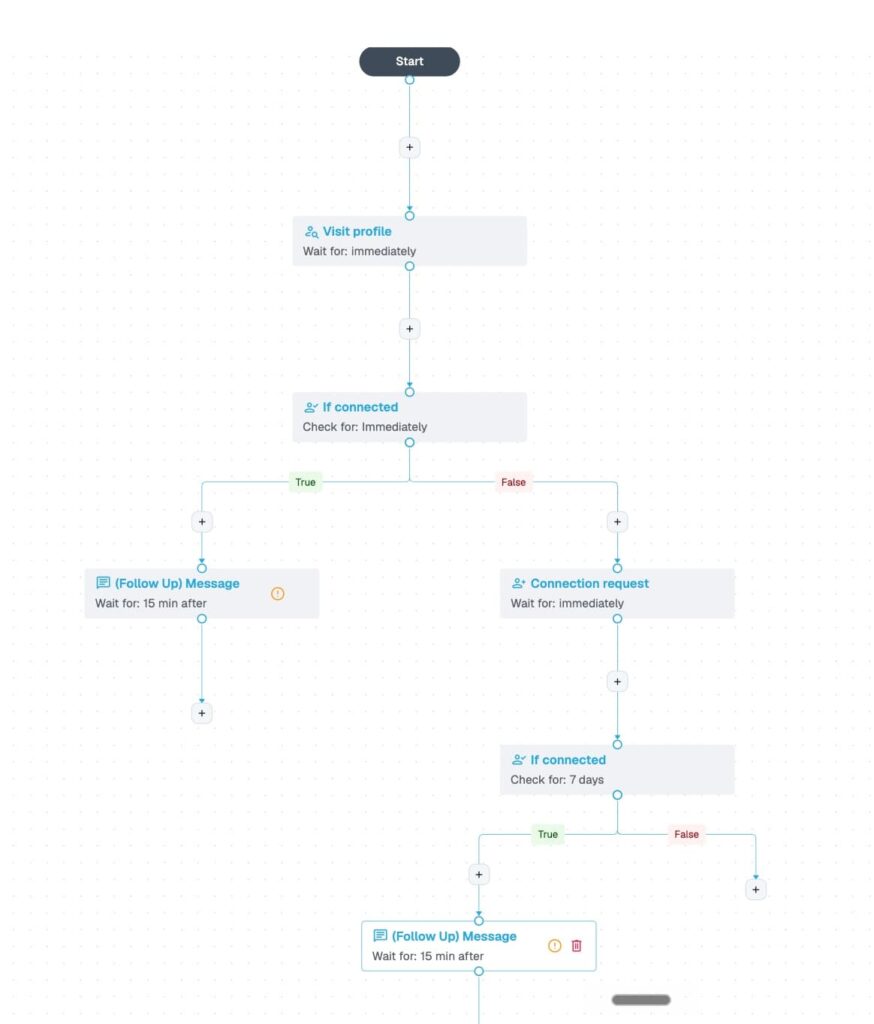
Account safety is brand safety here: a profile that gets restricted for spammy automation does the opposite of building awareness.
Keep it clean: warm up a new or newly automated account (start around 20 requests a day and ramp over two to three weeks), keep connection requests within LinkedIn’s limits, randomize delays, and let the sequence stop on reply.
Step 5: Stay top of mind across channels
One touch builds recognition. Repeated, useful touches build a brand.
After the LinkedIn sequence, the goal is to stay in front of the same people on other channels so your name is familiar when they’re finally ready to buy. Multichannel is how awareness compounds.
That repetition is what makes later outreach land.
“…when we do the outbound to our key ICP personas, people have already seen us, they’re aware of us, what we do, they recognize our faces — and that’s worked really well for us.” — Morgan Edmondson, co-founder of Nesti, which builds personalized AI video for go-to-market teams, told GTM Society.
Three ways to keep showing up, from simplest to most advanced.
Add an email step to the same sequence
The cleanest option lives inside Expandi.
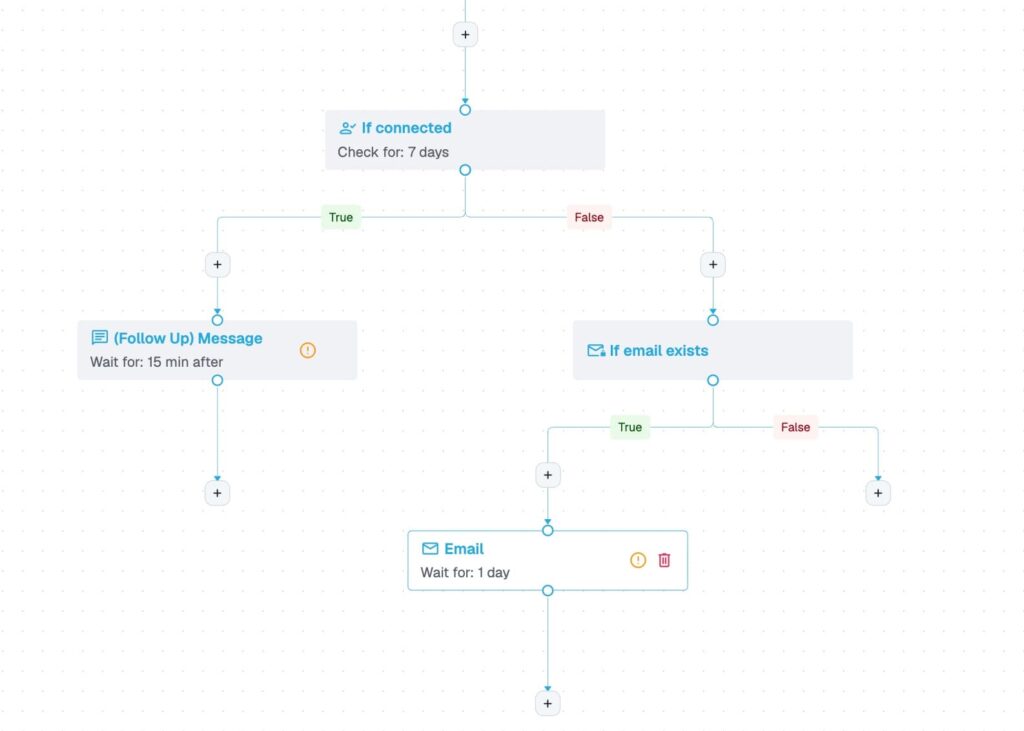
Add an Email action to your Builder campaign so a prospect who didn’t reply on LinkedIn gets a useful follow-up in their inbox.
Connect Gmail, Outlook, or another provider, add an “If email exists” condition before the email step, and the LinkedIn-and-email sequence runs itself, with no third-party tools and no data leaving your stack.
Retarget on LinkedIn with Matched Audiences
To stay visible in the same place the first touch happened, LinkedIn Matched Audiences lets you upload your contact or target-account list (minimum 300 members) and show ads to those exact people, or retarget anyone who engaged with your content or company page.
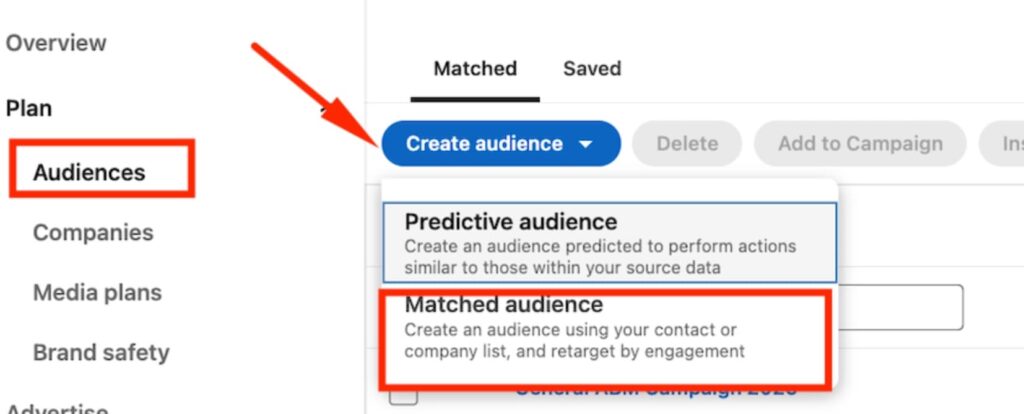
Because it stays inside LinkedIn, there’s no cross-platform data transfer, which makes it the cleanest retargeting route for B2B.
Retarget on Meta with a Custom Audience (advanced)
The original version of this play pushed contacts into a Facebook Custom Audience to retarget them there, and it still works if your audience is on Meta.
The flow:
- Find each contact’s email with AI lead generation tools like Hunter or Clay.
- Pass it through Zapier into a Meta Custom Audience built from a customer list.
- Run a retargeting ad.
Meta needs at least 100 matched contacts to deliver (1,000+ is better for the algorithm), so feed it a full campaign’s worth.
One important caveat for 2026: uploading found or scraped emails into Meta is a different use of that data than your outreach, and EU regulators have rejected “legitimate interest” as the basis for it. For European contacts, that means you need explicit consent, which cold prospects won’t have given.
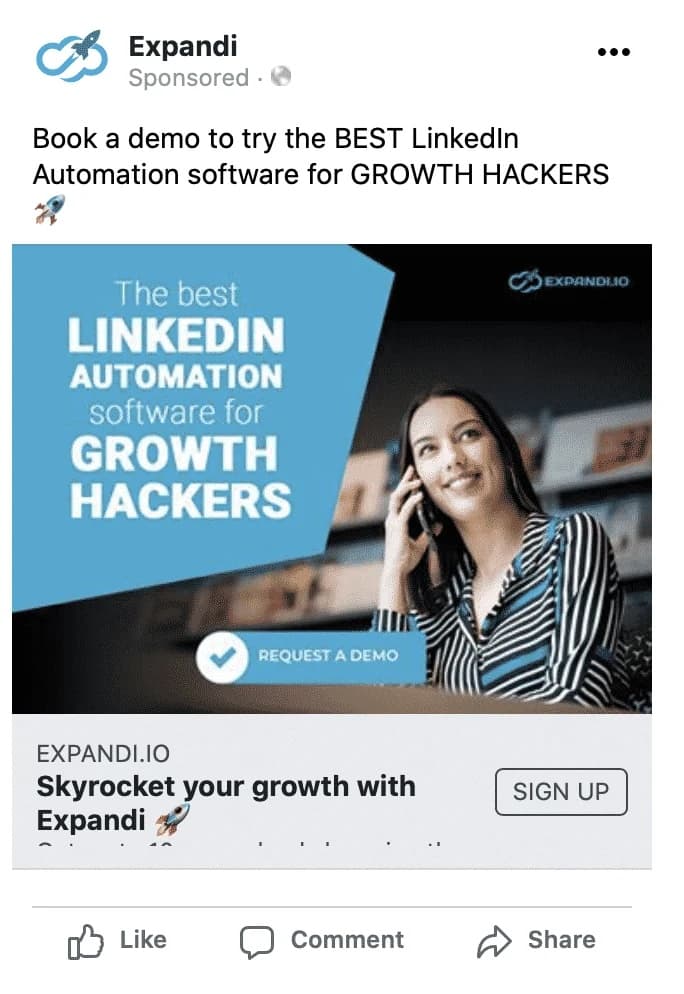
If you’re targeting the EU, keep retargeting on LinkedIn or by email.
The Meta route fits non-EU, opted-in, or existing-customer audiences. And when someone engages with those ads or your posts, that engagement is itself a buying signal you can trigger a fresh, warmer sequence from.
The results: why this playbook on increasing brand awareness on LinkedIn works
Run end to end, this play built awareness with a thousand cold prospects and turned a chunk of them into conversations, at acceptance rates above the LinkedIn average.
It’s one of the LinkedIn lead-gen plays we run ourselves. Here’s what our two-version test returned, same offer and same audience size:
| Metric | Version 1 (with note) | Version 2 (blank request) |
|---|---|---|
| Prospects contacted | 495 | 490 |
| Connections accepted | 152 (31%) | 198 (40%) |
| Replies to follow-ups | 22 | 71 |
Two takeaways.
- First, the blank connection request beat the written one on both acceptance and replies — proof that a strong profile and a relevant offer can outperform a clever note.
- Second, 40% acceptance sits well above the 28.5% average across the 13M+ connection requests in our 2026 outreach benchmarks, because the offer gave people a reason to say yes.
The retargeting layer is what extends those numbers past the campaign. Every contact who saw the resource and then keeps seeing your brand on LinkedIn or in their inbox is awareness you’re compounding for next quarter’s pipeline.
Common LinkedIn brand awareness mistakes to avoid
This play fails for predictable reasons: pitching too early, gating the resource, or skipping account warm-up. Sidestep these and the campaign builds the brand awareness it’s meant to:
- Pitching in the first message. The play works because it gives before it asks. A demo request in the connection note kills the goodwill and the acceptance rate.
- Gating the resource. Sending warm contacts to a form to download the thing defeats the point. Hand over the file or a direct link.
- Skipping profile optimization. Outreach drives profile views, and an unfinished profile turns a brand impression into a shrug.
- Blasting without warm-up. Pushing volume on a cold account gets it restricted, which damages the brand you’re trying to build. Ramp gradually.
- Letting sequences run past a reply. If a campaign keeps messaging someone who already answered, the brand impression flips from helpful to careless. Stop every sequence on reply.
Turn brand awareness into booked pipeline
Brand awareness on LinkedIn comes down to being useful to the right people before they’re ready to buy, so when they are, you’re the name they already trust.
The PDF lead magnet play does that at scale: a genuinely helpful resource, delivered through value-first outreach, reinforced across channels until recognition turns into pipeline.
That’s the kind of campaign Expandi is built to run: cloud-based, dedicated-IP outreach with smart sequences and an AI Analyzer that personalizes every message.
Start a free 7-day Expandi trial and launch your first value-first awareness campaign this week.
Frequently asked questions
Increase brand awareness on LinkedIn by reaching the right buyers directly with something useful.
Optimize your profile, give a free resource like a PDF to in-ICP prospects through value-first outreach, then stay top of mind with email and retargeting. Pair that with consistent content so the people you reach also keep seeing you. The goal is to be familiar before a buyer is in the market.
Reach is how many people see your brand. Awareness is how many remember it.
You can reach thousands with a post or an ad and still build little awareness if nothing sticks. On LinkedIn, awareness comes from repeated, relevant contact: a useful resource, a recognizable profile, and timed follow-ups — so the right buyers recall you when they’re ready to buy.
Expect early signals in weeks and real recognition over a few months.
A value-first outreach campaign can lift profile views and connection acceptances within the first few weeks, since you’re contacting buyers directly. Broader awareness: branded search, inbound mentions, people recognizing you cold — builds over three to six months of consistent reach and follow-up. It compounds, so the teams that keep showing up pull ahead.
Track profile views, search appearances, post impressions, and follower growth over time: rising numbers mean more people recognize you.
For outreach specifically, connection acceptance and reply rates work as proxies: when a value-first campaign accepts above the LinkedIn average, your brand and offer are landing. Branded search volume and direct traffic to your site round out the picture.
You can build a lot of it for very little. Organic content and an optimized profile cost only time, and a value-first outreach campaign runs on an automation tool from around $99 a month per seat, plus the cost of creating one good resource.
Paid LinkedIn ads add budget on top — useful for extra reach, though the organic, outreach-led play carries most of the awareness here. A common approach is to start organic and layer ads once the play is working.
Yes. For B2B, it’s the strongest social channel for brand awareness. LinkedIn has more than 1.3 billion members, and 85% of B2B marketers rate it their highest-value platform, so it’s where your buyers already spend their professional attention.
It works for awareness because you can reach decision-makers directly and stay in front of them with content and outreach, rather than hoping they scroll past an ad.


You’ve made it all the way down here, take the final step