LinkedIn Acceptance Rate in 2026: Benchmarks and How to Boost Yours With Expandi and Clay

Your LinkedIn acceptance rate is the gate that decides whether the rest of your outreach is successful or not. If prospects don’t accept the request, they never see the follow-up, the pitch, or the case study you spent two hours writing.
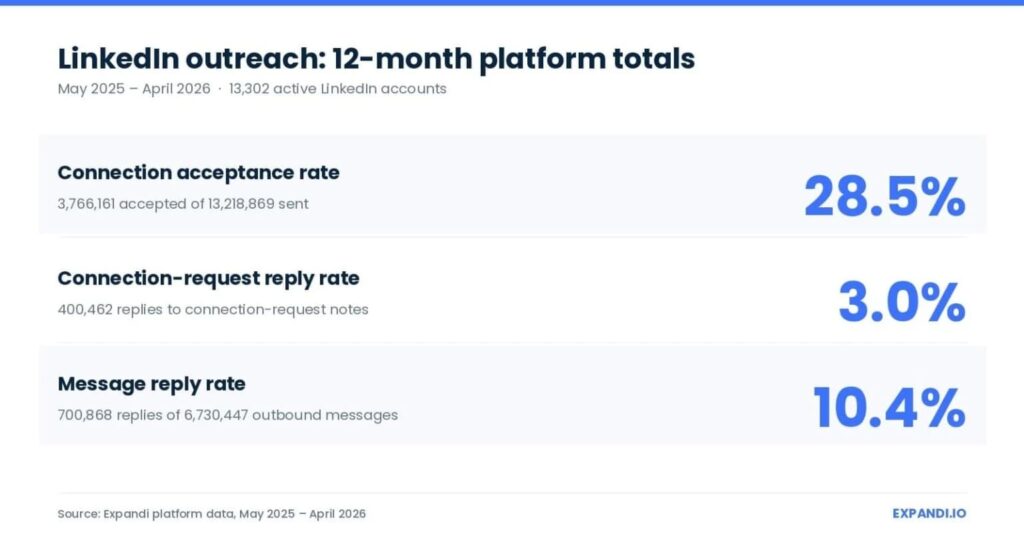
In 2026, the average acceptance rate sits at 28.5% across 13.2 million Expandi-tracked requests — meaning seven out of ten cold requests get ignored by default.
We pulled the highest-performing campaigns running on Expandi to understand what separates the campaigns stuck at 20% from the ones running at double the platform average — and it’s those same three moves, consistently.
Learn what counts as a good LinkedIn acceptance rate in 2026 across different industries, the six factors that boost your LinkedIn acceptance rate the most, and the 5-step Expandi + Clay workflow that turns a flat list into hyper-personalized outreach.
Key Takeaways
- The 2026 LinkedIn connection acceptance rate benchmark is 28.5% across 13.2M Expandi-tracked requests. A good rate is 30-45%. Below 20% risks account restriction.
- Industry moves acceptance far more than sender profile — industries in the 2026 dataset range from 17.5% to 40.1%, while sender seniority lands within a 3-point band. Target-list quality drives the headline number.
- Six factors move acceptance: picture and banner, headline, summary, work experience, content cadence, personalization. Optimize all six before scaling volume.
- The Expandi + Clay workflow targets actively posting leads, enriches each prospect’s recent post for context, and sends a uniquely personalized request: the combination that puts campaigns in the top acceptance band.
LinkedIn Acceptance Rate in 2026: Benchmarks and How to Boost Yours With Expandi and Clay


What is the average LinkedIn acceptance rate in 2026?
The platform-wide average LinkedIn connection acceptance rate is 28.5% as of 2026, per our LinkedIn outreach benchmarks for 2026 — 13.2 million connection requests sent between 2025 and 2026.
That number is a baseline. Where you land depends mostly on three things:
- Who you’re targeting.
- What your profile looks like.
- How you personalize your LinkedIn connection requests.
How to read your LinkedIn acceptance rate
A good LinkedIn acceptance rate in 2026 sits between 30% and 45%. Below 20% signals targeting or profile problems, and 60%+ puts you in the top tier of campaigns.
Here’s the full breakdown:
| Acceptance rate | What it means |
|---|---|
| Below 20% | Red flag — targeting or profile issues. Risks account restriction. Stop sending and fix profile or list before scaling. |
| 20-30% | Average. Profile is okay but targeting or messaging could improve. |
| 30-45% | Good. Strong targeting and profile. |
| 45-60% | Excellent. Tight ICP fit, optimized profile, signal-based outreach. |
| 60%+ | Top 10% of campaigns in the 2026 dataset. Hyper-personalized, signal-triggered, warm-lead campaigns. |
By industry and sender seniority
Industry targeting swings acceptance more than anything else in the 2026 dataset:
| Industry segment | Acceptance rate |
|---|---|
| Broadcast media | 40.1% |
| Staffing and recruiting | 36.5% |
| Platform-wide average | 28.5% |
| Apparel and fashion | 19.9% |
| Consumer electronics | 17.5% |
Sender seniority barely registers.
Across the 13,302 senders in the dataset, every seniority bucket lands within a 3-point band — 26.3% for junior senders up to 29.4% for C-level.
The list you target moves the number. The title on your own profile barely does.
How long should my LinkedIn connection request be?
LinkedIn caps the connection note at 200 characters for everyone — Premium changes how many personalized invites you can send (unlimited, versus three a month on free accounts), and the length cap stays the same.
What works inside that limit:
- 1-2 sentences that reference a specific signal (their post, a mutual connection, a shared event).
- A single line on why they should connect.
- No pitch, no link, no CTA.
As a rule of thumb, the shorter the connection request, the better.
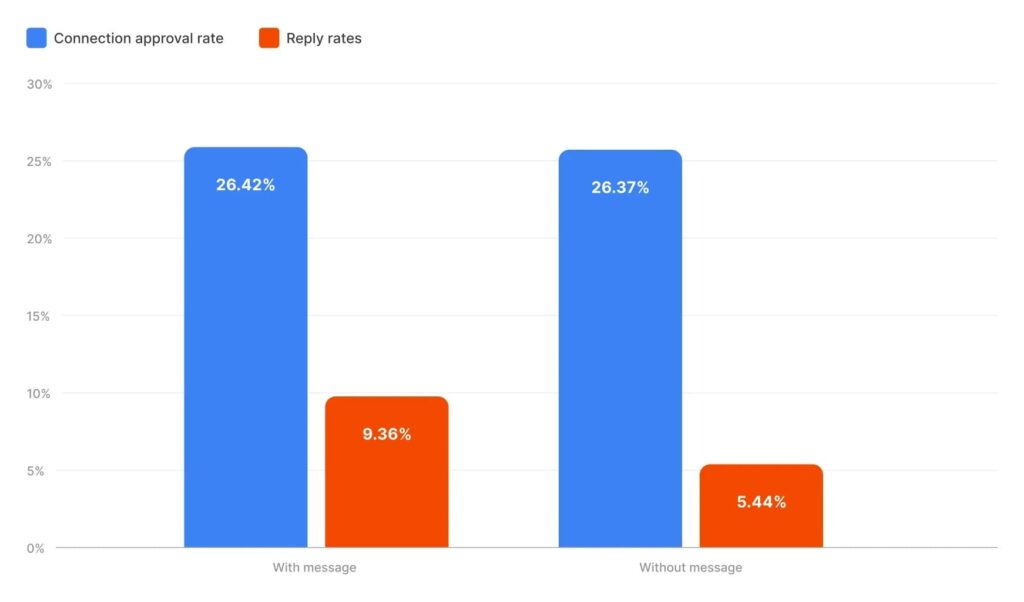
Belkins’ 20M-attempt study of campaigns run through Expandi found acceptance lands within rounding distance with or without a note — 26.42% versus 26.37% — while the reply rate after the accept jumps 72% when a note is there.
A tight, specific note sets up the conversation that follows the accept.
“Do not send a lengthy message in your connection request because people will think it’s spam and they won’t connect with you,” says Alex Fine, co-founder of Understory.
For more on what works in the note itself, see our LinkedIn connection message templates guide.
What determines your LinkedIn acceptance rate? 6 factors that move the number
Six things separate accounts hitting 50%+ acceptance from accounts stuck at 20%.
Optimize all of them before scaling outreach volume — fixing the profile and ICP first is cheaper than burning a list to find out something’s off.
1. Profile picture and banner
Use a professional headshot — high-quality, approachable, smiling.
The banner can show you in a professional environment (giving a talk, on a panel) or a branded Canva graphic showcasing your role or company. Default banners and missing headshots both tank acceptance immediately.
2. Headline
Your headline is the first thing every prospect sees in the connection request preview. Write who you help and how, rather than your job title.
“Helping SaaS companies scale outbound with signal-based campaigns” beats “Marketing Specialist.”
3. LinkedIn summary
Use the About section to tell your story.
Focus on who you help, the specific problems you solve, and outcomes where possible. Include keywords relevant to your industry naturally — these affect search visibility on LinkedIn too.
4. Work experience
Achievements over responsibilities.
Include quantifiable data where you can. “Grew pipeline 3x in 60 days for B2B SaaS clients” reads stronger than “managed accounts and ran campaigns.”
5. Content cadence
People accept requests from faces they recognize in the feed.
Even one well-targeted post per week shifts you from static profile to recognizable peer — and a dormant profile gives the prospect nothing to check you against.
6. Personalization (for what comes next)
Include a personalized note that references something specific — a recent post, a shared group, mutual connections, or an event you both attended. Generic “I’d love to connect” lines underperform notes that reference something specific to the prospect.
“If you are just trying to sell me something… there’s a chance that I will refuse the connection. But if you are more interested just by being connected… giving more context, then there’s a chance that I will accept,” says Alex Delivet, founder of Collect, a customer onboarding platform.
One nuance worth naming directly: per Belkins’ 20M-attempt study of Expandi campaigns, personalization barely moves acceptance itself (26.42% with a note vs 26.37% without). Where it moves the number is the post-acceptance reply rate, which jumps from 5.44% to 9.36%.
Acceptance on its own is a vanity number: a network full of silent connections books zero meetings. The note’s job is the conversation the accept starts.
For more on profile optimization top-to-bottom, see our improve LinkedIn profile tips guide.
Additional tips to boost your average LinkedIn acceptance rate
Beyond profile and personalization, these tactics compound on top of the six factors above:
- Monitor and adjust campaigns weekly. Review acceptance rates, message responses, and overall campaign performance. A 30% rate three weeks in is fine — a 30% rate after three months means you’re not iterating.
- Warm up the account before scaling. Before launching outreach, spend a week or two engaging with posts, joining relevant groups, and connecting with people in your industry. This builds credibility and warms the algorithm.
- Respect LinkedIn’s limits. The working weekly connection request cap sits around 100, and mobile-connector flows add another 50-100 on top. Pushing past the cap triggers warnings and eventually restrictions. Use Expandi’s daily limits and randomization to pace requests at human speed.
How to boost your acceptance rate with Expandi + Clay: 5-step outbound workflow
This is the workflow customers run when they want both halves of the funnel working — acceptance well above the 28.5% average, and a real conversation once the connection lands.
The acceptance lift comes from targeting people who actively post on LinkedIn (they’re checking notifications, they see the request). The reply lift comes from Clay-generated openers written off each prospect’s most recent post.
Two tools you’ll need:
- Expandi — cloud-based LinkedIn automation that sends connection requests at human pace from a dedicated country-based IP on your own account.
- Clay — data enrichment platform with 150+ premium data sources and AI message drafting. Pulls each prospect’s recent LinkedIn post.
For the full setup between the two tools, see our Clay and Expandi integration guide.
Step 1: Target active leads
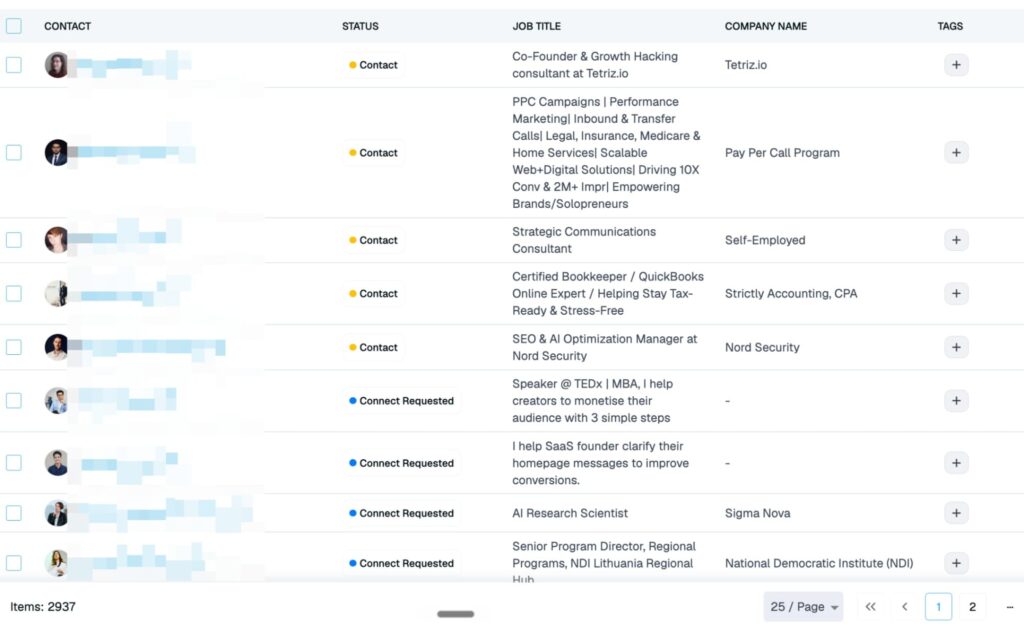
Scrape people who recently engaged with a post, use Sales Navigator filters, or import a list from a competitor’s followers.
Active leads are the point — they’re already on LinkedIn checking notifications, so your request gets seen.
To import the list in Expandi:
- Sign in to Expandi, or start a free 7-day trial if you haven’t yet.
- Create Search > Add new search > Sales Navigator search > paste the URL.
- Expandi imports the leads in a few minutes. Export as CSV for the next step.
Step 2: Enrich with Clay
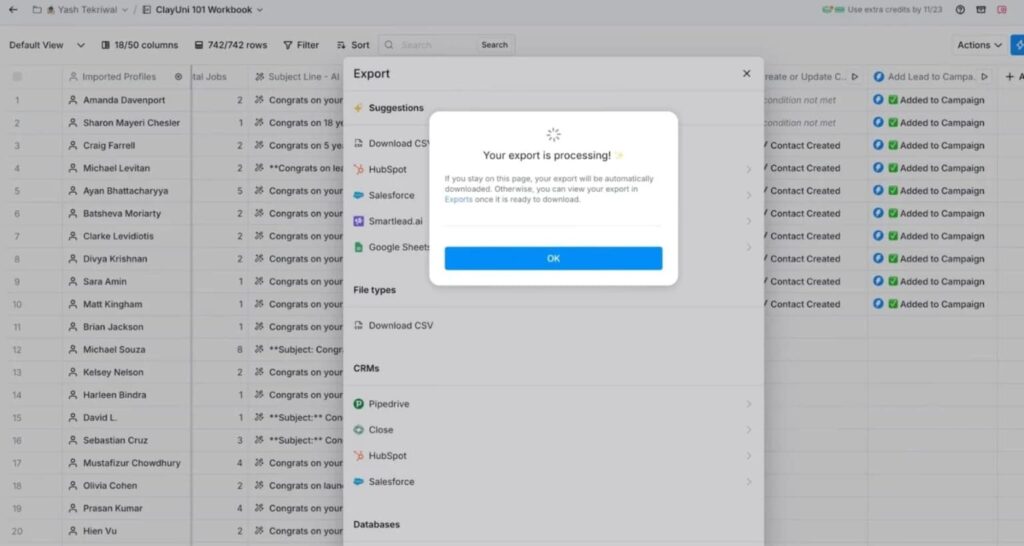
Create a free Clay account. Clay pulls from 150+ premium data sources to enrich outreach lists with public data.
To enrich the list in Clay:
- Create a new table in your Clay workspace.
- Upload the CSV from Expandi.
- Click “Add Enrichment” > “Find Recent Post by User.” Clay searches each prospect’s recent posts and adds the most recent one as a new column.
Step 3: Generate personalization icebreakers with Clay
This is where the recent posts from Step 2 turn into openers — the step that makes every request read hand-written:
- Add another enrichment from the top right.
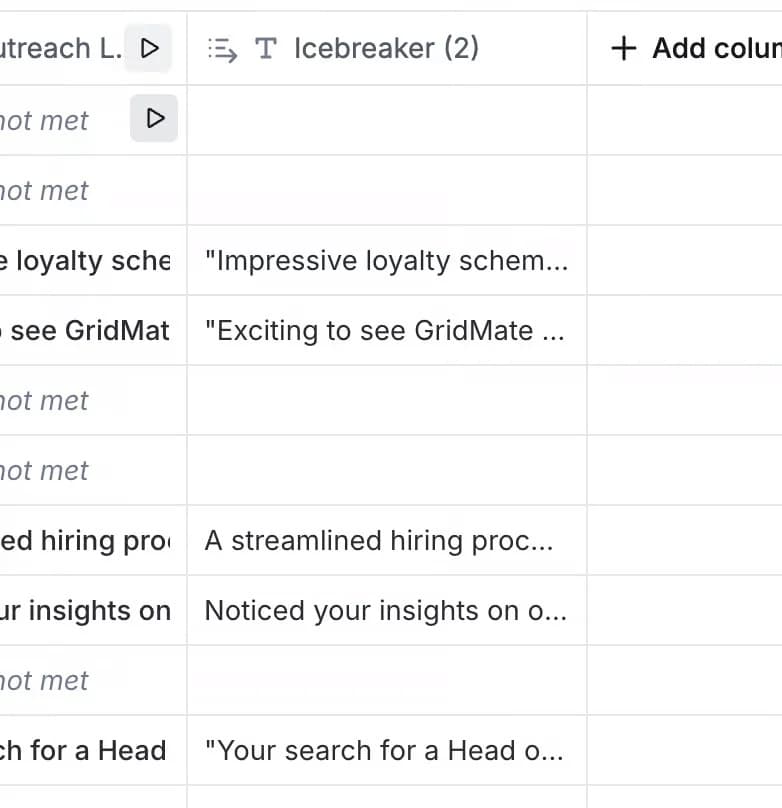
- Use Clay’s AI to generate a unique opener for each prospect based on their recent post, using this prompt:
“Analyze a person’s recent LinkedIn post and generate a unique opening line for cold LinkedIn outreach: 1. Limit it to 12 words. 2. Make it relevant to their title. Title: {job_title} Post: {Post}”
Select “cold email copywriter” as the system prompt so the AI hits the right tone.
Clay generates uniquely personalized openers in a new column. Each prospect gets their own line, written off their actual recent activity.
Download the enriched list as a CSV.
Step 4: Set up the Expandi campaign
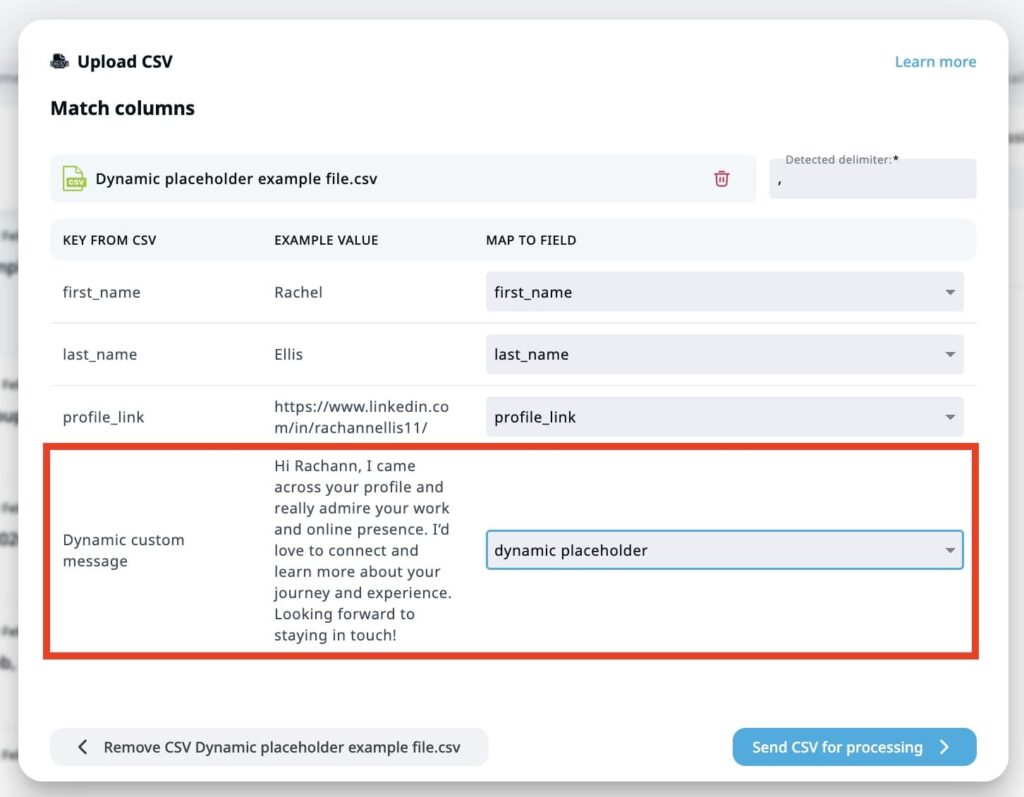
Back in Expandi, create a dynamic placeholder for the Clay personalization column:
- Under My Network > Placeholders > Create Placeholder.
- Name it (e.g., “Icebreaker”) and create.
- Create a new campaign > Builder.
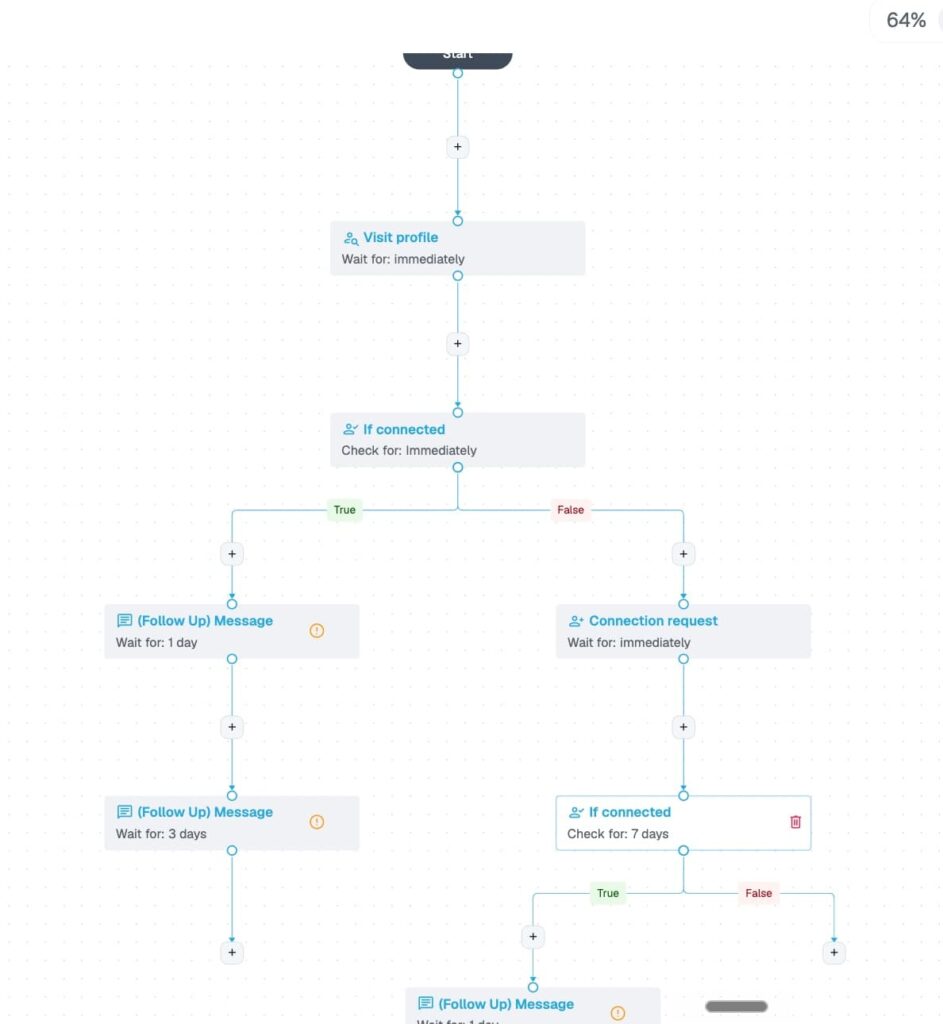
Since this is a connection request campaign, the flow is simple: a single connection request step. If you want to layer follow-ups for accepted prospects, add a message step after.
Step 5: Write the template and launch your campaign
Last step. Set up the connection request template using the dynamic placeholder:
{{icebreaker_fallback:”Let’s connect!”}} [Your follow-up line — optional, but try something contextual to the icebreaker]
The fallback ensures every request has a message even if the Clay column is empty for some prospects.
- Save the message.
- Add the people from your Clay CSV: People > Upload CSV.
- Activate the campaign.
From here the campaign can grow past the single request: add a follow-up message step for everyone who accepts, a wait-and-email step for anyone who goes quiet, or any of Builder’s 19 actions and 11 conditions to turn one icebreaker into a full sequence.
The same Clay placeholder works in every later message, so the personalization carries through the whole flow.
Why this workflow produces top-band campaigns
The workflow does two jobs at once, each backed by data from earlier in this article:
- Acceptance lift — targeting active posters. People who recently posted are on LinkedIn, checking notifications, and primed to see and act on your request. This is what moves the headline acceptance number above the 28.5% average.
- Reply lift after accept — Clay-generated openers per prospect. Per Belkins’ 20M-attempt study, personalization barely moves acceptance but lifts the post-accept reply rate 72% (from 5.44% to 9.36%). The unique opener earns the conversation once the connection is in.
- Sustainable delivery — Expandi paces requests at human speed inside LinkedIn’s limits, so the workflow scales without account warnings.
Acceptance from who you target. Conversation from how you open it. Together, they’re the campaigns sitting in the 45-60%+ band.
Get started with the Expandi + Clay workflow
The best part about this workflow is you can get started with both tools today for free:
- Claim your free 7-day Expandi trial — set up your first outreach campaign today.
- Create a free Clay account — 150+ premium data sources and AI message drafting.
With those two tools alone, you can run a hyper-personalized campaign that hits acceptance rates other teams take six months to figure out.
Boosting your LinkedIn acceptance rate frequently asked questions
What is a good LinkedIn acceptance rate in 2026?
A good LinkedIn connection acceptance rate in 2026 is 30-45%.
The platform-wide average is 28.5% across 13.2 million Expandi-tracked requests. Below 20% is a red flag for targeting or profile issues and risks account restriction. Above 45% is strong, and hyper-personalized warm-lead campaigns run higher still.
How can I increase my LinkedIn connection acceptance rate?
Three things move the rate fastest: optimize the profile (picture, headline, summary), tighten the ICP filter so you’re targeting active and relevant leads, and personalize the connection note off a specific signal (a recent post, mutual connection, or shared event).
If a campaign is stuck below 25%, check those three first — one of them is broken.
Does sending personalized connection requests increase acceptance?
Personalization barely moves acceptance, but it transforms the reply rate after the accept.
Per Belkins’ analysis of 20M LinkedIn outreach attempts from Expandi customers, acceptance rates with and without notes are within rounding distance (26.42% vs 26.37%), but reply rates jump from 5.44% to 9.36% — a 72% lift. The note’s job is to set up the next conversation.
What is the LinkedIn weekly connection request limit?
LinkedIn’s working weekly cap is around 100 connection requests per account, and mobile-connector flows add roughly 50-100 more on top.
Sending above the cap triggers warnings and eventually account restrictions. Expandi’s daily limits and randomization keep campaigns safely inside the platform’s limits.
Why is my LinkedIn acceptance rate so low?
If acceptance is below 20%, look at three suspects: an unoptimized profile (no banner, weak headline), targeting outside your ICP, or generic requests with no personalization.
Fix all three before scaling volume — pushing more requests at a 15% rate burns the list and risks the account.



You’ve made it all the way down here, take the final step