LinkedIn Outreach for Lead Gen Agencies: How to Scale in 2026 Without Burning Leads

Month two of a lead gen agency’s LinkedIn outreach often looks like this: high volume, low replies, a client list mostly burned, but nothing booked.
Pushing harder at the same list shortens it faster and drags the reply rate lower, and LinkedIn’s anti-spam systems flag accounts with that exact pattern. By the time the QBR comes around, the client is asking what changed.
What if you led with warm-lead campaigns instead? Outreach to people who already visited the client’s profile, registered for the same event, or engaged with a post. Because the lead moved first, the message lands with context: campaigns built on warm triggers reply at 13.4-16.86% in our 2026 data, against a 10.3% average across all LinkedIn DMs.
Agencies hitting 20%+ connection rates and 7%+ replies run the same pattern — warm-lead campaigns up front, multi-touch follow-ups, manual handoff only once the lead has self-qualified.
This guide covers the four mistakes that burn leads for lead gen agencies, the six-step framework that scales LinkedIn outreach, and the Expandi-specific tactics to automate lead generation campaigns.
Key Takeaways
- The biggest mistake lead generation agencies make in LinkedIn outreach: chasing volume over targeting, skipping lead warm-up, generic messaging, and no follow-ups. Each one tanks reply rates and shortens the list.
- The fix is a six-step framework: warm leads first, automated multi-touch sequences, personalization tied to how each lead got onto the list, disciplined follow-ups, compliance, and transparent client reporting.
- Warm-lead campaigns top the 2026 benchmarks — Inbound Profile Visitor campaigns reply at 13.4%, Event Participant campaigns at 14.21%, and personalized Messenger campaigns at 16.86%, against a 10.3% platform-wide DM average.
- Expandi’s native AI Analyzer scores reply sentiment and routes hot leads first, shrinking manual inbox triage.
How to run LinkedIn outreach as a lead gen agency?


The 4 biggest mistakes lead gen agencies make with LinkedIn outreach
The agencies that scale run different campaigns from the ones that stall — capacity has little to do with it.
The four patterns below are what we see breaking down most often across customer accounts.
1. Relying on lead volume instead of targeting
Every lead gen agency wants higher conversion rates. Under pressure to hit volume goals, the pull toward chasing more leads over better-targeted ones is real — and it’s what tanks reply rates.
Higher volume of the wrong leads is counterproductive. It burns through the lead pipeline, tanks reply rates, frustrates the leads themselves, and damages the agency’s account standing.
“One of the biggest mistakes is reaching out randomly to a lot of people within one company, without tracking the most precise ideal customer profile. You can’t share a clear value proposition and articulate how they’ll benefit from meeting with you if you aren’t targeting the right ICP. They have no reason to take a meeting.” — Dana Kosychenko, Senior SDR at Belkins, an outbound lead gen agency
It also puts the LinkedIn account at risk. LinkedIn’s anti-spam systems flag accounts that send high volumes with low reply rates, and a restricted account stops outreach cold.
Solution: connect strategically with targeted leads
Target specific lead segments with intent-centered campaigns, built from sources that already carry a signal of interest:
- Your CRM or lead generation tool.
- A targeted Excel list.
- An advanced LinkedIn or Sales Navigator search combining dozens of filters (industry, job title, geography, connections, more).
- People who view your LinkedIn profile.
- Comments or likes on your posts, competitor posts, or industry-peer posts.
- LinkedIn Live attendees, events, or webinars.
A shorter, better-targeted list makes it easier to warm up leads, personalize against how you found them, and follow up in a more human way.
2. Not warming up leads before outreach
If you skip warming up LinkedIn prospects before sending a connection request or DM, you get lower response rates and end up chasing even more leads to hit quota.
It is a snowball — more work, worse results, unhappy clients.
Solution: nurture targeted leads first
Build familiarity with prospects over time so your outreach feels recognized rather than cold.
“Prior to reaching out to a lead and trying to sell them something, you start engaging them. When they open LinkedIn and notice our client visited their profile or liked their recent posts, it shows there’s a real, interested person behind the screen, not just a sales robot.” — Dana Kosychenko, Senior SDR at Belkins
You can nurture leads by:
- Visiting their profile.
- Liking their LinkedIn posts.
- Endorsing them for a skill.
- Commenting on their posts.
- Joining their comment-section conversations on other posts.
- Sending targeted emails.
The warm-up pays off in the data.
Automated passive touches before the ask — profile views, post likes, follows — set up the connection request to land warm.
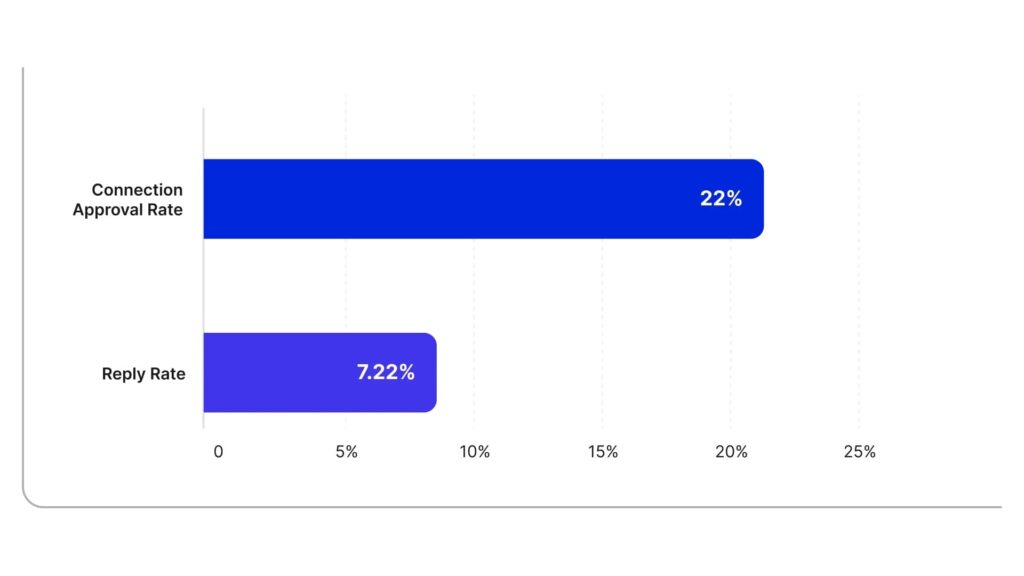
Campaigns built in Expandi’s Builder (the drag-and-drop sequence editor used to chain these touches) average a 22% connection acceptance rate and a 7.22% reply rate in our State of LinkedIn Outreach H1 2026 report, well above cold-start benchmarks.
3. Failing to personalize outreach
The buyer is reading every message through one filter: what’s in it for me. Generic openers like ‘Hello sir/madam’ or ‘I hope this finds you well’ underperform notes tied to a specific signal — and at scale, the gap is the campaign.
Messages that dive straight into the pitch get ignored — especially if the lead has shown no prior interest.
Solution: personalize against how you found the lead
Reference the trigger that put them on your list. Show you have done the work by connecting how you found them to the reason you are reaching out and the value you bring.
“Sometimes I’ll spend just a minute looking at their profile to find something to personalize — maybe a recent promotion or a long tenure. It’s small, but it makes the message feel human.” — Dana Kosychenko, Senior SDR at Belkins
Personalize to cover:
- How you found them or why you are reaching out.
- Your expertise, value, or offer.
- Pain points you solve for their role or industry.
- What is in it for them.
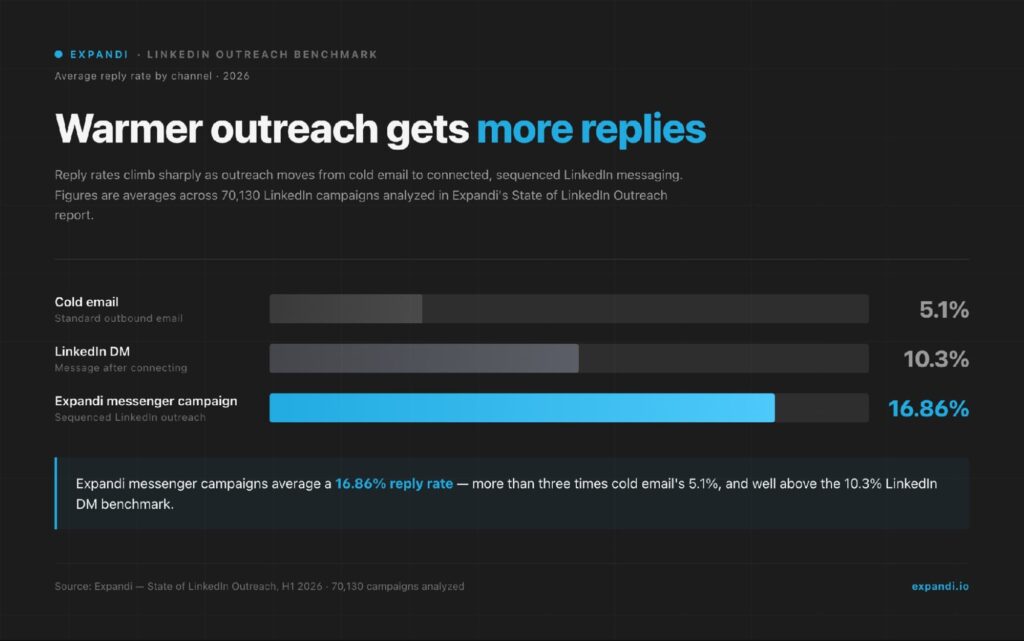
Personalize messages to LinkedIn Live event attendees by referencing the event and the takeaway you found most useful. Expandi Messenger campaigns — which start from a warm trigger (event attendee, post engager, group member) rather than a cold connect — hit 16.86% reply rates — well above the 10.3% platform-wide DM average.
4. Skipping follow-ups
Leads skip a first message for boring reasons — busy, distracted, forgot. Reps who give up after one touch leave high-intent leads on the table.
“Don’t give up too easily — but also don’t be too pushy. Our rule of thumb is that every reply should be handled within 24 hours and that everyone gets at least three or four follow-ups. Once the lead has expressed interest, you should work on it as much as you can.” — Dana Kosychenko, Senior SDR at Belkins
Solution: build a follow-up sequence with value at each step
Keep follow-ups short, relevant, and valuable.
Skip generic “just following up” messages — reference previous interactions, shared interests, or a fresh angle. Offer a resource, a relevant case study, or a personalized video.
Restraint is part of the discipline. In Belkins’ study of 16.5 million cold emails, an initial email plus one follow-up produced the highest average reply rate (8.4%), with returns declining on every send after — by the fourth follow-up, unsubscribe rates triple.
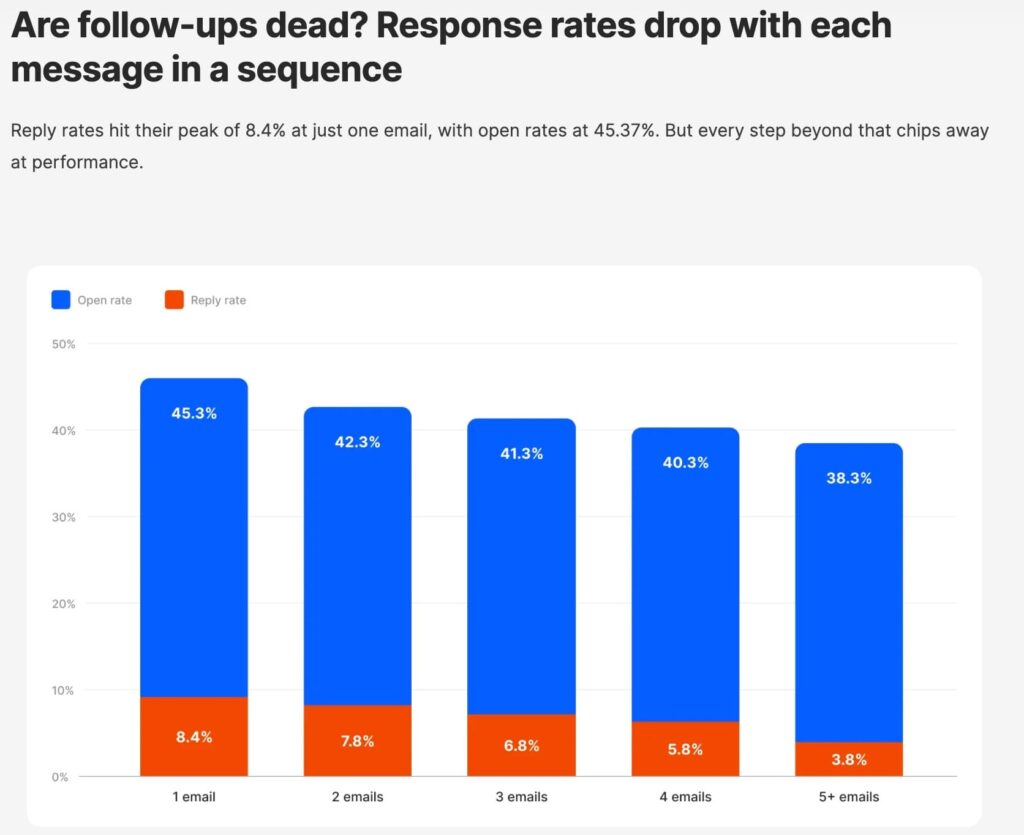
LinkedIn’s curve is friendlier: campaigns that add a second follow-up see 4.05% more responses, per our 2026 data. Across a campaign of a few hundred leads, that gap is the difference between hitting client quota and missing it.
How to run LinkedIn outreach as a lead generation agency without burning leads: 6-step framework
The six-step framework below is how the highest-performing lead gen agencies on Expandi run client outreach in 2026.
The channel earns that focus. LinkedIn puts 1 billion+ business professionals in reach and was rated the #1 platform for B2B lead generation, per their own audience data.
“I find LinkedIn to be one of the best-performing channels for lead generation, so it’s important to run it efficiently. There’s a huge pool of professionals there to set up highly targeted and profitable meetings for clients.” — Dana Kosychenko, Senior SDR at Belkins
Step 1: prioritize warm leads over cold prospects
As a lead gen agency, run outreach to people who are already engaging with your client first.
Using intent and behavioral data captured on LinkedIn, build hyper-targeted campaign lists and write messaging that lands.
Inbound profile visitor campaigns
Profile visitors have already shown interest in your client’s offer or team. Free accounts only show the last five viewers, while Premium unlocks the full viewer list for the past 365 days — which is why Expandi’s Inbound campaign needs a Premium seat.
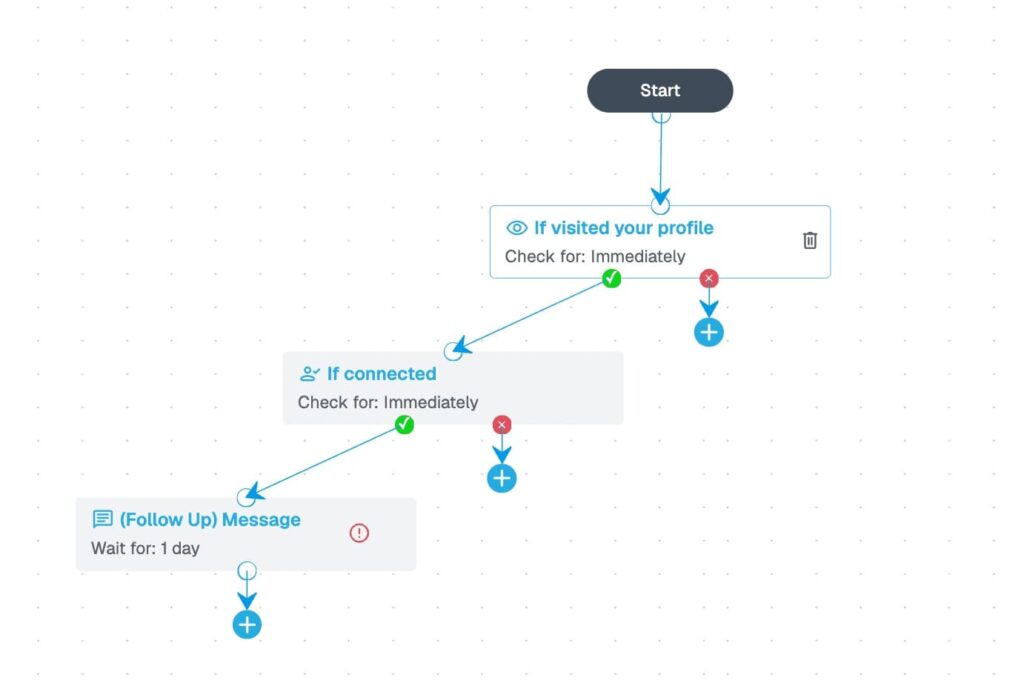
Expandi’s Inbound campaign pulls profile visitors into the campaign list on every sync, so visitors are captured even when the campaign isn’t actively sending. Across the platform these campaigns average a 13.4% reply rate, per our 2026 data.
Keep the message friendly and open-ended:
“Hey [first name]! I noticed you took a look at my profile. Anything I can help you with regarding [topic]?”
Event attendee campaigns
Industry events create memorable peer-to-peer connections. Mimic the same effect by joining topical LinkedIn Live events and reaching out to other registrants.
Sign up for a LinkedIn event, then add the event URL to Expandi’s Event Search to import the attendee list for your outreach campaign. Event Participant campaigns hit 14.21% reply rates in the same dataset.
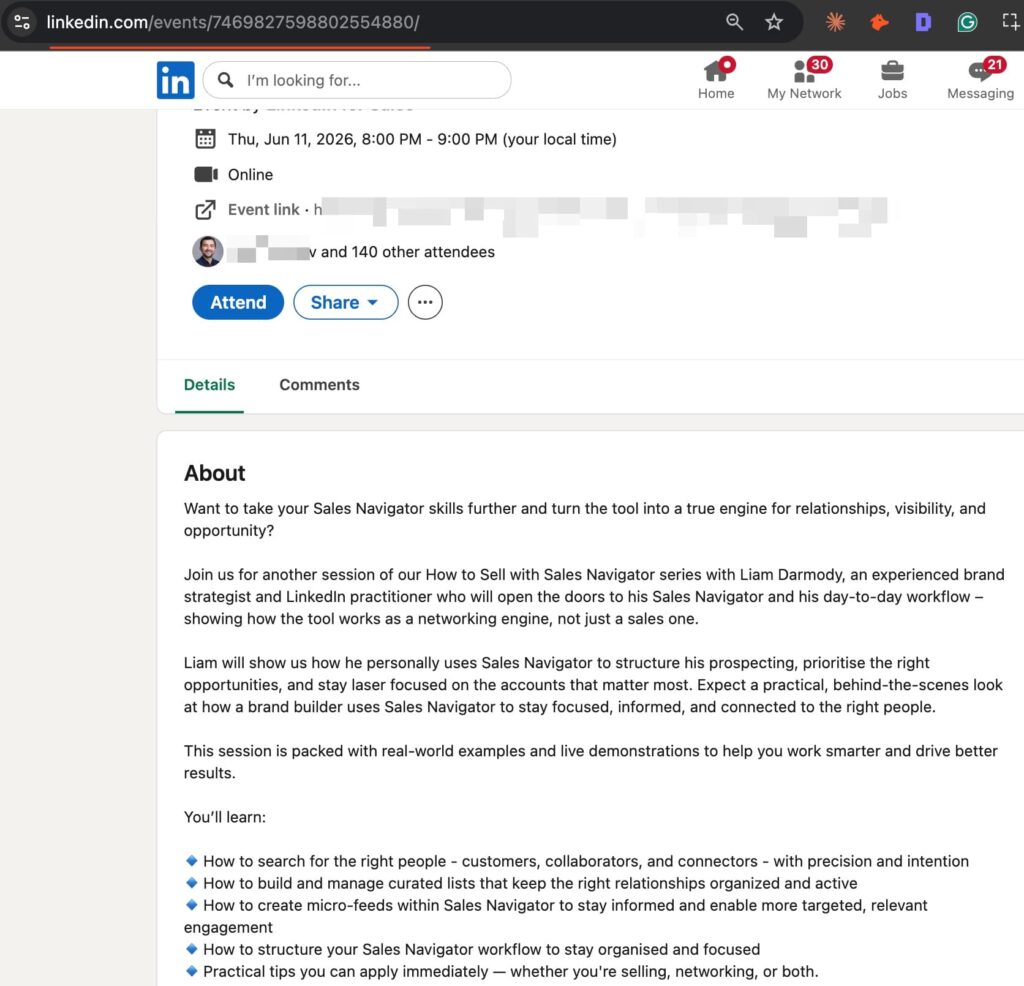
A message that fits the moment:
“Hey [first name]! I noticed you attended [LinkedIn Live event name]. I talk with CMOs regularly who share the same [pain point]. How are you handling it?”
Note: due to recent LinkedIn changes, you can only message users with a Message button in the participant list (not Follow or Connect).
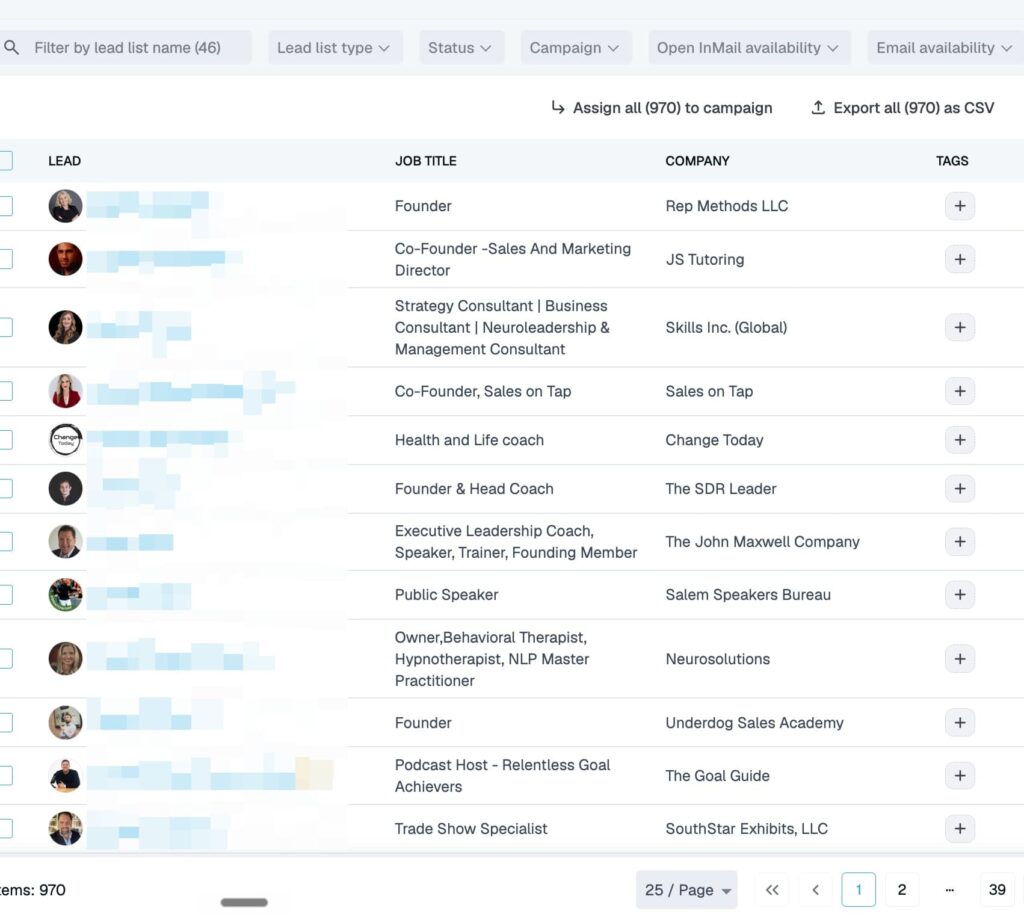
Post comments, poll engagers, and group members campaigns
Social listening tells you what your ICP cares about based on what they comment on, how they vote in polls, and which groups they join. Each of those signals leaves a breadcrumb you can pick up.
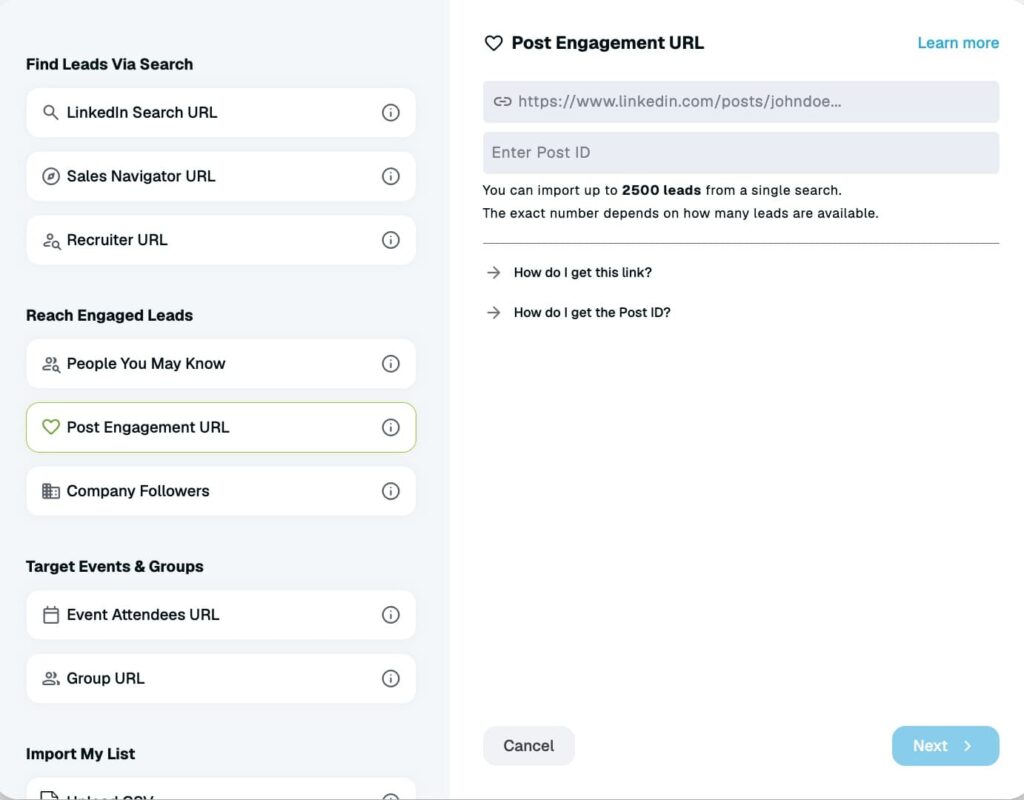
Using Expandi Search, import a list of users who:
- Commented on posts from you, a competitor, or an industry peer. Send a follow-up referencing the post topic.
- Voted in your poll. Filter by how they voted to send ultra-personalized messaging based on their response. (You can only retrieve responses to polls you authored.)
- Follow your business Page or a competitor’s. Send a targeted message to test in-market signals. You can retrieve all leads (1st-, 2nd-, and 3rd-degree connections, up to 1,000 leads) if you own the Page, or any 1st-degree connections from Pages you do not own.
Step 2: automate multi-touch outreach
You have targeted warm prospects. Now automate the multi-touch flow that primes and nurtures them before your real outreach lands.
Automate the manual engagement (profile views, post likes) so the lead recognizes your name by the time your DM arrives.
Stay automated for the initial outreach, then take over manually once the lead replies.
“A lot of the workflow is automated. We step in manually with positive leads, who are more likely to convert, so we’re not wasting time on every single reply.” — Dana Kosychenko, Senior SDR at Belkins
Option 1: use a campaign template
Expandi’s template marketplace is organized by use case — generate more leads, grow your network, get more demos, develop a personal brand.
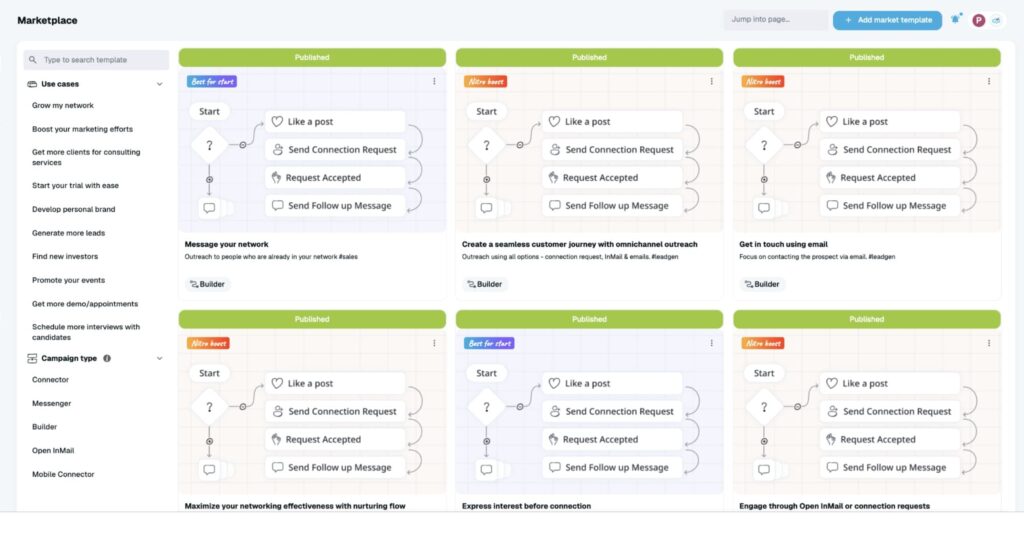
Each template is a customizable flow you can start from.
Option 2: build a custom flow
Builder Campaigns let you drag and drop 20 actions and 11 conditions into custom if-then sequences.
Actions include:
- Visit profile.
- Follow profile.
- Follow company.
- Invite to follow company.
- Mobile connection request.
- Skill endorsement.
- Connection request.
- Follow-up message.
- Send Email.
- Open InMail.
- Like a post.
- Webhook.
- Add tags.
Conditions include:
- If connected.
- If email opened.
- If visited your profile.
- If email exists.
- If post liked.
- Plus ICP filters and custom conditions.
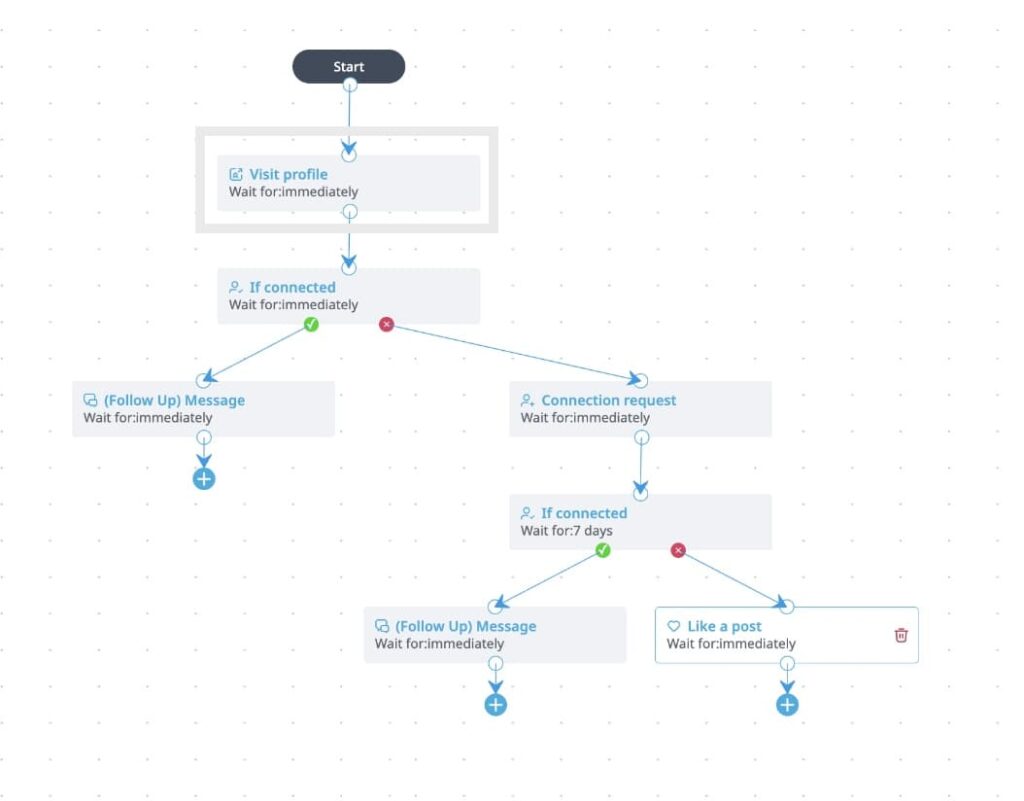
Layer actions and conditions with wait times, body messages, and personalization placeholders to build sequences that escalate over days.
Step 3: personalize outreach to cement a genuine connection
The fastest path to a reply is personalization that references something real.
Keep initial messages non-salesy and centered on mutual interests, the lead’s activity, industry insights, or shared connections.
Reference past engagement:
- How you found them: “Noticed you’re also a member of [Group]. Have you attended their office hours?”
- How you help clients like them: “Saw your post about [topic]. Thought I’d share this one-page case study on how we helped a client overcome [challenge].”
- What you have for them: “Saw your comment on [influencer’s] post. Thought you might enjoy our recent Trends Report on that topic.”
Add video for personalization that compounds
85% of video marketers say video has helped them generate leads, per Wyzowl’s 2026 survey.
With Expandi’s Sendspark integration, lead gen agency reps can send custom video messages directly inside LinkedIn DMs.
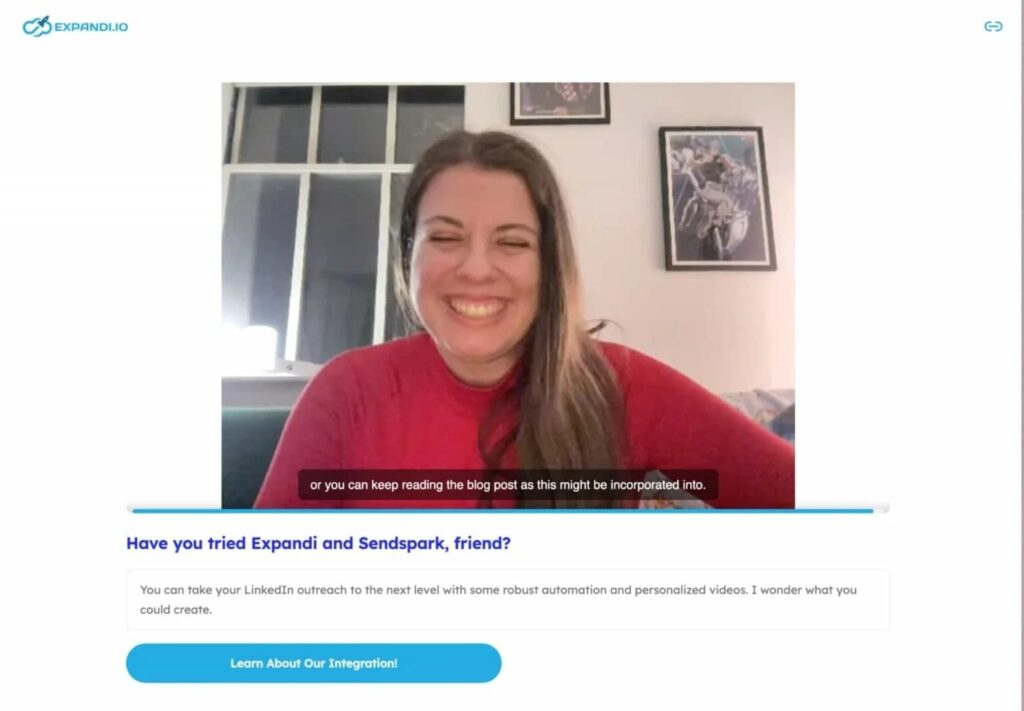
For example:
“Hi [first name], saw your recent post about [topic] — really insightful. I recorded this short video to share a few strategies we’ve seen work with teams like yours.”
Sendspark’s Video Script Generator writes the script and its AI clones your voice to dynamically greet every lead by name. Stitch the personalized greeting to a pre-recorded demo and link to a custom landing page for a one-to-one moment at scale.
Step 4: follow up without overdoing it
The 2026 platform-wide DM reply rate is 10.3% — nine first messages out of ten go unanswered. The follow-up is what unlocks the pipeline.
Keep follow-ups short, relevant, and rooted in value. Skip “just following up” — reference previous interactions, shared interests, or a fresh angle. Offer a resource, a relevant case study, or a video message.
Expandi’s AI features sharpen follow-ups:
- Tags to prioritize. Filter your multi-account LinkedIn inbox by Interaction (awaiting reply, replied) to respond to engaged leads, or by Status (new contact, connection requested) to triage fast.
- AI-optimized timing and messaging. Expandi analyzes reply trends to optimize timing and copy for each follow-up based on past engagement — no guesswork required.
- Sentiment-based adjustments. Expandi’s AI Analyzer scores replies and categorizes responses as positive, neutral, or negative, so you prioritize follow-up to the hot leads first.
- Trigger-based outreach. If a lead engaged (viewed your profile, liked your post) but did not reply, Expandi automatically initiates a timely signal-based follow-up.
Still no response?
Extend the follow-up campaign with more time between steps, or update your Builder campaign with additional passive engagement (post reactions, profile visits) to stay familiar until the lead is more receptive.
Know when to switch to a human touch. Automation earns its keep by setting up meaningful conversations for a human to finish.
Step 5: Stay compliant with LinkedIn’s limits
LinkedIn outreach must stay inside the platform’s rules to protect your client’s reputation and your agency’s standing. Expandi tracks LinkedIn’s evolving connection limits and recommends adjustments to keep campaigns safe.
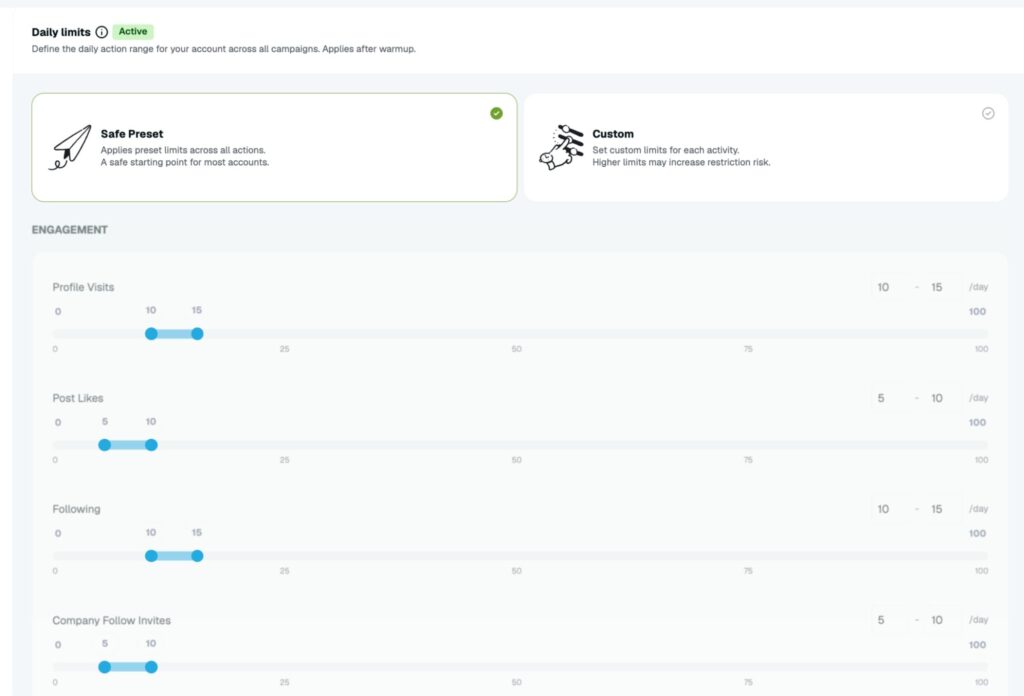
Best practices to stay compliant:
- Monitor connection invite volume. Don’t let pending requests pile up. Use Expandi to automatically withdraw pending requests on a schedule.
- Review each account’s status. Resolve any pending warnings before they escalate into a restricted account, and optimize tactics over time.
- Use Expandi’s mobile connector campaign. Adds 50-100 extra connection requests per week on top of standard limits via the mobile flow (requires 2FA).
- Track prospect feedback. Use Expandi tags to flag individuals who specify they do not want to hear from your team, so they are excluded from your campaigns.
An agile compliance approach protects your clients and preserves the ability to reach the right people.
Step 6: provide transparent client reporting
Clients expect regular updates on performance and tangible results. Expandi’s analytics tracks every campaign action and reply rate, generating automated reports with easy-to-digest charts.
Share weekly or monthly reports with clients covering:
- Number of connection requests sent.
- Acceptance rates.
- Message reply rates.
- Meetings booked.
- Engagement trends and reply sentiment (positive vs negative).
- Anecdotal insights or objections from prospects.
Tie each metric to a client goal. For example, track the lead-to-meeting pipeline by measuring connection acceptance, message reply rate, and conversion rate together.
Past one client account, scale the infrastructure. Expandi Workspaces let an agency manage multiple LinkedIn accounts from one dashboard — shared campaign templates, 100+ permission settings, and client-level reporting, with white-label available on the Agency plan.
The numbers do not lie, even when you do not like what you see. Transparency builds trust and creates the conditions to test optimizations honestly.
Scale LinkedIn outreach for your agency clients in 2026
The most successful lead gen agencies in 2026 use LinkedIn automation tools that warm leads before outreach, automate routine engagement, personalize against how each lead got onto the list, and step in manually only when the lead is hot.
That is the gap Expandi closes. Smart sequences, signal-based campaign triggers, cloud-based execution, native AI sentiment analysis, and a unified inbox — built for agencies running outreach for multiple clients.
If your clients have outsourced their sales to your agency, having the right tools behind you ensures you’ll deliver results that exceed their expectations time and again.
Start your free 7-day Expandi trial and run your first warm-lead campaign this week.
Frequently asked questions
A good LinkedIn connection acceptance rate for agency outreach in 2026 is 30-45%. Below 20% is a red flag for either targeting or profile issues and risks LinkedIn account restrictions.
Across our customer data, warm-lead campaigns significantly outperform cold ones — Inbound campaigns average 13.4% reply rates and Event Participant campaigns 14.21%.
LinkedIn’s working weekly cap is around 100 connection requests per account, varying by account age, profile completeness, and engagement signals, and mobile-connector flows add roughly 50-100 more on top.
Sending above the limit triggers warnings and eventually restrictions. The practical scaling move for agencies is running multiple warmed-up seats rather than pushing a single account past its limit.
Three things separate scaling agencies from burning ones: warm-lead targeting (campaigns prioritizing profile visitors, event attendees, and post engagers over cold lists), multi-touch sequencing that builds familiarity before the pitch, and personalized messaging that references how each lead got onto the list.
Volume without these collapses reply rates and triggers LinkedIn restrictions.
Yes, but only tools that respect LinkedIn’s limits and operate inside the platform’s terms. Expandi runs on the agency’s own LinkedIn account, paces actions to look human, and integrates email and Sales Navigator for full multichannel campaigns.
Scraping APIs and tools that operate outside the platform put accounts at restriction risk.
First replies tend to land within 1-2 weeks of a campaign launch, and first meetings within 3-4 weeks. Pace depends on lead quality, message-market fit, and follow-up cadence.
Campaigns built on warm-lead targeting and multi-touch follow-up compound — reply rates climb in weeks 2-4 as familiarity builds across the lead list.


You’ve made it all the way down here, take the final step