Best LinkedIn Marketing Tools in 2026: Build, Analyze & Automate Your B2B Strategy

In 2026, winning on LinkedIn isn’t about posting more or copying prompts from ChatGPT. It’s about using the right marketing tools to take already established best practices to the next level.
This means leveraging content for outreach, using analytics to double down on what works, and combining organic and paid efforts into one system.
In this guide, we break down the best LinkedIn marketing tools for 2026 and how to use them to build, analyze, and scale a modern B2B strategy.
To make things easier, we evaluated tools based on ease of use, integration with LinkedIn workflows, support, compliance with official APIs, and usefulness for B2B marketers in 2026.
Here’s what we’ll cover:
- What’s new on LinkedIn in 2026, and what you need to keep in mind when looking at LinkedIn automation tools
- The best LinkedIn marketing tools in 2026 (by category)
What’s New on LinkedIn in 2026 (And Why Marketing Tools Matter More Than Ever)
Over the past year, LinkedIn has rolled out changes that directly affect how marketers create content, run ads, and measure performance.
Here’s what’s different in 2026 and why your marketing tools should match how LinkedIn works.
- LinkedIn now has ~1.3 billion members, making it one of the most competitive B2B attention channels.
- Creator Mode has been retired, replaced by improved creator tools focused on newsletters, analytics, and audience insights.
- Campaign Manager has expanded, with better media planning, AI-assisted optimization, and native dynamic UTM support.
- The Conversions API now enables more reliable server-side tracking and better attribution beyond cookies.
- LinkedIn now prioritizes native and short-form video, pushing static, low-effort content further down.
- Teams need tighter reporting from post → pipeline, with clear links between content, engagement, outreach, and revenue.
- LinkedIn has quietly introduced new native features that change how teams measure impact and scale campaigns, but are easy to miss if you’re only using default settings (covered in detail below).
What this means for your LinkedIn marketing and automation tools
These updates mean LinkedIn marketing in 2026 is no longer about basic content creation and outreach. You need automation tools to help you:
- Turn high-performing content into outreach and demand generation.
- Measure what drives pipeline.
- Combine organic, paid, and outbound without guessing.
- Scale outreach and reach more people without getting your LinkedIn account suspended.
The right marketing tools should make these features measurable, repeatable, and scalable.
They should reduce guesswork, shorten feedback loops, and allow teams to operate LinkedIn as a growth channel. This is why the right LinkedIn marketing tools matter more than ever.
Before we begin, note that some LinkedIn marketing and automation tools process first-party or profile-based data. Always review each provider’s privacy policy to understand how your data is stored, processed, and shared before connecting it to your workflow.
14 Best LinkedIn Marketing Tools in 2026
Below is a curated list of LinkedIn marketing tools for 2026, grouped by use case. Each tool earns its spot based on how modern teams use LinkedIn (content, ads, reporting, outreach, etc.).
For each tool, we’ll break down:
- What it’s best for within a LinkedIn strategy
- Key features that matter in 2026
- Where it fits in your overall stack (solo use vs. combined with other tools)
- Pricing context so you know what to expect
- Compliance considerations, especially for automation and outreach tools
Here’s a quick overview before we begin.
| Tool | Category | Best for | Pricing | Key strength |
| Taplio | Content + analytics | Organic growth and content marketing | From $39/mo | Post insights + planning |
| Writesonic | AI writing | Drafting + content variations | From $49/mo | Fast content iteration |
| Canva | Creative and visual | Carousels and ad creatives | Free, premium from $15/mo | Reusable visual templates |
| Copy.ai | AI workflow and writing | GTM + messaging at scale | From $29/mo | Repeatable workflows |
| Expandi | Outreach automation | Safe LinkedIn outreach at scale | From $99/mo | Compliance-first automation |
| Metricool | Scheduling | Scheduling + reporting | Free, premium from $22/mo | Lightweight dashboards |
| Sprout Social | Social suite | Team workflows and managing content at scale | From $199/seat/mo | Approvals + reporting |
| Hootsuite | Social suite | Enterprise content scheduling | From $149/user/mo | Multi-channel ops |
| Shield Analytics | Analytics | LinkedIn post analytics | From $15/mo | Historical performance |
| Clay | Data enrichment | ICP + personalization data | Free, more credits from $149/mo | Enrichment workflows |
| Revenue Attribution Reporting (RAR) | Native LinkedIn feature | Pipeline & revenue attribution | Included | Revenue-level reporting |
| Flexible Ads | Native LinkedIn feature | Scalable creative testing | Included | Automated asset optimization |
| Ad personalization (macros) | Native LinkedIn feature | Relevance at scale | Included | Profile-based personalization |
| Campaign hierarchy alignment | Native LinkedIn feature | Cross-channel consistency | Included | Industry-standard structure |
Best content & creative marketing tools for LinkedIn
Content is still the engine of LinkedIn marketing, but in 2026 the advantage no longer comes from simply publishing more posts. AI has made basic content creation accessible to everyone, the real differentiator is now with quality, consistency, and distribution.
Content and creative tools help turn ideas into high-performing LinkedIn posts, visuals, and ad creatives, while also providing insight into what resonates with their audience.
The best tools in this category help you test format, refine messaging, and build repeatable content systems. As opposed to “just” letting you schedule posts.
1. Taplio
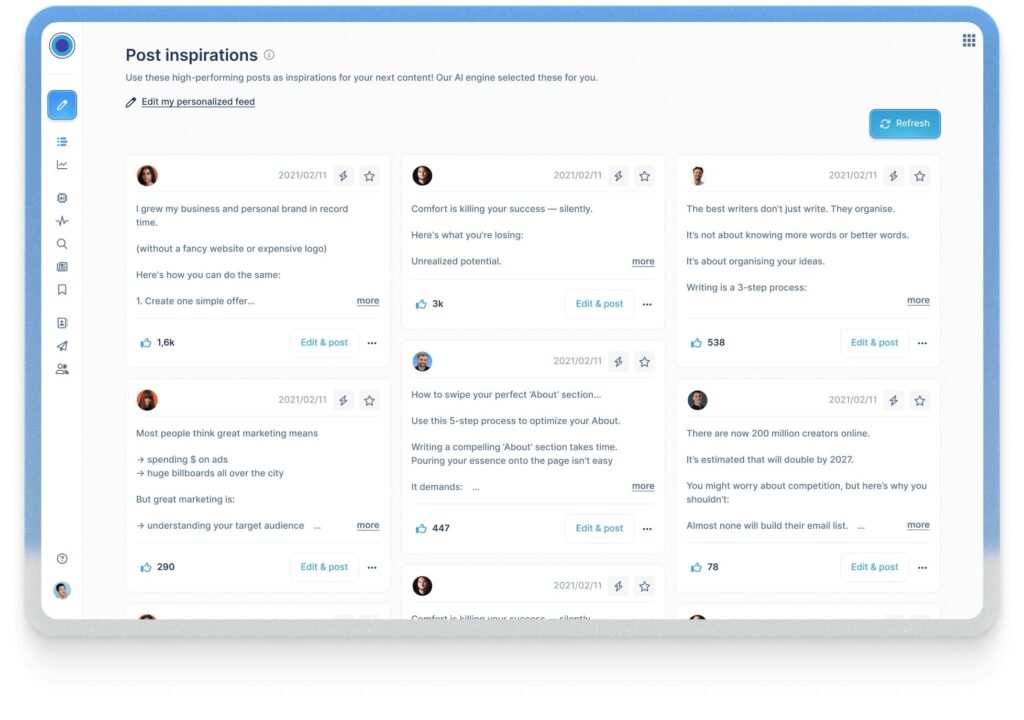
Taplio is a LinkedIn-focused content and analytics tool for professionals and teams who want to grow consistently on LinkedIn with content marketing.
In 2026, AI-generated content is everywhere on LinkedIn. But Taplio’s value is helping you understand what performs and why.
Taplio combines content inspiration, scheduling, and analytics into one workflow. Instead of publishing blindly, you can analyze post performance, identify patterns across top-performing creators, and refine their content strategy based on real engagement data.
Best for
- Organic LinkedIn content creation and planning.
- Personal branding for founders and operators.
- Analyzing post-performance and engagement trends.
- Building a consistent posting cadence.
Key features
- AI-assisted post ideas based on viral and high-performing LinkedIn content.
- Post scheduling and content management.
- Post-level analytics for views, engagement, and growth trends.
- Insights into what content formats and topics perform best.
- Basic CRM-style view of people engaging with your posts.
Pricing
- Starter: $39/mo.
- Standard: $65/mo.
- Pro: $199/mo.
Compliance considerations
Taplio operates through LinkedIn’s approved workflows and does not rely on automation. It’s primarily a content and analytics tool, which means there are minimal account safety risks when used as intended.
However, users should avoid over-automating engagement actions and ensure all interactions remain within LinkedIn’s acceptable use policies.
2. Writesonic
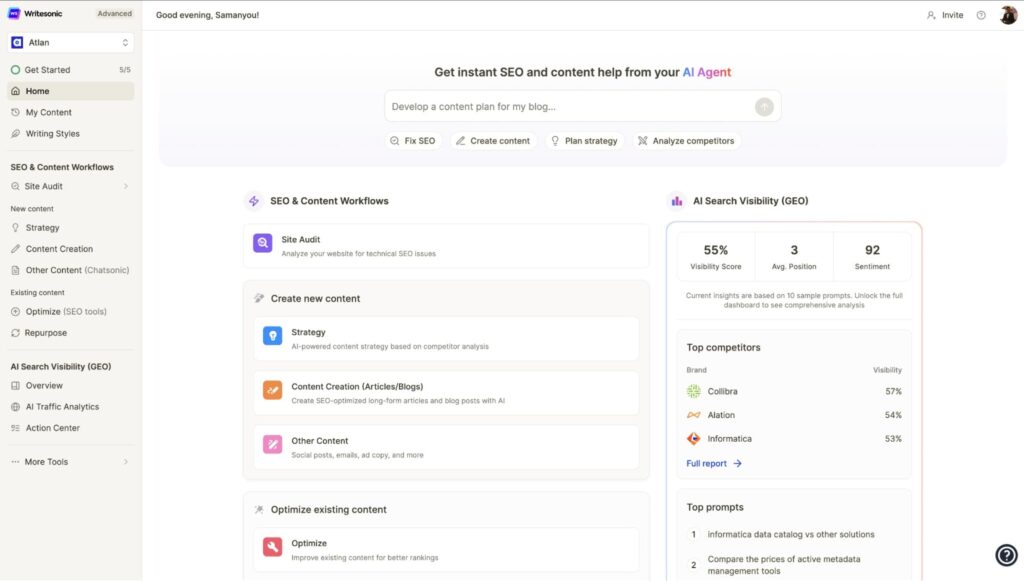
Writesonic is an AI-powered writing tool designed to help you create content faster without starting from a blank page. In the context of LinkedIn marketing in 2026, its role is to speed up ideation, iteration, and testing.
Writesonic is most effective when used for drafting and optimization. It helps B2B marketers quickly generate post variations, headlines, ad copy, and longer-form LinkedIn content that can then be refined, personalized, and tested.
As of writing, Writesonic does not offer LinkedIn post analytics, engagement metrics, or audience insights. So it’s best used alongside tools like LinkedIn native analytics or content performance platforms if you want to get the most out of your content marketing efforts.
Best for
- Speeding up LinkedIn content ideation and drafting.
- Generating multiple post and ad copy variations.
- Supporting content teams with AI-assisted writing workflows.
- Scaling content output without sacrificing consistency.
Key features
- AI-generated LinkedIn posts, headlines, and ad copy.
- Brand voice customization to align content with your tone.
- Support for long-form content, including LinkedIn articles.
- SEO-informed writing for thought leadership and educational posts.
- Templates for social posts, ads, and marketing copy.
Pricing (updated & linked)
- SEO + content automation
- Lite: $49/mo.
- Standard: $99/mo.
- Professional: $249/mo.
- SEO + Content + AI Search Tracking and Optimization
- Advanced: $499/mo.
- Enterprise: Custom pricing.
Compliance considerations
Writesonic does not interact directly with LinkedIn accounts, APIs, or automation features. So, as a content creation tool, it carries no account safety risk on its own.
Compliance depends on how the generated content is used. In general, you should avoid spammy, low-effort posting and ensure AI-generated content complies with LinkedIn’s content and advertising policies.
3. Canva
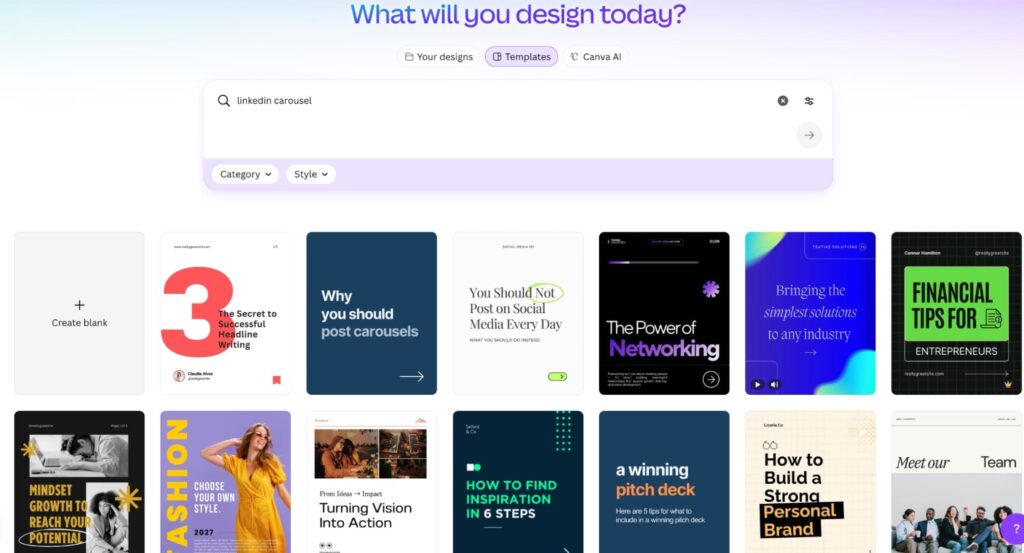
Canva is the creative layer most B2B teams rely on for LinkedIn in 2026 for all things visuals, infographics, LinkedIn carousels, and more.
Beyond static design, with Canva, you can now also design LinkedIn ad assets and export them directly into your LinkedIn ad account (via the LinkedIn Ads app), where they show up in Campaign Manager’s media library for publishing.
Canva also lets you create reusable carousel templates once and then quickly duplicate and edit them for future posts. Making it easy to maintain a consistent, branded design across LinkedIn carousels without starting from scratch every time.
Best for
- Designing LinkedIn creatives (organic + paid).
- Branded LinkedIn carousels, ad images, and video assets.
- Speeding up production with templates + brand kits.
Key features
- LinkedIn-native templates for posts, ads, and video creative.
- Brand kit and reusable design systems for consistent visuals.
- Exporting creatives directly to a LinkedIn ad account via Canva’s LinkedIn Ads app.
- Support for ad formats like static images and video (exportable into Campaign Manager media library).
Pricing
- Free with limited features.
- Pro: $15/mo/per person.
- Business: $20/mo/per person.
- Enterprise: Custom.
Compliance considerations
Canva is a creative tool and does not automate any of your LinkedIn actions. So, from a compliance standpoint, it’s safe to use without any risks.
The main compliance risk is indirect: if you’re publishing ads, ensure your creative follows LinkedIn’s advertising policies and that any claims, testimonials, or targeting statements meet LinkedIn’s standards.
4. Copy.ai
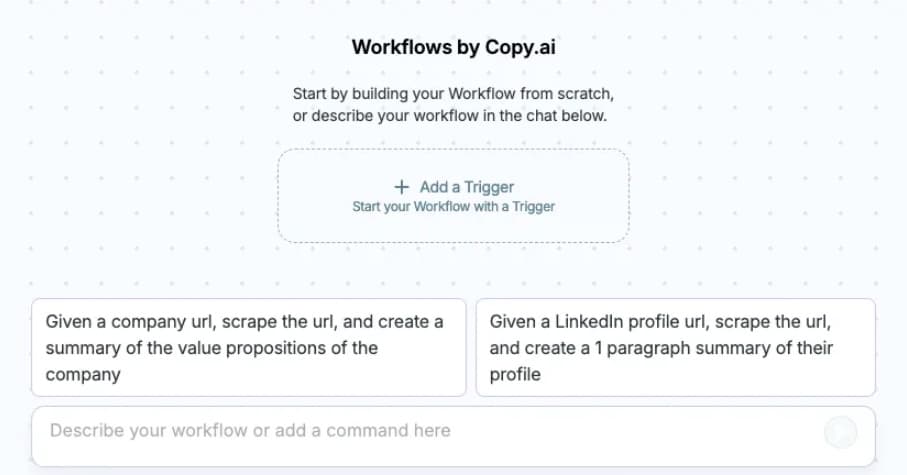
Copy.ai is an AI-powered content platform for teams that need to scale messaging across multiple channels, including LinkedIn.
In 2026, its value goes beyond “just” writing individual posts. Copy.ai is best used for marketing and sales teams to maintain consistent messaging across organic content, ads, and outbound outreach.
Copy.ai’s main focus is on repeatable workflows. This makes it particularly useful for B2B teams running LinkedIn as part of a broader go-to-market system, where the same core messaging needs to show up in posts, ad copy, connection requests, and follow-ups.
Best for
- Scaling LinkedIn messaging across teams.
- Aligning content, ads, and outbound copy.
- Creating repeatable AI workflows for marketing and sales.
- Supporting multi-person LinkedIn content operations.
Key features
- AI-powered workflows for generating and refining LinkedIn posts, ad copy, and outreach messages.
- Centralized brand voice and messaging guidelines.
- Support for multi-step content processes instead of one-off prompts.
- Templates for sales, marketing, and social use cases.
- Collaboration features for teams working on shared messaging.
Pricing
- Chat: For small teams starting to drive real business value with AI – $29/mo.
Compliance considerations
Copy.ai does not connect directly to LinkedIn accounts or perform automation actions. From a compliance standpoint, it is safe to use as a content and workflow tool.
But as with any AI-generated content, you’d need to review output to make sure it aligns with LinkedIn’s content guidelines and avoids spammy or misleading messages, especially if used for outreach or ads.
Outreach & LinkedIn marketing automation tools
Outreach and automation tools are where LinkedIn marketing becomes high-leverage. And potential high-risk, if used incorrectly.
In 2026, LinkedIn continues to enforce stricter limits around automation behavior, message volume, and coordinated activity. Be sure to always review LinkedIn’s Terms of Service when using outreach automation.
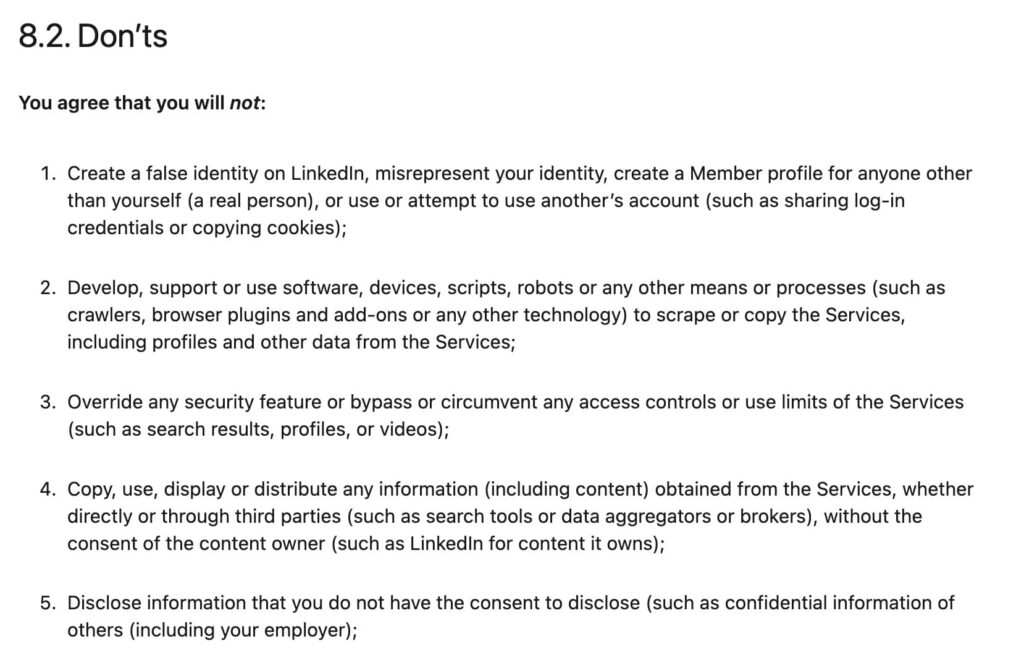
This means, if you’re going to use automation, the goal is controlled, compliant, human-like automation that supports your outreach efforts.
For example, sending 100 connection requests or messages in 10 minutes is a clear red flag and most likely will lead to getting your LinkedIn account suspended.
A safer approach is a slow, human-like drip. Which means reaching out to a small number of prospects per day, spacing actions naturally, and prioritizing personalization over volume.
The best lead generation tools don’t try to “hack” LinkedIn. Instead, they focus on safety, personalization, realistic activity limits, and workflows that complement organic or paid efforts.
1. Expandi
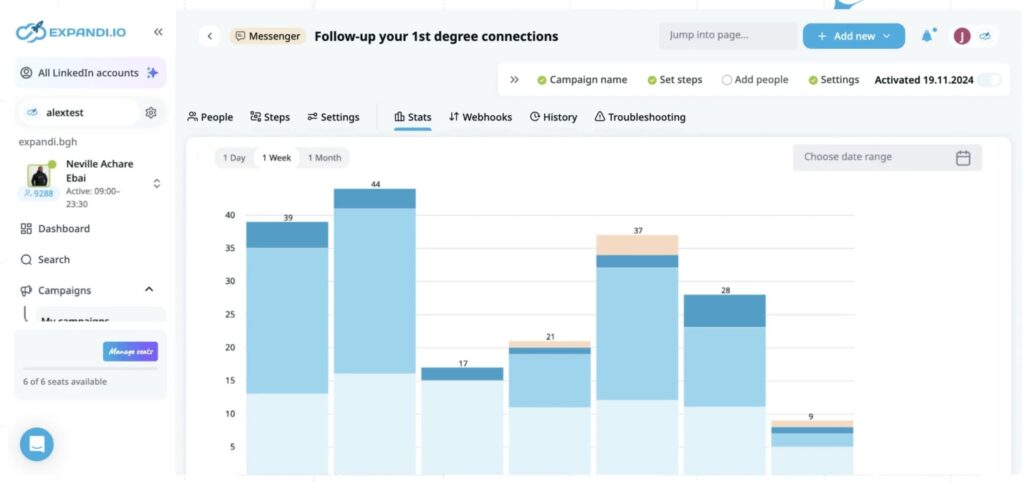
Expandi is a LinkedIn outreach and automation platform built specifically with account safety and personalization in mind. In 2026, LinkedIn is more aggressive about detecting misuse. Which is why Expandi was built to be a compliance-first tool rather than a “growth hack” tool.
Instead of blasting messages at scale, Expandi helps teams run structured, behavior-based outreach that works alongside content and inbound interest. It’s most effective when used to follow up with people who’ve engaged with your content, visited your profile, or fit a clearly defined ICP. Rather than spamming many people at the same time.
Best for
- Automating LinkedIn outreach safely.
- Personalized connection requests and follow-ups.
- Turning content engagement into conversations.
- B2B sales teams, founders, and agencies running LinkedIn at scale.
Key features
- Automated LinkedIn connection requests, messages, and follow-ups.
- Smart sequences with conditional logic based on prospect behavior.
- Personalization using dynamic variables and profile data.
- Support for multi-step campaigns combining LinkedIn and email.
- Built-in limits and delays to mimic human behavior.
- Centralized dashboard for managing multiple campaigns.
Pricing
- Expandi offers a 7-day free trial.
- Paid plans start at $99/month per account, with custom pricing available for agencies and teams.
Compliance considerations
Expandi is designed to operate within LinkedIn’s usage limits, but it is still an automation tool.
Results and safety depend heavily on configuration. Users should avoid aggressive daily volumes, spammy messaging, or engagement-pod-style tactics. Always review LinkedIn’s Terms of Service and use Expandi as a support layer, not a replacement for thoughtful outreach and DMs.
For more info on getting the most out of human-based automation, see our guide on LinkedIn connections limit.
LinkedIn scheduling & social management tools
Scheduling and social management tools help B2B teams stay consistent on LinkedIn without turning posting into a manual task. In 2026, these tools are less about “set and forget” scheduling and more about operational control and keeping LinkedIn activity aligned with marketing efforts.
For solo creators, scheduling tools reduce friction. For teams, they introduce structure: approvals, shared calendars, performance dashboards, and cross-channel coordination.
While LinkedIn has native scheduling, third-party tools still play an important role when consistency, scale, or reporting matter.
Below are the best LinkedIn scheduling and social management tools to consider in 2026.
1. Metricool
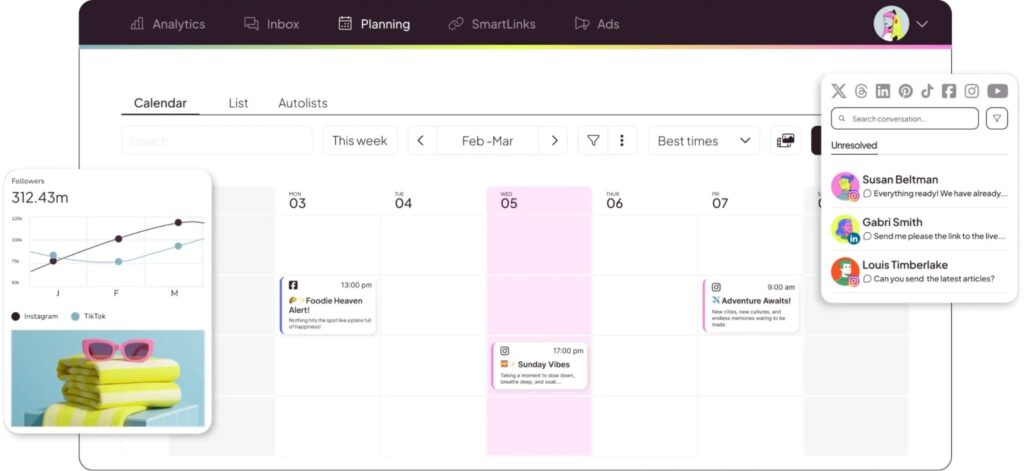
Metricool is a scheduling and analytics platform designed for marketers who want visibility across multiple channels while keeping LinkedIn simple and measurable.
In 2026, Metricool stands out for teams that need scheduling plus performance tracking without the complexity or cost of enterprise social suites.
Metricool combines LinkedIn post scheduling with analytics dashboards to help understand how content performs over time. It’s especially useful for B2B teams managing LinkedIn alongside other platforms and wanting a single place to track reach, engagement, and growth trends.
Best for
- Scheduling LinkedIn posts consistently.
- Managing LinkedIn alongside other social platforms.
- Basic performance tracking and reporting.
- Small to mid-sized marketing teams.
Key features
- LinkedIn post scheduling with calendar view.
- Analytics for impressions, engagement, and follower growth.
- Cross-platform dashboards (LinkedIn, X, Instagram, etc.).
- Content planning and performance comparisons over time.
- Lightweight reporting for teams and clients.
Pricing
- Free: Manage 1 brand, limited features.
- Starter: $22/mo.
- Advanced: $54/mo.
- Custom: Contact sales
Compliance considerations
Metricool uses LinkedIn’s approved publishing APIs for scheduling and analytics. As a scheduling tool, it does not introduce automation risks when used within LinkedIn’s posting limits.
That said, users still should avoid posting content that goes against LinkedIn’s platform policies.
2. Sprout Social
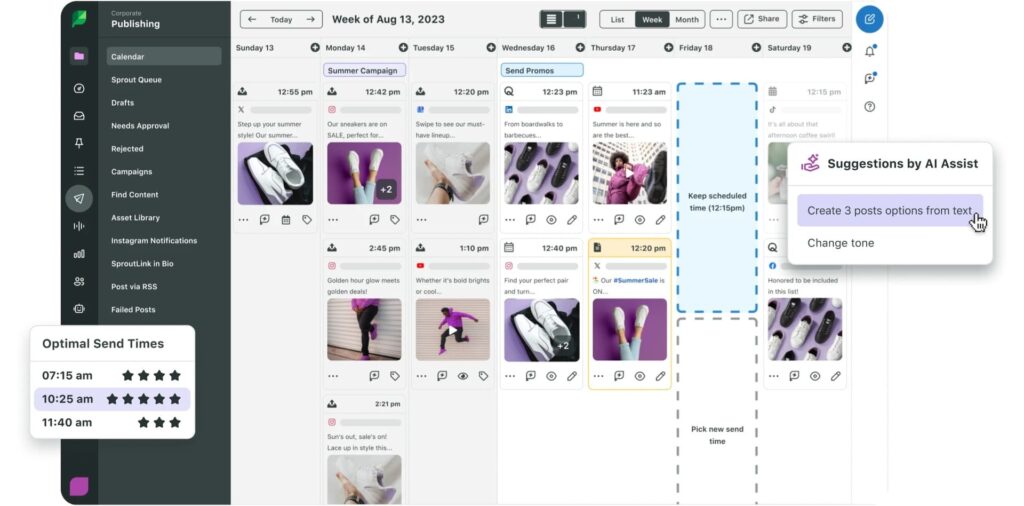
Sprout Social is an enterprise-grade social media management platform built for larger teams that need governance, collaboration, and deep reporting. On the LinkedIn side, Sprout focuses more on content approvals and measuring content reports across the organization.
In 2026, Sprout Social is best suited for B2B companies where LinkedIn is a major channel but not the only one. It centralizes publishing, engagement, and analytics into a single system that supports marketing, brand, and communications teams at scale.
Best for
- Large teams managing LinkedIn content at scale.
- Approval workflows and internal collaboration.
- Advanced analytics and reporting.
- Multi-channel social media operations.
Key features
- LinkedIn post scheduling and publishing.
- Approval workflows and role-based access.
- Advanced analytics and reporting dashboards.
- Social inbox for managing comments and messages.
- Cross-channel performance insights.
Pricing
- Standard: $199/per seat/mo.
- Professional: $299/per seat/mo.
- Advanced: $399/per seat/mo.
- Enterprise: Custom.
Compliance considerations
Sprout Social operates through LinkedIn’s official APIs and is safe from an automation standpoint. Compliance considerations mainly apply to content moderation, messaging, and data access.
3. Hootsuite
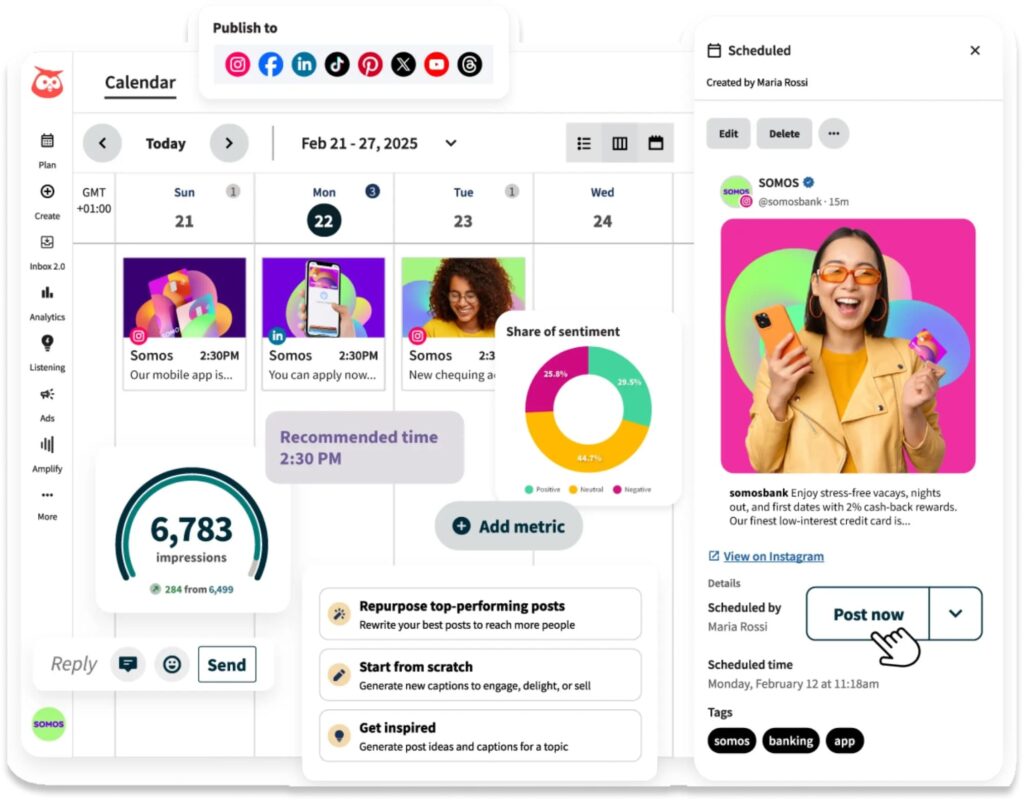
Hootsuite is one of the most established social media management tools and remains relevant in 2026 for bigger teams that need broad platform coverage and mature scheduling capabilities.
For LinkedIn, Hootsuite is primarily a distribution and monitoring tool rather than a growth or analytics specialist.
Best for
- Scheduling LinkedIn posts at scale.
- Centralizing social publishing across platforms.
- Monitoring LinkedIn activity alongside other channels.
- Enterprise and global teams.
Key features
- LinkedIn post scheduling and bulk publishing.
- Content calendar and team collaboration tools.
- Basic LinkedIn analytics and reporting.
- Social listening and monitoring streams.
- Integration with multiple social networks.
Pricing
- Standard: $149/per user/mo.
- Advanced: $399/per user/mo.
- Custom: Request a demo.
Compliance considerations
Hootsuite uses LinkedIn-approved APIs for scheduling and monitoring.
As with other LinkedIn marketing tools in this category, the primary “risk” comes from misuse, overposting, or low-quality content that can hurt performance.
LinkedIn analytics & insights tools
Analytics and insights tools help B2B teams understand what’s working on LinkedIn and what isn’t.
In 2026, surface-level metrics like likes and impressions are no longer enough. Marketers need clearer visibility into content performance over time, audience behavior, and how LinkedIn activity connects to pipeline and revenue.
While LinkedIn provides native analytics, third-party tools in this category add depth, historical context, and enrichment that native reporting alone can’t offer. These tools are valuable for teams treating LinkedIn as a long-term growth channel rather than a short-term posting experiment.
1. Shield Analytics
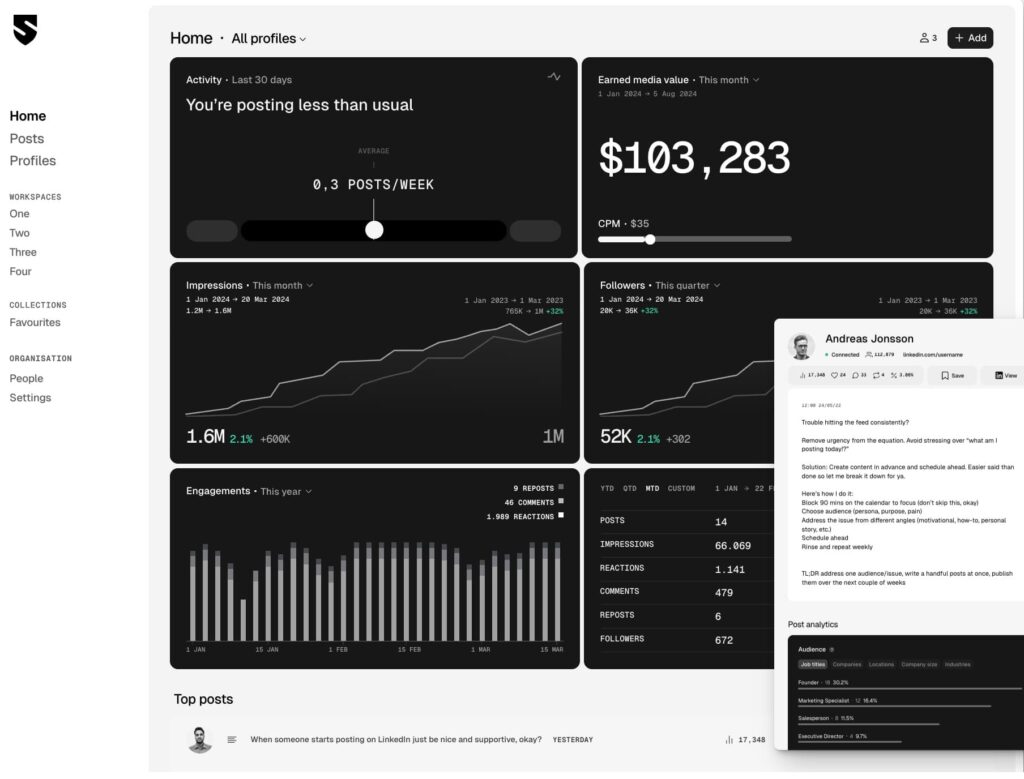
Shield is a LinkedIn-specific analytics platform focused on content performance and audience insights. It’s designed for professionals and teams who want a clear, centralized view of how their LinkedIn posts perform over time, without relying on manual exports or scattered dashboards.
In 2026, Shield is especially valuable for creators, founders, and B2B marketers who publish frequently on LinkedIn and want to identify patterns across formats, topics, and posting cadence.
Best for
- Analyzing LinkedIn content performance over time.
- Understanding engagement trends and audience growth.
- Tracking personal profile or creator-led LinkedIn strategies.
- Reporting on organic LinkedIn performance.
Key features
- Post-level analytics for impressions, reactions, comments, and engagement rate.
- Historical performance tracking across weeks and months.
- Audience insights including follower growth and demographics.
- Collections to group and analyze posts by theme or campaign.
- Exportable reports for internal analysis or clients.
Pricing
- Personal plans (tracks one profile):
- Shield: $15/mo.
- Shield + AI agent: $27/mo.
- Team / agency plans (tracks more profiles):
- Shield: $25/per profile/mo.
- Shield + AI agent: $37/per profile/mo.
Compliance considerations
Shield accesses LinkedIn data through approved methods and focuses on analytics only. It does not automate posting, engagement, or outreach, which makes it low risk from a compliance standpoint.
That said, users should still follow LinkedIn’s data usage policies when exporting or sharing reports.
2. Clay
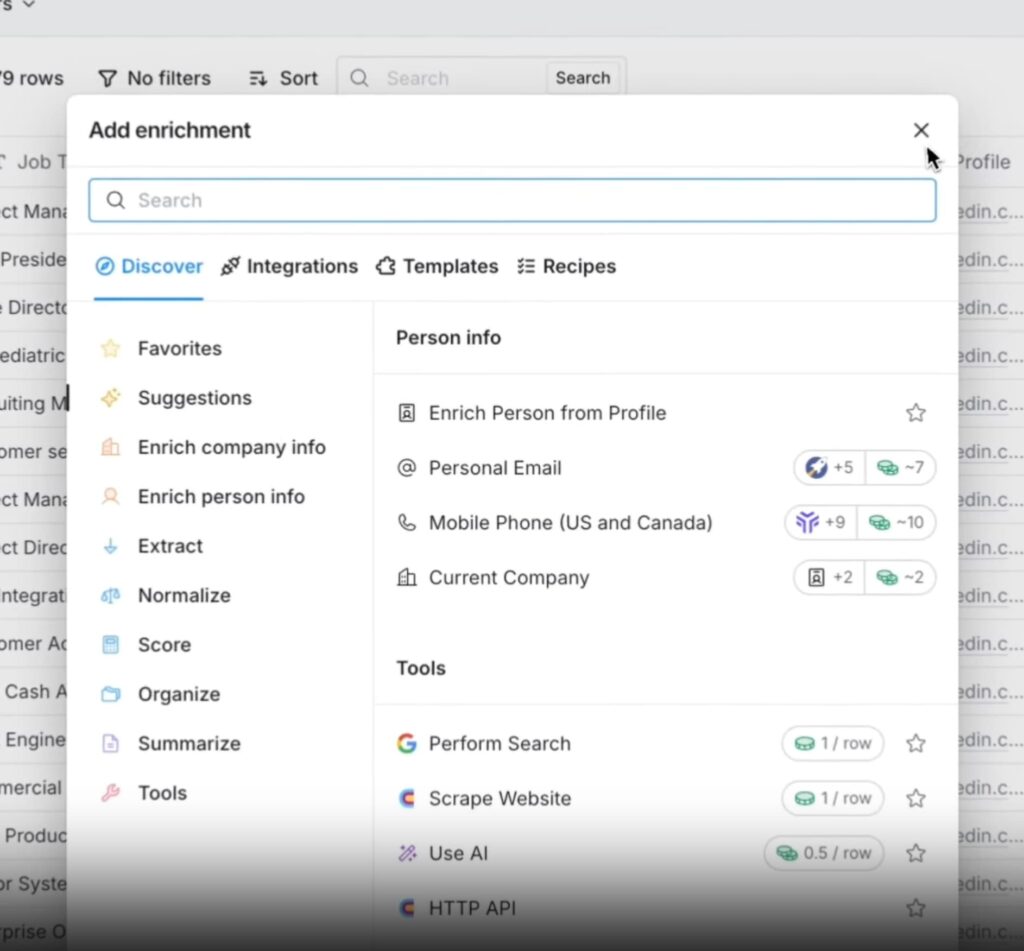
Clay is a data enrichment and research platform that helps B2B teams turn LinkedIn profiles into actionable datasets. While not a traditional analytics tool, Clay plays a critical insight role by enriching LinkedIn data with firmographic, technographic, and behavioral information.
In the context of LinkedIn marketing in 2026, Clay is most useful for connecting LinkedIn activity to targeting and outreach. It allows teams to build enriched lead lists, score prospects, and personalize messaging based on far more than job title alone.
Best for
- Enriching LinkedIn leads with company and contact data.
- Building and scoring ICP-based prospect lists.
- Powering personalization for outreach and campaigns.
- Connecting LinkedIn activity to go-to-market workflows.
Key features
- Automated data enrichment for LinkedIn profiles.
- AI-assisted research (Claygent) for prospect and company insights.
- Custom workflows for scoring and segmentation.
- Integrations with CRMs and outreach tools.
- Flexible data pipelines for sales and marketing teams.
Pricing
Clay pricing is credit-based and varies by usage and enrichment volume.
- Free: 100 credits/mo, limited features.
- Starter: $149/mo-$229/mo (depending on credits).
- Explorer: $349/mo-$699/mo.
- Pro: $800/mo-$2,000/mo.
- Enterprise: Contact sales.
Compliance considerations
Clay does not automate LinkedIn actions directly, but it processes and enriches LinkedIn-derived data.
Teams should ensure their data sourcing and usage comply with LinkedIn’s terms and applicable data privacy regulations, especially when exporting data into outreach or CRM systems.
Native LinkedIn features most teams miss in 2026
LinkedIn’s native marketing features have evolved over the past years. But many of the changes aren’t immediately obvious inside Campaign Manager.
While the fundamentals of LinkedIn ads and tracking largely remain the same, LinkedIn has introduced quieter updates that affect how teams test creatives, attribute revenue, and structure campaigns. These changes matter most once you’re already running ads, publishing consistently, and measuring performance beyond surface-level metrics.
This section focuses on native LinkedIn features that change execution in 2026. But are often underutilized because they sit outside the usual “setup checklist”.
Here’s what you might have missed.
1. Revenue Attribution Reporting (RAR)
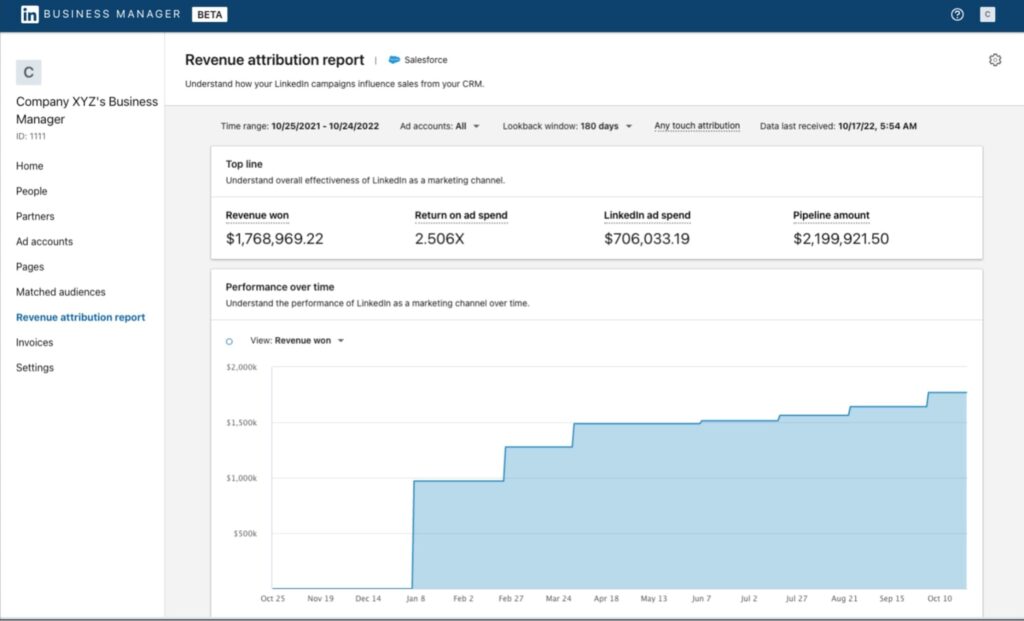
Revenue Attribution Reporting is a native reporting feature from LinkedIn that connects ad exposure to downstream business outcomes such as pipeline and revenue.
Unlike standard lead or conversion reporting, RAR syncs CRM opportunity data into LinkedIn Business Manager to show how LinkedIn marketing influences revenue outcomes further down the funnel.
RAR lives inside LinkedIn Business Manager and requires a CRM integration with Salesforce or HubSpot.
In most cases, enabling RAR is not fully-serve. It typically requires support from a dedicated LinkedIn account manager to configure and activate the report. Once set up, however, it provides visibility into how LinkedIn ad exposure influences pipeline and revenue.
Best for
- B2B teams measuring LinkedIn impact beyond lead volume.
- RevOps and finance-led organizations.
- Teams running LinkedIn ads alongside Salesforce.
Key features
- Revenue and pipeline reporting tied to LinkedIn ad exposure.
- Visibility into open opportunities and closed-won revenue influenced by LinkedIn.
- Metrics such as revenue won, pipeline amount, ROAS, win rate, and average deal size.
- Any-touch attribution based on LinkedIn engagement (views, clicks, likes, shares).
- Adjustable lookback windows (30, 60, 90, or 180 days).
Pricing
- Included with LinkedIn advertising. No additional costs to use RAR beyond ad spend and CRM resources.
Compliance considerations
LinkedIn Revenue Attribution Reporting operates within LinkedIn’s official APIs and Business Manager environment. That said, teams are responsible for ensuring proper CRM permissions, API access, and compliance with applicable data privacy regulations when connecting Salesforce.
2. LinkedIn Flexible Ads
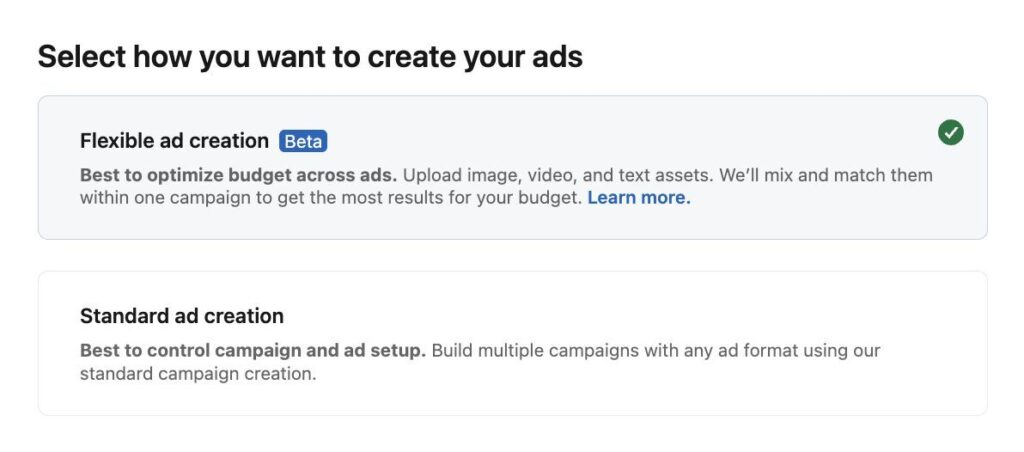
Flexible Ads is a native ad feature (rolling out in early 2026) from LinkedIn that allows you to upload multiple creative assets and let LinkedIn automatically mix, match, and optimize combinations across campaigns.
Instead of manually creating and testing one ad variant per campaign, Flexible Ads let you upload multiple images, videos, and copy variations in one place. LinkedIn then dynamically tests combinations and shifts budget toward the best-performing variants over time.
Best for
- B2B teams running campaigns at scale.
- Marketers testing multiple creative formats and messaging.
- Teams looking to reduce manual ad setup and iteration.
- Advertisers focusing on improving creative performance efficiency.
Key features
- Upload multiple assets per campaign (images, videos, copy variations).
- Automatic mixing and matching of creative combinations.
- System-driven optimization toward higher-performing variants.
- Reducing need for manual A/B testing and duplicate campaigns.
- Better insight into which visuals and messaging resonates with your audience.
Pricing
- Included with LinkedIn advertising, no additional cost beyond typical ad spend.
Compliance considerations
Flexible Ads is a native LinkedIn advertising feature and operate fully within LinkedIn’s advertising policies and official APIs. Availability may depend on account type or rollout status, and advertisers are responsible for ensuring all creative and messaging comply with LinkedIn’s ad guidelines.
3. Ad personalization (macros)
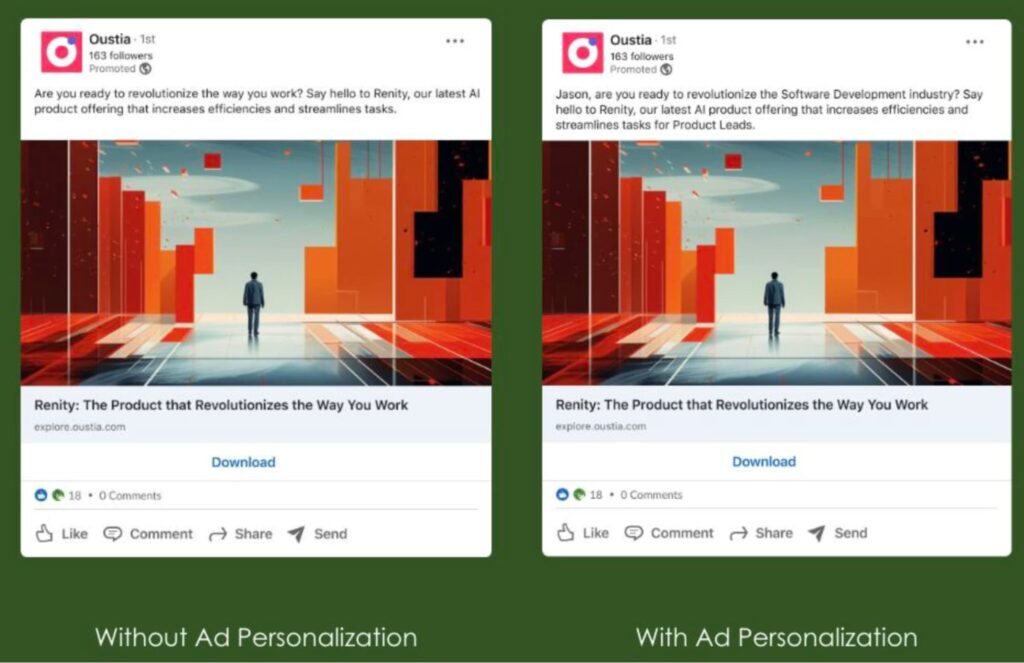
LinkedIn ad personalization is a feature that helps you tailor ad copy to each viewer using profile-based macros such as:
- %FIRSTNAME% – LinkedIn Member.
- %LASTNAME% – LinkedIn Member.
- %COMPANYNAME% – Your company.
- %JOBTITLE% – Professional.
- %INDUSTRY% – Industry.
LinkedIn supports macros across Sponsored Messaging, Dynamic Ads, and Sponsored Content (single image and video).
Best for
- B2B teams running segmented campaigns where relevance matters.
- Brand/awareness teams trying to lift attention without building dozens of ad variants.
- ABM-style targeting where company/role alignment drives performance.
- Advertisers testing copy while keeping creative production lean.
Key features
- Profile-based macros for personalization (first name, job title, industry, company name).
- Macro support across Sponsored Messaging, Dynamic Ads, and Sponsored Content for single image + video.
- Personalization that happens automatically at delivery (LinkedIn fills in member data at render time).
Pricing
- No additional cost beyond ad spend.
Compliance considerations
Macros rely on LinkedIn member profile fields and render personalized content in ad copy. Use personalization in a way that stays compliant with LinkedIn ad policies and avoids overly familiar or sensitive wording.
4. Campaign naming conventions & structure alignment
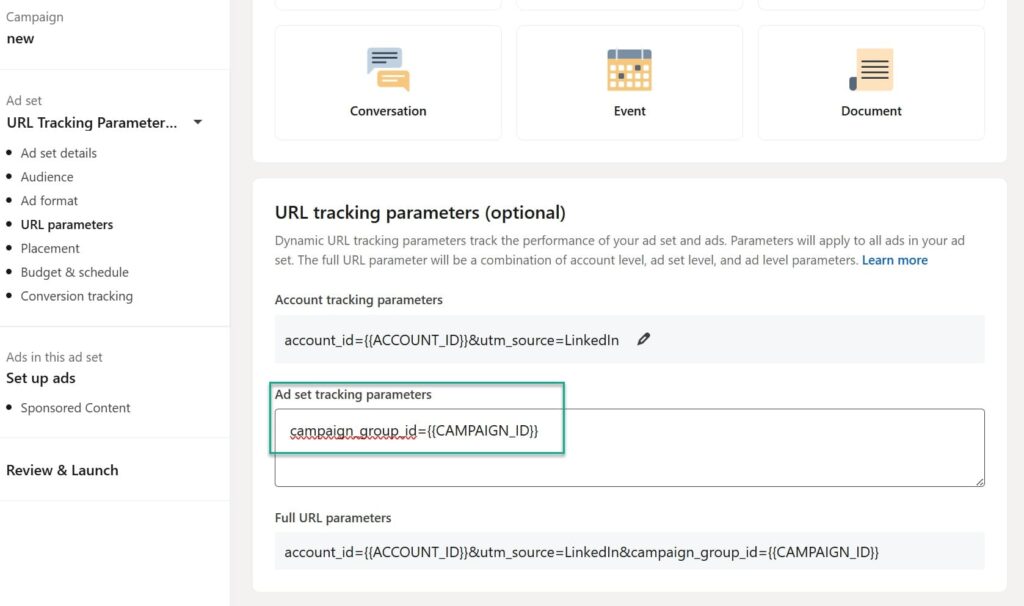
Starting in 2025, LinkedIn began updating the campaign hierarchy naming inside Campaign Manager to improve clarity and align with industry-standard terminology used by other ad platforms.
Specifically, LinkedIn is renaming two of the four hierarchy entities (without changing how campaigns function):
- Campaign group → Campaign.
- Campaign → Ad set.
- Ad account and Ad remain the same.
Best for
- Teams running LinkedIn ads alongside Meta/Google and wanting consistent terminology.
- Agencies onboarding new team members across multiple ad platforms.
- Teams using dynamic UTM parameters and needing clean, stable tracking templates.
Key features
- New campaign hierarchy terms.
- Changes designed to align with industry-standard naming and simplicity workflows/navigation.
Pricing
Included with Campaign Manager.
Compliance considerations
This is a native Campaign Manager change and fully within LinkedIn’s official advertising environment.
LinkedIn Marketing Tools in 2026: FAQ
The best LinkedIn marketing tools in 2026 depend on how you use LinkedIn. Most B2B teams rely on a mix of native LinkedIn tools for ads and tracking, content and creative tools for publishing, analytics tools for performance insights, and compliant automation tools for outreach. The strongest results usually come from a small, focused stack rather than trying to use everything at once.
LinkedIn has introduced several native features in recent years that go beyond basic campaign setup and reporting. In 2026, notable updates include Revenue Attribution Reporting (RAR) for tying ad exposure to pipeline and revenue, Flexible Ads for scalable creative testing, and ad personalization macros that increase relevance at scale. LinkedIn has also updated campaign hierarchy naming to better align with other ad platforms.
LinkedIn automation tools can be safe in 2026 if used correctly. Most account issues come from aggressive behavior, such as sending large volumes of connection requests or messages in a short time. Tools that enforce realistic limits, delays, and personalization significantly reduce the risk of account restriction.
Canva can design LinkedIn ad creatives and export them directly to your LinkedIn ad account using the LinkedIn Ads app. The creatives appear in Campaign Manager’s media library, where you can attach them to campaigns. Canva does not launch or manage ads itself. Publishing and optimization still happen inside LinkedIn Campaign Manager.
Final Thoughts
There are hundreds of LinkedIn marketing tools out there, and it’s easy to get overwhelmed or feel like you’re missing out if you’re not using all of them. But more tools don’t automatically mean better results.
The smartest way to choose your stack is to start with your workflow.
If your focus is publishing content, you need tools that help you create consistently and understand what resonates based on data.
If outreach is part of your strategy, you need a way to turn that visibility into conversations without risking your account.
If you’re running ads, tracking and attribution become non-negotiable.
Instead of asking “Which tools should I use?”, ask “What am I actively doing on LinkedIn right now, and what’s slowing me down?”
Then pick tools that remove friction from those exact steps. When your tools match your workflow, LinkedIn becomes easier to manage, more predictable, and far more effective over time.
That said, if LinkedIn outreach is part of your strategy, Expandi helps you do it safely at scale.
It’s built for turning targeted profiles into real conversations through personalized connection requests and follow-ups, without aggressive volume or risky automation.
You can start with a free trial, set up human-like outreach campaigns, and scale conversations in a way that stays aligned with LinkedIn’s limits.
See if Expandi is right for you and claim your free, 7-day trial here!




You’ve made it all the way down here, take the final step