What Does Actively Recruiting Mean on LinkedIn in 2026?



The “Actively recruiting on LinkedIn tag” indicates that an organization on the platform is looking for new employees. This small green tag shows that a company is open to finding new candidates, and is a great way to attract attention from job seekers
You might have come across it – either as a recruiter or if you’re potentially looking at a new workplace. But what exactly does it entail? How can you use it to find the best talent for your company? That’s why you have this guide.
Here, you will learn:
- What does the “Actively Recruiting” tag mean on LinkedIn?
- How do I get the tag on my job postings on LinkedIn?
- Benefits of the actively recruiting tag on LinkedIn
- 5 Most effective ways to reach potential candidates on LinkedIn
- What templates to use if you’re focusing on active, outreach recruitment
Let’s get started.
What Does Actively Recruiting Mean on LinkedIn?
The “Actively Recruiting” tag on LinkedIn is the green, little label that indicates a company is still looking for new candidates to fill a specific role or position. In other words, it signals that the company is actively sourcing talent rather than waiting for candidates to apply for the position.
There are two types of recruitment techniques: Active and passive recruiting. A company is actively recruiting when it’s actively on the lookout for potential new hires. They make intentional efforts to showcase their recruitment needs by finding and connecting with the best talent.
A great way to actively recruit candidates is through LinkedIn outreach. Here, recruiters actively identify and contact candidates who match specific job requirements through advanced LinkedIn search filters or personalized messages. The goal is to build rapport and connection before making the hiring request to the candidate.
On the other hand, passive recruiting occurs when the hiring manager is open to potential candidates approaching them, but isn’t looking for applicants for a specific job. Obviously, these recruiting methods have their own pros and cons. However, if you’re looking for specific candidates with a set of skills, chances are it’s going to be easier to reach out to them yourself.
This is something we’ll cover in detail below with some best practices and templates to keep in mind as well. But first, the next question you might be wondering is how to get the “Actively Recruiting” tag on LinkedIn.
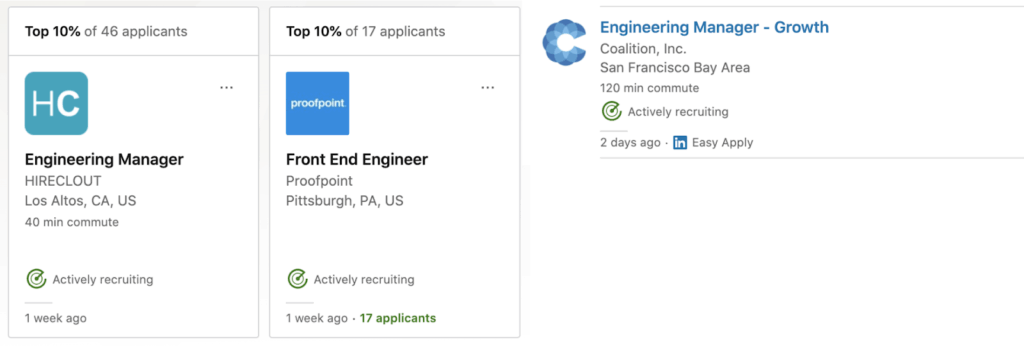
Source: LinkedIn
How do I get the “Actively Recruiting” tag on LinkedIn?
Unfortunately, there is no quick button to activate the Actively Recruiting tag on your job listings. LinkedIn’s algorithm determines and places the said tag on your job postings. Having the tag on your LinkedIn job postings lets candidates identify whether your company is actively involved in the recruiting process.
For your job postings to get the actively recruiting tag, the LinkedIn algorithm considers two factors from your recruiting activity in the past week.
- Your responsiveness to job applications on LinkedIn.
- How you reach out to potential candidates via LinkedIn InMail outreach.
If you don’t meet these criteria, your job postings may not receive the actively recruiting tags.
What Triggers “Actively Recruiting” on LinkedIn?
A combination of recruiter actions —- engaging with applicants, sending InMails, or moving candidates through stages in the recruitment process —- triggers the actively recruiting tag on LinkedIn.
However, this doesn’t necessarily mean the company is actively filling roles. In some cases, a company may still be evaluating applicants or even rejecting candidates while the tag remains visible.
For instance, if a company is reviewing applications, messaging candidates, or updating their Applicant Tracking System (ATS), LinkedIn’s algorithm may register these activities as signs of active recruitment, thus applying the tag. This could even happen when a company is not immediately hiring but wants to keep an active pipeline of potential candidates.
Benefits Of The Actively Recruiting LinkedIn Tag
As the world’s renowned platform for business professionals, LinkedIn is the premier platform for finding qualified candidates. Using the actively recruiting tag helps LinkedIn job postings stand out and indicates to candidates that you’re urgently hiring, increasing the chances of receiving qualified applications faster.
If done right, you gain the following benefits when actively recruiting on LinkedIn:
- Target the right people, fast.
- Find similar LinkedIn profile suggestions.
- Streamlined hiring process
- Increased engagement with the right talent
- Better use of LinkedIn Recruiter
Let’s take a look at each in detail.
1. Target the right people fast
With over 1 billion members across 200+ countries on LinkedIn, it’s easy to see why it’s the #1 platform for recruitment. Various features, such as LinkedIn advertising, InMail, and advanced search filters, grant active recruiters access to the world’s most qualified talent pool to find the right candidate.
Suppose your firm is hiring a GTM engineer with expertise in AI sales tools and technology. If you reach out to potential hires through job postings or engage them via LinkedIn InMail, the LinkedIn algorithm may place the actively recruiting tag on your job postings, increasing the chances of being noticed by applicants and boosting your LinkedIn recruitment efforts.
Likewise, job seekers will also identify and reach out to recruiters looking to fill the vacant positions in their company once they see the actively recruiting tag. But how do you do this?
Use operators such as AND, NOT, OR, quotation marks, and parentheses for advanced search criteria. This will help to identify target companies or recruiters seeking to fill vacant positions.
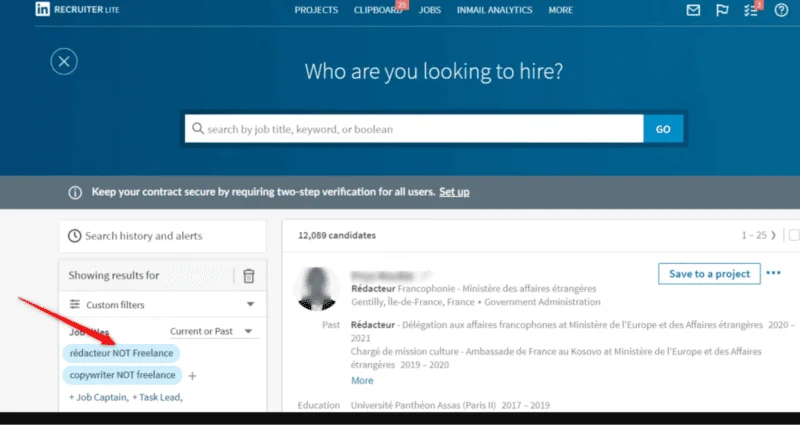
Using filters to target the right people on LinkedIn
Ideally, active recruiters can also track down ideal candidates on the platform through the LinkedIn X-ray search. They can reach out and let job seekers know they’re actively recruiting rather than letting them find your job postings.
2. Find similar LinkedIn profile suggestions
Once you do find a potential candidate, LinkedIn automatically recommends other relevant profiles and candidates to expand your reach and fill more roles quickly.
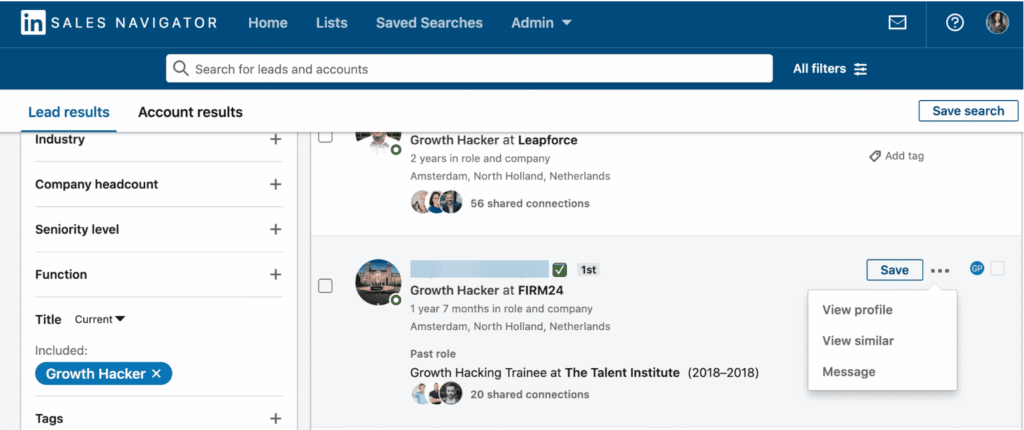
Finding similar accounts on LinkedIn Sales Navigator
With LinkedIn Sales Navigator, you can use even more advanced search filters, such as:
- Keyword searches,
- Company size,
- Group membership,
- Company type,
- Job opportunities,
- Profile language,
- And more.
Once you find your list of candidates, you can also use the “view similar profile” feature to expand your search even more.
3. Streamlined hiring process
When a job posting has the actively recruiting tag, it signals commitment from the recruiter and encourages candidates to apply for the job openings. This prompts both parties to interact with each other, reducing the time spent during the recruiting process.
They don’t have to waste time looking for the right candidates or sending messages randomly to job seekers. Instead, their effort is targeted, while candidates get jobs without wasting their time with unmotivated recruiters.
4. Increased engagement with the right talent
With the active recruiting tag on your job posting, you don’t have to waste time sourcing resumes or reaching the wrong candidates. Instead, the tag attracts high-quality candidates who are more likely to reach out to the recruiters and apply for the position.
Also, when you have the tag on your company’s profile, the recruiters reach out to more potential hires via LinkedIn outreach campaigns. If you have a huge list of qualified candidates, they can use a LinkedIn automation tool to boost their outreach efforts. This eliminates guesswork and improves the chances of hiring the right candidate.
5. Improved use of LinkedIn Recruiting tools
The actively recruiting tag indicates transparency in the company’s intent to hire and improves its reputation. When paired with powerful tools like LinkedIn Recruiter and Recruiter Lite, they find, connect with, and engage professionals faster at scale.
For example, they can identify and target ideal candidates with search filters. By checking a candidate’s job title, location, skills, and using other relevant keywords, they can prioritize or save searches to a project.
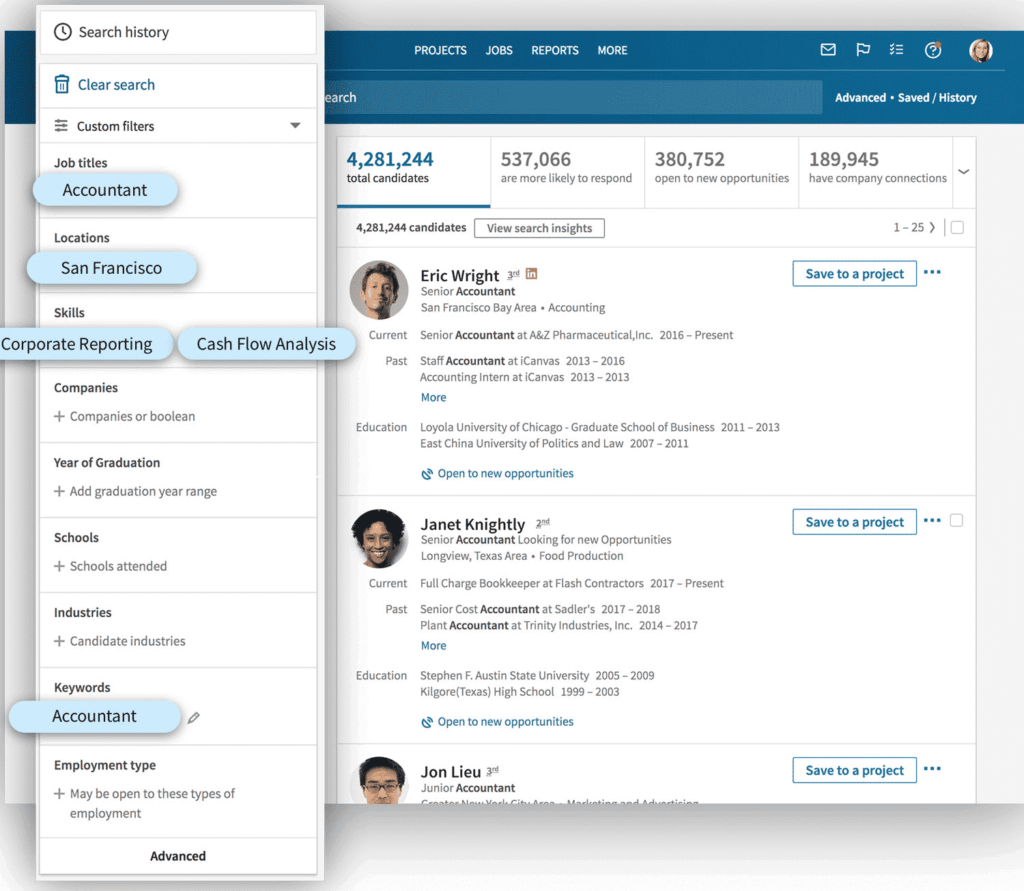
Using search filters on LinkedIn Recruiters
Additionally, you can also manage and track your recruitment efforts with its built-in analytics tool, which essentially lets you know how your campaign is performing.
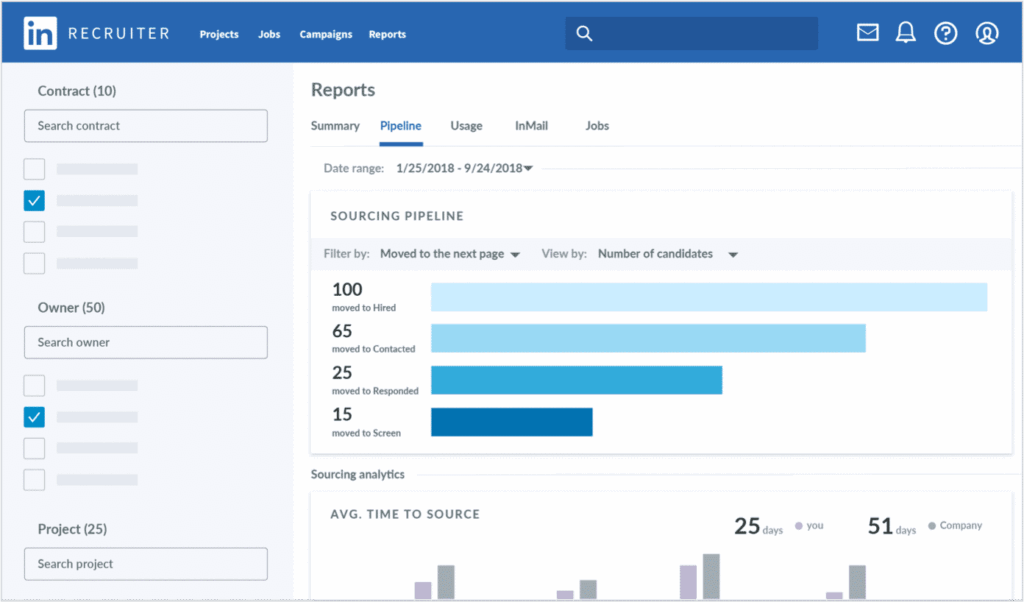
Measuring recruitment efforts on LinkedIn Recruiter
Depending on your needs, LinkedIn Recruiter can cost you around $99.95 per month (Lite version) or $825 per month (Corporate plan). However, this price tag may not align with many businesses’ budgets. So, they can also use other LinkedIn account types to improve the recruiting process.
How To Reach Potential Candidates If You’re Actively Recruiting On LinkedIn?
To recap so far, using LinkedIn for recruitment is a great method for reaching out to candidates or letting them come to you. But how exactly can you get the most out of active recruitment on LinkedIn? Let’s find out in this section with these best practices.
- Create optimized LinkedIn recruitment job posts.
- Consider LinkedIn ads depending on your audience.
- Use LinkedIn private mode before doing outreach.
- Encourage and ask for referrals.
- Use LinkedIn automation to actively hire candidates.
1. Create, optimize, and share your LinkedIn recruitment job posts
Your LinkedIn recruitment job posts signal your firm is hiring. Without it, you’d be throwing darts in the dark. To stand out, optimize your posts with the required information, such as job title, description, skills required, and other information.
Also, make sure your job description aligns with your brand values so that your LinkedIn followers will want to apply as soon as you share your job posts. Alternatively, simply look up similar positions you’re recruiting for to see what other companies are focusing on.
Focus on the relevant keywords, job requirements, and benefits to see what you can improve. This will increase the possibility of being noticed by qualified candidates.
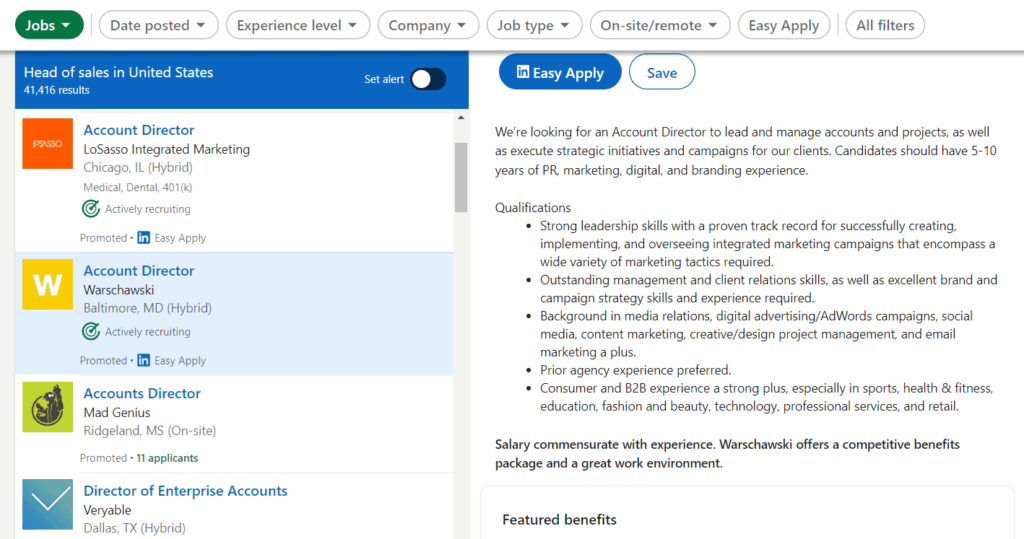
Optimizing job information on LinkedIn
2. Consider LinkedIn ads
LinkedIn ads aren’t just for marketers. Recruiters can use LinkedIn ads to target the right people with information about their company and open roles. With recruitment ads, you can run job ads, spotlight ads, follower ads, sponsored content, and more.
What makes this option ideal for recruiters is that you can target people based on job title, seniority, skills, school, years of experience, and more.
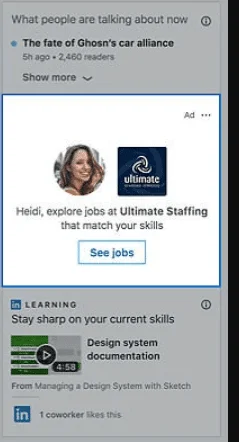
LinkedIn job ads
3. Use LinkedIn private mode when actively recruiting on LinkedIn and doing outreach
If you don’t want your prospects to get the notification that you visited their profile, you should turn on LinkedIn private mode to stay anonymous. To do so, go to LinkedIn Settings & Privacy, click “Visibility,” select “Profile viewing options,” and switch to private mode.
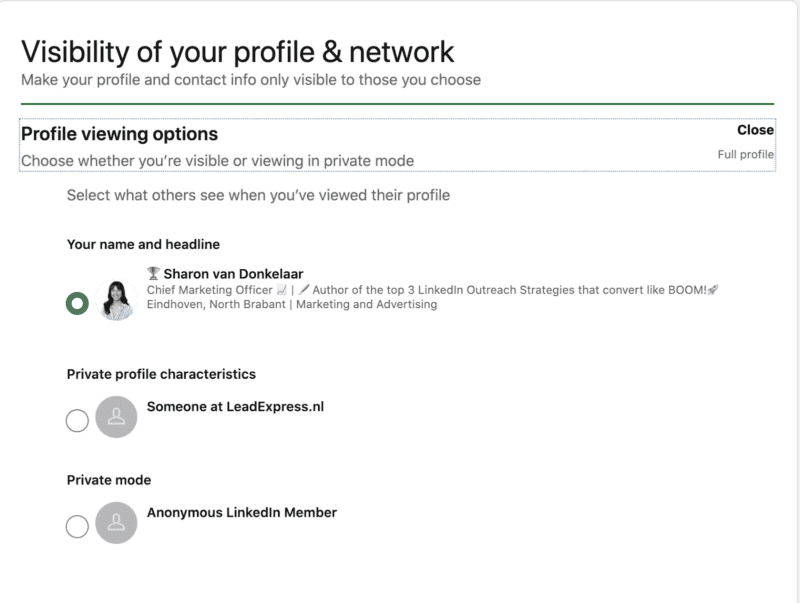
Switching to private mode on LinkedIn
When you’re creating a list of potential candidates to reach out to, it’s better not to give it away that you’re going to message them – it’ll spoil the surprise.
This is a great way to shortlist candidates, learn more about their past experience, and get an overview of who should advance to the next step of the application.
4. Encourage referrals
This works best if you don’t have a huge following or the advertising budget to boost your reach.
To encourage referrals and word-of-mouth recommendations, consider listing a financial reward in your job posting.
This attracts top talent, reduces costs on advertising, and creates a positive culture. Overall, employees hired through referrals tend to last longer.
This is simple to execute. In your job listing, simply include a note that if the reader knows someone else who might be more relevant for the position, they’ll get a financial reward for referring the right person.
5. Use automation
Last but not least, use an automation tool for your LinkedIn outreach as a recruiter. This works best when you don’t want to spend months growing your LinkedIn accounts to find the right talent or creating a budget for advertising.
For this, you’ll need an automation tool like Expandi to do your outreach for you. Essentially, Expandi takes your LinkedIn search results (whether it’s the free version or Sales Navigator) and automates sending connection requests, follow-ups, and InMails where necessary.
Here’s how we managed to get a 74.2% reply rate and hired 3 new ideal SDRs on LinkedIn using automation:
- Go to Expandi.
- From there, you need to set up a Connector Campaign in Expandi to start sending connection requests and follow-ups.
- In the Campaigns tab, select Connector Campaign.
- Enter a name for the campaign.
- Continue with a template and messaging sequence.
- Create your messages (we’ll show the templates below)
- Go to the “People” tab and click “Add new search.”
- Choose “Sales Navigator search.”
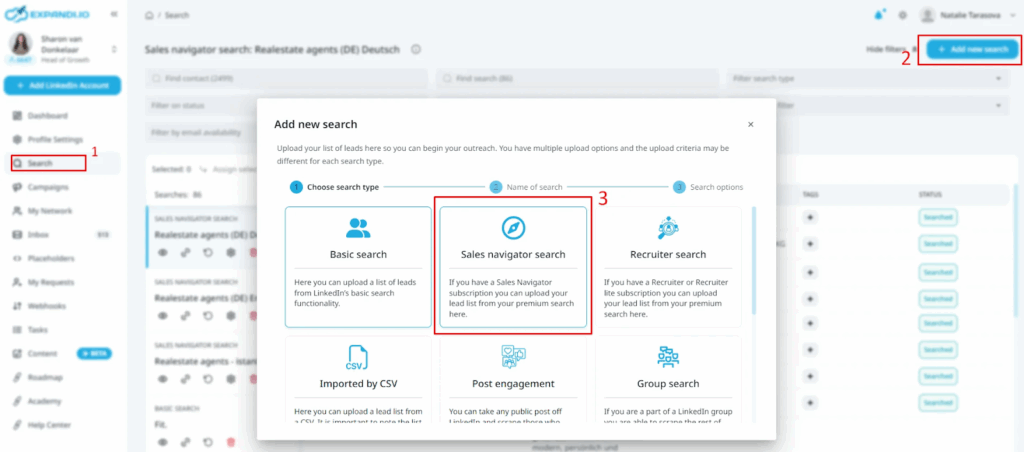
Finding Sales Navigator Search in Expandi
8. Enter the name of your campaign and click the “Next” button.
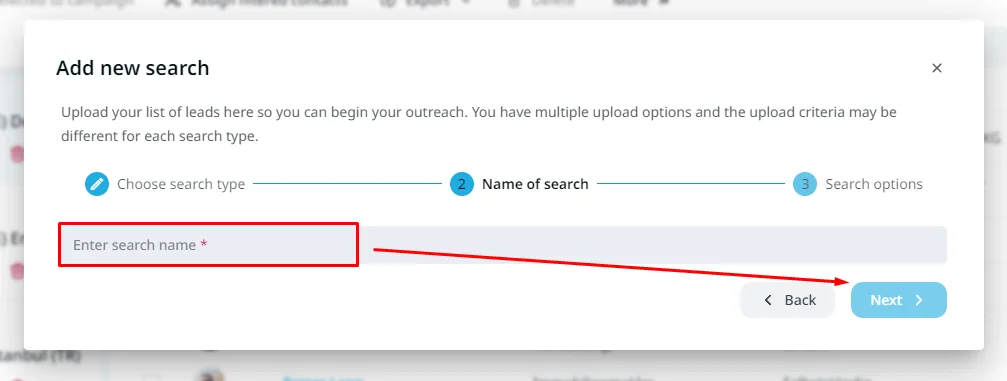
Searching for candidates on LinkedIn via Expandi
9. Then go to LinkedIn Search Navigator and create a detailed search on LinkedIn for our ideal candidate based on their job title, geography, current company headcount, vertical, and keywords in their profile.
10. Scrape the search results from LinkedIn. To do that, copy the LinkedIn search URL.
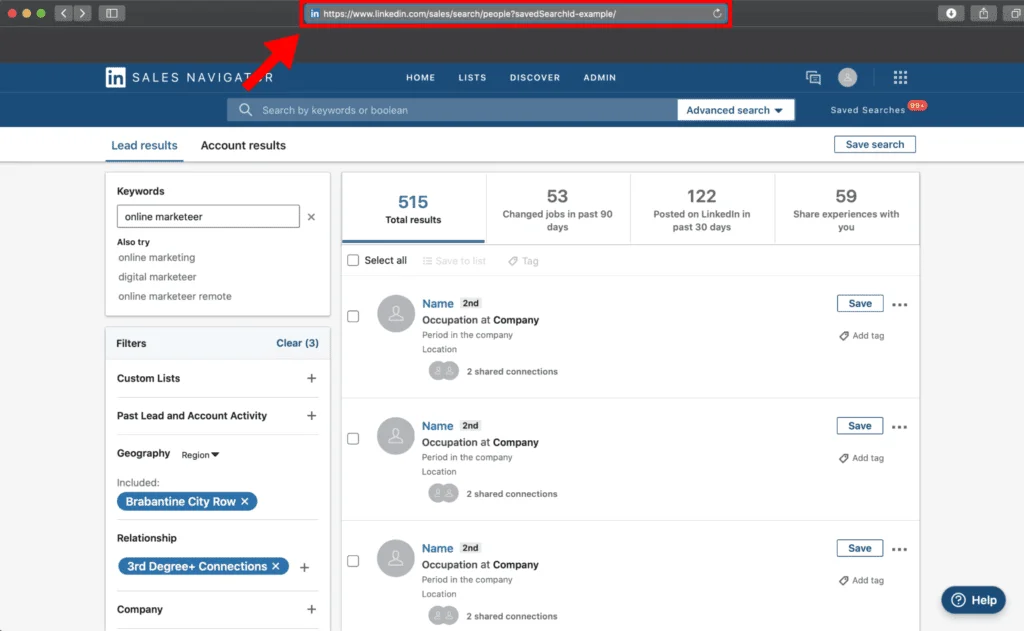
Scraping search results from LinkedIn
11. Go back to Expandi and “Paste the URL” that you copied from Sales Navigator. Keep in mind that only 2500 people will be imported into your account at once because of LinkedIn’s limit.
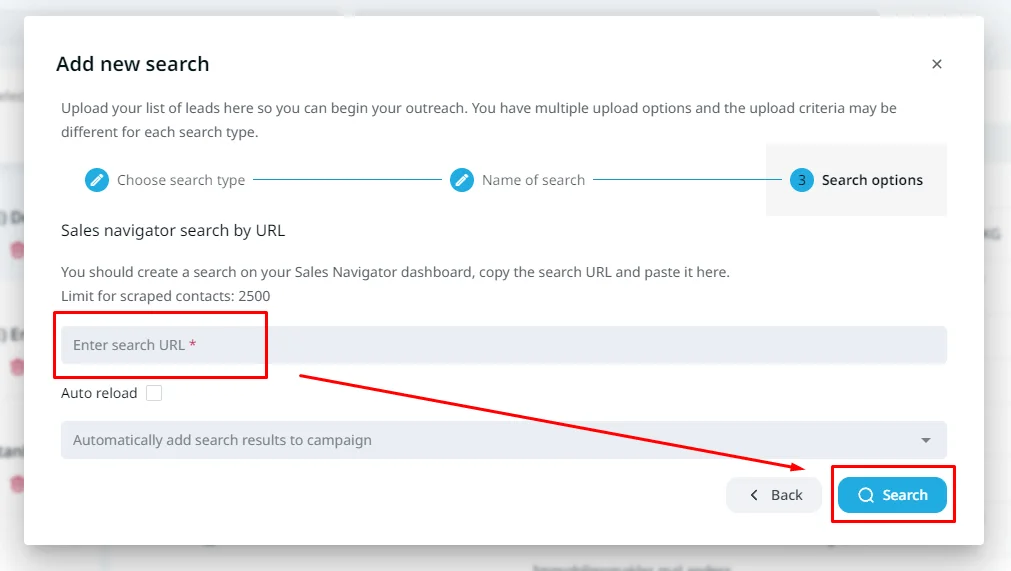
Importing lead list via Expandi
12. Click on Search and wait until all of the LinkedIn accounts are added to your search.
13. That’s it. You can activate your campaign.
Using this approach is more effective when actively recruiting on LinkedIn because:
- It’s cheaper than LinkedIn Recruiter.
- You see results faster.
- It’s easier than running LinkedIn ads.
And overall, you have more control over your entire recruiting process. You never know when you’re going to receive the actively recruiting tag on LinkedIn or if you’re going to receive it at all. That’s because it’s based on the algorithm.
However, implementing this approach lets you take measures into your own hands instead.
Now, if you’re doing outreach recruitment, here are some proven templates to use that worked for us.
Actively Hiring on LinkedIn: Top 3 Templates To Use For Outreach
If you’re actively recruiting on LinkedIn, consider outreach as part of your strategy if you want to hire and reach the right people.
For that, use these 3 templates.
Message #1 – 1 hour after connecting
“Thanks for accepting {first_name}! I noticed you work as a {job_title}. Are you interested in a new opportunity? I’m building out our Sales Team at Expandi – and we’re looking for a Sales Development Representative. Let me know if you’re interested in learning more about the role. We’ve been on an insane journey bootstrapping to $6M ARR in just 18 months, exclusively inbound. In 2026, our goal is to grow to $10M in ARR, and our outbound sales team will be a big driver to help us achieve that! Look forward to hearing from you – {Signature}.”

Looking for a new role gif
Message #2 – 2 days after
“Hey {first_name} – Thought I’d send you a quick ping to see if you caught my last note?”
Message #3 – 5 days after
“Signing off after this {first_name} – Not to worry if you’re currently not interested in a new opportunity. Out of interest, let me know if you know anyone who might be interested in the role? Keep in touch – {Signature}.”
Though the GIF in this outreach is an optional step, it can be a great way to stand out. To learn how to use dynamic GIFs in your outreach, check out how image GIF personalization works.
Why You Need Expandi for Active Recruitment
Want to streamline your hiring process and get the most out of it? Try Expand to automate your efforts. With our LinkedIn automation tool, you can source the right talent and hire qualified candidates faster.
Our tool automates your LinkedIn outreach efforts. You don’t have to send messages one by one. Instead, you can automatically visit profiles, send connection requests, craft personalized messages, and send follow-ups to increase the chances of hiring the perfect candidate for your company. Get started with a free, 7-day Expandi trial now!
Or, if you have more questions on using LinkedIn automation for recruitment, be sure to join our Facebook group, The LinkedIn Outreach Family. We’ll be sure to help you out if you need any direction!
FAQ: What Does “Actively Recruiting” Mean on LinkedIn in 2026?
It means the company or recruiter is actively searching for candidates to fill open positions. It’s an invitation for professionals to apply or engage.
No. It strongly suggests active hiring, but sometimes companies forget to update the status after positions are filled.
Anyone viewing the company page, job post, or recruiter profile can see it.
Yes, companies marked as actively recruiting are more likely to respond quickly to relevant applicants.
Not exactly.
– Hiring = definite open roles
– Actively Recruiting = actively sourcing talent, even if specific roles aren’t publicly posted yet
Yes. Some recruiters forget to remove it, so always cross-check recent job postings.
If the role fits your profile, yes. It usually means faster consideration.
Recruiters or company admins manually turn it on through job posts or recruiter tools.







You’ve made it all the way down here, take the final step