21 Best AI Email Marketing Tools to 10x Your Sales in 2026


Outbound email teams don’t struggle with ideas, but with execution speed and workflows. Writing variants, segmenting lists, testing angles, and reacting to performance all take time.
AI shortens that cycle by drafting copy, adjusting messaging based on behavior, and optimizing delivery automatically. But not all AI email marketing tools do the same thing, and some of them solve very specific, narrow problems.
To put this list together, we mapped the AI email tools our customers — SDRs, lead gen agencies, and B2B founders running outbound — pair with their LinkedIn campaigns, then cross-checked each against 2026 reply-rate benchmarks for email alone vs. coordinated email plus LinkedIn.
Below, we break down where AI genuinely fits, what each one does best, and who it’s for.
- How AI works in email marketing (main use cases and types of AI tools)
- 21 Best email AI tools for email marketing
Key Takeaways
The best AI email marketing tools in 2026 depend on your use case. Here is the breakdown:
Outbound and sales outreach automation
- Expandi — safe multi-touch outreach at scale (email plus LinkedIn).
- Instantly — high-volume cold email plus deliverability.
- Smartlead — multi-inbox control for agencies and SDR teams.
- Mailshake — AI cold email plus a built-in phone dialer in one workflow.
- Woodpecker — simple, reply-focused cold email automation.
Lifecycle email and marketing automation
- Klaviyo — e-commerce lifecycle plus retention automation.
- ActiveCampaign — automation-heavy lifecycle (email plus optional CRM).
- Encharge — SaaS lifecycle automation (event-based).
- Customer.io — product-led, event-driven lifecycle messaging.
- Iterable — enterprise lifecycle plus omnichannel orchestration.
Newsletters, brand campaigns and creators
- Mailchimp — simple newsletters plus SMB email marketing.
- Campaign Monitor — design and brand-first campaigns.
- ConvertKit (Kit) — creators (bloggers, podcasters, newsletter operators).
- Beehiiv — modern AI-powered newsletters with built-in audience growth.
Deliverability and transactional email infrastructure
- SendGrid — transactional email plus deliverability at scale.
- Mailgun — developer-first delivery plus monitoring and validation.
Other AI email marketing tools
- HubSpot Marketing Hub — CRM-first email marketing inside a bigger platform.
- Brevo — budget-friendly email plus SMS with broad channel coverage.
- GetResponse — email plus funnels plus webinars in one tool.
- MailerLite — general-purpose AI email marketing with a generous free tier.
- Lavender — AI email coaching and scoring to improve outbound quality.
What are the best AI email marketing tools?

21 best AI tools for email marketing
Below is a curated list of AI email marketing tools that are actually used in production email workflows – across lifecycle, newsletters, and outbound outreach.
For each tool, I’ll cover:
- What it does at a high level
- Key features that matter in practice
- Why I included it (what it’s genuinely good at)
- Who it’s best for
- A verified user review (so you’re not relying on marketing claims)
There’s no single “best” AI email marketing tool. Each one solves a different part of the email workflow, so the goal here is to help you quickly identify which tools fit your setup.
So, let’s get into it.
1. Expandi – best for safe LinkedIn + email outreach automation at scale
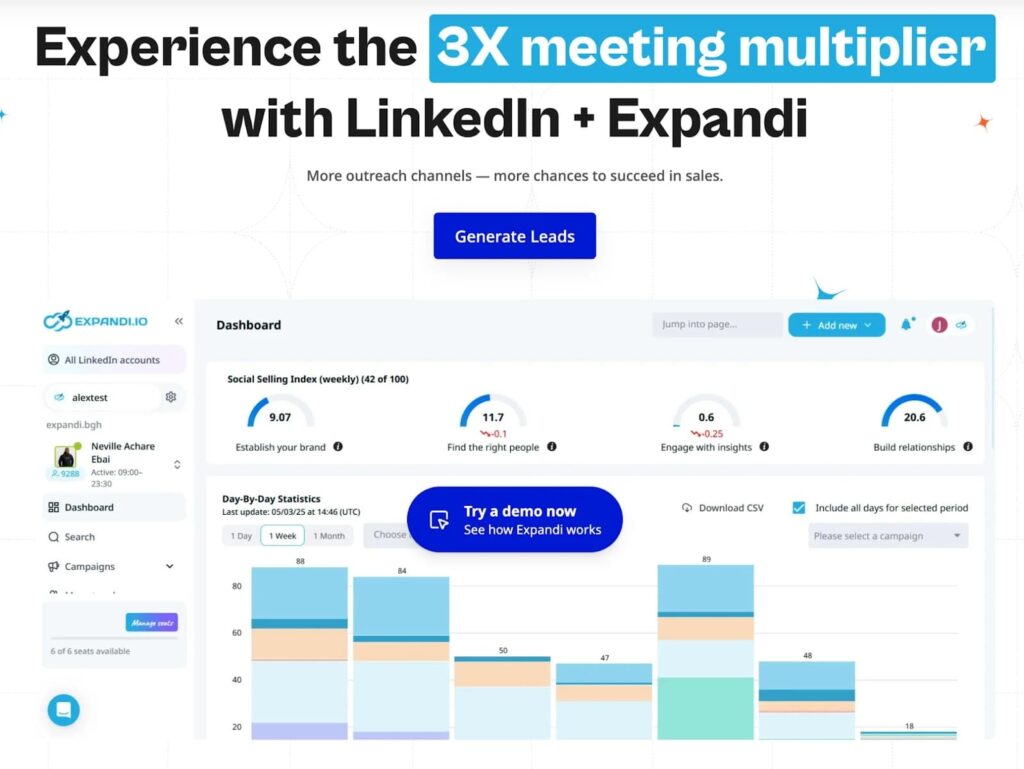
Expandi is a global, omnichannel outreach automation platform built primarily for LinkedIn and email outreach. While it’s often known for LinkedIn automation, Expandi also plays a strong role in AI-assisted email outreach and sales sequences, especially for teams running outbound at scale.
It’s especially useful for outbound teams running high-volume campaigns who need advanced sequencing logic, personalization at scale, and tight control over when messages are sent or paused.
Then, to take email outreach a step further, Expandi also lets you build multi-touch flows that combine email with LinkedIn follow-ups. This way, prospects who don’t reply in one channel can be nudged in another. Ultimately, you get to improve reply and meeting-booking rates without increasing volume.
Across 13.2 million connection requests sent through Expandi between May 2025 and April 2026, the platform-wide connection acceptance rate is 28.5% and the message reply rate is 10.4% (see Expandi’s State of LinkedIn Outreach report for the underlying methodology). Staffing and Recruiting teams see roughly 2x the platform average on every metric.
Key Features
- Email + LinkedIn sequences: Combines email and LinkedIn touchpoints in one coordinated workflow.
- Intent Signals: Detect when prospects engage with your LinkedIn content (profile visits, post likes, comments) and trigger outreach at the exact right moment. This turns email-plus-LinkedIn from parallel channels into a coordinated sequence.
- Workspaces: Manage multiple client or team accounts from a single dashboard with no extra charge per seat. Built for agencies and growing sales teams.
- Mobile Connector: Send up to 50-100 extra connection requests per week per account on top of LinkedIn’s standard limits, through mobile-simulated campaigns.
- AI Message & follow-up generation: Generates contextual replies directly in the inbox for faster response handling.
- Sentiment Analysis: Labels replies as Interested, Maybe, or Not Interested to prioritize leads.
- Human-safe automation: Mimics natural behavior and respects platform limits to reduce account risk.
What I Like About It
- Email and LinkedIn outreach run in one combined workflow, instead of managing separate campaigns in separate platforms.
- You can pull leads straight from LinkedIn search results and use them immediately for outreach, without bouncing between tools or CSVs.
- The global inbox keeps all replies in one place, which makes day-to-day outbound much easier to manage.
Who It’s For
- B2B SaaS teams running outbound email + LinkedIn together.
- Lead gen agencies managing outreach for multiple clients.
- Sales teams that need sequencing logic.
Pricing
- $99/month per LinkedIn account on monthly billing, or $79/month per account billed annually (20% off, two months free).
- All features included on every seat — no feature gating. 7-day free trial, no credit card required.
Verified User Review
“I used Expandi. I put an automation so that it would go through everybody that liked and commented my post. I booked a couple of demos from that.” — Nick Tomic, Face2Face
2. Klaviyo – best for eCommerce AI-powered lifecycle emails & newsletters
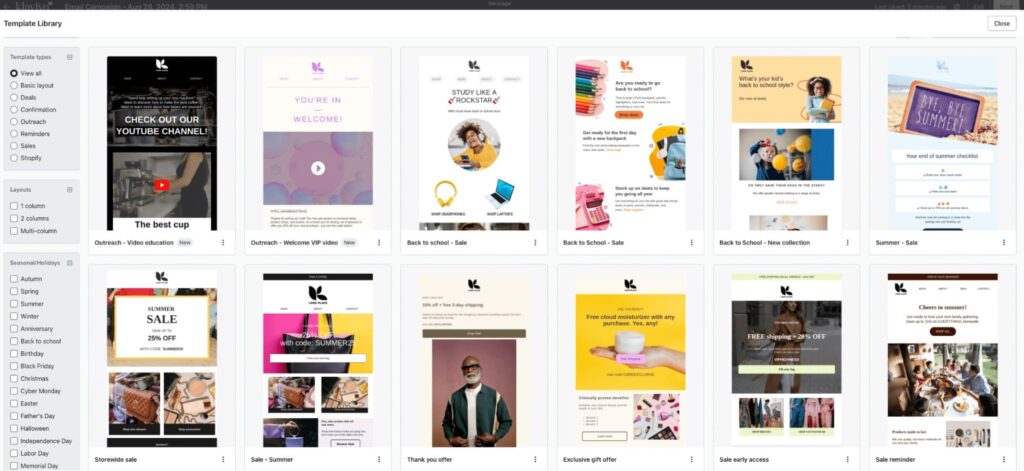
Klaviyo is an email/SMS marketing platform built for lifecycle automation and retention. It’s designed around first-party customer data and event-triggered workflows (“flows”) that let teams automate welcome, abandoned cart, post-purchase, winback, and other lifecycle programs.
Klaviyo’s AI is embedded directly into segmentation, flows, and campaign optimization, rather than positioned as a standalone feature.
Key Features
- Predictive analytics: Surfaces metrics like CLV (customer lifetime value) and churn risk so you can prioritize who to win back vs nurture.
- Smart Send Time: Finds an optimal send time using engagement data to help maximize opens/clicks.
- Flows automation: Builds event-triggered sequences (e.g., joins list, purchase, abandoned cart) across email and SMS.
- AI subject line assistant: Generates subject line options to streamline campaign setup and testing.
- Multi-channel automation: Automates email + SMS (and also mentions push + webhooks depending on setup) from one workflow system.
What I Like About It
- Klaviyo’s AI is most useful when it’s tied to lifecycle decisions (timing + who to target) rather than just rewriting copy.
- Predictive analytics + Smart Send Time + flows is a strong combo for retention teams that want automation driven by customer behavior. Especially powerful for eCommerce.
Who It’s For
- E-commerce and subscription businesses running lifecycle-heavy email programs.
- Teams focused on retention, repeat purchases, and LTV.
Pricing
- Depends on the number of subscribers you’ll have and how many messages you’d like to send per month.
- For 1,001-1,500 subscribers and 250 messages per month:
- Email: Starting at $45/mo at 15,000 emails per month.
- Email + mobile messages: $60/mo at 15,000+ emails and 1,250 mobile messaging credits per month.
Verified User Review
“I greatly appreciate the opportunity offered by Klaviyo to customize email marketing flows, an aspect that allows strategies to be adapted to the specific needs of customers effectively. Furthermore, Klaviyo’s ability to analyze customer behavior is extremely useful; I can segment customers based on type when the information is correctly provided by the CMS and analyze important metrics such as Life Time Value (LTV) and the average time between orders without the need to incorporate other third-party tools.” – verified Growth Marketing Manager review.
3. ActiveCampaign – best for AI-powered marketing automation (email + CRM)
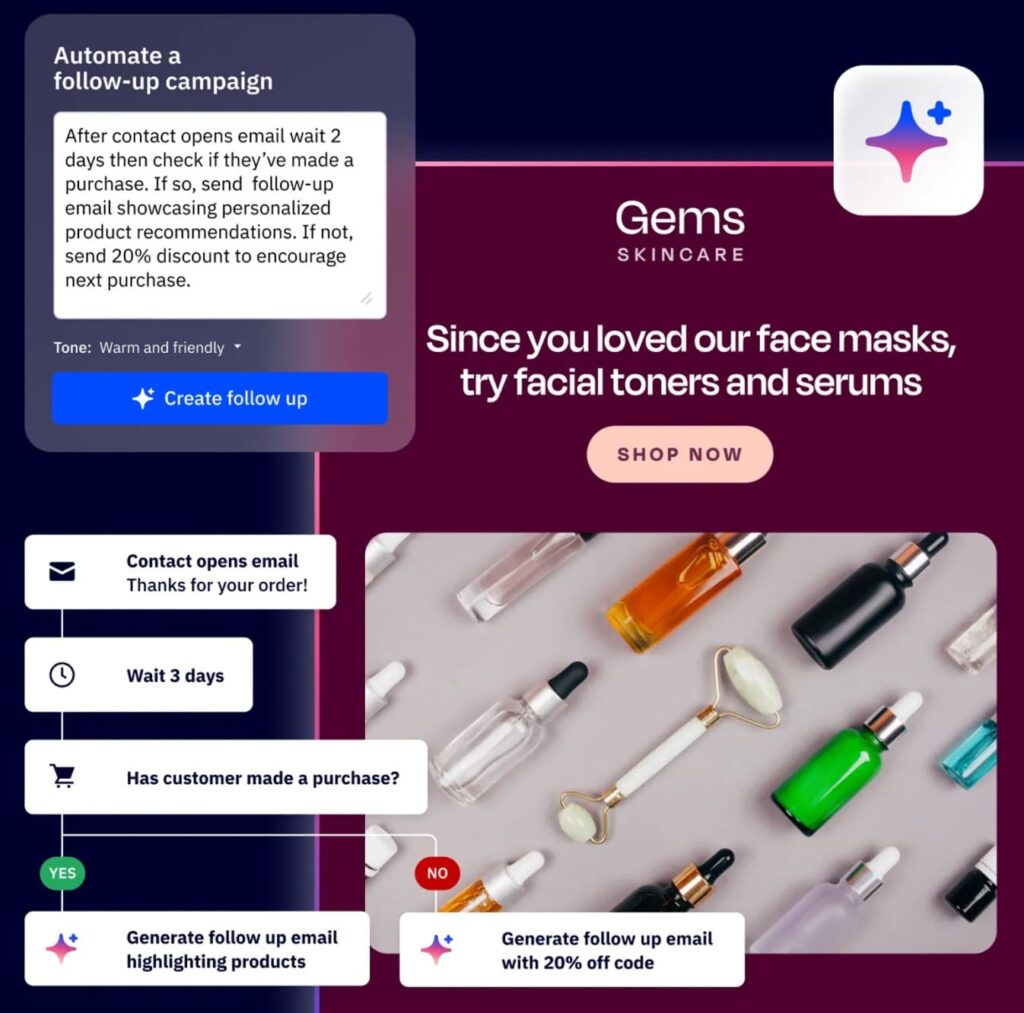
ActiveCampaign is an email marketing and automation platform that’s especially strong when you want lifecycle campaigns + deeper automation logic, with optional CRM and AI features layered in.
It’s a good fit for teams that don’t just want to “send newsletters”, but want to automate journeys end-to-end and tie email activity back to pipeline.
Key Features
- Predictive Sending: Automatically sends campaigns/automations at each contact’s most likely open time to improve engagement.
- Generative AI in the Email Designer: Generates text options inside the email editor from a prompt, so you can draft faster without leaving the builder.
- Generative AI campaign content: Supports AI-generated subject lines and other content blocks as part of its generative AI tooling.
- Win Probability: Uses AI to estimate how likely a deal is to close, helping sales teams prioritize follow-up.
What I Like About It
It’s one of the more “automation-first” tools on the list. The value is how ActiveCampaign combines send-time optimization + content generation + (optional) pipeline intelligence in one platform.
Who It’s For
- Teams running automation-heavy lifecycle journeys (beyond basic newsletters).
- SMB/mid-market teams that want email + automation + optional CRM in one system.
Pricing
- Depends on features and number of email contacts.
- For 1,000 email contacts, you can expect to pay around:
- Starter: $15/mo.
- Plus: $49/mo.
- Pro: $79/mo.
- Enterprise: $145/mo.
Verified User Review
“What I appreciate most about ActiveCampaign is how seamlessly it integrates marketing automation with CRM capabilities. It allows us to create highly personalized customer journeys without needing a large marketing ops team. The segmentation and automation features are incredibly powerful. We can trigger email sequences, in-app messages, or nurture flows based on user behavior, which helps us deliver relevant content at the right time.” – verified CMO and Co-Founder review.
4. HubSpot Marketing Hub – best for CRM-first email marketing (especially if already using HubSpot)
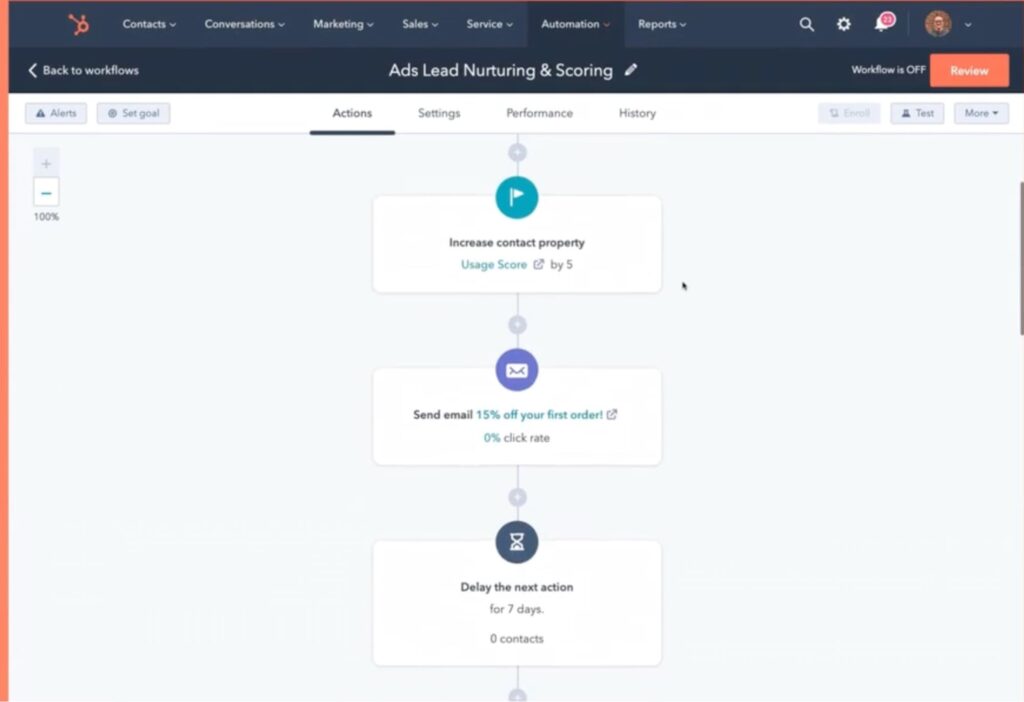
HubSpot is known for its all-in-one platform approach to marketing. It combines CRM, marketing automation, and email marketing into a single system, with dozens of tools built around contact data, lifecycle stages, and pipeline management.
It’s a strong choice if you’re already using HubSpot or if your team thinks about email as part of a broader CRM-driven motion, rather than a standalone channel.
HubSpot also layers in AI through Breeze, which adds AI writing assistance, content suggestions, and performance insights inside marketing emails. Useful for speeding up execution without breaking existing workflows.
Key Features
- AI email writing assistance: Generates subject lines and email copy inside the email tool to speed up campaign creation.
- Email automation with workflows: Triggers follow-up actions based on engagement (opens, clicks, bounces) using workflows tied to CRM data.
- Breeze AI across the platform: Adds AI assistance across marketing/sales/service, using CRM context (helpful if email is part of a broader GTM motion).
What I Like About It
HubSpot covers all the essential email marketing features without being hard to use. It’s especially strong if you’re already using HubSpot, since email, automation, contacts, and pipeline all live in the same place.
HubSpot has a tool for almost everything, which makes it convenient and cohesive.
Who It’s For
- Teams already using HubSpot and want email marketing tightly integrated with their CRM.
- Small to mid-market teams that want all essential email features in one platform without managing multiple tools.
Pricing
For individuals and small teams:
- Free: Free marketing, sales, service, and other tools. Free for up to 2 users.
- Starter: Essential marketing, sales, service, content, and data management software. $10/mo/seat.
- Professional: For marketing teams who want to effectively run omni-channel campaigns, automation, and reporting to build a scalable demand engine. $890/mo
For businesses and enterprises:
- Professional – For marketing teams running omni-channel campaigns, automation, and reporting. $890/mo.
- Enterprise – For marketing organizations managing customer journeys at scale and accelerating revenue growth. $3,600/mo.
Verified User Review
“Quick and responsive when your portal doesn’t have much data in it. It’s fairly easy to learn, with a clean interface and a logical structure. The workflow builder is intuitive for basic automation, and a lot of the tracking is handled automatically… Everything useful seems to be locked behind another paywall. Merging records, more custom reports, etc.
If you’re experienced in marketing analytics or source tracking, HubSpot often feels restrictive.” – verified Head of Demand Generation Marketing.
5. Mailchimp – best for simple newsletters & SMB email marketing
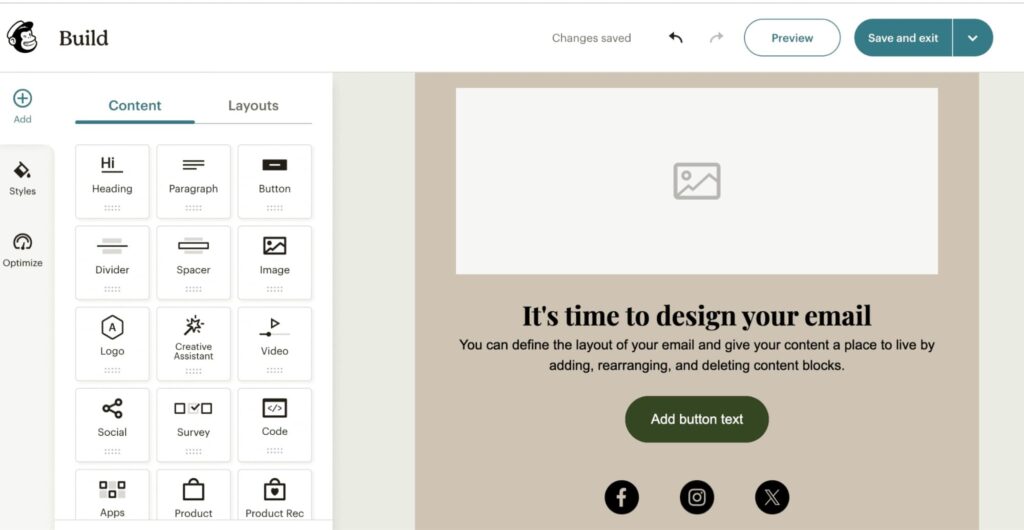
Mailchimp is one of the most widely used email marketing platforms, best known for newsletters, basic automations, and ease of use. It’s designed for teams that want to get emails out quickly without dealing with complex setup, deep lifecycle logic, or heavy CRM dependencies.
Over the years, Mailchimp has added AI features to help with copy, subject lines, and basic optimization, but it remains a simplicity-first tool rather than an advanced automation platform.
Key Features
- AI content assistant: Generates subject lines and email copy to speed up newsletter creation.
- Essential automations: Get welcome emails, abandoned-cart nudges, and follow-ups running without a complex setup.
- Send-time optimization: Lands sends when each contact tends to open, based on their past engagement.
- Audience segmentation: Split your list by engagement and contact data so the right people get the right email.
- Templates & editor: Launch a branded newsletter fast with a big template library and drag-and-drop editor — no designer required.
What I Like About It
Mailchimp is easy to pick up and hard to break. You don’t need a dedicated email specialist to run campaigns, and the editor makes it fast to launch newsletters.
It’s not built for complex lifecycle automation or advanced personalization, but that’s also why many small teams like it, there’s very little overhead.
Who It’s For
- Small businesses and creators sending regular newsletters.
- Teams that want simple email marketing without complex automation.
- Companies early in their email journey that don’t need deep lifecycle logic.
Pricing
- Depends on number of contacts.
- Free: Limited features, under 250 contacts.
- For 500-1,500 contacts, you can expect to pay:
- Essentials: $13.25/mo.
- Standard: $22.5/mo.
- Premium: $175/mo.
Verified User Review
“Mailchimp is great for small business, and the start-ups who want to keep their customer relationship management in one place, but the platform is based on how many contacts you grow, and the cost is not friendly for small business today… integrating with their API is challenging if you don’t have detailed documentation or information about the technology stack involved” – verified Digital Marketing Manager.
6. Brevo – best for budget-friendly email + SMS with AI basics
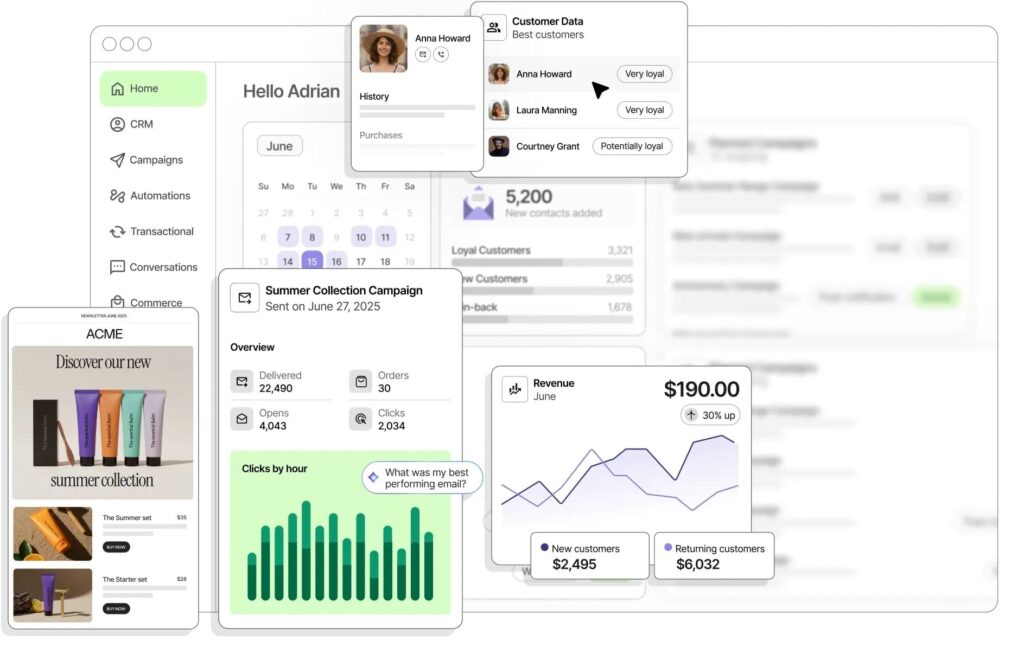
Brevo (formerly Sendinblue) is an email and SMS marketing platform positioned as a cost-effective alternative to heavier tools. It’s commonly used by small to mid-sized teams that want email, SMS, and basic automation without enterprise pricing or complexity.
Brevo includes AI-assisted features for content and optimization, but the core value is coverage + affordability, not depth.
Key Features
- AI email content assistant: Helps generate subject lines and email copy to speed up campaign setup.
- Email + SMS campaigns: Run email and SMS from the same platform using shared contact data. Channels include email, SMS, WhatsApp, web and mobile push, livechat, and others.
- Basic automation workflows: Cover welcome flows, follow-ups, and simple lifecycle emails so routine sends run on their own.
- Send-time optimization: Shifts delivery to when each contact engages, so more sends land at the right moment.
What I Like About It
Brevo gives you a lot for the price. You get email, SMS, and automation in one place without being forced into expensive tiers early.
It’s not the most advanced tool in terms of segmentation or lifecycle logic, but for teams that want broad functionality without overengineering, it’s practical and approachable.
Who It’s For
- Small to mid-sized teams with smaller budget.
- Businesses that want email + SMS without managing multiple tools.
- Teams that need basic automation, not complex lifecycle orchestration.
Pricing
- Starter: $9/mo.
- Standard: $18/mo.
- Professional: $499/mo.
- Enterprise: Talk to sales.
Verified User Review
“I appreciate how advanced and easy-to-use their automation features are. The workflows allow me to create detailed customer journeys without feeling overwhelmed, which is especially helpful when managing a growing brand… The CRM is the part I find least developed. When I compare it to platforms like HubSpot, it feels like it’s missing some important features for organizing and maintaining customer records” – verified user in education management.
7. Encharge – best for SaaS lifecycle email automation
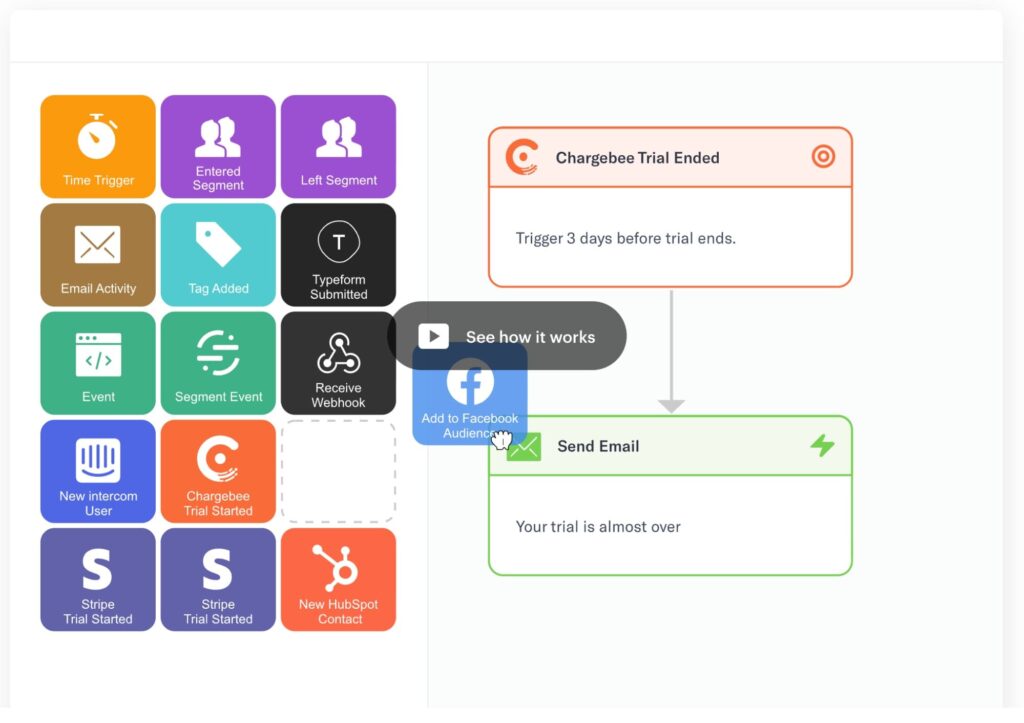
Encharge is a customer engagement platform built specifically for SaaS lifecycle email.
It’s designed around event-based automation, making it easy to trigger emails based on in-app behavior, product usage, and lifecycle stage rather than just list membership.
Compared to broader platforms, Encharge stays focused on email-first lifecycle automation instead of trying to be a full CRM or marketing suite.
Key Features
- Event-based automation: Fire emails off what users do in-product — events, page views, key actions — so messages match behavior.
- Visual flow builder: Build multi-step lifecycle sequences (onboarding, activation, retention, churn prevention).
- Behavioral segmentation: Group users by real product usage rather than static profile fields, so onboarding and retention emails hit the right cohort.
- AI-assisted email creation: Helps generate and refine email copy inside campaigns.
- SaaS-friendly integrations: Plug into your product analytics and data stack so event data flows in without custom work.
What I Like About It
Encharge feels purpose-built for SaaS. Instead of forcing lifecycle logic into a general email tool, it starts with product behavior as the core signal, which makes onboarding and retention emails far more relevant.
You’re not paying for CRM features or channels you don’t need.
Who It’s For
- SaaS companies running product-led growth motions.
- Teams focused on onboarding, activation, and retention emails.
- Product and lifecycle marketers who need event-driven email, not newsletters.
Pricing
- Depends on number of subscribers.
- For 2,000, you can expect to pay:
- Growth: $79/mo.
- Premium: $129/mo.
- Enterprise: Talk to sales.
Verified User Review
“Encharge really shines in letting us build out custom automations with its visual flow builder. It’s easy to drag and drop steps, set up triggers based on actual user behavior, and personalize messages for different client segments… The flip side to all this flexibility is that there’s a bit of a learning curve. If you or your team haven’t used marketing automation before, expect to spend some time figuring out how to make everything work together” – verified Director Strategic Initiatives and Marketing Communications.
8. Instantly – best for high-volume cold email with deliverability built in
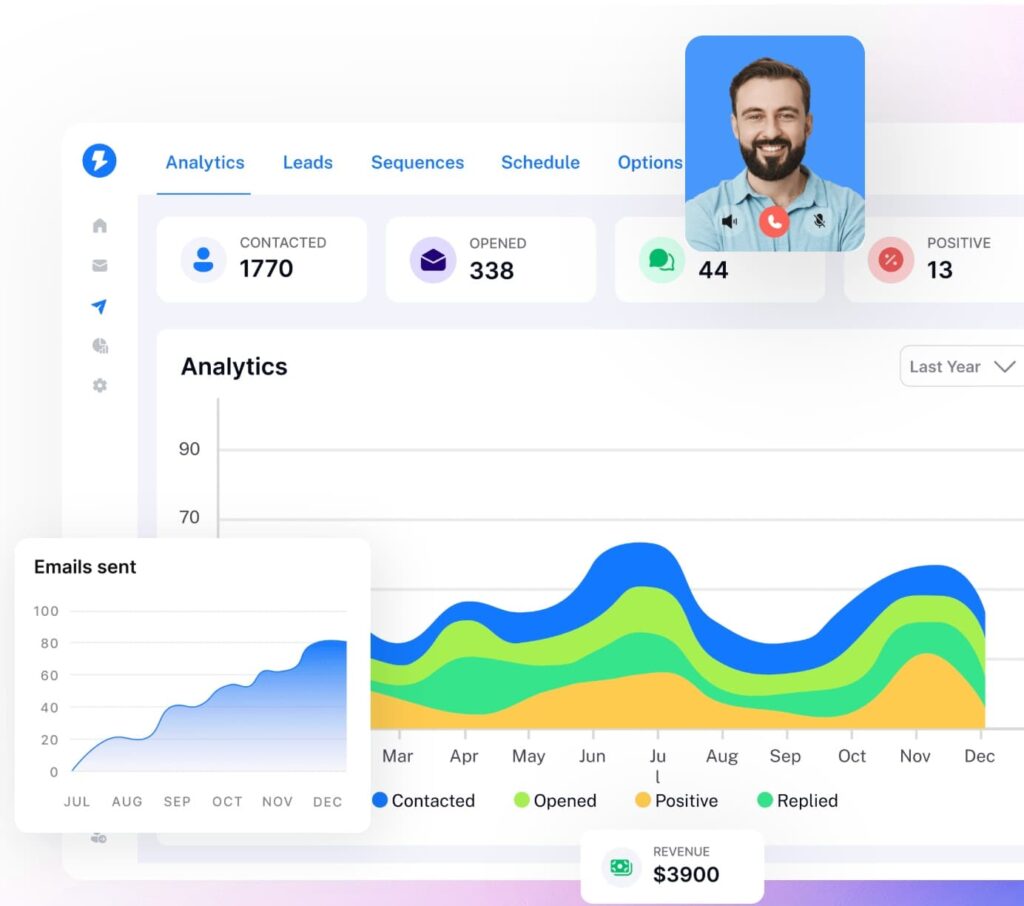
Instantly is an outbound email platform built for scaling cold email safely. It’s best known for letting teams run outreach across multiple inboxes while layering in deliverability features (like warmup + infrastructure controls) so high volume doesn’t automatically mean high spam risk.
One unique angle: Instantly also offers a Website Visitors product that uses a pixel to identify US-based website visitors and can push identified visitors into outreach campaigns automatically.
Key Features
- Unlimited email accounts + warmup: Scale sending across multiple inboxes while warming them up to protect reputation.
- Deliverability infrastructure (SISR / IP sharding & rotation): Uses server/IP sharding and rotation to help maintain deliverability at scale.
- Website Visitors pixel: Identifies US-based visitors (including business details) and can push them into outreach campaigns.
- AI/automation across outreach workflows: Positions AI across outreach + engagement workflows inside the platform.
- DFY email accounts: Buy deliverability optimized email accounts ready to go to save time.
What I Like About It
It’s built for volume + deliverability (warmup + infrastructure are core, not add-ons).
The Website Visitors feature is a strong “intent → outreach” bridge when you have meaningful US traffic and want to follow up fast.
Who It’s For
- SDR teams and agencies running high-volume cold email.
- Teams that need multiple sending accounts and deliverability controls baked in.
Pricing
- Growth: $37/mo.
- Hypergrowth: $97/mo.
- Light speed: $358/mo.
Verified User Review
“What I find most impressive about Instantly is how effortlessly it streamlines outreach management and campaign scaling. The user interface is straightforward and intuitive, making it easy to get started without facing a steep learning curve. The automation features have saved me considerable time, and the deliverability tools help ensure that my messages actually reach recipients’ inboxes. Whenever I’ve had questions, their support team has been both helpful and responsive. Overall, Instantly has made my workflow significantly more efficient.” – verified founder review.
9. SendGrid – best for transactional email & deliverability at scale
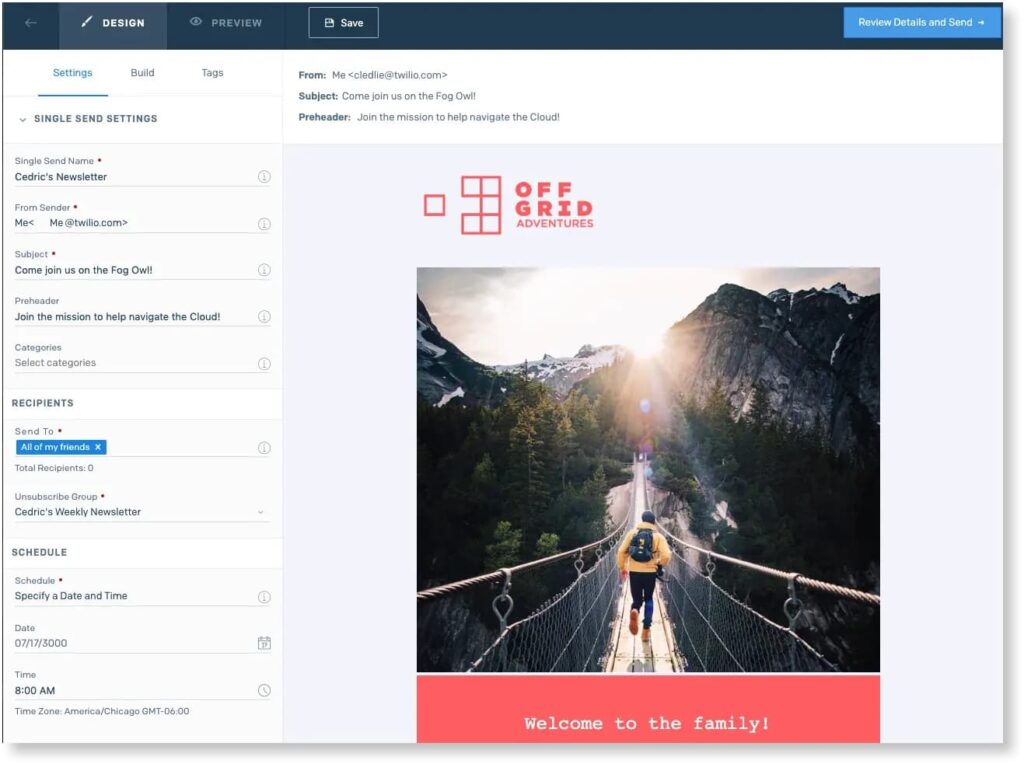
SendGrid (by Twilio) is an email delivery platform built for reliability, scale, and inbox placement. It’s not a marketing-first tool. Teams use SendGrid when email is mission-critical, transactional messages, product notifications, receipts, and high-volume sends that absolutely need to land.
AI email marketing focus here isn’t about copy. It’s about deliverability, routing, and performance monitoring under the hood
Key Features
- High-volume email delivery: Built to reliably send large volumes of transactional and programmatic emails.
- Deliverability optimization tools: Keep mission-critical mail out of spam with reputation monitoring, suppression management, and ISP-level insights.
- Email activity & analytics: See exactly what happened to every send — delivery, opens, bounces, spam reports — so you catch problems early.
- Dedicated IPs & IP warmup: Supports controlled scaling and reputation management for serious senders.
- API-first architecture: Wire email straight into your app or backend so sends fire from your own product logic.
What I Like About It
SendGrid does one thing extremely well: make sure emails get delivered. There’s no fluff, no bloated UI, and no attempt to be a full marketing suite.
It’s the kind of tool you don’t think about day-to-day, which is exactly what you want when email delivery is part of your product or core infrastructure.
Who It’s For
- Product and engineering teams sending transactional or system emails.
- High-volume senders who care about deliverability and reputation control.
Pricing
- Depends on the number of emails you’d like to send per month.
- For <3,000 emails, you can expect to pay:
- Essentials: $19.95/mo.
- Pro: $89.95/mo.
- Premier: Custom pricing.
Verified User Review.
“First and foremost, the reliability of Twilio SendGrid is unmatched. The API ensures that emails are delivered promptly and consistently without the hassle of managing complex email infrastructure. With Twilio’s extensive network of servers, emails are sent efficiently, minimising the chances of them ending up in spam folders or being undelivered altogether… One aspect that could be improved is the complexity of the initial setup process” – verified associate software engineer.
10. Mailgun – best for developer-first email delivery & monitoring
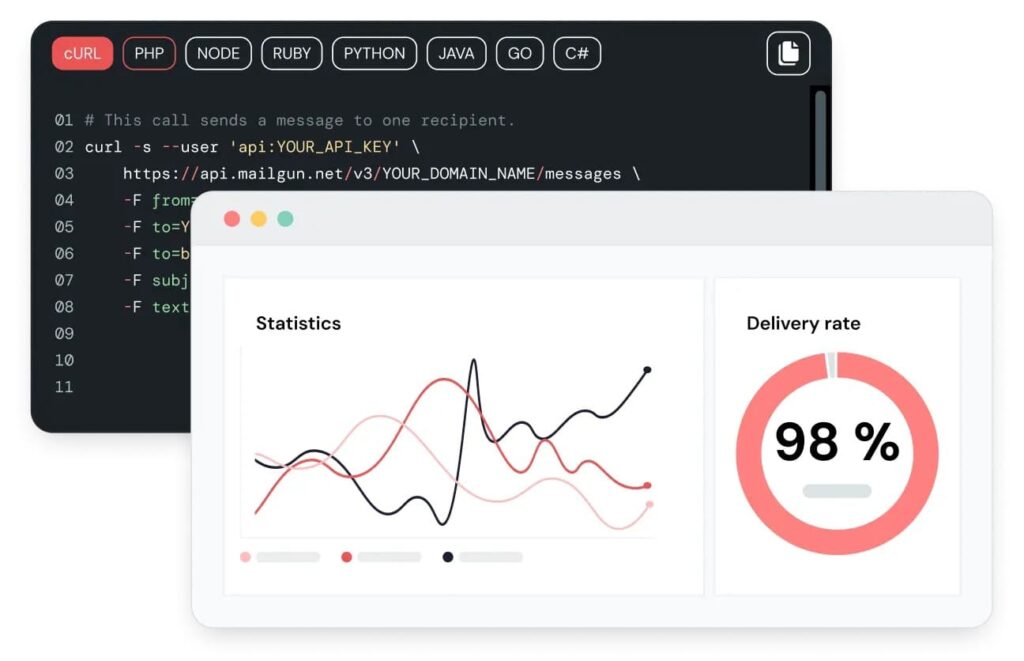
Mailgun is an email delivery platform built for developers and technical teams that want control over how emails are sent, tracked, and monitored. Like SendGrid, it’s not a marketing-first tool, it’s used for transactional emails, system notifications, and high-volume programmatic sending.
Where Mailgun stands out is its email observability and diagnostics, which make it easier to understand why emails fail or land poorly.
Key Features
- API-first email sending: Built for engineering teams that need to send transactional and programmatic email straight from code.
- Deliverability monitoring: Surfaces bounces, spam complaints, and reputation signals in detail, so you see why mail fails instead of guessing.
- Email validation: Verifies email addresses before sending to reduce bounces and protect sender reputation.
- Inbound email routing: Pipe replies and incoming mail straight back into your app or workflow, with no manual handling.
- Dedicated IPs & IP warmup: Supports reputation control for high-volume senders.
What I Like About It
Mailgun gives you visibility that many email tools hide. If something breaks, you can usually figure out why instead of guessing.
It’s not the simplest tool on the list, but for teams that care about deliverability mechanics and want insight into what’s happening behind the scenes, that’s a big feature.
Who It’s For
- Engineering or technical teams sending transactional or system emails.
- Companies that want email validation + delivery monitoring in one place.
Pricing
- Depends on number of emails you’re sending.
- For 10,000 emails per month, that’s:
- Free: 100 emails per day.
- Basic: $15/mo.
- Foundation: $35/mo.
- Scale: $90/mo.
Verified User Review
“The best thing about Mailgun is its ability to handle high sending volumes reliably while protecting our domain’s reputation. As a commercial SME, we send a lot of electronic documentation, and before using Mailgun, our domain was constantly being blocked due to high bounce rates and invalid emails. Mailgun automatically manages and filters these issues, which is crucial for our operations… I’d say the initial setup and interface can be a little confusing.” – verified IT manager.
11. Customer.io – best for event-driven lifecycle email (product & SaaS teams)
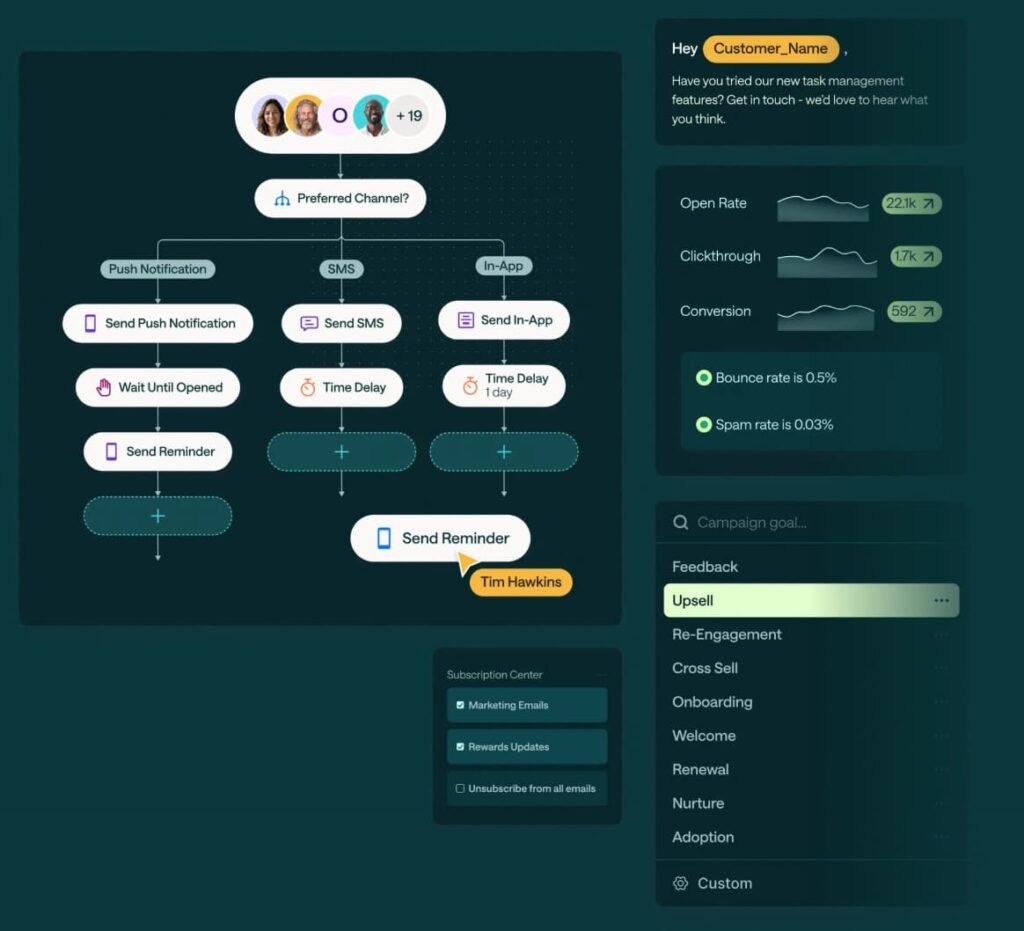
Customer.io is a customer engagement platform built around event-driven messaging. It’s designed for product-led and SaaS teams that want to trigger emails based on what users do inside product.
Email is the core channel, but everything starts with real-time events and behavioral data, which makes it a strong fit for onboarding, activation, retention, and re-engagement workflows.
Key Features
- Event-based email automation: Fire messages off real product events and API calls so onboarding and retention react to what users do — across email, push, in-app, and SMS.
- Advanced segmentation: Build segments that update in real time off event and attribute data, so the right users get the right flow as behavior changes.
- Visual workflow builder: Map complex, branching lifecycle flows with conditional logic without hand-coding each path.
- AI-assisted content tools: Helps generate and refine email copy inside campaigns.
What I Like About It
Customer.io is very strong when email needs to react to product behavior. You’re not forcing lifecycle logic into a marketing tool. Events are the foundation, which makes messages feel timely and relevant.
It’s more technical than tools like Mailchimp or HubSpot, but that’s the trade-off for flexibility and control.
Who It’s For
- SaaS and product-led teams running event-driven lifecycle emails.
- Growth and product marketers who need real-time behavioral triggers.
- Teams with engineering resources to implement and maintain event tracking.
Pricing
- Customer.io pricing is usage-based and varies by message volume, channels, and features.
- For 5,000 profiles, the pricing is:
- Essentials: $100/mo.
- Premium: $1,000/mo.
- Enterprise: Custom.
Verified User Review
“I like how powerful and flexible the automation system in Customer.io is. The workflow builder makes designing customer journeys incredibly easy, whether they are simple drip sequences or complex, multi-step flows. Everything is visual, logical, and easy to adjust… The learning curve can be steep. Because the platform is so flexible, it can take time for new users to understand all the features.” – verified Sr. account executive.
12. Iterable – best for enterprise lifecycle email & omnichannel orchestration
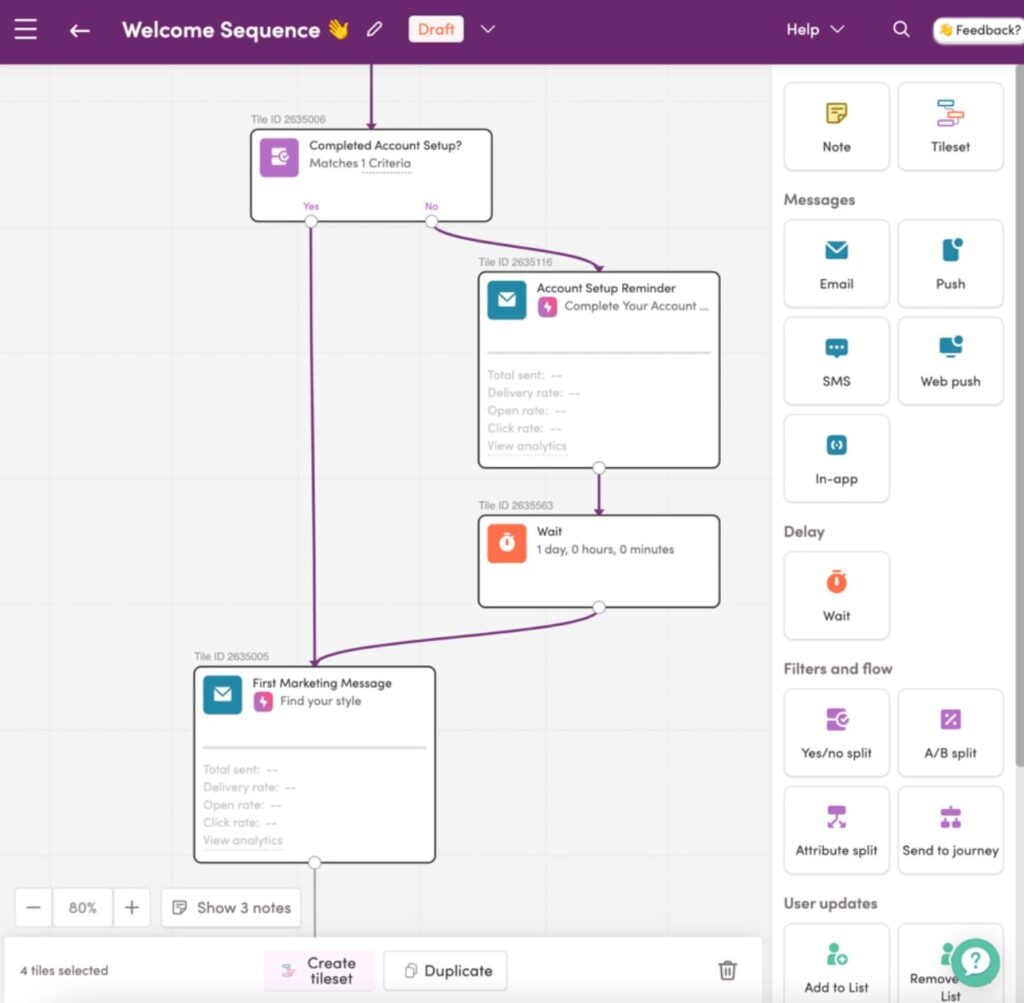
Iterable is a customer engagement platform built for large, data-heavy teams running complex lifecycle programs at scale. It’s commonly used by enterprise SaaS, fintech, and consumer tech companies that need advanced segmentation, orchestration across channels, and tight control over experimentation.
Email is a core channel, but Iterable is designed for cross-channel lifecycle orchestration, with AI used to support optimization, targeting, and decisioning rather than just copy generation.
Key Features
- Advanced segmentation: Target precisely at scale by building granular audiences from real-time events, attributes, and behavior.
- Journey orchestration: Run one coordinated lifecycle across email, push, SMS, and in-app from a single flow.
- AI-powered optimization: Lean on AI for send-time, audience targeting, and performance insights so large programs tune themselves.
- Experimentation & testing: Built-in A/B and multivariate testing across messages and journeys.
- Enterprise controls: Govern access and permissions across big teams without losing control of who can send what.
What I Like About It
Iterable is built for scale and complexity. If you’re running millions of messages across multiple channels and need precise control over who gets what and when, it handles that well.
It’s not lightweight and it’s not cheap. But for enterprise teams, it replaces a patchwork of tools with a single lifecycle engine.
Who It’s For
- Enterprise SaaS and consumer tech companies.
- Teams running complex, multi-channel lifecycle programs.
- Organizations with dedicated lifecycle, data, and engineering resources.
Pricing
- Custom-quote based, have to talk to sales.
- Expect to pay $10,000-$30,000/year, according to online reviews.
Verified User Review
“I really appreciate the wide range of features that help boost efficiency across various teams, including product, marketing, and data. Iterable gives our team the flexibility required for quick experimentation, the scalability to connect with audiences worldwide, and an easy-to-use interface. It also allows us to build custom journeys that we couldn’t create with our previous solution.” – Lifecycle marketing manager.
13. GetResponse – best for email marketing with funnels & webinars
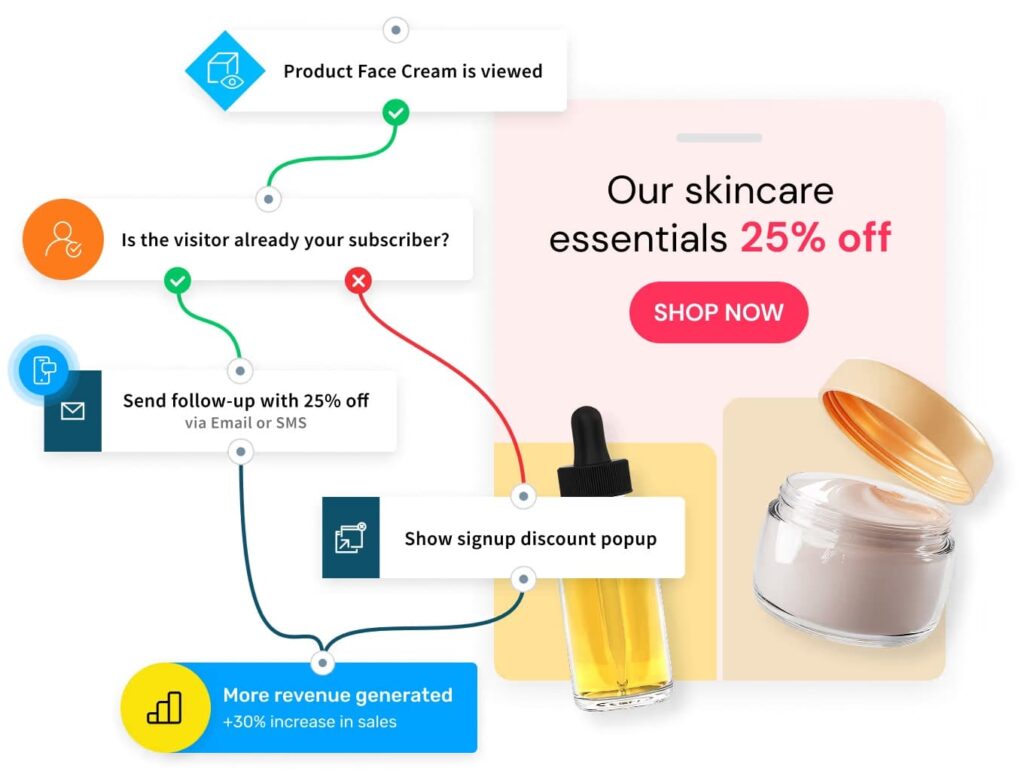
GetResponse is an email marketing platform that combines email campaigns, basic automation, landing pages, and webinars in one tool. It’s positioned for teams that want more than just newsletters, but don’t need a full CRM-first or enterprise lifecycle platform.
AI features are mostly focused on speeding up campaign creation and optimization, rather than deep behavioral decisioning.
Key Features
- AI email generator: Helps create subject lines and email copy directly inside the editor.
- Marketing automation workflows: Automate onboarding, lead nurturing, and follow-ups so leads keep moving without manual sends.
- Funnels & landing pages: Build lead capture funnels without relying on separate tools.
- Webinars built in: Host and promote webinars directly from the same platform.
- Send-time optimization: Adjusts delivery timing based on engagement data.
What I Like About It
GetResponse is convenient if you want email + funnels + webinars under one roof. You don’t need to stitch together multiple tools just to run lead gen campaigns.
It’s not as deep as enterprise lifecycle tools, but it offers more structure than basic newsletter platforms.
Who It’s For
- Small to mid-sized teams running lead gen and webinar-driven email campaigns.
- Marketers who want funnels and landing pages bundled with email.
- Teams that want more than newsletters without moving into enterprise tooling.
Pricing
- Depends on list size.
- For a list of 5,000 people:
- Starter: $44/mo.
- Marketer: $77/mo.
- Creator: $89/mo.
- Enterprise: Custom.
Verified User Review
“As someone who manages email marketing for several clients, I find the drag-and-drop builder to be a real lifesaver. It allows me to quickly create branded templates without needing to consult a designer each time. The workflows are also very intuitive, enabling me to set up onboarding sequences, product reminders, and nurturing campaigns within minutes. The analytics are straightforward and make it easy for me to compare performance across different clients.” – verified marketing research.
14. Campaign Monitor – best for brand-first newsletters & campaigns
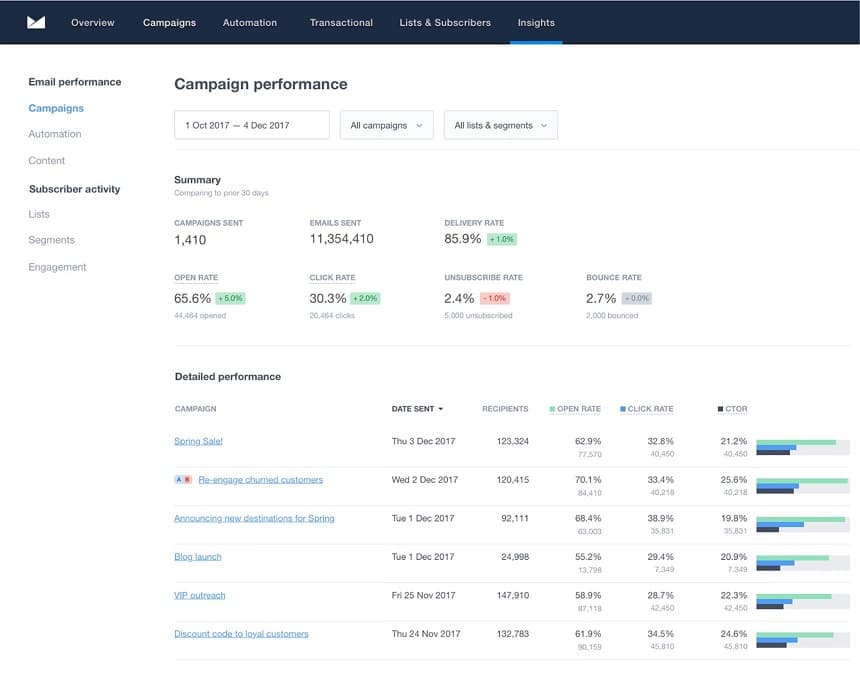
Campaign Monitor is an email marketing platform built for design-heavy, brand-sensitive email campaigns. It’s most commonly used by marketing teams that care deeply about layout, visuals, and consistent brand presentation. Especially for newsletters and promotional sends.
AI here is light and supportive, focused on helping teams move faster rather than automating complex lifecycle logic.
Key Features
- Email design & templates: Ship polished, on-brand emails fast with a drag-and-drop editor and brand-friendly templates.
- Journey automation: Set up automated journeys and follow-ups so routine sends run without hands-on work.
- AI copy assistance: Helps generate subject lines and email content inside campaigns.
- Audience segmentation: Split contacts by engagement and attributes so each group gets a relevant send.
What I Like About It
Campaign Monitor shines when presentation matters. Emails look polished, on-brand, and consistent without much effort.
It’s not built for complex lifecycle automation or event-driven logic. But for teams running high-quality newsletters and campaigns, it does exactly what it promises without unnecessary complexity.
Who It’s For
- Marketing teams with brand-heavy newsletters and campaigns.
- Agencies managing email for multiple brands.
- Teams that prioritize design and consistency over deep automation logic.
Pricing
- Based on list size and sending volume, with multiple tiers depending on features.
- For 500-2,500 contacts:
- Lite: $70/mo.
- Essentials: $109/mo.
- Premier: $189/mo.
- Enterprise: Contact sales.
Verified User Review
“Campaign Monitor has an easy to use interface that makes building emails quick and easy. Our emails look great and we find that we have a reasonable level of flexibility when creating our templates… The reporting isn’t as good as it could be in relation to transactional emails.” – verified head of marketing.
15. MailerLite – best for general-purpose AI email marketing with a strong free tier
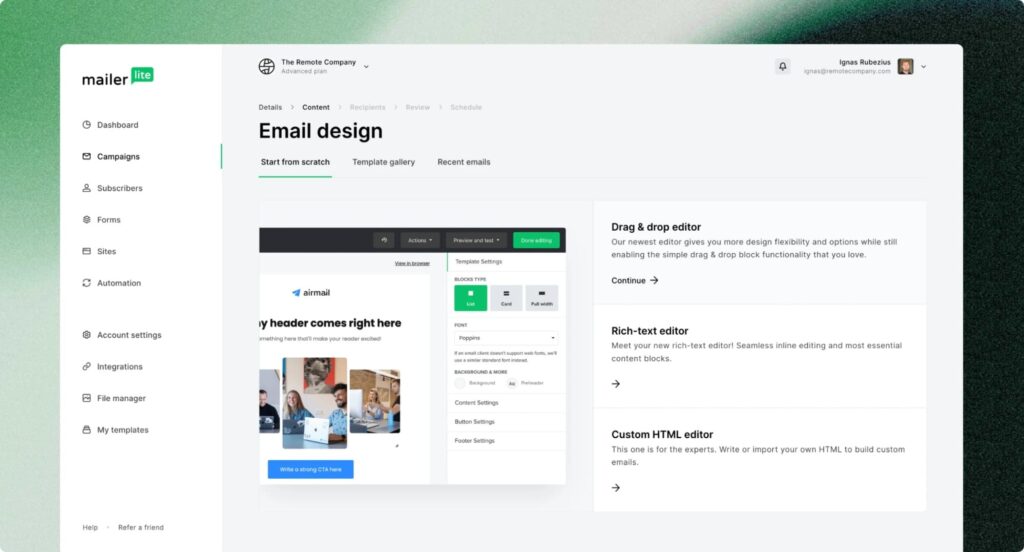
MailerLite is a popular SMB and creator-friendly email marketing platform used by over 1 million businesses worldwide. It’s built around ease of use — a drag-and-drop editor, a simple automation builder, and a free tier generous enough that small teams can run real campaigns without paying anything.
The AI layer sits inside the editor: an AI writing assistant for subject lines, copy, and full newsletter drafts, plus AI landing-page and image generation.
Key Features
- AI writing assistant: Generates subject lines, email copy, full newsletter drafts, and content ideas (Advanced plan and above).
- AI landing pages + AI image generator: Spin up landing pages and on-brand visuals without leaving the editor.
- Drag-and-drop email editor: Beginner-friendly with dynamic content blocks and unlimited templates on paid plans.
- Email automation: Welcome sequences, abandoned-cart flows, behavior-triggered sends.
- Built-in signup forms, pop-ups, landing pages, and websites: Lead capture and publishing inside one platform.
What I Like About It
The free tier is the most generous in this category — 500 subscribers and 12k monthly sends is enough for a real small business to run welcome flows, newsletters, and basic automations without paying anything. Paid tiers stay affordable as you scale.
The AI writing assistant is the meaningful AI feature here (subject lines, full drafts, content ideas), but it’s gated to the Advanced plan ($20+/mo), not the cheaper Growing Business tier.
Who It’s For
- Small businesses, freelancers, and creators sending newsletters and lifecycle emails on a budget.
- Teams that want a clean editor and easy automation without managing a heavier platform.
- Anyone outgrowing Mailchimp’s free tier and wanting more send volume at the same price point.
Pricing
Depends on the number of subscribers. Paid plans start from $10/mo (Growing Business) or $20/mo (Advanced) at 500 subscribers.
For up to 5,000 subscribers:
- Free: $0/mo for up to 500 subscribers, 12,000 emails/month, 1 user seat.
- Growing Business: $39/mo, unlimited emails, 3 user seats, unlimited templates, dynamic emails, multivariate testing.
- Advanced: $50/mo, unlimited seats, AI writing assistant, smart sending, custom HTML editor, enhanced automations.
- Enterprise: Custom pricing for businesses with 100K+ subscribers. Dedicated success manager, dedicated IP, deliverability consultation.
Verified User Review
“MailerLite simplifies marketing tasks and is quite comprehensive for sending emails, capturing subscribers, and automating communications. The free plan is generous and the editor is easy enough that I don’t need a designer.” – verified G2 user review.
16. Mailshake – best for AI cold email plus built-in dialer in one workflow
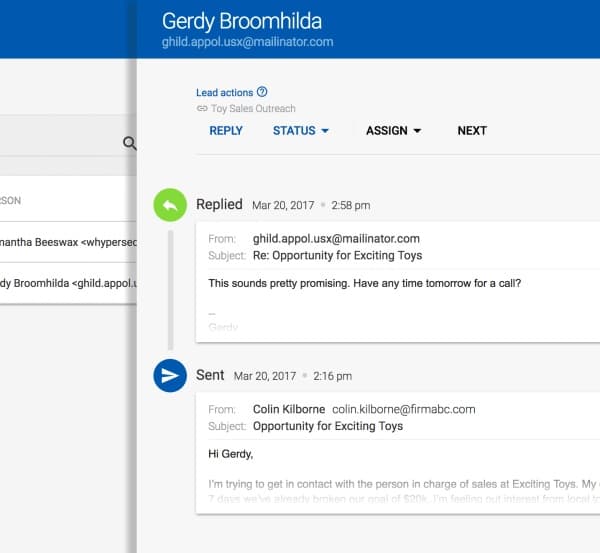
Mailshake is a sales engagement platform that combines cold email automation with a built-in phone dialer in one tool. It’s positioned for SDR teams and agencies that want to run high-volume outbound across email and calls without stitching together multiple platforms.
The AI layer sits on top: SHAKEspeare AI email writer drafts and improves email copy, and Maximus AI Sales Coach scores every sales call to coach reps on what to fix.
Key Features
- SHAKEspeare AI Email Writer: Drafts cold email copy from a prompt in under a minute, creates A/B variants, and rewrites emails for clarity. Free with every Mailshake account.
- Multiple Mailboxes with email rotation: Send across multiple email addresses with automated rotation, plus built-in deliverability tools to protect sender reputation.
- Built-in Dialer: Make calls from inside Mailshake with unlimited US/Canada VOIP, phone scripts, and call logging (Sales Engagement tier and above).
- Maximus AI Sales Coach: Auto-scores every sales call, fills in scorecards, and shares personalized feedback with reps — essentially an AI sales manager for call coaching.
- Lead Catcher: Centralized queue for managing replies — one-click responses, lead status tracking (won/lost/ignored), and team handoffs.
- Data Finder: Built-in B2B contact database with credits included per tier.
What I Like About It
Mailshake’s edge is bundling cold email and phone outreach in one tool. Many cold email platforms stop at email; Mailshake’s dialer lets reps follow a sequence email with a same-day call from inside the same workflow.
It’s not the deepest deliverability stack on the list (Instantly and Smartlead go further on infrastructure), but the email + dialer + AI call coaching combo is rare at this price point.
Who It’s For
- SDR teams running cold email plus phone outreach from one platform.
- Agencies that want CRM-integrated email with a built-in dialer included.
- Sales managers who want AI call coaching alongside outbound email.
Pricing
- Starter: $29/mo, 1 email address, 1,500 monthly sends, AI email writing, A/B testing.
- Email Outreach: $49/mo, 2 email addresses, unlimited sends, email rotation, personalization, unified inbox, CRM integrations.
- Sales Engagement: $99/mo, 10 email addresses, built-in dialer with 5 phone numbers, unlimited US/Canada dialer minutes, lead scoring, onboarding call.
- Agency: Custom pricing.
Verified User Review
“The interface stays clean and intuitive, which makes day-to-day outreach much smoother, especially when you’re managing multiple campaigns at once… One area that could be improved is how automated replies are handled. Occasionally, things like spam filter notices or auto-generated blocks are counted as real replies, which can be a bit misleading when reviewing leads.” — verified Sales Development Representative review.
17. Smartlead – best for multi-inbox cold email infrastructure & deliverability
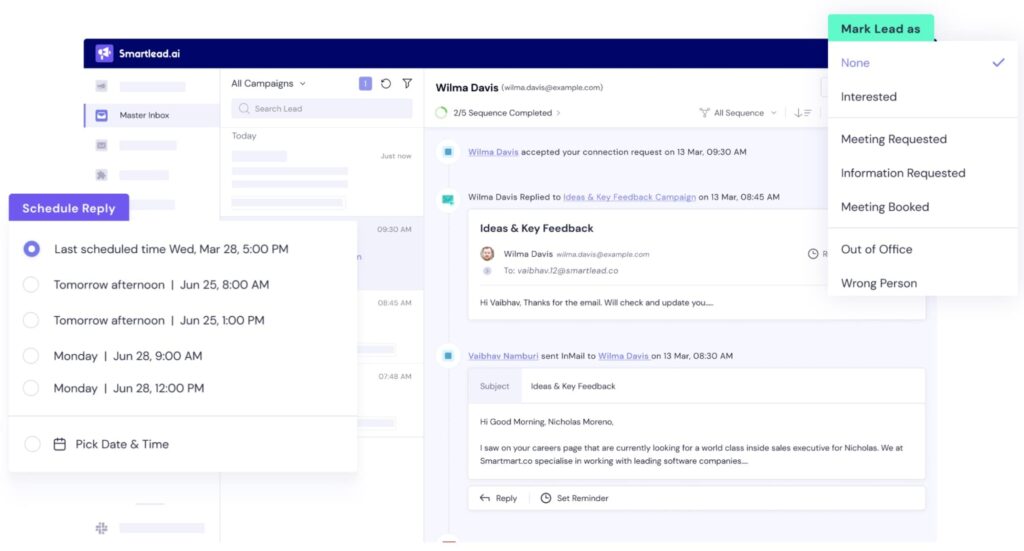
Smartlead is a cold email platform built for teams that need to scale outbound volume safely. It’s designed around sending from multiple inboxes at once, with deliverability controls baked into the core product rather than added later.
Compared to tools that focus on copy or personalization, Smartlead’s strength is infrastructure and making sure emails land while running high-volume campaigns.
Key Features
- Multi-inbox sending: Send campaigns across many email accounts at once, spreading volume to reduce spam risk and protect sender reputation.
- Automated inbox warmup: Gradually warms up new inboxes to establish trust with email providers.
- Centralized campaign management: Manage sequences, inboxes, and sending logic from one dashboard.
What I Like About It
Smartlead is purpose-built for teams where deliverability is the bottleneck, not copy. If you’re already confident in your messaging but keep running into inbox placement issues, Smartlead gives you the infrastructure to scale without constantly burning domains.
Who It’s For
- Agencies and SDR teams running high-volume cold email.
- If you’re managing multiple inboxes or domains.
Pricing
- Basic plan: $39/mo, perfect for solopreneurs trying out Smartlead.
- Pro plan: $94/mo, perfect for marketers and pre-scale businesses.
- Custom plan: $174+/mo, perfect for lead gen agencies and at scale businesses.
Verified User Review
“I appreciate Smartlead for its intuitive design, and the support team is always very helpful whenever I encounter any issues. I’ve built my entire cold email tech stack using both Clay and Smartlead, and I’ve never experienced any problems with deliverability.” – verified head of growth.
18. Woodpecker – best for simple, reply-focused cold email outreach
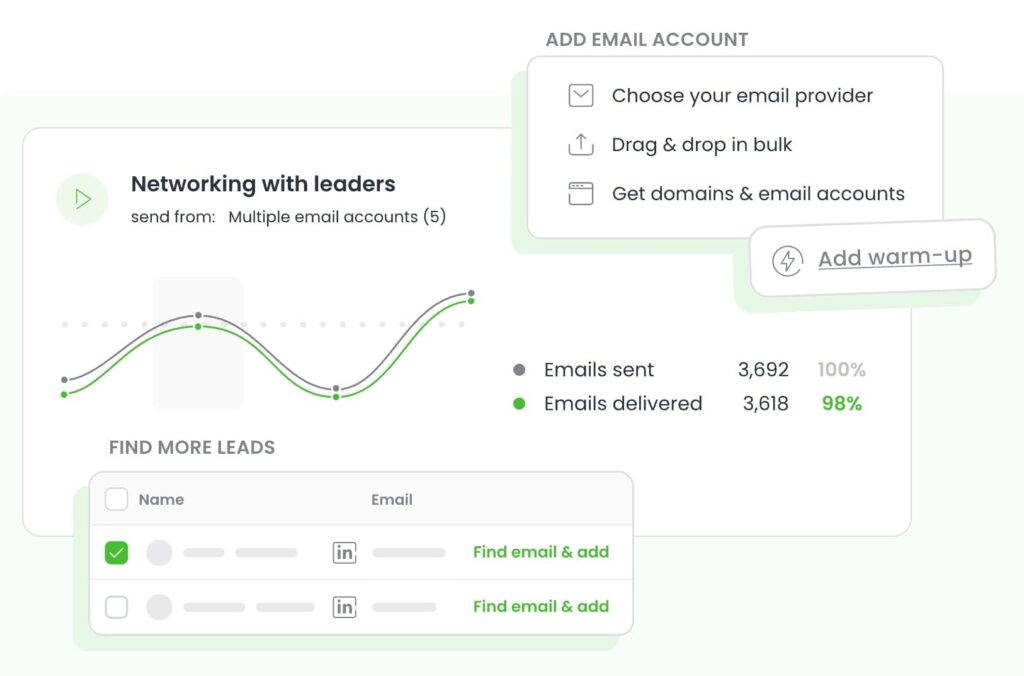
Woodpecker is a cold email tool focused on doing the basics well. It’s designed for teams that want reliable outreach and follow-ups without complex setups, advanced infrastructure, or heavy automation logic.
This email tool is mainly for small teams and agencies that care about reply management and essential outreach features. Don’t expect anything too complicated or over the top AI features, but for cold email outreach, it’s got everything you’d need.
Key Features
- Automated follow-up sequences: Runs follow-ups automatically so prospects are nudged consistently without manual chasing.
- Reply detection: Detects replies and stops sequences to avoid the classic mistake of following up after someone has already responded.
- Personalization fields: Supports basic personalization using custom fields to keep outreach relevant without overengineering.
- Extra marketing and outreach addons: Offers supporting tools to help reduce bounce rates and protect sender reputation (LinkedIn outreach automation, warm-ups, lead credits, and more).
What I Like About It
Woodpecker is straightforward and predictable. You don’t need a complicated RevOps setup or a deliverability playbook to get value out of it. It’s easy to launch campaigns and trust that follow-ups won’t go rogue.
Who It’s For
- Small teams running straightforward cold email campaigns.
- Agencies managing clients who want simplicity over advanced controls.
Pricing
Pricing can vary depending on the number of prospects you want to reach.
- Starter: $35/mo for 500 contacted prospects.
- Growth: $188/mo for 10,000 contacted prospects.
- Scale: $1,354/mo for 100,000 contacted prospects.
- Max: $9,999/mo for unlimited contacted prospects with unlimited emails per month.
Verified User Review
“Woodpecker.co solves the hassle of managing cold email outreach by providing an intuitive, centralized platform to automate and track campaigns. Instead of juggling spreadsheets or manually following up, Woodpecker makes scheduling, personalizing, and analyzing emails easy—all in one place… The user interface, while often praised as intuitive, still draws complaints for issues like awkward email sequence management” – verified sales head.
19. ConvertKit (Kit) – best for creators (bloggers, podcasters, YouTubers, coaches)
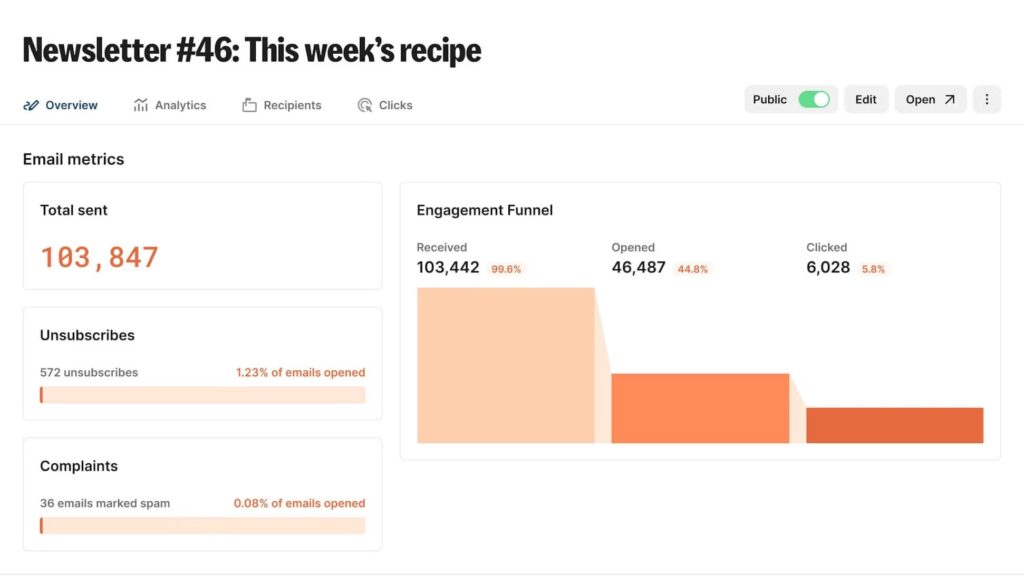
ConvertKit (now branded as Kit) is built for creators who want to grow an audience and monetize it through newsletters and automated email sequences, without needing an enterprise marketing ops setup.
It’s especially popular for content-led businesses (blogs, podcasts, YouTube channels), where email is used to nurture an audience and sell products, courses, memberships, or sponsorships.
Key Features
- Forms & landing pages: Build no-code opt-in forms and landing pages to grow your list without extra tools.
- Newsletters: Create and send newsletters designed for creator-style publishing.
- Visual automations: Drag-and-drop automation builder for welcome sequences, nurture flows, and sales sequences.
- Tags & segments: Organize subscribers by interest so the right people get the right message at the right time.
What I Like About It
You can spin up opt-ins, send newsletters, and build simple automations without turning email into a complicated ops project.
Kit is mainly for online creators like bloggers, YouTubers, podcasters, and course creators who want to build and engage with their audience, sell digital products, and run email marketing with easy-to-use automation.
Though it’s less ideal for traditional e-commerce or large corporations.
Who It’s For
- Creators: bloggers, podcasters, YouTubers, newsletter operators.
- Coaches/consultants building an audience + selling digital offers.
- Small teams that want simple automations + list growth tools without a heavy platform.
Pricing
Kit pricing depends on how many email subscribers you have.
For 10,000 subscribers, pricing is:
- Free up to 10,000 subscribers (limited features).
- Creator: $141/mo.
- Pro: $208/mo.
Verified User Review
“I liked the option of having a landing page, user subscription management and a decent delivery rate in one place. The option of having a paid newsletter exactly matched my requirements. I found their delivery rate is better in comparison to other tools… Reporting is something that can be improved for sure” – verified product & growth.
20. Beehiiv – best for modern AI-powered newsletters with built-in growth
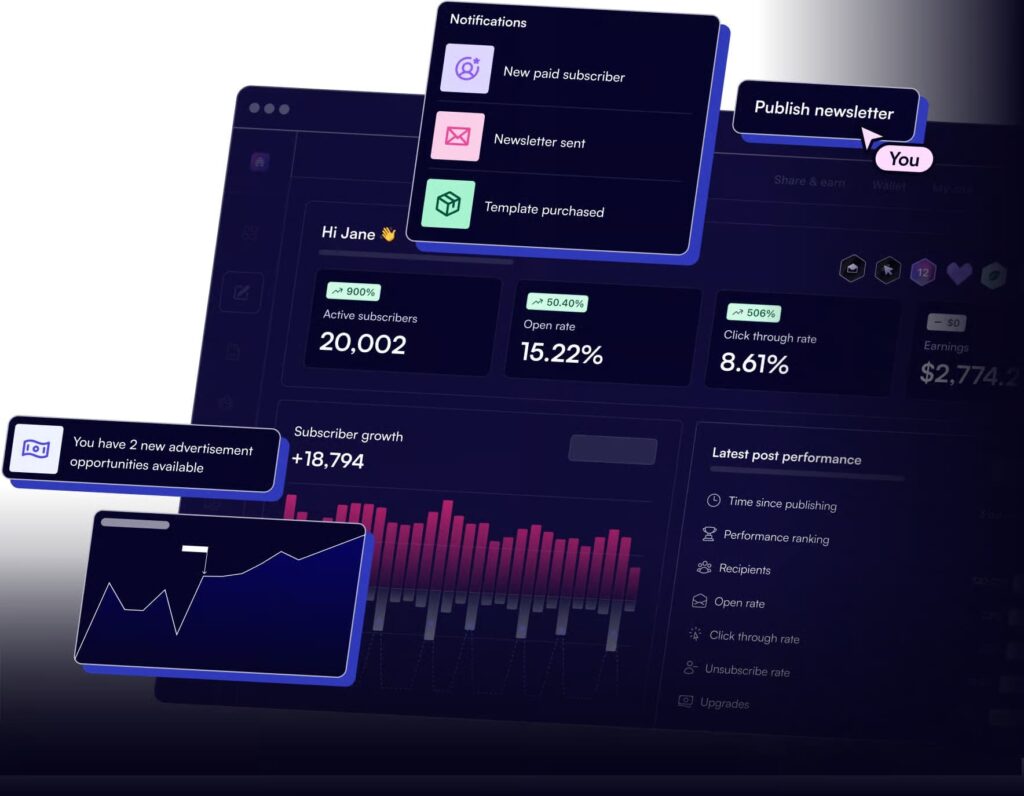
Beehiiv is the newsletter platform built by the ex-Morning Brew team for serious newsletter operators — creators, indie publishers, and brand media teams. Beyond standard email marketing, it stacks audience growth tools (Recommendations network, Boosts, referral programs) and AI features (subject line testing, AI website builder, content suggestions) directly into the platform.
It’s the closest thing to a creator-grade newsletter OS in 2026.
Key Features
- Newsletter + website + podcast publishing: One platform for the full creator stack.
- AI tools: Subject line testing, AI content suggestions, AI-driven website and design builder.
- Recommendations & Boosts: Built-in growth network for cross-promotion and paid audience acquisition.
- Monetization: Paid subscriptions with 0% take rate (Stripe fees only), ad network, sponsorship storefront.
- Email automations, surveys, and polls: Engagement and lifecycle tools (paid tiers).
- Analytics: Audience growth, engagement, and revenue tracking in one dashboard.
What I Like About It
The growth tools are the differentiator. Most newsletter tools assume you bring your own audience; Beehiiv ships with growth infrastructure (Recommendations, Boosts, referral programs) baked in.
For creators trying to grow from 1k to 50k subscribers, that matters more than another AI subject-line generator.
Who It’s For
- Independent creators, indie publishers, and creator economy operators.
- Brand newsletter teams that want growth + monetization in one tool.
- Substack migrants who want zero-fee monetization and more control over their list.
Pricing
Depends on the number of subscribers. The free Launch plan covers up to 2,500 subscribers; paid plans scale with list size from there.
For up to 5,000 subscribers:
- Launch (Free): $0/mo, up to 2,500 subscribers. Newsletters, website, podcast, unlimited sends, recommendation network, AI website builder.
- Scale: $89/mo, up to 100,000 subscribers. Ad Network, Boosts, 0% take rate on paid subscriptions, email automations, surveys and polls, 3 team seats.
- Max: $169/mo. Everything in Scale plus removes beehiiv branding, sponsorship storefront, audio newsletters, dynamic content, up to 10 publications, unlimited seats.
- Enterprise: Custom pricing for brands at scale. Dedicated account manager, dedicated IPs, Send API, SSO.
Verified User Review
“I love that beehiiv’s monetization feature is so easy to use. I also like that we are matched with ads rather than having to find them ourselves, and the ads we receive are usually a good match for our business. It’s difficult to import emails into certain segments. We had issues where all of the emails were getting rejected, and were advised to create a tag, add emails to that tag, then create a segment condition based on that tag” – verified Head of Marketing.
21. Lavender – best for AI-powered email coaching
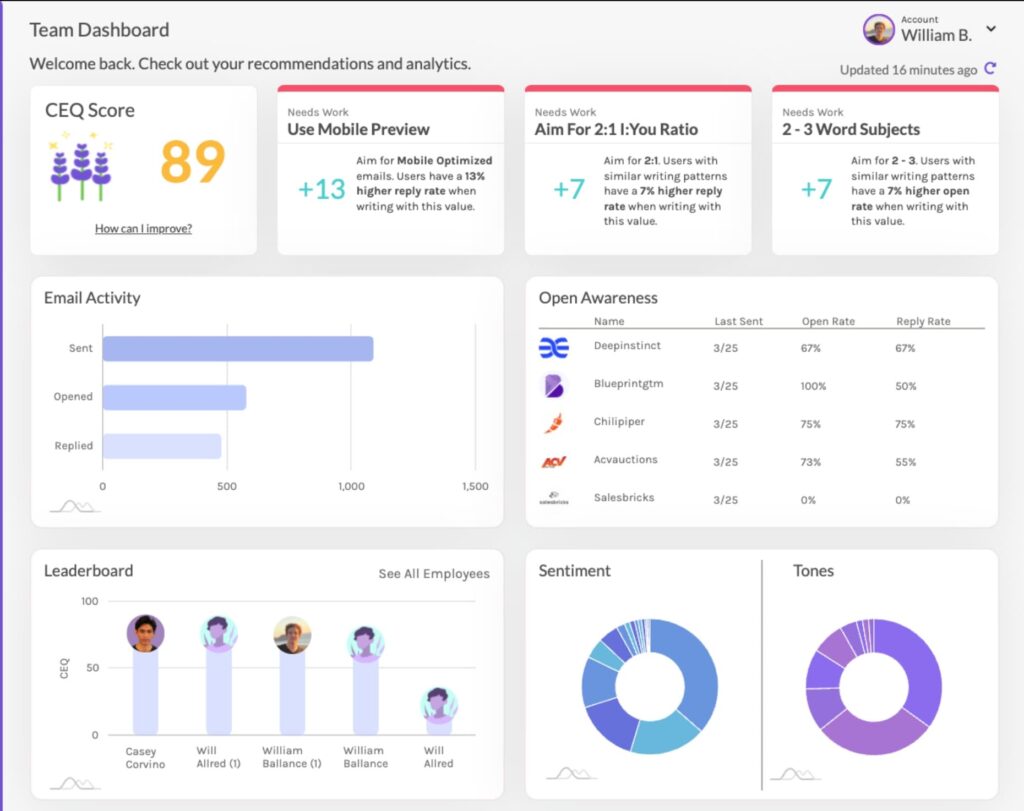
Lavender is an AI email coach designed to help sellers write more effective outbound emails.
At the same time, you can do outreach with Lavender AI. For the most part though, it’s specifically designed as an email AI coach to help you write more effective outreach messages, based on your audience.
Key Features
- Email scoring: Scores emails and templates against best practices so reps know what to fix before hitting send. Gain feedback on quick fixes, what to work on, long term trends, and custom best practices.
- Instant AI rewrite suggestions: Suggests drafts and edits to improve clarity and reply likelihood.
- Recipient context in inbox: Brings recipient research (news/insights/context) into the inbox to speed up personalization.
What I Like About It
Many AI email tools help you with copy or coming up with A/B test variations.
Lavender can be more useful when you already have reps sending daily and need a system that improves quality and consistency.
Who It’s For
- SDRs/AEs who write lots of outbound emails daily.
- Teams that want coaching and quality control without heavy enablement overhead.
Pricing
- Basic: Free but only for 5 emails/month.
- Starter: For individuals, $29/mo.
- Individual Pro: Includes integrations, $49/mo.
- Team plan: Includes integrations & Coaching Dashboard, $99/seat/mo.
Verified User Review
“The actual product is very simple but powerful when writing emails, because what Lavender realizes is that emails are not a one size fits all. From a team wide perspective, very easy for sales managers to look at the data and analytics and know exactly how to coach their reps.” – verified account executive.
Why email alone isn’t enough in 2026
Email by itself has stopped pulling the reply rates it used to.
The numbers from 2026 outbound research make the gap obvious, and they all point in the same direction: coordinated, multichannel sequences outperform single-channel email by a wide margin.
- Email alone averages a 3.8% reply rate, per Outreaches.ai’s 2025 cold outreach benchmarks.
- Omnichannel sequences (3+ channels) pull 287% more responses than single-channel, from the same Outreaches.ai report.
- AI-personalized emails hit 18% reply rate vs. 3.4% for generic templates, per Autobound’s 2026 analysis.
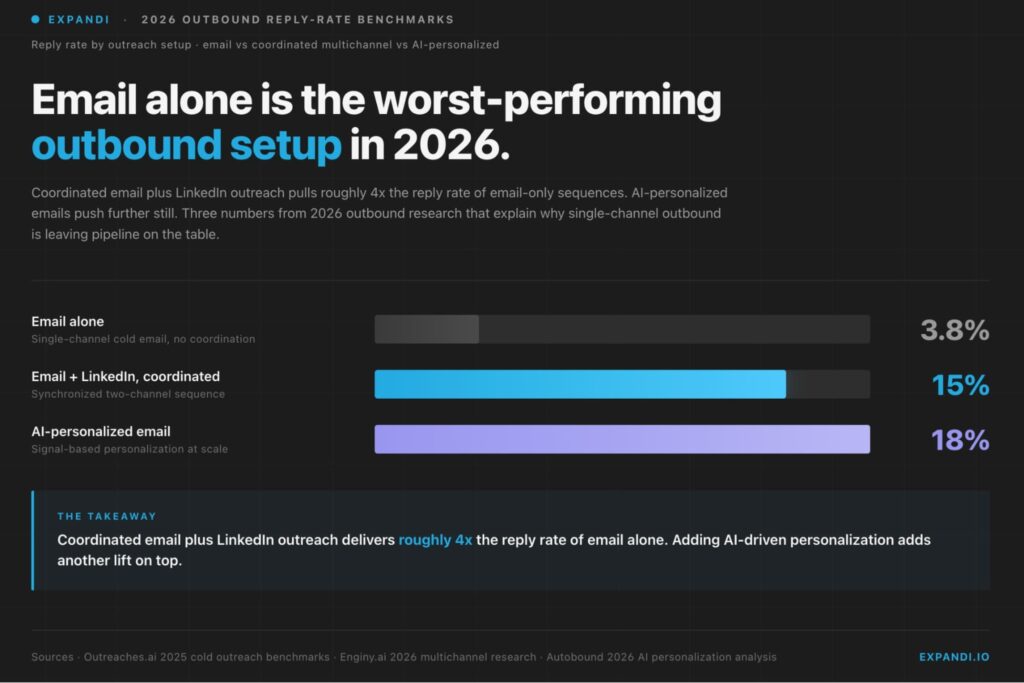
Two practical reads from this data:
- An outbound program that still leans on email alone in 2026 is leaving most of its pipeline on the table.
- The lift only shows up when channels are synchronized as a single sequence: a LinkedIn touch that ignores email opens, or an email follow-up that ignores a profile visit, gives back the multichannel premium.
“My social media posts influence 50% of my open opportunities.” — Alina Vandenberghe, Co-founder and Co-CEO at Chili Piper
That is the lens the rest of this list uses.
Tools are grouped by where they sit in the email workflow, and the Expandi entry shows how the LinkedIn layer plugs in alongside whatever email tool you already run.
How AI works in email marketing (overview and main use cases)
AI in email marketing covers two distinct things that get bundled together. The distinction determines what you can safely automate and where human judgment is still required.
AI for email marketing applies to: lifecycle emails, newsletters, and outbound outreach or sales sequences — anywhere teams send emails at scale and need to move faster without losing relevance or deliverability.
AI-powered email platforms (lifecycle and newsletters)
Email marketing platforms with AI built directly into the product — used for welcome, onboarding, retention, and winback flows, plus regular newsletter sends.
The AI learns from opens, clicks, site events, and conversions, then optimizes send time, targeting, and flow logic in the background.
The three jobs AI does here:
- Subject line and preview testing at scale. Generate variants, predict winners, iterate faster than manual A/B.
- Send-time optimization. Hit each contact’s inbox when they are most likely to engage.
- Behavior-based segmentation. Group users by actions (visits, trials, purchases, inactivity), replacing static list membership.
AI-assisted copy, rewriting, and basic A/B testing are now standard features across this category.
AI for outbound outreach and sales sequences
Outbound email and sales engagement tools with AI inside the workflow. Teams reach for these when the goal is to start conversations, book meetings, and manage replies at scale: cold email sequences, multi-step follow-ups, and reply management across many sender accounts.
The three jobs AI does here:
- Personalization beyond merge fields. Offer and angle changes based on role, industry, and intent signals, using firmographic and enrichment data.
- Adaptive follow-ups based on engagement. Pause, reroute, change angle, or stop based on opens, clicks, or reply intent.
- Reply classification and routing. Sort replies into Interested / Objection / OOO / Not Now → assign the next step automatically and cut manual inbox triage.
Not every use case matters to every team. The right setup depends on your email motion (lifecycle, newsletter, outbound), volume, data quality, and how much you want to automate vs. review.
There is no single “best” AI email marketing tool — only tools that fit your workflow better than others.
Recommended AI email marketing tool stacks
21 tools is a lot to weigh when you really just need to know what to buy.
The fastest way to narrow it down is by team size and outbound motion. Below are three starting stacks — each pairs an email tool with Expandi on the LinkedIn side, because the 2026 data above is clear that coordinated email plus LinkedIn is where the reply-rate lift actually comes from.
For solo founder or early-stage
At this stage you want full coverage without the overhead.
Run cold email through Instantly — it handles volume, warmup, and deliverability without needing a RevOps hire — and run LinkedIn through Expandi.
Two tools give you a complete multichannel motion: email and LinkedIn working the same prospect list, with you still close enough to every reply to keep it personal. It’s the cheapest way to stop leaving the multichannel premium on the table.
For growing sales team (5 to 20 reps)
Once several reps are sending daily, quality drifts — and that’s what quietly kills reply rates at scale.
Keep Instantly or Smartlead for email volume and inbox rotation, add Lavender so every rep gets coaching on their copy before it ships, and run Expandi for LinkedIn plus Signals so the team reaches out the moment a prospect engages with a post or profile.
Expandi’s Workspaces handle the multi-rep, multi-account side with no extra charge per seat, so the LinkedIn layer scales with headcount rather than fighting it.
For enterprise or large SDR org
Large orgs already have a sales engagement platform wired into the CRM for email cadences, routing, and forecasting — ripping that out isn’t worth it.
Keep Outreach.io (or whatever you run today) for the email and process side, and layer Expandi alongside it as the dedicated LinkedIn engine.
Signals fires into your existing cadences when a prospect engages on LinkedIn, so reps act on real intent rather than guessing. You keep your system of record and finally cover the one channel most enterprise outbound motions still underuse.
Where to go from here when building your AI email marketing stack
There’s no single “best AI email marketing tool.” The best setup is the one that removes the most friction from your workflow without adding new risk. A simple way to decide:
- If email is tied to product behavior → lifecycle platforms win.
- If email is tied to pipeline and conversations → outbound tools matter.
- If email must always land → infrastructure tools are non-negotiable.
Plenty of teams end up running more than one category as they scale. But if your focus is outbound — especially email alongside LinkedIn — execution control matters more than which tool you pick.
That’s where Expandi fits: a safe way to run multi-touch email and LinkedIn workflows from one place without burning accounts or leads.
See if Expandi is right for you & claim your free, 7-day trial here.
FAQ: AI for email marketing
AI for email marketing refers to using machine learning and automation to improve how emails are written, sent, targeted, and optimized.
Practically speaking, AI helps with things like send-time optimization, behavioral segmentation, subject line testing, personalization, and workflow automation. Most modern email platforms now include some level of AI in email marketing by default.
AI in email marketing is mainly used to speed up execution and improve decision-making, not fully replace humans.
Common use cases include predicting the best send time, grouping contacts based on behavior, generating copy variations, adapting follow-ups, and optimizing lifecycle flows. In outbound, AI also helps with personalization, reply classification, and sequencing logic.
The best AI email marketing tools depend on your use case. Here are a few tools to consider:
For outbound email marketing with AI: tools like Expandi, Instantly, or Smartlead
For lifecycle and newsletters: tools like Klaviyo, ActiveCampaign, or Customer.io
For infrastructure and deliverability: SendGrid or Mailgun
Both. Email alone averages 3.8% reply rates. LinkedIn alone averages 10.3%. Coordinated email plus LinkedIn achieves 15%. The best teams in 2026 run both in a synchronized sequence, not as separate efforts.
Expandi handles the LinkedIn side of multichannel outreach. Paired with any email tool on this list, it creates a coordinated sequence: warm up on LinkedIn, follow up via email, re-engage on LinkedIn. Signals detects when email recipients engage on LinkedIn, telling your team exactly when to reach out.
Generative AI for email marketing is safe when used as a support layer, not a fully autonomous system.
It works best for drafting copy, creating variants, or speeding up ideation. Teams should still review outputs to avoid generic messaging, compliance issues, or deliverability risks. Many successful teams use AI to assist, not replace, human judgment.




You’ve made it all the way down here, take the final step