7 Ethical LinkedIn outreach best practices to follow in 2026

Key Takeaways
Ethical LinkedIn outreach means relevance over volume, transparency about who you are and why you’re reaching out, personalization built only from public profile information, respect for silence and refusals, and staying inside LinkedIn’s Terms of Service and applicable privacy law.
Warm a new account gradually, keep pending requests low, and run automation through a cloud-based tool that mimics human timing. The sections below cover the five principles, the safe daily limits, where compliant contact data comes from, and the settings that keep an account healthy.
7 Ethical LinkedIn outreach best practices to follow in 2026

LinkedIn is still one of the primary channels B2B teams use to generate leads, and the rules for using it well have shifted from “how do I avoid a ban” toward “how do I reach people without violating their trust or the platform’s terms.” Those two questions have the same answer more often than not: outreach that a recipient would recognize as legitimate is also the outreach LinkedIn is least likely to flag.
This guide covers the ethical commitments that hold up under scrutiny, the account limits that keep you compliant, and the tooling choices that separate defensible automation from the kind that gets accounts restricted.
The five principles of ethical LinkedIn outreach
Ethical outreach is a method, not a disclaimer you add at the end of a sequence. Five principles define it, and each one maps to a concrete behavior you can check before a campaign goes live.
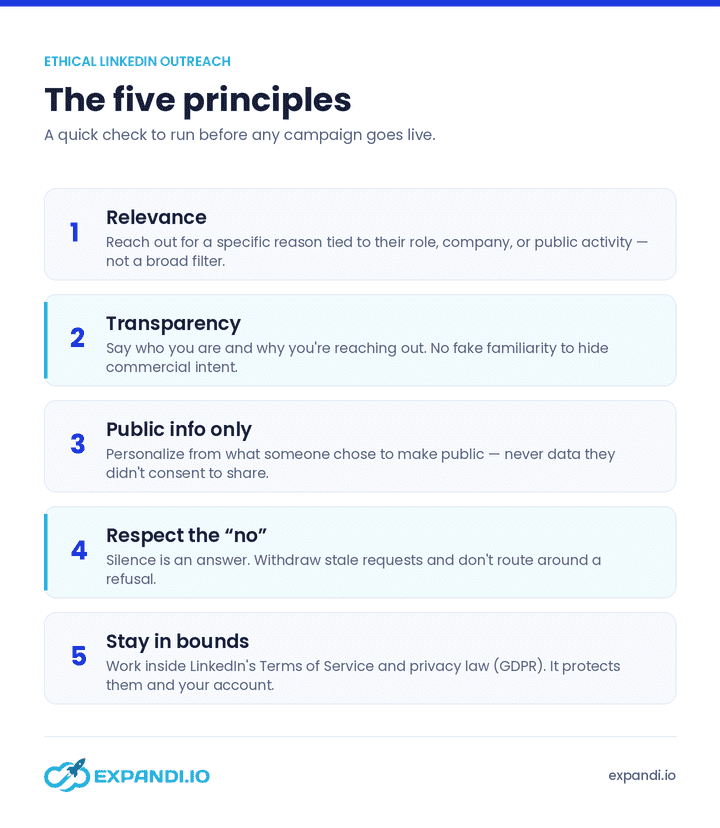
Let’s get into each principle with a bit more detail:
- Relevance. Reach out because you have a specific reason tied to the person’s role, company, or public activity, not because they matched a broad filter. A message that could have gone to ten thousand people reads as spam to the one who receives it.
- Transparency. State who you are and why you’re contacting them. Hiding the commercial intent of a message behind fake familiarity is the fastest way to lose a prospect’s trust and to earn a spam report.
- Personalization from public information only. Reference what someone has published, posted, or listed on their profile. Ethical personalization draws on what a person chose to make public, never on data they didn’t consent to share.
- Respecting refusals and silence. A non-response is an answer. Withdraw stale requests, stop following up when someone declines, and never route around a “no” with a second account or a different channel.
- Staying inside LinkedIn’s ToS and privacy law. LinkedIn’s User Agreement prohibits scraping and unauthorized automation, and regulations such as GDPR govern how you collect and store contact data. Compliance here protects both the person you’re contacting and your own account.
Run every campaign against these five before launch. If a step fails one of them, the problem is the campaign, not the principle.
7 best practices for ethical LinkedIn outreach
1. Warming up your account and setting daily limits
A new LinkedIn account that jumps from two manual connections a day to fifty automated ones signals non-human behavior, and LinkedIn’s monitoring is built to catch exactly that pattern.
Warming up means ramping activity gradually so your account’s history looks like a person’s, not a script’s.
Daily limits depend on account age, whether you hold a Premium or Sales Navigator subscription, and your current acceptance rate. Use the ramp below for a new account, holding each tier for the days indicated before increasing:
| Account age | Connection requests per day |
|---|---|
| Days 1–5 | 10 |
| Days 5–10 | 20 |
| Days 15–20 | 30 |
| Days 20–25 | 50 |
Hold those settings for about two weeks and monitor the account before increasing further.
As a working rule, don’t send more than 50 connection requests per day if your acceptance rate is below 60%, and aim your daily request volume at roughly 3–5% of your total connection count. An account with 2,000 connections, for example, can support around 50 requests a day once warmed up.
Slow and steady wins here. Sending too many requests risks the account; sending too few starves your pipeline. The balance point moves with your acceptance rate, so treat that number as your throttle.
Rough ceilings by account type, once warmed up:
- Free account: up to ~30 connection requests per day, once you have more than 1,500 connections.
- Sales Navigator (Premium): roughly 50–70 requests per day, if your average acceptance rate is above 60%.
For direct messages to first-degree connections: about 30 per day on a slow, new-account approach; 50–70 per day spread across the day on a warmed-up account; and 70–100 only on a premium account when you’re confident in your targeting.
Monthly search limits run to roughly 30 for cold accounts, up to 300 for warmed-up free accounts, and effectively unlimited with Sales Navigator.
Pro tip: Connection limits protect the account; a complete profile earns the acceptances. Use a clear professional photo, a background image rather than the default, and a headline and summary written by a person rather than auto-generated. A profile that looks maintained improves reply rates and reinforces the transparency principle, since the person you’re contacting can see exactly who you are.
2. Where your contact data comes from
Compliant outreach starts with compliant data. Where a contact record originated determines whether your outreach is defensible, and it’s the part of the process most teams document least.
Ethical sourcing on LinkedIn means working from information people have made public on the platform and reaching them through LinkedIn’s own connection and messaging system, rather than scraping private data or buying lists of personal email addresses with no clear provenance.
Under GDPR’s “legitimate interest” basis, you should be able to explain why you hold someone’s data, where it came from, and how it relates to a genuine business reason for contact.
Expandi‘s approach fits this model: outreach runs through LinkedIn itself, triggered by public signals like profile views, post engagement, and content interactions, so the “contact data” is the connection relationship rather than a harvested email file.
Reaching people on the platform where they published their information, in response to something they did publicly, keeps the data trail short and explainable. If you can’t say where a contact came from and why contacting them is justified, that’s the record to leave out of the campaign.
3. Delete old and pending connection requests
Pending requests that never get accepted are a signal LinkedIn watches. An account sending high volumes of requests that mostly sit unanswered looks like an account that isn’t connecting with real, relevant people, so periodic cleanup keeps you under the radar.
Clear pending requests manually through My Network → Manage → Sent, where every invitation you’ve sent is listed.
Keep the running total well below 500; once pending invitations climb toward 1,000–1,500, LinkedIn may temporarily suspend your ability to send new requests. Withdraw anything older than 10–15 days as a standing habit.
In Expandi, you can withdraw pending requests in bulk rather than clearing them one at a time, which makes the cleanup a weekly task instead of a manual chore.
4. Use personalization to improve your connection requests
Personalization raises acceptance rates for two reasons: generic messages sent to everyone trigger LinkedIn’s spam detection, and people respond more readily to a message that shows you paid attention. Both reasons point to the same practice, and both are grounded in the relevance principle from earlier.
Even experienced senders often stop at {first_name}, {last_name}, and {company_name}. Those tags are so common now that recipients read them as automation.
Dynamic personalization goes further: a dynamic placeholder resolves to different content for each recipient, so you can reference a prospect’s website, a mentioned solution, or another public detail without writing each message by hand.
For a defined audience with something in common, dynamic personalization is what makes automated outreach read as if it were written individually.
In one Expandi campaign using this approach, the account reached a 69% connection request acceptance rate and an 83% response rate on the follow-ups. Those figures are from a single campaign, not a platform-wide benchmark, and results vary with audience and offer. You can also see the latest outreach benchmarks across industries.
For the full breakdown of dynamic personalization and the exact templates behind that campaign, see LinkedIn personalization beyond first and last name or a tutorial on how to do it with Expandi:
5. Use a cloud-based tool for safety
Not every LinkedIn automation tool carries the same risk. Chrome extensions and browser plug-ins that run inside your browser and alter your LinkedIn behavior from there are easier for LinkedIn to detect, and tools that scrape user information or drive spammy outreach run against LinkedIn’s Prohibited Software and Extensions policy directly.
A cloud-based tool lives on the web rather than in your browser, which changes the safety profile in four ways:
- It operates as though you’re using LinkedIn from a separate computer, which is harder for LinkedIn to detect than browser-level activity.
- Many cloud tools assign a dedicated IP address, so you stay logged in from a consistent location rather than appearing to jump between countries.
- It simulates human behavior: working hours, daily limits, randomized delays, and controlled sending patterns that don’t read as automated.
- It supports advanced personalization beyond first and last name, which improves acceptance rates without tripping spam filters.
Cloud-based operation is the angle where account safety and ethical practice line up most cleanly: the same design that keeps an account compliant also keeps its behavior honest about being human-paced. For a deeper treatment of safe automation, see how to get more leads from LinkedIn automation without getting banned.
6. Templates and response rates
What you write in the connection request and the follow-ups determines whether a targeted list turns into replies.
The common failure is a generic template sent to a cold, poorly matched audience:
“Hi {first_name}, saw you were working at {company_name}. Thought I’d reach out and tell you a bit more of what I do, and see if there’s any room for collaboration.”
That message asks for the recipient’s time while offering nothing specific in return. Targeting fixes more of this than wording does. A request sent to people who share a genuine, identifiable point of contact performs on the strength of that relevance.
One Expandi campaign targeted people who had liked or commented on a specific LinkedIn post, using only first-name personalization:
“Hi {first_name}, saw you also liked the LinkedIn growth hack post by [name] from [company]. I guess we have growth in common. Let’s connect.”
Because the targeting was precise, that campaign reached a 72% acceptance rate, and 40% of recipients replied to the follow-ups. The personalization was minimal; the shared context did the work. These are single-campaign numbers, not guaranteed outcomes.
For the full teardown of that campaign and the sequence behind it, see the LinkedIn content retargeting growth hack.
7. Set up time-zone and interaction settings
LinkedIn tracks when an account is active, and an account sending requests at a constant clock time every day, including midnights and holidays, reads as scripted. Activity that follows a plausible human schedule reads as human.
Time-zone and interaction settings let you control the days, hours, and delay intervals for sending.
An account logged in at 10 AM in the Netherlands, 5 PM in the US, and 7 PM in Berlin on the same day tells LinkedIn something is off. Anchoring activity to one time zone, with randomized delays and defined working hours, keeps the pattern consistent with a real person’s day.
Before launching a first campaign, confirm the profile and settings are ready. Five steps to prepare before launching an automated LinkedIn outreach campaign covers the pre-launch checklist.
How do I start running ethical LinkedIn Outreach campaigns?
The behaviors that keep a LinkedIn account healthy and the behaviors that treat recipients fairly are largely the same list: reach relevant people, say who you are, personalize from public information, respect silence, and stay inside the platform’s terms.
Warming an account, capping pending requests, and running automation through a cloud-based tool are the mechanics that make that possible at more than a handful of messages a day.
The single most useful next step is to audit one live campaign against the five principles above before your next send. If a step can’t pass all five, rebuild that step.
Ready to run outreach that stays compliant and gets replies? Start a free trial of Expandi and set up your first signal-based campaign.
Frequently asked questions about ethical LinkedIn outreach
Yes. Reaching people through LinkedIn’s own connection and messaging system, based on the public information they’ve chosen to share, is more consistent with privacy expectations than sourcing personal email addresses from third-party lists. The channel matters: contacting someone where they published their professional information keeps the data trail short and explainable.
For a warmed-up account, keep requests under about 50 per day if your acceptance rate is below 60%, and target roughly 3–5% of your total connections daily. New accounts should ramp from around 10 requests per day up over the first few weeks. Free accounts can support about 30 per day once established; Sales Navigator accounts, around 50–70.
LinkedIn’s User Agreement prohibits scraping and unauthorized automation, and browser-based tools that alter your LinkedIn behavior are the easiest to detect. Cloud-based tools that mimic human timing and work from public signals carry less risk, but any automation is used at your own risk under LinkedIn’s terms.
Warm the account gradually, keep pending requests below 500, personalize instead of sending identical messages, run automation through a cloud-based tool, and set consistent time-zone and working-hour settings so activity follows a plausible human schedule.
Compliant outreach stays inside LinkedIn’s terms and applicable law. Ethical outreach adds a standard the rules don’t fully enforce: relevance, transparency, and respect for refusals. The two overlap heavily, and outreach that clears the ethical bar almost always clears the compliance one too.


You’ve made it all the way down here, take the final step