Email Drip Campaigns: A B2B Guide to Drips Across LinkedIn and Email (+ Examples)


An email drip campaign earns replies when each email lands right after the lead does something worth answering. Five generic emails on a timer earn the unsubscribe.
B2B teams on Expandi already run drips across two channels. In our H1 2026 data, 66.96% of campaigns paired LinkedIn steps with email, and LinkedIn messages replied at 10.3% against 5.1% for cold email.
Here’s what we’ll cover:
- How a drip differs from a newsletter or a blast, and the seven types B2B teams run.
- A seven-step build, from the trigger to a test cohort, plus the practices that keep replies coming.
- The KPIs that track revenue, and why open rate dropped to the bottom of the list.
- Where LinkedIn fits in the sequence, with four teardowns and a customer case study.
TL;DR
An email drip campaign is a sequence of automated emails that starts when a lead does something and stops when they reply or convert. Three rules carry it: a real trigger, one goal per email, and a clear exit.
Track meetings booked, positive replies, and spam complaints, and treat open rate as directional. Then add LinkedIn steps to the same sequence, where messages reply at about twice the rate of cold email.
Key Takeaways
- A drip starts on a trigger, works toward one goal, and ends the moment the lead replies or converts.
- Trigger-based drips suit sales work, because the first email arrives while the reason to talk is still fresh.
- Keep sales drips to three to five emails spaced three to five days apart. Belkins’ 2026 data shows email returns dropping sharply after step 5.
- Rank KPIs by distance to revenue: meetings, positive replies, and replies first, open rate last, since Apple Mail Privacy Protection preloads emails whether or not anyone reads them.
- Expandi’s Builder runs LinkedIn and email steps in one campaign, branches on whether a lead connected or has an email address, and pauses a lead once they reply.
Email Drip Campaigns: A B2B Guide to Drips Across LinkedIn and Email (+ Examples)


How an email drip campaign differs from a newsletter or a one-off blast
An email drip campaign, or drip email campaign, is a pre-written sequence of emails sent automatically to one lead at a time. A lead’s action or a set date starts it, and a reply, a conversion, or an opt-out ends it. A newsletter goes to the whole list on a schedule, and a blast is a single send.
Here’s how the three email formats compare:
| Email drip campaign | Newsletter | One-off blast | |
|---|---|---|---|
| Starts when | A lead takes an action or reaches a date | The calendar says so | You hit send |
| Who gets it | One lead at a time, as they qualify | The whole list | A segment or the whole list |
| Number of sends | A planned series of three or more | One per issue, open-ended | One |
| Goal | One conversion: a reply, a meeting, or an activation | Stay top of mind | Announce something |
| Stops when | They reply, convert, or opt out | They unsubscribe | After the send |
Drip marketing shows up at every stage of the B2B sales funnel, from the first download to the renewal conversation.
Time-based vs trigger-based drip campaigns
A time-based drip sends on a fixed schedule from a start date, such as a five-part email course that goes out every three days after signup. It’s simple to build and suits education, since every reader gets the same content.
A trigger-based drip waits for a behavior.
A prospect visits your pricing page, comments on a post, or accepts a connection request, and the first email goes out because of that action. For sales teams, the trigger is the whole point: the email can mention the moment that started it.
Post engagement is one of the easiest triggers to act on, since the comment tells you what the person cares about.
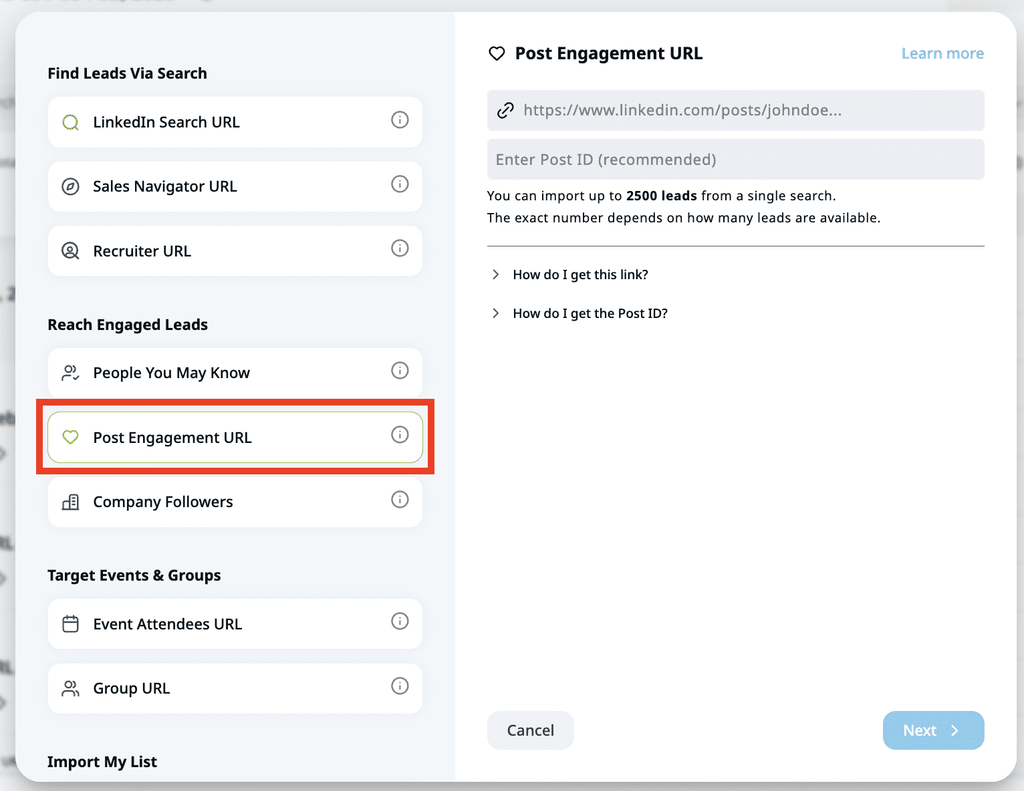
Alex Fine, co-founder of Understory, an allbound growth agency for SaaS companies, described the setup his team runs in a GTM Society interview:
“So you can say if someone’s engaging with this post, they match my ICP, push it to an Expandi campaign, and then you can send it out immediately. And what that does is it shows relevance.”
Alex Fine, Understory
7 types of B2B email drip campaigns
Seven drip types cover the B2B buying cycle from signup to renewal. Each has its own trigger, length, and goal, and the lengths below are starting points to test against your own sales cycle.
1. Welcome drip for new subscribers and downloads
A welcome drip starts when someone subscribes, downloads a resource, or registers for an event. Its job is to deliver what they asked for and set expectations for what comes next.
Three or four emails over the first week or two keep your name fresh without crowding the inbox. The welcome drip is the entry point of marketing funnel automation, where content leads start moving toward sales.
Event registrations get their own version: a reminder or two before the date, then a follow-up drip after it. Attendees get a next step tied to the session, and no-shows get the recording.
2. Onboarding or trial drip for new users
An onboarding drip starts at signup and pushes a new user to the first moment of value, such as a first project or a first integration. Trial drips add a countdown to the end of the trial.
These run longer than sales drips because they follow the trial. Customer.io’s trial series, broken down later in the examples, ran 13 emails over 38 days.
3. Lead nurture drip for early-stage leads
A lead nurture drip keeps an early-stage lead warm until they’re ready to talk to sales. Each email moves one step closer to a call, from a guide to a case study to a webinar recording.
Belkins, a B2B lead generation agency, runs its nurture emails once every 3 to 7 days.
Across 16 drip campaigns and 70+ emails, Belkins reports 15 new deals and almost 150 nurtured contacts within two months.
4. Outbound prospecting sequence for cold leads
An outbound sequence is the sales-led drip: cold emails to a defined list, each with a new angle, stopping on reply. Email sequence outreach lives or dies on the second and third emails.
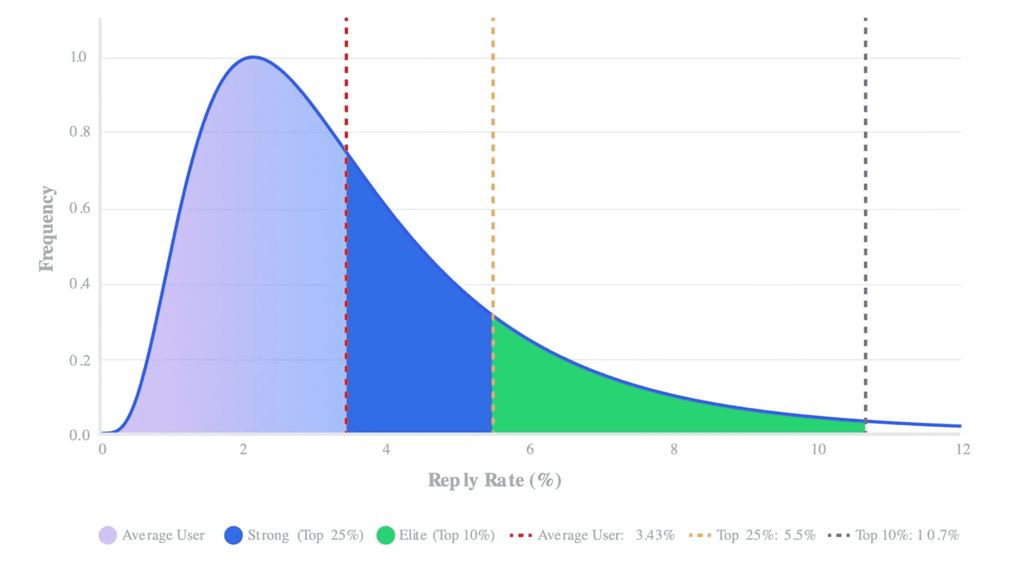
Belkins’ 2026 sales follow-up study found follow-ups produce 58.6% of all replies, and it puts the sweet spot for B2B email sequences at three to five steps.
5. Post-demo follow-up drip for active deals
A post-demo drip starts the day after a demo and covers the questions buyers raise once the call ends, like pricing, security, and how to sell the purchase internally.
Three or four emails over two weeks, each answering one objection, give your champion something to forward to the rest of the buying group.
6. Re-engagement drip for leads who went quiet
A re-engagement drip targets lost opportunities and contacts who stopped engaging. The content changes with the reason they went quiet, such as a competitor win, bad timing, or budget.
For unengaged subscribers, Belkins flags anyone who received 10+ emails and opened none, sends 2 to 3 reminders asking them to confirm the subscription, and removes the rest.
7. Upsell or renewal drip for existing customers
An upsell or renewal drip goes to existing customers, triggered by a usage milestone or a contract date. Each email pairs the ask with a reason to stay or grow: results so far, a new feature, or a plan that fits the next stage.
Start renewal emails a couple of months before the contract ends, so there’s time for a real conversation before procurement gets involved.
How to build an email drip campaign in 7 steps
To build an email drip campaign, pick the audience and trigger, set one goal, and plan the touches and spacing.
Then write each email for a single job, add stop rules, set up deliverability, and launch to a small test group before the full list.
Step 1: Pick the audience and the trigger
Start with who enters the drip and what puts them there. A tight audience with a clear trigger gives every email something specific to say.
One example: a VP of Sales at a 50 to 500 person SaaS company who viewed your pricing page twice this week. A broad list with a date trigger gives you a newsletter in disguise.
Step 2: Set one goal for the drip campaign
Every drip needs one conversion it’s built to produce: a booked meeting, a reply, an activated account, or a renewal. Write it down before you write any email.
When a lead hits that goal, they leave the drip. The same number tells you whether the drip works.
Step 3: Map the number of touches and the spacing
Decide how many emails the drip sends and how far apart. For sales drips, three to five emails spaced three to five days apart is a sensible starting range.
Timing inside the sequence matters too. In Belkins’ follow-up data, step 3 alone booked more meetings than steps 1 and 2 combined, so a drip that stops at two emails leaves meetings on the table.
Step 4: Write each drip email for one job
Give every email one purpose and one ask. For a four-email sales drip, one way to split the jobs:
- Email 1 explains why you’re reaching out now.
- Email 2 shows proof from a similar customer.
- Email 3 answers the likeliest objection.
- Email 4 closes the loop politely.
For line-by-line copy help, see how to write cold emails that get replies.
Step 5: Add exit and stop rules before launch
Decide what pulls a lead out of the drip before it goes live.
A reply stops everything, including steps on other channels. So do a booked meeting, an unsubscribe, a hard bounce, and a status change to customer in your CRM.
Without these rules, a prospect who said yes on Tuesday gets a follow-up on Thursday asking if they saw your last email.
Step 6: Set up deliverability basics for your drip
Inbox placement decides whether the drip runs at all. Gmail and Yahoo started enforcing bulk sender rules in February 2024, and Outlook.com began routing non-compliant high-volume senders to Junk after May 5, 2025.
Before the first send, check these sender requirements:
- Authenticate your domain with SPF, DKIM, and DMARC, which Google’s email sender guidelines require for anyone sending 5,000+ messages a day to Gmail accounts.
- Keep spam complaints in Postmaster Tools below 0.10%, and never let them reach 0.30%.
- Add one-click unsubscribe headers plus a visible unsubscribe link, and honor requests within two days, as Yahoo’s sender best practices require.
- Apply the same authentication for Outlook.com, where Microsoft’s high-volume sender requirements cover domains sending more than 5,000 emails a day.
- Remove hard bounces right away, since neither Google nor Microsoft publishes a bounce-rate threshold to aim for.
Step 7: Launch the drip to a test cohort first
Run the drip on a small slice of the audience first, around 50 to 100 leads, and watch the first week by hand. Check that triggers fire, branches route correctly, replies stop the sequence, and nothing lands in spam.
Once the test cohort runs clean, open the drip to the full list.
7 B2B email drip campaign best practices
The best email drip campaigns read like one person following up on something real.
Relevant context, short emails, sensible spacing, a capped sequence, plain text, controlled tests, and fast unsubscribes get you there. For cold-specific rules, see our cold email outreach best practices.
Personalize each drip email with real context
Personalize with something the lead did or said. A first name in the greeting proves nothing about relevance, and buyers notice.
Gartner’s 2025 survey of 632 B2B buyers found 73% actively avoid suppliers who send irrelevant outreach. The trigger is the best context you have: the post they commented on, the page they visited, or the webinar they joined.
Michal Jackowski, founder of ZenABM, a platform for account-based marketing on LinkedIn, made the same point about targeting in a GTM Society interview:
“You need to understand who you’re selling to, what’s the problem that you’re solving for them, and then figure out how to put your solution to their problem in front of them in a non-horrible way so they don’t burn the bridge straight away.”
Michal Jackowski, ZenABM
Keep each drip email short with one ask
A drip email should fit on a phone screen and ask for one thing. Two asks split the reader’s attention, and a long email gets saved for later and forgotten.
Pick the single action you want, and use a cold email call to action the reader can answer in one line.
Space sales drip emails three to five days apart
Three to five days between sales emails gives the lead time to read and respond while they still remember who you are. Nurture drips can stretch further, as with Belkins’ every 3 to 7 days.
Send on business days, in the lead’s time zone.
Cap the drip sequence at three to five emails
Longer drips stop paying off. In Belkins’ data, steps 3 to 5 drive 53.5% of email-sourced meetings, while step 6 adds little at a 0.28% reply rate.
Our LinkedIn data shows the same curve. In our State of LinkedIn Outreach H2 2026 report, three-message campaigns replied at 9.8%, against 5.0% for five or more messages.
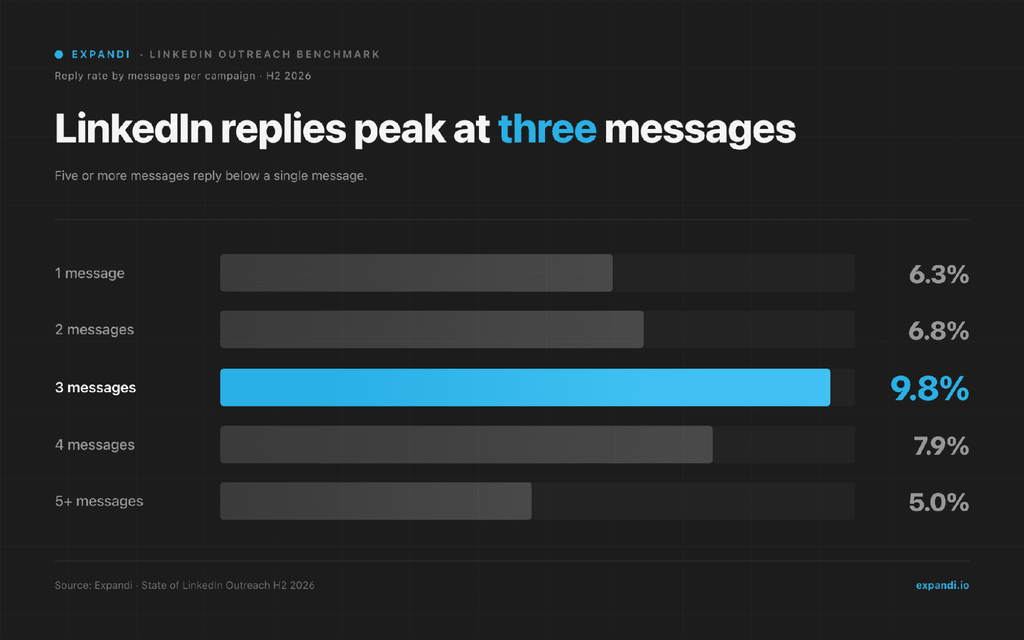
When a lead reaches the cap with no reply, move them to another channel or a later re-engagement drip.
Use plain text for sales drip emails
Sales drips should look like an email from a person: plain text, no banner image, one link at most. Designed HTML templates suit newsletters and product announcements.
A plain email reads as one-to-one, which is the impression a sales drip needs to make.
Test one variable at a time in drip emails
Change one thing per test: the subject line, the opening line, the ask, or the send day. Change two at once and you won’t know which one moved the result.
Split leads randomly between the two versions, and wait for enough replies to compare before you call a winner.
Honor unsubscribes fast and follow the law
Every drip needs a working opt-out.
The FTC’s CAN-SPAM compliance guide makes no exception for business-to-business email, requires honoring opt-outs within 10 business days, and lists penalties of up to $53,088 per violating email.
Yahoo asks for two days, so build your process around the stricter deadline.
Email drip campaign KPIs that matter (and the ones that lie)
The email drip campaign KPIs worth tracking sit close to revenue: meetings booked, positive reply rate, and reply rate. Deliverability metrics come next as guardrails. Open rate belongs at the bottom, because Apple Mail Privacy Protection records opens whether or not anyone read the email.
Here are the drip KPIs ranked from closest to revenue to furthest:
| KPI | What it tells you | Benchmark or limit |
|---|---|---|
| Meetings booked | Whether the drip produces pipeline | Set a baseline per drip and beat it |
| Positive reply rate | Share of leads who reply with interest | Track it apart from all replies |
| Reply rate | Whether the message lands at all | 0.45% for cold email to net-new contacts in 2025 (Belkins) |
| Click rate | Interest in the content you linked | Useful for nurture drips with content links |
| Bounce rate | List quality | No official threshold. Remove hard bounces at once. |
| Spam complaint rate | Deliverability risk | Below 0.10%, never 0.30% (Gmail) |
| Unsubscribe rate | Relevance and frequency | Watch for spikes after one email |
| Open rate | Directional only | Inflated by Apple Mail Privacy Protection |
Belkins’ cold email response rate study measured that 0.45% across 7,530,489 emails, dividing replies by total sends with open tracking off. Compare it only with a reply rate calculated the same way.
Open rate is the vanity metric of email.
Apple’s Mail Privacy Protection downloads remote content in the background by default, whether or not the person engages with the email, so tracking pixels fire for emails nobody read.
Apple accounted for 76.56% of email opens tracked by Litmus in September 2026, so a large share of open data on any list is unreliable.
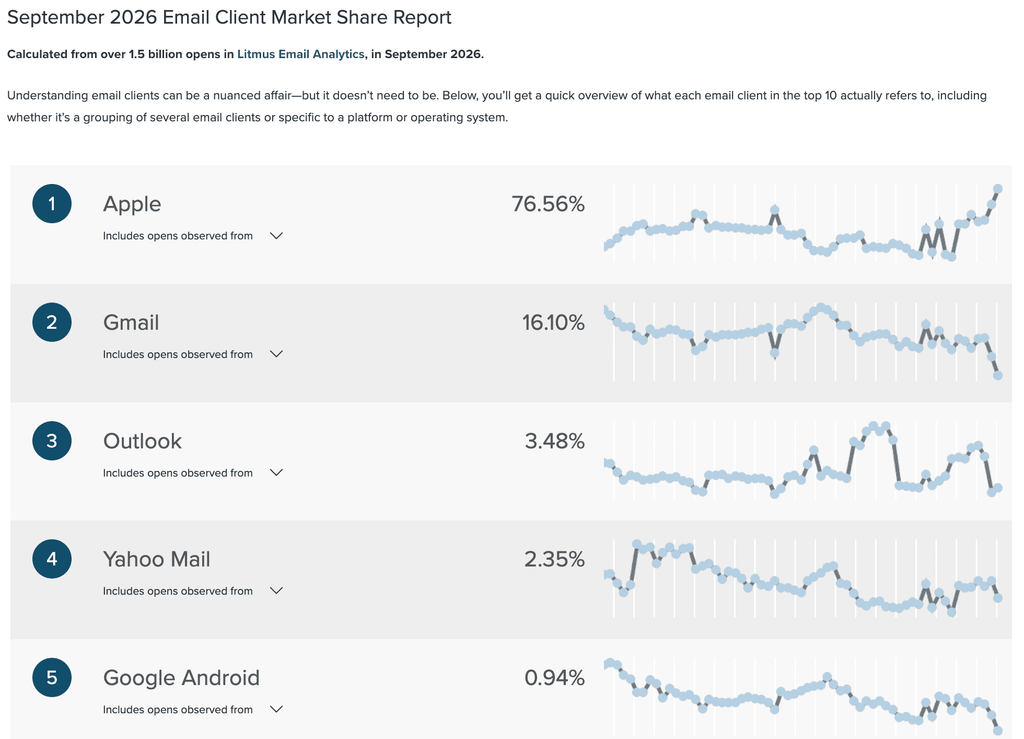
Use opens only to spot a sudden drop that could signal a deliverability problem. For the full metric set, see our breakdown of email marketing KPIs.
Why your email drip campaign should include LinkedIn
Adding LinkedIn steps to an email drip campaign gives the lead a second place to see your name, in an inbox with no spam filter.
In our State of LinkedIn Outreach H1 2026 report, LinkedIn messages replied at 10.3% on average, against 5.1% for cold email, across 70,130+ campaigns.
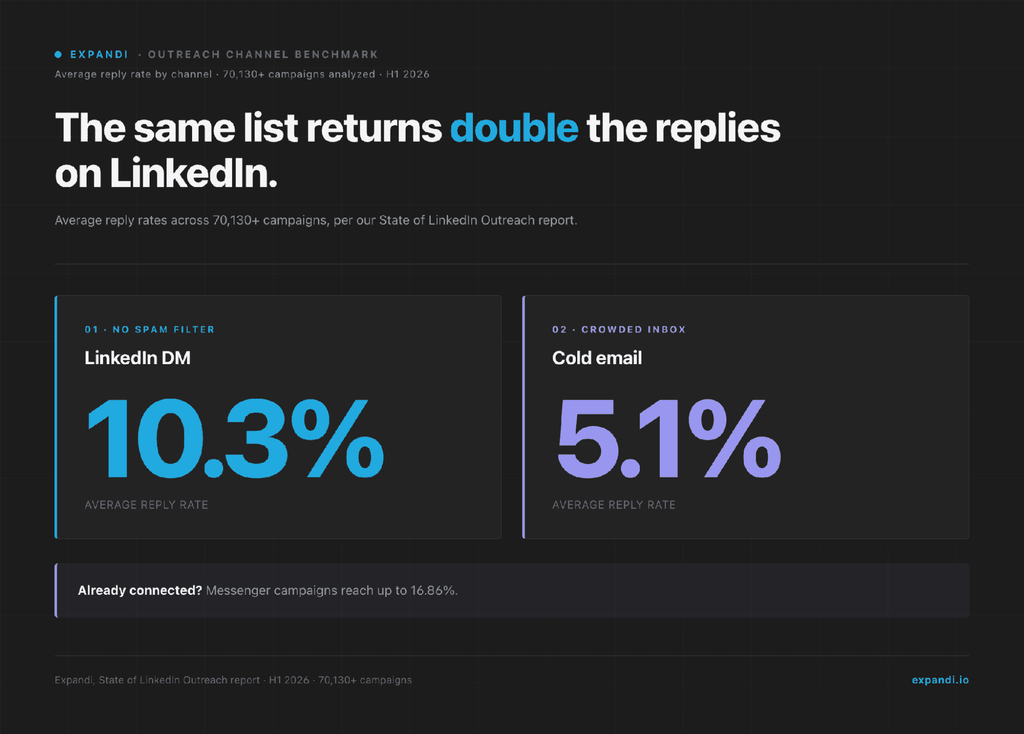
Teams on Expandi have already made the move: 66.96% of campaigns in that dataset combined LinkedIn and email.
Recognition matters because B2B deals are group decisions. LinkedIn’s B2B Institute surveyed 500+ senior B2B buyers with Bain in 2024. Of those buyers, 81% said the product they bought was known by everyone in the buying group on day one.
The order of the channels matters too.
Belkins’ LinkedIn outreach study, which covers 15.1 million contacts from Expandi campaigns, found messages to existing connections replied at 12.2%, against 7.9% for connect-then-message campaigns.
The two groups reached different audiences, so treat the gap as the value of an existing connection, with no controlled test behind it. Belkins also gives a handoff rule: when a three-step email sequence gets no reply, send a LinkedIn connection request before a fourth email.
Keep that first LinkedIn message as short and specific as the LinkedIn cold messages that earn replies.
Fabian Bacher, who leads an enterprise sales team at Semrush, described how his team moves between channels in a GTM Society interview:
“Follow up with a customized call or a message, maybe even via email. So we would jump from different channels. But having that first touchpoint, highlighting that you have people in common that you know, and doing that at scale with a tool like Expandi has really worked well for us.”
Fabian Bacher, Semrush
How to sequence LinkedIn and email without double-touching
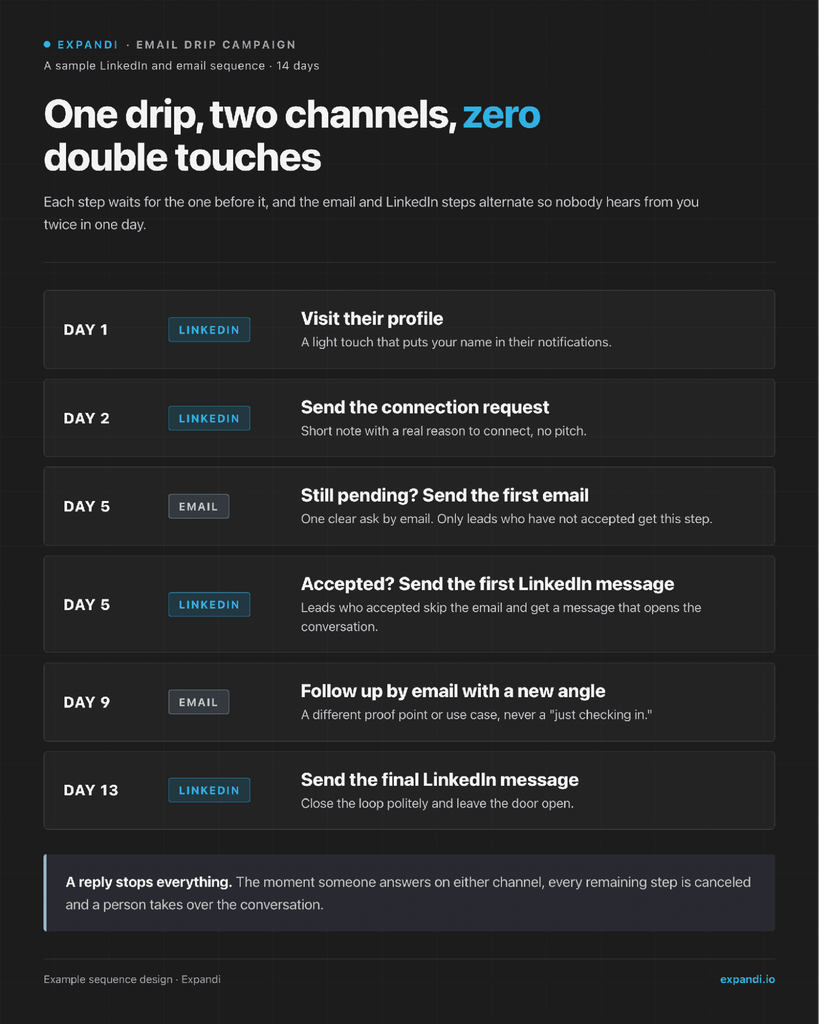
Sequence the channels so each touch depends on the last one, and never send a LinkedIn message and an email on the same day.
Here’s a 14-day LinkedIn and email sequence that alternates the two channels:
- Day 1: Visit the prospect’s LinkedIn profile.
- Day 2: Send a connection request with a short note.
- Day 5: If the request is pending, send the first email.
- Day 5: If they accepted, send a LinkedIn message instead.
- Day 9: Follow up by email with a new angle.
- Day 13: Send a final LinkedIn message.
A reply on either channel stops every remaining step.
The day 1 profile visit works as a light LinkedIn warm-up sequence step, putting your name in their notifications before the request arrives.
Building a LinkedIn and email drip in Expandi
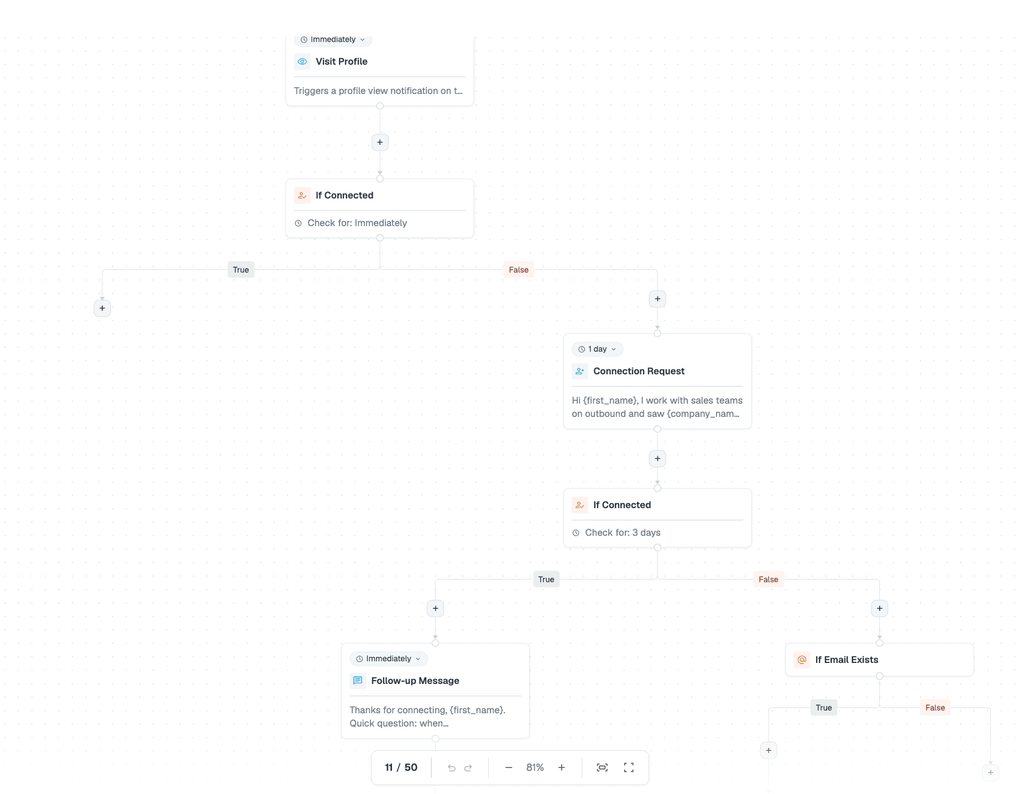
Expandi’s Smart Campaigns Builder runs the whole sequence in one campaign. It has 20 actions and 11 conditions, and each condition splits leads into a positive and a negative path.
Warming leads up before outreach pays off in the Builder too. In our H1 2026 data, Builder campaigns that combine warm-up steps with outreach reached a 22% connection approval rate and a 7.22% reply rate.
To set up the 14-day drip in the Builder:
- Start with a Signals step if profile visits or post engagement should enroll leads.
- Add Visit profile, then If connected, and put the Connection request on its negative path with a one-day delay.
- Add a second If connected after the request, with a check window such as three days.
- On the negative path, add If email exists, then an Email step.
- On the positive path, add the LinkedIn follow-up message.
- Finish each path with the day 9 email and the final message.
Expandi Signals has to be the first step after Start, and it syncs profile visits, company page visits, and post engagement about once a day. Every Email step needs If email exists in front of it, and your mailbox connected in Expandi.
- When a lead replies to a LinkedIn message or a campaign email, Expandi pauses that lead, and the next step isn’t scheduled.
- Email replies are detected when the mailbox is connected with its inbox (IMAP) details.
On accounts with Expandi Email, campaign emails show up beside the LinkedIn conversation in the Expandi Inbox, so the rep sees the whole thread before answering. A simple LinkedIn inbox management routine keeps those replies from piling up.
Teams sending email at higher volume can keep it in Smartlead.
The Builder’s Integrations action exports leads from an Expandi campaign into a Smartlead campaign, and the Smartlead and Expandi workflow shows the setup step by step. Smartlead sits on the Expandi integrations page next to the native CRM connections.
To test one variable, Expandi’s A/B testing splits a lead list randomly across two campaigns that differ in a single step.
That keeps sequencing, testing, and replies in one place, so the rest of your sales engagement tools stack has less to cover.
Real B2B email drip campaign examples
These four B2B email drip campaign examples cover trial onboarding, trial conversion, re-engagement, and a LinkedIn-first sequence with an email fallback.
Each teardown lists the trigger, the sequence, what works, and what we’d change.
Customer.io: a 13-email trial onboarding drip
Onboarding consultant Steph Knapp signed up for a Customer.io trial in 2019 and logged every email the trial sent without using the product.
Here’s the drip at a glance:
- Trigger: Free trial signup.
- Sequence: 13 emails over 38 days, alternating between the success team and a named onboarding specialist, with trial-end emails on days 27, 31, and 38.
- Goal: Convert the trial to a paid plan.
What works: the specialist’s emails read like personal notes, and the day 2 email really was sent by hand after the specialist spotted a non-business email address. The day 14 email takes on the real objection in its subject line: how long integration takes.
What we’d change: three emails on day 1 is a lot for someone who just signed up. We’d fold the confirmation and welcome into one and let the specialist’s note arrive on day 2.
FreshBooks: closing a trial and winning it back
Steph Knapp’s teardown of the FreshBooks trial emails from 2018 covers the second half of a 30-day trial. Here’s that half of the drip at a glance:
- Trigger: Day 19 of a 30-day trial without a paid plan.
- Sequence: Emails on days 19, 22, 24, and 27 cover a use case, a plan choice, a 30% discount on higher tiers, and a final reminder. Winback emails follow on days 31, 34, and 36.
- Goal: Get the user onto a paid plan.
What works: the drip keeps going after the trial ends, and the day 27 subject line says plainly how many days are left.
What we’d change: a discount on day 24 teaches users to wait for one. We’d put a customer result there and save the discount for the winback.
Belkins: re-engaging contacts who stopped opening
Belkins’ reactivation drip targets contacts in an inactive segment, meaning anyone who received 10+ emails and opened none. Here’s the drip at a glance:
- Trigger: Entering the inactive segment.
- Sequence: 2 to 3 reminders asking the contact to confirm they still want the emails, with a click-to-confirm link and a thank-you page.
- Goal: Confirm the subscription or remove the contact.
What works: it cleans the list on purpose. Contacts who never engage get removed, which keeps the list honest and protects the sending domain.
What we’d change: opens decide who counts as inactive, and Apple’s preloading makes some unengaged contacts look active. We’d add clicks and replies to the rule.
A17 Technologies: LinkedIn first, email as the fallback
A17 Technologies founder Andrew Bush used an Expandi Builder campaign to book interviews with C-level executives for product research.
Here’s the drip at a glance:
- Trigger: A Sales Navigator search of active 2nd-degree connections.
- Sequence: A connection request with a note, up to two weeks to accept, a greeting a day after acceptance, and daily follow-ups. Contacts with an email address then get an email and an email follow-up.
- Goal: Book a research call.
- Result: The campaign dashboard shows 165 of 387 contacted executives connected, 43 replied to the connection, and 82 replied to later messages.
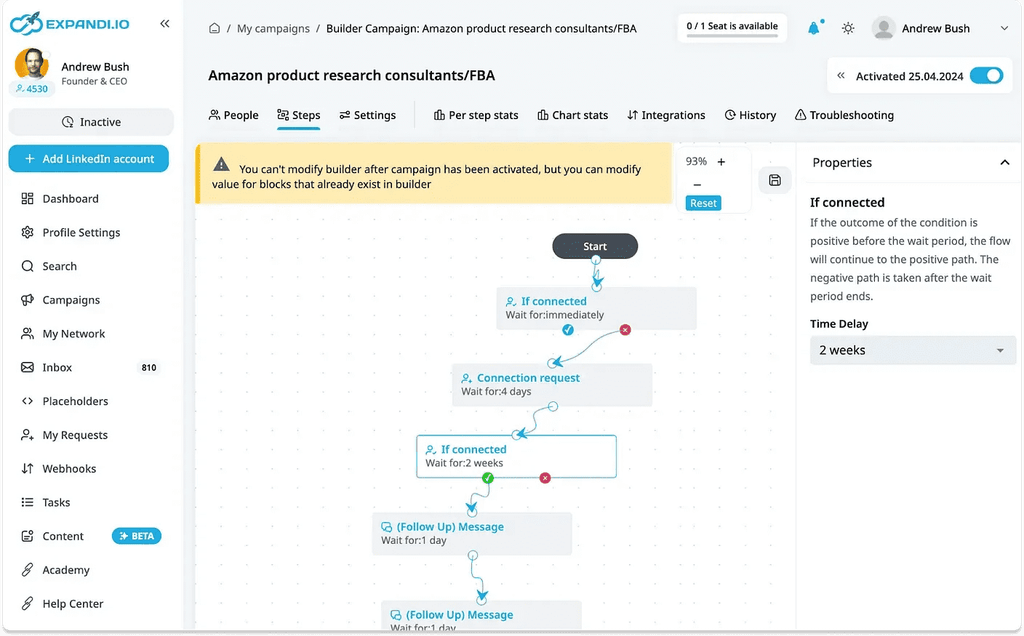
What works: email only goes to people who stayed quiet on LinkedIn, so the two channels never overlap.
What we’d change: daily follow-ups are a lot for C-level contacts. Our data shows replies peaking at three messages, so we’d space them three to four days apart and stop at three.
Case study: how UltB pairs email volume with LinkedIn follow-ups
UltB, a Berlin agency that builds outbound sales systems for agencies, software companies, and startups, books 5+ appointments a week by following its email campaigns with LinkedIn outreach in Expandi.

Email was UltB’s primary channel, at up to 1 million emails a month.
Ratko, UltB’s Head of Growth, added Expandi to follow up on LinkedIn with anyone who showed interest, and interested contacts flow from Close CRM into a Connector campaign automatically.
In one month, 907 contacts were flagged as interested and 719 got connection requests.
52.85% accepted, and 18.92% of everyone who got a request replied to a follow-up message, or 35.8% of those who connected.
The LinkedIn side runs four touches after the connection:
- A message that references their interest and asks for a seven-minute chat.
- A one-line nudge a day later, with a short Loom video.
- A free-leads offer three days after that.
- A personalized image four days later.
Prospects told Ratko the multichannel approach was the main reason they replied.
The pattern to copy: email does the volume and the qualifying, and LinkedIn goes only to people who raised a hand, so every connection request lands on a warm lead.
Turning your next email drip campaign into meetings
An email drip campaign books meetings when a real trigger starts it, each email has one job, and a reply ends it. Keep sales drips to three to five emails, judge them on replies and meetings, and hold spam complaints under 0.10%.
Then add LinkedIn to the same sequence, so the lead sees your name in two places and email goes only where LinkedIn didn’t land.
Add LinkedIn to your next drip: build it in Expandi and try it free for 7 days.
Email drip campaign FAQs
What is the 30/30/50 rule for cold emails?
The 30/30/50 rule is a sales rule of thumb with no single known source. The common version credits 30% of cold email success to targeting, 30% to the message, and 50% to follow-up. The numbers add up to more than 100, so read it as a reminder that follow-up deserves as much effort as the first email.
How many emails should a drip campaign have?
Match the length to the drip type. Welcome drips run three or four emails, onboarding and trial drips follow the length of the trial, and sales drips stop at five. Re-engagement drips need only two or three, since their job is to confirm interest or clean the list.
Is a drip campaign the same as a nurture campaign?
A nurture campaign is one type of drip campaign. Drip describes the mechanics: automated emails sent in sequence on a trigger or schedule. Nurture describes the goal, which is keeping an early-stage lead warm until they’re ready for sales.


You’ve made it all the way down here, take the final step