The Complete Guide to Expandi Signals: Target People Already Interested in You

Your pipeline target went up again, so the team sends more cold connection requests to more people pulled from the same databases everyone else is working through.
And while they grind through that list, a warmer one builds itself every day:
- People visiting your profile.
- Checking your company page.
- Commenting on your LinkedIn posts.
Expandi Signals is LinkedIn signal-based outreach built into the platform: it adds those people to a campaign automatically and syncs new matches roughly every 24 hours.
Profile and company page signals need LinkedIn Premium or Sales Navigator, post engagement runs on a free account, and none of them require list building.
The performance gap is why this guide exists.
When we analyzed 70,130 campaigns for our State of LinkedIn Outreach report, campaigns built on profile visitors replied at 13.4%, above the 10.3% LinkedIn average and more than double the 5.1% cold email pulls.
The rest of this guide covers everything you need to know to target people with intent-based outreach:
- How each signal type works and who it catches.
- The setup requirements that block campaigns before they start.
- A step-by-step walkthrough in the campaign builder.
- Message templates matched to each signal.
- The benchmarks to hold your outreach results against.
Key Takeaways
- Expandi Signals automatically adds people who visited your profile, viewed your company page, or engaged with a LinkedIn post to a campaign. New matches sync about every 24 hours, with zero list building.
- Profile and company page visitor signals require LinkedIn Premium or Sales Navigator, and the company page signal also needs admin rights to the page. Post engagement works on a free LinkedIn account.
- Signal campaigns out-reply cold ones: profile visitor campaigns average 13.4% replies against the 10.3% LinkedIn-wide average and 5.1% for cold email, per our H1 2026 data.
- Keyword filters on post comments turn the post engagement signal into topic-level targeting: the closest thing on LinkedIn to intent-based audience building.
- Expandi’s Builder runs all signal types with AND/OR stacking, ICP filters to cut noise, and automatic duplication prevention so nobody gets contacted twice across campaigns.
The Complete Guide to Expandi Signals: Target People Already Interested in You

What is signal-based outreach and why it beats cold LinkedIn campaigns
Signal-based outreach targets people whose behavior already shows interest. For example, a profile visit, a company page view, a comment on your post.
- A database filter tells you who fits your ICP on paper.
- A signal tells you who is moving right now, and the person supplies both the timing and the context for your message.
Buyers do their homework quietly: per Gartner’s March 2026 sales survey, 67% of B2B buyers prefer a rep-free buying experience. The research phase happens without you in the room.
Profile visits, company page views, and post engagement are the visible tip of that hidden process: the moments a quiet evaluation surfaces where you can see it.
Picture the same prospect twice.
- In the cold version, a RevOps lead gets a connection request from an SDR she has never heard of, pitching a tool she has no active need for. It sits in her invite pile with eleven others.
- In the warm version, you know exactly one thing more: LinkedIn shows she visited your profile yesterday.
You have no idea why. Maybe she’s evaluating tools, maybe a colleague forwarded one of your posts.
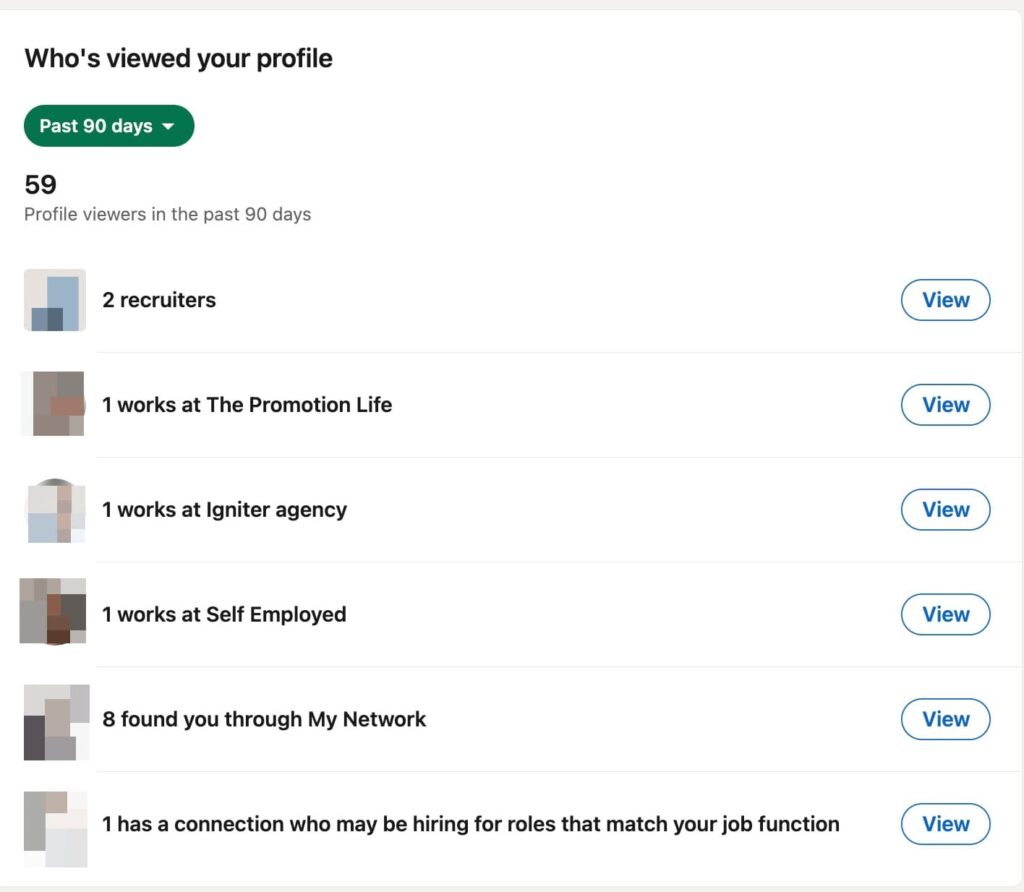
So the message asks: ‘Hey {first_name}, saw you stopped by my profile — curious what brought you over?’ The message references something she did, not something about her. It’s easier to answer than a pitch from a stranger.
Same prospect, same SDR.
- One message interrupts a stranger.
- The other follows up on something she did.
Our State of LinkedIn Outreach 2026 report puts numbers on that gap across 70,130 campaigns: campaigns targeting profile visitors average 13.4% replies, against 10.3% for LinkedIn DMs overall and 5.1% for cold email.
A Signals campaign starts from a demonstrated action.
Semir Jahic runs his entire outbound motion the same way:
“But now I’m really structured around who’s following me, who’s engaging with my posts, who’s engaging with our company page, who’s following it. And I kind of target them very specifically with my approaches and tailor my outreach to them. … It’s really 90% of our pipeline is that way. I have not sent a single cold email, not made a single cold call.” — Semir Jahic, founder of Salesmotion, an account-intelligence platform for sales teams
For the strategy layer (which social signals exist and how sales teams use them), see our breakdown of signal-based outreach. This guide covers the feature that executes it.
3 Expandi Signal sources — plus the keyword filter that turns post engagement into topic targeting
Expandi Signals gives you three sources to build campaigns on — profile visits, company page visits, and post engagement — plus a keyword filter that upgrades post engagement into topic-level targeting.
Four distinct plays, one setup surface.
In the campaign builder you’ll see the first three as the Signals action’s sources; the fourth lives one click deeper, as a keyword filter on the post engagement source.
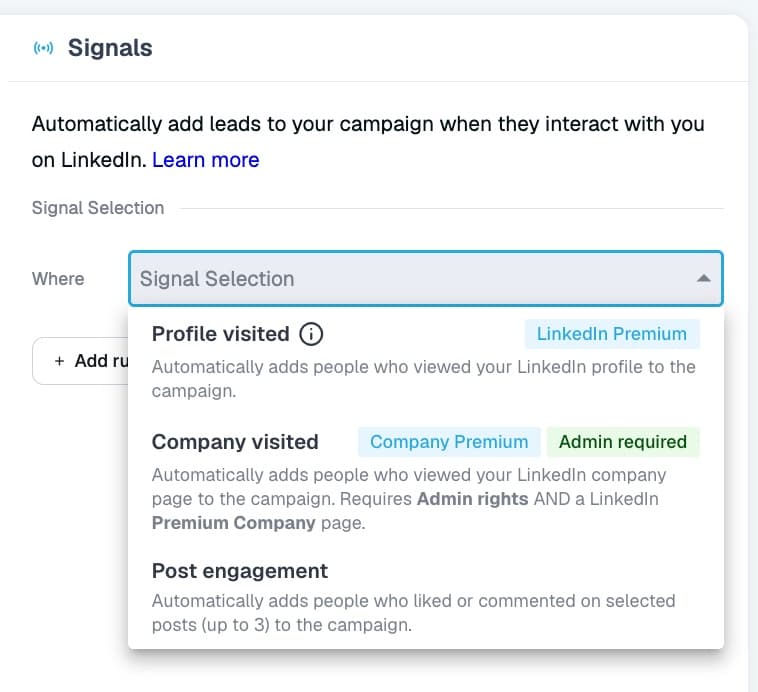
Here is the full picture:
| Signal source | Sub-option | What it adds | Needs |
|---|---|---|---|
| Profile visited | — | People who viewed your profile | LinkedIn Premium or Sales Navigator |
| Company visited | — | People who viewed your company page | Page admin rights + Premium or Sales Navigator |
| Post engagement | Likers, commenters, or both | Engagers on up to 3 posts | Post URL only |
| Post engagement | + Keyword filter on comments | Only commenters whose comment contains your keyword | Post URL only |
Signal 1: people who visited your LinkedIn profile
A profile visit is one of the strongest person-level signals LinkedIn surfaces. Someone searched, clicked a post, or got forwarded your name, and spent time deciding whether you matter to them.
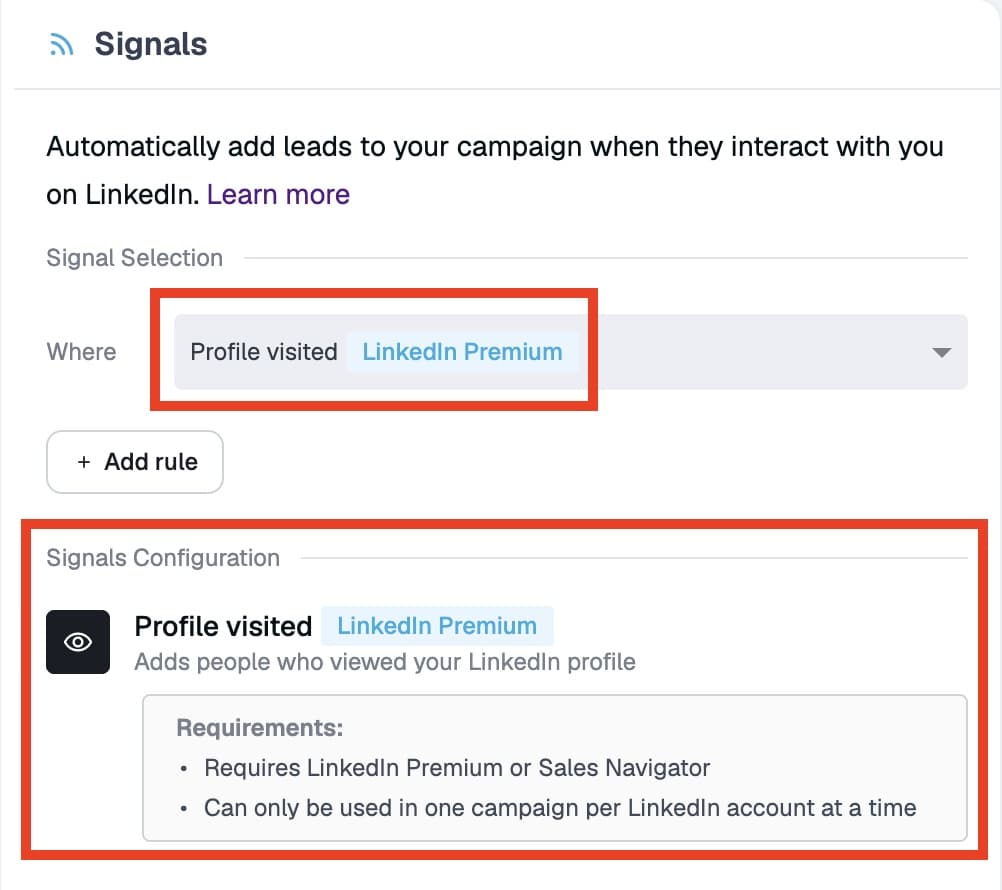
The profile visitor signal pulls each viewer LinkedIn surfaces to you into your sequence, on the requirement that your account has LinkedIn Premium or Sales Navigator. A free LinkedIn account shows only your last five named viewers, so the paid tiers are what unlock the full list this signal reads from.
Two constraints to know upfront.
- The profile visitor signal can run in one active Builder campaign at a time.
- The audience is unfiltered by default: recruiters, job seekers, students, and competitors all visit profiles too.
Pair it with an ICP filter (covered below) so only people matching your title, industry, and company-size criteria continue into the sequence.
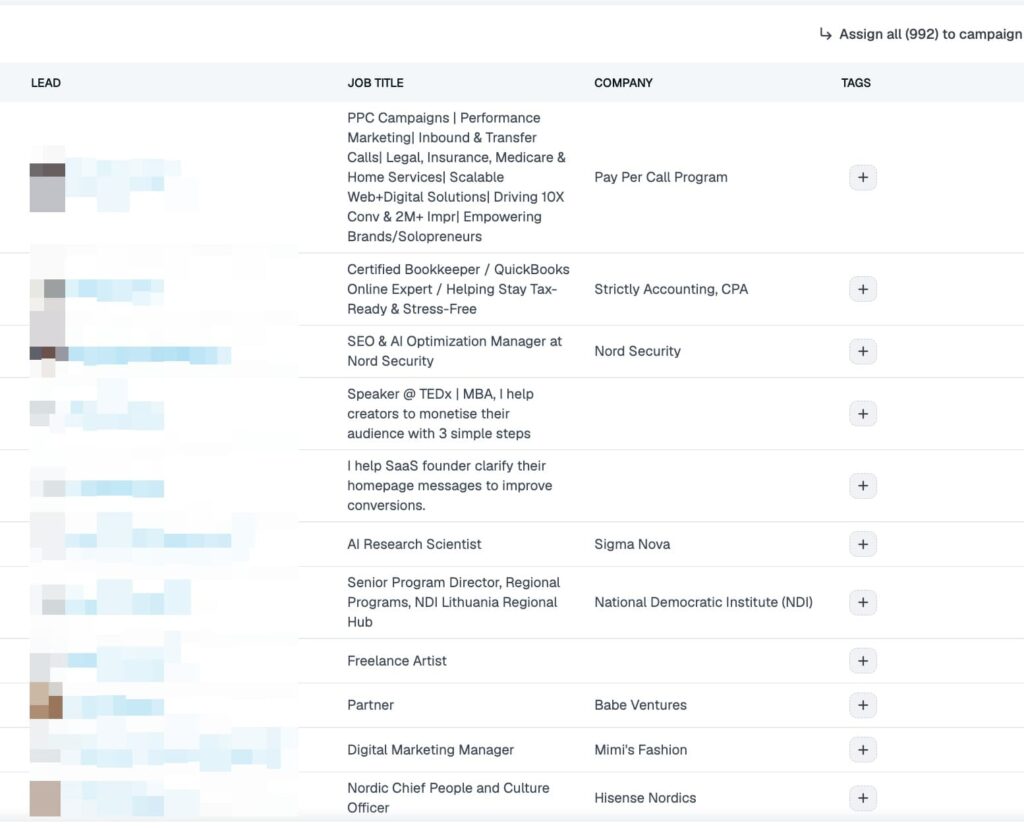
Best fit: SDRs and founders running inbound-led outbound. If you post regularly or run ads, your profile traffic is a steady stream of pre-warmed prospects, and this campaign works it for you around the clock.
Signal 2: people who visited your LinkedIn company page
Company page visits are account-level intent.
An individual researching a vendor checks the company page to size up the product, the team, and whether the operation looks real.
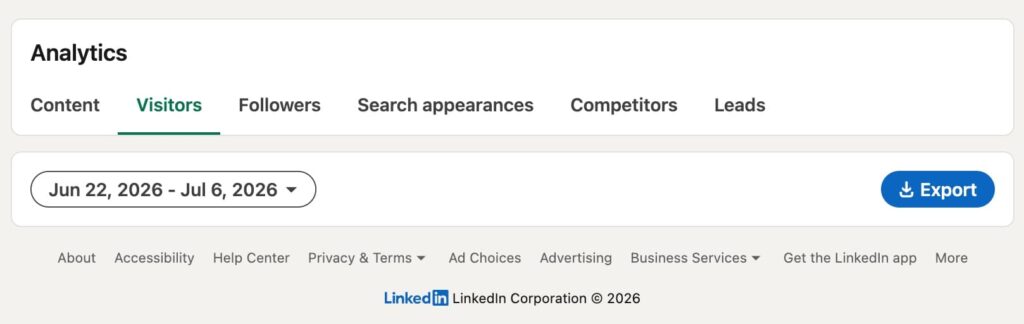
The company page visitor signal imports those visitors into a campaign, and it carries the most setup requirements of the three sources: you need admin rights to the company page, plus a Premium or Sales Navigator subscription on the connected account.
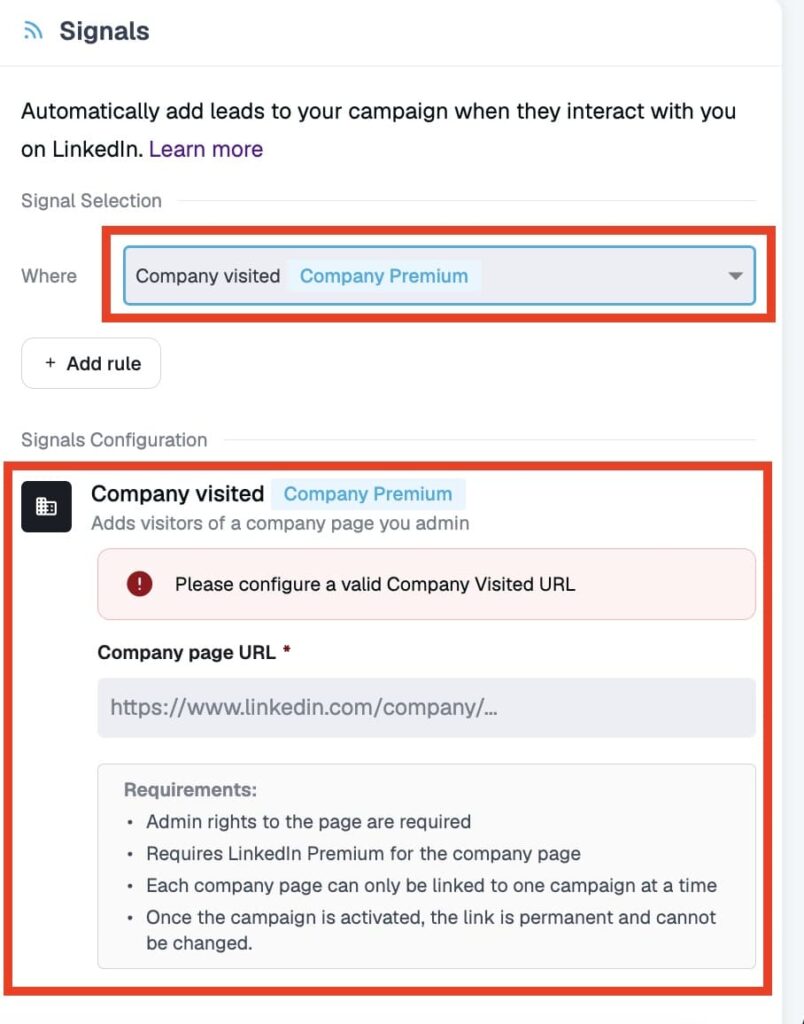
Address the blocker before you build.
If an agency or a marketing lead owns the page, get admin access granted to the LinkedIn account that runs the campaign; without it, the signal won’t activate. Once the campaign is active, the connected page URL is locked, so double-check it before you go live.
Best fit: demand gen and account-based marketing teams. A visitor from a target account is exactly the hand-raiser an ABM play waits for, and this signal surfaces them the day they show up.
Signal 3: people who liked or commented on a post
Post engagement is the loudest signal of the three because it happens in public.
A like or a comment is a deliberate, visible action on a specific topic, which hands you both the opener and the segmentation.
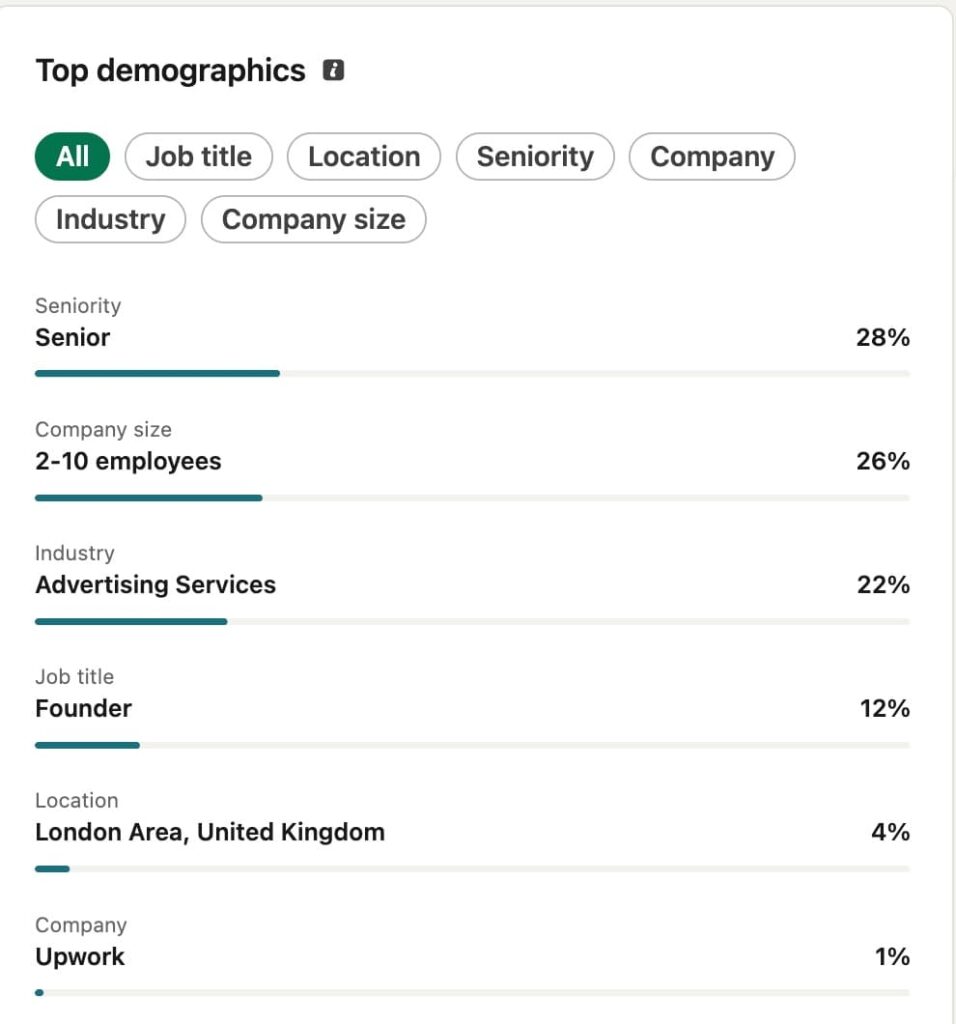
Setup is the lightest too: paste the post URL into the Signals action, choose whether to pull likers, commenters, or both, and the campaign fills itself. One campaign tracks up to three posts, and this source works on a free LinkedIn account.
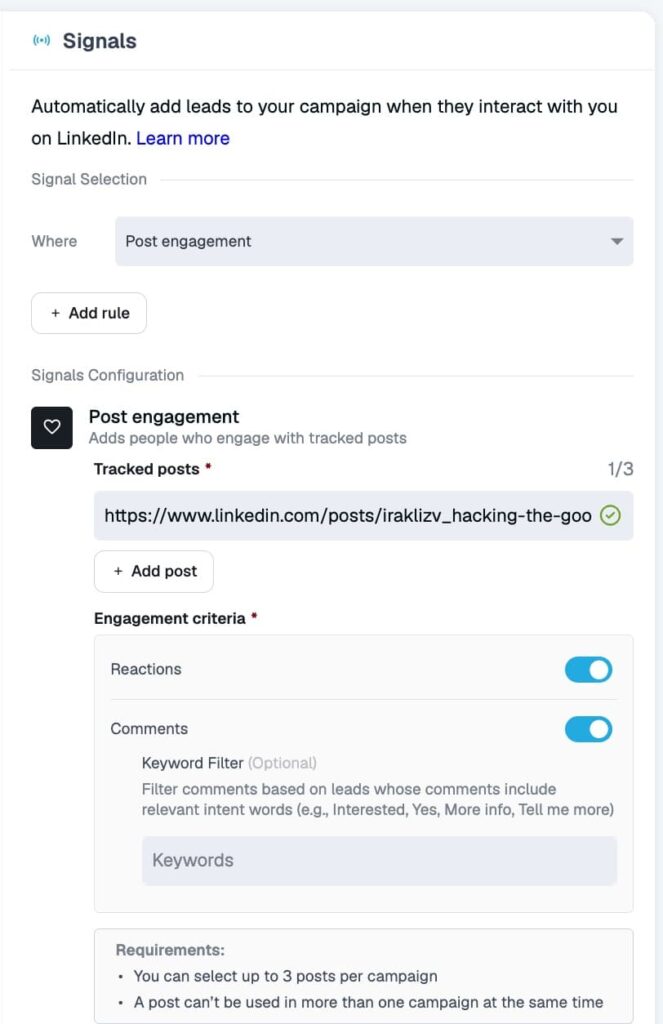
The post can be yours or anyone’s: a case study you published, a poll, or an industry post your buyers gathered around.
Nick Tomic turned a single post into booked demos this same way, as he explains in his GTM interview:
“And that post got 50 comments. … I put an automation so that it would go through the whole list of everybody that liked and commented that post. And then I added them on LinkedIn with a message saying, hey, I saw you engage with my case study. I was wondering if you wanted to learn more, right? And so I booked a couple demos from that.” — Nick Tomic, founder and CEO of Face2Face, a face-to-face video platform for websites
Best fit: content-led outbound, lead magnet delivery, and thought leadership follow-up. Every post you publish becomes a lead source you can plug a campaign into the same day.
The keyword filter: turning post engagement into topic targeting
The keyword filter is a setting inside the post engagement source. Turn it on and Expandi imports only the commenters whose comment contains a word you specify.
That turns a broad engagement pool into topic-level targeting: everyone who commented “interested” on a launch post, everyone who dropped “send it” under a lead magnet, everyone who mentioned a specific pain in a discussion thread.
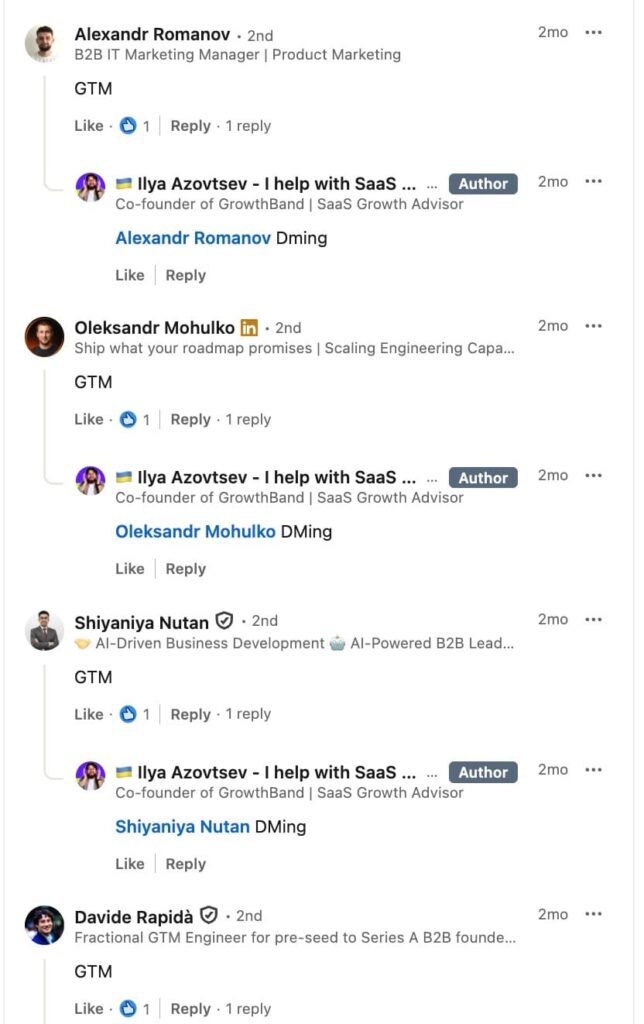
The classic play is the comment-gated lead magnet.
Publish a post offering a resource to anyone who comments a trigger word, point a Signals campaign at the post with that keyword filter, and delivery plus follow-up run themselves. The same mechanic covers competitive and niche categories: filter for the product category or problem your buyers name in comments, on your posts or on an industry voice’s.
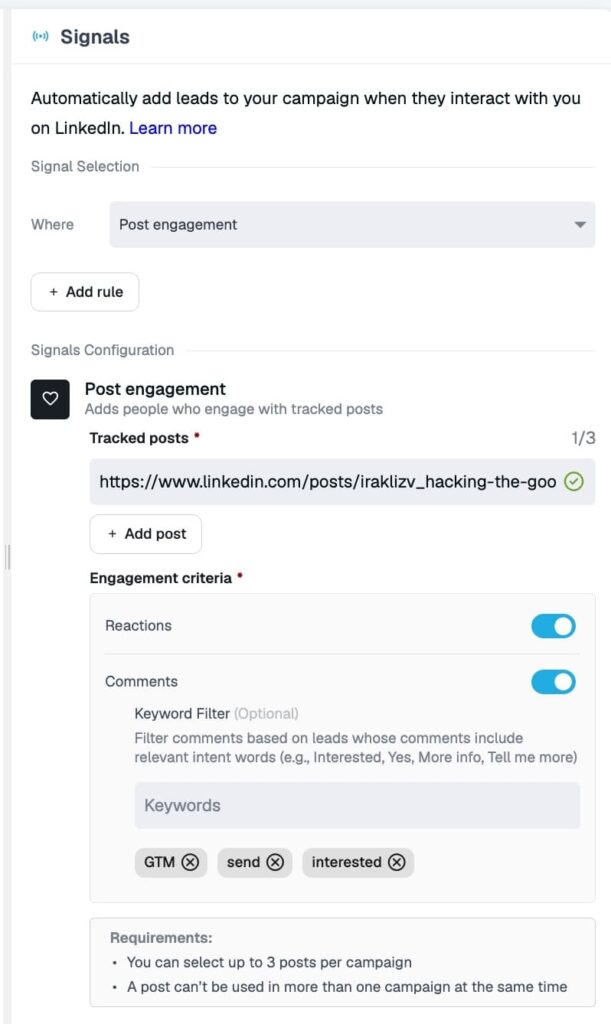
Michal Jackowski runs this style of topic-first targeting for his own product:
“We basically use them to target folks that engage with specific content that relates to the stuff that we built … and actually paying customers coming from basically us reaching out to people and saying, hey, I know [you’ve] been interested in this subject. What problems are you facing with it?” — Michal Jackowski, co-founder of ZenABM, a platform that turns LinkedIn ad engagement into account insights inside your CRM
Best fit: advanced operators targeting niche audiences, lead magnet campaigns, and anyone selling into a category where buyers self-identify in comments.
How to set up a Signals campaign in Expandi
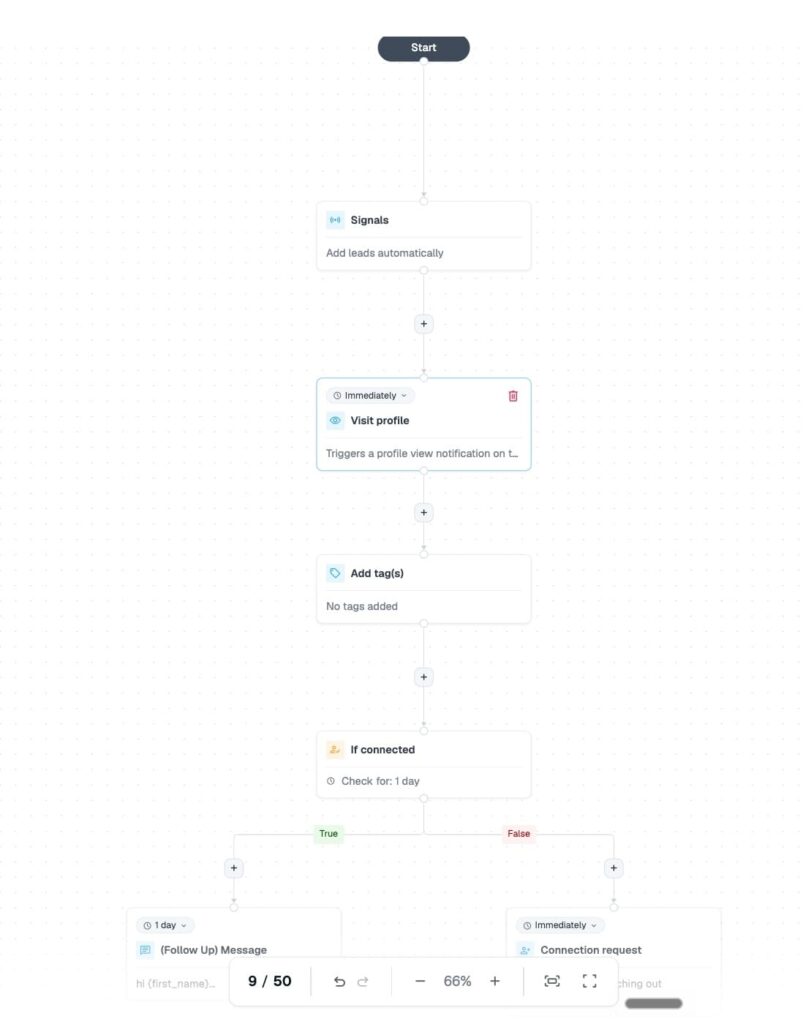
Every Signals campaign lives inside a Builder campaign, Expandi’s if-then sequence type, and the Signals action has one placement rule: it must be the first step after Start.
The setup takes a few minutes once the access requirements are in place.
To set up a signal-based outreach campaign in Expandi:
- Create a new campaign and choose Builder as the campaign type.
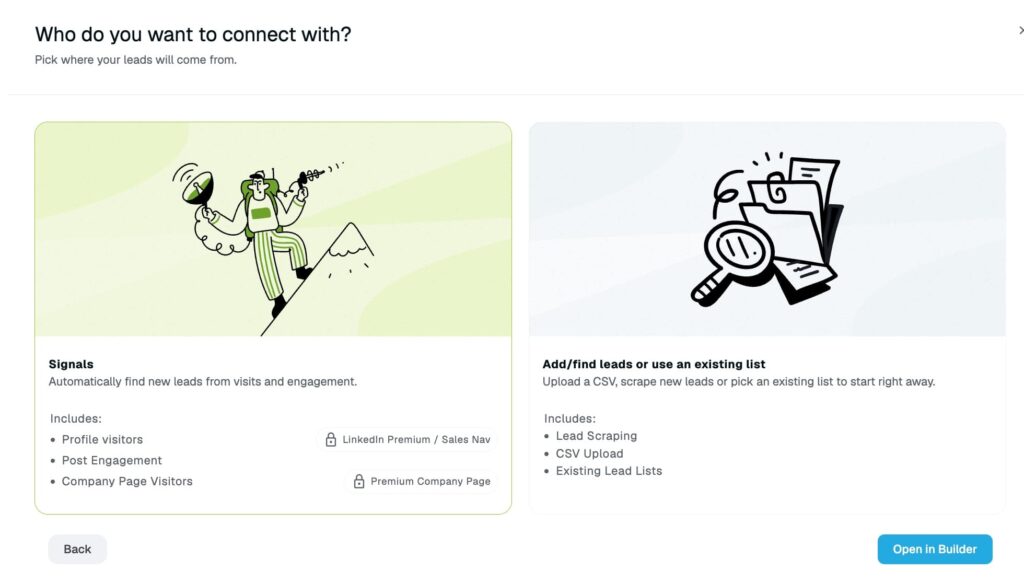
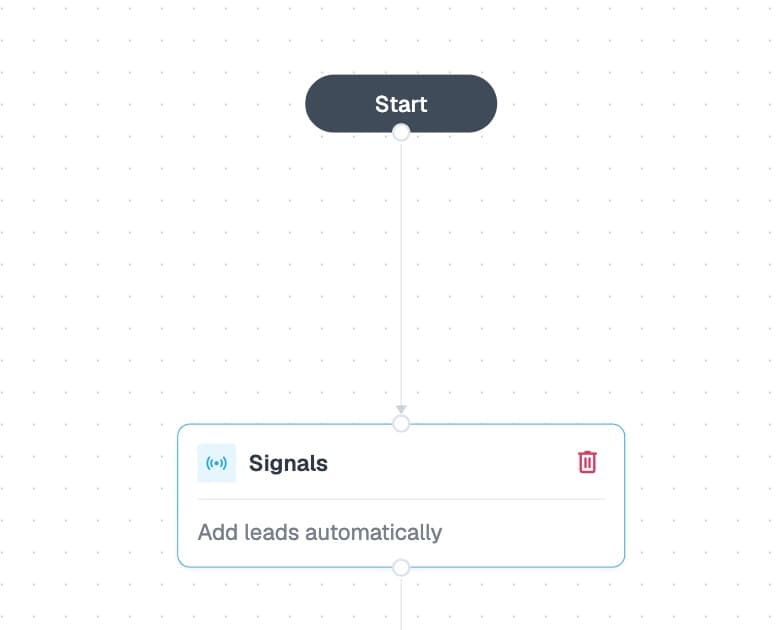
- Add the Signals action as the first step after Start. It only works in that position.
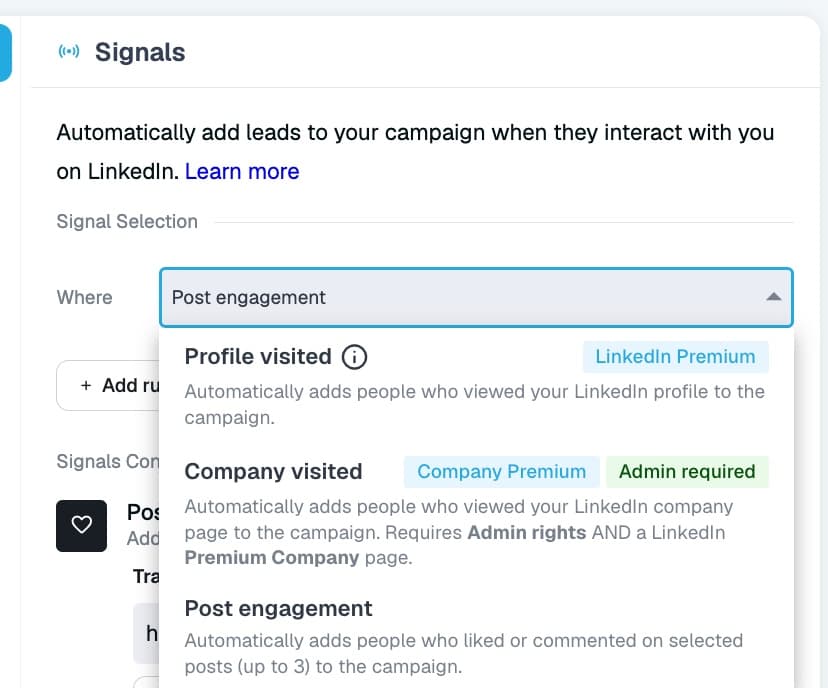
- Open the action’s Properties and pick your source under “Automatically add the leads to my campaign”: Profile visited, Company visited, or Post engagement.
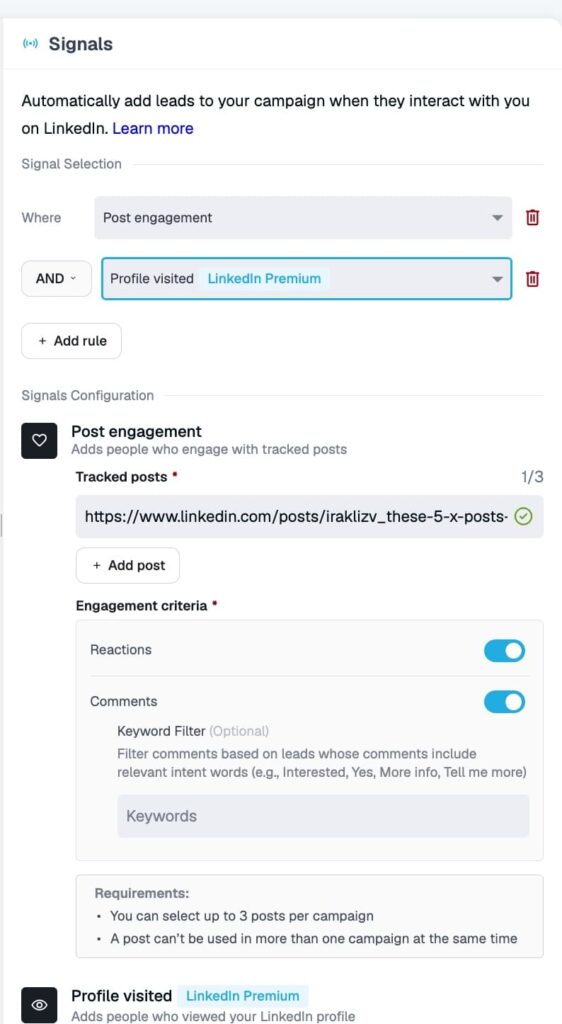
- For post engagement, paste up to three post URLs, choose likers and/or commenters, and add a comment keyword filter if you want topic targeting.
- Stack a second signal with AND/OR logic if the campaign should combine sources, for example, profile visitors who also engaged with a post.
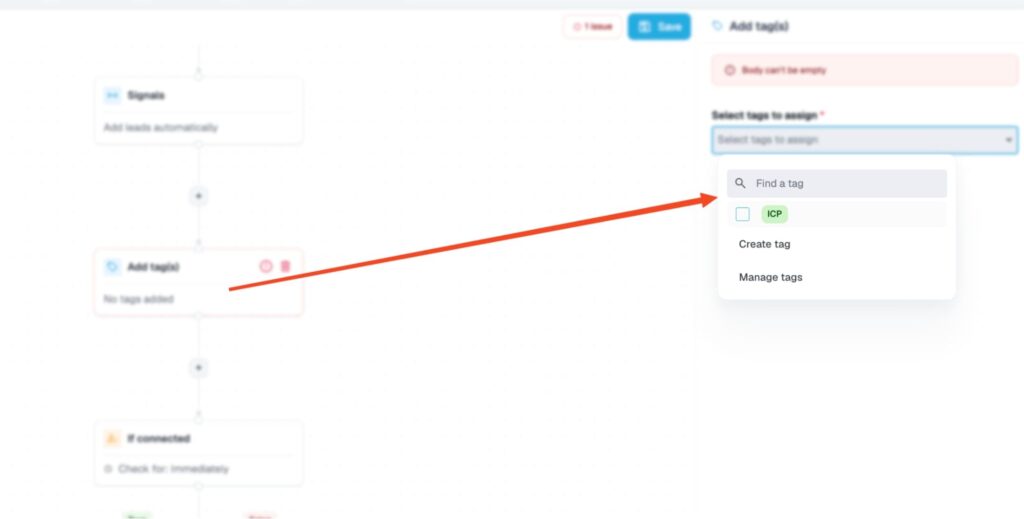
- Add an ICP Filter condition after the signal step so only leads matching your title, industry, and company-size criteria continue.
- Build the rest of the sequence: connection request, follow-up messages, email steps, or any of the other Builder actions.
- Activate. The campaign starts empty by design. Expandi syncs new matches into it roughly every 24 hours.
Three setup blockers stop Signals campaigns before they start.
- Visitor signals refuse to run without Premium or Sales Navigator on the account.
- The company page signal needs admin rights to the page.
- And a Signals campaign accepts no other lead source (no search imports, no CSV uploads), so signal traffic and list-based outreach live in separate campaigns.
Each profile, company page, and post can feed only one active campaign at a time, which matters once you scale past your first campaign (more on overlap below).
The sequence you attach behaves like any other Expandi smart sequence, with the full set of actions and conditions available after the signal step.
4 Message templates for each signal type
A signal hands you context, and the message should spend it in the first line.
The templates below are starting points: swap the placeholders, cut anything that sounds like a pitch, and keep the first message under three sentences.
Template for profile visitors
A profile visit gives you a natural opener, so name it plainly and hand them an easy reason to reply. For example:
“Hey {first_name}, noticed you stopped by my profile this week. Curious what brought you over. Working on anything around [your topic] at {company_name}?”
Why it works: the visit is acknowledged without ceremony, the question is easy to answer, and there is no pitch to defend against. Profile visitors already know who you are, so introductions waste the one advantage the signal gives you.
Template for company page visitors
A company page visit is account-level interest, so open on the category rather than the click. For example:
“Hi {first_name}, saw some interest from {company_name} in what we do at [your company]. If [category] is on the roadmap this quarter, happy to share the setup teams your size run. Let me know either way.”
Why it works: it references the visit at the company level, which reads as attentive rather than watchful, and it leads with something the visitor gets to keep regardless of whether they buy.
Template for post engagers
Post engagement is public, so referencing it feels natural to the prospect. Acknowledge the engagement, then offer the next layer of value:
“Hey {first_name}, saw your comment on my post about [topic], glad it landed. I put together a deeper breakdown of the same play. Want me to send it over?”
Why it works: it rewards the action they took and stays on the topic they chose. The offer extends their interest, so accepting it is the path of least resistance.
Template for keyword-filtered comment leads
Keyword-filtered leads asked for something specific, so deliver it and stop. For example:
“Hey {first_name}, you commented [keyword] on the [topic] post, so here it is: [resource]. If you hit a snag applying it, tell me and I’ll point you to the fix.”
Why it works: it keeps a public promise fast, which builds more trust than any pitch, and the follow-up offer creates a reason for a second conversation without forcing one.
How to combine Signals with other LinkedIn targeting filters
Raw signal traffic is warm but unqualified, and the ICP Filter condition is what turns it into a targeted campaign.
Placed right after the signal step, it checks each imported lead against your criteria (job title, industry, company size) and only lets matches continue.
For example, your profile visitors might include recruiters, colleagues, and job seekers.
The filter makes sure your sequence only reaches the ones who look like buyers.
AND/OR stacking adds a second precision layer.
- Combining sources with OR widens the funnel (profile visitors plus post engagers in one campaign).
- AND narrows it to compound intent: someone who visited your profile and engaged with your post is meaningfully warmer than either signal alone, and can justify a more direct message.
After replies start coming in, Expandi’s AI Analyzer sorts them by sentiment into:
- Interested.
- Maybe Interested.
- Not Interested.
Qualified conversations can then flow into your pipeline through Expandi’s Salesforce integration, or into HubSpot, Pipedrive, and other CRMs via Zapier or webhooks, with the full LinkedIn context attached.
Check out all the CRM integrations you have available with Expandi.
Signal campaigns vs cold outreach: the real benchmarks
Signal campaigns out-reply cold outreach across every dataset we publish.
The clearest cut comes from our State of LinkedIn Outreach H1 2026 report, built on 70,130 real campaigns:
| Outreach type | Average reply rate |
|---|---|
| Cold email | 5.1% |
| LinkedIn DM (all campaigns) | 10.3% |
| Profile visitor (Inbound) campaigns | 13.4% |
| Event attendee campaigns | 14.21% |
| Messenger campaigns (1st-degree connections) | up to 16.86% |
The pattern inside the table is the argument for this whole feature:
- Reply rates climb with the strength of the pre-existing relationship.
- Cold email sits at the bottom.
- The LinkedIn-wide average lands mid-ladder.
- Campaigns aimed at people who already visited, attended, or connected occupy the top.
How to run multiple Signals LinkedIn campaigns in Expandi without overlap
Once each signal type has its own campaign, the overlap question appears: what happens when the same person visits your profile and comments on your post in the same week?
Expandi answers part of it with hard limits. Use the blacklist plus per-signal exclusivity (one active profile-visitor campaign, one post per campaign) to cover the rest, so a lead stays in a single conversation.
To keep a multi-signal setup clean:
- Run one campaign per signal type, each with its own sequence written for that context.
- Remember the built-in exclusivity: one profile visitor campaign per account, one campaign per company page, one campaign per post.
- Launch the highest-intent campaign first. Where signals overlap, per-signal exclusivity keeps the same person from being caught twice, so start with the campaign whose messaging you’d want to win.
- Use the blacklist for profiles and domains that should never enter any campaign: existing customers, open opportunities, competitors.
- Check the campaign-level reply rates monthly and cut the signal that underperforms for your audience rather than running all of them on principle.
This structure keeps every prospect in exactly one conversation, with a message written for the specific action they took.
Turn the interest you already have into pipeline on autopilot
Signal-based outreach flips the targeting question from “who fits our filters?” to “who already moved toward us?” Then, Expandi Signals automates the entire loop, from catching the profile visit, page view, or comment to running the follow-up sequence.
Profile visitors cover person-level intent, company page visitors cover account-level intent, and post engagement with keyword filters covers topic-level intent.
The benchmarks reward the switch with reply rates well above cold averages.
Start your 7-day free trial and point your first Signals campaign at the people already looking at you.
Expandi signal-based outreach: FAQ
Signal-based outreach means contacting people based on an observable action they took (a profile visit, a company page view, a post engagement) rather than their presence on a purchased or filtered list.
The action supplies both the timing and the opening context for the message. It sits between inbound (waiting for the prospect to reach out) and cold outbound (contacting strangers), working the middle ground of demonstrated interest.
Intent data platforms infer interest from third-party behavior: topic research across the web, review-site activity, or ad engagement, at the account level.
Expandi Signals uses first-party LinkedIn behavior directed at you specifically (your profile, your page, your posts) at the individual level, and then runs the outreach itself. The two can complement each other, but Signals requires no separate data subscription.
The Inbound campaign is an older standalone campaign type that auto-imports your profile viewers into a fixed flow, and only one can exist at a time.
The Signals action lives inside Builder campaigns, covers company page visits and post engagement in addition to profile visits, and gives you the full if-then sequence logic after the signal step. For new setups, Builder with a Signals step is the more flexible route.
Signal campaigns are among the safer automation patterns because the audience is small, warm, and naturally throttled by real visitor volume.
Expandi adds the platform-level protections on top: cloud-based sending from a dedicated country-based IP, gradual account warm-up, smart daily limits, and randomized delays between actions that mimic human pacing. Keeping your sequence personal and your daily volumes inside the recommended limits is the remaining part of the job.
Sales Navigator is one way to qualify, but any LinkedIn Premium subscription unlocks the profile visitor and company page visitor signals.
The post engagement signal works on a completely free LinkedIn account, since likes and comments are public. Expandi itself runs without Sales Navigator. It is only required for Sales Navigator-specific search imports and Paid InMail steps.




You’ve made it all the way down here, take the final step