How to Network on LinkedIn: 10 Proven Strategies (2026)

Most LinkedIn connections go nowhere. The default advice on how to network on LinkedIn: send requests, wait, and hope someone replies, stopped working a long time ago.
With over 1 billion members on LinkedIn, the platform is saturated with outreach noise. And here’s what makes it worse: personalizing your connection request barely moves acceptance rates. The real gap is what happens after someone connects: the timing, the follow-up, the context behind the outreach.
We’ve seen this firsthand across 70,000+ outreach campaigns run through Expandi.
The sales teams closing deals on LinkedIn are working with a different playbook: one built around behavioral signals, sequenced follow-up, and reaching out to people who already have a reason to know who you are.
This guide covers 10 networking strategies that actually drive results in 2026, built from what we see working across B2B sales teams, SDRs, and agencies running outbound at scale. Here’s what we’ll cover:
- Why networking on LinkedIn fails and what to fix
- 10 proven strategies for LinkedIn networking to drive results in 2026
- 5 LinkedIn networking mistakes to avoid
- How to scale LinkedIn networking and outreach with Expandi without getting your LinkedIn account flagged.
Key Takeaways
- Adding a message to your connection request doesn’t significantly boost acceptance, but it lifts reply rates by 71% compared to requests with no note.
- Multi-action sequences combining a profile view, connection request, and follow-up can push reply rates above 11% vs under 6% for single-touch outreach.
- Signal-based networking, which means reaching out to people who already engaged with your posts — generates the highest reply rates of any LinkedIn outreach type.
- Pair these strategies with Expandi to automate the repeatable parts: signal-triggered sequences, follow-up timing, and profile warm-up — while keeping targeting and messaging human.
How to Network on LinkedIn: 10 Proven Strategies (2026)


Why most LinkedIn networking fails — and what to fix
The default approach to LinkedIn networking is to find someone in your target market, send a connection request, connect, and send a pitch. This is the most common sequence on the platform, and it has the worst outcomes.
In 2026, the shift happening among high-performing sales teams is from volume-based to signal-based networking. Instead of blasting connection requests to a scraped list, they’re using behavioral signals: who viewed their profile, who commented on their content, or who attended the same event. This is to find warm entry points before the first message lands.
That’s the framework this guide on how to network with people on LinkedIn is built around.
10 strategies for LinkedIn networking that drive results in 2026
These strategies cover how to do networking on LinkedIn at scale, ranked by impact, starting with the foundation many people skip.
1. Optimize your LinkedIn profile before you reach out
Your profile is the first thing someone checks after receiving your connection request. If it looks incomplete, reads like a job description, or has no clear positioning, your acceptance rate takes a hit before you’ve even said a word.
Three elements carry the most weight here: your headline, your banner image, and your About section. Your headline should describe who you help and what you do, not just your job title.
‘Head of Growth at X Company’ tells no one anything. ‘Helping B2B SaaS teams build outbound pipeline on LinkedIn’ gives someone a reason to accept.
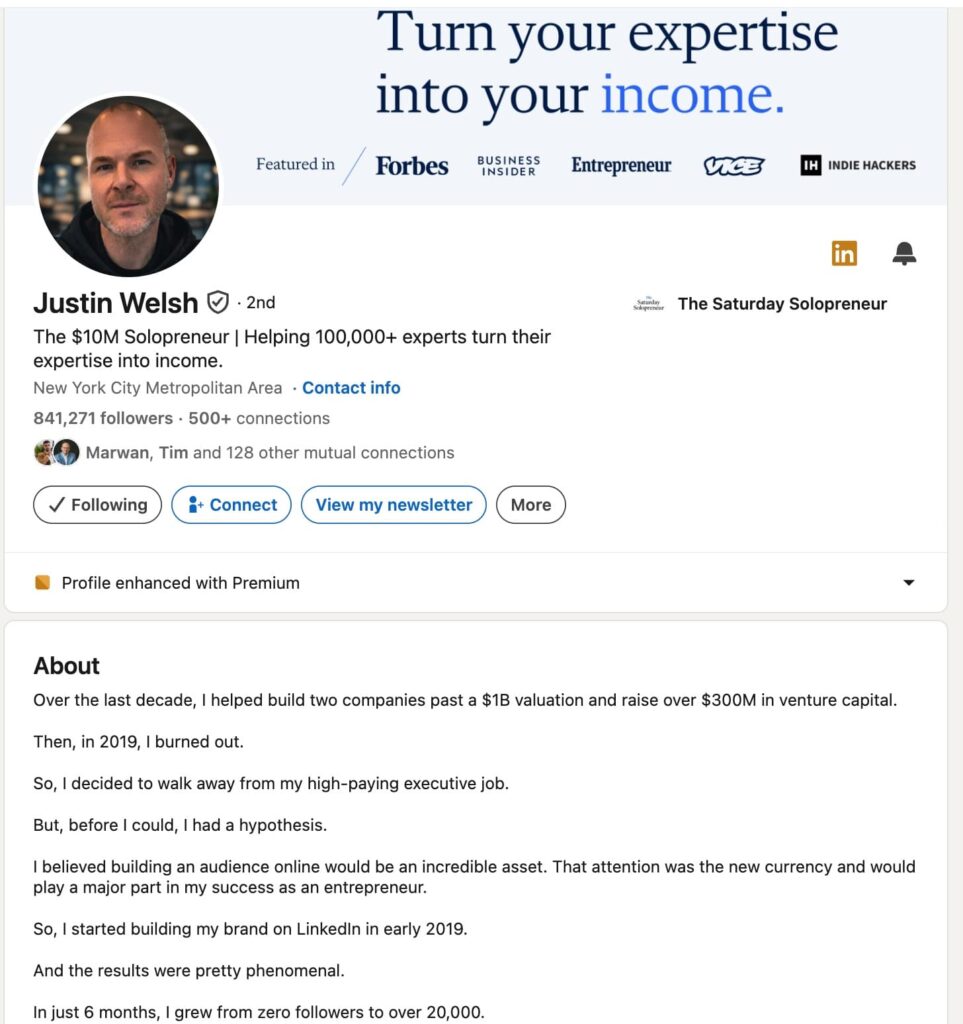
Your About section should answer one question: why should someone in your target audience want to connect with you? Keep it to 3-4 sentences in first person. Avoid generic claims and focus on specific outcomes you create or problems you solve.
See our full guide on improving LinkedIn profile tips for more info and examples on this.
2. Define exactly who you want to reach
Networking without a target is just scrolling. Before sending a single connection request, define your ideal connection profile: industry, seniority, company size, geography, and any behavioral filters you can apply.
On LinkedIn’s free plan, you can filter searches by location, company, job title, and school. But if outbound is part of your workflow, you’ll hit LinkedIn’s search limit quickly.
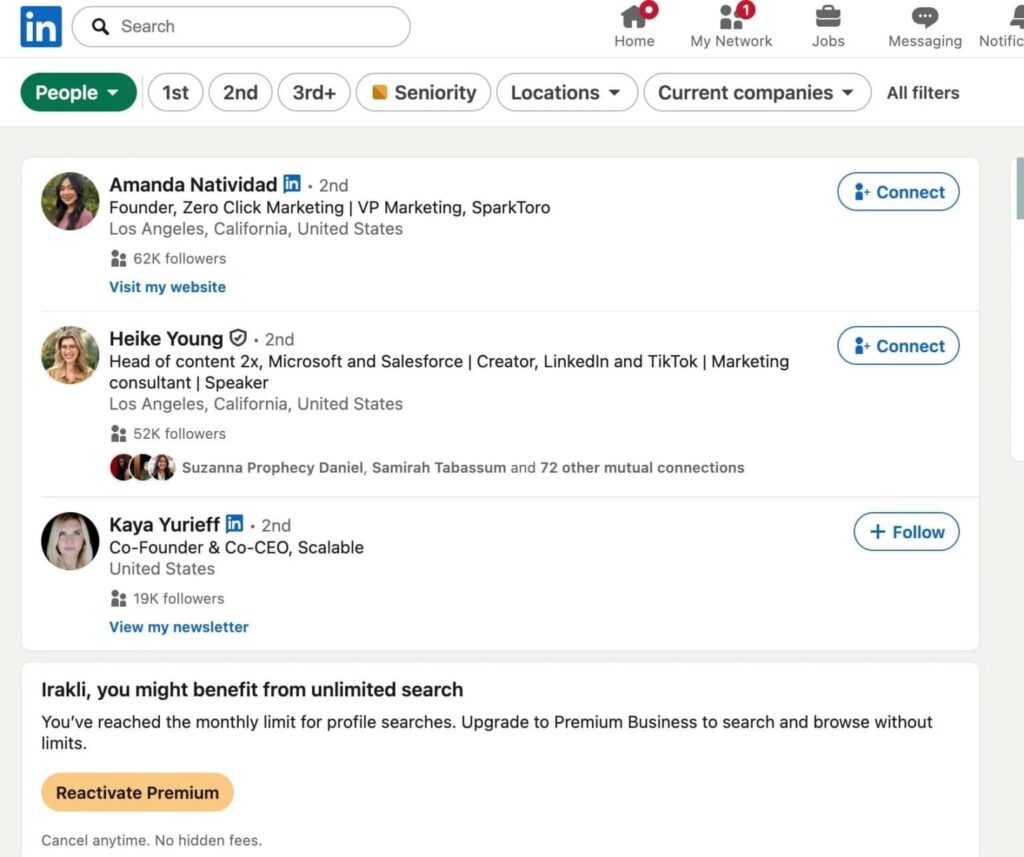
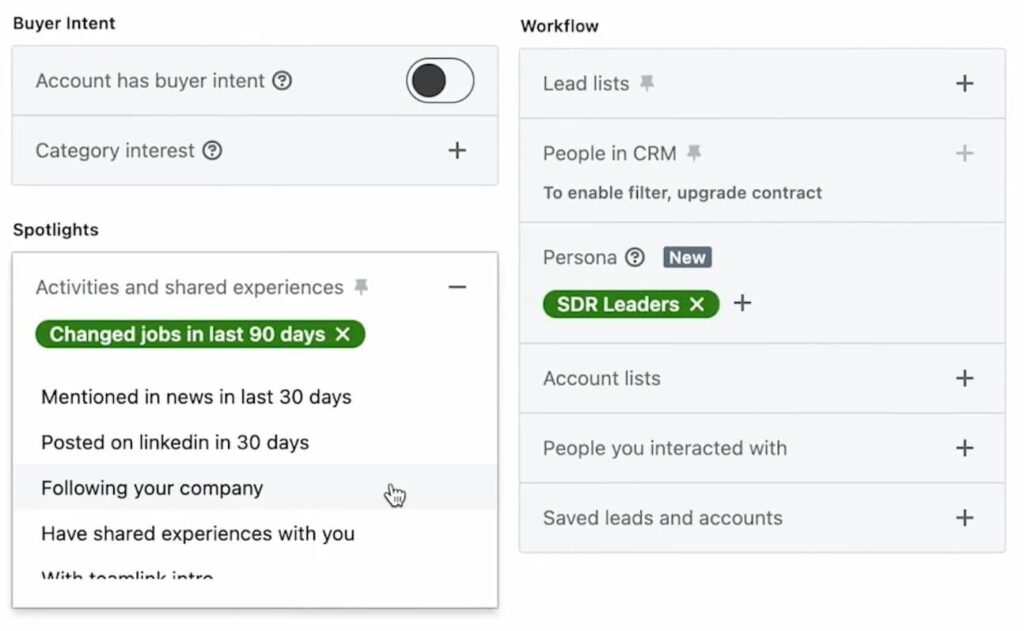
LinkedIn Sales Navigator adds signal-based filters such as recent job changes, company headcount growth, and content engagement, which is where precision targeting becomes powerful. If you’re running outreach at scale, Sales Navigator is worth the cost simply for the targeting depth it unlocks.
Be specific with your brief. ‘SaaS founders in the EU who posted in the last 30 days’ is a real target. ‘Marketing professionals’ is a category. The more specific your targeting, the more relevant your outreach, the higher your reply rate.
3. Engage with their content before you connect
Sending a connection request cold is the default. Engaging with someone’s content first gives you a natural reason to connect that doesn’t feel manufactured.
The process: like or comment meaningfully on 2-3 of their posts before sending a connection request. When you do reach out, reference the specific post or topic.
“I saw your point about outbound vs. inbound pipeline last week. Wanted to connect as we’re seeing similar dynamics with our customers” is a completely different opener than “I’d like to add you to my professional network.”
This is called social warming. It works because it shifts the dynamic from “stranger who wants something” to “peer who pays attention.” At small scale, it’s manual. If you want to do it at scale, it can be automated, which we’ll cover below.
4. Send connection requests with context
There’s a common misconception that adding a note to your connection request significantly lifts your acceptance rate. The Belkins 2025 study found otherwise: acceptance rates are virtually identical with or without a message (26.42% vs 26.37%).
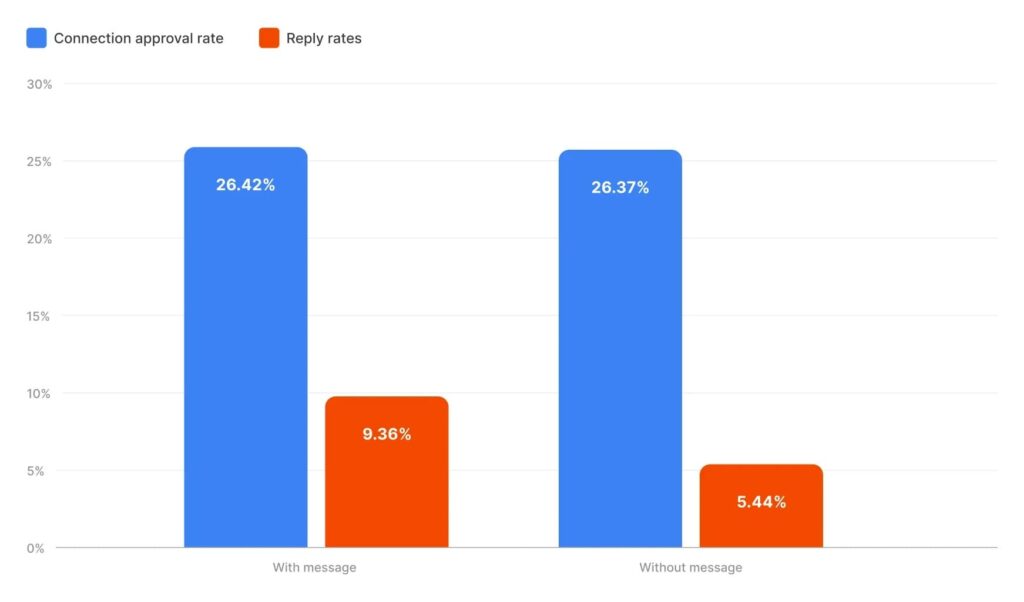
What the note does do is lift your reply rate after connecting: 9.36% compared to 5.44% without one. That’s a 71% improvement in actual conversations started. So the goal of your connection note is to prime the conversation.
Keep the note under 100 characters. Give one specific reason to connect: a shared group, a post they published, a mutual contact, or a specific challenge their role is likely facing. Skip the pitch entirely or save that for after they accept.
Example:
“Hi [Name]. Saw you’re scaling an SDR team at [Company]. Wanted to connect as I work with similar teams at this stage.”
5. Use content to pull connections in
Posting consistently on LinkedIn is one of the most overlooked networking strategies for B2B sales. When you publish content that resonates with your target audience, they come to you. Those inbound connections are inherently warmer than outbound ones.
The practical approach: pick two or three topics at the intersection of what you know and what your target audience cares about. Post 2-3 times per week. Engage with comments the same day they land.
One important note: comment quality outperforms post volume. A well-placed, insightful comment on a post from a target account generates more relevant connection requests than three average posts of your own. Prioritize depth over frequency.
See our full guide on LinkedIn content strategy for real examples and frameworks you can use here.
6. Use LinkedIn Events as outreach triggers
LinkedIn Events are one of the cleanest outreach entry points available. When someone attends the same event as you, you have an immediate, non-spammy context for connecting.
The process: find events your target audience attends, or host a small event of your own. Connect with attendees before or after, referencing the event specifically: “I noticed you’re attending [Event Name]. Wanted to connect as I’m also following the [topic] space closely.”
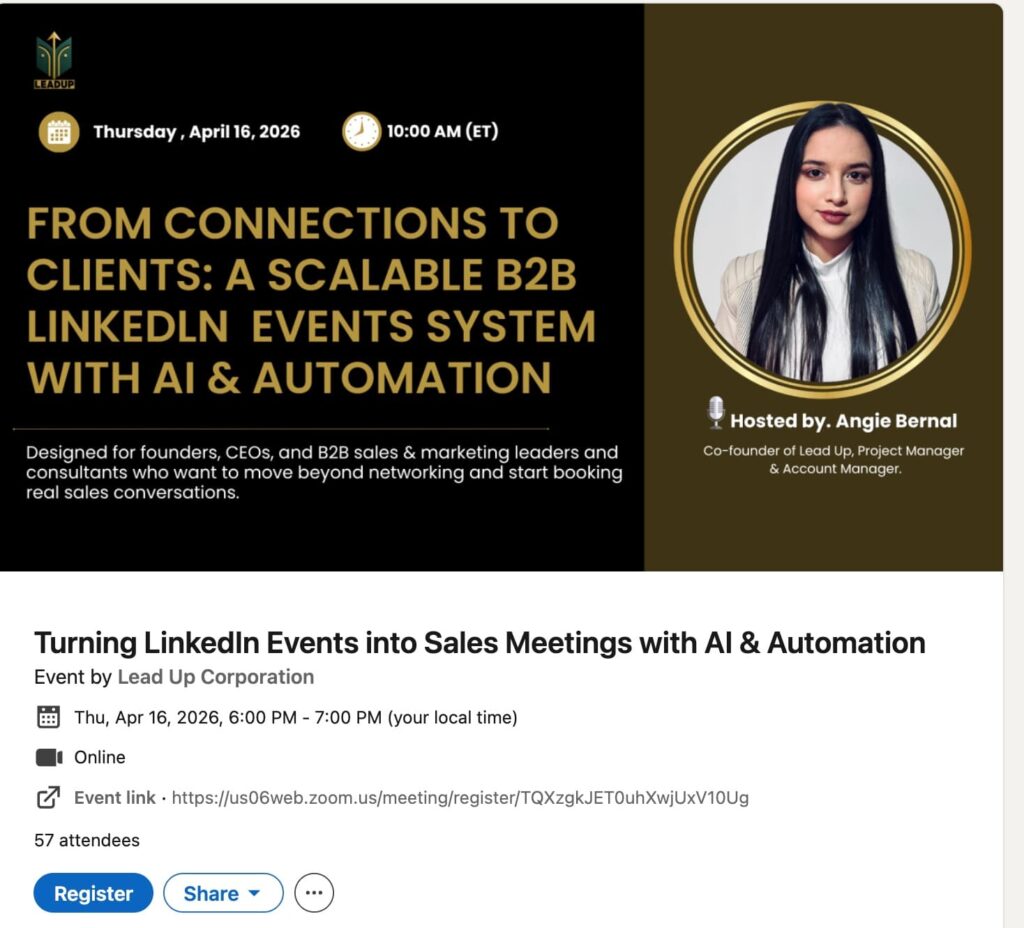
You can access the attendee list from most LinkedIn Events by clicking Attendees after registering. This gives you a pre-filtered, intent-signaling audience that’s far warmer than a cold search result. Combined with a sequenced follow-up, LinkedIn Events become a repeatable sourcing channel.
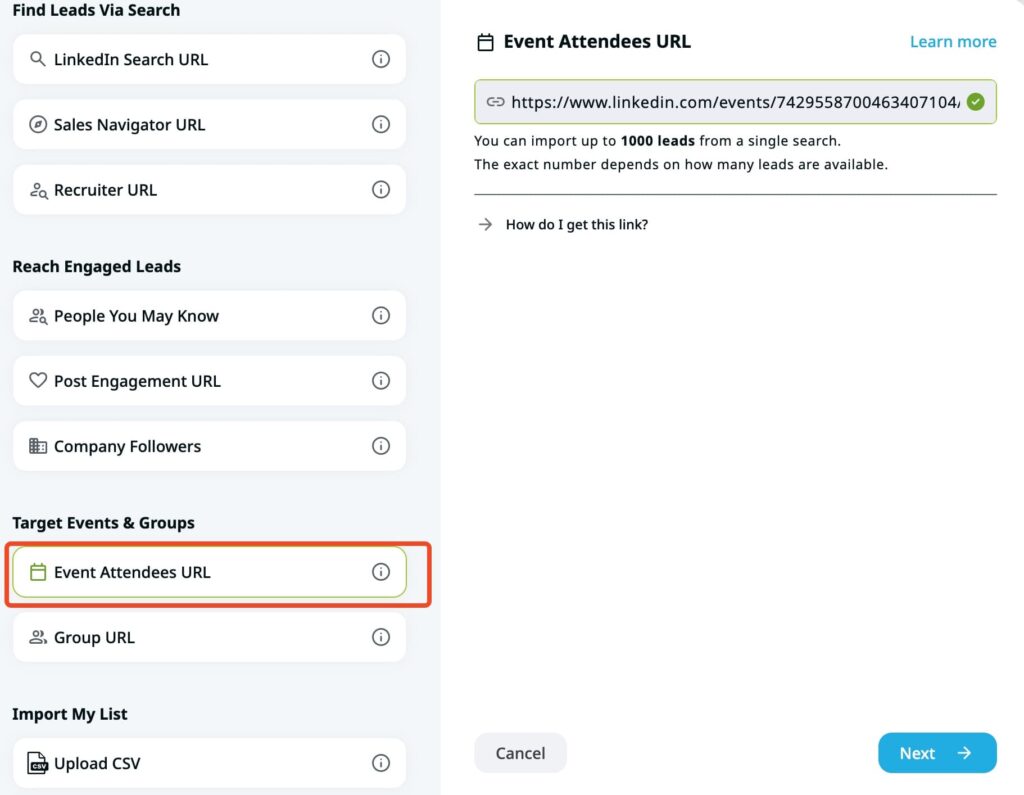
Pro tip: With Expandi, you can fully scrape LinkedIn event attendees for outreach. Then, you can automate your outreach (connection requests, follow-ups, etc.) all from one place. More on this later.
7. Work LinkedIn Groups strategically
Most LinkedIn Groups have low engagement. The member list, however, is valuable. It’s a self-selected audience who identified as relevant to a specific topic, industry, or use case.
Join 3-5 groups where your ideal connections are likely to be. Message members directly with group membership as the context: “I noticed we’re both in [Group Name]. Wanted to connect as I work with similar companies in this space.”
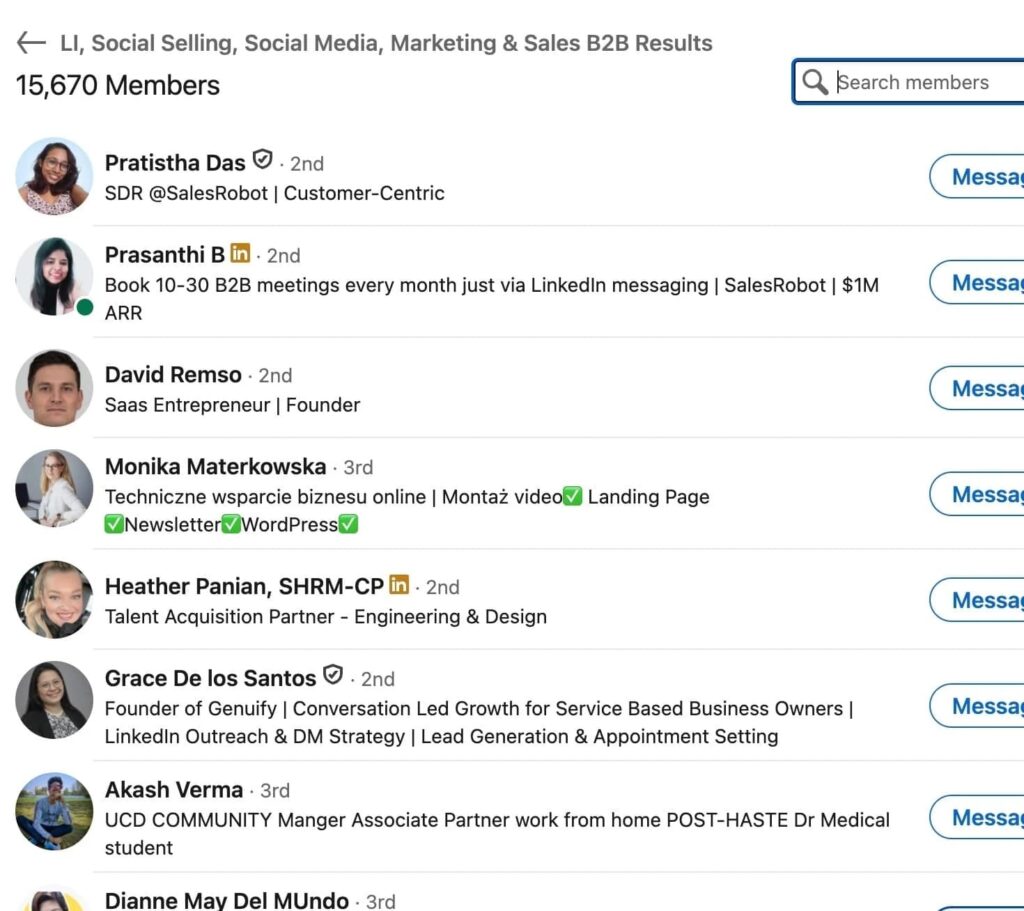
With Sales Navigator, you can filter group members by title, company size, seniority, and geography —which turns a broad industry group into a precise prospecting list. This is particularly effective for industry-specific groups where your ICP is concentrated.
8. Follow up with a structured sequence
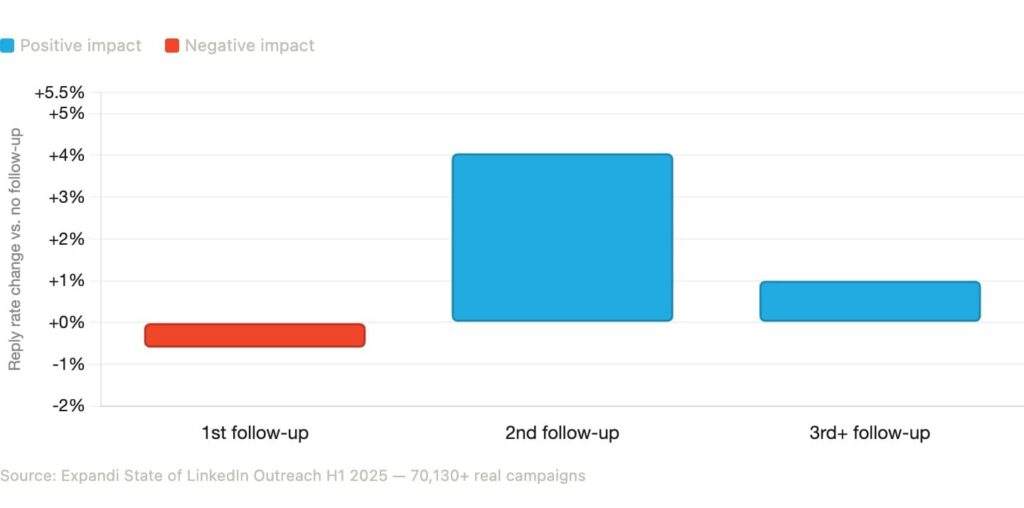
Most LinkedIn outreach fails because there is no second message. After analyzing over 70,000+ real outreach campaigns, in our 2025 state of LinkedIn report, we found that the second follow-up drives a 4.05% lift in reply rates. Yet most sellers stop after one message. The first follow-up actually sees a slight dip of 0.6%, which is why so many teams give up too early.
A practical sequence structure:
- Day 1: Connection request with a personalized note.
- Day 3 after acceptance: Value-add first message. Share a relevant insight, ask a genuine question, or reference something specific from their work.
- Day 7: Soft follow-up if no reply. One sentence, low-friction. Don’t repeat the previous message.
- Day 14: Final message. Make it easy to say no or come back later.
The most common mistake in follow-up is repeating yourself. Each touchpoint needs a new angle, like a different piece of content, a relevant observation, or a specific question. Repetition signals that you don’t have a real reason to reach out.
9. Turn post engagement into outreach triggers
This is where LinkedIn networking shifts from guesswork to intent-based outreach.
When someone likes, comments on, or shares your LinkedIn post, they’ve already signaled interest in you or your topic. That’s a far warmer starting point than a cold search result. The problem is identifying and reaching out to every person who engaged at scale. Manually, this breaks down fast.
Instead, use post engagement as a trigger for an outreach sequence. Reply rates on post-engagement campaigns are significantly higher than cold list outreach because the first touchpoint isn’t cold.
The setup is straightforward: define which post or posts you want to pull engagers from, build your sequence steps, and reach out. The signal does the qualification work for you.
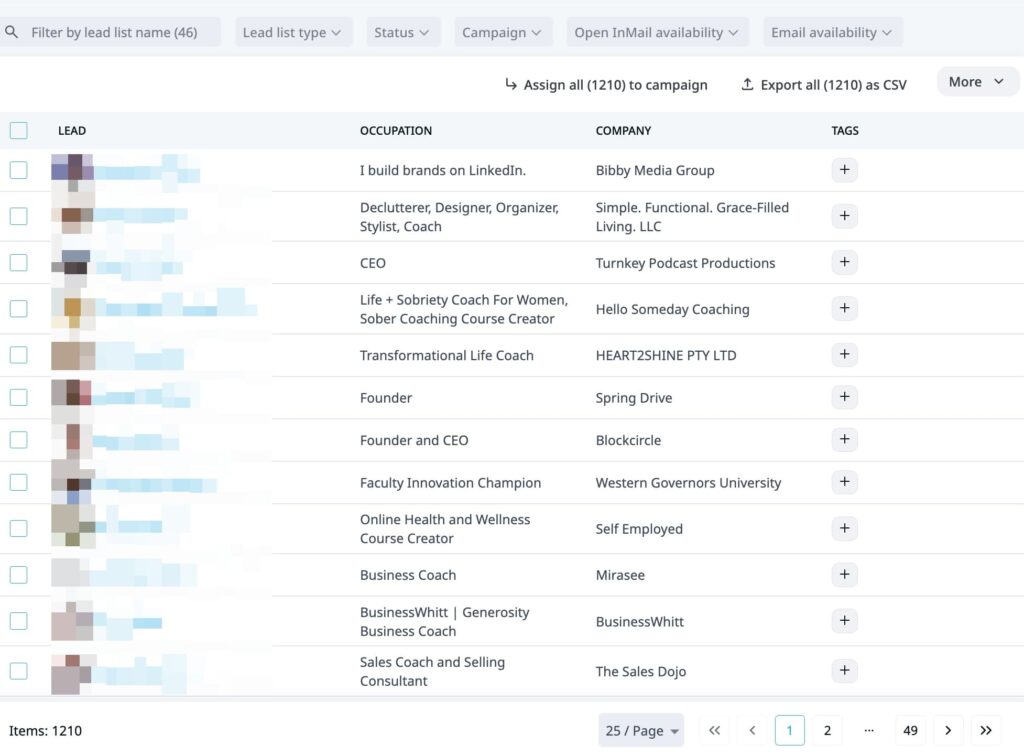
If you know where your audience hangs out and whose content they engage with, you can pull 1,000+ ICP-fit prospects in minutes with Expandi and feed them straight into an outreach sequence.
10. Automate intelligently to scale what works
Manual LinkedIn networking hits a ceiling fast. Once you’re juggling multiple sequences, follow-up timing, and personalization in parallel, quality drops and threads start falling through.
The right approach is to automate the high-volume, repeatable parts of the workflow while keeping strategy and personalization inputs human. Connection requests, profile views, follow-up timing, and campaign logic are all automatable. Target selection, messaging angle, and offer positioning are not.
Expandi is built specifically for this balance. It runs cloud-based on a dedicated country-specific IP, includes account warm-up to protect your LinkedIn account, and applies smart daily limits to keep activity within LinkedIn’s safety thresholds. You design the targeting and sequence logic. Expandi handles the execution at scale.
The repeatable parts worth automating: connection requests and follow-up timing from strategy 2, social warming actions like profile views and post likes from strategy 3, post-engagement triggers from strategy 9, and event attendee sequences from strategy 6.
The parts that stay human: who you’re targeting, what angle you’re leading with, and how you respond once someone replies.
5 LinkedIn networking mistakes to cut immediately
Most of these are easy to fix once you know to look for them.
Pitching in the first message.
After someone accepts your request, the first message should start a conversation or add value. Save the ask for touch 2 or 3.
Don’t do this:
“Hi [Name], thanks for connecting! I wanted to share how our platform helps sales teams book 3x more meetings. Would you be open to a quick 15-minute call this week?”
Do this:
“Hi [Name], noticed you’re scaling the SDR team at [Company] — we’ve been working through similar challenges with a few teams in [industry]. Happy to share what’s been working if it’s useful.”
One opens with what you want. The other opens with what they might find relevant. The difference in reply rate is significant.
Ignoring people who engage with your content.
Every like and comment is a warm signal. If you’re not following up, you’re leaving pipeline on the table. And it’s one of the highest-converting outreach sources most teams skip entirely.
Don’t do this:
Someone comments on your post, you like their comment and move on.
Do this:
“Hi [Name], saw you liked my post on outbound sequencing — curious if that’s something your team is actively working on right now?”
One treats engagement as a vanity metric. The other turns it into a conversation starter.
Sending the same follow-up twice.
Each touchpoint needs a new angle: a different piece of content, a fresh observation, or a specific question. If you don’t have something new to say, wait until you do.
Don’t do this:
“Hi [Name], just following up on my last message. Would love to connect!”
Do this:
“Hi [Name], we just published a breakdown of SDR ramp time that reminded me of what you’re building at [Company] — thought it might be useful.”
One signals you have nothing new to offer. The other gives them a reason to reply.
Focusing only on volume.
Connecting with large numbers of unqualified people dilutes your network and tanks your engagement rate. LinkedIn’s algorithm surfaces your content to your connections — a relevant, engaged network amplifies your reach. A random one doesn’t.
Don’t do this:
Blast 500 connection requests to anyone with a sales title, no filtering, no personalization.
Do this:
Target 50 people who match your ICP exactly, personalize the note, and follow up once with something relevant to their role.
Instead of filling your network with noise, build a list of people worth messaging.
Not treating LinkedIn as a long game.
The strongest networks are built over months, not campaigns. Set a weekly baseline: 3-5 posts, 10 meaningful comments, 20 targeted connection requests. Track it for 60 days before judging results. Consistency compounds in ways a single sprint never does.
Don’t do this:
Run a two-week outreach blitz, get inconsistent results, abandon the channel.
Do this:
Block 30 minutes daily for LinkedIn — posting, commenting, following up. Review results at 30 and 60 days, not after one week.
In short, consistency is the strategy here. Now, here’s how to run it at scale without it taking over your calendar
How Expandi scales LinkedIn networking automatically without getting your account flagged
Expandi is a cloud-based LinkedIn automation platform built for B2B sales teams, SDRs, and agencies. It’s designed to scale the strategies in this guide without triggering LinkedIn’s spam detection or putting accounts at risk.
The three things that make it different for networking at scale:
- Signal-based campaigns. Expandi lets you trigger automated sequences based on who engaged with your posts, who viewed your profile, or who attended a specific LinkedIn event. Outreach goes to people with existing context, not cold lists.
- Smart sequence logic. If/then branching means follow-ups only fire when needed. If someone replied, the sequence stops. If they connected but didn’t reply, the next step triggers after a set delay. No duplicate messages or manual tracking.
- Safety-first architecture. Dedicated country-based IP per account, built-in warm-up period, and smart daily limits that stay within LinkedIn’s activity thresholds. Accounts running Expandi look like active users.
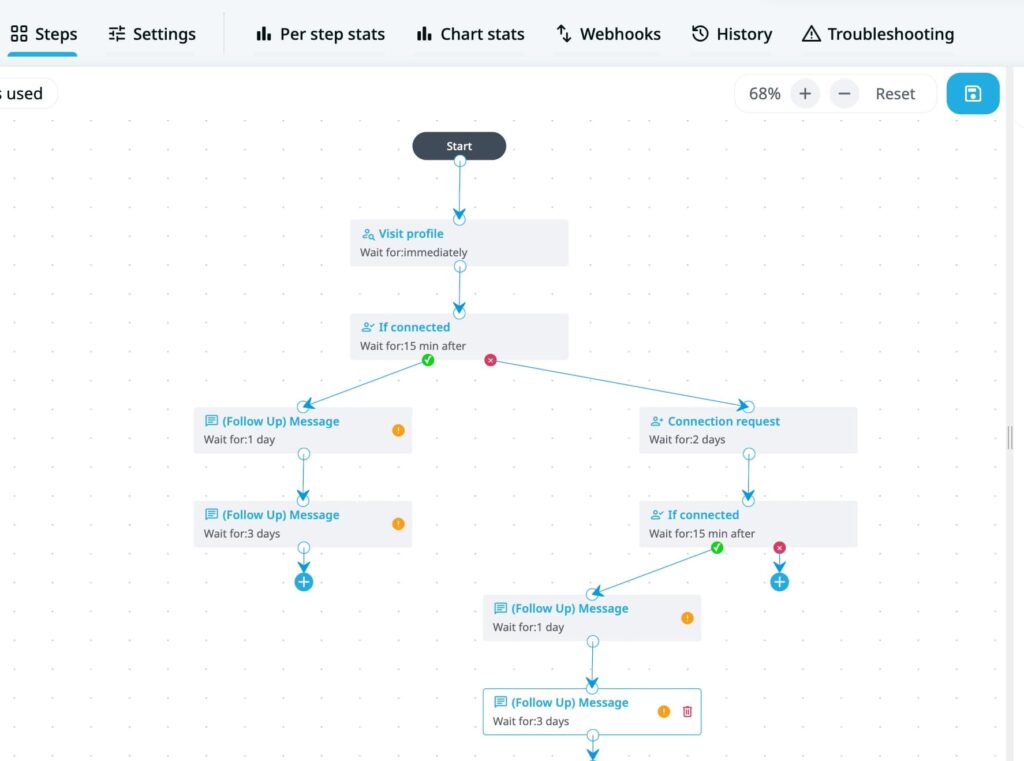
A practical example: someone likes your post (strategy 9), Expandi automatically views their profile, sends a connection request with a contextual note, and fires a follow-up two days after they accept. Once they reply, you can take it from there for the human touch.
Stormbreaker used this approach of scraping LinkedIn posts and hit a 50% reply rate across every outreach campaign they ran. Read the full story here.
How to network on LinkedIn: FAQ
Effective LinkedIn networking combines a strong profile, targeted outreach, and structured follow-up. Define who you want to reach, engage with their content before connecting, personalize your connection request with a specific reason, and follow up 2-3 times with value-added messages rather than repeated pitches.
Adding a note won’t meaningfully change whether someone accepts your request: acceptance rates are typically identical either way. Where it makes a real difference is reply rate after connecting. Think of the note less as a way to get in and more as a way to set up the first conversation.
Signal-based networking means using behavioral cues: post engagement, profile views, event attendance, and job changes as triggers for outreach rather than targeting cold lists. When someone has already interacted with your content, your connection request lands with context.
Tools like Expandi can automate sequences that trigger from these signals, so your outreach goes to people who already have a reason to know who you are.
Two to three follow-ups after the initial connection is the practical range. Each touchpoint should add something new: a different piece of content, a specific question, or a fresh observation.
Repeating the same message drops reply rates and risks getting marked as spam. Multi-step sequences with 2-3 follow-ups consistently outperform single-touch outreach.
Automation helps when the underlying strategy is sound. If personalization and targeting are already working manually, automation multiplies those results without multiplying your time. If the strategy isn’t working, automation just sends bad messages faster. Tools like Expandi add safety limits, dedicated IPs, and account warm-up to keep automation within LinkedIn’s thresholds while scaling the volume.
Start building a professional network on LinkedIn that actually converts
Most sales teams treat LinkedIn networking as a numbers game. The data says otherwise — reply rates nearly double when outreach is timed around signals rather than sent to cold lists, and the difference between a dead inbox and a pipeline channel is usually structure.
The strategies in this guide work individually. They compound when you run them together. Pick two or three to implement this week, get the sequencing right, then layer in automation once the manual version is working.
Ready to scale what’s already working well? Let Expandi run the execution for you: signal-based triggers, smart follow-up sequences, and safety limits built in.Start your free 7-day trial — no credit card required.



You’ve made it all the way down here, take the final step