Expandi MCP: Stop operating your outreach. Start prompting it.


Your AI agent can now run your outreach inside Expandi. Not advise you on it. Run it.
Expandi MCP connects the AI you already use, Claude or ChatGPT or anything else that speaks MCP, to your Expandi account. You describe what you want in plain language and it does the work: builds the list, drafts the campaign, writes the replies, and tells you why yesterday’s sending stopped short. Nothing goes out without your approval.
Seven parts of the outreach loop are reachable:
- Enrich. Read any lead and write back what LinkedIn does not carry, pulled from the tools you already pay for: funding stage, tech stack, verified email, deal stage.
- Target. Qualify leads against your criteria and build a custom lead list from the ones that pass.
- Route. Add, pause and resume leads in campaigns as things change.
- Build. Turn a brief into a full campaign draft: the flow, the copy in every step, the timing.
- Reply. Read a thread with its full context and draft a response.
- Diagnose. Find out why outbound stalled, and recover the leads that got stuck.
- Measure. Read acceptance, reply and conversion rates, funnel drop-off and trends.

Why we built it
Automation took the sending off your hands and actually handed you a second job: running the software. Building the lists, wiring the sequences, working the inbox, pulling the numbers on a Friday afternoon. Every one of those is a screen you had to learn before you could do the thing you actually wanted to do.
The harder half is that the software tells you what happened, not why. Your campaign was set to 40 invites and sent 12. The dashboard reports 12. Finding out why means account health, then limits, then working hours, then the lead count, then the failure log, and you are four screens in before you have a theory.
Meanwhile you already have an AI open in the next tab, one you trust with your writing and your thinking, and it cannot see any of this.
So we did not add AI to Expandi. We made Expandi something your AI can run. The campaigns, the limits, the inbox and the data are all the same underneath. What changed is that there is now a second way in, and it is the one you are already sitting in.
Watch the announcement session
We walked through the whole thing live, including the setup and a few use cases worth stealing.
Watch the Expandi MCP announcement session
Ask it why something is not working
This is the one to try first, because it is the question with no good existing answer today.
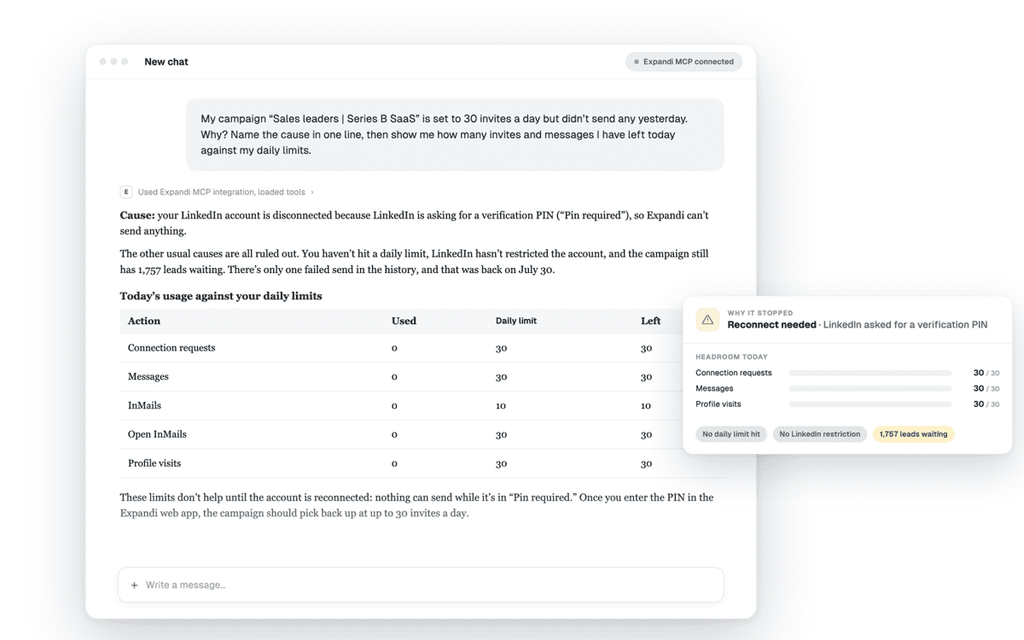
Ask why a campaign under-sent and your agent checks everything at once: whether you hit the daily limit, whether it ran outside your sending hours, whether the account disconnected, whether the campaign simply ran out of leads. It comes back with a cause rather than a number for you to interpret.
Then ask it to fix what it can. It resumes the leads that auto-paused and retries what failed. What it will not do is paper over something that needs you. If the account disconnected or LinkedIn threw a restriction, it says so plainly and stops.
The same applies to performance. Acceptance, reply and conversion rates, the step where people fall out of a sequence, how this month compares to the last one. It can show you the individual leads behind any number, so you can check its work instead of trusting it.
“My campaign was set to 40 invites a day and sent 12. Why, and what can you fix?”
Ask it to build the thing
Describe your ICP and your agent qualifies each lead against it, then builds a custom lead list from the ones that pass. Point a campaign at that list and it feeds itself.
This is the part worth spending your attention on, because when outreach underperforms it is usually the list rather than the copy. A message that applies to everyone applies to nobody, and segmentation is exactly the sort of work an agent is good at: querying, filtering, excluding.
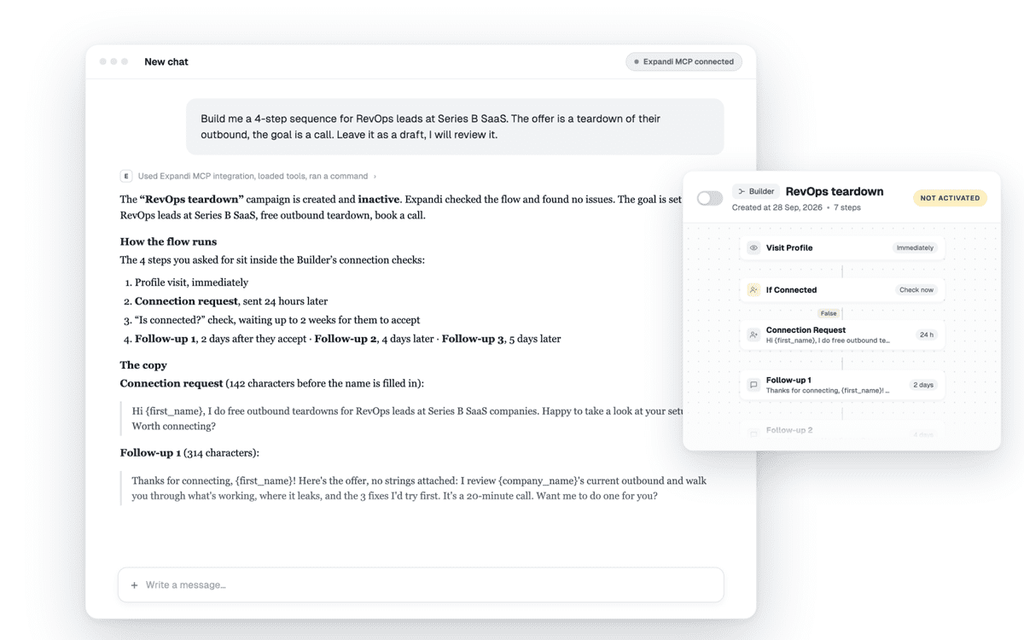
Then the sequence. Give it the brief, who you are going after, what you are offering, what a win looks like, and it lays out the flow, writes the copy in each step, and sets the delays. You get a draft in the builder to review. The builder stops being a learning curve and becomes a review screen.
Here’s something to keep in mind, though. The MCP is the bridge, not the brain. It connects your agent to Expandi and hands it the tools, and your agent does the thinking and the writing.
Give it one line and you get generic copy back. Point it at your tone of voice, your ICP, your real offer and the outcome you want, and the draft lands close to what you would have written yourself. That work is still yours.
“Build a list of RevOps leads at 50 to 200 person SaaS companies, then draft a four step sequence for them. The offer is a teardown of their outbound and the goal is a call.”
And once a campaign has run, the list gets better on its own. Ask which angle actually converted and who those people were, and your agent can build the next list out of the answer rather than out of your original guess. That is the part worth repeating every month.
Ask it to work the day
Campaigns go stale between the moment you set them up and the moment they send. Somebody changes jobs, somebody books a meeting through a different channel, somebody replies and the sequence keeps going anyway.
Your agent can go through a campaign and act on what changed: pause the people whose situation moved, resume the ones who should be running, move somebody to a sequence that fits them better now.
And the inbox, which is where outbound is actually won and where the hours go. It reads the thread, pulls in everything Expandi knows about the person and the campaign they came from, and writes you a reply. Then it waits for you.
“Show me my unread replies, warmest first, draft a response to each, and pause anyone who asked for a meeting.”
You still decide what goes out
An agent that can act quickly on your LinkedIn accounts is exactly the thing that gets accounts restricted, if nothing constrains it. So it is constrained, in ways worth being specific about.
Sending is approval-gated. Your agent drafts replies. Nothing leaves your account until you approve it.
Campaigns build as drafts. It lays out the flow and writes the copy. A human attaches the audience and switches it on.
No autonomous LinkedIn actions. Connection requests, likes and sends are not AI-driven on their own.
No pretending a problem is fixed. If your LinkedIn account disconnects, it flags it and tells you what to do rather than faking a reconnection.
It can only do what you can do. The connection is scoped to the user who authorized it. An admin gets full visibility across the team through their agent. A limited seat stays limited.
You can see everything it did. Every action your agent takes is logged in the Logs tab, with the time it happened and the LinkedIn account it ran on. You never have to take its word for anything.
Underneath all of that, your existing protections still apply.
Your agent works inside the daily limits and warm-up schedule you already configured, and it checks how much headroom you have left before it adds volume. It cannot raise your limits, change your working hours or edit your warm-up, because there is no tool for it to do that with. Your accounts run the way they ran yesterday, at a pace you could not keep by hand.
How to connect
The connection lives in Account Settings, under ‘AI agents’. You copy the Expandi server address, add it in your AI tool, sign in to Expandi, and read the authorization screen before you approve it. That screen shows which Expandi account you are connecting as and everything your agent will be able to do.
It takes a few minutes, you do not need to write code, and you connect once for every LinkedIn account you manage.
See everything it can do on the Expandi MCP page.
Using something else? Anything that speaks MCP works, including automation tools like n8n and Make, which connect with an access token instead of a browser sign-in.
FAQ
No. You paste an address, sign in to Expandi, and approve the connection.
No. Everything runs through the same daily limits, warm-up and working hours as the rest of Expandi.
They overlap and they are built for different jobs. The Open API is for systems calling Expandi directly, in code you maintain. MCP is for a person working conversationally through an agent. You can run both side by side.
Yes. Keep in mind that disconnecting from inside Expandi revokes every connected tool at once.
Anyone with an Expandi account, including the 7-day free trial. It’s live on every account and still labeled Beta while we keep improving it from how people actually use it.
5,000 leads per custom list, and the same per campaign.
Start with one question
You do not need a plan for this. Connect your agent and ask it something you would otherwise have clicked through five screens to find out.
“Which campaign is doing best?” is a fine first prompt. “Why did this one stop sending?” is a better one.
Start your 7-day free trial (MCP works from day one), or open Account Settings, ‘AI agents’, and connect the AI you already have open.






You’ve made it all the way down here, take the final step