How to Use MCPs Responsibly in 2026

Key Takeaways
Model Context Protocol (MCP) is the standard that lets AI agents connect to your CRM, LinkedIn tools, and other systems and take action inside them, not just answer questions.
That reach is the point, but also the risk. The safe version of MCP keeps three things in place: least-privilege access so an agent can only touch what it needs, a human approving anything customer-facing, and a log of every action for review.

MCP went from a developer thing to standard plumbing fast, and security has been playing catch-up ever since. The Open Worldwide Application Security Project (OWASP) now keeps a Top 10 list just for MCP, separate from its lists for LLMs and AI agents, because MCP opened a door the older lists never accounted for.
Gartner expects 40% of enterprise apps to include AI agents by the end of 2026, up from under 5% in 2025. But it also expects more than 40% of agentic AI projects to be scrapped by 2027, mostly over cost, fuzzy ROI, and weak controls. Speed is easy. Doing it safely is the hard part.
For sales and RevOps teams, the takeaway is not “avoid MCP.” It is that the value of connecting AI to your stack depends entirely on how you connect it. This guide is written for that decision.
What is Model Context Protocol (MCP)?
Model Context Protocol is an open standard, introduced by Anthropic in late 2024, that defines how AI applications connect to external tools, data sources, and services.
Instead of building a custom integration for every AI-to-tool connection, you expose systems through a single protocol that any MCP-compatible AI can use. The common shorthand for it is a “USB-C port for AI”: one interface layer in place of fragmented, one-off connections.
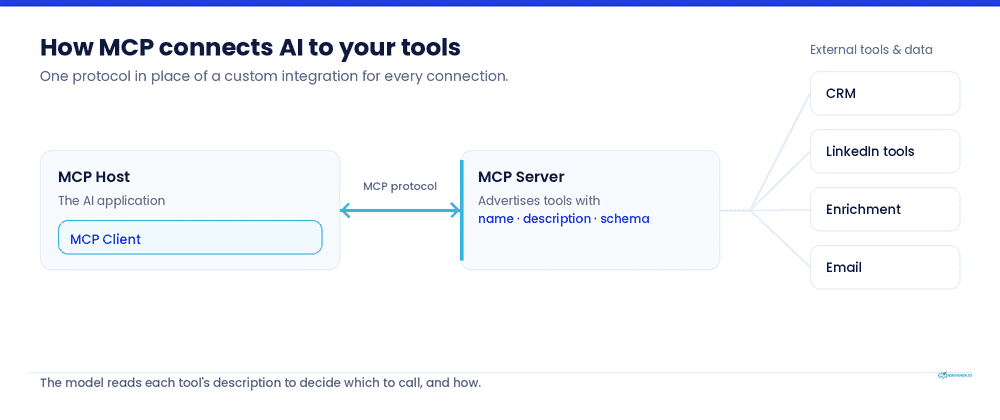
The mechanics matter for understanding the risk later. An MCP host (the AI application) runs an MCP client, which talks to one or more MCP servers.
Each server advertises the tools it offers, and every tool ships with metadata: a name, a description, and a parameter schema. The AI reads that description to decide which tool to call and how.
| Traditional API | MCP | |
|---|---|---|
| Who decides which call runs | A developer, in code, ahead of time | The AI model, at runtime, from natural language |
| Integration effort | A custom build per tool connection | One protocol any compatible AI can use |
| What changes at runtime | Nothing; calls are fixed | The model chooses the tool, timing, and inputs |
| Main security concern | Standard API access control | The model can be steered into unintended calls |
The shift from developer-controlled calls to model-decided calls is what makes MCP powerful and what makes it a security topic rather than just an engineering one.
Why MCP matters for modern sales teams
Most AI in sales has so far been confined to a chat window. It drafts a message, summarizes a call, or suggests a subject line, and then a human copies the output into the actual tool. MCP removes the copy-paste step.
An AI agent connected through MCP can read a lead’s activity, pull firmographic data, update a CRM field, and queue a follow-up, moving from answering questions to taking action across the systems a sales team already uses.
For a RevOps lead, that means the research-and-enrichment work that eats an SDR’s morning can run in the background. For a sales leader, it means the tooling gap between “AI can suggest this” and “AI can do this” starts to close. The same reach is exactly why the controls in the rest of this guide are not optional.
The benefits of MCP-powered workflows
Used within clear limits, MCP-connected workflows change a few concrete things for a sales org:
- Less manual data movement. The agent moves data between LinkedIn tools, enrichment sources, and the CRM directly, instead of a human exporting and re-importing it.
- Faster prospect research. Pulling recent activity, company news, and role changes into a single brief happens in seconds rather than across a dozen open tabs.
- Context-aware assistance. Because the agent can read CRM history and prior touches, its suggestions reflect the actual account rather than a generic template.
- Connected tooling. One protocol links the pieces of a stack that previously needed separate, brittle integrations.
The productivity case is real but narrower than the marketing around it. McKinsey’s 2025 State of AI found that 88% of organizations use AI in at least one business function, yet in any given function no more than 10% have scaled AI agents.
In 2026, it’s critical to build governance before scaling autonomy, not just to move faster on features.
The risks of uncontrolled MCP access
MCP does not replace traditional security principles. It extends them into an environment where the model’s output directly drives which tools run and with what parameters.
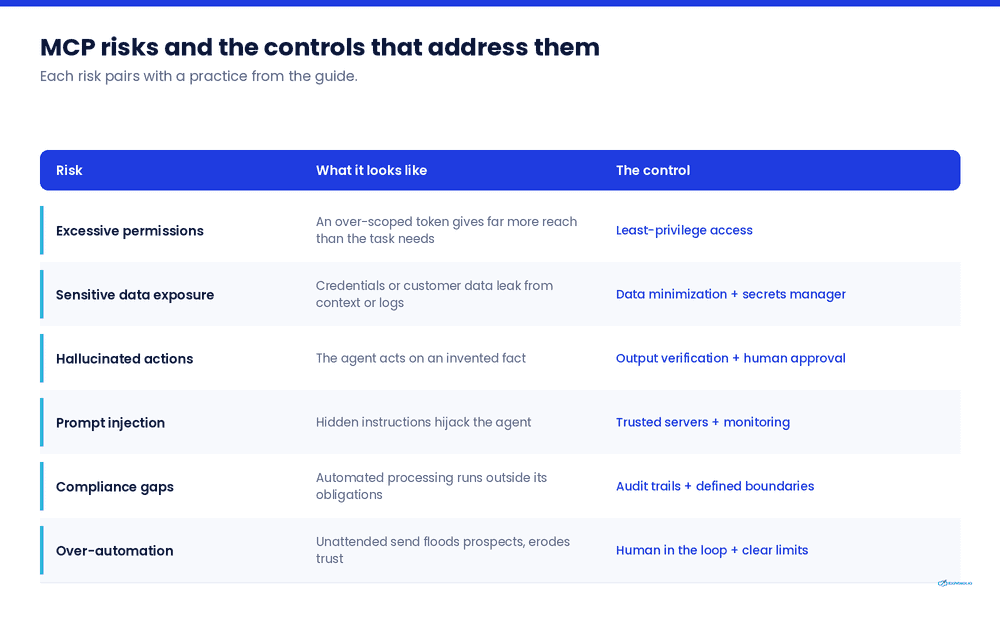
Most MCP-specific risks map onto categories OWASP already tracks for LLM applications, especially prompt injection, data leakage, and excessive agency. Here is where those show up in practice.
Excessive permissions
MCP servers often request broad access scopes: full inbox access where read-only on one label would do, full CRM write access where a single object would suffice. An over-scoped token means that any compromise, or any mistaken action, has the full reach of that permission. The principle to hold onto: an agent should hold the narrowest access that still lets it do its job.
Sensitive data exposure
Hard-coded API keys, long-lived tokens, and secrets stored in model memory or protocol logs are recurring failure points. Attackers retrieve them through injected instructions, compromised context, or debug traces, then move into the systems those credentials unlock. Customer data flowing through an agent’s context is exposed the moment any link in that chain leaks.
Hallucinated actions
An AI that invents a plausible-sounding fact is a familiar problem. An AI with MCP access that invents a plausible-sounding action is a new one. A misread instruction can become a sent message, an updated record, or a deleted field, because the model is now wired to the tools that carry those actions out.
Prompt injection attacks
Prompt injection ranks as the number one risk on OWASP’s Top 10 for LLM applications, and MCP raises the stakes. The defense that works for most software fails here: the model cannot reliably tell a legitimate instruction from a malicious one when both arrive as plain text.
A poisoned tool description, a booby-trapped document the agent retrieves, or instruction-like text hidden in a tool’s response can all steer the model into a tool call the user never authorized. Analysts have documented real cases where content inside a connected repository or retrieved file hijacked the agent’s behavior.
Compliance and privacy concerns
An agent moving customer data between systems is a data-processing activity, and it falls under the same regimes as any other.
Frameworks now touching agent behavior and credential controls include the EU AI Act, ISO 42001, SOC 2, and, for regulated environments, DORA and PCI-DSS. NIST began an AI agent standards effort in early 2026. “The AI did it” is not a compliance position.
Over-automation reducing authenticity
This one is specific to outreach. The point of connecting AI to a sales stack is to remove friction, not to remove the person. An agent that researches, drafts, and sends with no human in the loop produces outreach that reads exactly like what it is: unattended.
The reach that makes MCP useful is the same reach that, unchecked, floods prospects with generic volume and erodes the sender’s credibility.
10 best practices for using MCPs responsibly
The risks above have well-understood mitigations. None of them require slowing down; they require deciding where the guardrails sit before you scale.
1. Give AI the least privilege necessary
Scope every token and connection to the narrowest set of actions the workflow needs. Read-only where the agent only needs to read. One CRM object, not the whole instance. If a task later needs more access, widen it deliberately rather than starting wide “to be safe.”
For example, an agent that enriches lead records needs write access to the Contact object’s firmographic fields, nothing more. It does not need permission to delete records, edit deal stages, or read your billing system, so it should not hold those scopes, even if the connector offers them by default.
2. Keep humans in the approval loop
Anything customer-facing, a sent message, a booked meeting, an external commitment, should pass a human before it goes out. Human oversight is where accountability stays with a person, and it is the single control that most cleanly separates a useful assistant from an unsupervised liability.
Say an agent drafts a personalized connection request and queues it. A rep sees the draft, the prospect it is aimed at, and the reasoning, then approves, edits, or kills it. The message only leaves after a person has looked at it, so a bad inference never reaches the prospect.
3. Verify AI-generated outputs
Treat the agent’s output as a draft, not a decision. Before a record update or an outbound message lands, confirm the underlying facts. This is the direct countermeasure to hallucinated actions: a wrong field caught in review costs a second; the same error written to the CRM propagates.
For instance, an agent researching a prospect reports a job title of “VP of Sales.” Before that writes to the CRM or seeds a personalized opener, the source should be checkable, a linked profile or company page, not just the model’s assertion. If the agent can’t show where the fact came from, it doesn’t get written.
4. Audit every automated action
Log what the agent did, when, with which tool, and on whose behalf. OWASP specifically recommends alerting on tool responses that contain instruction-style language and treating tool schemas and responses as possible injection surfaces. Protect the logs from tampering, and keep enough context to reconstruct events without hoarding sensitive content you do not need.
When a prospect later asks why they were contacted, the log should let you reconstruct the chain: which signal triggered the outreach, what the agent pulled, which rep approved it, and when it sent. Without that trail, “why did we message this person” has no answer.
5. Protect customer data
Never store credentials in code, config files the agent reads at startup, or model memory. Use short-lived tokens and a secrets manager. Minimize what customer data enters the agent’s context in the first place, because data that never reaches the context cannot leak from it.
To personalize an opener, the agent needs a prospect’s name, role, and recent public activity, not their phone number, deal value, or private notes from past calls. Feed it the fields the task requires and withhold the rest, so a leak exposes less.
6. Use trusted MCP servers only
A third-party MCP server is code running with access to your systems. Vet it the way you would any dependency: known maintainer, reviewable source, current patches. The tool-poisoning attack class works precisely because a malicious server can advertise a tool whose description manipulates the model.
For example, before connecting a community-built “LinkedIn enrichment” MCP server that would touch your prospect data, check who maintains it, whether the source is public and recently updated, and what scopes it asks for. An unmaintained server from an anonymous author is a dependency you can’t stand behind, no matter how useful the tool looks.
7. Monitor workflows continuously
Watch for the patterns that signal trouble: unexpected tool combinations, repeated authorization failures, unusual data volumes, or a sensitive tool firing right after the agent processed untrusted content. Continuous monitoring catches the failure mode that point-in-time review misses.
For instance, an agent that normally enriches 50 records an hour suddenly pulls 5,000, or starts calling a CRM-export tool right after reading an external document. Either pattern should trip an alert and pause the workflow for review, rather than surfacing days later in a bill or a breach report.
8. Set clear automation boundaries
Decide, in writing, what the agent may do on its own and what always requires a human. Draft and enrich autonomously; send and commit only with approval is a defensible default line for outbound sales. Ambiguity here is what turns a helpful workflow into an incident.
For example, a written boundary might read: the agent may research prospects, update CRM fields, and draft messages without approval; it may never send outreach, connect with a prospect, or book a meeting without a rep’s sign-off. Anyone on the team can point to the line and know which side an action falls on.
9. Test before deploying at scale
Pilot on a bounded workflow with real telemetry before rolling an agent across the team. One documented pattern from 2026: a working single-team agent scaled to several squads without governance, and every squad hit the same failure at once. Prove the workflow and its guardrails on a small surface first.
Run the enrich-and-draft agent with one SDR on one campaign for a couple of weeks. Watch the approval edits, the error rate, and the logs. Once you know where it slips and have tuned the guardrails, roll it to the wider team, not before.
10. Educate your team
The people running these workflows need to recognize prompt injection, understand why least privilege matters, and know when to withhold approval. Governance that lives only in a document does not hold; the operator who spots an odd tool call is often the real last line of defense.
For instance, a rep approving drafts should know to pause when an opener references a detail no legitimate source would have surfaced, or when the agent proposes an action outside its usual pattern. That instinct comes from a short briefing on how these failures look, not from the rep having read the security policy once at onboarding.
A secure MCP workflow for sales teams
Here is what the practices above look like assembled into one realistic flow:
- Research. The agent reads a prospect’s recent professional activity and public company signals, pulling them into a single brief. Read-only access; no writes at this stage.
- Enrich. It updates the CRM record with verified firmographic data, writing to defined fields only, with every change logged.
- Draft. It composes personalized outreach using the account context it has gathered.
- Human approval. A rep reviews the draft and the recommended next step. Nothing customer-facing has left the building yet.
- Send and track. On approval, the message goes out and the agent logs the touch and surfaces the follow-up.
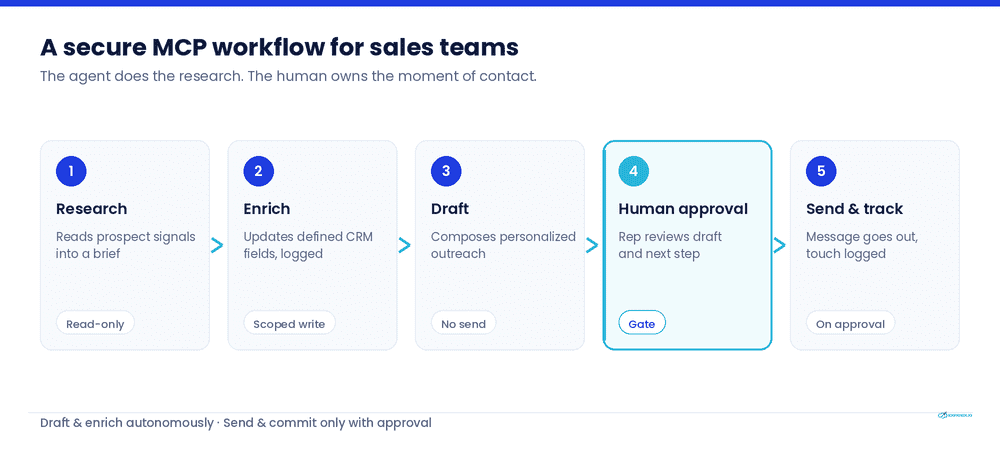
The agent does the research, enrichment, and drafting. The human owns the moment of contact. That division is not a limitation bolted on for safety; it is the design that makes the automation trustworthy enough to use on real accounts.
Common misconceptions about MCP
The confusion around MCP tends to cluster around a few claims that sound reasonable until you look closer. Each one shapes how teams decide whether to adopt it, so they’re worth correcting directly.
| “MCP gives AI unrestricted access.” | It gives AI whatever access you scope to it. Unrestricted access is a (bad) configuration choice, not a property of the protocol. |
| “AI agents can replace sales teams.” | Agents remove manual work around the edges of selling: research, enrichment, data movement. The relationship, the judgment, and the accountable decision stay with people. |
| “More automation is always better.” | In outreach, more unattended automation lowers reply rates and burns sender reputation. The right amount of automation is the amount that preserves the human at the moments a prospect can feel. |
| “MCP is only relevant for developers.” | The implementation is technical; the decisions, what to connect, what to automate, where a human signs off, are business decisions owned by people. |
| “Security slows innovation.” | The 2026 data points the other way. The teams scaling successfully built governance first. The controls are what let you move fast without the rollback. |
Is your business ready for MCP?
A short readiness check before you connect an agent to anything that touches a customer:
- Governance: Is there a written line between what the agent may do alone and what needs human approval?
- Security: Are credentials in a secrets manager rather than code or config, and are tokens short-lived and least-privilege?
- Integrations: Are the MCP servers you plan to use from trusted, maintained, reviewable sources?
- Training: Does the team running the workflow understand prompt injection and know when to withhold approval?
- Monitoring: Do you log every automated action and alert on suspicious patterns?
- Compliance: Do you know which regimes (EU AI Act, SOC 2, ISO 42001, and others relevant to your industry) apply to the data the agent will move?
If any answer is “not yet,” that item is the work to do before scaling, not after.
Frequently asked questions
An open standard, introduced by Anthropic in late 2024, that defines how AI applications connect to external tools, data, and services through one common interface instead of custom integrations for each connection.
MCP is as secure as its configuration. The protocol introduces real risks, prompt injection, over-scoped permissions, tool poisoning, but each has a known mitigation. Least-privilege access, human approval on customer-facing actions, trusted servers, and full audit logging are what make a given deployment secure.
An MCP server advertises tools to a connected AI client. Each tool carries a name, a description, and a parameter schema. The AI reads those descriptions to decide which tool to call and with what inputs, then the server executes the call against the underlying system.
The main ones are prompt injection, excessive permissions, sensitive data exposure, hallucinated actions, tool poisoning from untrusted servers, and compliance gaps. OWASP maintains a dedicated Top 10 for MCP covering these.
Yes, if you connect a CRM through an MCP server, an agent can read and write to it within the scope you grant. This is exactly why least-privilege scoping and audit logging matter: grant access to defined objects and fields, not the whole instance.
For bounded, reversible, internal actions, automatic execution can be fine. For anything customer-facing or hard to undo, keep a human in the approval loop. The safe default for outbound sales is: draft and enrich automatically, send and commit only with approval.
With a traditional API, a developer writes every call explicitly. With MCP, the AI model decides which tool to call and with what parameters based on natural language. That flexibility is MCP’s advantage and the source of its distinct security concerns.
Scope access narrowly, keep a human approving customer-facing actions, use only trusted MCP servers, log every action, and pilot on a small workflow before scaling. The secure workflow earlier in this guide is a working template.
Build secure, compliant MCP workflows
MCP is a real step forward for AI-powered productivity, and its value depends on thoughtful implementation. The teams that will get the most out of it are the ones treating safety as the enabling condition.
That makes tool selection part of the safety work, not a step that comes after it.
The practices in this guide are easier to hold when the platforms you build on already assume a human in the loop, scope access narrowly, and log what runs, rather than leaving you to bolt those controls on afterward. The right tools make the safe path the default one.
Join Expandi’s GTM Society if you want to talk to other founders and salespeople like you and discuss the ethical and responsible use of AI.

You’ve made it all the way down here, take the final step