How to Run LinkedIn ABM Campaigns That Convert (2026)

Key Takeaways
- ABM targets a named list of companies and the several people who decide inside each one, so results are measured per account.
- Tier accounts by fit and set acceptance benchmarks by industry, the only targeting cut with real spread in our data. The ABM campaign template below keeps tiers, committee and signals on one sheet.
- Warm each account up for a few weeks before anyone connects: executive posts, ads to the company list if you run them, and light profile touches.
- Give each persona a three-message sequence with its own angle, so the committee hears one story from several directions. The five examples below show the pattern with real triggers.
- Expandi’s Signals, Shared Campaigns and Global Inbox cover the outreach layer: warm accounts surface on their own, two reps never message the same stakeholder, and every reply lands in one place.
How to Run LinkedIn ABM Campaigns That Convert (2026)


An ABM campaign can run for months against a target account list, fill a dashboard with impressions, and still book zero meetings, because nobody turned that attention into conversations with the people who sign.
LinkedIn ABM campaigns convert when the outreach layer is as coordinated as the ads. Across 13.2 million connection requests in our outreach data, the patterns behind that are specific: warm ties before the ask, short sequences, and human-written copy for the accounts that matter most.
Here’s what this guide covers:
- How to tier target accounts and map the buying committee on LinkedIn.
- A six-step playbook from account warmup to handoff, with our outreach benchmarks.
- A copyable template and five ABM campaign examples to run.
- A scorecard for tracking success at the account level.
Types of ABM campaigns
An ABM campaign is a coordinated set of marketing and sales touches aimed at a defined list of target accounts and at the several people inside each one who make the buying decision.
The unit of success is the account. ITSMA first codified account-based marketing in 2003, and the core idea still holds: pick the companies first, then earn a place with the people who run them.
Here’s how an ABM marketing campaign compares with a lead-based campaign:
| Lead-based campaign | Account-based campaign | |
|---|---|---|
| Starting point | A persona or segment | A named list of target accounts |
| Who you contact | Anyone who matches the filters | Several stakeholders per account |
| Personalization | Segment level | Account level or deeper |
| Success metric | Leads, replies, meetings | Committee coverage, engaged accounts, pipeline per account |
The three types differ in how many accounts you work and how much attention each one gets:
| Type | Suggested accounts | Personalization depth | What LinkedIn outreach looks like |
|---|---|---|---|
| One-to-one (tier 1) | 5 to 25 strategic accounts | Research per account and per person | Human-written notes and messages for each stakeholder, executives engaging before any request goes out |
| One-to-few (tier 2) | 25 to 150 accounts in clusters that share a problem | One story per cluster, personalized first line | A sequence per persona and cluster, with company placeholders and a cluster-specific angle |
| One-to-many (tier 3) | Hundreds of accounts | Segment level | Templated sequences with placeholders, started by account signals |
Our golden rule: Keep tier 1 copy human-written.
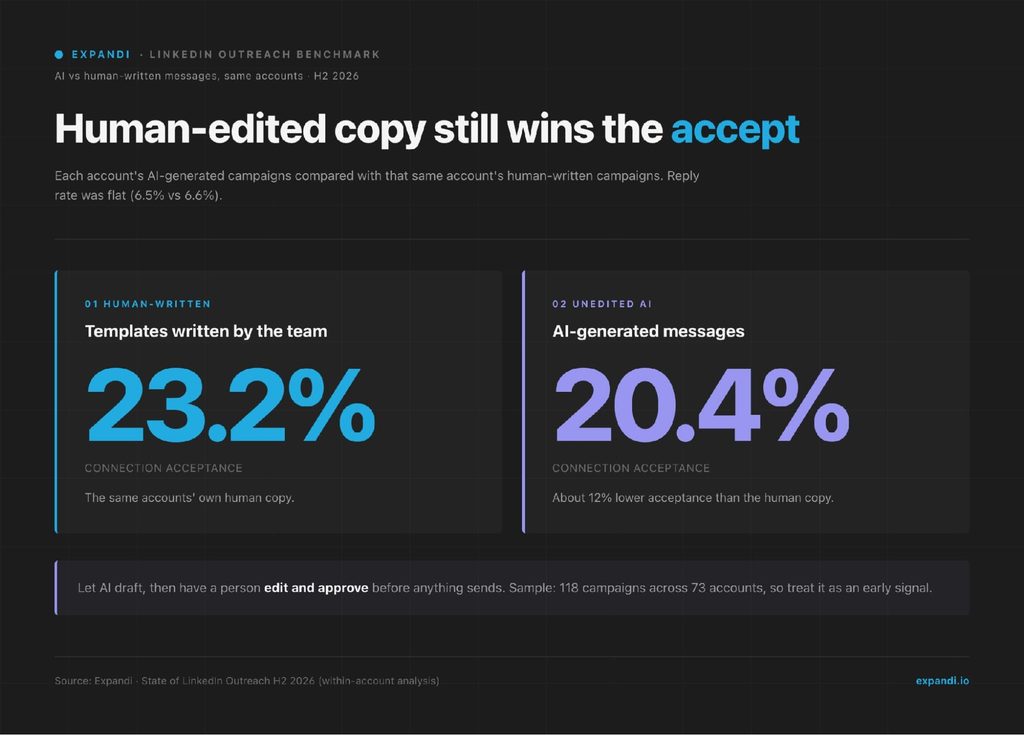
In our State of LinkedIn Outreach H2 2026 report, AI-generated connection messages were accepted at 20.4% against 23.2% for the human-written templates sent from the same accounts, about 12% worse. AI drafts are fine for tier 3. Your 20 most valuable accounts get a person.
ABM pays off when deal sizes justify the research and a committee makes the call.
Matija Nakic, CEO and co-founder of Farseer, a planning and forecasting platform for mid-market and enterprise finance teams, described that shift in a GTM Society interview:
“We are very relationship-based, because FP&A solutions are sold kind of top-down… The pillars of our go-to-market strategy are sales outreach and events, and now we are establishing the ABM motion, and I think this will take over in the next few years for us.”
Matija Nakic, Farseer
Why run ABM campaigns on LinkedIn?
On LinkedIn, the buying committee is already mapped by name. Forrester’s State of Business Buying 2024 found that on average, 13 people within the organization are involved in the buying decision, and most purchases in its survey involved two or more departments.
Finding those 13 people is the hard part of ABM, and it’s the part LinkedIn handles.
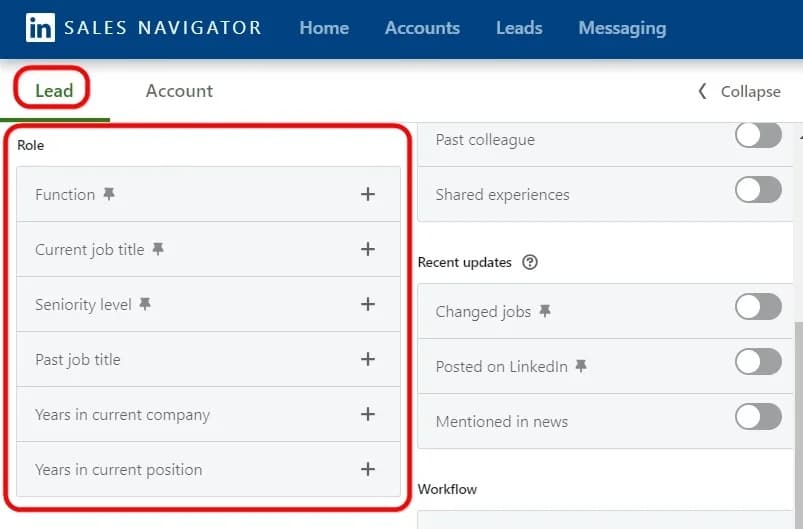
Sales Navigator filters people by the accounts on your list, by function and by seniority. The same people then see your ads, your team’s posts and your outreach, so each channel builds on the last.
A CRM record tells you who worked there when the contact was created. LinkedIn shows who works there today, what they posted last week and whether they looked at your company page.
How to run a LinkedIn ABM campaign in 6 steps
The process runs in six steps: pick and tier the accounts, map who decides inside each one, warm them up, watch for signals, run coordinated outreach, and hand warm replies to the account owner.
Each step feeds the next, so skipping warmup or mapping shows up later as low acceptance and scattered replies.
Step 1: Build and tier your target account list
Start from your best customers.
Pull the ten accounts with the strongest retention or expansion, list what they share (industry, headcount, tech stack, the event that opened the deal), and turn those traits into filters.
Score every candidate account from 1 to 3 on fit and trigger, then sort into your three tiers.
Benchmark each tier against its own industry before you launch.
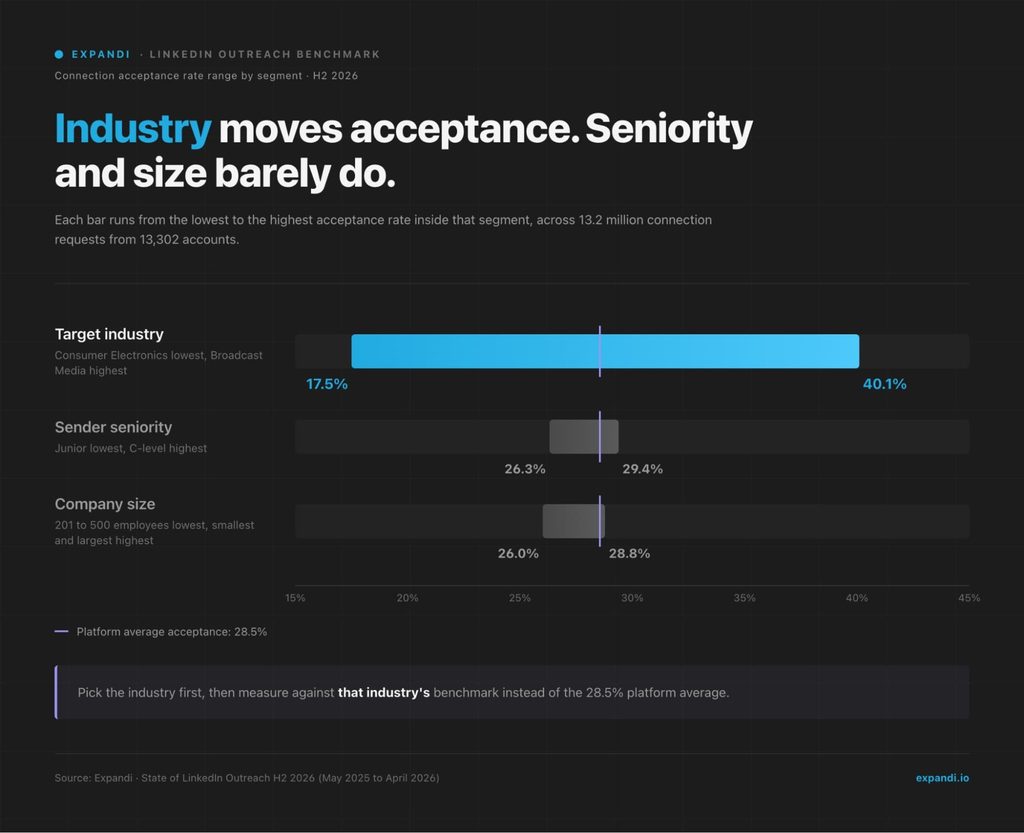
Per our H2 2026 data, acceptance ranges from 17.5% to 40.1% depending on the industry you target, while sender seniority and company size barely move it. So a 22% acceptance rate can be a warning sign in one vertical and above average in another.
Check the acceptance benchmarks per industry for your target accounts and set that as the bar, not the 28.5% platform average.
To turn the account list into people with Sales Navigator filters:
- Save your target companies to an account list, one list per tier.
- Run a lead search filtered to that account list.
- Add function and seniority filters for each persona.
- Copy the search URL and import it into Expandi.
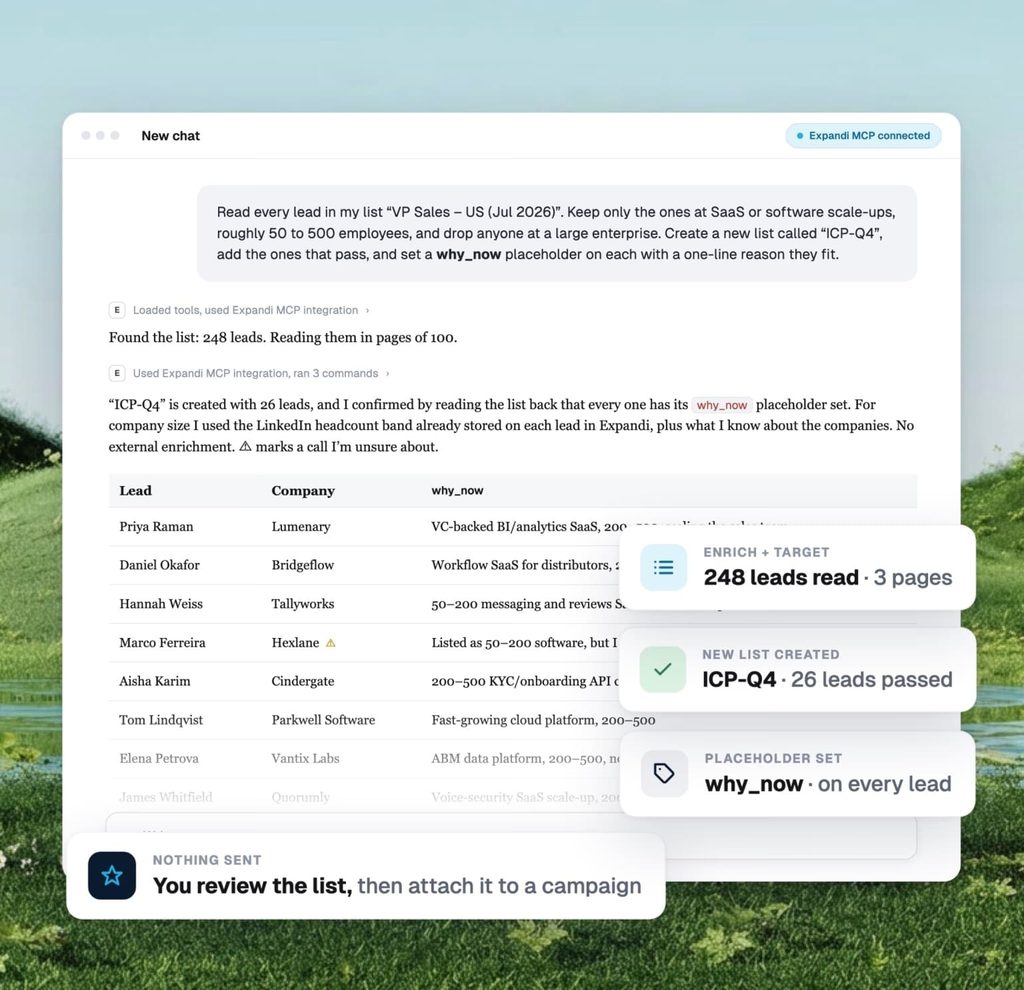
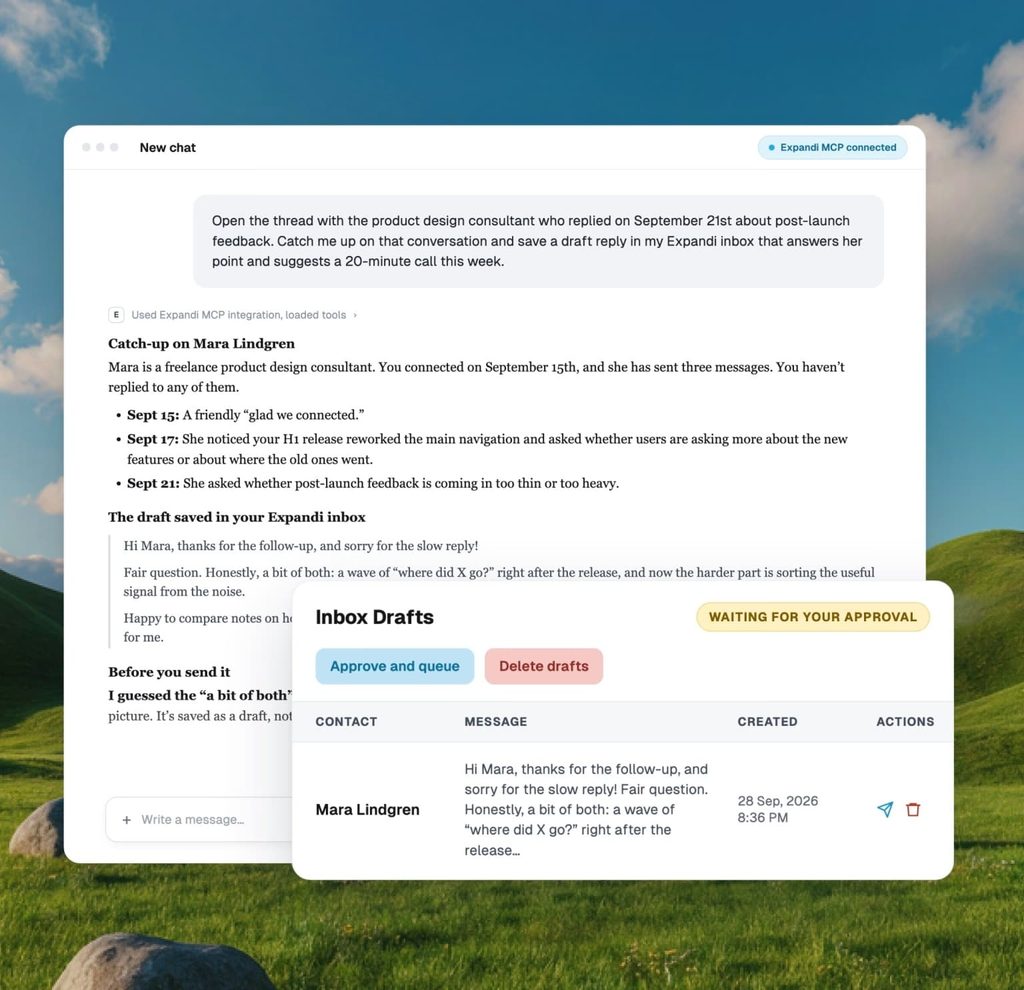
If your leads already sit in a CRM export or an old campaign, hand the qualification to your AI assistant. With Expandi’s MCP, you describe your ICP and the assistant qualifies leads into a custom list, enriching each one with placeholders you can use in messages. Nothing sends until you approve it.
Step 2: Map the buying committee for each account
For each tier 1 and tier 2 account, name the people who decide and give each of them a reason to talk to you.
Four roles cover the committee:
| Role | Typical titles | What they need to see | First-message angle |
|---|---|---|---|
| Champion | Director or team lead who owns the problem | Proof it works for teams like theirs | A problem their team deals with and how peers solved it |
| Decision-maker | VP or C-level budget owner | Business impact and risk | The outcome, framed in the metrics they report on |
| Blocker | IT, security, legal, procurement | Safety, compliance, integration effort | The answer to their objection, delivered through the champion |
| End user | Manager or individual contributor | Day-to-day workflow gains | How their week gets easier |
Map four to six people per tier 1 account, two or three per tier 2 account, and one or two per tier 3 account.
- Keep the blocker on the map and out of the first wave.
- The champion brings them in later with context, which lands better than a cold message from your side.
Map everyone who can stop the deal, including people you won’t message first.
JB Daguené, founder and CEO of Evergrowth, which builds AI agents that work alongside sales teams, described a deal his team lost at the last step in a GTM Society interview:
“…everything was aligned with one customer to close. We have done everything by the book and it was a decision maker and whatnot. We’ve built a case internally. But at the end, the CEO and the CMO cut the process and said, we’ve never heard of Evergrowth on social media. We want to go with Clay. Because they have heard and seen, you know, that company more than us.”
JB Daguené, Evergrowth
That gap is what the next step closes.
Step 3: Warm up the account before anyone connects
Spend a few weeks warming the account before the first connection request goes out, at two levels: the company and the individual people on your map.
At the company level, two tools do the work.
- If you run LinkedIn ads, upload the account list as a company list for Matched Audiences. LinkedIn requires at least 300 rows for the upload and a match of 300 member accounts before the audience can run, so tier 1 accounts go into a larger list with tier 2.
- The second tool is executive thought leadership: posts from your CEO, head of sales or founder that the committee sees in the feed.
Joliene van Grieken, co-founder of The Growth Syndicate, a team that embeds inside B2B companies to run growth and ABM, put it this way in a GTM Society interview:
“…especially in ABM, a lot of people still use just single ads on LinkedIn. But really what we’re starting to see is that you want to just do thought leadership… Put a couple of people that are in your company that are quite important for the business or a public face… like CEO, head of sales, a CTO. And make sure that they have a specific opinion around what you’re doing, around the market, where the market is going.”
Joliene van Grieken, The Growth Syndicate
Executive visibility shows up in acceptance too.
Per our H2 2026 data, sender accounts with 1,000+ followers and consistently engaged posts accepted at 30.5%, against 27% to 29% across the platform. The sample is small (38 accounts), so treat it as a direction.
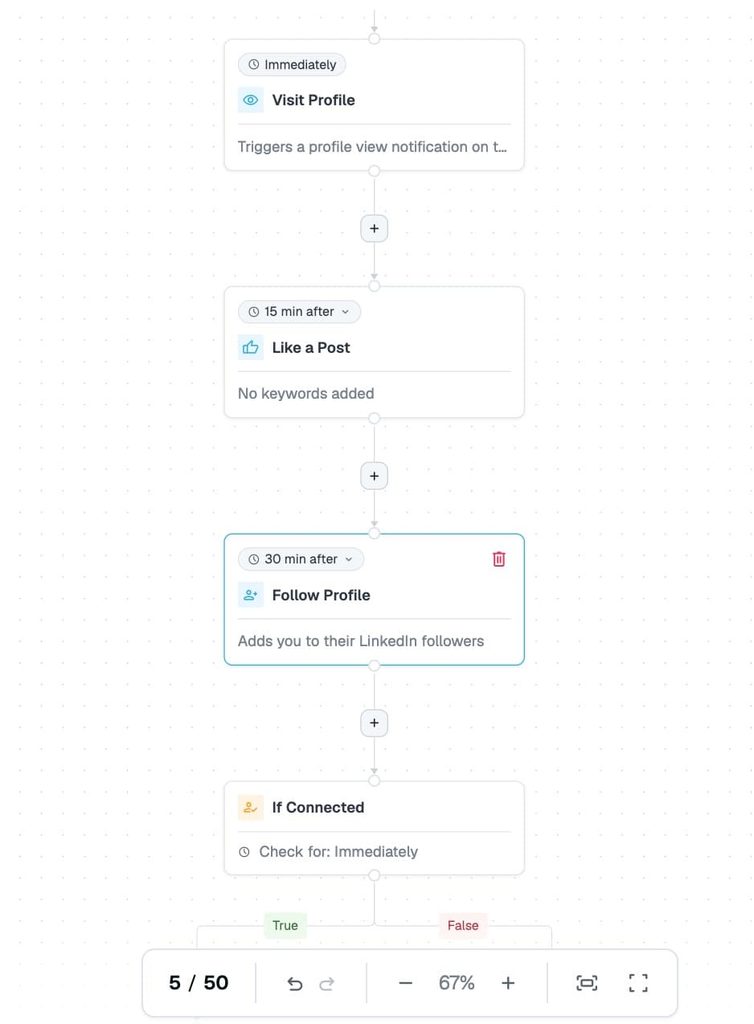
At the person level, a profile view, a like on a recent post and a follow put your name in front of each stakeholder before the request arrives.
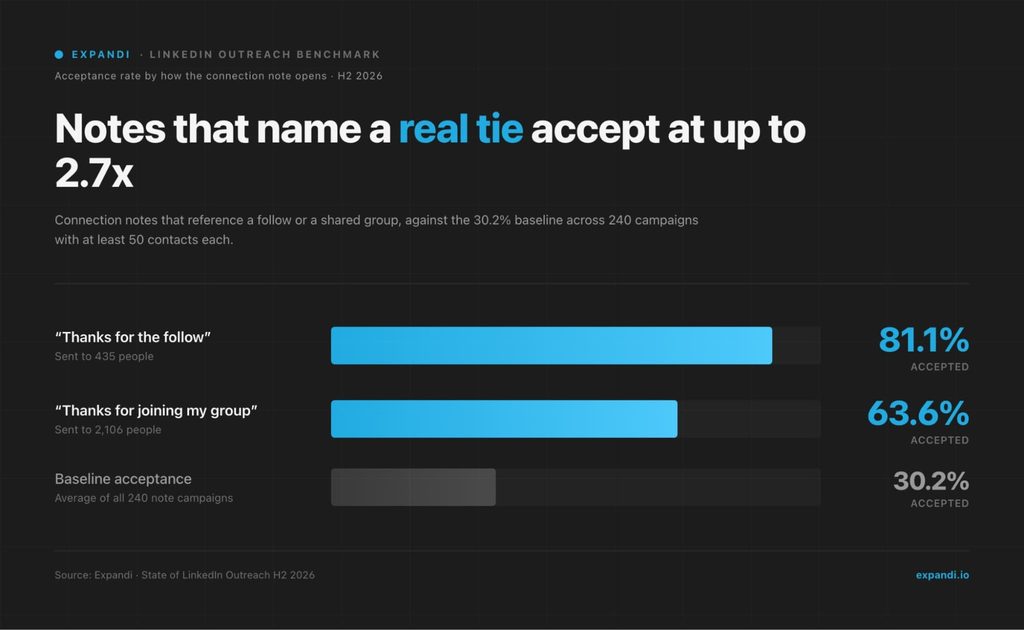
Our LinkedIn warm-up sequence lays out the full order. The payoff is measurable: connection notes that reference an existing tie, such as a follow, a shared group or a shared network, accepted at 1.8 to 2.7 times the 30.2% single-request baseline in our H2 2026 data.
The tie has to be real, and warmup is what creates it.
In Expandi, a Builder campaign runs those touches as steps before the request: visit profile, like a post, follow profile and follow company. Conditions such as If connected then decide what happens next, so the first message only goes out once the connection exists.
Step 4: Watch for account-level signals
Move an account from warmup to outreach when its people start showing interest. Watch for these intent signals at the account level:
- Company page visits from people at target accounts
- Stakeholders liking or commenting on your team’s posts
- Profile visits from anyone at the account
- Registrations for an event you host or attend
- A new executive in a relevant role, which Sales Navigator’s Changed jobs filter flags for the last 90 days
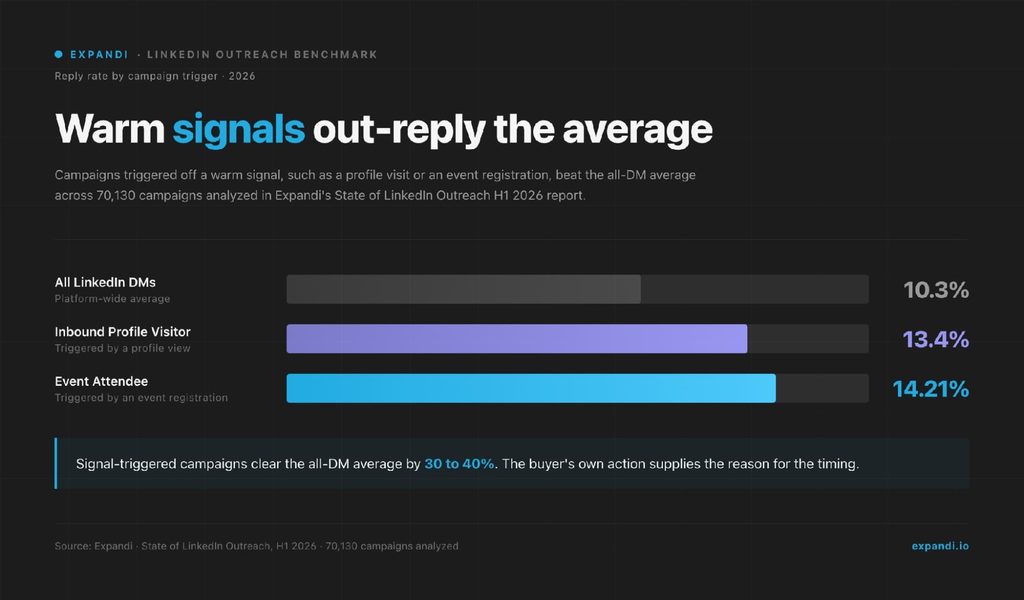
Signal-started campaigns reply better, which is the idea behind signal-based outreach. In our State of LinkedIn Outreach H1 2026 report, campaigns built on profile visitors replied at 13.4% and event-attendee campaigns at 14.21%, against 10.3% across all LinkedIn DMs.
Expandi Signals adds people who visited your profile, viewed your company page or engaged with a post to a campaign automatically, and syncs new matches about every 24 hours.
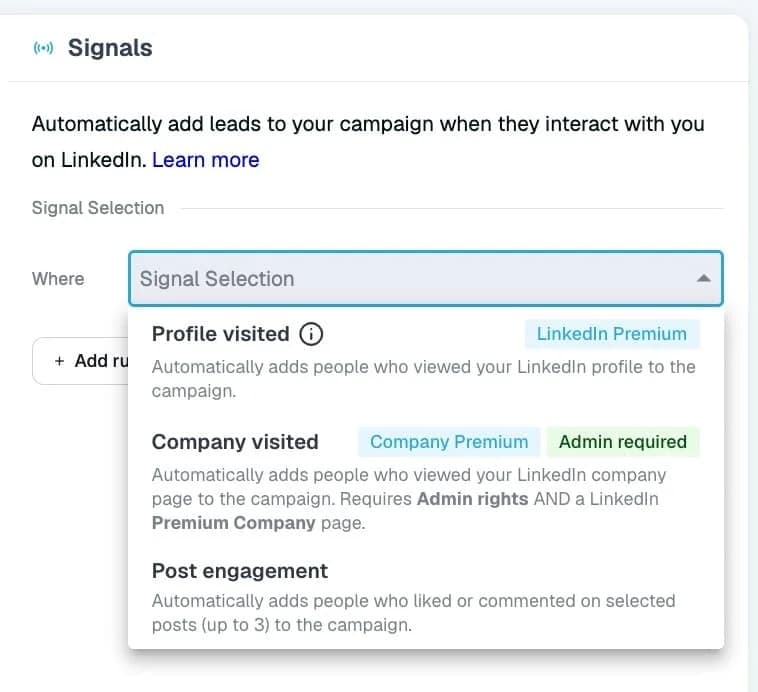
Profile and company page signals need LinkedIn Premium or Sales Navigator, and the company page signal also needs admin rights to the page. Add an ICP filter so only people who match your title, industry and company-size criteria continue into the sequence.
A simple rule we recommend: when two or more people from the same account show a signal within two weeks, move the whole account from warmup to outreach.
- One visit can be curiosity.
- Two from the same company point to a conversation happening internally.
Step 5: Run coordinated outreach to several stakeholders
Give each persona its own short sequence, three messages with an angle built for that role, so the committee hears one story from several directions.
Per our H2 2026 data, three-message campaigns replied at 9.8%, while five or more messages dropped to 5.0%, below a single message. Message 2 was the strongest per send at 8.8%, so put your sharpest pitch there.
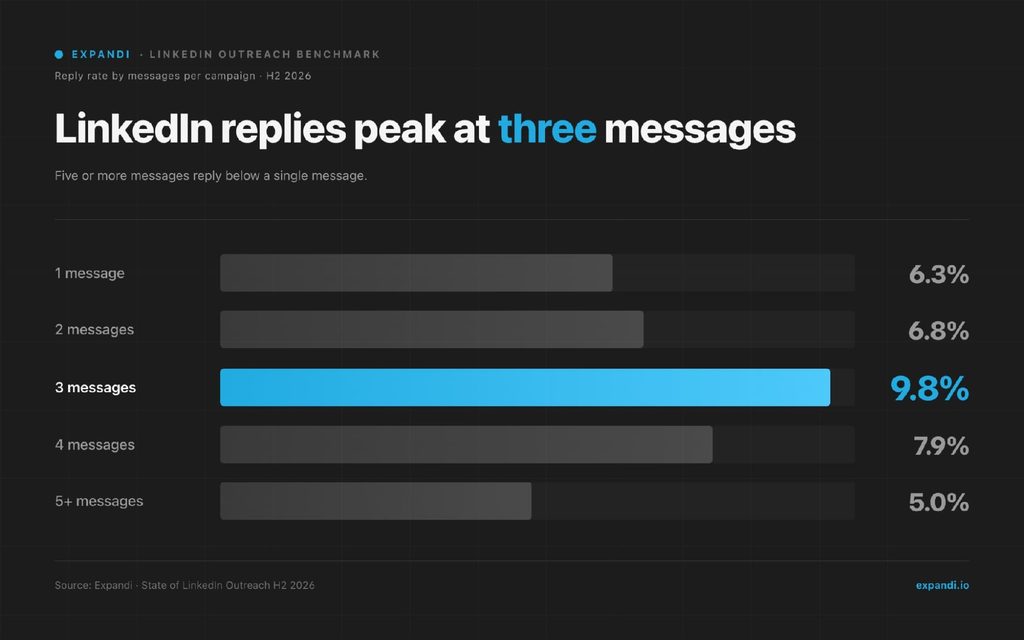
Sequence length matters more in ABM.
Six stakeholders on a five-message sequence means 30 messages into one org chart. Three per person keeps the account warm. A three-message sequence per persona looks like this:
- After the accept: context from the warmup and one question about their problem.
- A few days later: the strongest proof point for that role.
- A week later: a low-effort next step or a graceful exit.
The angle for each role comes from research on the person.
Fabian Bacher, who leads an enterprise sales team at Semrush, the marketing intelligence platform, described his team’s approach in a GTM Society interview:
“Researching the people help a lot with that and adding something that’s relevant to the role, but also personal to the person… really researching the LinkedIn profiles and using that with a short, concise message that speaks to both… our understanding of their role, but also our understanding of their online persona usually gets a lot of responses.”
Fabian Bacher, Semrush
Decide on connection notes by tier.
Free LinkedIn accounts can add a personalized note to only three connection requests a month, at up to 200 characters each, while Premium members can personalize every invitation. Tier 1 stakeholders deserve a note written for them, so run tier 1 from Premium or Sales Navigator seats.
For tiers 2 and 3, let the first message after the accept carry the context: per our H2 2026 data, replies to connection notes fell from 3.5% to 2.2% over the year as more people accept without answering. For senior stakeholders who ignore requests, our comparison of LinkedIn InMail vs message covers when an InMail is the better way in.
Coordination is what separates multi-threading an account from several reps prospecting the same company.
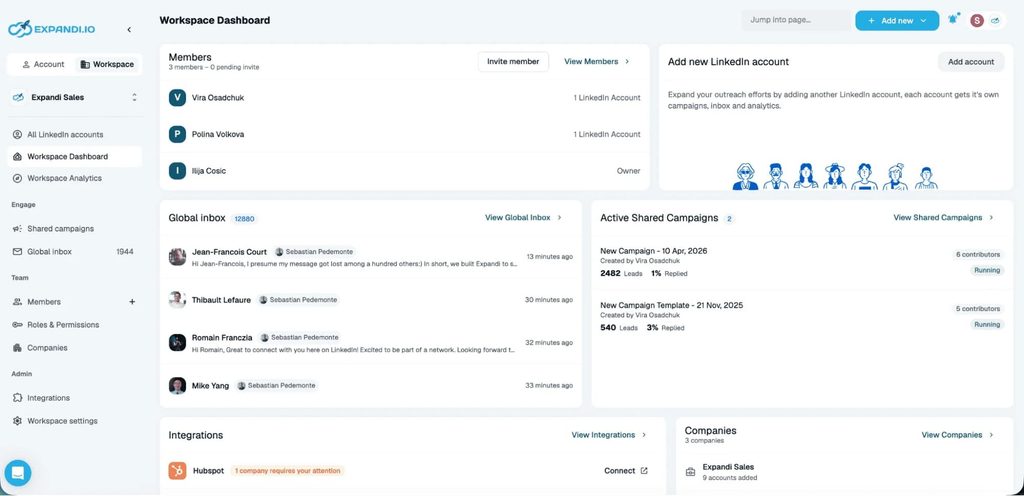
Expandi’s Shared Campaigns run one campaign across several LinkedIn accounts in a Workspace:
- Import the account’s stakeholders by CSV or profile links.
- Build the sequence once.
- Pick the contributor accounts.
When those accounts belong to the same Workspace company, leads are split between them automatically, so two of your accounts never message the same person. New leads land in batches every 24 hours, sized to each account’s daily limit, which keeps your LinkedIn outreach automation inside safe ranges.
Two rules keep the account clean:
- When one stakeholder books a meeting, pause the account’s other sequences and let the owner decide who to bring in next.
- When an account goes quiet after the full sequence, move it back to warmup and let the next signal restart outreach.
Step 6: Hand warm replies to the account owner fast
Every account needs one named owner, the AE or SDR who runs it, and every warm reply should reach that owner the same day.
Expandi’s Global Inbox brings every campaign conversation from every LinkedIn account in the Workspace into one sorted view, so a reply to one rep’s sequence reaches the account owner even when a teammate sent the message.
The AI Analyzer sorts replies into Interested, Maybe Interested and Not Interested, which gives the owner a ready triage queue.
A good handoff note covers four things:
- Who replied, their role and what they said.
- Which signal or content moved them.
- Who else at the account has engaged, and how.
- The agreed next step and its date.
Then push the activity to your CRM so marketing sees it too.
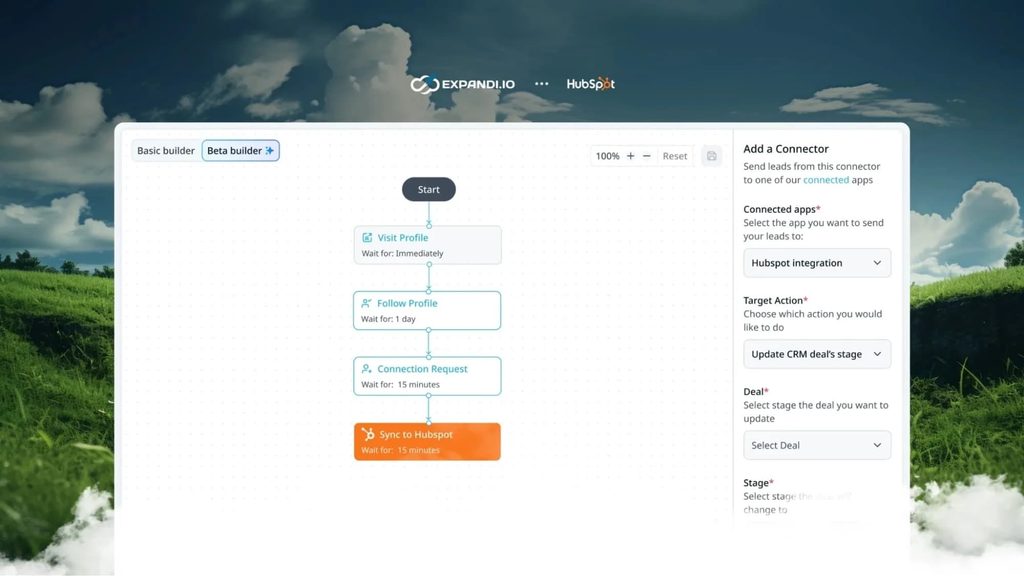
The Expandi CRM integration syncs contact details and the full interaction timeline to HubSpot, Pipedrive and Salesforce. The sync works at contact level, so roll contacts up to their company record in the CRM to read engagement per account.
LinkedIn ABM campaign template
This template puts each account, or each tier 1 stakeholder, on one row, so everyone working the account reads the same plan.
Copy it into a sheet and fill it tier by tier, starting with tier 1:
| Account | Tier | Why now (signal) | Stakeholders mapped | Persona | Message angle | Sequence | Owner | Status | Next step |
|---|---|---|---|---|---|---|---|---|---|
| [Account name] | 1 | Two stakeholders viewed the company page this week | 4 of 6 | Champion: [title] | [Problem their team owns] | Warmup, then 3 messages | [Rep] | Outreach | Message 2 on [date] |
| [Account name] | 2 | New VP joined in the last 90 days | 2 of 3 | Decision-maker: [title] | [Outcome in their metrics] | Congratulate, then 2 messages | [Rep] | Warmup | Connect on [date] |
A few rules for filling it in:
- Why now: log the latest signal and its date. An account with no signal stays in warmup.
- Stakeholders mapped: write it as a fraction, so gaps in the committee stay visible.
- Rows: use one row per stakeholder for tier 1 and one row per account for tiers 2 and 3.
- Status: stick to five values, warmup, outreach, engaged, meeting and recycle.
5 ABM campaign examples on LinkedIn
These are strong ABM campaign ideas you can run on LinkedIn this quarter. Each one lists who it targets, the trigger, the sequence and what to measure.
1. The awareness-to-outreach cycle
This is the full ABM cycle in one play: build familiarity with the account first, then reach out to people who already know your name.
- Targets: one industry cluster of tier 1 and tier 2 accounts, pulled from a Sales Navigator account list.
- Trigger: a few weeks of problem-aware ads to the company list plus boosted executive posts, until stakeholders start engaging.
- Sequence: connect with the engaged stakeholders first, then the rest of the committee, referencing the problem the content addressed.
- Measure: accounts engaged before outreach, acceptance against your segment benchmark, meetings per account.
Morgan Edmondson, co-founder of Nesti, which builds personalized AI video for go-to-market teams, described what the cycle feels like on the outbound side in a GTM Society interview:
“…when we do the outbound to our key ICP personas, people have already seen us, they’re aware of us, what we do, they recognize our faces and that’s worked really well for us.”
Morgan Edmondson, Nesti
2. New executive at a target account
A new executive sets priorities and reviews vendors early, which makes their first 90 days a natural opening.
- Targets: new VPs and C-level hires at accounts on your list.
- Trigger: Sales Navigator’s Changed jobs filter, run inside your account list and imported as a lead list.
- Sequence: a congratulations with no pitch, then a benchmark or resource that fits their first 90 days, then an offer to compare notes.
- Measure: acceptance, reply rate and meetings booked inside their first quarter.
3. Committee members engaging with your posts
A like or comment on your team’s post is a public sign that a stakeholder cares about the problem you write about.
- Targets: stakeholders at target accounts who like or comment on your team’s posts.
- Trigger: a post engagement signal on up to three posts, filtered by your ICP criteria and checked against the account list.
- Sequence: open on the topic they engaged with, then share a deeper take in message 2.
- Measure: accounts with two or more engagers, reply rate by persona.
Our guide to LinkedIn post engagement outreach covers the setup step by step.
4. Company page visitors from target accounts
A company page visit from a target account means someone there is looking you up before saying a word to sales.
- Targets: people at target accounts who viewed your LinkedIn company page.
- Trigger: the company page signal, which syncs new visitors about every 24 hours.
- Sequence: lead with the problem your company page speaks to and leave the visit itself out of the message.
- Measure: visitor-to-connection rate and replies per account.
5. Event attendees before and after the event
Events give you shared context and a natural deadline for asking to meet.
- Targets: stakeholders from target accounts attending a conference or webinar in your space.
- Trigger: speaker and sponsor lists plus people engaging with the event’s posts, matched to your accounts in Sales Navigator.
- Sequence: connect about four weeks out with the event as context, ask to meet in the final week, and follow up with a recap afterward.
- Measure: meetings booked at the event and replies to the post-event follow-up.
Our playbook for LinkedIn outreach around conferences covers building the attendee list.
How Talmatic ran a one-to-many campaign with Expandi
Talmatic, an IT staffing company, used Expandi to win new clients by reaching IT and HR decision-makers at mid-to-large companies.
Its team built the list in Sales Navigator, filtered by industry, company size and seniority, and imported it into Expandi. To work the list, Talmatic set up two campaign types:
- Connector campaigns sent personalized connection requests based on each lead’s job title, industry and company size.
- Builder campaigns carried the follow-up, with messaging built around one promise: vetted engineers, matched fast.
The follow-up sequence ran three steps: a quick introduction, a message on key benefits and a last call. Across 1,838 contacts, the campaign produced:
- 154 replies.
- 18 interested leads.
- 12 intro calls.
- 2 signed contracts.
Talmatic targeted a filtered segment, which is how tier 3 works: tight filters, two personas, and one templated story at volume.
How to track LinkedIn ABM campaign success
Track ABM campaign success at the account level: how much of each committee you reach, how many accounts engage, and what pipeline those accounts produce. Lead counts and impressions hide the question that matters, which is whether the right accounts are moving.
Score each campaign in three layers:
| Layer | Metric | Why it matters | Where the number comes from |
|---|---|---|---|
| Coverage | Share of the committee mapped | Shows whether you know who decides | Your account plan in the template above |
| Coverage | Share of mapped stakeholders connected | Shows whether you can reach them | Expandi campaign stats |
| Engagement | Accounts with two or more stakeholders engaged | Separates real account interest from one curious person | Expandi campaign stats and Signals |
| Engagement | Acceptance and reply by persona against your segment benchmark | Shows which roles and angles land | Expandi campaign stats, industry benchmarks |
| Outcomes | Meetings per account | Shows whether conversations turn into sales motion | CRM |
| Outcomes | Pipeline influenced | Ties the campaign to revenue | CRM, with contacts rolled up to the account |
| Outcomes | Days from first touch to opportunity | Shows whether ABM speeds deals up | CRM |
Coverage and engagement move within weeks.
Outcomes move in quarters, so measure pipeline and velocity over 6 to 12 months before judging the campaign. Want to nail down specific metrics to track? Here are the lead generation KPI’s we recommend tracking to continuously improve reply rates & campaign outcomes.
If you run Expandi through MCP, your AI assistant can read acceptance, reply and conversion rates back to you by campaign, which turns the weekly persona check into one prompt.
Common ABM campaign mistakes
Avoid these five mistakes when you run ABM on LinkedIn:
- Picking more accounts than you can personalize. If you can’t write for 50 accounts by hand, you have 20 tier 1 accounts and 30 in tier 2.
- Messaging only the most senior person. One stakeholder is one point of failure, and the champion builds the internal case the budget owner signs.
- Letting reps contact the same stakeholders. Two pitches to one VP in the same week read as disorganized. Shared campaigns and one owner per account prevent it.
- Running five-plus message sequences. Replies drop to 5.0% at five or more messages, and six stakeholders multiply the noise.
- Judging by impressions or lead counts. An account with 40,000 impressions and no conversations is a lost account.
Turning your first LinkedIn ABM campaign into meetings
A LinkedIn ABM campaign converts when the committee is mapped, the account is warm before anyone connects, and every stakeholder hears a short sequence built for their role from one coordinated team.
Start with ten tier 1 accounts, fill in the ABM campaign template above, pick one of the five ABM campaign examples to run first, and judge the campaign by accounts engaged and pipeline per account.
Start a free 7-day trial and build the outreach layer for your first tier.
Frequently asked questions
An ABM campaign is a coordinated push of marketing and sales touches at a named list of companies, aimed at the several people who make the buying decision in each. On LinkedIn, that means warming the account with posts or ads, then reaching three to six stakeholders with sequences built for their roles. Results are measured per account.
Beyond signal-based plays, four ideas work well on LinkedIn. Run a customer-reference play where a happy customer’s peers at similar companies hear their story. Time outreach to a competitor’s renewal window or a public product change. Expand into sister companies of existing customers, and reactivate closed-lost accounts when a new executive joins.
Size the list to your personalization capacity. Plan on 10 to 25 tier 1 accounts per rep, a few dozen more in tier 2 clusters, and tier 3 on templates and signals. Start smaller than feels comfortable and add accounts as the first ones convert or recycle.
Engagement shows up within the first few weeks of warmup and outreach. Meetings follow within one or two months for warm accounts. Pipeline and closed revenue take two to four quarters on enterprise deals, so plan the review cycle around the sales cycle.
No. Ads help warm the account at the company level, but executive posts, profile touches and signal-based outreach can do the same job on a smaller budget. Start without ads, and add them once your list is large enough that paid reach beats one-to-one engagement.
Yes, in a lighter form. A founder with a list of 20 dream accounts can map the committee, post for that audience and run short sequences per role without an ads budget. The discipline is the same, and the smaller list makes personalization easier.



You’ve made it all the way down here, take the final step