Top 15 Time-Saving ChatGPT Prompts for Sales


ChatGPT can cut the time sales reps spend on non-selling tasks, but only if you connect the outputs to a system that properly deploys them.
Most AI outreach advice stops at the prompt. But a well-written message sitting in a Google Doc doesn’t book meetings. And going back and forth with ChatGPT for every prospect, then manually copy-pasting each reply into LinkedIn, doesn’t scale past a handful of conversations.
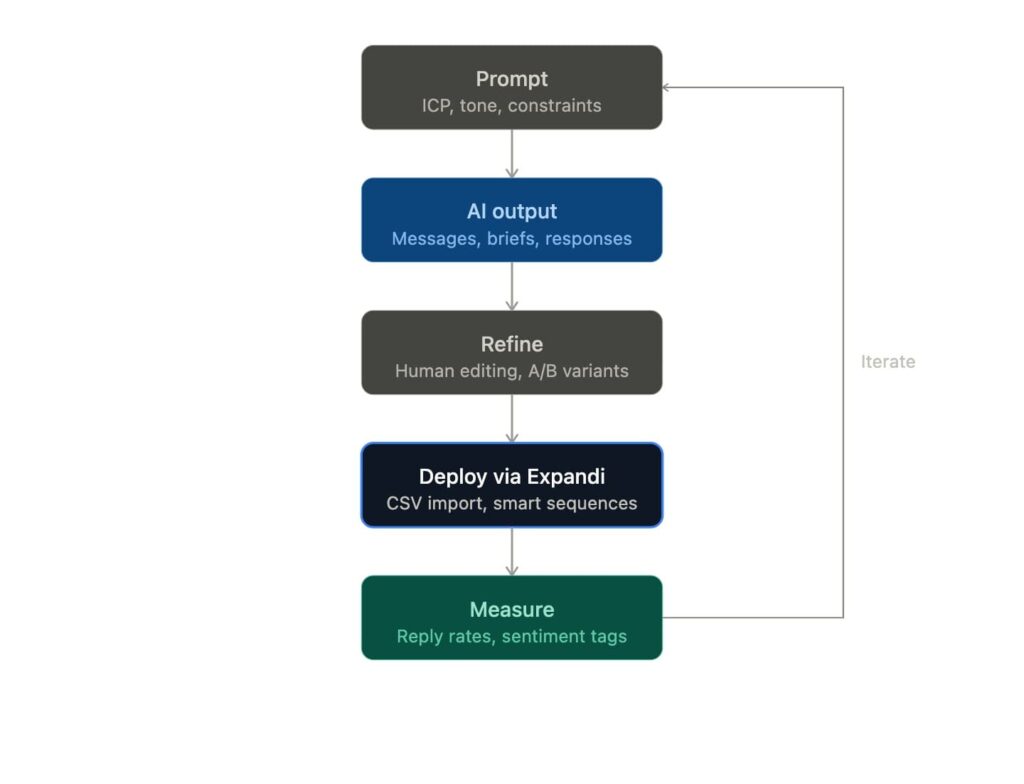
The best sales reps getting replies have figured out how to use ChatGPT for sales and business development as a system.
At Expandi, we’ve worked with thousands of sales teams and agencies running outreach across LinkedIn and email. The ones generating pipeline have a system that takes AI outputs and deploys, tracks, and iterates on them at scale.
Below are 15 prompts organized by sales stage, from prospecting and cold outreach to objection handling and coaching, plus how to plug each output into automated outreach sequences that run without manual copy-pasting.
Key Takeaways
- Sales reps spend 70% of their week on non-selling tasks. ChatGPT can help with research, message drafting, CRM summaries, and call prep.
- Specificity is what ChatGPT needs to produce usable copy. The more context you give it on role, constraints, and the prospect’s situation, the less editing the output needs.
- Sales prompts below work across the full sales cycle: ICP research, cold outreach, objection handling, deal analysis, and coaching.
- Copy-pasting AI output one message at a time doesn’t scale. The ROI comes from feeding those outputs into automated outreach sequences.
- Expandi connects AI-generated messages to live campaigns across LinkedIn and email, with conditional logic, sentiment tagging, and reply tracking built in.
Top 15 Time-Saving ChatGPT Prompts for Sales

Why most ChatGPT for sales advice falls short
The web is full of “100 ChatGPT prompts for sales” listicles. Most share the same problem: they give you a prompt and an example output, then stop.
No guidance on how to refine the output, deploy it at scale, or how to connect it to actual pipeline.
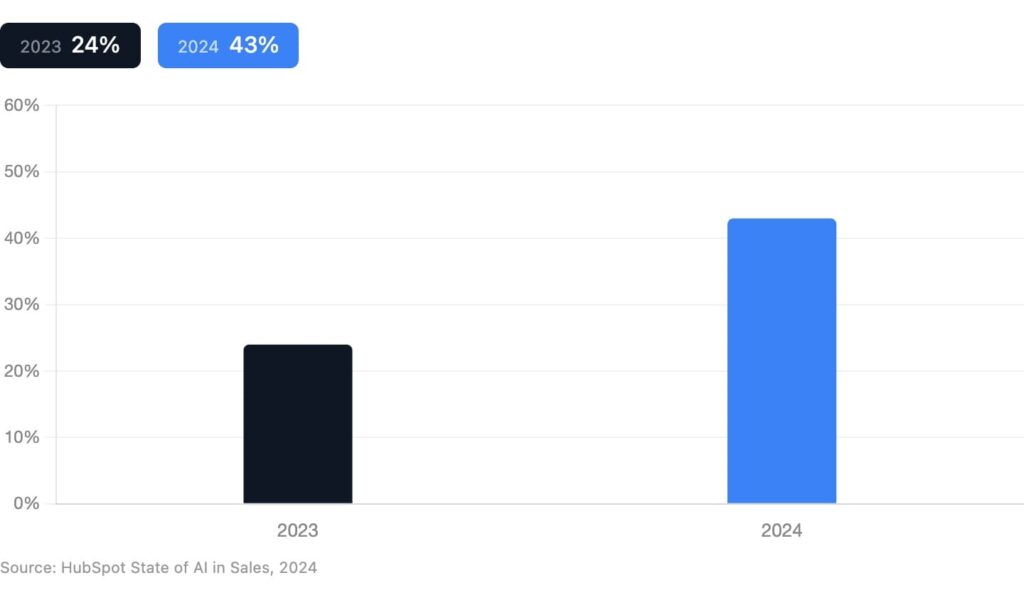
According to HubSpot’s 2024 State of AI in Sales report, 43% of sales professionals now use AI at work, up from 24% the year before. And 47% of those reps use generative AI specifically for writing outreach messages.
But adoption does not equal results.
Salesforce’s 6th State of Sales report found that sales reps still spend 70% of their time on non-selling tasks: CRM updates, meeting prep, internal emails, and research. ChatGPT can absorb a chunk of that workload, but only if SDRs know what to ask and where to plug the outputs in.
The prompts below are structured to solve both problems. Each one includes the context variables ChatGPT needs to produce usable output, and by the end, you’ll know how to connect the output to an actual outreach workflow.
3 prompts for using ChatGPT for sales prospecting
The best outreach starts before you write a single message. These prompts help you build sharper ICPs, research accounts faster, and find signal-based triggers that give you a reason to reach out.
For a broader look at how AI fits across the full funnel, see our guide on AI for lead generation.
1. Define and refine your ICP
Use this prompt when you’re starting a new campaign or entering a new market segment and need to get specific about who you’re targeting.
“Act as a B2B sales strategist. I sell [product/service] to [target market]. My product helps with [core problem it solves]. Build me an ICP profile that includes: job titles most likely to buy, company size range, industry verticals, 3 common pain points these buyers face, and 2-3 objections they’ll raise. Keep it specific enough that I could build a Sales Navigator search from it.”
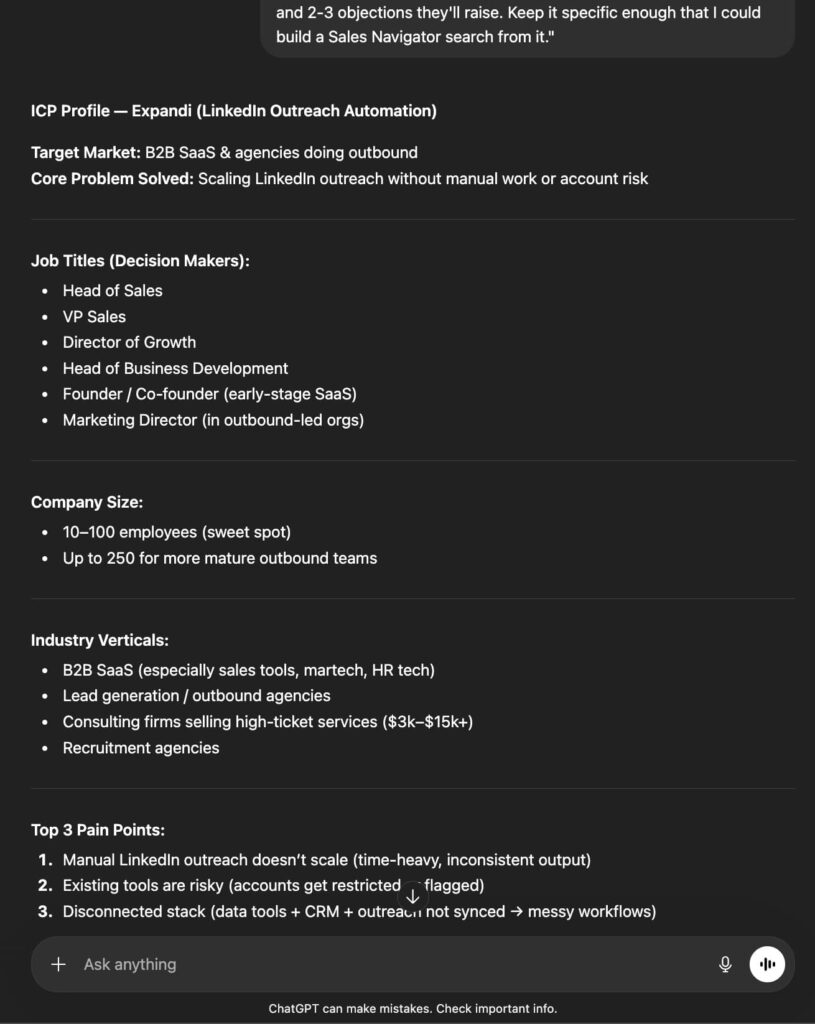
The last constraint is key. If the output is too broad to filter on LinkedIn, it’s too broad to outreach against. Refine until you can turn the ICP into a prospecting list.
2. Pre-outreach account research
Use this before reaching out to a high-value prospect. Paste in their company website URL, a recent LinkedIn post, or a job posting.
“I’m about to reach out to [Name], [Title] at [Company]. Here’s context: [paste LinkedIn bio, job posting, or company About page]. Based on this, give me: 3 likely priorities this person has right now, 2 pain points my product could address, and a one-sentence icebreaker I could use in a LinkedIn connection request under 300 characters.”
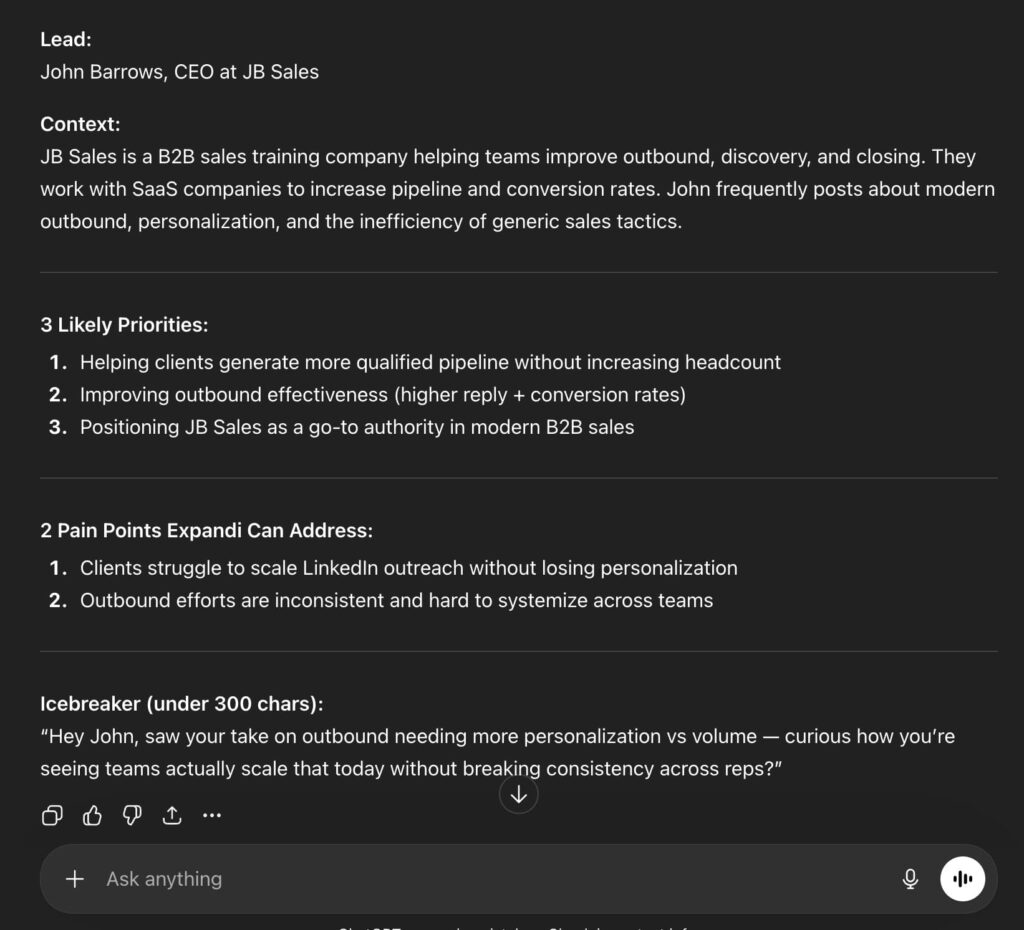
This is where ChatGPT for sales prospecting gets practical. Instead of spending 10 minutes per prospect on manual research, you get a structured brief in seconds.
3. Signal-based trigger identification
Use this when you have a list of accounts and want to find timely reasons to reach out.
“I’m targeting [industry] companies with [X employees]. What are 5 common buying signals or trigger events that would indicate they need [your product category]? For each trigger, give me a one-sentence outreach hook I could use.”
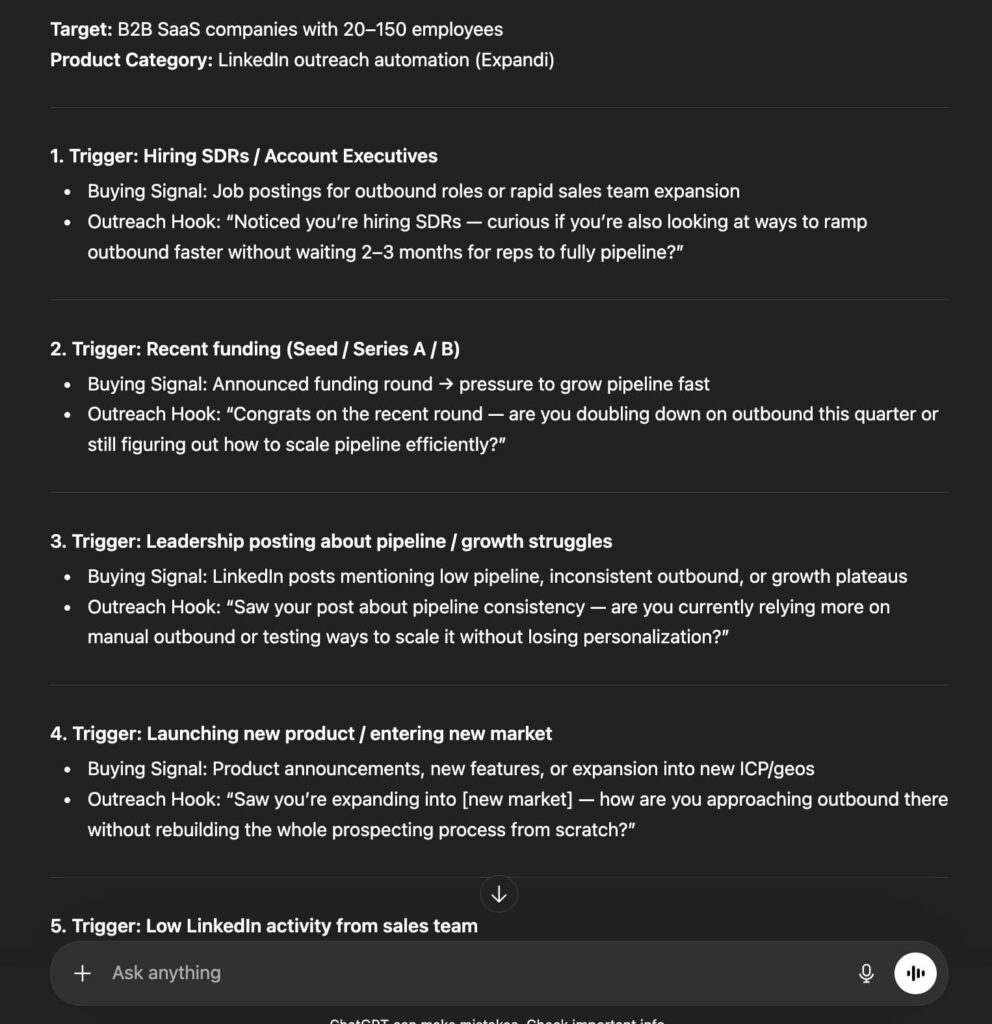
Triggers like new hires, funding rounds, or tech stack changes give your outreach a reason beyond “I saw your profile.” Pairing these with ChatGPT prompt best practices makes your research even more targeted.
4 ChatGPT prompts for cold outreach (LinkedIn + Email)
This is where most people land when searching for ChatGPT prompts for sales. The trick is giving ChatGPT enough structure that the output is usable without heavy editing.
1. LinkedIn connection requests that get accepted
LinkedIn caps connection request notes at 300 characters. That constraint forces brevity, which ChatGPT tends to ignore without explicit guardrails.
“Write a LinkedIn connection request note under 300 characters. I’m reaching out to [Title] at [Company] because [specific reason: shared connection, trigger event, relevant content they posted]. Tone: casual and peer-level, not salesy. End with a soft open, not a hard CTA. No exclamation marks or em dashes.”
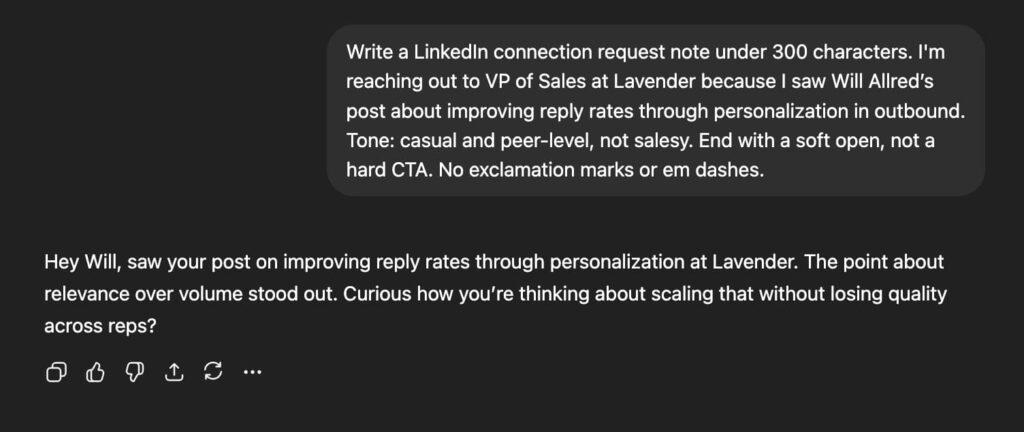
For more examples, see our breakdown of LinkedIn cold message samples with proven reply rates.
2. Cold emails that earn replies
Cold email works best when it’s short, specific, and focused on one CTA. This prompt builds that in.
“Write a cold email to [Title] at [Company]. My product [one sentence on what it does]. Their likely pain point is [specific problem]. The email should be under 100 words, lead with their problem (not my product), and end with a single low-friction CTA like booking a 15-minute call. Subject line should be under 5 words and curiosity-driven. No “I hope this email finds you well. CTA: Mind if I send over quick Loom on how we helped [Company X] achieve [Outcome]?”
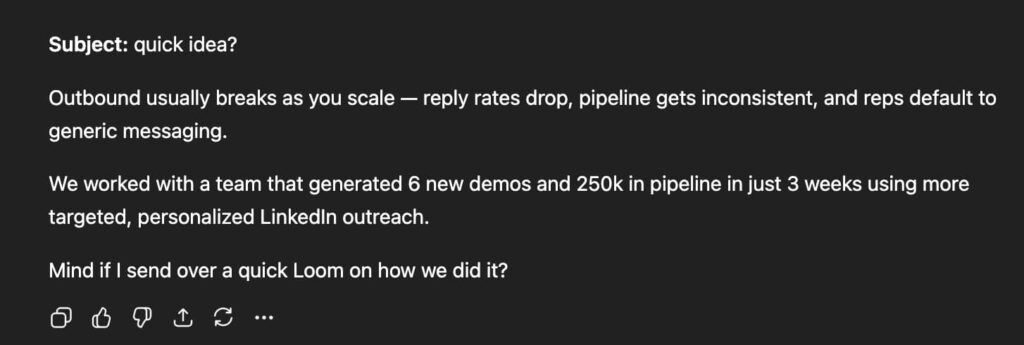
Pair this with our guide on writing cold emails with ChatGPT for more frameworks and examples.
3. Follow-up sequences (multi-touch)
A single cold email or LinkedIn message rarely closes anything. The follow-up sequence is where deals move forward. This prompt generates a complete multi-touch sequence, not just “checking in” messages.
“Create a 4-step follow-up sequence for a cold outreach campaign targeting [Title] at [Company type]. Step 1 is the initial cold email (already written). Steps 2-4 should: add new value in each message (a relevant stat, resource, or angle), get progressively shorter, and use a mix of tones (helpful, direct, last-chance). The final step should include a clear breakup line. Each message under 75 words.”
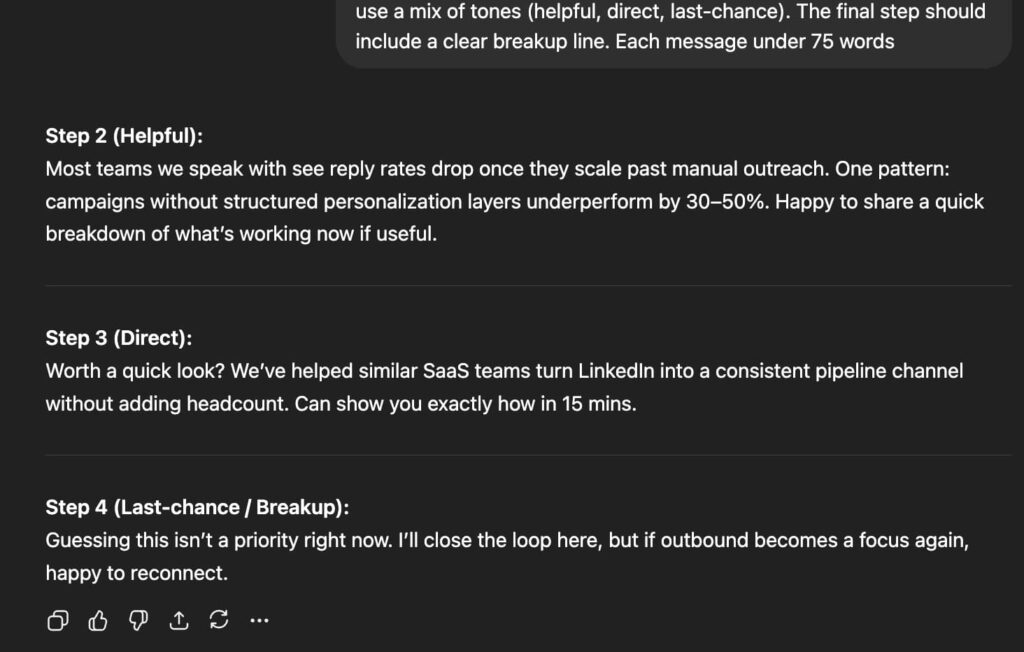
For a deeper look at structuring cold email sequences, check our best practices guide.
4. Personalizing connection requests using lead’s post history
A pattern across someone’s post history tells you what someone actually cares about.
“Pasting recent LinkedIn posts from a lead below. Identify the themes they post about most and write a connection request under 300 characters that references one of those themes, ties it to [your product category], and opens a conversation without pitching. Tone: peer-to-peer, not salesy.
[Post history:]”
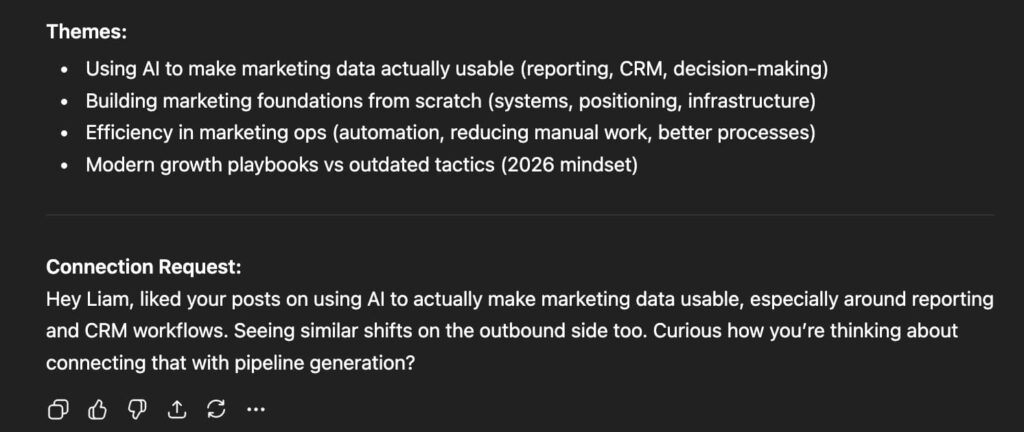
If the output still feels generic, add their job title and company context to the prompt. The more overlap between their stated interests and your ICP’s pain points, the sharper the message.
3 ChatGPT prompts for sales objection handling
Objections are predictable. Most B2B lead generation companies and sales teams face the same 5-10 pushbacks repeatedly.
ChatGPT can help you prepare responses in advance and practice for live conversations.
1. Prepare for common objections
Use this before a call or when building a team objection playbook.
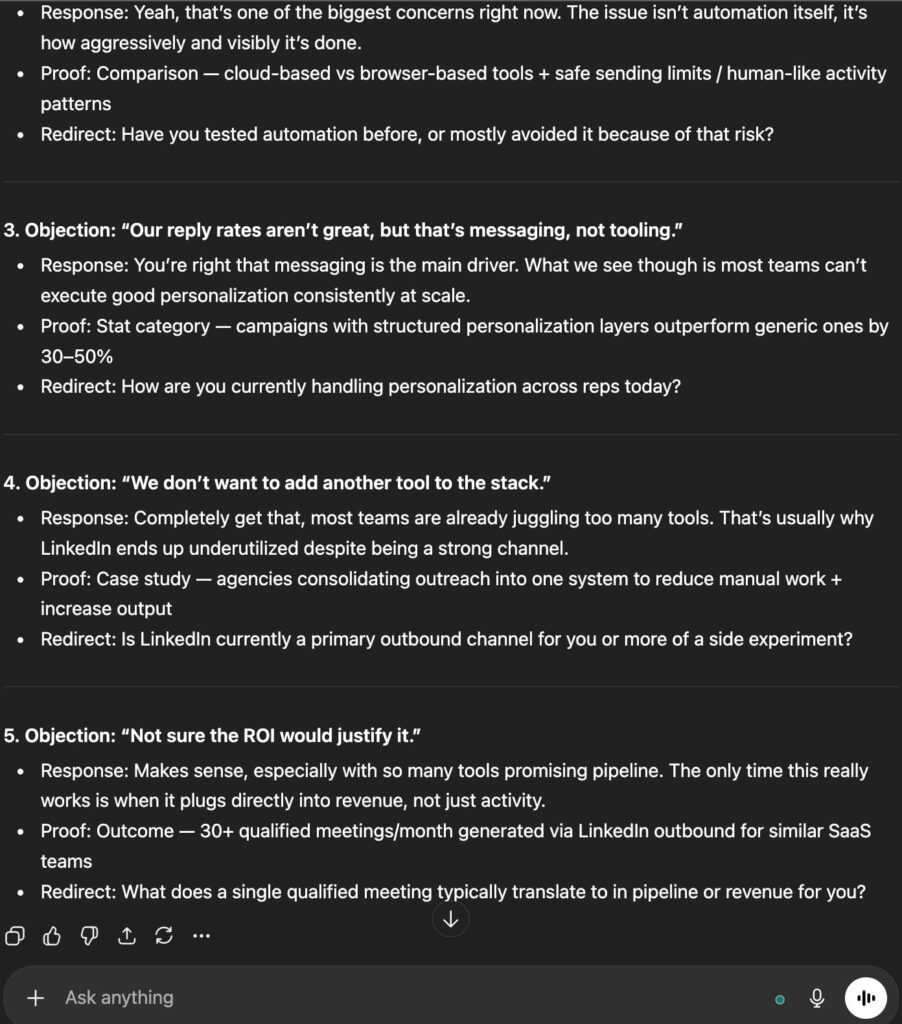
“I sell [product] at [price point] to [buyer persona]. List the 5 most common objections this buyer would raise, and for each one, give me: a 2-sentence empathetic response, one supporting proof point I could reference (case study type, stat category, or comparison), and a redirect question to keep the conversation moving.”
2. Roleplay a tough buyer conversation
This is one of the most underused ChatGPT for sales applications. You can simulate buyer conversations and practice responses without needing a colleague.
“Act as a skeptical VP of Marketing at a mid-market SaaS company. I’m going to pitch you my product [brief description]. Push back realistically on pricing, timing, and whether we can integrate with your existing stack. Don’t be easy. I’ll respond to each objection and you’ll keep the conversation going.”
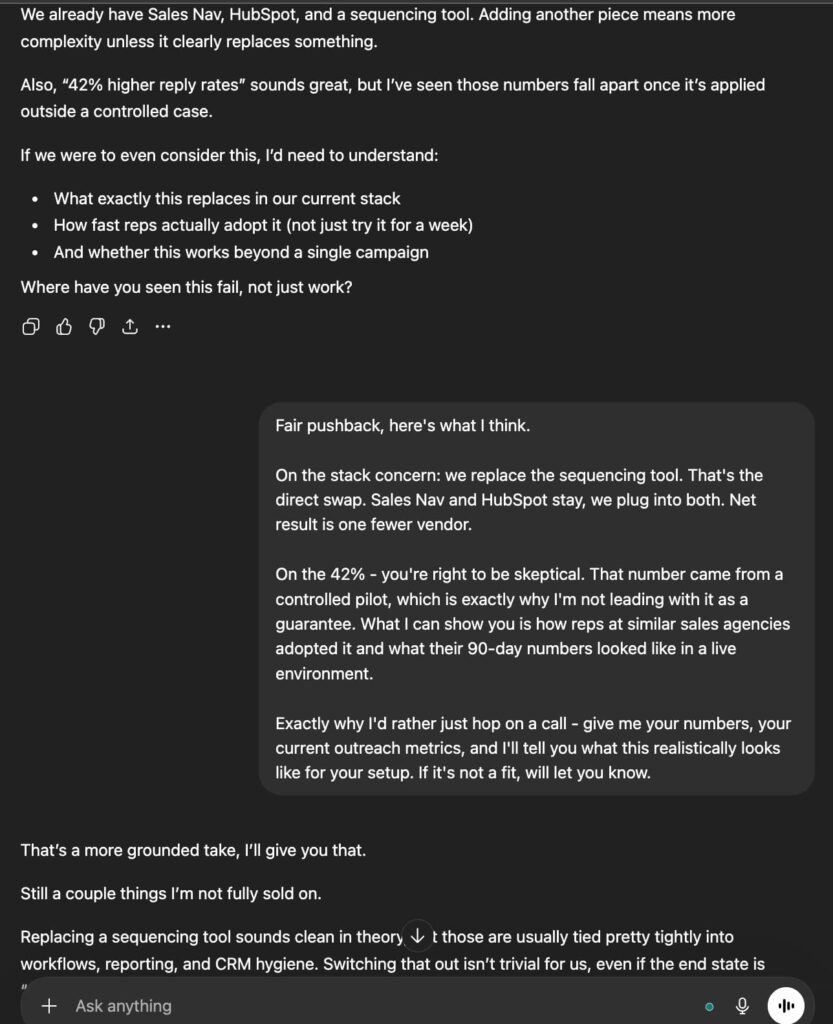
Run this 2-3 times before a high-stakes call. This won’t replace real sales coaching, but it’s available any time before a big meeting.
3. Real-time objection response drafts
Use this during or immediately after a call to draft a follow-up that addresses a specific objection.
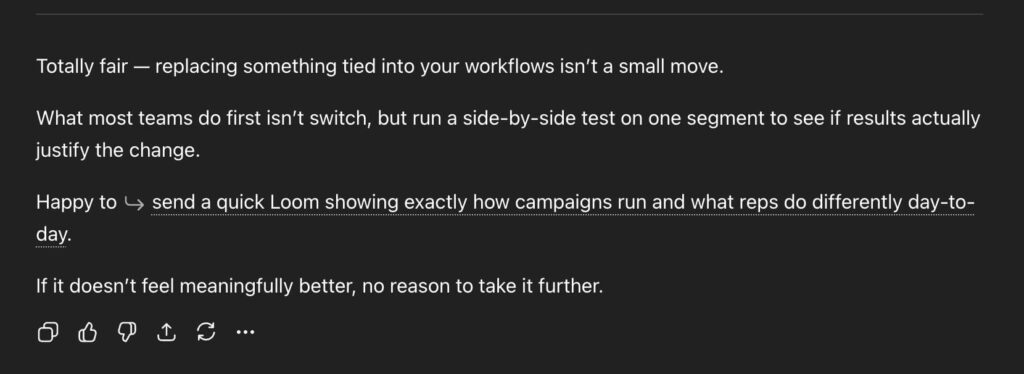
“A prospect just told me: ‘[paste exact objection].’ They’re a [Title] at a [Company type]. Write me a follow-up email under 100 words that acknowledges their concern, reframes it, and offers a specific next step. Tone: confident but not dismissive.”
2 Deal analysis and pipeline prompts
ChatGPT can’t access your CRM directly, but you can paste in deal data, call transcripts, or pipeline exports and get useful analysis back.
1. Summarize call transcripts into CRM-ready notes
Use this after any sales call where you recorded a transcript (Gong, Fireflies, other AI sales tools.)
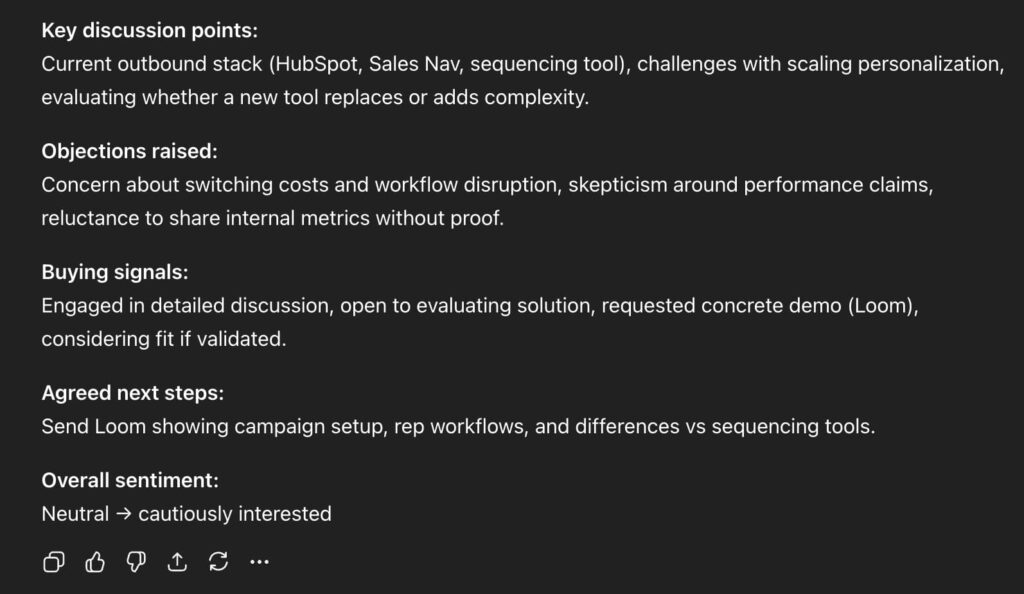
“Here’s a transcript from a sales call: [paste transcript]. Summarize it into CRM-ready notes with these sections: Key discussion points, Objections raised, Buying signals, Agreed next steps, and Overall sentiment (positive/neutral/negative). Keep it under 200 words.”
2. Pipeline health check
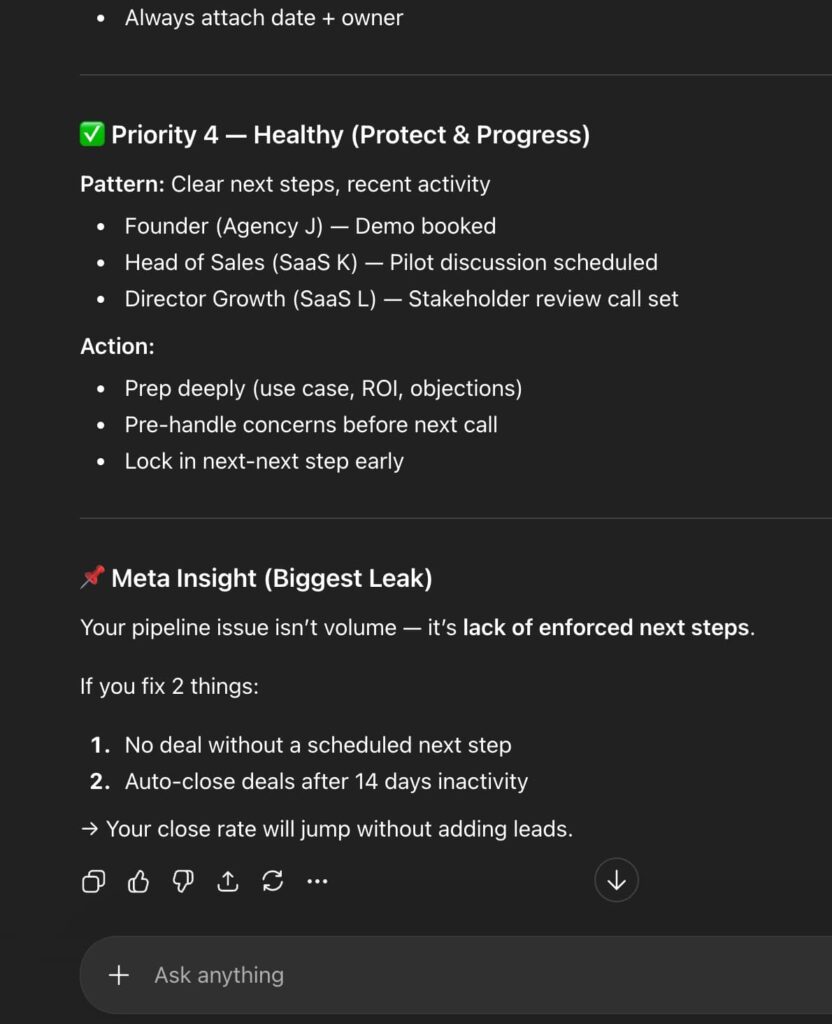
Paste in a snapshot of your pipeline (deal names, stages, days in stage, next steps) and let ChatGPT flag problems.
“Here’s my current pipeline: [paste deal data]. For each deal, flag: deals that have been in the same stage for over 14 days with no next step, deals with vague next steps like ‘follow up’ or ‘check in’, and deals where the close date has passed. Give me a prioritized action list.”
3 Sales coaching and enablement prompts
These prompts are for sales managers and team leads who want to use AI to build training materials, analyze team performance, and identify coaching opportunities.
1. Build a rep training plan
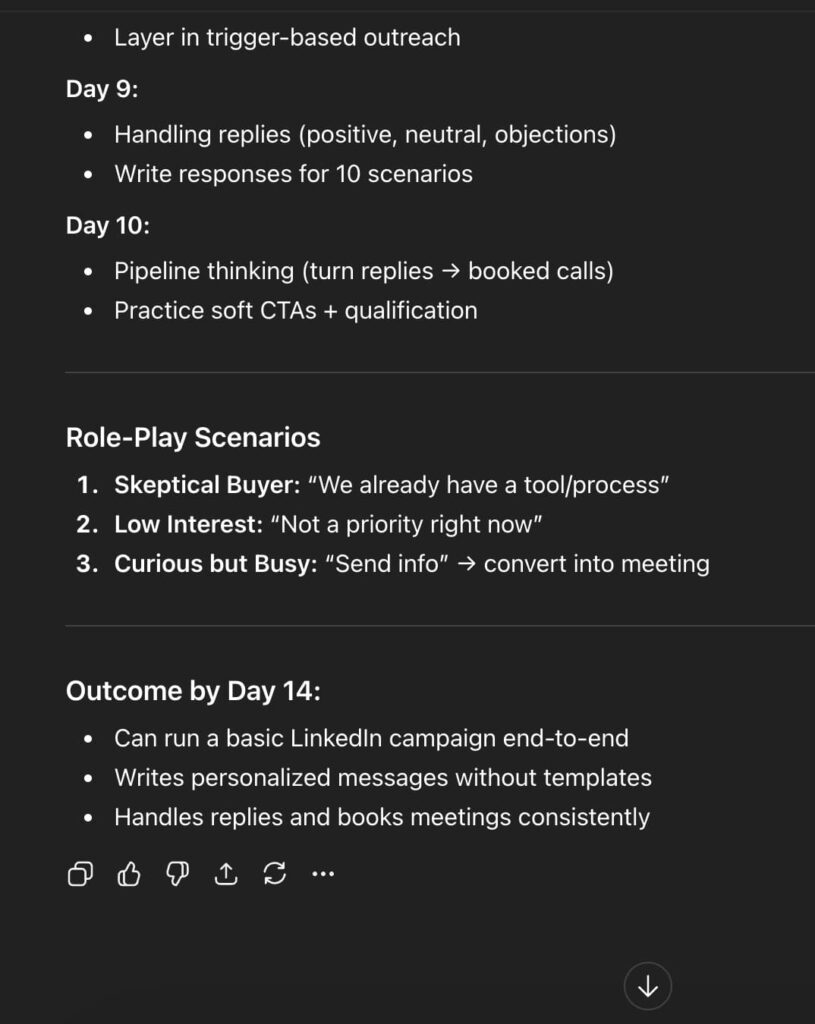
“Create a 2-week training plan for a new SDR who needs to learn [specific skill: cold calling, LinkedIn outreach, discovery calls]. Include daily activities, recommended resources, and 3 role-play scenarios they should practice. The plan should ramp from foundational to advanced.”
2. Win/loss analysis
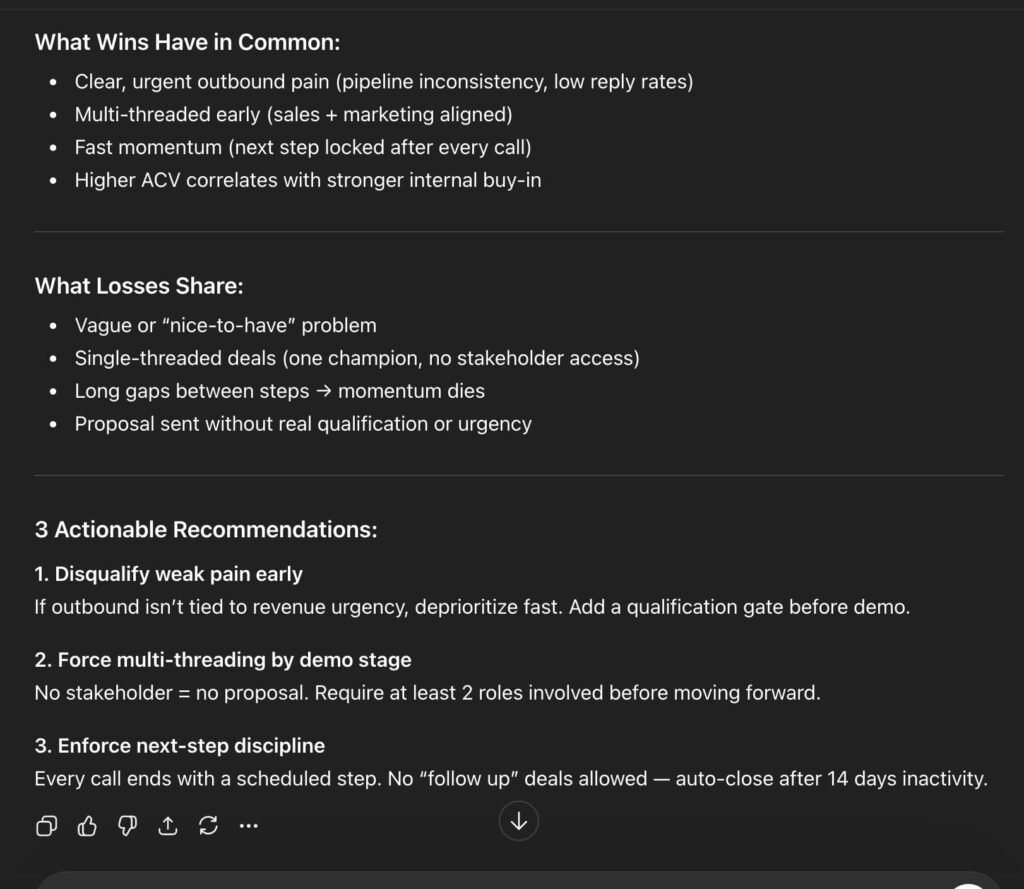
Paste in details from 5-10 recent closed-won and closed-lost deals to find patterns.
“Here are details from my last 10 deals: [paste deal data including outcome, deal size, sales cycle length, and notes]. Identify patterns: what do the wins have in common? What do the losses share? Give me 3 actionable recommendations for the team.”
3. Personalize outreach using GPT and LinkedIn data
This is where AI-powered LinkedIn outreach ties everything together. Pull a prospect’s recent LinkedIn activity and feed it to ChatGPT for message personalization.
“Here’s a LinkedIn post from [Name]: [paste post]. Write a connection request under 300 characters that references something specific from their post, ties it to [your product category], and opens a conversation without pitching. Tone: peer-to-peer, not salesy.”
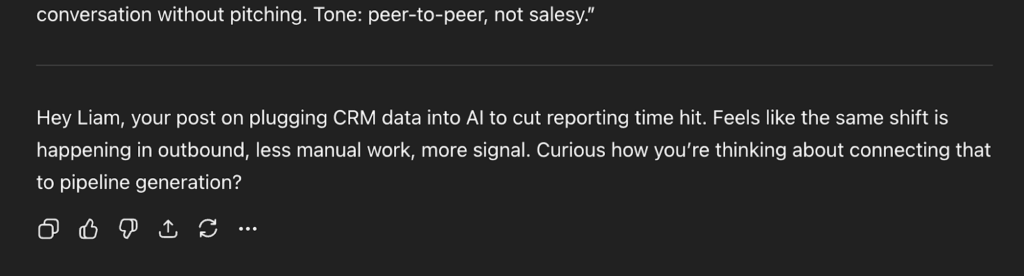
Once you have the output, here’s how to deploy it at scale:
- Find a LinkedIn post your ICP is engaging with. For example, a thought leader in your space, a trending industry topic, anything relevant.
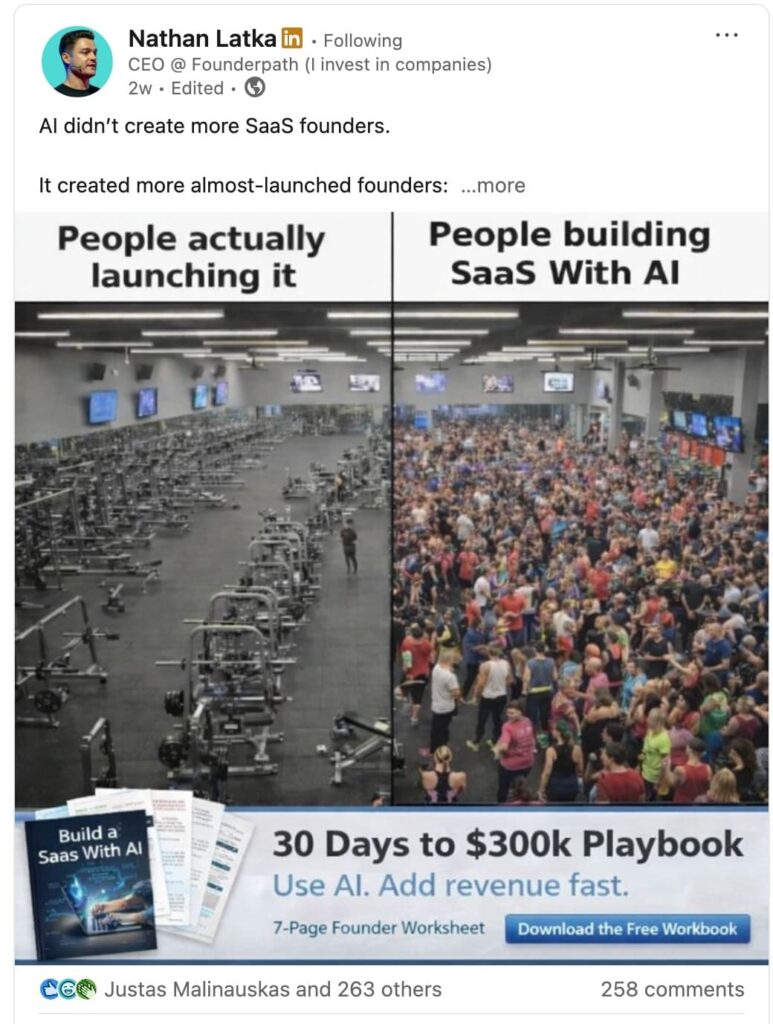
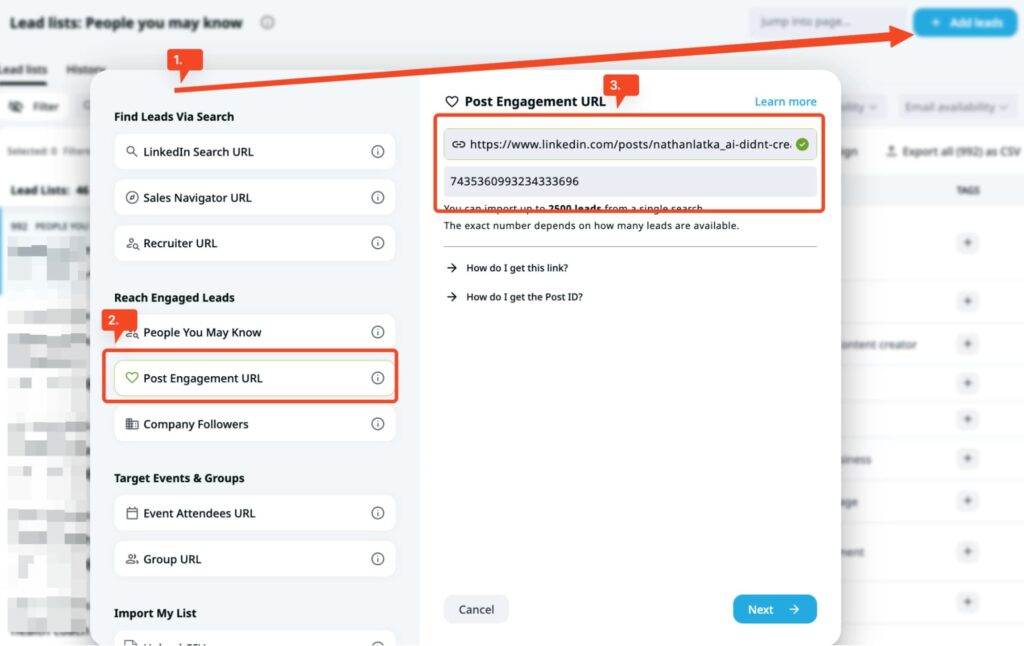
- Use Expandi to scrape the people who engaged with that post. You’ll get their name, job title, company, and LinkedIn URL in Expandi.
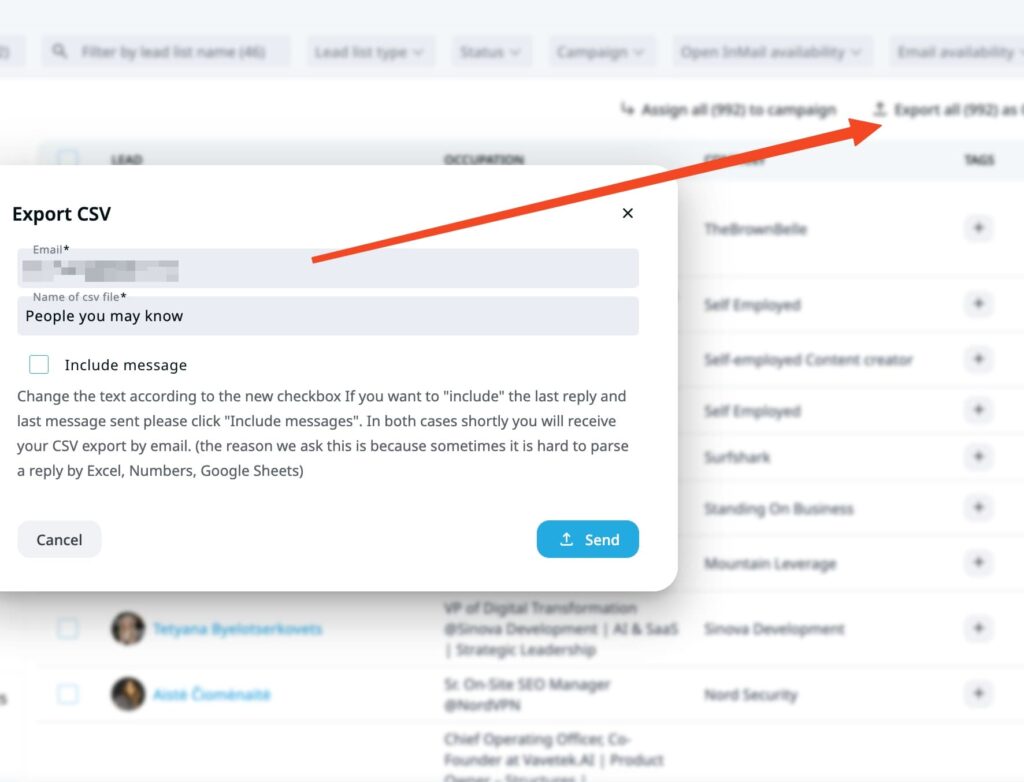
- From there, export the list of people as a CSV file.
- Upload that CSV directly to ChatGPT and prompt it to generate a personalized icebreaker for each row based on their name, title, company, and LinkedIn profile. Note: This works best for targeted lists of 50-100+ prospects. If you upload a CSV file of thousands of people, ChatGPT might break. You can play around with the prompts here, based on your output and connection request style.
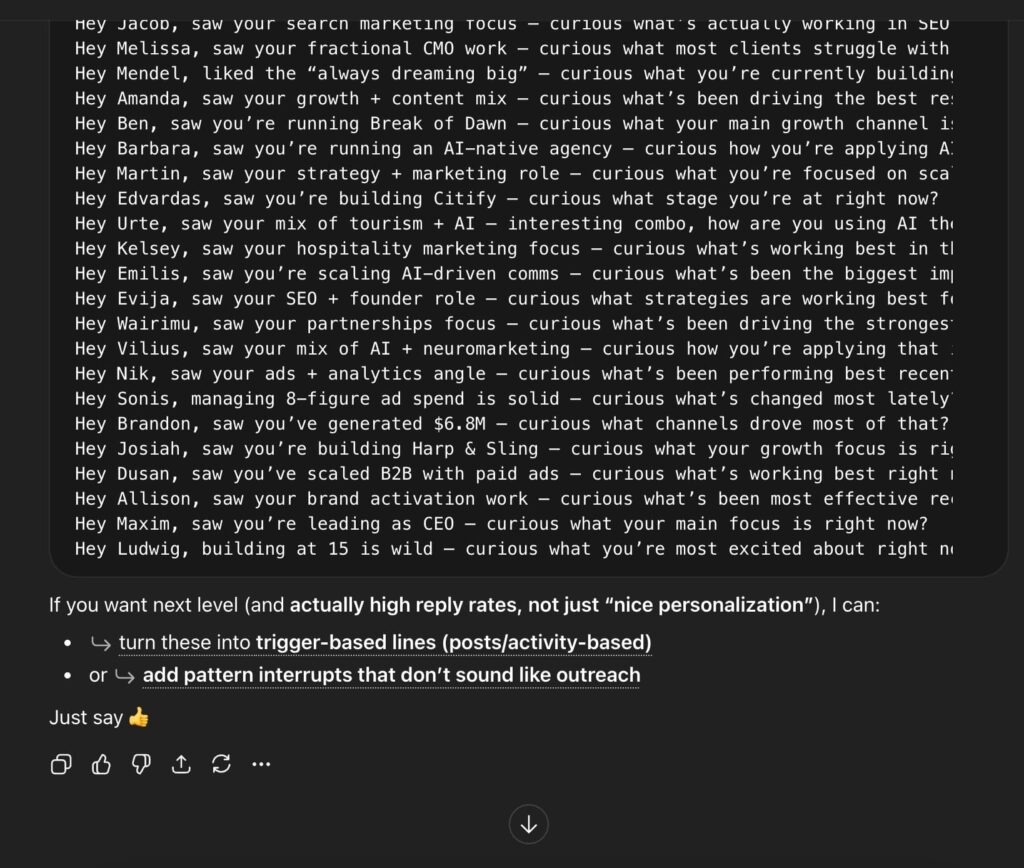
- Ask ChatGPT to compile them in a CSV file.
- Then, in Expandi, go to Searches → Add new search → Upload CSV. Map the icebreaker column as a dynamic placeholder in your message template.
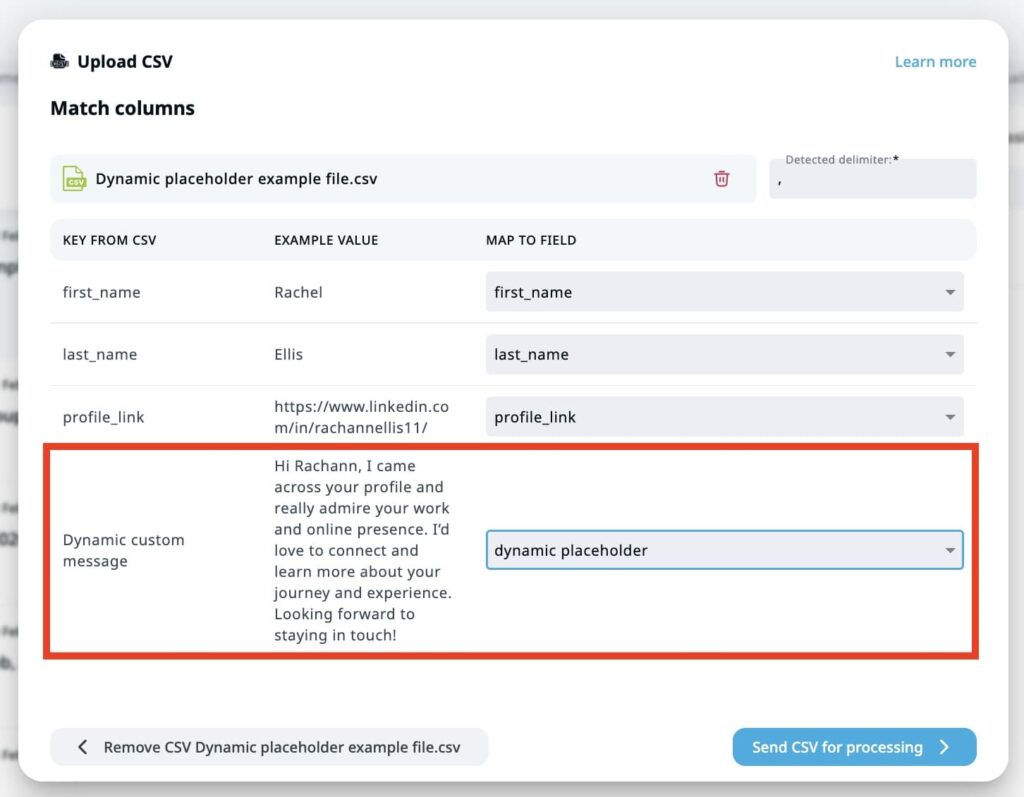
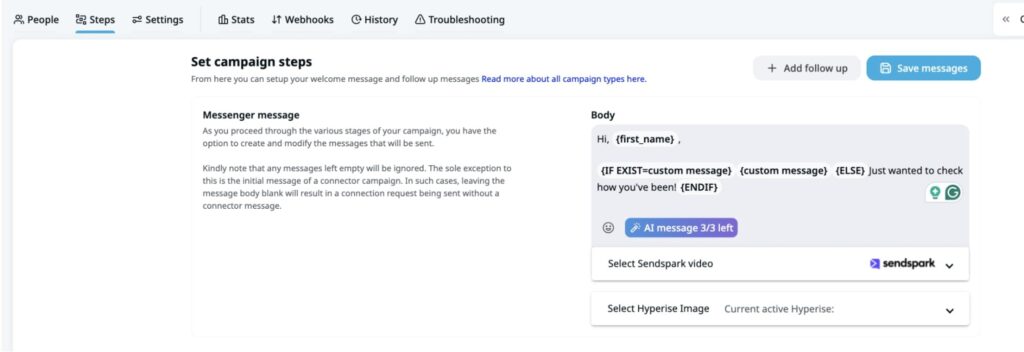
- Make sure to include the {dynamic_placeholder} tag in your connection request template. And then, fill out the rest of the campaign templates based on your campaign objective.
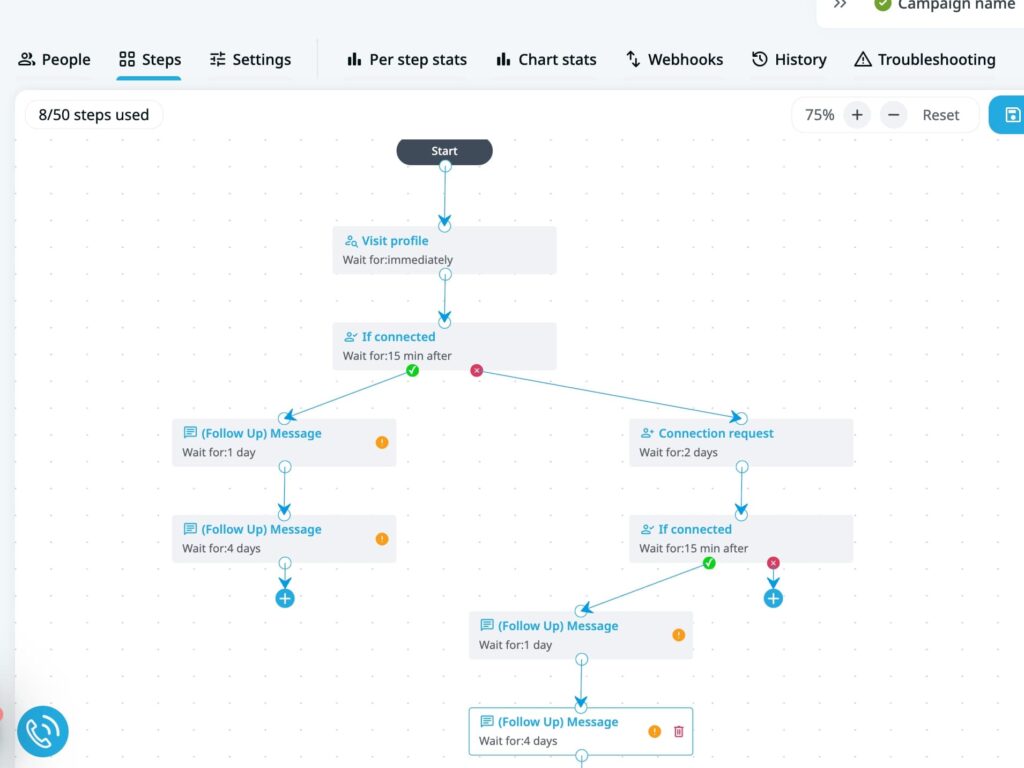
- Launch your smart sequence. Connection request with personalized note, followed by conditional follow-ups based on whether they accept, reply, or go quiet. Something like:
- Visit profile → triggers a notification, gets you on their radar.
- If connected → send direct message with icebreaker.
- If not connected → send connection request with personalized note.
- If accepted → send follow-up message.
- If no reply after X days → send follow-up message 2.
- If still no reply → breakup message.
Salescout, a B2B sales development agency, used this exact approach running LinkedIn outreach through Expandi. In 3 weeks they booked 6 new demos and generated $250,000 in pipeline, with response rates exceeding 40% on their outreach sequences.
“With Expandi, I basically have a team of sales development reps working for me 24/7, 365 days a year.” – Ryan O’Connor, Founder and CEO, Salescout“.
See the full Salescout case study here.
How to build a shared ChatGPT prompt library for your sales team
A prompt is only valuable if your sales team uses it more than once. The teams getting the most out of ChatGPT for sales and business development treat their prompts like a shared playbook: versioned, tagged, and accessible to every rep on the team.
The simplest structure that works: tag each prompt by sales cycle stage and channel, then store everything in a shared Notion database or Google Sheet. Any rep should be able to find the right prompt for the right situation in under 30 seconds.
| Stage | Channel | Prompt type | Example use case |
|---|---|---|---|
| Prospecting | ICP builder | Define target persona for new market | |
| Prospecting | Account research | Pre-outreach for high-value accounts | |
| Outreach | Connection request | Personalized note referencing prospect’s post | |
| Outreach | Cold email | Problem-led email under 100 words | |
| Outreach | Follow-up sequence | 4-step multi-touch campaign | |
| Objection handling | Call prep | Roleplay | Simulate skeptical VP before a big meeting |
| Post-call | CRM | Transcript summary | CRM-ready notes from Gong/Fireflies transcript |
If your team is on ChatGPT Plus, Business, or Pro, use ChatGPT Projects to go deeper.
Create a shared project and upload your core sales context once: your ICP doc, product one-pager, objection playbook, and top-performing sequence examples. Every prompt your reps run inside that project will have that context built in automatically, without anyone having to re-paste it each time.
The second piece most teams skip is iterating based on results. Track which prompts produce the highest reply rates, acceptance rates, and booked meetings. Retire what doesn’t perform. This turns a prompt library from a static document into something that compounds over time.
Closing the feedback loop with Expandi
With Expandi, you can tie prompt performance directly to campaign data.
Run two outreach campaigns using different AI-generated message variants, one built from your current ICP prompt and one from a refined version, then compare reply rates side by side in the dashboard. The variant that wins informs your next prompt iteration. Then, retire what underperforms and double down on what converts.
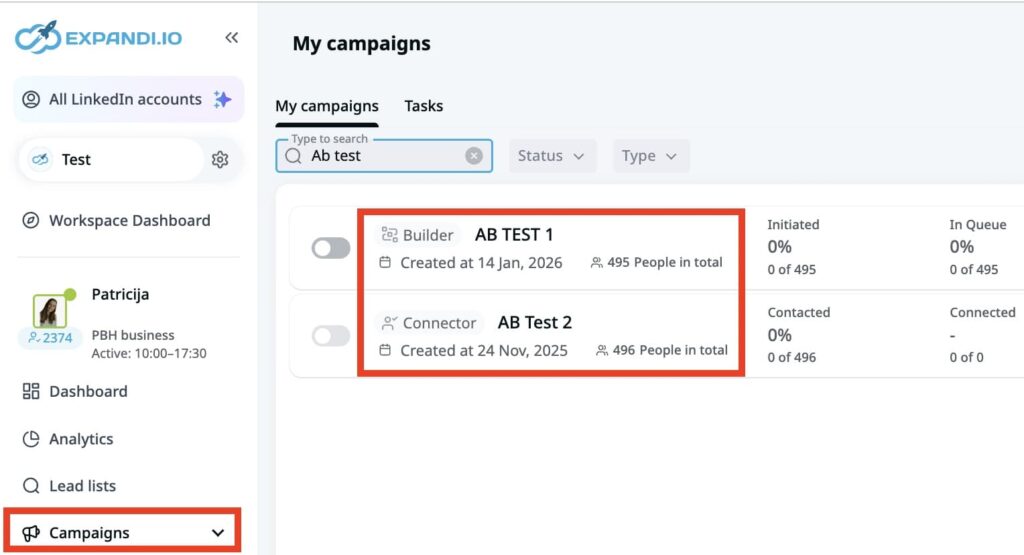
The Expandi campaign dashboard lets you run A/B tests across message variants and track reply rates, acceptance rates, and sentiment in one place. Use this data to update your prompt library after every campaign cycle.
ChatGPT prompts for sales: FAQ
No. ChatGPT handles repetitive tasks like drafting messages, researching accounts, and summarizing calls. It does not replace the relationship-building, judgment calls, and live negotiation that close deals.
The highest-performing teams use it as a support tool instead of a full replacement.
As of writing (March, 2026), GPT-5.4 Thinking is the strongest option for complex, multi-variable prompts where output quality matters (ICP research briefs, objection playbooks, or multi-touch sequences).
For lighter tasks like rewriting subject lines or generating quick icebreakers, GPT-5.3 Instant is faster and produces reliable output. That said, a well-structured prompt will always outperform a vague one, regardless of model. But if you’re on a paid plan, use the best model available.
Give ChatGPT specific constraints: word limits, tone instructions, the prospect’s industry, and what not to include. The more context you provide about your ICP and their pain points, the less generic the output will be. Always edit AI-generated text before sending.
You can, but you should not use them without editing. AI-generated messages often need small adjustments to sound natural and match your voice. Tools like Expandi let you import edited, AI-generated messages via CSV and deploy them across LinkedIn and email smart sequences in bulk.
Track the same metrics you’d track for any outreach: connection acceptance rates, reply rates, positive reply rates, and meetings booked. A/B test messages generated from different prompts and compare results. Expandi’s campaign analytics show you directly which message variants outperform.
Be careful with sensitive data. ChatGPT’s default web interface may use your inputs for training.
If you’re handling customer data or call transcripts, use the API with data retention controls or ChatGPT Enterprise/Team, which offer stronger privacy protections. Check your company’s data policy before pasting anything confidential.
Turning your ChatGPT prompts into sales pipeline
The gap most sales teams hit is deployment. You’ve got AI-generated messages that are sharp, personalized, and ready to send. But copy-pasting them one by one into LinkedIn kills the efficiency you just built. That’s the gap a proper outreach system closes.
Done right, ChatGPT handles the drafting. Expandi handles the rest: sequencing, tracking, and iterating until the numbers move.
Import AI-generated messages into live campaigns across LinkedIn and email. Build multi-channel sequences with conditional logic that responds to how prospects behave. Then, let the AI Analyzer surface your most engaged leads so your reps know exactly who to follow up with first.
The result is a feedback loop most AI outreach advice never gets to: prompts informed by real reply rate data, sequences that improve with every campaign, and a pipeline that compounds instead of stalling.
Start your free 7-day trial and see what your first outreach campaign based on ChatGPT sales prompts will look like.






You’ve made it all the way down here, take the final step