How to Write Cold Emails That Get Replies

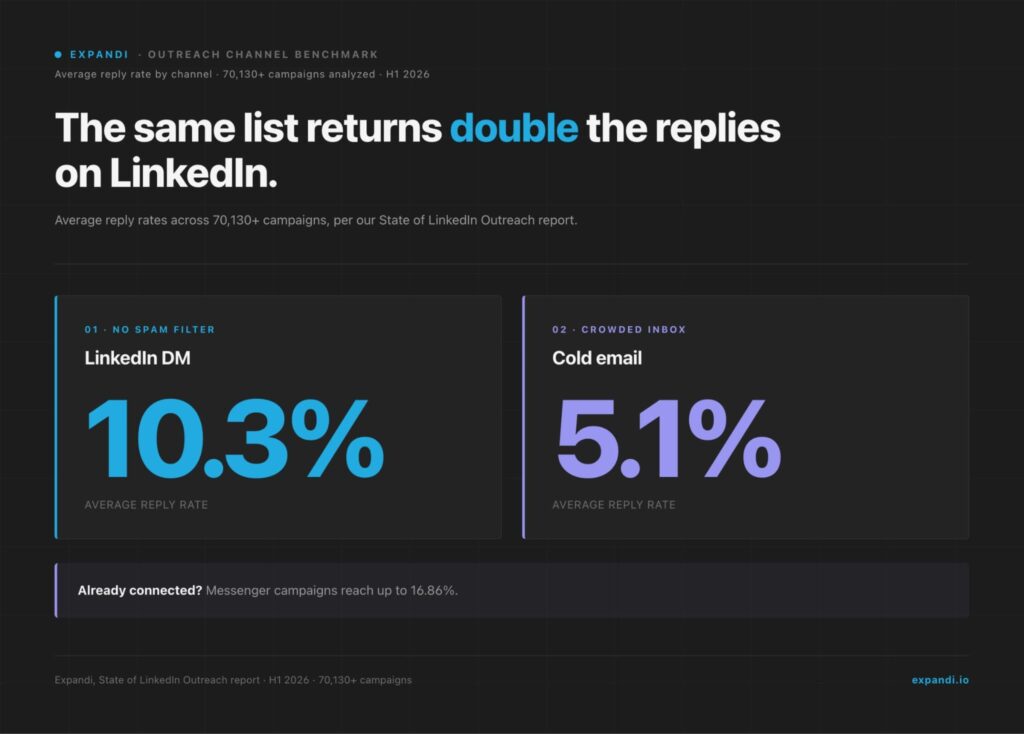
Learning how to write cold emails that get replies is mostly a sequencing problem: the reason you’re reaching out has to land before the pitch does. Our own platform data shows signal-triggered campaigns replying at 13–14%, against a 10.3% average across all direct messages, while cold email as a channel sits at 5.1%.
Here’s what this guide covers:
- The four decisions — trigger, subject line, single ask, exit — and why the trigger leads.
- How to find a trigger worth emailing about.
- Subject lines and CTAs that get answered, with examples to copy.
- Three annotated cold email examples.
- Writing cold emails with ChatGPT without sounding like everyone else.
Key Takeaways
- Four decisions in sequence: trigger, subject line, single ask, exit. The trigger carries the other three.
- Lead with the trigger. A job change, a funding round, a hiring post, content they just shared — a reason to email now is what earns the reply.
- Under 100 words. One ask. One link, max.
- Close without fake urgency. Manufactured deadlines and a third “just circling back” read as pressure.
- Relevance is hard to hold at volume. Expandi triggers outreach off real events — a profile view, a post engagement, a job change — so the reason survives the scale.
How to Write Cold Emails That Get Replies


The four decisions behind every cold email that gets a reply
Every cold email that gets a reply comes down to four decisions, made in this order:
| Decision | The job it does | The question it answers |
|---|---|---|
| 1. The trigger | Gives the email a reason to exist | Why am I emailing this person now? |
| 2. The subject line | Earns the open | Will this get clicked in a full inbox? |
| 3. The ask | Makes replying easy | What one thing am I asking for? |
| 4. The exit | Closes without pressure | How do I leave the door open? |
The order is the whole point.
- A strong trigger makes a plain subject line work and a small ask feel obvious.
- A weak trigger, or none, leaves the subject line to carry the entire email, and it cannot.
That is why two emails with near-identical copy can pull wildly different reply rates: one arrived with a reason, the other arrived at random.
Start with the trigger that gives your cold email a reason to exist
A trigger is the specific, recent reason you’re reaching out to this person now:
- A job change.
- A funding round.
- A hiring push.
- A post they just published.
- A visit to your profile.
This answers the prospect’s first silent question: why me and why now, before they think to ask it. Without a trigger, a cold email is a guess sent to a stranger.
In our own campaign data, outreach anchored to a real event outperforms the average by a wide margin.
Per our State of LinkedIn Outreach report, built on 70,000+ analyzed campaigns, signal-triggered campaigns reply well above the norm: profile-visitor campaigns at 13.4% and event campaigns at 14.21%, against a 10.3% average across all direct messages. The trigger is the variable doing that work.
The reason relevance beats volume is simple: an email that names something true about the prospect reads as aimed, and aimed emails get answered. One founder put the principle plainly:
Michal Jackowski, founder of ZenABM, an ABM platform that turns LinkedIn engagement into buying signals, said this in a GTM Society interview:
“It’s not always the best product wins. It’s the product that is put in front of most relevant people that wins.” — Michal Jackowski, ZenABM
The same logic sits underneath warm outreach: rather than guessing who might care, you send when someone shows they already do.
Intent signals turn a cold list into a queue of people with a reason to hear from you.
What counts as a trigger for cold emails
The strongest triggers are recent, specific, and visible to the prospect. They are the raw material of signal-based outreach. A short list of what to watch for:
- A job change or promotion into a buying role.
- A funding round, acquisition, or new market entry.
- A hiring spree in a team your product touches.
- A post, comment, or article they just published.
- A profile view, connection acceptance, or event attendance.
- A change in their tech stack, a tool added or dropped.
Recency and specificity are what separate a trigger from a guess.
Compare a vague opener like “I saw you’re in sales” with a real one: “I saw the three SDR roles you posted last week.” The second names something that happened, while the first names a category. Only one of them earns a reply.
How to write a cold email opening line off that trigger
The opening line turns the trigger into a sentence.
Name what you noticed, in plain language, in the very first line, because inbox previews expose it before the email is even opened. The first line is really a second subject line.
A few cold email openers that lead with the trigger:
- “Saw {company_name} closed its Series B last week — congrats.”
- “The three SDR roles you posted caught my eye.”
- “Saw your post on {topic} last week.”
Openers that waste the line:
- “I hope this email finds you well.”
- “My name is.”
- “I’m reaching out because.”
They spend the preview pane on nothing. Our guide on how to start an email breaks down openers that survive the preview.
Write a cold email subject line that earns the open
A cold email subject line earns the open when it reads like a note from someone who knows the recipient: short, specific, lowercase-casual, and free of selling words.
Relevance beats cleverness. The subject’s only job is to get the email opened, and a concrete detail does that better than a curiosity gap.
The split between a subject that gets opened and one that gets deleted:
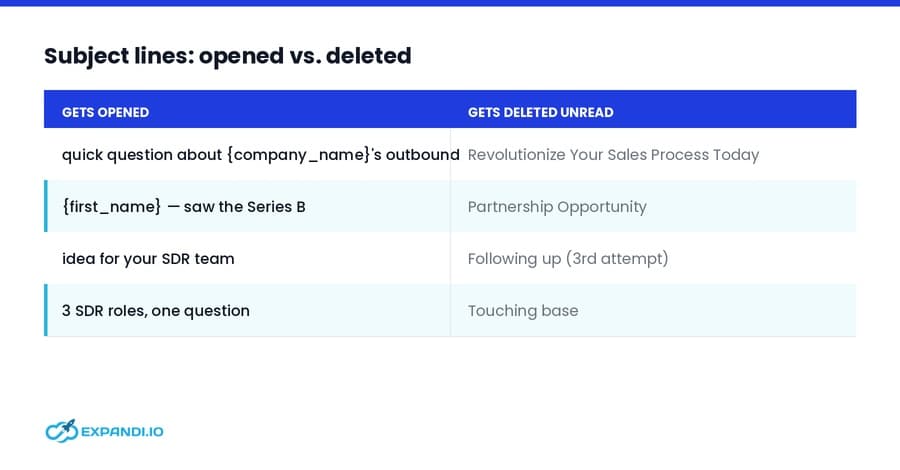
A few rules the openers on the left follow:
- Keep it under about six words.
- Skip the ALL CAPS and exclamation marks.
- Drop the fake “re:” on a first send.
- Mirror the trigger so the subject and the first line tell one story.
The same thinking applies on LinkedIn, where subject lines decide whether an InMail gets read.
Make one ask, and keep it easy to say yes to
One cold email makes one ask.
The tighter and lower-friction the ask, the higher the reply rate, because saying yes to curiosity costs less than saying yes to a meeting. Early in a conversation, an interest-based question beats a calendar demand every time.
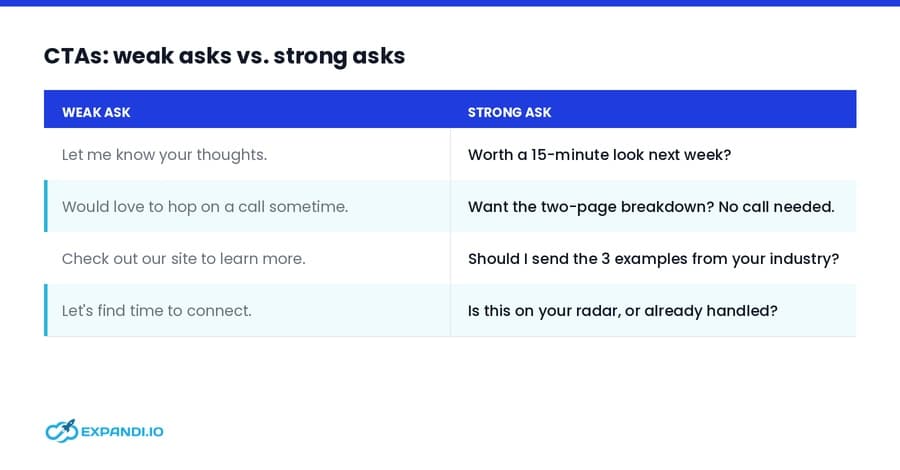
The difference between an ask that stalls and one that gets answered:
Two mechanics make the strong column work.
- First, it asks for one thing, so the prospect has a single decision to make rather than a menu.
- Second, it lowers the cost of yes: a reply, a nod, a “send it over” is easier to give than a slot on a calendar.
Keep one link at most in the email, and let the ask be the clearest sentence in it.
Close the email without fake urgency
The close is the last line, and it decides whether the whole email reads as a request or a squeeze.
- Manufactured urgency, fake deadlines, “last chance,” a third “just circling back,” reads as pressure and gets ignored.
- A clean exit that leaves the door open earns more honest replies, including the useful “not now” that keeps the door open for next quarter.
Timing is part of the close too.
An email that arrives too hard, or at the wrong moment, gets filed under ignore, so the exit’s job is to stay low-pressure enough that a prospect with bad timing still feels free to answer later.
Closes that leave the door open without pushing:
- “No response needed if the timing’s off — this’ll be here when it changes.”
- “If it’s not a priority this quarter, a one-line ‘not now’ is a real answer.”
Follow-ups belong to the close as well. One well-timed follow-up earns its place: a second touch adds roughly 4% more responses in our data. Past that, “just bumping this” adds a notification and no new reason to reply.
The craft is in the follow-up carrying a fresh angle, not a repeat of the first send.
3 full cold email examples you can adapt
Here are three complete cold emails, each built off a different trigger and annotated against the four decisions.
Swap the bracketed details for your prospect’s specifics, keep the body under 100 words, and stop the moment they reply.
Example 1: the funding trigger
The email:
Subject: quick idea after the Series B
Hi {first_name},
Saw {company_name} closed its Series B last week — congrats. A raise comes with a pipeline number attached, and the two SDR roles you just posted suggest outbound is part of the plan.
We help {industry} teams stand up outbound in the first 90 days post-raise, before the new reps even start. Worth a 15-minute look while the plan is still forming?
{your_name}
Why it works: the trigger is the funding round plus the SDR roles, two recent and specific signals.
The subject names the event and sells nothing. The ask is a single 15-minute look, framed around the prospect’s own timing. The exit ties to “while the plan is still forming,” a real window rather than a fake deadline.
Example 2: the hiring trigger
The email:
Subject: the 3 SDR roles you posted
{first_name}, noticed {company_name} is hiring three SDRs while running outbound from a single domain. In our client work, that combination tends to surface as deliverability trouble within a quarter, because the new reps ramp faster than the infrastructure.
Is that on your radar yet, or already handled?
{your_name}
Why it works: the trigger is the specific job posts, read as a signal about how their setup is about to strain.
The subject is the trigger itself. There’s one ask, phrased as a yes-or-no question that costs nothing to answer. The exit offers an out, “or already handled,” so the whole thing reads as curiosity rather than a pitch.
Example 3: the content-engagement trigger
The email:
Subject: your post on {topic}
{first_name}, liked your {topic} post last week, especially {specific_line}.
We ran into the same wall building outbound for {similar_company}, and the fix ended up being {one_sentence_approach}. Happy to send the two-paragraph version if it’s useful, no call attached.
{your_name}
Why it works: the trigger is the prospect’s own content, quoted specifically enough that it could only be them.
The subject references the post. The ask is a low-friction “want the version,” with the meeting removed entirely. The exit is the no-call reassurance, which lowers the cost of saying yes.
Best practices for writing cold emails that get replies in 2026
Cold email in 2026 works the way it always has, under harder conditions. Inboxes are fuller, spam filters are stricter, and AI has made generic outreach effectively free to produce.
The result is that relevance and restraint carry more weight than they used to, and raw volume carries less. The practices that hold up:
- Lead with a trigger, every time. A genuine reason to reach out is the one thing a template cannot manufacture for you.
- Keep the first touch under 80 words. Per Instantly’s 2026 cold email benchmark, built on billions of interactions across 2025, the best-performing first-touch emails stay under 80 words.
- Make one ask and include one link at most. Extra links raise spam scores and split the reader’s attention.
- Get deliverability right before you scale. Per Google’s sender guidelines, authenticate your sending domain with SPF and DKIM, plus DMARC for higher volumes.
- Write for the phone. Buyers read on mobile between meetings, so short paragraphs and one idea per email beat a dense block of text.
For the fuller list across offers, targeting, and infrastructure, our cold email outreach best practices guide goes deeper.
How to write cold emails with ChatGPT without sounding like a bot
ChatGPT is useful for cold email as a research and drafting assistant, and costly as a ghostwriter.
Used well, it speeds up the work around the message, finding the trigger, structuring the draft, tightening the copy, while your voice and the specific reason for the send stay yours.
Where AI helps with a cold email:
- Research: summarize a prospect’s recent posts, funding news, or role change into a one-line trigger.
- Structure: turn rough notes into a four-part draft — trigger, subject, ask, exit.
- Editing: cut a bloated draft under 80 words, or generate three subject-line options to test.
Where it hurts: handing it a generic prompt and shipping whatever comes out.
That is exactly the output flooding inboxes right now, and prospects can tell. Across our own platform, 29.19% of users now use AI for messaging and 53.71% personalize their outreach, and the winners are the ones using AI to personalize faster while keeping the reason for each send their own.
Inside Expandi, the AI Analyzer handles this natively: it drafts campaign messages and follow-ups from your goal and target audience, then sorts incoming replies by sentiment so interested leads surface first.
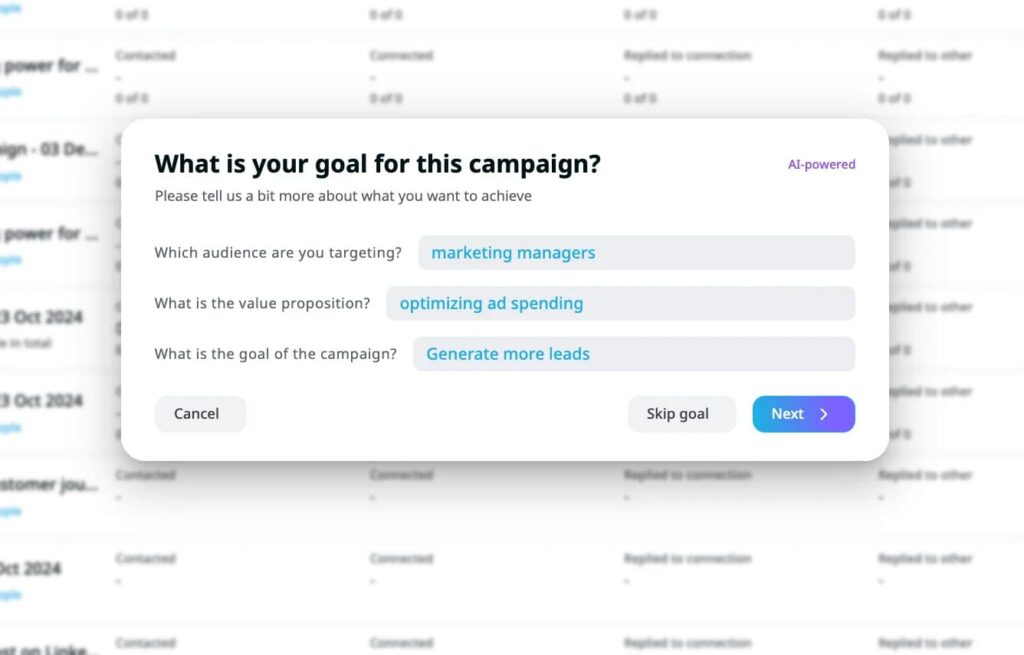
ChatGPT stays the research and ideation layer, and the sending tool writes copy in the context of the actual campaign. Our roundup of ChatGPT prompts for sales covers the research side, and AI hyper-personalized messages shows the in-product version.
How to scale cold emails without losing the trigger
Relevance is easy to hold for ten prospects and hard to hold for a thousand.
The trigger that makes a single cold email work is the first thing dropped when volume goes up, which is why generic blasts exist at all. Holding the trigger at scale is a tooling problem, and it is the problem signal-based sending is built to solve.
The idea is to fire outreach off real events rather than a static list.
- A profile view.
- A post engagement.
- A job change.
- An event signup.
Whichever it is, the reason for the message is baked into the moment it sends.
Alex Fine, co-founder of Understory, a sales and marketing agency for B2B SaaS companies, said this in a GTM Society interview:
“If someone’s engaging with this post, they match my ICP, push it to an Expandi campaign, and then you can send it out immediately. And what that does is it shows relevance.” — Alex Fine, Understory
Expandi runs this across LinkedIn and email from one Builder sequence: a post engagement or profile view triggers a message, if-this-then-that conditions decide each prospect’s next touch, and merge tags keep every message personalized without hand-writing each one.
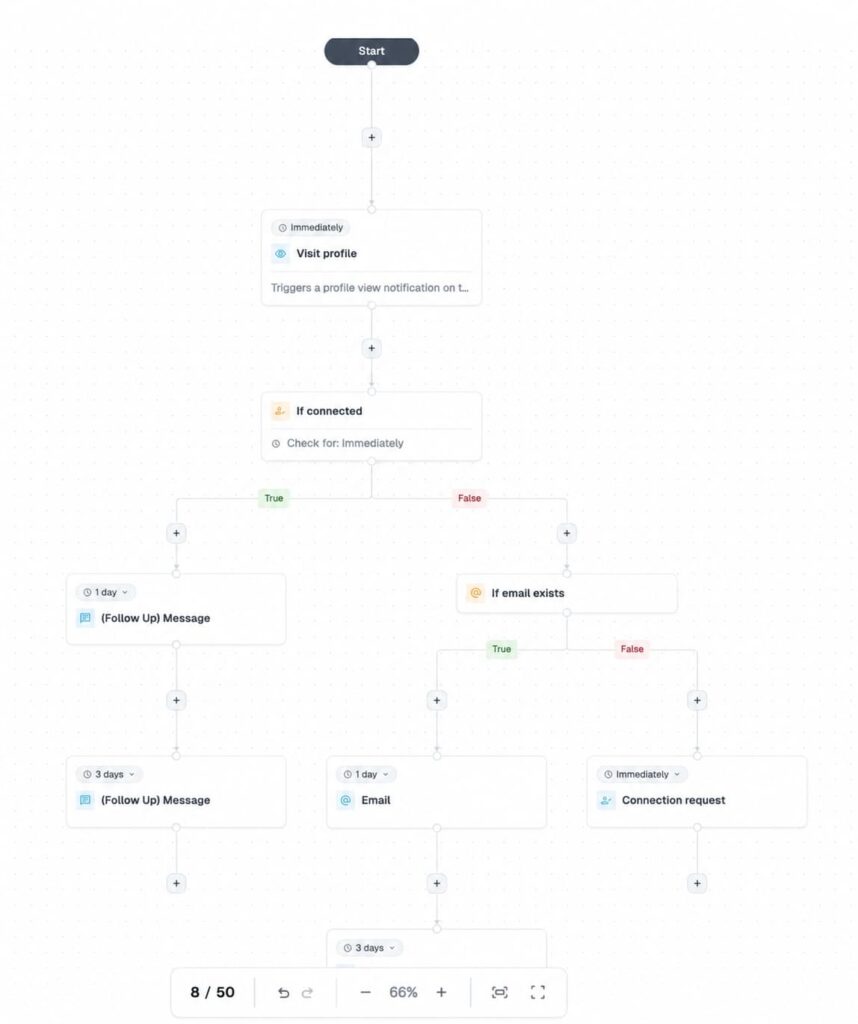
This is how teams scale personalized outreach without adding headcount, and the personalization it holds onto is what keeps the trigger intact from ten sends to ten thousand.
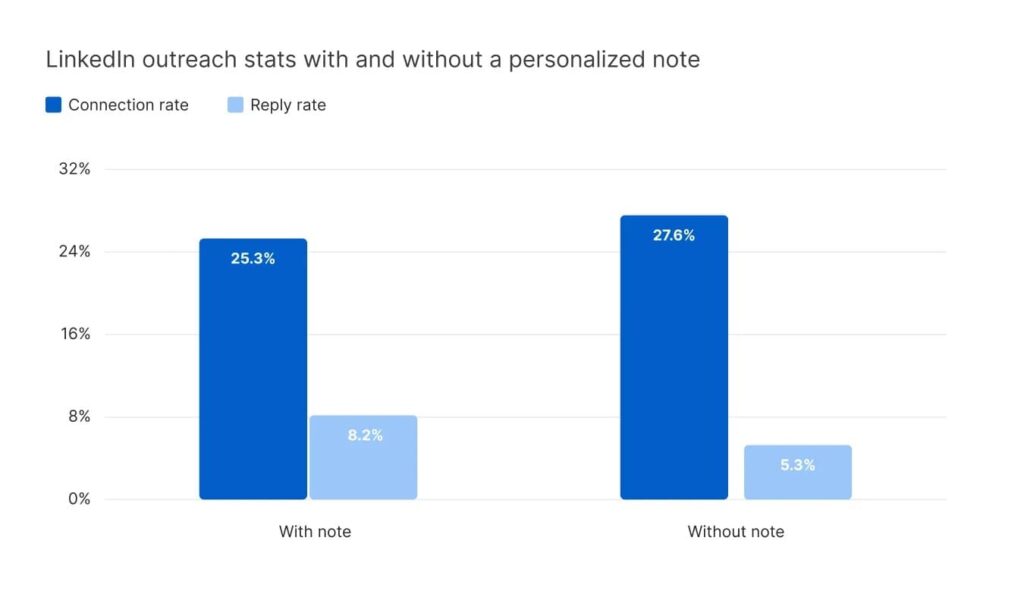
Personalization is one of the few levers that reliably moves reply rate. On the LinkedIn side, Belkins’ 2025 study of 15M+ Expandi outreach contacts found a personalized note lifts replies from 5.3% to 8.2%. Expandi runs the LinkedIn half of this system today, with email as a channel inside multichannel sequences and a dedicated email outreach tool on the way.
Turning cold emails into replies
Writing cold emails that get replies is less about clever copy and more about order: find the trigger, earn the open, make one easy ask, and leave a clean exit.
The trigger does the heavy lifting, and the other three follow from it. Hold that reason across every send and the same list answers at a far higher rate than a generic blast ever will.
Expandi runs the signal-based, multichannel version of this today. Start your free 7-day Expandi trial and build outreach that keeps its reason at scale.
FAQs about writing cold emails
Keep the first touch under 80 to 100 words. Instantly’s 2026 benchmark found the best-performing first-touch emails stay under 80 words.
A short email gets read on a phone in seconds. A long one gets saved for later and rarely reopened.
A real reason to reach out, delivered simply. The emails that get answered lead with a trigger (a funding round, a job change, a post the prospect published), earn the open with a specific subject line, make one easy ask, and close without pressure. The trigger matters most.
Open on the trigger in the first line, in plain language: name the funding round, the hire, or the post you noticed.
Inbox previews expose that first line before the email is opened, so spend it on something specific rather than “I hope this email finds you well.”
One or two well-timed follow-ups, each with a new angle. In our data, a second touch adds about 4% more responses, and returns fall off after that.
Endless “bumping this” messages add pressure and no new reason to reply, so stop on a clean breakup email.
Yes, with conditions. Platform-wide averages are low, around 3.4% per Instantly’s 2026 benchmark, because generic AI-written outreach has flooded inboxes.
Targeted, trigger-led campaigns still clear double-digit reply rates, so effectiveness comes down to relevance rather than volume.
Use ChatGPT for the work around the email, researching the trigger, structuring the draft, and tightening the copy, rather than as a ghostwriter.
A whole email from a generic prompt reads generic. Keep the trigger and your voice yours. Expandi’s AI Analyzer handles the same drafting in the context of a live campaign.
A cold email is a single message to a prospect who has never heard of you. A cold email sequence is a planned series of timed touches, the first email plus a handful of follow-ups, that runs until the prospect replies.
Everything in this guide applies to the first email. A sequence adds the follow-up layer on top.


You’ve made it all the way down here, take the final step