CFBR Meaning on LinkedIn: What It Is and Does It Still Work?

Key Takeaways
- CFBR stands for Commenting for Better Reach: a comment left to carry a post into the commenter’s network.
- The reach mostly goes to the post’s author. Four identical letters give readers no reason to click on the person who wrote them.
- LinkedIn’s March 2026 feed update targets comment automation, engagement pods, and engagement bait, so the automated and pod-driven versions of CFBR are the ones it goes after.
- Expandi’s Signals pulls the people who like or comment on a post into a campaign, so a human comment can lead to a follow-up that names it.
Open a hiring post on LinkedIn and the comment section can read CFBR, CFBR, CFBR, forty times down. So what is CFBR on LinkedIn? It stands for Commenting for Better Reach, a comment people leave to push a post into their own network’s feed.
Whether CFBR works depends on which side of the post you’re on. If it’s your post, a wall of CFBRs from real people can carry it well outside your network, which is why job seekers and hiring managers ask for them. If you’re the one commenting, four letters do almost nothing for your own visibility.
If you sell on LinkedIn, the value sits somewhere else: a CFBR shows who engaged, and on your own post it hands you a reason to reach out. In our connection-note data, requests that open on an existing tie like that accept at up to 2.7x the baseline.
Here’s what we’ll cover:
- What CFBR stands for, its variants, and where it started.
- Whether commenting CFBR still boosts reach after LinkedIn’s 2026 feed changes.
- What to comment when you want the comment to count.
- How sellers read a CFBR, plus a five-step workflow to follow up on post engagement.
What is CFBR on LinkedIn, and what does it mean?
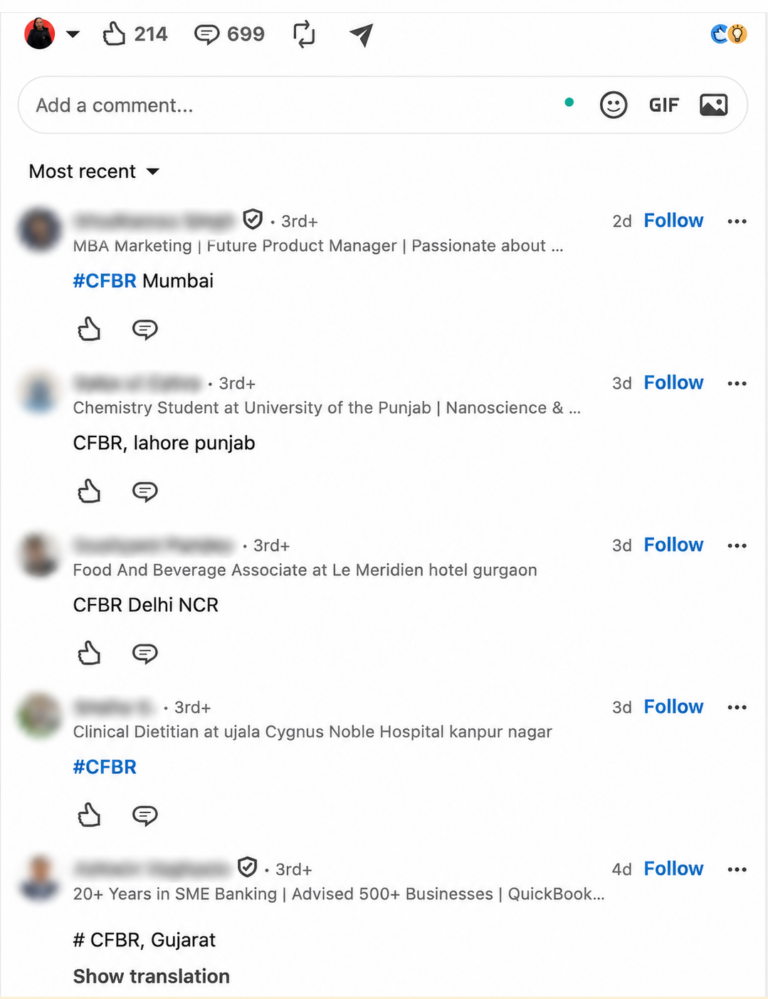
CFBR stands for Commenting for Better Reach. People comment it under a LinkedIn post to push that post into their own network’s feed, a quick way to help the author without writing anything longer.
There’s no LinkedIn feature behind it. CFBR is a user convention, the same way “+1” is, and the CFBR full form is the same wherever you see it.
CFBR on LinkedIn spelling variations
| Shorthand | What it means | Where you’ll see it |
|---|---|---|
| CFBR | Commenting for Better Reach | Layoff, job search, and hiring posts |
| cfbr or #CFBR | The same comment in lowercase or as a hashtag | Comments, and sometimes the post itself |
| CFR | Comment for Reach | The same posts as CFBR |
| CBFR | A typo for CFBR | Anywhere CFBR appears |
| ++ or +1 | A quick boost or “I agree” | Opinion and viral posts |
Where did CFBR on LinkedIn come from?
CFBR spread on LinkedIn during the 2022 to 2023 tech layoff wave. Feeds filled with layoff and “open to work” posts, and connections wanted a fast way to help without writing a recommendation for everyone they knew.
By March 2023 the acronym was common enough for The New York Times to cover it. The piece was republished by The Seattle Times under the headline “Sorry you were laid off. ‘CFBR.’”
That headline sums up the mixed feelings: the comment helps a little, and it says nothing.
CFBR has since moved well past layoff posts. You’ll find it under hiring posts, urgent requests like blood donor appeals, and posts from friends, anywhere someone wants a post to travel further.
How does CFBR boost your reach on LinkedIn?
CFBR runs on one mechanic: a comment can carry a post into the commenter’s network. When you comment, LinkedIn can show that post to your connections with a “commented on this” line above it. That puts the post in front of people outside the author’s network.
The theory is that every CFBR works as a small bridge. One comment from someone with 2,000 connections can move the post one network further out, and forty comments can move it forty networks out.
Comments also feed the engagement signals behind how the LinkedIn algorithm ranks posts, which is why a burst of them early on looks like a shortcut to reach.
Does CFBR still work on LinkedIn in 2026?
It depends on whose reach you mean.
- For the post’s author, real people commenting CFBR in volume can still push a post into network after network.
- For the commenter, a CFBR gives readers no reason to click on them, and LinkedIn’s 2026 feed changes target the automated and pod-driven versions either way.
In March 2026, LinkedIn announced changes to its feed with three targets: comment automation, engagement pods, and engagement bait such as “comment to agree” prompts. LinkedIn says it is working “to make engagement pods ineffective and curb comment automation.”
One human CFBR under a colleague’s post is harmless, and so is a wall of them from real people. CFBRs posted by a tool or traded inside an engagement pod are the version LinkedIn says it is working to make ineffective.
When is it ok to comment CFBR on LinkedIn?
CFBR still has a place when speed matters more than words:
- You want to support someone’s job search without vouching for their work.
- The post is urgent, such as a blood donor appeal or a missing person alert.
- The author asked people to comment so the post travels.
When CFBR backfires and reads as spam
Is CFBR spam? One comment for someone you know is fine. CFBR reads as spam in these situations:
- You leave it on every viral post, including posts from people you’ve never met.
- The post asked for advice or an opinion, and you gave four letters.
- The goal is your own visibility, and four letters give readers nothing to click on.
- A tool posts it for you. Automated comments are what LinkedIn’s 2026 rules go after first, and repeat offenders risk a restricted LinkedIn account.
What to comment instead of CFBR
Swap the four letters for one or two sentences that carry a specific detail and name who should care. The post gets the same comment signal, and readers get a reason to look at who wrote it.
On a hiring post from a company you know, for example:
“Worked with their RevOps team last year, and they run a tight pipeline. AEs who like clean data should take a look.”
On an industry post your buyers follow, for example:
“The ramp time point matches what I see: new SDRs book faster when week one goes to live calls. Which part of ramp do you find slowest?”
How to use CFBR comments for better outreach & LinkedIn networking
Every CFBR is a public, timestamped sign that a person is active on LinkedIn right now and paying attention to a topic. A CFBR on your own post goes further: that person read your post and chose to push it to their network, so you share a tie before you ever connect.
The reach CFBR promises goes to the author. The opportunity it creates goes to whoever follows up, which is also the crux of how to network on LinkedIn well: start with someone who already raised a hand.
Where the CFBR comment appears changes what it tells you
| Where the CFBR appears | What it signals | What to do |
| On your own post | The person read your post and pushed it to their network. You now share a tie. | Connect with a note that mentions the post. Signals can pull these engagers into a campaign. |
| On a hiring post from a company in your ICP | The company is adding headcount, and its network is active. | Treat the hiring post as a timing trigger. Reach the decision maker at the company and skip the commenters. |
| On an industry post your buyers follow | The commenter is active right now and cares about the topic. | Pull the post’s engagers, keep the ones who fit your ICP, and open on the topic itself. |
Start with your own posts, where a CFBR means someone boosted you. On someone else’s post, the people who wrote real comments are the stronger signal, and the keyword filter can pull just them.
The follow-up stays welcome when it thanks the person for the specific engagement, asks about the topic, and keeps the pitch out of the first note.
One line we hold firm on: CFBR started under layoff and “open to work” posts, and it’s still everywhere there. Leave those posts alone. Prospecting a laid-off person, or the people rallying around them, turns a moment of support into a sales list.
Why an existing tie lifts your connection acceptance rate
Connection notes that reference something you already share get accepted at higher rates than cold ones.
In our State of LinkedIn Outreach H2 2026 report, 240 connection-request-only campaigns with at least 50 contacts each set a 30.2% baseline.
Notes that referenced a follow, a group, or a shared network ran at 1.8 to 2.7x that rate.
The top note, “Hey {first_name}, thanks for the follow,” reached 81.1% acceptance across 435 contacts. These figures are associations: the tie has to be real, and senders who use one tend to do other things well too.
A CFBR on your post is the same kind of tie.
Mads Wedderkopp, former CEO of DreamInfluence, an influencer marketing platform for B2C brands, uses engagement on his posts this way when he hires, as he explained in a GTM Society interview:

I keep a short list of people that do interact with my content that has the right profile or right title that I know in a year or maybe in half a year, I will need a person like this. … And then I can use the reference that they’ve interacted with my content earlier.
Comment by hand, follow up with a system
Keep the comment human and let software handle what happens after it.
Some LinkedIn tools sell automated commenting, down to generic lines like “Nice!” posted on a schedule, and some guides still recommend engagement circles that trade comments on every post. LinkedIn is shutting both down.
How to turn post engagement into conversations with Expandi
Expandi’s Signals action pulls a LinkedIn post’s likers, commenters, or both into a Builder campaign, then runs the sequence you wrote. It works on your own posts and on anyone’s public post, runs on a free LinkedIn account, and syncs new engagers about every 24 hours.
Signals is the execution layer for signal-based outreach: a CFBR, a like, or a thoughtful comment becomes the reason for your first message.
To turn post engagement into conversations with Expandi Signals, run these five steps:
Step 1: Post about a problem your buyers have
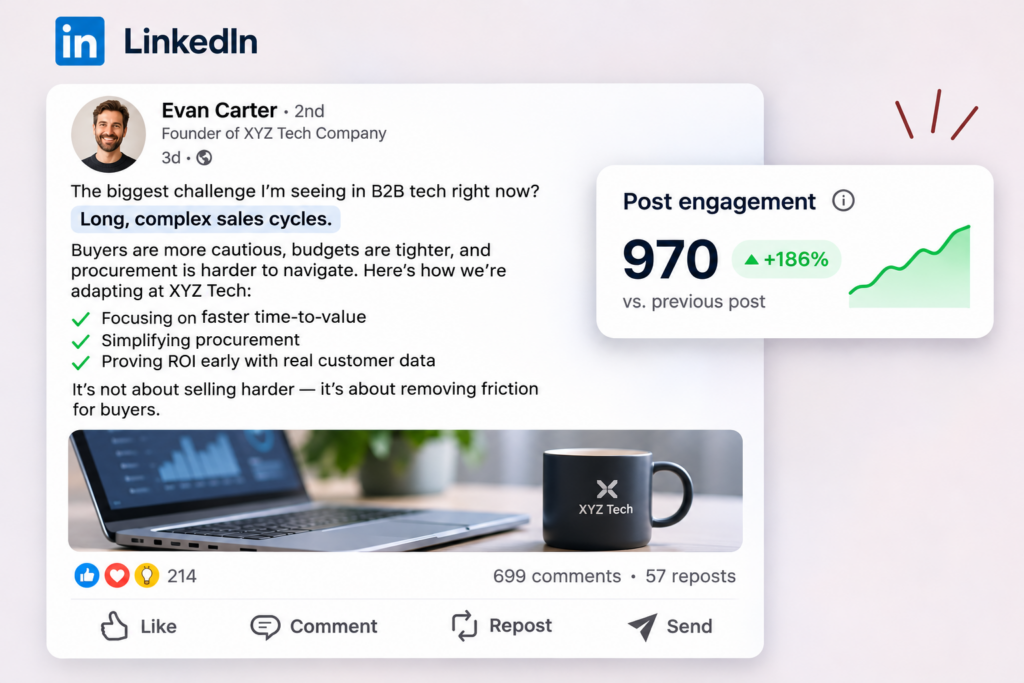
Signals need engagement to work with, so start with a post your buyers will want to react to.
A LinkedIn content strategy built around their problems keeps engagers coming, and commenting by hand on their posts puts your name in front of them before you connect.
If the post shares a link, check the preview with LinkedIn Post Inspector before you publish, so the post shows the right image and headline.
Need some inspiration? Try our free LinkedIn post generator tool to generate LinkedIn posts that spark real engagement.
Step 2: Add the Signals action to a Builder campaign
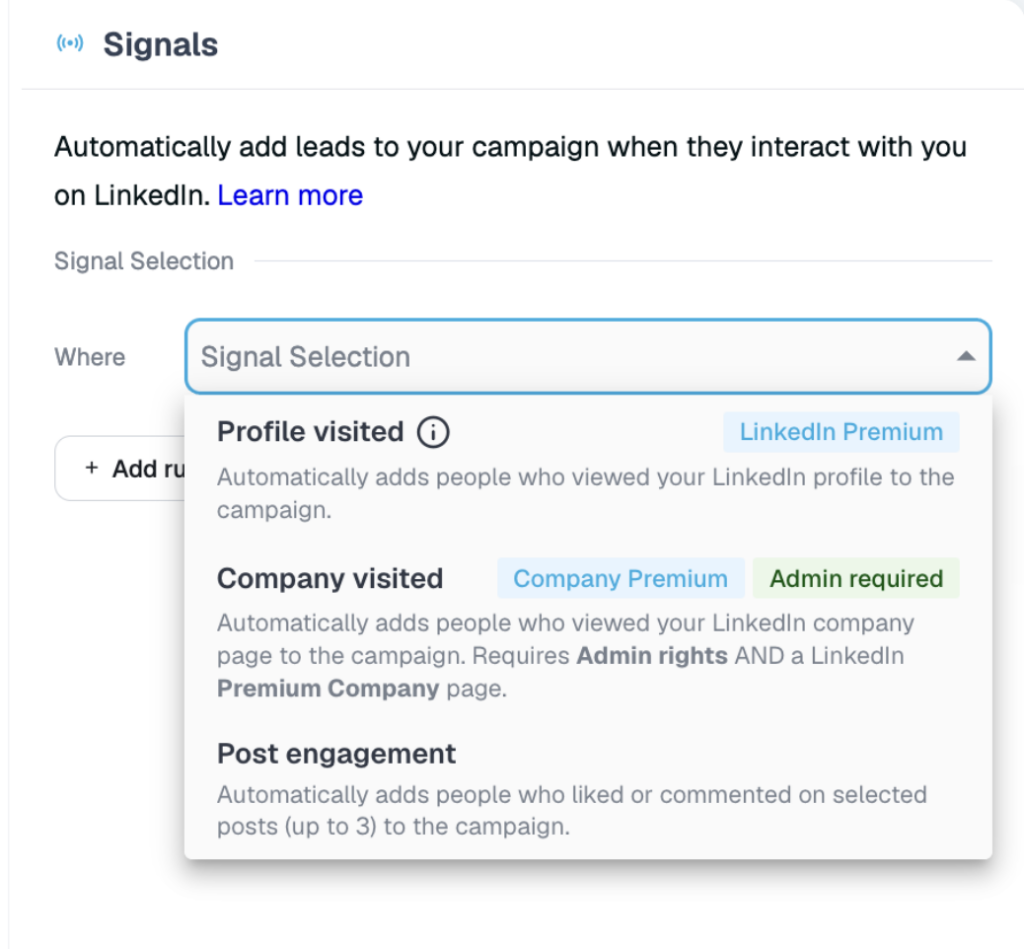
Create a Builder campaign and add the Signals action as the first step after Start, the only position it works in. Choose Post engagement, paste up to three post URLs, and switch on Reactions, Comments, or both. CFBR commenters come in with everyone else.
On an industry post, the keyword filter narrows the pull to commenters who used a specific word, which turns a busy thread into topic-level targeting.
Step 3: Filter post engagers to your ICP
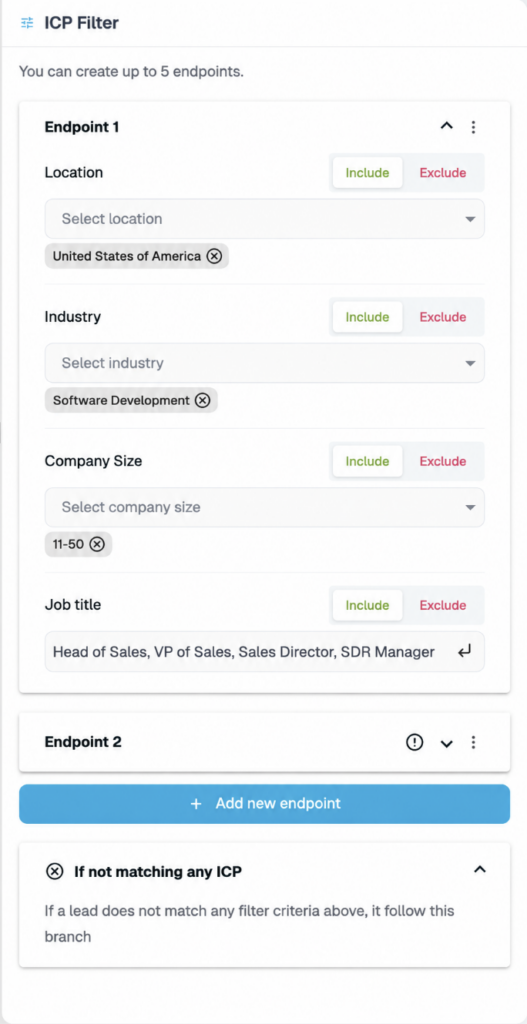
Add an ICP Filter condition right after the Signals step, so only people who match your job title, industry, and company size continue.
A post also pulls in recruiters, peers, and job seekers, and the filter keeps your sequence on buyers.
Step 4: Send a connection request that names the engagement
Keep the note under 175 characters, Expandi’s limit for connection notes, and lead with the post. Name the post and its topic, and leave the acronym out. For a commenter, for example:
“Hi {first_name}, thanks for pushing my post on SDR ramp time into your feed. Curious how your team handles it today.”
Write the note for the person who engaged, and change it when the post changes.
Nick Tomic, founder and CEO of Face2Face, a face-to-face video platform for websites, ran this play on one of his case study posts. He explained it in his GTM Society interview:

I had a post on LinkedIn which did really well, one of my case studies. That post got 50 comments. And what I did is I used Expandi. I put an automation so that it would go through the whole list of everybody that liked and commented that post. Then I added them on LinkedIn with a message saying, hey, I saw you engage with my case study, I was wondering if you wanted to learn more. And so I booked a couple of demos from that.
Step 5: Follow up with a three-message sequence
Replies to the connection note itself fell from 3.5% to 2.2% over the year in our H2 2026 data, so the messages after acceptance carry the conversation. Three-message sequences reply best, and message 2 converts at 8.8% per send, the highest of any position, so put your clearest ask there.
Build the sequence with Smart Campaigns, keep each message short, and take the thread by hand the moment someone replies.
Case study: How Stormbreaker turned a shared tie into a 54.5% reply rate
Stormbreaker, which Matt Cretzman founded as a LinkedIn lead generation agency, built its campaigns around people who already showed up somewhere.
In 2022, one campaign targeted attendees of Faith Driven Entrepreneur online events, and the connection note opened on that shared event:
“{first_name}, did you have the chance to attend any of the recent “Faith Driven” online events? I enjoy connecting with fellow faith business leaders who value collaboration. Anyways hope your business is going well!”
Two short follow-ups came after acceptance. Four hours later came an invite to a virtual coffee, and the next day a message with context on Matt’s two businesses.
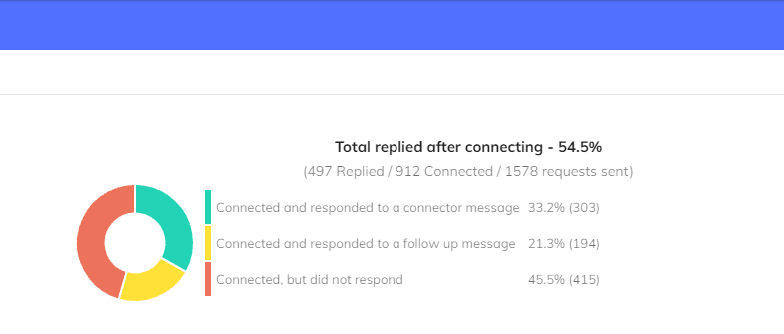
The Stormbreaker case study shows 912 of 1,578 requests accepted (58%). Of those 912 new connections, 497 replied (54.5%): 303 answered the connection note itself, and 194 replied to a follow-up.
The replies read like people picking up a conversation. One attendee wrote back that they had been at the conference and offered an intro call. A CFBR on your own post gives you the same kind of opener: a moment you and the prospect already shared.
Catch the signal behind the CFBR comment & improve your outreach
Let’s recap. CFBR (Commenting for Better Reach) can still carry a post for its author but does almost nothing for the person commenting, and it gives sellers a signal worth following up on.
LinkedIn’s 2026 feed changes make copy-paste comments worth even less, so write a real comment when you engage with someone else’s post.
The real value goes to whoever notices who engaged and follows up with context.
See who’s engaging with your posts and start the conversation: start your 7-day free trial.
FAQs
The full form of CFBR is Commenting for Better Reach. Some people expand it as Comment for Better Reach, and both mean the same thing. You’ll see it in capitals, in lowercase, or as the hashtag #CFBR.
Typing CFBR by hand now and then is safe. LinkedIn’s warning covers members who keep posting automated comments through scripts or browser plugins. The risk comes from a tool posting the same comment across hundreds of posts.
Yes, briefly and early. A short, personal thank-you adds fresh activity while the post is still circulating. Vary the wording so your replies don’t read like a script.
Reposting with a line of your own puts the post in your followers’ feeds under your name and tells them why it matters. A CFBR leaves it to LinkedIn to surface your comment activity. If you know the author’s work, a repost with one sentence of context does more.
No, CFBR is a LinkedIn habit, and it relies on LinkedIn showing your comment activity to your connections. On Facebook and Instagram, the acronym is rare, so a real comment or a share does more.


You’ve made it all the way down here, take the final step