Should You Let an AI Sales Agent Run Your Outbound?


Every AI sales agent pitch promises the same thing: it finds leads, writes the messages, sends them, and books meetings while you sleep. Our answer is to let it do most of that work and keep the decision on what gets sent.
When we compared AI-written LinkedIn messages with human-written templates inside the same 73 accounts, the unedited AI messages were accepted 20.4% of the time, against 23.2% for the accounts’ own templates.
Here’s what we’ll cover:
- What an AI sales agent is, and where an assistant ends and an agent begins.
- The outbound work AI already handles well.
- Four ways a fully autonomous AI SDR goes wrong, including the LinkedIn risk.
- A step-by-step split of what to hand over and what to approve.
- Six questions to ask before you buy, and what an approval step looks like in practice.
Key Takeaways
- An AI sales agent researches, writes, and acts across several outbound steps. The real buying decision is which of those steps it gets to finish without you.
- Hand AI the work that’s cheap to check: ICP qualification, list building, enrichment, first drafts, and diagnosing stalled campaigns.
- Keep a person on what can’t be undone: activating campaigns, sending messages, and answering warm replies, especially on LinkedIn, where a restricted account stops all outreach.
- In our data, unedited AI messages were accepted 20.4% of the time, against 23.2% for the same accounts’ human-written templates, so the AI drafts and a person edits.
- Expandi works with the AI assistant you already use: it builds lists, campaign drafts, and reply drafts, and nothing goes live until you activate or approve it.
Should You Let an AI Sales Agent Run Your Outbound?


What an AI sales agent does well
An AI sales agent is software that uses a large language model to research, write, and act on outbound tasks across several steps. It’s strongest at the work that’s slow by hand and cheap to check:
- Researching accounts.
- Qualifying leads.
- Building lists.
- Writing first drafts.
- Working out why a campaign stopped sending.
An AI SDR or AI BDR is the same idea aimed at booking first meetings.
Sellers expect the time savings to be real. In Salesforce’s State of Sales 2026 survey of 4,050 sales professionals, 54% of sellers say they’ve used agents, and they expect agents to cut prospect research time by 34% and email drafting by 36%.
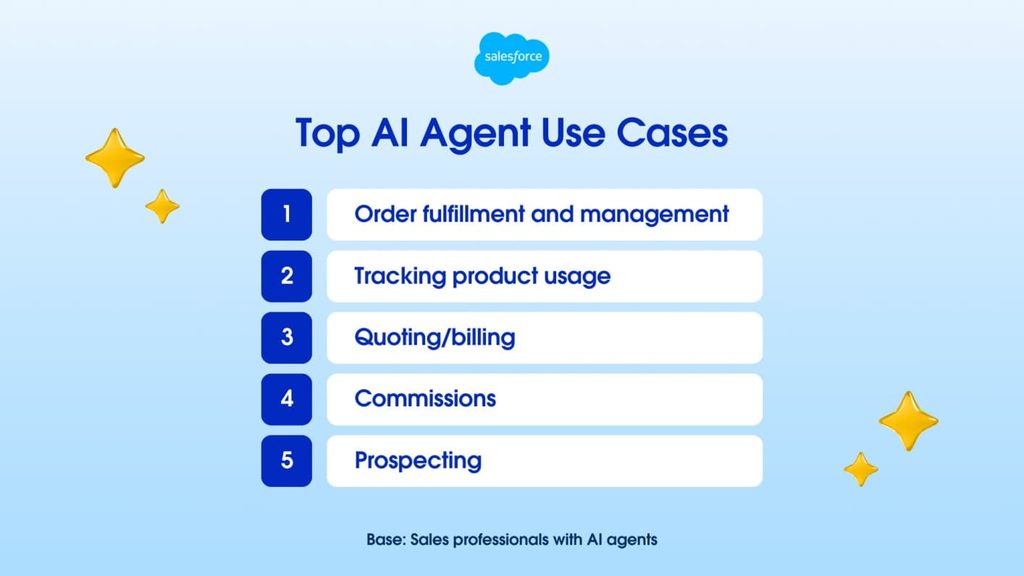
The outbound jobs where an AI sales agent pulls its weight:
- Research: reading a prospect’s profile, company, and recent activity before a rep touches the account.
- ICP qualification: sorting a raw list by company size, industry, and role, and flagging the edge cases.
- List building and enrichment: turning a plain-language description into a list, with a one-line reason each lead fits.
- First drafts: sequences, connection notes, and follow-ups a person can edit in minutes.
- Diagnostics: naming why a campaign stalled, from a daily limit to a disconnected account.
Diagnostics is the most underrated of the five. A stalled campaign can mean a hit limit, a verification PIN, or an empty list, and an agent connected to your outreach tool checks them all at once.
For the research side, our playbook on AI for sales prospecting covers the prompts and the checks. None of this work reaches a prospect until someone sends it, and that’s where the risk starts.
Where an autonomous AI SDR goes wrong
An autonomous AI SDR goes wrong when it sends without a person seeing the work. The damage comes from small mistakes repeated across a whole list, on LinkedIn accounts and sending domains that take time to recover.
The AI sales assistant vs agent question comes down to how much of the work happens “without human input,” and AI sales tools fall along a spectrum:
- AI sales assistant: suggests research, copy, or next steps, and a person does the work.
- Agent with approval: does the work end to end, and a person signs off before anything reaches a prospect.
- Fully autonomous agent: does the work and sends on its own, inside whatever guardrails it was given.
And the number of agents is about to climb.
Gartner predicts that by 2028, AI agents will outnumber sellers by 10 times, yet fewer than 40% of sellers will say agents improved their productivity. Dan Gottlieb, VP Analyst in the Gartner Sales practice, gave the reason: “If those systems are fragmented, the agents will scale the fragmentation.”
The AI outbound risks fall into four groups.
It can cost you the LinkedIn account or the sending domain
On LinkedIn, the risk is account safety.
LinkedIn’s prohibited software policy bans unauthorized automated methods for sending messages, and members who break it risk having their accounts restricted or shut down.
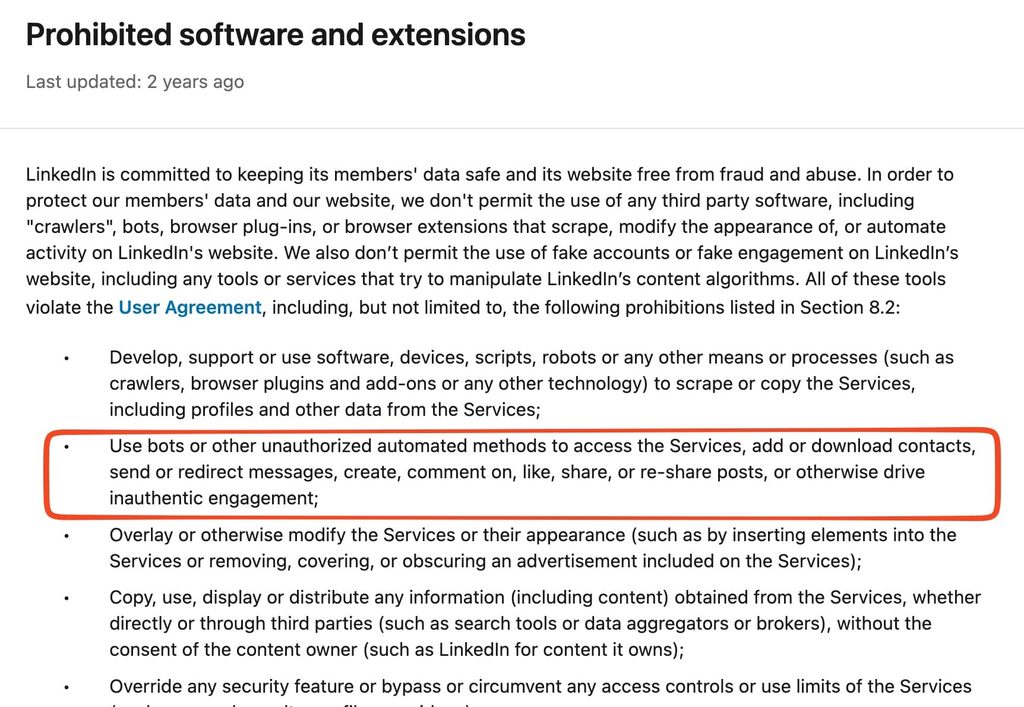
A restricted account stops every campaign on that profile at once, along with the conversations sitting in its inbox.
What gets an account flagged is activity that looks automated:
- Sudden jumps in volume.
- Actions at all hours.
- The same exact message repeated across hundreds of profiles.
An agent chasing a meeting target pushes on all three, because more sends look like more progress.
Safe sending runs on daily caps, a warm-up period that raises volume gradually, and fixed sending hours, and any agent you connect should have to work inside them. If an account has already been hit, here’s what to do when your LinkedIn account is restricted.
On email, the risk is reliability.
Google’s sender guidelines ask senders to keep reported spam rates below 0.10% and never reach 0.30%.
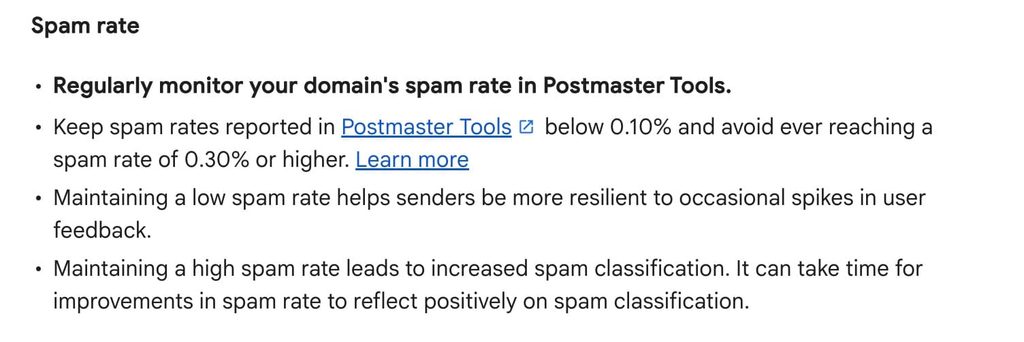
Domain reputation is shared, so a burned domain hurts every rep who sends from it, and an agent tuned for volume gets there faster than a team that watches the numbers.
Its mistakes repeat before anyone sees them
An autonomous agent copies a mistake to every lead in the sequence before a person reads the first send. One wrong claim about a prospect’s company, a name pulled from the wrong field, or a cheerful follow-up to someone who asked to be left alone goes to the whole list at once.
A human SDR who makes the same mistake makes it once, notices, and fixes it. An agent with no review step makes it a few hundred times, and your brand carries every one.
Unedited AI copy still trails human templates
In our own data, AI-written outreach lost to human-written templates once we compared like with like.
Across 118 campaigns from 73 accounts (October 2025 to June 2026), AI-personalized campaigns looked stronger at first glance: 20.4% acceptance against 17.3% for everyone else.
That gap was selection bias, because the accounts using AI were stronger operators to begin with. Compared within the same accounts, unedited AI messages were accepted 20.4% of the time against 23.2% for human-written ones, about 12% lower (a 2.8-point gap).
Reply rates were flat at 6.6% and 6.5%, per our State of LinkedIn Outreach H2 2026 report.
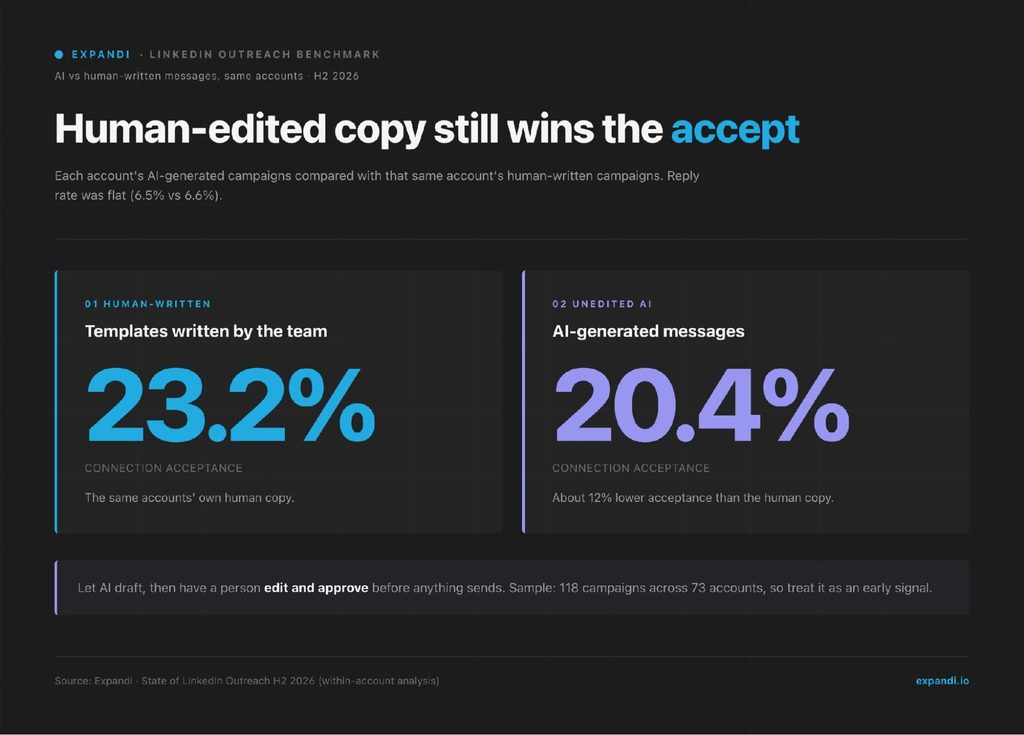
The finding is about unedited AI copy.
The report’s recommendation is to use AI for the starting draft, then rewrite it with what you know about the prospect, which keeps the speed and puts a person on the final word.
Glenn Miseroy, our co-founder and CEO, framed the result in the report’s introduction:
“There are more tools, more AI, and more automation than ever, but the fundamentals still determine who wins. … Technology should help teams be more relevant and more human … and not to just send more.” – Glenn Miseroy, Expandi
You can’t learn from what you can’t see
An agent that decides and sends on its own leaves you with outcomes and no reasoning.
When meetings come in, you can’t tell whether the targeting worked or the timing got lucky, and when they stop, you can’t tell what changed.
When the agent’s choices pass through a person, every edit becomes feedback: you see which segments it misjudges, which claims it stretches, and which drafts you send untouched.
That review record is how an AI SDR earns more autonomy over time.
Which outbound steps should an AI sales agent own?
An AI sales agent for outbound should own the steps that are cheap to check and easy to fix, draft the steps where an error repeats across every lead, and leave the irreversible ones to a person.
That’s human-in-the-loop sales AI in practice: the review point sits on the send, and the rest of the work moves at machine speed.
Here’s how the split looks, step by step:
| Outbound step | Who should own it | Why |
|---|---|---|
| ICP qualification, list building, and enrichment | AI | Cheap to check and easy to fix before anything is sent. |
| Campaign setup and sequence structure | AI drafts, you approve | A wrong step or delay repeats across every lead in the campaign. |
| Message copy | AI drafts, you edit | Unedited AI messages were accepted 20.4% of the time, against 23.2% for human templates, in our data. |
| Activation and sending | You | Irreversible, and on LinkedIn it carries account risk. |
| Reply handling | AI drafts, you approve | A wrong reply to a warm lead can cost the deal. |
| Diagnosing stalls and reading results | AI | Saves the most time and sends nothing. |
The rule of thumb: automate what’s cheap to check, and approve what you can’t take back.
Reply handling deserves the most care, because a warm reply is the moment a campaign turns into pipeline. Let the agent catch up on the thread and draft the answer, then read it before it goes.
The same holds for longer B2B lead nurturing, where one off-tone message can undo weeks of follow-up.
Autonomy belongs to the steps your review record shows the agent getting right. If you’ve stopped editing its list qualification for a month, that step is ready to run on its own, while message copy and replies earn it last.
Alexandra Harris, co-founder and CMO of CogniStream AI, an AI voice research platform, learned what scaling early costs. She put it this way in a GTM Society interview:
“I had to pull back from the scaled outreach because we’re still experimenting with product market fit. Once we nail the messaging, then we go and scale up.” – Alexandra Harris, CogniStream AI
How to evaluate an AI sales agent before you buy
Evaluate an AI sales agent on control before features: whether it can send without approval, whether you can see why it acted, and whether it respects the limits of the channels it touches.
Feature lists look alike across vendors, and six questions separate them.
Vendor labels are a weak guide too.
Gartner estimates that only about 130 of the thousands of agentic AI vendors are real, with the rest “agent washing” existing assistants and chatbots. It also predicts that over 40% of agentic AI projects will be canceled by the end of 2027 due to escalating costs, unclear business value, or inadequate risk controls.
Ask every AI sales agent vendor these six questions:
- Can it send or activate without approval, and is that the default? Approval should be built in, with no setting that turns it off.
- Can you see what it did and why? Look for an action log you can filter by account, plus a reason for each decision.
- Does it respect platform limits, warm-up, and sending hours? Its actions should count against the same daily caps as everything else.
- What can it write to? Map every system it can change, from lead lists to your CRM, and confirm what stays out of reach.
- Can you switch it off instantly? A one-click disconnect matters most on the day something goes wrong.
- What does it do with a reply it doesn’t understand? It should flag the thread for a person and leave the reply unsent.
Ilija Cosic, our Head of Sales, rates the agent he runs on Expandi by its limits first. He said this during our MCP launch webinar:
“It wasn’t really what it produces. It’s actually what it refuses to do. My system in the background keeps a ledger so it never contacts someone we’ve already spoken to.” – Ilija Cosic, Expandi
What the middle ground looks like in practice for AI sales agents
The middle ground is agentic outbound with a hard stop before anything leaves your account.
In Expandi, you connect the AI assistant you already use, such as Claude or ChatGPT, and it builds lists, drafts campaigns, writes reply drafts, and diagnoses stalls, while activation and sending stay with you.
The connection runs on the Model Context Protocol (MCP), an open standard for plugging AI assistants into other software, and our guide to MCP for outbound explains it in plain terms.
A week of outbound with it looks like this.
Step 1: Turn a plain-language description into a qualified list
Describe the ICP and let the AI sort an existing list. For example:
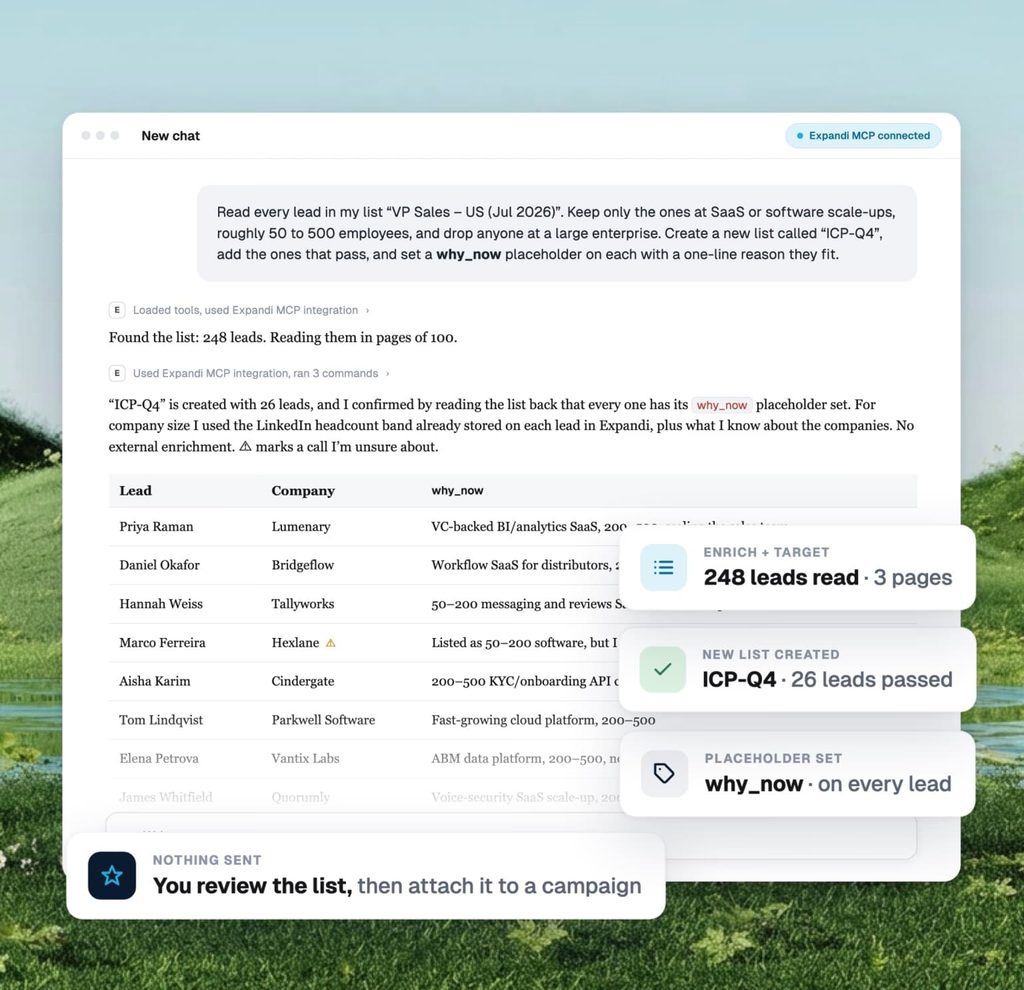
“Read every lead in my list … Keep only the ones at SaaS or software scale-ups, roughly 50 to 500 employees, and drop anyone at a large enterprise. Create a new list called ‘ICP-Q4’, add the ones that pass, and set a why_now placeholder on each with a one-line reason they fit.”
In this example, the AI read 248 leads, kept 26, created the list, and marked the calls it was unsure about. Nothing is sent. You review the list, then attach it to a campaign.
Step 2: Get a campaign draft from a short brief
Give the AI the audience, the offer, and the goal, and ask for a draft. For example:
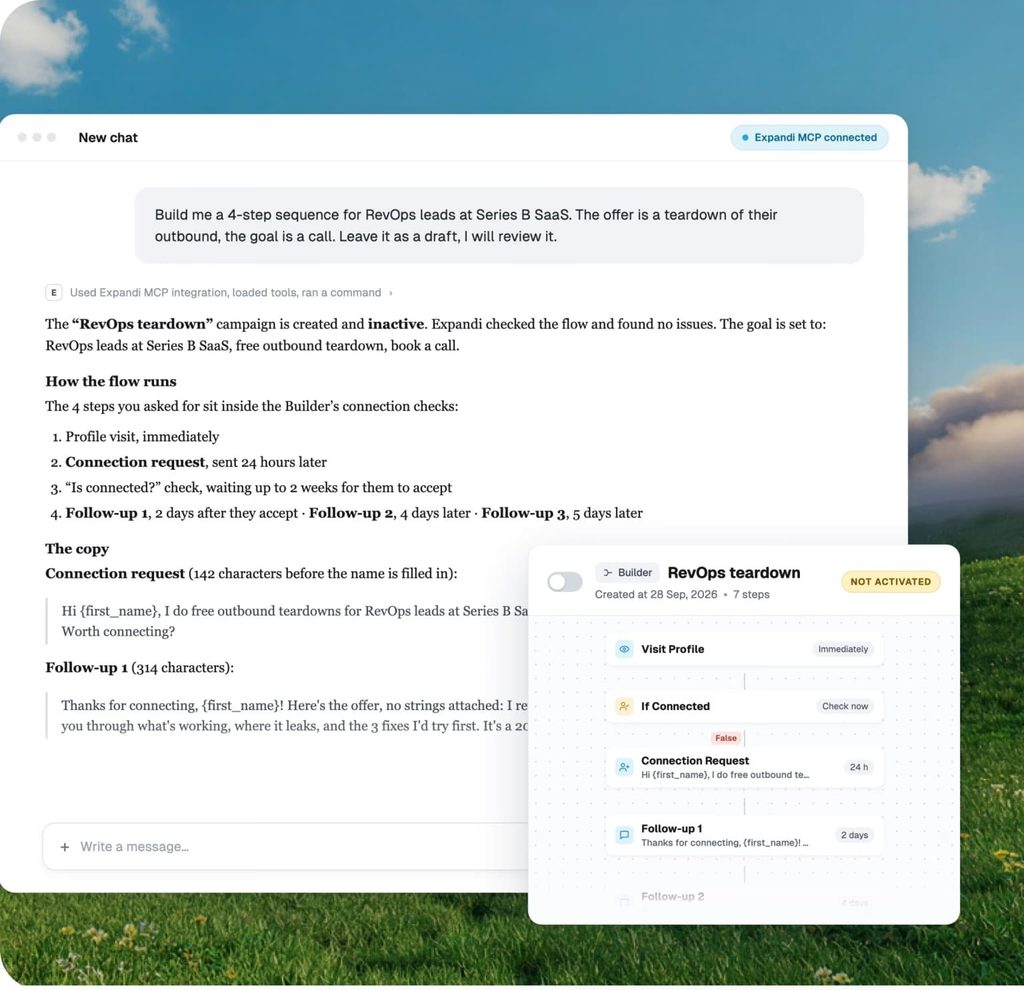
“Build me a 4-step sequence for RevOps leads at Series B SaaS. The offer is a teardown of their outbound, the goal is a call. Leave it as a draft, I will review it.”
The campaign lands in the Expandi campaign builder as an inactive draft, with the steps, delays, and copy written in. Sequences can mix LinkedIn steps with email steps, so one review covers both channels.
The AI can’t activate a campaign or edit a running one, so you read every step, attach the audience, and switch it on yourself.
Step 3: Approve the replies your AI drafts
Ask the AI to catch you up on a conversation and draft the answer. For example:
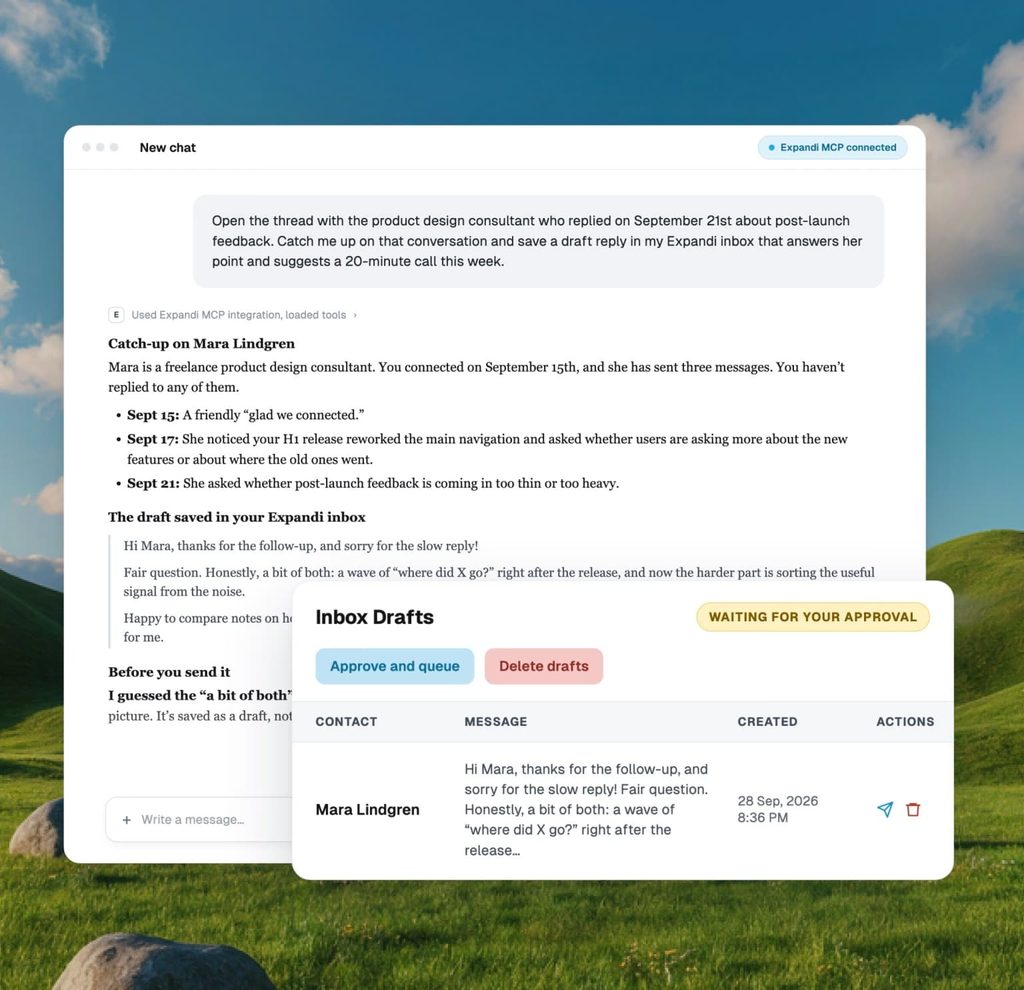
“Open the thread with the product design consultant who replied on September 21st about post-launch feedback. Catch me up on that conversation and save a draft reply in my Expandi inbox that answers her point and suggests a 20-minute call this week.”
The AI summarizes the thread and saves the reply as a draft in your Expandi inbox, where it waits for your approval. You can edit it, send it, schedule it, or delete it, one draft at a time or in bulk.
The AI works only on existing threads, with no new outreach and no connection requests.
Step 4: Ask why a campaign stalled and how much headroom is left
When a campaign goes quiet, ask for the cause and the numbers. For example:
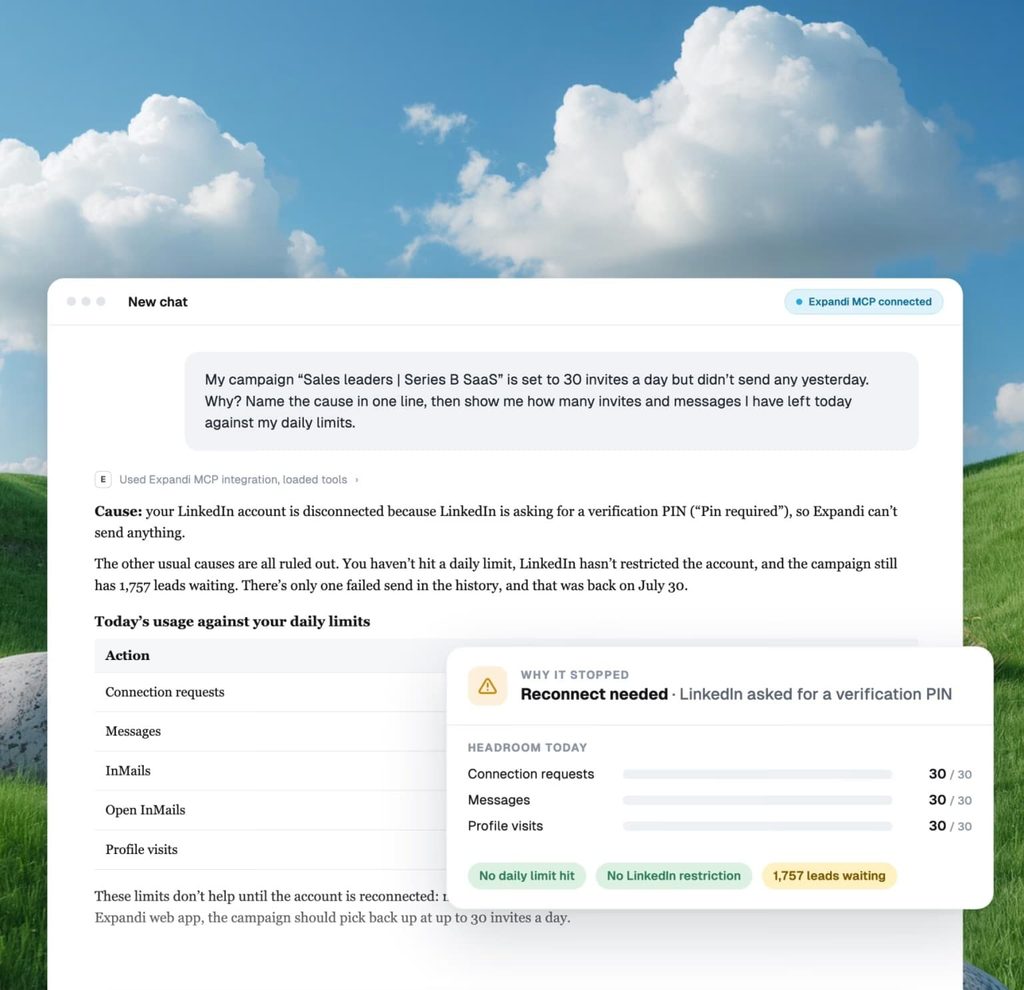
“My campaign ‘Sales leaders | Series B SaaS’ is set to 30 invites a day but didn’t send any yesterday. Why? Name the cause in one line, then show me how many invites and messages I have left today against my daily limits.”
In this example, the cause was a disconnected account: LinkedIn had asked for a verification PIN.
The AI also returned the account’s headroom, meaning how many of today’s invites, messages, and profile visits are still unused under its daily limits. Ask for that number before you add volume.
The boundaries that stay fixed
Across all four steps:
- The AI acts only when you ask it to.
- It can do only what your own Expandi user can do, so the roles you set in Workspaces still apply.
- It works inside the same daily limits, warm-up, and sending hours as the rest of Expandi.
- Every action lands in an actions log you can filter by app, LinkedIn account, and action.
- You can disconnect every connected tool in one click.
There’s no tool that lets the AI send a message or activate a campaign, so approval can’t be lost to a misconfigured setting.
That’s the setup Expandi for sales teams is built around: the AI SDR does the setup work, and the team keeps the send.
How BelVG runs it across five LinkedIn profiles
BelVG, an e-commerce development company, runs this setup across five LinkedIn profiles.
Taras Pashniak, its GTM engineer, builds and monitors campaigns from Claude Code. He put it this way when we spoke with him:
“Before, I spent hours operating Expandi. Now it’s all from my Claude Code. I have skills and commands I built myself, and I run them daily to monitor the situation, and that’s awesome. I can launch a campaign directly from Claude Code and only touch Expandi to press the launch button. That’s all.” – Taras Pashniak, BelVG
Over the 90 days to October 7, 2026, those profiles sent 7,696 connection requests, about 20% were accepted, and their 29% reply-to-acceptance ratio beat the 22% median for Expandi accounts.
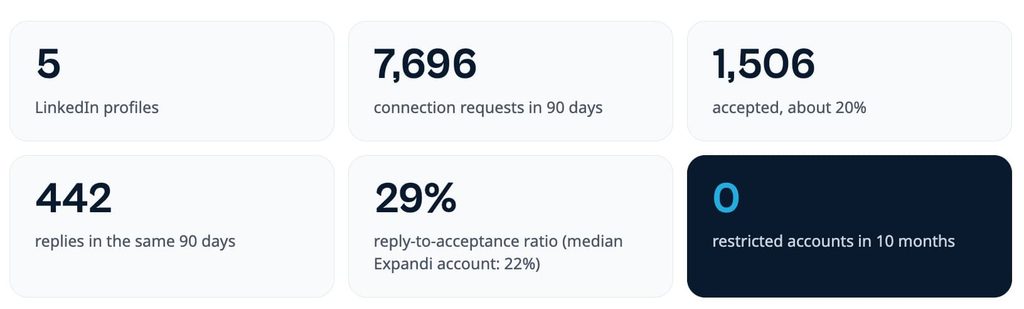
No BelVG account has been restricted in 10 months. Read the full BelVG story for the setup here.
Connect your AI to Expandi from your account settings to run the same loop. It needs an active Expandi subscription.
So, should an AI sales agent run your outbound?
Let an AI sales agent run most of your outbound work, and keep the send for yourself until the agent has earned more.
Hand it research, list building, enrichment, first drafts, and diagnostics today, approve campaigns and replies before they go out, and widen its autonomy one step at a time as your review record shows it getting those steps right.
Choosing which tasks run on their own is next on our roadmap, and until it ships, nothing your AI builds goes live without you.
Start a free 7-day Expandi trial and connect the assistant you already use.
AI sales agent FAQ
An AI sales agent changes the SDR job more than it removes it. Research, list building, and first drafts move to the agent, and the SDR’s time shifts to reviewing what goes out, handling warm replies, and working the accounts that need a human touch.
Teams that run agents well still need someone who knows the buyer well enough to spot a bad draft.
It’s as safe as the limits around it. LinkedIn restricts accounts for automated activity that breaks its rules, so any AI that sends should work inside daily caps, a warm-up period, and sending hours, with a person approving messages before they go.
No tool can guarantee an account will never be restricted, which is why approval and conservative limits matter more than speed.
AI sales agent pricing comes in a few shapes: a per-seat license, credits that each lead or reply draws down, a fee per contact or per conversation, or a flat monthly managed service.
Several fully autonomous platforms publish no price and quote annual contracts on request. Budget for the extras too: sending domains and mailboxes, data credits, and the time someone spends reviewing the output.
Yes, once it’s connected to your outreach tool. On their own, ChatGPT and Claude can research prospects and write drafts, but they can’t see your campaigns or act in them. Connected through MCP (Model Context Protocol), a standard way for AI assistants to plug into other software, they can read leads, build campaign drafts, and draft replies inside the tool, within whatever permissions that tool allows.
Sales automation follows rules a person set in advance, such as sending the second follow-up if there’s no reply after three days. An AI sales agent reasons about each case, deciding what to research, what to write, and which step comes next based on what it finds.




You’ve made it all the way down here, take the final step