What Is MCP, and Why Does Your Outbound Stack Need One?


MCP for outbound is the difference between an AI agent that writes your LinkedIn message and one that can check whether the connection request was accepted before it sends.
On September 2, we opened the Expandi MCP beta, and the hard part of building it was deciding which live campaign context an agent needs that no CRM holds. Outbound tools are becoming things AI agents operate, and the MCP servers shipping from CRM and email platforms skip the LinkedIn layer entirely.
Here’s what this guide covers:
- What MCP is, in one paragraph you can repeat to your team.
- The outbound context that CRM-first MCP servers leave out.
- What an MCP-connected outbound stack looks like in practice.
- What the Expandi MCP beta can and cannot do today.
- Four questions to ask any vendor about MCP readiness.
What is MCP, and what does it change for an outbound stack?
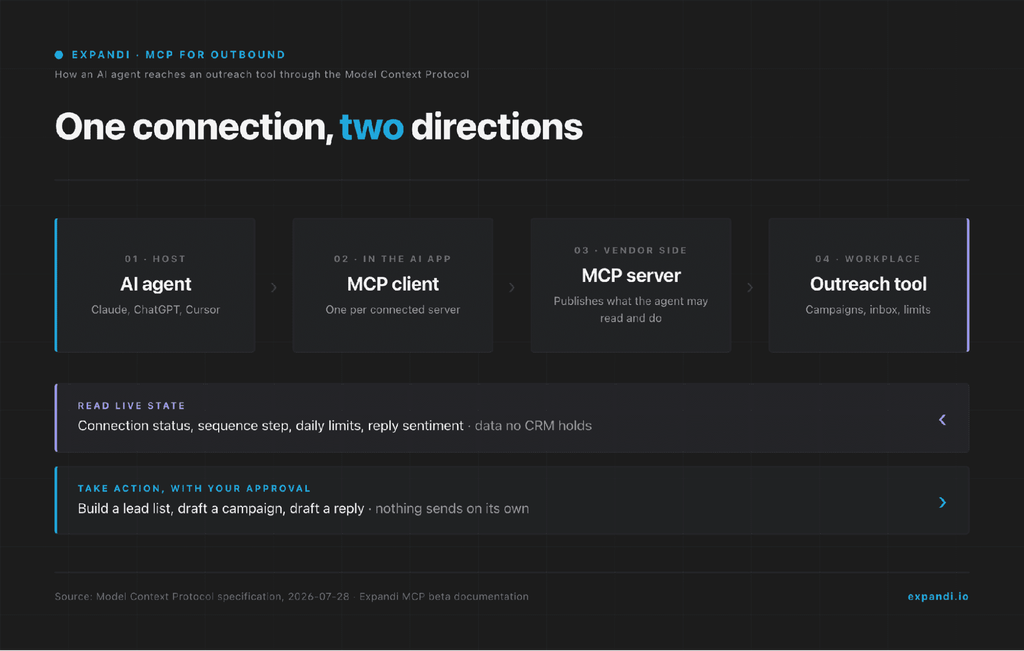
MCP (Model Context Protocol) is an open standard that lets an AI application connect to external software through one shared interface. The AI app, such as Claude or ChatGPT, acts as the client. The software it connects to, whether a database, a CRM, or a LinkedIn outreach tool, runs an MCP server that publishes which data the AI may read and which actions it may take.
The plainest analogy is a USB-C port.
- Before a common port, every device shipped with its own cable, and before MCP, every AI tool needed a custom integration with every piece of software it touched.
- With MCP, a vendor builds one server and any MCP-capable AI can plug in.
Anthropic open-sourced MCP in November 2024 and handed it to the Linux Foundation’s Agentic AI Foundation a year later.
At that point the maintainers reported over 97 million monthly SDK downloads and 10,000 active servers, with client support in Claude, ChatGPT, Cursor, Gemini, Microsoft Copilot, and VS Code. By the July 2026 specification release, that figure had grown to close to half a billion downloads a month.
The change for an outbound stack is in the verb.
- An AI agent with no MCP connection can draft a message for you.
- Connected through MCP, it can read the campaign, see where each lead sits, and act inside the tool with your approval.
That turns an outreach platform into something an agent can operate.
Why MCP for outbound needs more than CRM context
The MCP servers shipping from revenue platforms expose pipeline data.
Outreach’s MCP Server, generally available since February 2026, gives Claude and other agents its sequences, prospects, and deal records. Apollo’s covers contacts, enrichment, and email sequences. Warmly’s guide to MCP for sales teams is built around CRM records, calls, and website visitors.
Outreach sits in the sales engagement category and does a different job from a LinkedIn outreach tool, so the comparison here is about which context each server exposes.
None of that context tells an agent what is happening on LinkedIn. Social outbound has state of its own, and it lives in the outreach tool:
- Connection status: pending, accepted, or withdrawn after a set number of days.
- Sequence position: which step a lead is on and whether a branch condition fired.
- Account limits: how many of this week’s connection requests remain, and whether the account is still warming up.
- LinkedIn InMail: whether the lead has an Open Profile, and how many credits are left. Sales Navigator allocates 50 InMail credits a month, capped at 150.
- Reply state: whether the lead answered, and whether the reply reads as interested.
- Signals: who visited the profile or engaged with a post, the triggers signal-based outreach campaigns run on.
Two tasks show why that context is load-bearing.
First: should this lead get an InMail now, or wait for the connection request to be accepted?
A CRM knows the lead’s stage. The right answer depends on how long the request has been pending, whether the profile accepts Open InMail, and whether a credit is worth spending.
Second: why did this campaign send 12 messages today when it sent 40 yesterday?
The cause is a daily limit, a warm-up schedule, sending hours, an empty lead list, or a disconnected account. None of those facts exist in a CRM. An agent without them will guess, and an agent that guesses on LinkedIn puts the account at risk.
Agents are taking over more of this operating work, and the teams building around them are restructuring.
JB Daguené, founder and CEO of Evergrowth, a platform that builds agentic solutions so sales teams can work with agents, said this in a GTM Society interview:
“We actually created an agent that replaced our research team, and that was like 70 people. … In our team, we’re 16 people, but we have more than 40 agents that we work with. … Think about, do I really need a colleague for this, or can I create a digital colleague?” — JB Daguené, Evergrowth
A digital colleague running LinkedIn outreach needs the outbound state above. That is why the social layer needs an MCP server of its own.
What an MCP-connected outbound stack looks like in practice
In practice, an MCP-connected outbound stack means you describe the outcome to an AI agent, the agent reads live campaign state through the MCP server, prepares the work, and you approve what goes out.
Four routine tasks, and the context each one needs:
| Task you hand the agent | Context it needs | Where that context lives |
|---|---|---|
| Build a lead list from an ICP description | Existing leads, enrichment fields, blacklist | Outreach tool plus enrichment tools |
| Draft replies to unanswered conversations | Full thread, sequence step, reply sentiment | Outreach tool inbox |
| Decide between an InMail and waiting for the accept | Connection status, Open Profile flag, credits left | LinkedIn account plus outreach tool |
| Explain why sending stalled | Daily limit, warm-up stage, sending hours, account status | Outreach tool |
Two rules keep this safe: a person approves anything customer-facing, and every action lands in a log you can audit.
The MCP security best practices post covers the full setup. And if the stack already has more tools than the team runs, which AI tools a GTM strategy needs is the question to settle first.
Where the Expandi MCP fits in your outbound stack
The Expandi MCP beta is a remote MCP server for our LinkedIn automation platform, opened to customers in batches from September 2, 2026, with general availability set for September 30.
You connect an AI tool once from Account Settings, sign in to Expandi to authorize it, and the agent can then work across every LinkedIn account you manage.
Here is what it can do today:
- Find and enrich leads already in your account with data from your other tools, written back as placeholders you can use in messages.
- Build lead lists from a plain-language description of who you want to reach.
- Add, pause, and resume leads inside campaigns.
- Draft a full campaign, with steps and messages, for you to review and launch.
- Read inbox conversations and draft replies for your approval.
- Explain why outreach stopped: daily limit hit, outside sending hours, account disconnected, or out of leads. If an account drops, it says so rather than pretending to reconnect.
- Report acceptance, reply, and conversion rates by campaign.
Claude, ChatGPT, Cursor, and automation tools like n8n and Make connect to the same server address.
Claude and ChatGPT sign in through a browser, and tools that cannot open a browser use an access token from the setup page. Existing features stay in place: the AI Analyzer still sorts replies by sentiment inside the app, and a connected agent works on top of that.
What it deliberately leaves out matters as much.
Nothing sends or launches without you: campaigns are built as drafts you assign an audience to and activate, replies wait for your approval, and the agent acts only when asked.
It is a beta, with beta edges. Access opens in waves from the Expandi MCP waitlist, where the 23-minute launch recording also lives, and requires an active subscription. Disconnecting revokes every connected tool at once, with no per-tool disconnect yet.
The output also depends on the context the agent already has: give it your offer, audience, tone, and a few past messages first, or the drafts will read generic.
How to evaluate MCP for outbound in your own stack
MCP for outbound comes down to one question per tool: can an agent read the live state that outreach decisions depend on, and act on it with a person approving what goes out?
Ask every vendor in the stack:
- Does the MCP server expose live state (connection status, limits, sequence step), or only records?
- Can the agent act as well as read, and which actions stay human-approved?
- Does every action land in a log you can filter by account?
- Does it work with the AI tools your team already pays for?
Run those against every tool you own, then start a free, 7-day Expandi trial and connect your AI tool from Account Settings.
Frequently asked questions
No. An API is a set of endpoints one piece of software exposes, and every AI tool that wants to use it needs its own custom integration. MCP is a shared protocol on top: the vendor runs one MCP server that wraps its own API, and any MCP-capable AI client can connect, discover the available tools, and call them.
The agent decides which tools to call at run time based on your request, so no developer has to wire each call in advance.
For the Expandi MCP beta, no. You copy a server address into your AI tool’s connector settings, or paste a ready-made prompt that adds the connection for you, then sign in to Expandi and authorize it. Building your own MCP server is developer work. Using one a vendor built is a settings change.
A Zapier or n8n workflow is a fixed path a person designs in advance: when this event fires, run these steps. MCP hands the agent a menu of tools and lets it choose which to call, in what order, based on the request in front of it.
Workflows suit repeatable event-driven jobs, and MCP suits open-ended tasks such as diagnosing why a campaign stalled. The two also combine, since n8n and Make can connect to an MCP server with an access token.
Only if the MCP server allows it. In the Expandi beta it cannot: the agent drafts replies and builds campaigns as drafts, and a person approves each reply and launches each campaign. The agent also acts only when asked, and every action stays inside the account’s daily limits and warm-up.
Check this behavior in any outreach tool before you connect an agent to it.
No. MCP connects the agent to your tools and tells it which actions are available. Everything the agent knows about your offer, audience, and tone comes from what you have given it in the conversation, a project, or its memory. Load that context before you ask it to draft anything, and reuse the same conversation or project so it carries over.




You’ve made it all the way down here, take the final step