How Many GTM Tools Do You Really Need? Building a Lean Stack

GTM tools multiply faster than the pipeline they’re meant to create, and a working outbound motion needs fewer of them than the vendor rankings suggest: one tool per layer, three to five paid tools in total.
We went back through the founder interviews in our GTM Society bank and pulled every passage where an operator described their stack. One operator described a three-tool stack in a single sentence, and another had replaced a 70-person team with a single agent.
Here’s what this guide covers:
- The five layers every GTM stack has, and the one job each layer does.
- What over-tooling costs in spend, data, and rep attention, with 2026 numbers.
- The minimum tool count per layer, with named picks and what each one replaces.
- How Evergrowth swapped a 70-person research team for one agent, and what it cost them.
- A five-question test for when a new GTM tool earns its seat.
Key Takeaways
- A GTM stack has five layers: data, outreach, signals, CRM, and analytics. A lean GTM stack runs one tool per layer, and two of those layers can share a tool.
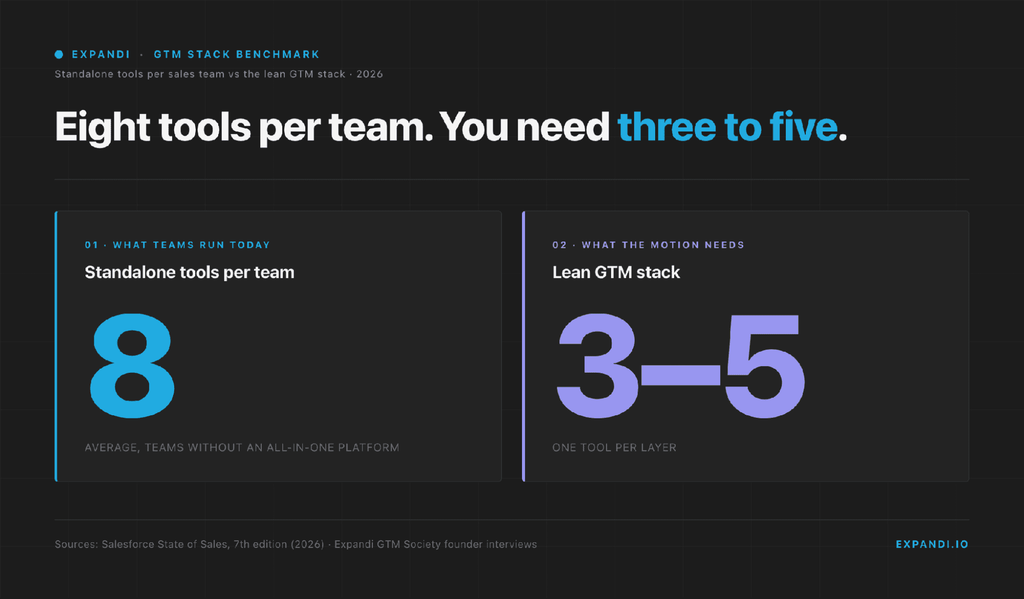
- Per Salesforce’s 2026 State of Sales, only a third of sales teams use an all-in-one platform. The rest average eight standalone tools, and nearly half of reps say the volume overwhelms them.
- Three to five paid tools cover a full outbound motion: one data source, one outreach platform, one CRM, and glue between them. Dedicated analytics comes later.
- Add a GTM tool only when it fills an empty layer or replaces two tools with one. A new tool never fixes a missing ICP or an unclear offer.
- Expandi covers two of the five layers in one seat, outreach and signals, and the inbox that comes with them: LinkedIn and email sequences, signal-based triggers, and a Global Inbox that syncs to HubSpot, Pipedrive, or Salesforce.
How Many GTM Tools Do You Really Need? Building a Lean Stack


What a GTM tool stack is made of: the five layers
A GTM tech stack is the set of tools that finds buyers, reaches them, tracks the conversation, and reports what happened.
Those four jobs, plus the data that feeds them, give you five layers, and every tool you pay for belongs to exactly one. Naming the layer before naming the tool is the whole trick to keeping the stack lean.
The five layers of a GTM stack, in the order a lead moves through them:
- Data and enrichment: builds the list and attaches verified emails, phone numbers, and firmographics to each record. This is where a lead is born.
- Signals and intent: tells you which of those leads are showing buying behavior signals right now, such as a profile visit, a post comment, a job change, or a website visit.
- Outreach and engagement: runs the sequence across LinkedIn and email, handles follow-ups, and holds the replies.
- CRM: the system of record for every account, contact, and deal stage. Everything else writes into it.
- Analytics: reports acceptance, reply, meeting, and pipeline numbers, and attributes closed revenue back to the channel that sourced it.
Webhooks, Zapier, or Make move records between layers. Treat that glue as plumbing between layers: it costs less when the core tools already integrate natively.
Some vendor rankings split the same work into eight or nine layers, with deliverability, AI copilots, conversation intelligence, and forecasting each getting a slot.
Treat those as features of the five, or as stage-specific add-ons, and the tool count stays honest. The layers exist to serve the go-to-market strategy you’ve already set, so a layer your motion never uses needs no tool at all.
What over-tooling your GTM stack costs
Over-tooling costs four things:
- Duplicated spend: two tools with an overlapping feature, both on annual contracts.
- Fragmented data: the CRM, the outreach tool, and the enrichment tool each hold a different version of the same lead.
- Rep context-switching: every extra tab is a place where a reply can sit unanswered.
- Admin overhead: someone owns the integrations, and that someone is the RevOps lead who was hired for something else.
Each cost is small per tool and compounds with every tool added.
The sprawl shows up in the data.
Zylo’s 2026 SaaS Management Index puts the average organization at 305 SaaS applications, with a median of 240. The same index finds organizations leave an average of 36% of their SaaS licenses unused.
Sales teams specifically are no leaner.
Salesforce’s State of Sales, seventh edition, a survey of 4,050 sales professionals, found that only a third of sales teams use an all-in-one platform. The rest use a mix of standalone tools, an average of eight per team, and nearly half of reps say they’re overwhelmed by the volume.
Among teams without an all-in-one platform, 84% plan to consolidate.
The supply side keeps the pressure on. The 2026 Marketing Technology Landscape from chiefmartec counts 15,505 products, with 1,488 added and 1,367 removed in a single year.
The vendor market churns whether or not your stack does.
The integration cost is the one operators feel first. Edmund Frey, who runs Edventure Capital, a go-to-market consulting and investment firm, after CRO roles at Adobe and SAP, put it bluntly in a GTM Society interview:
“There’s too much tools out there … and there’s too many excuses. The tools are not integrated. The tools won’t work. When I started sales in 1999, there was a yellow book and my phone … It’s very convenient to have LinkedIn now. Use it, but don’t forget how sales works.” — Edmund Frey, Edventure Capital
The lean argument has moved past tools and into headcount.
JB Daguené, founder and CEO of Evergrowth, which builds agentic solutions so sales teams can work alongside AI agents, framed it this way in a GTM Society interview:
“I think in the agentic world, you need to be super lean … and even leaner than before. Even today, the way we look at everything … in our team, we’re 16 people, but we have more than 40 agents that we work with.” — JB Daguené, Evergrowth
The question he asks before a hire, whether he needs a colleague or can build a digital one, is the same question to ask before a tool: does this fill a layer nothing else covers, or does it duplicate one?
How many GTM tools you need, layer by layer
A lean GTM stack runs three to five paid tools:
- One data source.
- One outreach platform that also captures signals and holds replies.
- One CRM.
- Analytics rides on the CRM until pipeline volume justifies a dedicated tool.
- Half a tool of glue between them.
The lean GTM stack, layer by layer:
| Layer | Minimum tools | Recommended pick | What it replaces |
|---|---|---|---|
| Data and enrichment | 1 (Sales Navigator optional) | Clay, or a direct provider such as Cognism or Kaspr | Separate email finder, phone finder, and list-building tool |
| Outreach, signals, and inbox | 1 | Expandi (LinkedIn and email sequences, Signals, Global Inbox) | LinkedIn automation tool, email sequencer, signal scraper, shared inbox |
| CRM | 1 | HubSpot, Pipedrive, or Salesforce (whichever reps update) | Spreadsheet pipelines, a second CRM per team |
| Analytics | 0 until three channels or a forecast-sized pipeline | CRM reporting, then an attribution tool | Dashboards nobody opens |
| Glue | 0.5 | Native integrations, then webhooks, Zapier, or Make | Manual CSV exports between tools |
| Total | 3 to 5 paid tools |
Here is the minimum per layer, and the pick if you’re choosing today.
Data and enrichment: one source, and Sales Navigator only if you search there
Minimum: one.
Pick a single enrichment tool that returns verified emails and phone numbers for a LinkedIn URL or a company domain, and make it the only place lead records are born.
Clay fits teams that want waterfall enrichment across providers and a table they can route from. A direct provider such as Cognism or Kaspr fits teams that want one contract and no build work.
Sales Navigator is a search surface, and it’s optional. Our State of LinkedIn Outreach H2 2026 report compared CSV-imported leads with Sales Navigator leads on the same platform: 18.5% versus 19.8% acceptance, and 5.5% versus 5.4% reply. Pay for it when your list-building lives there.
Skip it when your enrichment tool already produces the list.
Outreach, signals, and inbox: one platform for all three
Minimum: one.
This is the layer where stacks bloat fastest, because LinkedIn automation, email sequencing, signal capture, and a shared inbox each have a dedicated vendor.
- Buy them separately and you own four tools passing the same lead between them.
- Buy one platform that runs LinkedIn and email in the same sequence, triggers on buyer signals, and holds replies in one inbox, and the layer costs one seat.
That is the test to apply when comparing sales engagement tools: does one seat cover both channels and the inbox? Expandi is built to that shape, with LinkedIn and email steps in one sequence, signal-based triggers, and a Global Inbox.
Whichever platform you pick, settle the LinkedIn channel mix first. Connection requests and messages carry the bulk of outbound, and InMail versus message is mainly a cost question.
Alex Fine, co-founder of Understory, a sales and marketing agency that builds GTM engineering systems for SaaS companies, described the stack his team runs for clients in a GTM Society interview:
“A very common tactic that we’ll do is we’ll scrape social posts. So we’ll use tools like Triggerify … and we can sequence them out of tools like Expandi… You can push this information to Clay and then you can funnel it to Expandi. So you can say if someone’s engaging with this post, they match my ICP, push it to an Expandi campaign, and then you can send it out immediately. And what that does is it shows relevance.” — Alex Fine, Understory
That is three tools covering two layers.
The signal scraper folds into the outreach platform when the platform captures post engagement itself, which brings the layer back to one seat plus the enrichment source.
CRM: one, and it’s the one your team already keeps clean
Minimum: one.
The CRM is the system of record, so the right choice is the one reps will update.
- HubSpot suits teams that want marketing and sales in one place.
- Pipedrive suits outbound-led teams that live in a pipeline view.
- And Salesforce is the answer when the company already runs on it.
Switching between LinkedIn CRM tools to save a seat fee costs more in migration than it saves.
The better move is to choose the outreach platform for native sync with the CRM you keep, so conversations write back without a glue tool in between.
Analytics: zero dedicated tools until the CRM stops answering the question
Minimum: zero.
Acceptance rate, reply rate, meetings booked, and pipeline created all come out of the outreach platform and the CRM. A dedicated attribution or revenue-intelligence tool earns its seat when you run three or more channels and need to know which one sourced the deal, or when the pipeline is large enough that a forecasting miss costs more than the tool.
Until then, a weekly export and a spreadsheet answer the question. When the spreadsheet stops being enough, the pipeline attribution model matters more than the tool that runs it.
Glue: native integrations first, an automation tool second
Count it as half a tool.
Native integrations between your three core tools are the first line. Where a gap remains, a webhook out of the outreach platform into the CRM, or a Zapier or Make scenario, closes it for a few dollars a month.
A glue tool running more than ten scenarios is a sign that two of your core tools should be one.
Stack consolidation in practice: Evergrowth’s one-agent research team
Evergrowth spent close to ten years as a consulting shop, running two-day playbook workshops for companies with high ACV and complex products, with an outsourced research team behind the consultants.
In trying to make that team more efficient, JB Daguené’s team built an agent that did the research team’s job. The team was around 70 people.
“When we always try to make our team more efficient, we actually created an agent that replaced our research team, and that was like 70 people. And we kind of realized that … we killed the business, but at the same time was like, wow, that’s how the future is going to look like.” — JB Daguené, Evergrowth
The honest part is what came after.
Evergrowth is a little over a year old as an agentic platform, and Daguené says the hardest stretch was turning a consulting business into a platform business: two different skill sets, with consultants trained to run outsourced teams now working on an agentic product nobody had seen before.
His lesson is that he’d split the two businesses from day one and make the consulting arm a customer of the platform.
The consolidation lesson for a GTM stack follows the same line.
- A tool that replaces a whole layer also changes how the team is organized around that layer.
- Budget for that change and the consolidation pays. Ignore it and you’ve bought another tool while the operation stays the same size.
The full interview, including why Daguené now treats customer advocacy as free pipeline, is in GTM Society, Expandi’s free community, alongside 70+ founder interviews, a full GTM course, and live Q&A sessions.

When adding a GTM tool is the right call
A new GTM tool earns its seat when it fills an empty layer, replaces two tools with one, or removes a manual step the team repeats daily.
It fails the test when it patches a strategy problem: an ICP that hasn’t been narrowed, an offer that misses, or a channel nobody has run by hand yet.
Before adding a GTM tool, ask five questions:
- Which of the five layers does it fill?
- Does it replace two tools or sit beside them?
- Has the team run the workflow manually first?
- Does it sync to the CRM without glue?
- Who owns it, and which tool gets canceled?
The third question is the easiest one to skip.
David Neuhaus, co-founder of SocialHub, a social media management platform used by large companies and government teams, made the ordering point in a GTM Society interview: the first step is deciding who you want to reach and how you add value to them, and whatever you do around that is the next step.
- Skip the first step, he said, and the second one counts for nothing.
- A tool is always the second step.
The same test applies to the AI tools for GTM strategy arriving every month.
- An AI SDR that sits beside your outreach platform is a sixth tool.
- An AI feature inside the platform you already pay for is a feature.
Agencies feel this fastest.
Anyone working out how to start a lead generation business inherits a stack per client account, so a tool that adds one login per client scales the wrong number. A platform with workspaces and shared campaigns scales the right one.
Where Expandi fits in your lean GTM stack
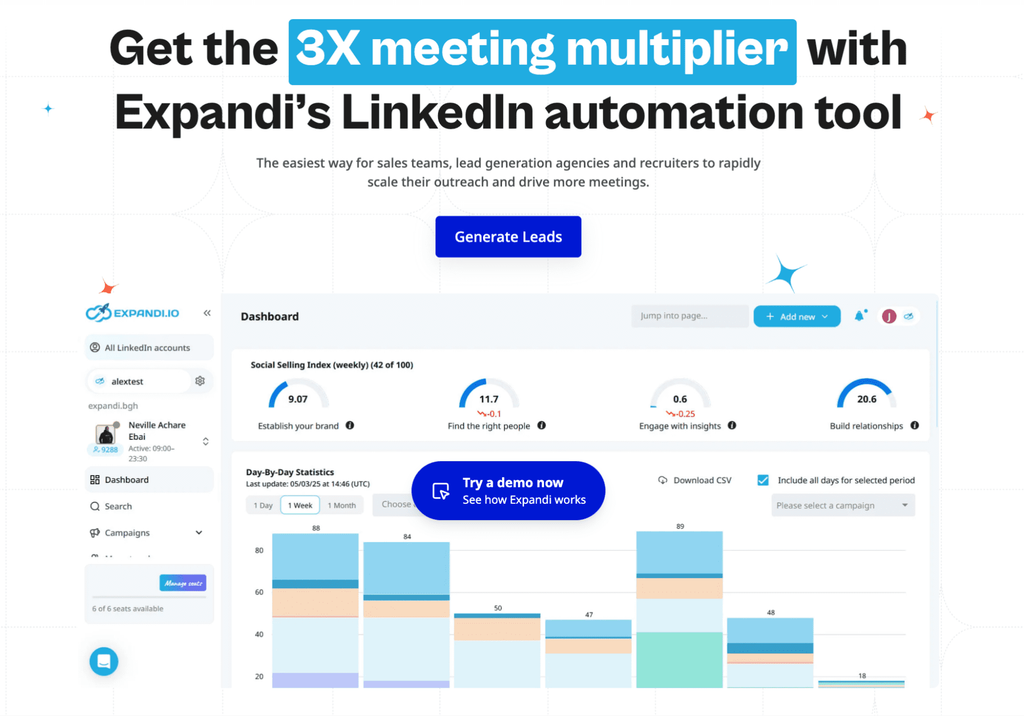
Expandi covers the outreach and signals layers in one seat, holds the replies, and writes the result into your CRM.
In the framework above, that is one tool where the standalone route means three or four.
What it replaces:
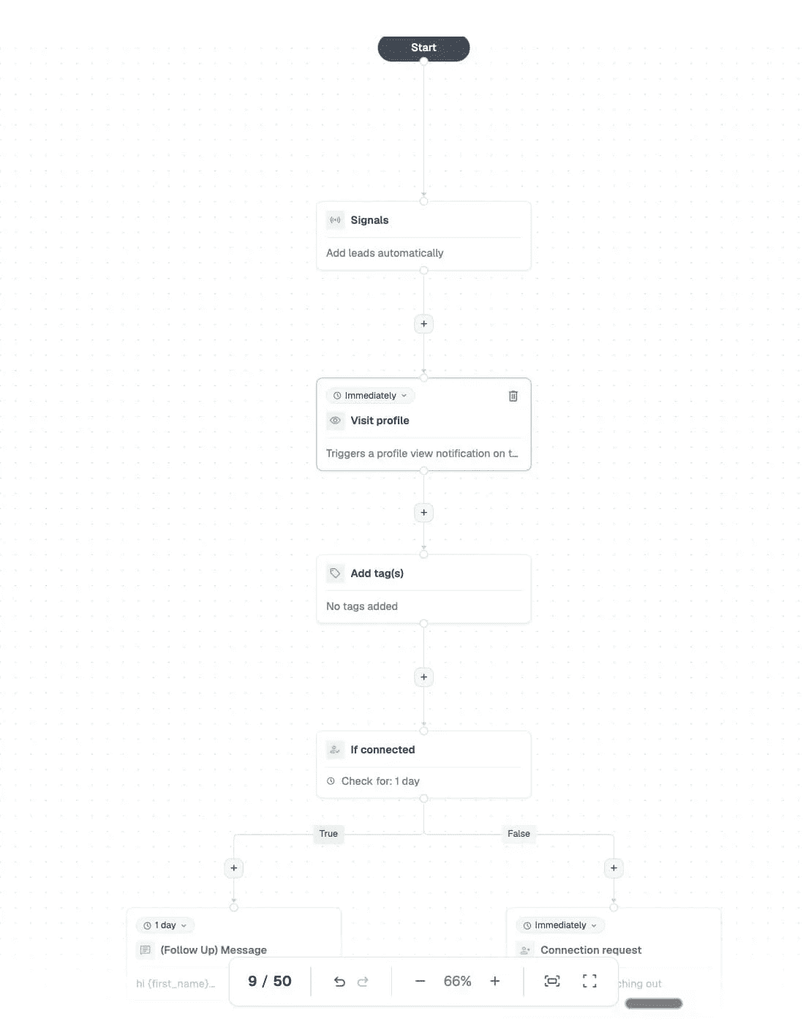
- The LinkedIn tool and the email sequencer: run connection requests, messages, and email steps in one if-then flow from a smart campaign, so a lead who accepts on LinkedIn and a lead who only opens the email get different next steps.
- The signal scraper: Expandi Signals pulls profile visitors, company page viewers, and post commenters straight into a campaign (the first two need LinkedIn Premium or Sales Navigator).
- The shared inbox: the Global Inbox holds LinkedIn and email replies from every account in one view, sorted by sentiment so Interested leads surface first.
- The glue: native CRM integration, no Zapier scenario needed.
Signal-triggered campaigns also outperform the platform average. Per our State of LinkedIn Outreach H1 2026 report, campaigns targeting profile visitors replied at 13.4% against a 10.3% average across all LinkedIn DMs.
Build the GTM stack you’ll still be running next year
The right number of GTM tools is the number of layers your motion uses, and for outbound that is three to five paid tools: one data source, one outreach platform that also captures signals and holds replies, one CRM, and a little glue.
Every tool past that has to fill an empty layer or replace two others.
If the outreach layer is where your stack has sprawled, start your 7-day Expandi free trial and run LinkedIn, email, signals, and the inbox from one seat.
FAQ
GTM tools cover every function that takes a product to market: marketing automation, data and enrichment, outbound and inbound engagement, CRM, and analytics.
Sales tools are the subset reps use to work deals, such as sequencers, dialers, and the CRM itself. A sales stack is one slice of the GTM stack, and the two overlap at the CRM and the outreach layer.
Price the stack per seat per layer, because per-seat pricing is how the tools are sold and a revenue percentage hides the seat math. A lean outbound stack means one enrichment tool, one outreach platform, and one CRM seat per rep, plus a shared automation tool.
Treat anything past five paid tools as a consolidation candidate.
Two or three. A founder-led team needs a CRM, which can be a free tier at this stage, one outreach platform for LinkedIn and email, and an enrichment source, which can start as a pay-as-you-go credit plan.
Add a dedicated data or analytics tool once a second rep joins and the founder stops being the single source of truth.
The CRM, because every other tool writes into it and switching it later is the costliest change in the stack. Second is the outreach platform, since it produces the conversations the CRM tracks. Enrichment comes third, once the target list outgrows what can be built by hand.
No. All-in-one platforms consolidate two or three adjacent layers, such as outreach, signals, and inbox, or CRM and marketing automation. Keep the CRM as an independent system of record and expect one data source and one engagement platform alongside it. Judge a platform that claims all five layers by the layer it added last.

You’ve made it all the way down here, take the final step