LinkedIn Outreach Strategy in 2026: 7 Steps Backed by Our Data

Key Takeaways
Target by industry segment first, and build your lists from warm sources such as profile visitors, event attendees and post engagers. Run three messages after the connection, with the strongest pitch in message 2. Draft with AI, but have a person edit and approve before anything sends. Measure against your industry benchmark, and change one variable at a time.
LinkedIn Outreach Strategy in 2026: 7 Steps Backed by Our Data


A Sales Navigator list, the same template everyone else sends, then silence: that’s what outreach looks like without a LinkedIn outreach strategy.
The strategy comes down to seven decisions:
- Who you contact.
- Where you find them.
- How you warm them up.
- What you say first.
- How many times you follow up.
- Who checks the copy.
- How you judge results.
We analyzed 13.2 million connection requests and 6.7 million messages sent on Expandi to see which decisions move results. Industry, a warm lead source and a three-message sequence do. Sender seniority and list source barely register.
Here’s what we’ll cover:
- The seven decisions, with the number behind each one.
- Where warm leads come from, plus a post-engagement campaign we ran ourselves.
- A connection note and three-message sequence you can adapt today.
- How to use AI for drafts without losing acceptance.
- How to measure against your own segment, and the guardrails and mistakes to plan around.
The 7 decisions behind a B2B LinkedIn outreach strategy
The best LinkedIn outreach strategy is a repeatable plan for who you contact, when, with what message and how often, plus a clear way to judge whether it’s working. Each of those choices has a measurable effect, and some matter far more than others.
Here’s what our State of LinkedIn Outreach H2 2026 report shows for each decision:
| Decision | What our data shows | What to do |
|---|---|---|
| Who to target | Industry moves acceptance from 17.5% to 40.1%. Seniority and company size barely move it. | Segment by industry, then measure against that industry’s benchmark. |
| Where to find them | Profile-visitor campaigns reply at 13.4% and event-attendee campaigns at 14.21%. | Start with profile visitors, event attendees and post engagers. |
| How to warm up | Builder campaigns, which warm leads up before the ask, reach 22% acceptance and 7.22% reply. | Visit their profile and like a recent post before sending the request. |
| What to say first | Notes that reference an existing tie accept at 1.8 to 2.7x the baseline. | Reference a real shared tie and save the pitch for later. |
| How many messages | Three messages reply at 9.8%. Five or more reply at 5.0%. | Send three, with the strongest pitch in message 2. |
| Who writes the copy | Unedited AI copy accepts about 12% worse than human-written copy. | Let AI draft, then have a person edit before it sends. |
| How to measure | Platform averages are 28.5% acceptance and 10.4% reply, but industry and market move both. | Compare against your industry and change one variable at a time. |
The warm-source and warm-up figures come from the H1 2026 edition of the report, which analyzed 70,130+ campaigns. The rest come from the H2 2026 dataset of 13.2 million connection requests across 13,302 accounts.
Glenn Miseroy, co-founder and CEO of Expandi, summed up the pattern in the H2 2026 report:
“There are more tools, more AI, and more automation than ever, but the fundamentals still determine who wins. Better targeting, shorter messages, and thoughtful follow-up consistently outperform unnecessary complexity.”
Glenn Miseroy, Expandi
Step 1: Pick your target segment by industry first
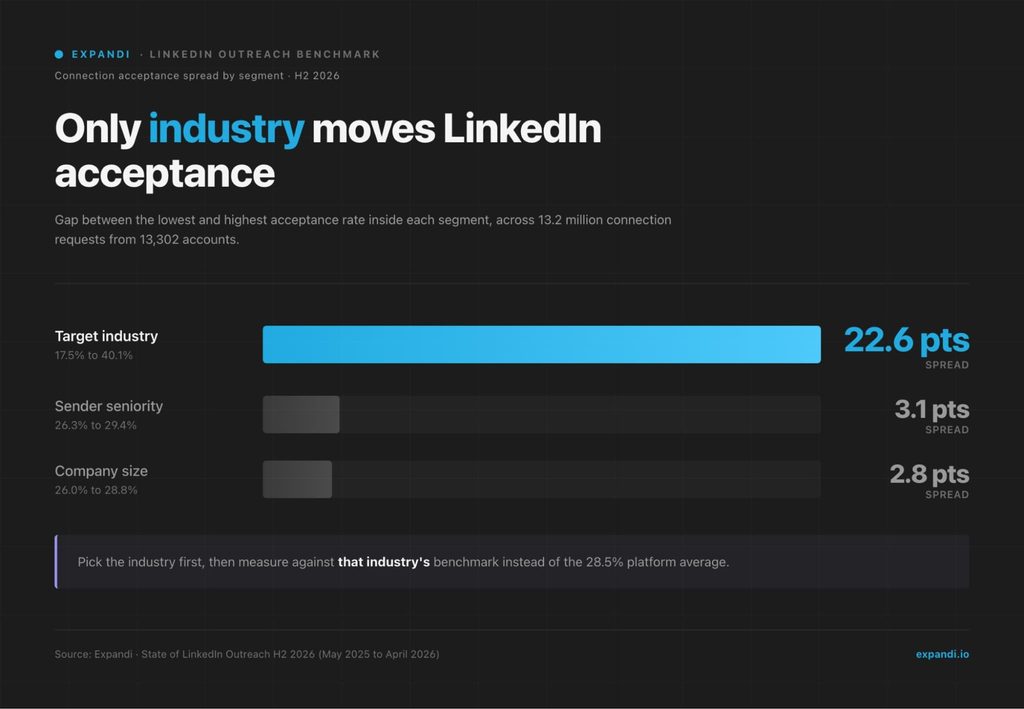
Start your LinkedIn outreach strategy by choosing an industry segment, because industry is the one targeting variable with real spread in our data. Acceptance ranges from 17.5% in Consumer Electronics to 40.1% in Broadcast Media, a 22.6-point gap that shapes every benchmark you measure against later.
Sender seniority and company size barely register by comparison. C-level senders accept at 29.4% and junior senders at 26.3%, a 3.1-point band. Company size sits inside a 2.8-point band, from 26.0% to 28.8%.
Two practical rules follow from that spread:
- Define your ICP by industry and role first, then compare results against the industry benchmarks for LinkedIn outreach for that segment, since the 28.5% platform average blends every segment together.
- Keep recruiting numbers out of a SaaS benchmark. Staffing and Recruiting replies at 18.9%, roughly double Computer Software’s 8.8%, because recruiting outreach offers the prospect something they want.
Tom Spoor, founder of OMB Digital, a Netherlands-based agency that runs LinkedIn outreach for software companies, named the ICP as step one in a GTM Society interview:
“Step number one, see what your ICP is. The real ICP is really difficult. Tell in 10 seconds what you are doing.”
Tom Spoor, OMB Digital
Step 2: Build your list from warm signals, then Sales Navigator
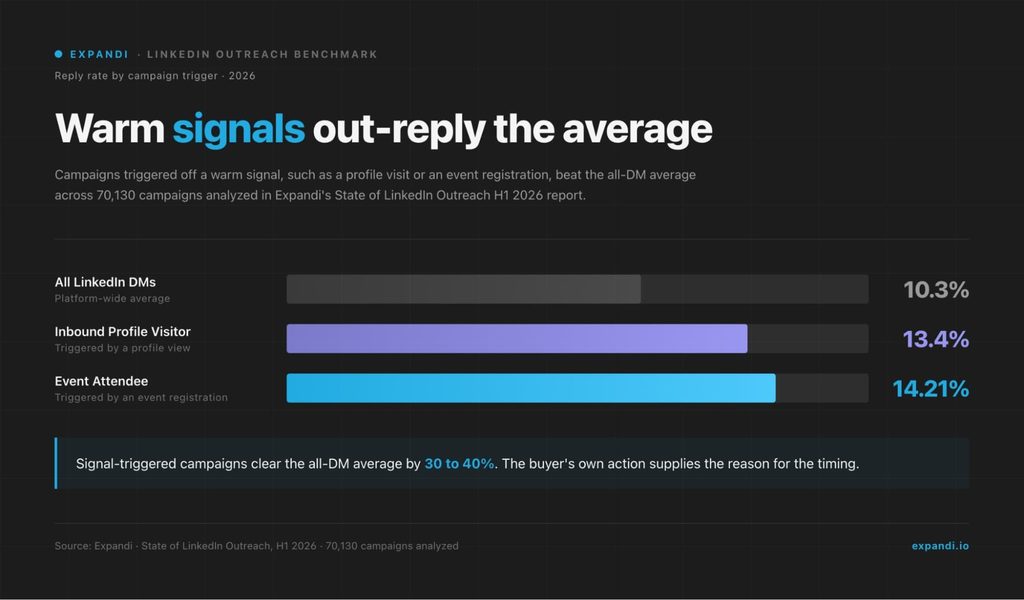
Warm sources beat cold lists because the prospect has already made the first move, so your message arrives with a reason attached. In our H1 2026 data, profile-visitor campaigns replied at 13.4% and event-attendee campaigns at 14.21%, against a 10.3% average across all LinkedIn DMs.
Four warm sources are worth building before any cold search:
- People who viewed your profile or your company page.
- Attendees of a LinkedIn event in your niche.
- People who liked or commented on a relevant post, yours or someone else’s.
- Members of LinkedIn groups your buyers belong to.
Each of these gives you a real reason to reach out, which is the core of signal-based outreach.
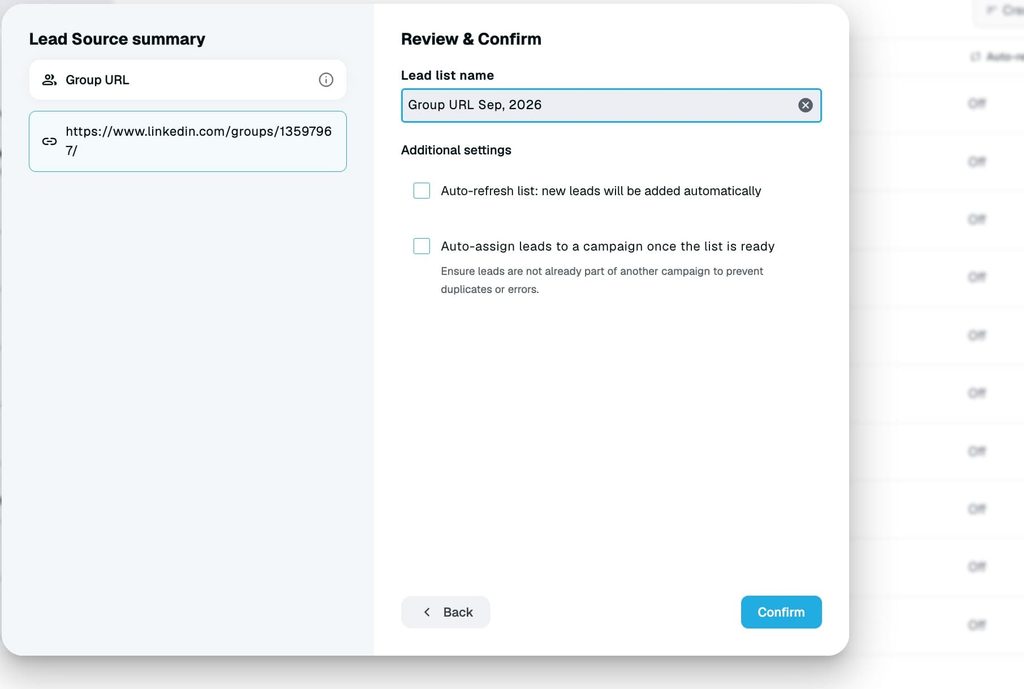
Groups add one more option: Expandi’s Group campaign sends message requests to fellow members without a connection first, and our guide to LinkedIn groups for outreach covers the setup.
Expandi Signals adds profile visitors, company page viewers and post engagers to a campaign automatically and syncs new matches about every 24 hours.
Profile and company page signals need LinkedIn Premium or Sales Navigator, while post engagement works on a free account.
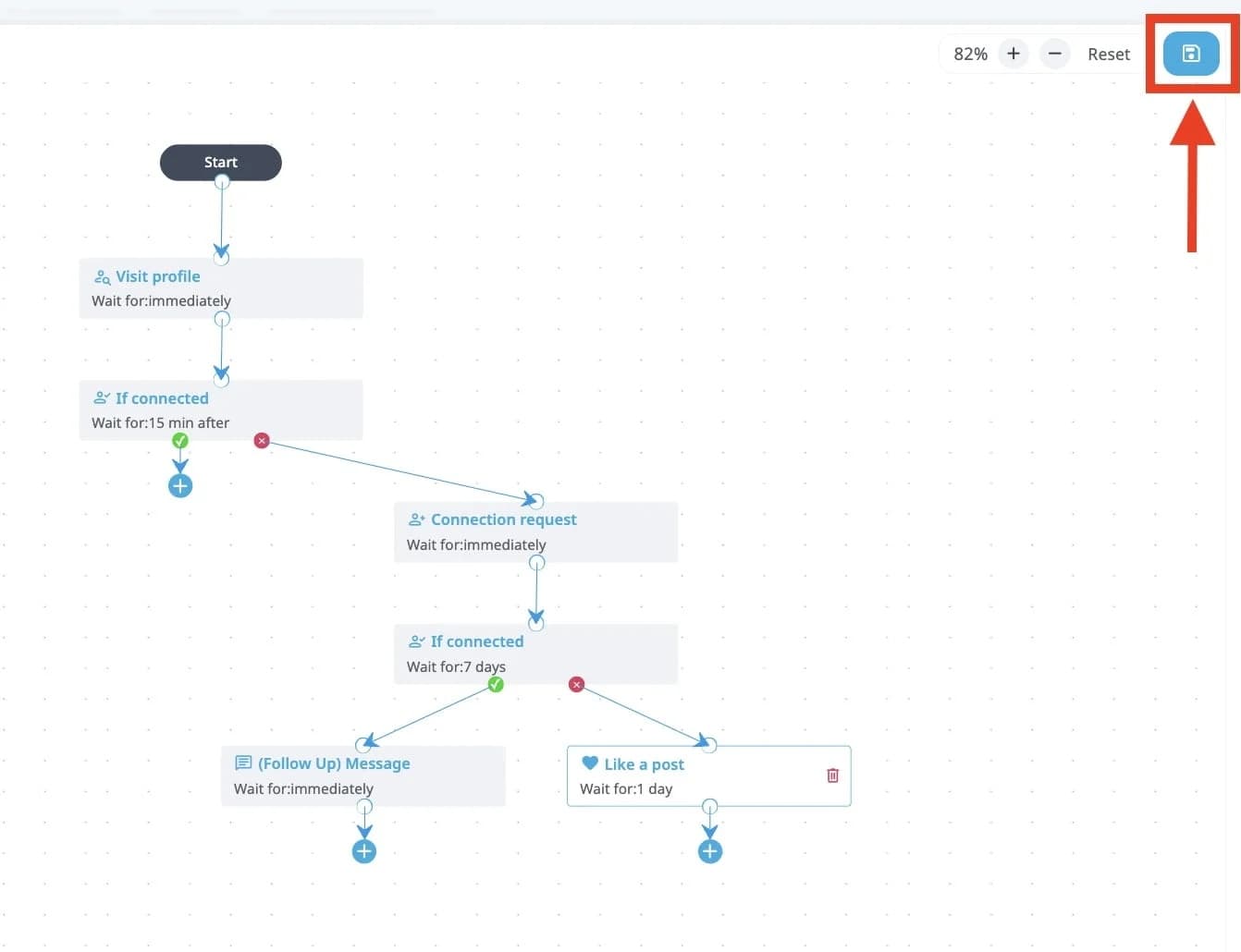
Sales Navigator searches, the backbone of a traditional LinkedIn prospecting strategy, fill in the rest of the list, and the filters you stack matter more than the source.
Across nearly 11,000 single-source campaigns, Sales Navigator leads accepted at 19.8% against 18.5% for CSV imports, and reply rates were identical. That’s about one extra acceptance per 77 requests, so choose between the two on cost and workflow, then spend the effort on Sales Navigator filters that narrow the list to your ICP.
Besnik Vrellaku, CEO and founder of Salesflow, described the shift toward signals in a GTM Society interview:
“One of the core things that I’ve learned is how to now navigate the change, focusing on data, strong data signals that have the buyer signals, so you are spending the efforts that can double your conversion rates over time.”
Besnik Vrellaku, Salesflow
When we ran it in 2020: 17+ demos from 142 post engagers
A post engagement outreach campaign we ran on our own pipeline in 2020 booked 17+ demo calls from 142 people, and the mechanic still holds. The setup had four parts:
- Find a high-engagement post on outreach and personalization, the topic our buyers cared about.
- Paste the post URL into Expandi to pull everyone who reacted or commented.
- Run a connector campaign with a note that mentions the post.
- Follow up with short messages, one carrying a personalized image.
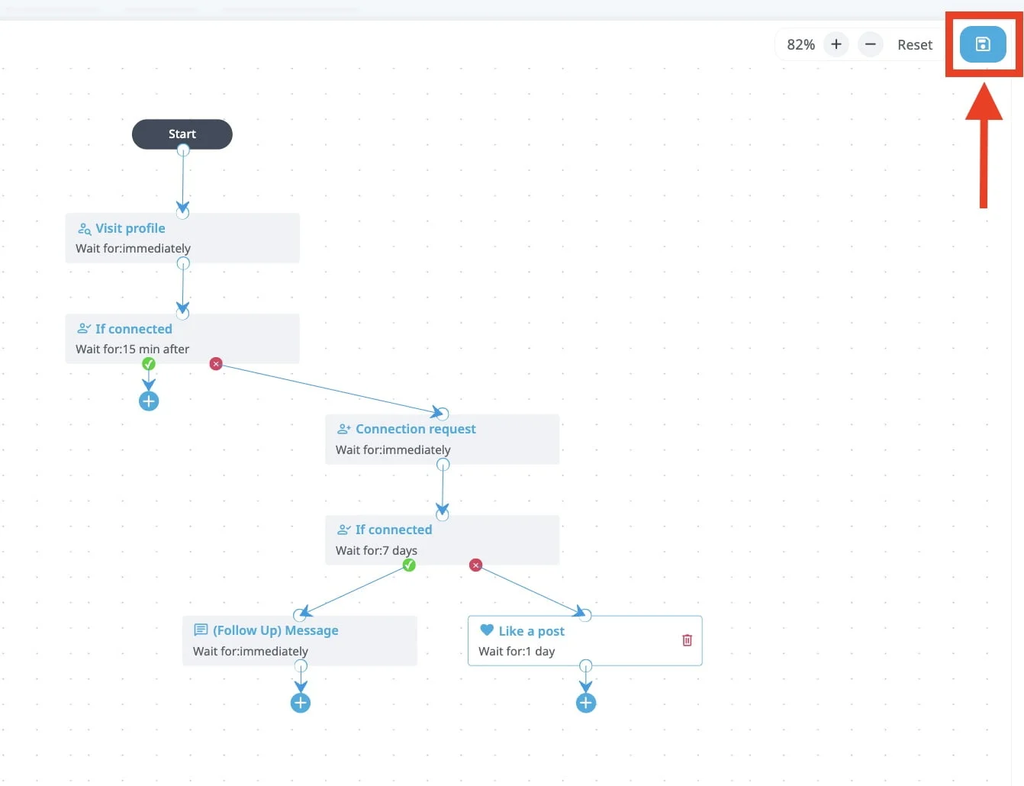
An earlier content-retargeting run from the same period used the same idea, connecting with people who engaged with a post and referencing it, and reached 72% acceptance with 40% of people replying to the follow-ups.
Every prospect shared a real reason to connect with us, a post we had both engaged with, so the first message arrived with context.
Step 3: Warm up your LinkedIn account, then the prospect
Warm-up runs on two levels: your account’s activity ramps gradually, and each prospect sees your name before the request arrives. Builder campaigns, which warm leads up with touches like profile visits before the ask, reached 22% acceptance and 7.22% reply in our H1 2026 data.
How to warm up your LinkedIn account
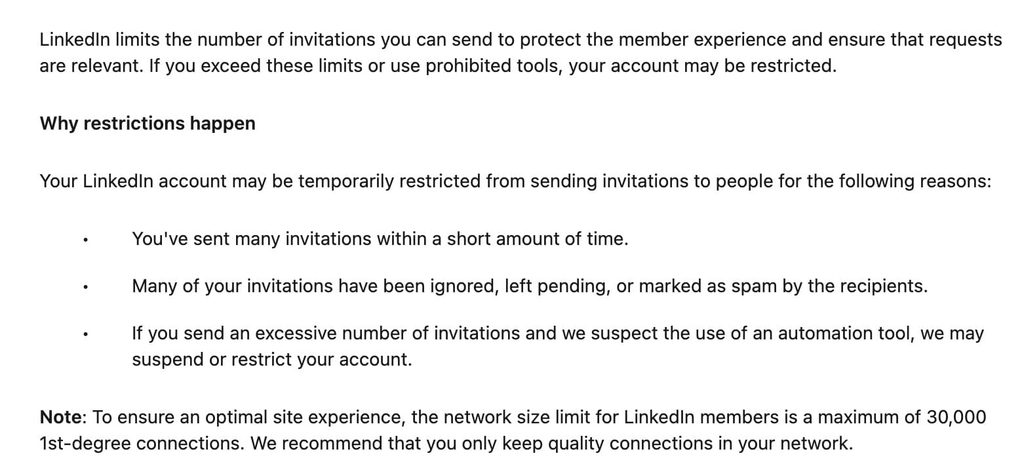
Ramp your account’s activity gradually, because a new or quiet account that jumps to full volume matches the pattern LinkedIn restricts. LinkedIn’s help page on invitation restrictions names the triggers: many invitations in a short time, and invitations that are ignored, left pending or marked as spam.
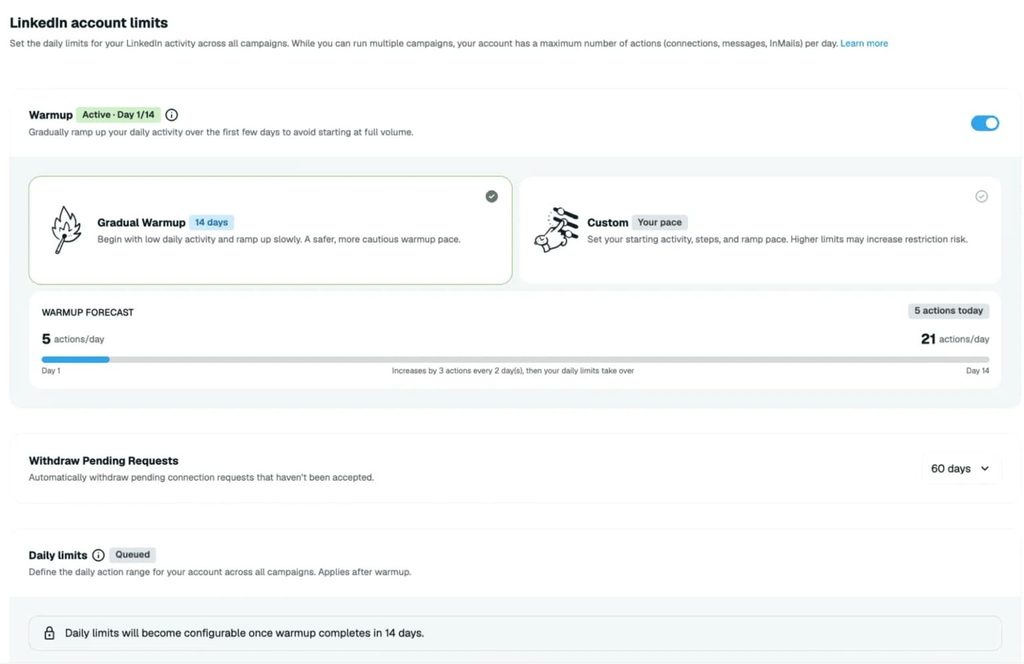
Expandi’s gradual warm-up starts an account at 5 actions a day and adds 3 more every two days until it reaches 21, then hands over to your own daily limits. Every seat also runs from a dedicated country-based IP, inside working hours you set, with human-like pacing between actions.
How to warm up the prospect before the connection request
Give each prospect two low-effort touches that put your name in their notifications, then send the request:
- Visit their profile.
- Like a recent post.
- Send a connection request.
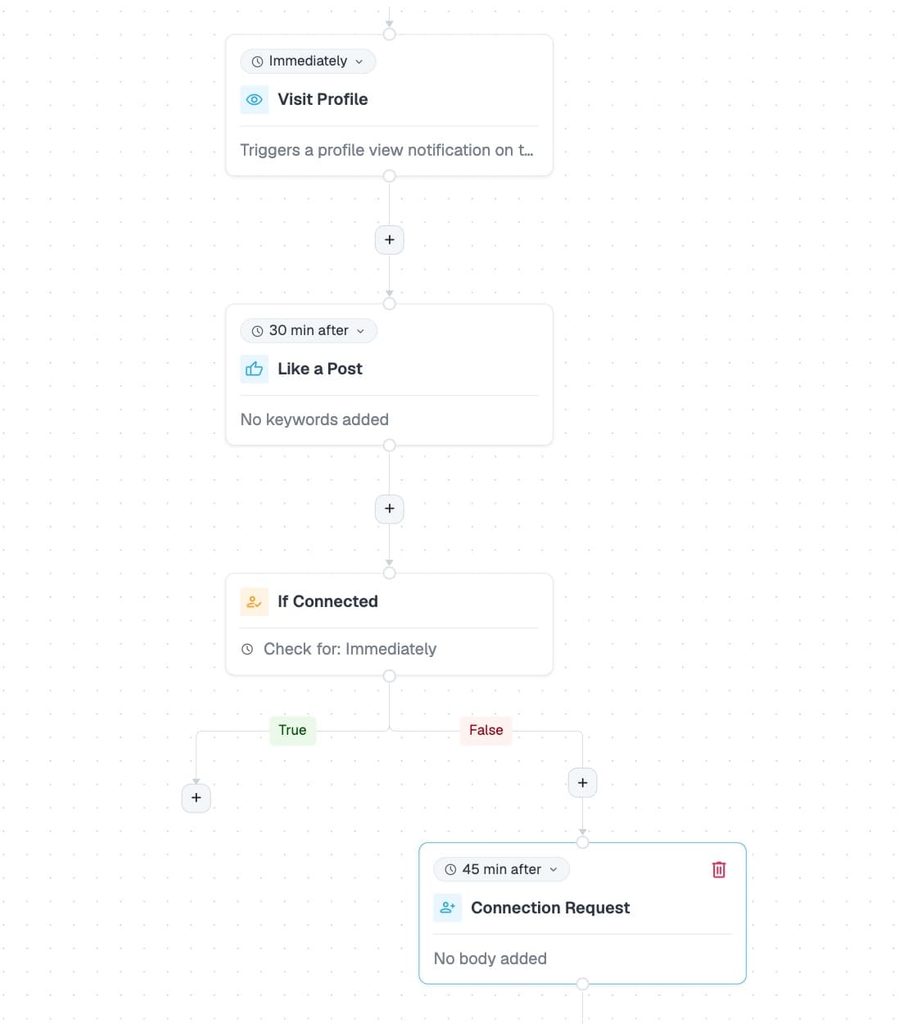
Posting on your own profile helps too, with a sample-size caveat. Accounts with 1,000+ followers and consistently engaged posts accepted at 30.5% against 27% to 29% across the platform, but that group was only 38 accounts, so treat it as directional.
LinkedIn’s own research points the same way. LinkedIn reported in 2014 that SSI leaders, members scoring high on its Social Selling Index, had 45% more opportunities per quarter and were 51% more likely to hit quota than SSI laggards.
The study is old, but the mechanism holds: an active, credible profile makes the connection request easier to accept.
Step 4: Write a connection note that gives a reason to accept
The connection note in a LinkedIn cold outreach strategy has one job: getting the accept.
Notes that reference an existing tie, such as a follow, a shared group or a mutual network, accepted at 1.8 to 2.7 times the 30.2% baseline in our H2 2026 data.
The best-performing note in the dataset thanked the prospect for a follow and accepted at 81.1% across 435 sends. The tie has to be real, which is why Step 3 matters: liking their post first gives you something true to reference.
We saw the same effect in a 2020 campaign of our own.
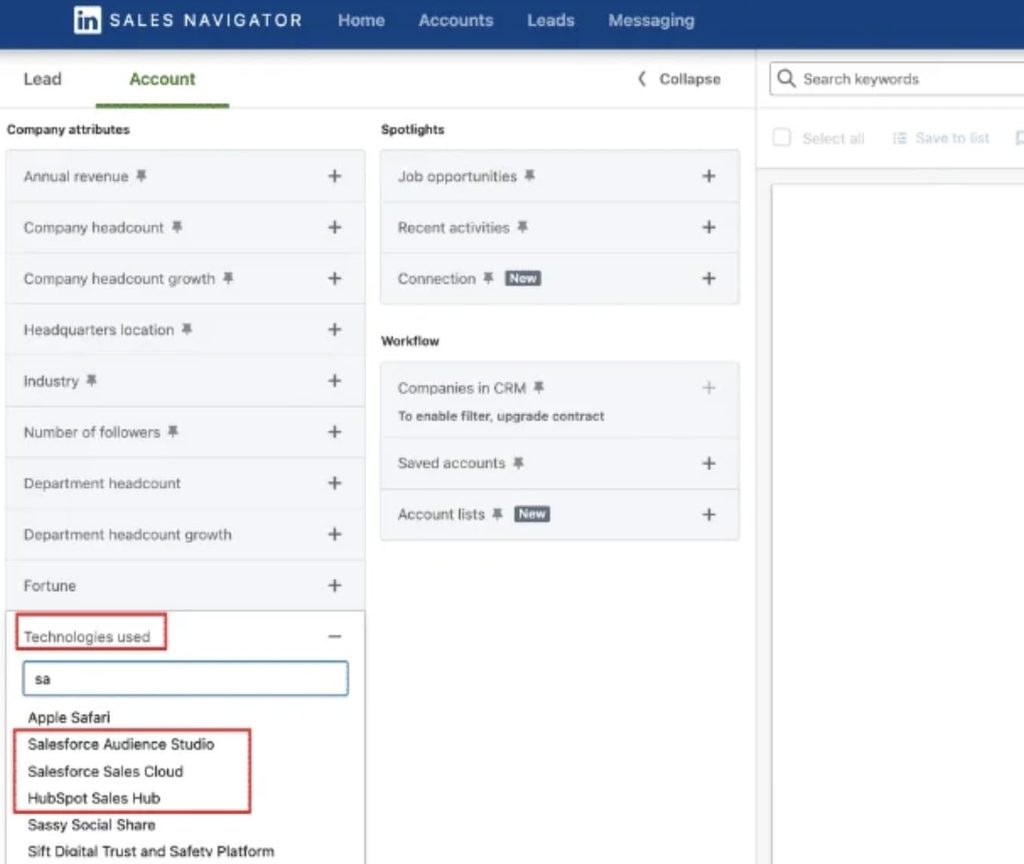
We targeted companies that used the same website-visitor tracking tool we did and opened the connection request with that shared detail. More than 70% accepted, and almost 50% replied to one of the follow-ups.
Our guide to reaching people who use a specific technology covers how to build that kind of list.
Save the pitch for later. Connection-note reply rate fell from 3.5% in May 2025 to 2.2% in April 2026, so prospects increasingly accept quietly and wait for the next message.
The note still pays off after the accept: Belkins’ analysis of 11.5 million connection requests sent in 2025 found requests with a note connected at 25.3% against 27.6% without one, but replied at 8.2% against 5.3%.
Two more settings shape the note:
- Send requests in the morning. Requests sent between 7 and 11am (Amsterdam time in our data) accepted at roughly 32%, against roughly 24% in the evening.
- Keep the note short. LinkedIn caps notes at 200 characters, and free accounts can add a note to only three requests a month. Premium removes the monthly cap.
Three notes built on a real tie, each under 200 characters:
- After a follow: “Hi {first_name}, thanks for the follow. I’ve been reading your posts on [topic] and would like to stay connected.”
- After an event: “Hi {first_name}, saw we’re both registered for [event]. Would be good to compare notes afterward.”
- After a post: “Hi {first_name}, noticed your comment on [author]’s post about [topic]. Your point on [detail] matches what we see too. Happy to connect.”
For more variations by situation, see our LinkedIn connection message templates.
Step 5: Run a three-message sequence with the pitch in message 2
Three messages is the sequence length that replies best.
In our H2 2026 data, three-message campaigns replied at 9.8%, while five or more messages dropped to 5.0%, below a single message, so stop after the third. Reply rate by sequence length:
| Messages in the sequence | Reply rate |
|---|---|
| 1 | 6.3% |
| 2 | 6.8% |
| 3 | 9.8% |
| 4 | 7.9% |
| 5 or more | 5.0% |
Position matters as much as count.
Message 2 replies best per send at 8.8%, ahead of message 1 at 6.1% and message 3 at 8.1%, so put your strongest pitch second.
Messages of 151 to 200 characters hit the peak reply rate of 8.5%, though one clear ask matters more than exact length. Expandi pauses a lead automatically once they reply, so nobody gets a scripted follow-up after answering.
Our guide to LinkedIn message automation covers the delays and conditions in more detail.
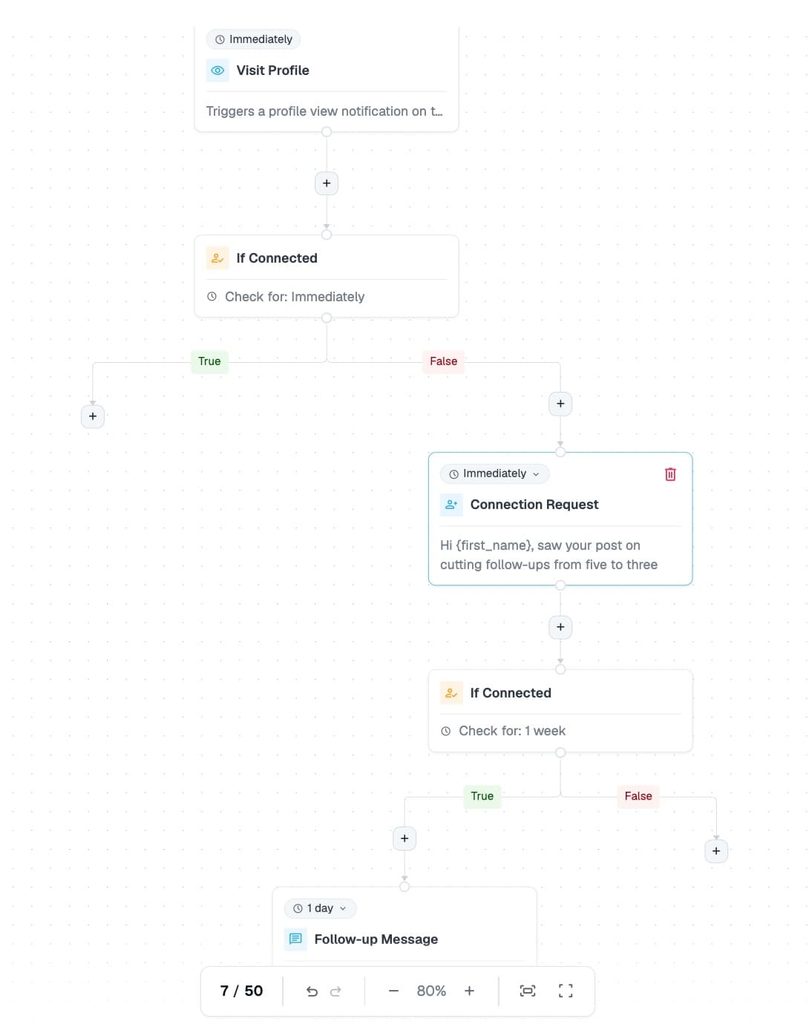
A three-message sequence to adapt, starting after the connection is accepted:
- Message 1 (the day after accepting): “Thanks for connecting, {first_name}. Curious how your team handles [problem area] right now?”
- Message 2 (three days later): “{first_name}, a pattern we keep seeing with [role]s in [industry]: [specific problem]. We help teams fix it by [outcome]. Worth a 15-minute look next week?”
- Message 3 (five days later): “Last note from me, {first_name}. If [problem] has moved down the list this quarter, all good. Happy to send over [resource] if it helps later.”
Our LinkedIn cold messages guide has more follow-up wording by situation.
Expandi’s Smart Campaigns build this sequence with if-then conditions, so only prospects who accept the request move on to message 1.
Step 6: Draft with AI, then have a person edit before it sends
AI drafts save time, but unedited AI copy costs acceptance.
When we compared AI-generated campaigns with human-written ones from the same accounts, human copy accepted about 12% better (23.2% against 20.4%), and reply rates were flat.
The edit step is where AI-drafted outreach earns that acceptance back.
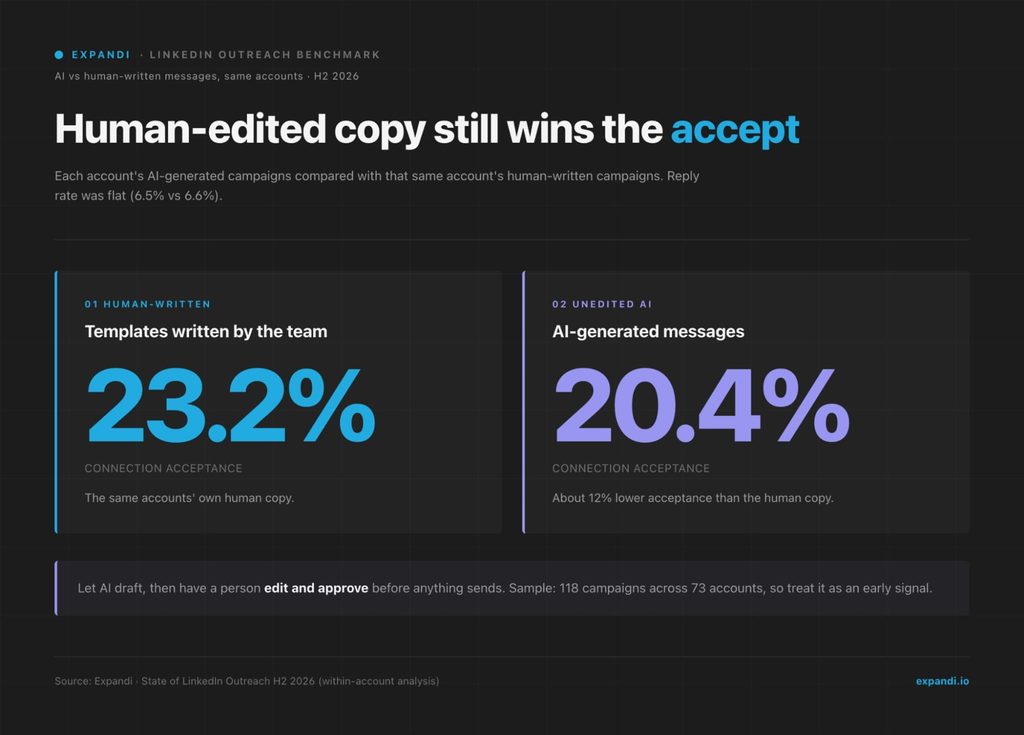
Across accounts, AI campaigns look stronger, but that gap comes from selection: the operators who adopt AI tend to run better campaigns already. The within-account comparison is the fair one, and it covers 118 campaigns across 73 accounts, so read it as an early signal.
Prospects judge every message against the pile in their inbox, and a generic one loses. Michel Lieben, co-founder of ColdIQ, a sales prospecting agency, described how prospects size up a pitch in a GTM Society interview:
“If I send you an outreach campaign… the first thing you’re gonna do is gonna look at my LinkedIn profile… If I have a LinkedIn profile with nothing on it, you would be like, okay, you know what, I received 40 other pitches in my inbox, it’s like, why would I consider this guy?”
Michel Lieben, ColdIQ
A review step keeps the speed of AI drafting without the acceptance hit:
- Let the AI Analyzer draft messages and follow-ups from your audience, offer and goal.
- Have the rep edit each draft with what they know about the segment.
- Have a manager approve new sequences before they go live.
- Spot-check a sample of live messages each week.
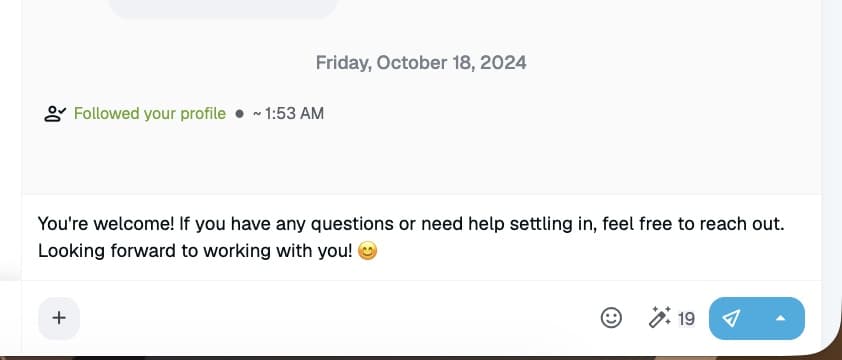
Teams that work from Claude or ChatGPT can run the same process through Expandi MCP, currently in beta. Your assistant builds lead lists, drafts campaigns and replies, and troubleshoots campaigns that stall. Everything lands as a draft, and nothing sends until you approve it.
Step 7: Work the replies and measure against your segment benchmark
Measure your LinkedIn outreach strategy against the benchmark for your segment, then change one variable at a time. The platform averages of 28.5% acceptance and 10.4% message reply are a starting point, while your industry and market set the real bar.
Our LinkedIn outreach benchmarks page breaks results down by industry and seniority.
Speed on warm replies decides whether they turn into meetings. Expandi’s Global Inbox pulls conversations from every connected account into one view, and the AI Analyzer sorts replies into Interested, Maybe Interested and Not Interested, so reps answer the hot ones first.
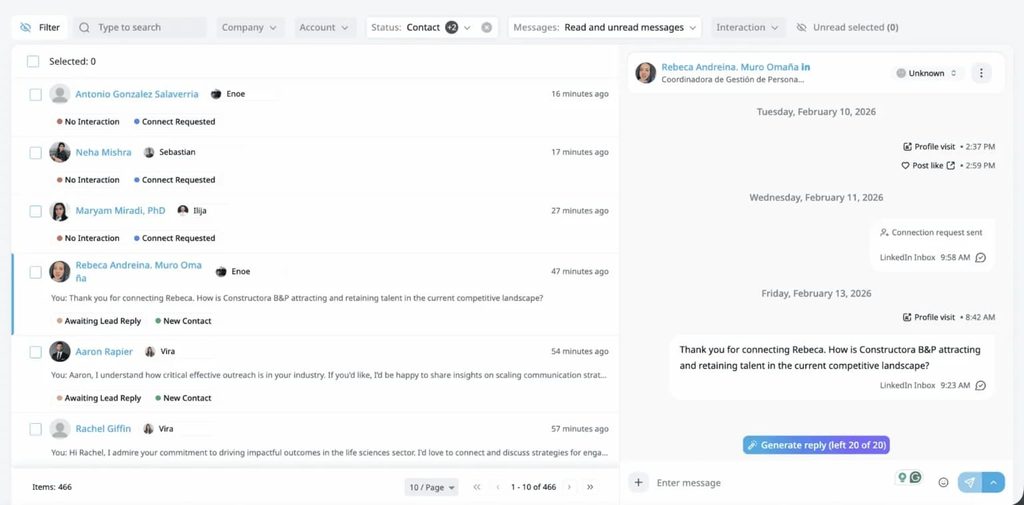
To diagnose a campaign, read its funnel in order:
- Acceptance rate: a low rate points to targeting or the note.
- Reply rate: few replies after good acceptance point to messages 1 and 2.
- Positive reply rate: replies without interest point to the offer.
- Meetings booked: interest without meetings points to the handoff.
Market matters as much as industry. Belkins’ 2025 analysis of 15.1 million contacts on our platform put the US reply rate at 6.0%, against 10.5% in the Netherlands. A US team measuring itself against a global average will read a healthy campaign as a failing one.
For teams, consistency is part of the strategy, because reps running different LinkedIn outreach strategies produce results nobody can compare.
Expandi Workspaces let a manager share one campaign across several LinkedIn accounts and set roles and permissions for each rep, while duplicate prevention stops two reps from contacting the same lead.
Guardrails every LinkedIn outreach strategy needs
Guardrails keep the account running long enough for the strategy to pay off. LinkedIn publishes no fixed weekly number, so our working assumption is roughly 100 connection requests a week, adjusted to the account’s age and history.
The LinkedIn connections limit guide breaks the numbers down further.
Automation tools sit outside LinkedIn’s User Agreement, as its prohibited software page states, so the practical risk comes down to behavior: volume, pace and how prospects respond.
Five guardrails to build into every campaign so you don’t get your LinkedIn account restricted:
- Ramp volume gradually on new or quiet accounts.
- Send inside working hours, with human-like pacing between actions.
- Withdraw invitations that sit pending for weeks. Per LinkedIn Help, a withdrawn contact can’t be re-invited for up to three weeks, so withdraw deliberately.
- Watch acceptance weekly. A sudden drop is the earliest sign that targeting or the note slipped.
- Keep each lead in one campaign, so no prospect hears from two reps.
Our ethical LinkedIn outreach best practices also cover the etiquette that keeps prospects from reporting you.
LinkedIn cold outreach strategy mistakes to avoid
The costliest LinkedIn cold outreach strategy mistakes come from skipping one of the seven decisions.
Each one below has a fix in the steps above, and fixing all six covers the core LinkedIn outreach best practices:
- Starting from a cold, unfiltered list. Build from warm sources first (Step 2).
- Pitching in the connection note. Use the note to earn the accept (Step 4).
- Running five or more messages. Three messages reply at nearly twice the rate (Step 5).
- Sending AI drafts unedited. Add a human edit and approval (Step 6).
- Judging results against the platform average. Use your industry and market (Step 7).
- Letting every rep run their own version. Share one campaign across the team (Step 7).
Philip Braches, head of sales at Planted, a sustainability software company based in Cologne, summed up the fix for the pitching mistakes in a GTM Society interview:
“Be personal, be you, and just have normal conversations and do not try to pitch everything away or everybody away. Just use the platform to connect on a human level and the results will follow.”
Philip Braches, Planted
Putting your LinkedIn outreach strategy to work
A LinkedIn outreach strategy works when each of the seven decisions is made on purpose: an industry segment, a warm source, a warmed-up account, a note with a real tie, three messages, an edited draft and a benchmark that fits your market.
Start with one warm source and one three-message sequence this week, then measure it against your industry before you scale your B2B LinkedIn outreach.
Start your free 7-day Expandi trial and run the whole strategy from one Builder campaign.
FAQs
Expect early signals within two weeks and a fair read after four to six. Acceptance shows up first, within days of the first requests, while reply and meeting rates need a few hundred sends before one campaign can be judged against another. New accounts take longer because volume ramps during warm-up.
No. Sales Navigator is a separate paid subscription, and it earns its cost when your list building depends on its advanced search filters and saved lead lists. Profile visitors, post engagers, event attendees, group members and CSV imports all work without it. Expandi runs without Sales Navigator too, and only Sales Navigator searches and paid InMail require it.
The seven decisions stay the same, but each client gets its own segment, benchmark and sequence, sent from the client’s own LinkedIn account. The harder part is operations: keeping campaigns, inboxes and reporting separate so client data never mixes. On Expandi, agencies run each client in its own workspace with role-based access and report against that client’s industry benchmark.
Yes, if you keep it light. Prospects check your profile before they accept, and recent posts give them a reason to trust the request. One or two posts a week on the problems your buyers face, plus a few comments on their posts, is a realistic load for a rep, and those comments create the ties a connection note can reference.
Yes, with limits. Free accounts can add a personalized note to only three connection requests a month, each up to 200 characters, and send the rest without a note. A free-account strategy leans on blank requests to warm, well-targeted leads, with the context saved for the first message after acceptance. Weekly invitation limits apply to free and Premium accounts alike.



You’ve made it all the way down here, take the final step