5 Cold Email Sequences That Get Replies in 2026

Article Key Takeaways
- A cold email sequence is a planned series of 4 to 6 timed emails to a prospect who has never heard of you
- 58% of all replies come from the first email & the remaining 42% arrive on later touches.
- Steady spacing keeps your name familiar without coming across as spammy.
- Warm new inboxes for at least 2 weeks & keep bounce rates under 2%.
- Consider automating part of your cold outreach with Expandi’s LinkedIn automation tool.
5 Cold Email Sequences That Get Replies in 2026

As a B2B business, finding new customers isn’t always as simple as throwing an ad onto Meta and watching the leads flow in. Most of the time, cold outreach is a necessary part of your client acquisition strategy. It sounds simple enough but in reality, GDPR compliance and privacy concerns pose a real challenge to cold email outreach.
If you send an email you drafted on ChatGPT to 2000 contacts, you’re going to end up with a blacklisted domain and a very low reply rate. If you’re tired of waking up to a dead inbox or you’re just not sure what to even say, we’ve put together a guide with tried-and-tested cold email sequences that get reply rates of up to 55%! Plus, we’ll take you through the basics of warming up your inbox and eventually automating the entire outreach process.
What is a cold email sequence?
A cold email sequence is four to six timed emails on days 1, 3, 7, 14, and 21, each doing one job: open the door, add proof, lower the ask, close the loop.
Campaigns that stop at touch one leave roughly four in ten replies on the table. The sequences below come from our own campaigns: one pulled a 49% reply rate to follow-ups and booked 42+ demos, and client campaigns with personalized GIFs reached reply rates as high as 55%.
Why do single-touch cold emails fail?
Your first email lands in an inbox that collected 40 new messages overnight, from a name the prospect has never seen. One send into that pile is a lottery ticket.
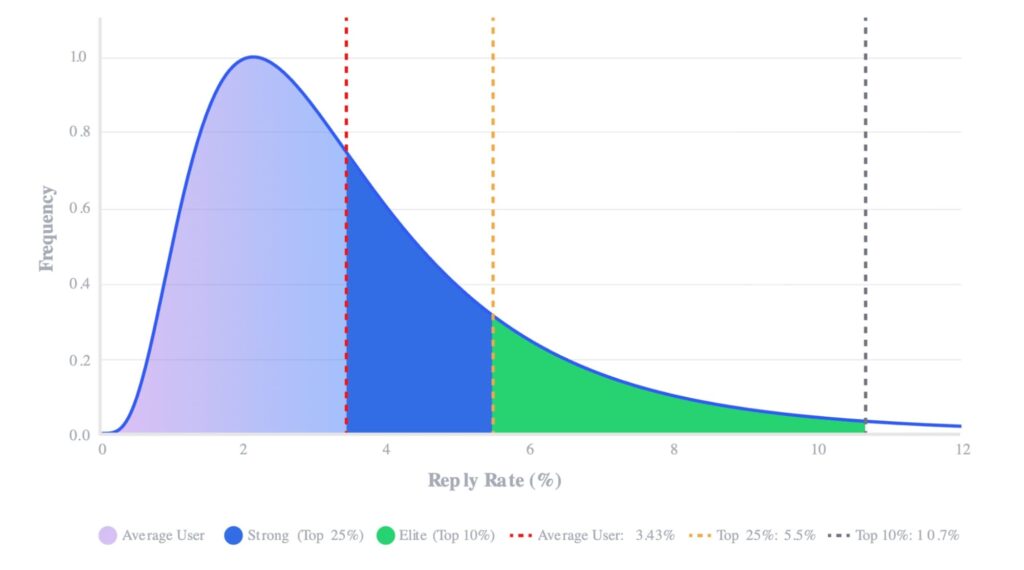
Per Instantly’s 2026 cold email benchmark report, built on billions of cold email interactions across 2025, the average reply rate sits at 3.43%, and 58% of all replies are generated from the initial email, with follow-ups contributing the remaining 42%. Stop after one email and that 42% never arrives.
Sequences work because they buy repeat exposure. By the third touch, your name reads as familiar, and familiar names get opened.
How does a cold email sequence work in 2026?
As we covered already, a cold email sequence is a short, tightly controlled series of emails sent one-to-one to a prospect who’s never heard of you — built on solid technical infrastructure rather than volume.
Before a single email goes out, the setup has to be right:
- Secondary domain. Cold outreach should never run from your primary business domain — a dedicated sending domain protects your core domain’s reputation if something goes wrong.
- Full authentication. SPF, DKIM, and DMARC need to be properly configured, and the domain warmed up for at least two weeks before real sending starts.
- Capped volume. Around 20–30 emails per inbox per day keeps deliverability healthy and avoids spam classifiers.
The sequence itself is short — 4 to 6 touches, with many businesses now finding the sweet spot at around 3:
- The opener leads with a specific, upfront value — a free asset, insight, or observation — not a pitch.
- The bump is a brief, low-pressure reply that adds one new angle or piece of proof.
- The close introduces urgency or scarcity to prompt a decision.
Each email stays under 80 words, written at a simple reading level, and the sequence stops the moment the prospect replies.
For B2B SaaS founders, agency owners, and sales leaders, the cold email sequence is the unit of outbound work. You build the infrastructure once, load a verified list, and let deliverability and reply data — not send volume — tell you what’s working.
How is an outreach sequence different from an email drip campaign?
Here’s how the two compare:
- An outreach sequence goes to a specific person, asks for a reply, and ends: either with a conversation or a polite breakup.
- A drip campaign goes to a segment, broadcasts content on a fixed schedule, and keeps running for as long as the contact stays subscribed.
The practical split: sequences live in sales tools and stop on reply. Drips live in marketing platforms and stop on unsubscribe.
How many emails should there be in a cold email outreach sequence?
Four to six emails is the working range for B2B cold outreach: under four gives up too early, and beyond seven, returns diminish unless each touch adds genuine new value.
The right number for your list comes from where replies land, and that distribution is lopsided.
Where do replies land in a cold email sequence?
Each touch in a five-email cold email sequence has its own day and its own job:
| Touch | Day | Job |
|---|---|---|
| 1 | Day 1 | Open the door: one problem, one proof point, one soft ask |
| 2 | Day 3 | Bump the thread: one new detail, the same ask in fewer words |
| 3 | Day 7 | Change the angle: a different pain or proof, same offer |
| 4 | Day 14 | Lower the ask: swap the meeting for a smaller yes |
| 5 | Day 21 | Break up: name the silence, close the loop, leave the door open |
With four in ten replies arriving after email one, touches two through five are where a mediocre campaign becomes a profitable one.
When should you stop following up?
Stop adding touches past six or seven.
Each email beyond that point returns fewer replies and adds spam-complaint risk, and complaints compound: Google’s email sender guidelines set the bulk-sender threshold at a 0.3% spam rate, which one annoyed prospect per 330 sends will hit.
Stop individual prospects sooner.
A hard bounce ends the sequence immediately, a clear no ends it politely, and zero opens across five sends flags a list problem, a deliverability problem, or both.
How long should the gaps between cold emails be?
Start tight and widen: days 1, 3, 7, 14, 21.
Three to four days between the early touches, then a widening tail that keeps the sequence alive for three weeks without crowding the inbox.
- The mechanical reason: mailbox providers read burst sending as bulk. Near-identical messages fired at fixed intervals are the exact signature spam filters train on.
- The behavioral reason: recognition of an unfamiliar sender fades fast. A day-3 bump lands while your first email is still visible in the inbox, and after that, each extra touch needs breathing room before it reads as persistence.
What’s the best cadence by prospect type?
The same cold email sequence structure stretches or compresses by deal size — pick your row:
| Sequence variable | SMB | Mid-market | Enterprise |
|---|---|---|---|
| Total emails | 4 | 5 | 6-7 |
| Sequence duration | About 2 weeks | About 3 weeks | 4-6 weeks |
| Email length | Under 80 words | Under 100 words | Up to 120 words |
| Tone | Casual and direct | Peer-to-peer, consultative | Measured, credential-led |
| CTA style | Meeting ask by touch 2 | Meeting ask by touch 3 | Small asks first, meeting later |
| When to stop | After touch 4 | After touch 5 | After touch 7, re-engage next quarter |
What should each cold email in the sequence say?
Every touch follows the same structural rules: one idea, one ask, one link at most, under 100 words (under 80 for the first touch).
The reader decides in seconds, on a phone, between two meetings. One idea keeps the email scannable, one ask removes decision friction, and one link keeps spam filters calm.
How do you write a cold outreach subject line that gets opened?
Write the subject like an internal note: lowercase-casual, specific, and free of selling words. Relevance beats cleverness:
| Gets opened | Gets deleted unread |
|---|---|
| quick question about {company_name}’s outbound | Revolutionize Your Sales Process Today |
| {first_name} — saw the Series B news | Partnership Opportunity |
| idea for {company_name}’s SDR team | Following up (3rd attempt) |
The first line matters as much as the subject, because inbox previews expose it.
How much personalization does a cold email sequence need?
Match the depth to the deal.
- Light personalization (company, role, a recent hire, the tech stack) takes seconds per prospect with merge tags and enrichment data, and it covers SMB and mid-market volume.
- Heavy personalization (a podcast appearance, a specific LinkedIn post, a teardown of their signup flow) costs minutes per prospect, so reserve it for enterprise accounts and short, high-value lists.
A useful cutoff: when one closed deal covers a month of an SDR’s time, research every prospect by hand.
The layer above both is timing.
A prospect who just raised a round, posted three SDR openings, or engaged with your LinkedIn post has a question open right now, and signal-based outreach turns that trigger into the reason the email exists. A mediocre email that arrives at the right moment outperforms a polished one that arrives at random.
How do you write a CTA that gets replies?
A reply-getting CTA is small, specific, and answerable from a phone.
Interest-based questions outperform calendar demands early in a sequence, because agreeing to be curious costs less than agreeing to a meeting:
| Weak CTA | Strong CTA |
|---|---|
| Let me know your thoughts. | Worth a 15-minute look next week, Monday or Tuesday? |
| Would love to hop on a call sometime. | Open to seeing the demo? I’ll send it over, no call needed. |
| Check out our website to learn more. | Should I send the 3 examples from your industry? |
5 best cold email sequence templates that convert
The five cold email sequence templates below cover the situations B2B outbound teams face on repeat: a research-driven SaaS buyer, an operational pain, a trigger event, a high-value list worth extra effort, and a thread that went cold.
Swap the placeholder details for your ICP’s language, keep every email under 100 words, and stop each sequence the moment a prospect replies.
Only the first email carries a subject line — send every follow-up as a reply in that same thread, so your original subject rides along and the prospect sees the full history.
1. The value-first sequence (SaaS and B2B tech)
Built for buyers who research before they talk to anyone.
The sequence leads with a useful asset and holds the meeting ask until trust exists, because research-driven buyers open insights and delete pitches.
Cadence: four emails on days 1, 4, 9, and 16.
Email 1 (Day 1):
Subject: benchmark data for {company_name}
Hi {first_name},
We pulled reply-rate data from [number] outbound campaigns in {industry} this quarter. Teams your size average [X]% — the top quartile runs [Y] points higher.
Want the two-page breakdown? Happy to send it over, no call attached.
{your_name}
Email 2 (Day 4):
{first_name}, one finding worth stealing even if we never talk: [single insight from the asset].
The full breakdown is still yours for a reply. Want it?
{your_name}
Email 3 (Day 9):
{first_name}, when {similar_company} rebuilt their outbound around this data, [outcome] followed within [timeframe].
If pipeline coverage is on your list this quarter, a 15-minute walkthrough would show whether the same play fits {company_name}. Open to it?
{your_name}
Email 4 (Day 16):
{first_name}, I’ll stop here. If outbound benchmarks become relevant later, the report is yours for the asking — one reply and I’ll send it.
Either way, good luck with the quarter.
{your_name}
Why it works: the first two touches give before any meaningful ask, so the day-9 meeting request reads as a fair trade.
The asset also creates a reply path for prospects too busy for a call, and every reply — even “just send the report” — starts a conversation.
2. The pain-agitation sequence (agencies and consultancies)
Built for services that remove an unpriced problem.
The sequence names a specific operational pain, quantifies what leaving it unsolved costs, then positions the service as the fix. Loss aversion does the persuading: a cost already being paid beats a benefit that might arrive.
Cadence: four emails on days 1, 3, 8, and 15.
Email 1 (Day 1):
Subject: {company_name}’s [pain area]
{first_name}, noticed {company_name} is [observable symptom — e.g. hiring three SDRs while running outbound from a single domain]. In our client work, that setup surfaces as [specific pain] within a quarter.
Is [pain] on your radar, or already solved?
{your_name}
Email 2 (Day 3):
Quick math on the cost side: [pain] at a team your size runs roughly [estimate — e.g. 10 SDR hours a week on manual follow-up]. Annualized, that’s [figure] of payroll pointed at busywork.
Worth comparing that to what removing it costs?
{your_name}
Email 3 (Day 8):
{first_name}, {similar_company} had the same setup. We [specific intervention], and [outcome metric] followed within [timeframe].
A 20-minute call would tell you whether {company_name}’s version of the problem is the same shape. Open to it?
{your_name}
Email 4 (Day 15):
{first_name}, I’ll close the file on this. If [pain] earns a line on next quarter’s priorities, you know where the fix lives.
Good luck either way,
{your_name}
Why it works: each touch raises the cost of inaction while the ask stays flat.
By email three the prospect has seen the problem, its price, and proof of removal, so the call reads as diligence.
3. The trigger-event sequence (funding, hiring, launches)
Built for timing.
The first touch anchors to something that happened — a funding round, a senior hire, a product launch — so the email reads as a response to news and arrives with a built-in answer to “why now?”
Cadence: four emails on days 1, 3, 7, and 14, starting within 48 hours of the trigger.
Email 1 (Day 1):
Subject: congrats on the Series A, {first_name}
Saw the announcement — congrats. A raise comes with a pipeline number attached, and the [role] openings suggest outbound is part of the plan.
We help [ICP] stand up [outcome] in the first 90 days post-raise. Worth a look while the plan is still forming?
{your_name}
Email 2 (Day 3):
{first_name}, across the funded teams we work with, headcount lands in month two and pipeline expectations land in month one. The teams that close that gap start outbound before the new reps arrive.
Happy to share the playbook we use. Want it?
{your_name}
Email 3 (Day 7):
Sent this playbook to two other [industry] teams post-raise: [one-line summary]. Both booked [outcome] inside a quarter.
15 minutes this week to see if it maps to {company_name}?
{your_name}
Email 4 (Day 14):
{first_name}, timing may be off — a raise buries calendars. If outbound becomes this quarter’s problem, reply and I’ll send the playbook, no call needed.
Congrats again,
{your_name}
Why it works: the trigger removes the biggest objection cold email carries, which is randomness.
Every touch stays tied to the event and to a deadline the prospect already feels.
4. The hyper-personalized sequence
This is the sequence behind the numbers in the intro, and the one we run ourselves.
One mutual-community campaign built on it pulled a 49% reply rate to follow-ups and booked 42+ demos, and client campaigns using dynamic GIFs reached reply rates as high as 55%.
The mechanism is visible effort.
A personalized image or GIF: the prospect’s name, company logo, or profile photo embedded in the visual — is a pattern interrupt in an inbox of plain text, and it proves a human aimed this email at this prospect.
In Expandi, the visuals come from the Hyperise integration (a separate subscription) and populate automatically from merge tags like {first_name} and {company_name}, so the visuals build themselves. AI hyper-personalized messages extend the same treatment to the copy itself.
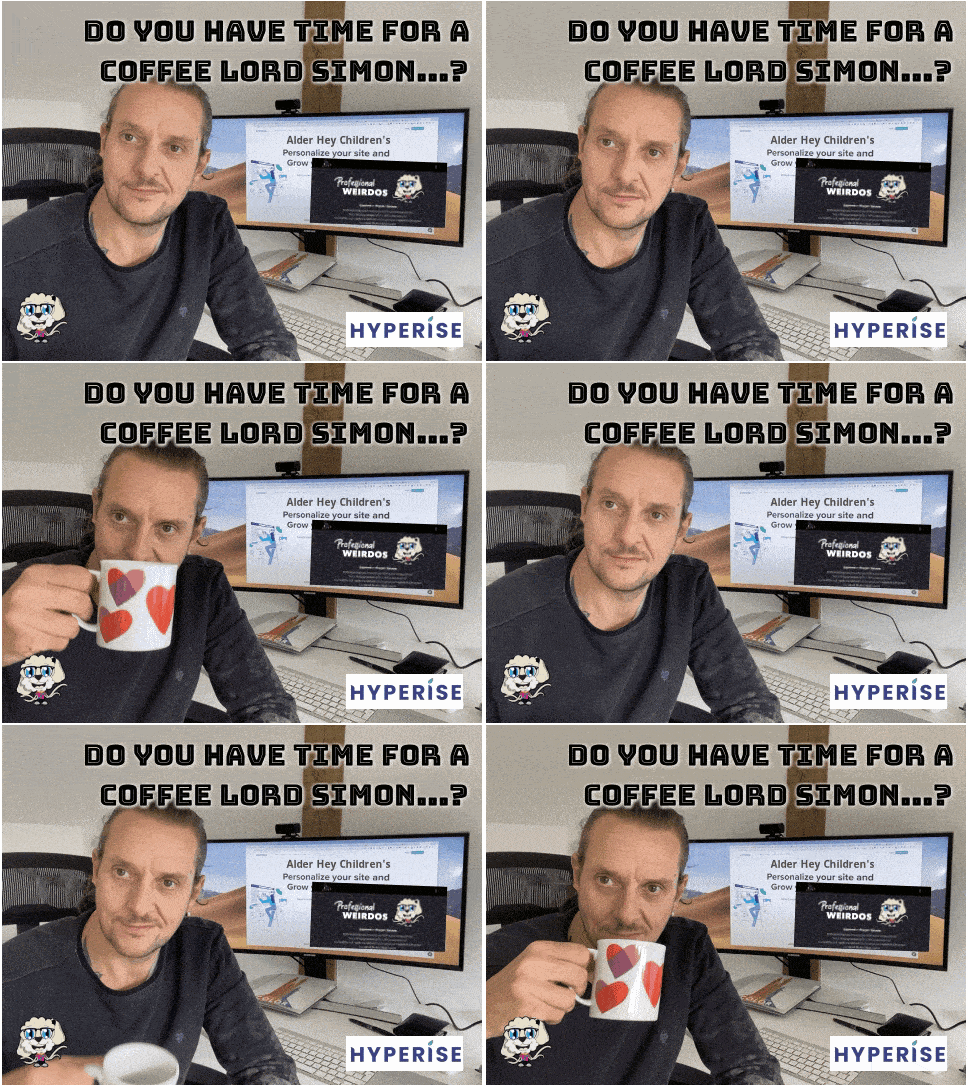
Cadence: three emails on days 1, 3, and 7. The reply rate front-loads, so the sequence stays short.
Email 1 (Day 1):
Subject: made this for you, {first_name}
Hi {first_name},
[Personalized GIF: the prospect’s name on a whiteboard, or their logo on a laptop screen]
Took a minute to make that, because a plain intro was never going to survive your inbox. The reason for the effort: we help {industry} teams [outcome], and {company_name} fits the pattern.
Worth 15 minutes to see the numbers?
{your_name}
Email 2 (Day 3):
{first_name}, the GIF was the hook. This is the substance: [one-sentence customer outcome with a number].
If that number would matter at {company_name}, the walkthrough takes 15 minutes.
{your_name}
Email 3 (Day 7):
[Personalized image: “Last call, {first_name}” on an airport departures board]
No response needed if the timing is wrong — this thread will be here when that changes. If [outcome] is worth a look now, pick any slot: {calendar_link}
{your_name}
Why it works: effort is the scarcest signal in cold outreach, and this sequence spends it where the prospect can see it.
The results above came from lists under a few hundred prospects with tight ICP fit. Hyper-personalization multiplies relevance that already exists, and on a poorly targeted list a GIF is a decorated miss.
5. The re-engagement sequence
Built for threads that died mid-conversation.
Deals go quiet for calendar reasons as much as interest reasons: budgets reset, priorities shift, champions change jobs. The sequence reopens the thread with a genuinely new reason to talk, because a replayed pitch reads as a rerun.
Cadence: three emails on days 1, 5, and 12.
Email 1 (Day 1):
Subject: new since we last spoke
{first_name}, when we spoke in {month}, [blocker] put this on ice. Two things changed since: [their change — e.g. the new EU office] and [your change — e.g. the integration you asked about shipped].
Worth reopening the conversation?
{your_name}
Email 2 (Day 5):
One data point from last quarter: [result or benchmark tied to their original interest]. Sharing it because it answers the question you raised about [objection].
Happy to walk through the rest — same 15 minutes as before.
{your_name}
Email 3 (Day 12):
{first_name}, I’ll park this for now. Thanks again for the time back in {month} — if [trigger] puts it back on your desk, one reply reopens everything.
{your_name}
Why it works: the sequence treats the earlier conversation as an asset.
Every touch references what the prospect said, shows what changed, and keeps the exit graceful, which protects the relationship for the quarter when timing turns. A professional thank you email after the original meeting makes this sequence land warmer months later.
What is a breakup email in cold outreach and why does it work?
A breakup email is the final touch of a cold email sequence: it tells the prospect you’re closing the thread, and it ends the campaign for that contact.
It converts because it forces a decision. The option of replying later quietly disappears, and loss aversion nudges fence-sitters to answer before it does.
It also protects the sender. Ending cleanly caps spam-complaint risk on unresponsive contacts and leaves a professional last impression.
For the body, keep the exit generous. One approach that works:
{first_name}, no response needed — I’ll read the silence as “wrong timing” and stop here. If [pain] comes back around, one reply reopens the thread and I’ll pick it up same-day. Good luck with [relevant goal].
{your_name}
One rule: mean it. A breakup email followed by touch seven trains prospects to ignore the word “last.”
How do you warm up your inbox before you send a cold email sequence?
A warm-up sequence for email outreach is the two to four weeks of preparation that decide whether your cold email sequence reaches inboxes at all.
Mailbox providers score the sending domain before any human reads the copy, so the work happens in three places: authentication, gradual volume, and list hygiene.
Authentication is a one-time DNS job. The volume ramp and list hygiene can run on autopilot with the right tools.
How do you warm up a domain and an inbox for cold email outreach?
To warm up a cold email domain and inbox:
- Buy a separate sending domain (a close variant of your main one) so outreach risk stays off the company domain.
- Authenticate it. Per Google’s sender guidelines, SPF and DKIM are required for all senders, plus DMARC for anyone sending 5,000+ messages a day to Gmail.
- Warm for at least two weeks before campaign one: start at 5-10 emails per inbox per day and increase gradually.
- Mix in human behavior (replies, forwards, threads with colleagues) so engagement signals accumulate alongside volume.
- Cap steady-state volume at 30-50 cold sends a day per inbox, and scale by adding inboxes.
How long does email warm-up take?
Two weeks is the minimum for a brand-new domain, and three to four weeks is safer for volume above a few dozen sends a day.
Warm-up also never fully ends: keep some human-pattern activity running alongside live campaigns, and re-warm any inbox that sat idle for two weeks or more.
Why does list quality matter more than copy?
A 2,500-message sequence to a list with a 5% bounce rate fires roughly 125 bounces at your domain in one campaign — enough to trip provider filters and end the campaign for every remaining prospect, whatever the copy quality.
Keep bounce rates below 2%, and treat lower as the goal.
Verify and enrich every address before it enters the sequence, re-verify lists older than a quarter, and drop catch-all domains that fail confirmation.
What mistakes kill cold email sequences?
Watch for the 6 failures that reliably end cold email sequences:
- Asking for the meeting in email one. The prospect has zero context, and a calendar ask is the priciest CTA in the deck. Earn it by touch two or three.
- Repeating the same message. “Just bumping this” adds a notification and no new reason to reply. Every touch must carry one new angle, proof point, or ask.
- Stacking links. Multiple links raise spam scores and split the reader’s attention. One link, or none.
- Sending at identical times every day. Fixed-interval patterns read as automation to mailbox providers. Randomize send windows.
- Skipping the breakup email. The sequence ends silently, collects no decision, and leaves the thread unresolved for both sides.
- Launching with no deliverability setup. Unauthenticated domains and unverified lists end campaigns within days, before copy quality enters the picture.
For the fuller prevention list across offers, targeting, and infrastructure, our cold email outreach best practices guide goes deeper.
How do you automate a cold email outreach sequence?
Manual sequencing survives to about 25 prospects, and then the spreadsheet wins.
Automated email sequences handle what breaks first at volume: timing every follow-up, stopping the thread the second a reply lands, and personalizing at a scale beyond hand-writing.
Expandi runs this logic across LinkedIn and email through if-this-then-that Builder sequences:
- A connection accepted can trigger a message.
- An opened email can trigger a follow-up.
- LinkedIn replies stop the flow automatically.
Email steps send natively from the same flow: connect your mailbox (Gmail, Yahoo, or custom SMTP) and the whole omnichannel sequence runs from one campaign. Warm-up and inbox rotation sit with dedicated email marketing tools alongside for now.
Expandi is building both features into our existing automation tool, along with multiple mailboxes per account for higher-volume sending, so stay tuned for that!
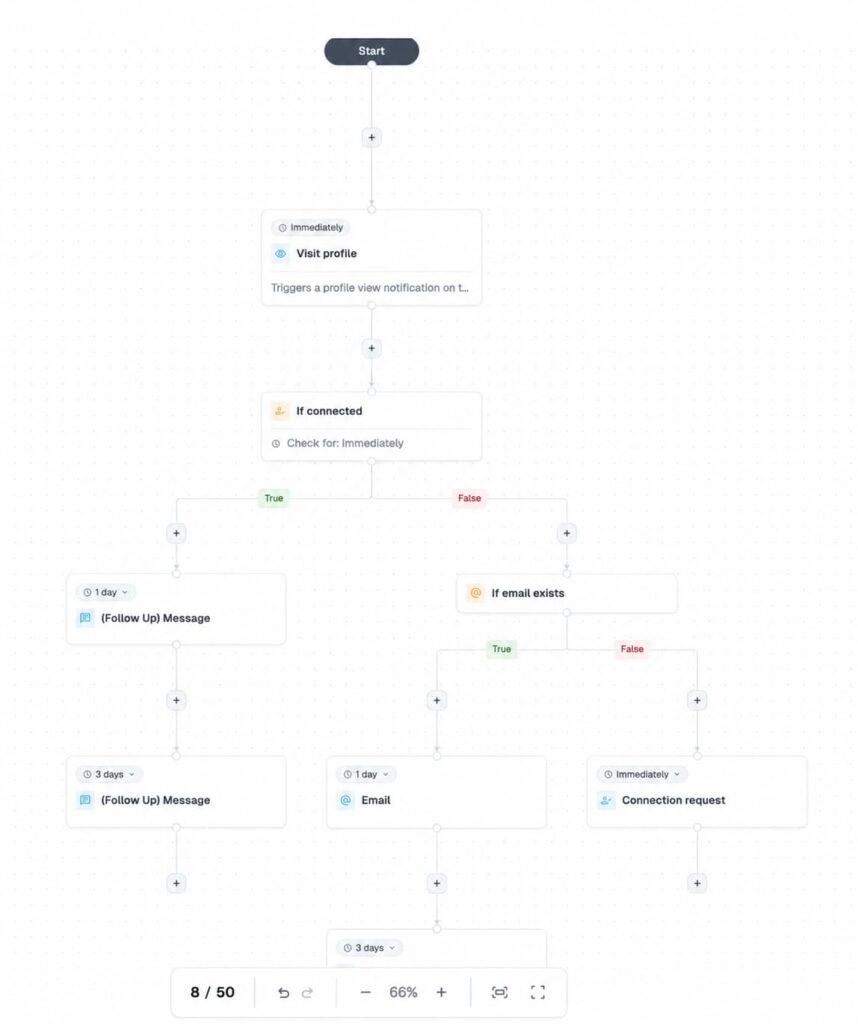
Alt text: How Expandi.io linkedin automation tool works for cold outreach
What should an outreach automation tool handle?
The gap between manual sending and an automated cold email sequence, job by job:
| Job | Manual sending | Automated sequence |
|---|---|---|
| Timing | Calendar reminders, missed on busy days | Every touch fires on schedule, in the prospect’s timezone |
| Follow-ups | Tracked in a spreadsheet, forgotten past touch two | Preset delays run the full sequence unattended |
| Reply detection | Reread the inbox, cross names off by hand | A reply stops the sequence instantly and routes the thread to you |
| Personalization at scale | Feasible to about 25 prospects a week | Merge tags, dynamic images, and conditions on every send |
| Sender rotation | One inbox carries the whole load | Volume spreads across multiple inboxes |
How do you measure whether a cold outreach email sequence is working?
Four numbers tell you whether to fix or to scale a cold outreach email sequence. Check them weekly, per sequence and per touch:
- Bounce rate: Above 2%, pause and re-verify the list before sending another touch. Smartlead 2026 benchmark report found the typical sender sitting right at that threshold, at 1.54%, with the weakest 10% climbing above 6.7% — reinforcing 2% as a meaningful line, not an arbitrary one.
- Reply rate per touch: Instantly’s 2026 benchmark puts the campaign average at 3.43%, the top quartile at 5.5%+, and the top 10% at 10.7%+. Under 3% overall, rewrite before you scale. Above 5.5%, add volume.
- Positive reply rate: Interested and “send more info” replies count for it, unsubscribes and “wrong person” replies count against it. A high raw reply rate full of negatives means the ICP is off.
- Meetings per 1,000 sends: Focus Digital’s analysis of its own campaigns found an average cold email conversion rate of 0.2153% (one closed deal per 464 emails sent), so meetings need to land well above that line for the math to work.
- Trace every booked meeting forward: The B2B pipeline attribution math on show rate, close rate, and deal size is what turns a reply-rate win into a revenue case.
What happens when you add LinkedIn to your cold email sequence?
Everything above assumes one channel.
Adding LinkedIn touches around the emails upgrades the whole system, because the prospect sees your face and name before the first email asks for anything.
The multi-channel cadence, day by day
A three-week multi-channel sequence, mapped touch by touch:
| Day | Channel | Action | Purpose |
|---|---|---|---|
| 1 | Visit the prospect’s profile | Your name appears in their notifications | |
| 2 | Connection request, no pitch | Opens the DM channel and puts a face to the name | |
| 3 | Email 1: problem, proof, soft ask | First ask arrives from a name they’ve already seen | |
| 5 | Like or comment on a recent post | Keeps you visible between emails | |
| 7 | Email 2: new angle | Second ask with fresh context | |
| 9 | DM (if connected): short, link-free version of the pitch | Reaches an inbox with no spam filter in the way | |
| 14 | Email 3: lower the ask | Trades the meeting for a smaller yes | |
| 17 | Second DM or InMail: share the asset | Value touch on the channel they check daily | |
| 21 | Email 4: breakup | Closes the loop across both channels |
Why does multi-channel outperform email-only?
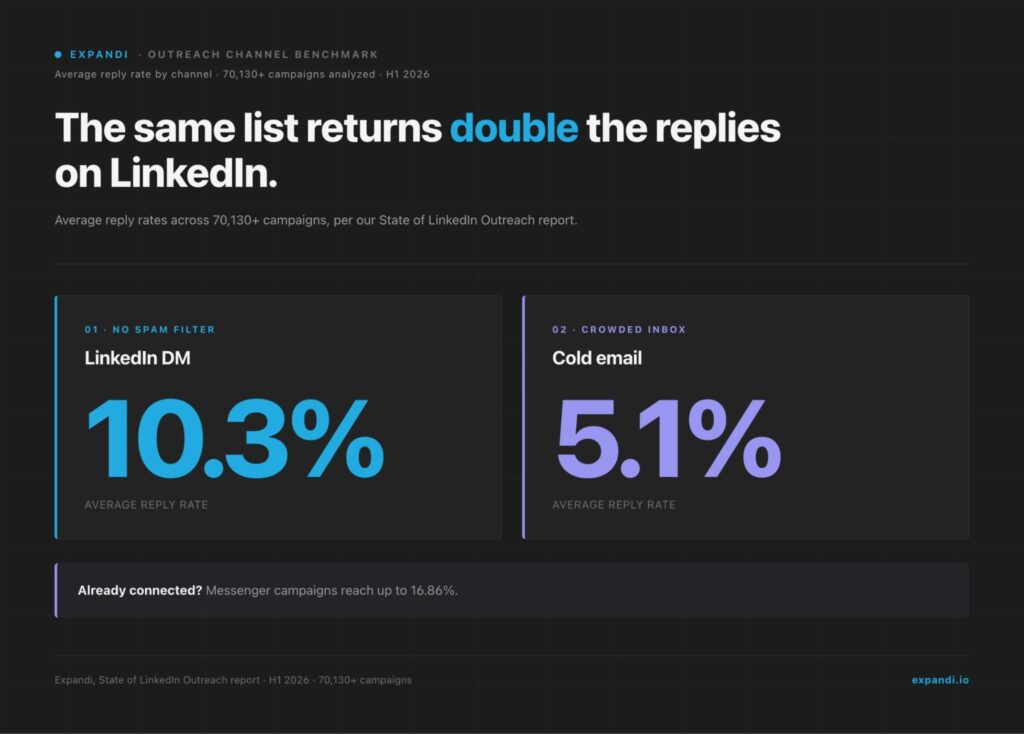
Our State of LinkedIn Outreach report, built on 70,130+ analyzed campaigns, puts the average LinkedIn DM reply rate at 10.3% against 5.1% for cold email, and messenger campaigns to already-connected prospects reach reply rates up to 16.86%.
A prospect who accepted your connection request reads email one as a message from someone they’ve met.
Operators who run both channels see the deliverability difference daily:
“You don’t have to worry about deliverability like you do with email. And you’re going to land in the primary inbox every time and people are going to read your messages. And if it’s relevant, they’re going to convert it to an opportunity for you.” — Alex Fine, co-founder of Understory, a sales and marketing agency for B2B SaaS companies
Running your cold email sequences with Expandi
Multi-channel needs preparation on the LinkedIn side too: a LinkedIn warm-up sequence protects the account the same way domain warm-up protects the inbox.
Running both channels by hand doubles the workload, and LinkedIn automation closes that gap.
Expandi sequences the profile visits, connection requests, DMs, and emails from one Builder flow, with if-this-then-that conditions deciding each prospect’s next touch. Campaign analytics show the reply rate each step returns.
A cold email sequence that books meetings comes down to structure: four to six emails, widening gaps, one job per touch, and a warm domain underneath.
Layer LinkedIn on top, and the same list answers at roughly double the rate our data shows for email alone.
Start your free 7-day Expandi trial and launch your first omnichannel sequence live this week.
Frequently Asked Questions
With a verified prospect list, most businesses can get good results from a 3 email sequence. Longer, higher-frequency sequences are more likely to trip spam filters, especially when combined with the tight daily sending caps (around 20-30 emails per inbox) that modern infrastructure demands.
The cadence looks like:
1. Opener: Leads with specific, upfront value, not a pitch.
2. Bump: Brief reply that adds one new proof point or angle.
3. Close: Short, final touch with urgency or scarcity to prompt a decision.
About three weeks for a standard five-touch sequence on a widening cadence: days 1, 3, 7, 14, 21. Enterprise deals stretch to six weeks. End on a breakup email, and re-engage next quarter if the fit stays strong.
Per Instantly’s 2026 benchmark, campaigns average 3.43%, the top quartile clears 5.5%, and the top 10% passes 10.7%. Judge the number per touch and by reply quality: a 4% rate full of interested buyers beats an 8% rate full of unsubscribes.
Authenticate the domain with SPF, DKIM, and DMARC, then send low volumes (5-10 a day) with human-pattern engagement for at least two weeks, ramping gradually. Keep steady-state cold volume at 30-50 sends per inbox per day and scale by adding inboxes.
Yes, wherever your buyers use LinkedIn. Our campaign data shows LinkedIn DMs replying at 10.3% against 5.1% for cold email, and messenger campaigns to already-connected prospects reach up to 16.86%. Profile visits and connection requests also warm your name before email one lands.
Yes, in the US and EU, with conditions. CAN-SPAM in the US requires accurate sender information, a working unsubscribe path, and a physical address.
GDPR in the EU requires a legitimate-interest basis, relevance to the recipient’s role, and an easy opt-out. B2B outreach to work addresses is workable under both when those boxes are checked.
Expandi covers both sides: it builds lead lists from LinkedIn searches, events, groups, and post engagement, then runs those lists through automated LinkedIn and email sequences with if-this-then-that conditions.
Its AI Analyzer writes messages and follow-ups and sorts replies by sentiment, so interested leads surface first.


You’ve made it all the way down here, take the final step